Monetizing Your First Website
Topics: Keywords, Domain,
Hosting, Wordpress Installation,
Advertisements, Backlinks
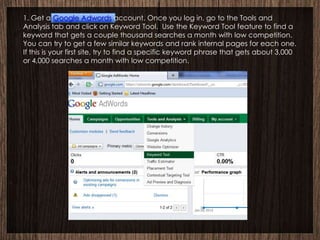
1. Get a Google Adwords account. Once you log in, go to the Tools and
Analysis tab and click on Keyword Tool. Use the Keyword Tool feature to find a
keyword that gets a couple thousand searches a month with low competition.
You can try to get a few similar keywords and rank internal pages for each one.
If this is your first site, try to find a specific keyword phrase that gets about 3,000
or 4,000 searches a month with low competition.
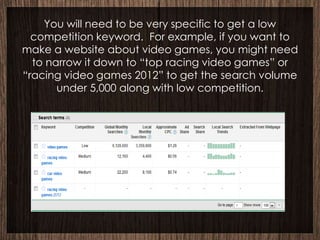
You will need to be very specific to get a low
  competition keyword. For example, if you want to
make a website about video games, you might need
  to narrow it down to “top racing video games” or
“racing video games 2012” to get the search volume
       under 5,000 along with low competition.
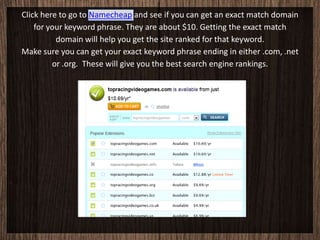
Click here to go to Namecheap and see if you can get an exact match domain
    for your keyword phrase. They are about $10. Getting the exact match
          domain will help you get the site ranked for that keyword.
Make sure you can get your exact keyword phrase ending in either .com, .net
         or .org. These will give you the best search engine rankings.
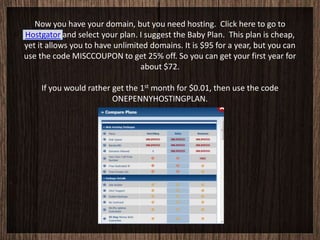
Now you have your domain, but you need hosting. Click here to go to
Hostgator and select your plan. I suggest the Baby Plan. This plan is cheap,
yet it allows you to have unlimited domains. It is $95 for a year, but you can
use the code MISCCOUPON to get 25% off. So you can get your first year for
                                 about $72.

     If you would rather get the 1st month for $0.01, then use the code
                         ONEPENNYHOSTINGPLAN.
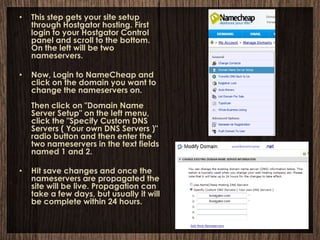
•   This step gets your site setup
    through Hostgator hosting. First
    login to your Hostgator Control
    panel and scroll to the bottom.
    On the left will be two
    nameservers.

•   Now, Login to NameCheap and
    click on the domain you want to
    change the nameservers on.
    Then click on "Domain Name
    Server Setup" on the left menu,
    click the "Specify Custom DNS
    Servers ( Your own DNS Servers )"
    radio button and then enter the
    two nameservers in the text fields
    named 1 and 2.

•   Hit save changes and once the
    nameservers are propagated the
    site will be live. Propagation can
    take a few days, but usually it will
    be complete within 24 hours.
Installing Wordpress (if you want it)
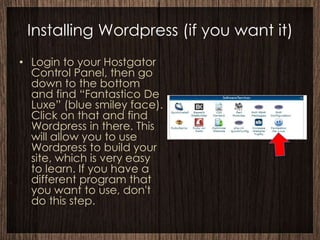
• Login to your Hostgator
  Control Panel, then go
  down to the bottom
  and find “Fantastico De
  Luxe” (blue smiley face).
  Click on that and find
  Wordpress in there. This
  will allow you to use
  Wordpress to build your
  site, which is very easy
  to learn. If you have a
  different program that
  you want to use, don't
  do this step.
When you have Wordpress installed you should be able to
  access it by going to Your Domain page, then adding /wp-
                       admin to the end.
          Like this: www.yourdomain.com/wp-admin

   7. At your Wordpress dashboard you can add new posts or
    pages. You can change your theme/template, menus or
   background by going to the Appearance tab. Also under
Appearance is the Widgets option. By putting Text/HTML widgets
  in your sidebar, you can have ads on the side of your page.
There are more Wordpress themes available to buy. One of the
         best themes for SEO purposes is the Thesis theme.

Under the Plugins tab, click on Add New and get the All in One
SEO Pack. This will help you optimize your titles and tags for SEO
                            purposes.
Monetizing Your Site
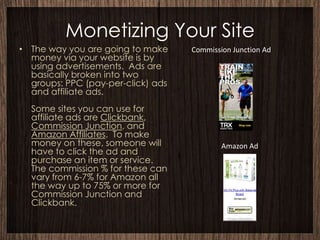
• The way you are going to make     Commission Junction Ad
  money via your website is by
  using advertisements. Ads are
  basically broken into two
  groups: PPC (pay-per-click) ads
  and affiliate ads.
  Some sites you can use for
  affiliate ads are Clickbank,
  Commission Junction, and
  Amazon Affiliates. To make
  money on these, someone will              Amazon Ad
  have to click the ad and
  purchase an item or service.
  The commission % for these can
  vary from 6-7% for Amazon all
  the way up to 75% or more for
  Commission Junction and
  Clickbank.
Google Adsense
•
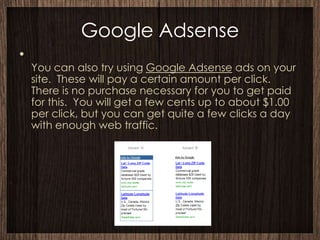
    You can also try using Google Adsense ads on your
    site. These will pay a certain amount per click.
    There is no purchase necessary for you to get paid
    for this. You will get a few cents up to about $1.00
    per click, but you can get quite a few clicks a day
    with enough web traffic.
Backlinks
• Moving on to backlinks. Backlinks are
  links to your site from other sites. These
  can be in the form of comments on
  blogs. So before you spend money on
  backlinks, just find blogs in your niche and
  make thoughtful comments on them. In
  the name spot, put your keyword. Put
  your URL in the website spot and you
  have just created a backlink. Backlinks
  are of much higher value to the search
  engines when they are on blogs with
  authority, but this is a good start.
Automatic Backlink Sites
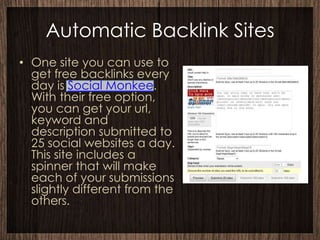
• One site you can use to
  get free backlinks every
  day is Social Monkee.
  With their free option,
  you can get your url,
  keyword and
  description submitted to
  25 social websites a day.
  This site includes a
  spinner that will make
  each of your submissions
  slightly different from the
  others.
Bookmarking Sites
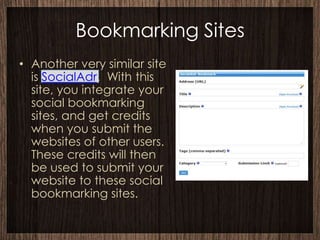
• Another very similar site
  is SocialAdr. With this
  site, you integrate your
  social bookmarking
  sites, and get credits
  when you submit the
  websites of other users.
  These credits will then
  be used to submit your
  website to these social
  bookmarking sites.
Advanced Bookmarking
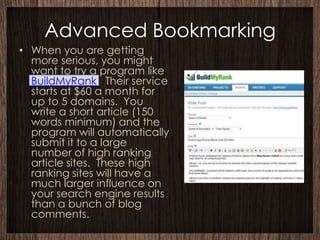
• When you are getting
  more serious, you might
  want to try a program like
  BuildMyRank. Their service
  starts at $60 a month for
  up to 5 domains. You
  write a short article (150
  words minimum) and the
  program will automatically
  submit it to a large
  number of high ranking
  article sites. These high
  ranking sites will have a
  much larger influence on
  your search engine results
  than a bunch of blog
  comments.
Build My Rank
• BuildMyRank now offers a free 15-day trial
  that includes 10 backlinks.
Resources
• For more info on       Namecheap
  how to write
  articles to get your   Hostgator
  site ranked on
  Google, check out
  these resources:
  The Backlinking
  Strategy That Works
• The Challenge

Website monetization

  • 1.
    Monetizing Your FirstWebsite Topics: Keywords, Domain, Hosting, Wordpress Installation, Advertisements, Backlinks
  • 2.
    1. Get aGoogle Adwords account. Once you log in, go to the Tools and Analysis tab and click on Keyword Tool. Use the Keyword Tool feature to find a keyword that gets a couple thousand searches a month with low competition. You can try to get a few similar keywords and rank internal pages for each one. If this is your first site, try to find a specific keyword phrase that gets about 3,000 or 4,000 searches a month with low competition.
  • 3.
    You will needto be very specific to get a low competition keyword. For example, if you want to make a website about video games, you might need to narrow it down to “top racing video games” or “racing video games 2012” to get the search volume under 5,000 along with low competition.
  • 4.
    Click here togo to Namecheap and see if you can get an exact match domain for your keyword phrase. They are about $10. Getting the exact match domain will help you get the site ranked for that keyword. Make sure you can get your exact keyword phrase ending in either .com, .net or .org. These will give you the best search engine rankings.
  • 5.
    Now you haveyour domain, but you need hosting. Click here to go to Hostgator and select your plan. I suggest the Baby Plan. This plan is cheap, yet it allows you to have unlimited domains. It is $95 for a year, but you can use the code MISCCOUPON to get 25% off. So you can get your first year for about $72. If you would rather get the 1st month for $0.01, then use the code ONEPENNYHOSTINGPLAN.
  • 6.
    This step gets your site setup through Hostgator hosting. First login to your Hostgator Control panel and scroll to the bottom. On the left will be two nameservers. • Now, Login to NameCheap and click on the domain you want to change the nameservers on. Then click on "Domain Name Server Setup" on the left menu, click the "Specify Custom DNS Servers ( Your own DNS Servers )" radio button and then enter the two nameservers in the text fields named 1 and 2. • Hit save changes and once the nameservers are propagated the site will be live. Propagation can take a few days, but usually it will be complete within 24 hours.
  • 7.
    Installing Wordpress (ifyou want it) • Login to your Hostgator Control Panel, then go down to the bottom and find “Fantastico De Luxe” (blue smiley face). Click on that and find Wordpress in there. This will allow you to use Wordpress to build your site, which is very easy to learn. If you have a different program that you want to use, don't do this step.
  • 8.
    When you haveWordpress installed you should be able to access it by going to Your Domain page, then adding /wp- admin to the end. Like this: www.yourdomain.com/wp-admin 7. At your Wordpress dashboard you can add new posts or pages. You can change your theme/template, menus or background by going to the Appearance tab. Also under Appearance is the Widgets option. By putting Text/HTML widgets in your sidebar, you can have ads on the side of your page. There are more Wordpress themes available to buy. One of the best themes for SEO purposes is the Thesis theme. Under the Plugins tab, click on Add New and get the All in One SEO Pack. This will help you optimize your titles and tags for SEO purposes.
  • 9.
    Monetizing Your Site •The way you are going to make Commission Junction Ad money via your website is by using advertisements. Ads are basically broken into two groups: PPC (pay-per-click) ads and affiliate ads. Some sites you can use for affiliate ads are Clickbank, Commission Junction, and Amazon Affiliates. To make money on these, someone will Amazon Ad have to click the ad and purchase an item or service. The commission % for these can vary from 6-7% for Amazon all the way up to 75% or more for Commission Junction and Clickbank.
  • 10.
    Google Adsense • You can also try using Google Adsense ads on your site. These will pay a certain amount per click. There is no purchase necessary for you to get paid for this. You will get a few cents up to about $1.00 per click, but you can get quite a few clicks a day with enough web traffic.
  • 11.
    Backlinks • Moving onto backlinks. Backlinks are links to your site from other sites. These can be in the form of comments on blogs. So before you spend money on backlinks, just find blogs in your niche and make thoughtful comments on them. In the name spot, put your keyword. Put your URL in the website spot and you have just created a backlink. Backlinks are of much higher value to the search engines when they are on blogs with authority, but this is a good start.
  • 12.
    Automatic Backlink Sites •One site you can use to get free backlinks every day is Social Monkee. With their free option, you can get your url, keyword and description submitted to 25 social websites a day. This site includes a spinner that will make each of your submissions slightly different from the others.
  • 13.
    Bookmarking Sites • Anothervery similar site is SocialAdr. With this site, you integrate your social bookmarking sites, and get credits when you submit the websites of other users. These credits will then be used to submit your website to these social bookmarking sites.
  • 14.
    Advanced Bookmarking • Whenyou are getting more serious, you might want to try a program like BuildMyRank. Their service starts at $60 a month for up to 5 domains. You write a short article (150 words minimum) and the program will automatically submit it to a large number of high ranking article sites. These high ranking sites will have a much larger influence on your search engine results than a bunch of blog comments.
  • 15.
    Build My Rank •BuildMyRank now offers a free 15-day trial that includes 10 backlinks.
  • 16.
    Resources • For moreinfo on Namecheap how to write articles to get your Hostgator site ranked on Google, check out these resources: The Backlinking Strategy That Works • The Challenge