Web Real Time Communication


                              1
What’s WebRTC?

“ WebRTC is a new front in the long war for an
        open and unencumbered web.
                                — Brendan Eich , inventor of
                   JavaScript


                                                       2
What’s WebRTC?
•   Web Real-Time Communication (WebRTC) is an upcoming standard
    that aims to enable real-time communication among Web
    browsers in a peer-to-peer fashion.

•   WebRTC project (opensource) aims to allow browsers to
    natively support interactive peer to peer communications and
    real time data collaboration.

•   Provide state of art audio/video communication stack in your
    browser.                                                  3
Earlier Efforts
•   Many web services already use RTC, but need downloads,
    native apps or plugins. These includes Skype, Facebook (uses
    Skype) and Google Hangouts (uses Google Talk plugin).

•   Downloading,   installing   and   updating   plugins   can   be
    complex, error prone and annoying.

•   Plugins can be difficult to deploy, debug, troubleshoot, test
    and maintain—and may require licensing and integration with
    complex, expensive technology.
                                                                  4
•   Integrating RTC technology with existing content, data and
What does it change?
•   No licenses or other fees.

•   Integration via simple, standardized Web APIs.

•   No Proprietary plugins.

•   No Security issues.

•   No downloads, no installation.

•   Just surf to the right address!

                                                     5
Aims of WebRTC
•   State of art audio/video communication stack in your
    browser.

•   Seamless person-to-person communication.

•   Specification to achieve inter-operability among Web
    browsers.

•   Interoperability with legacy systems.

•   Low cost and highly efficient communication solution   6
Architecture


               7
Architecture

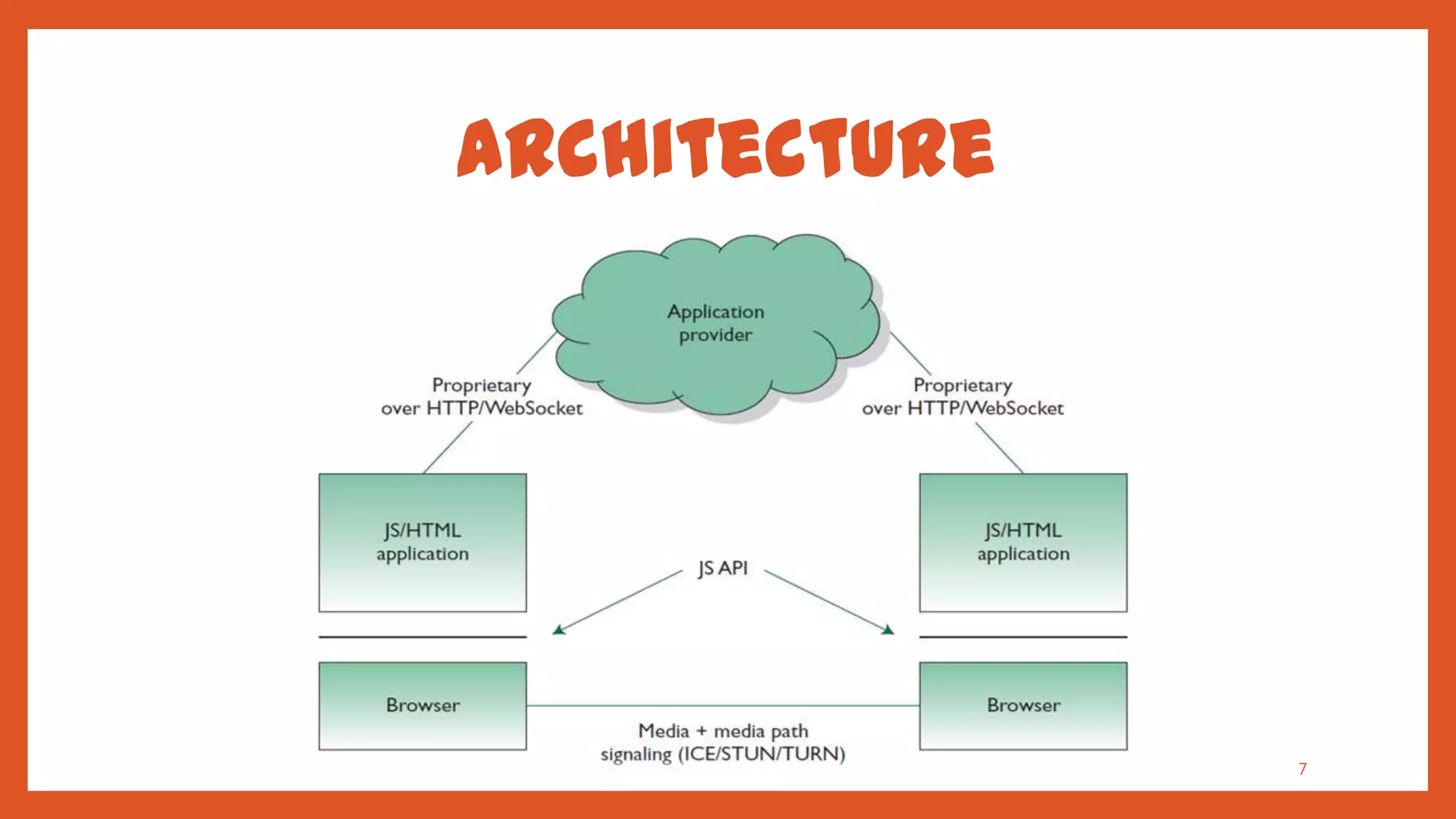
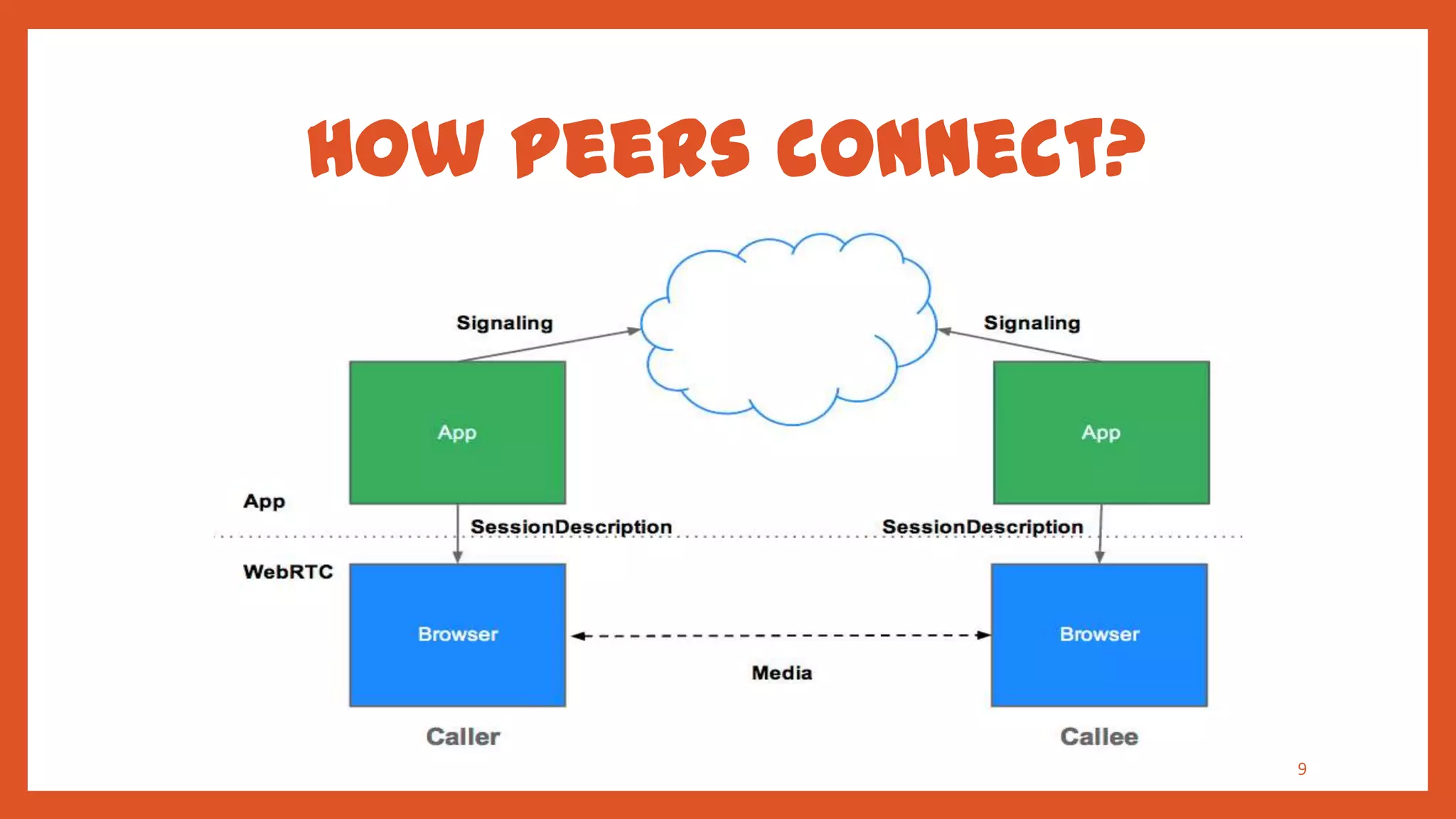
•   At startup, browsers do not know each other.

•   JavaScript mediates the setup process through server.

•   Media flows through the shortest possible path for
    latency.


                                                            8
How peers connect?


                     9
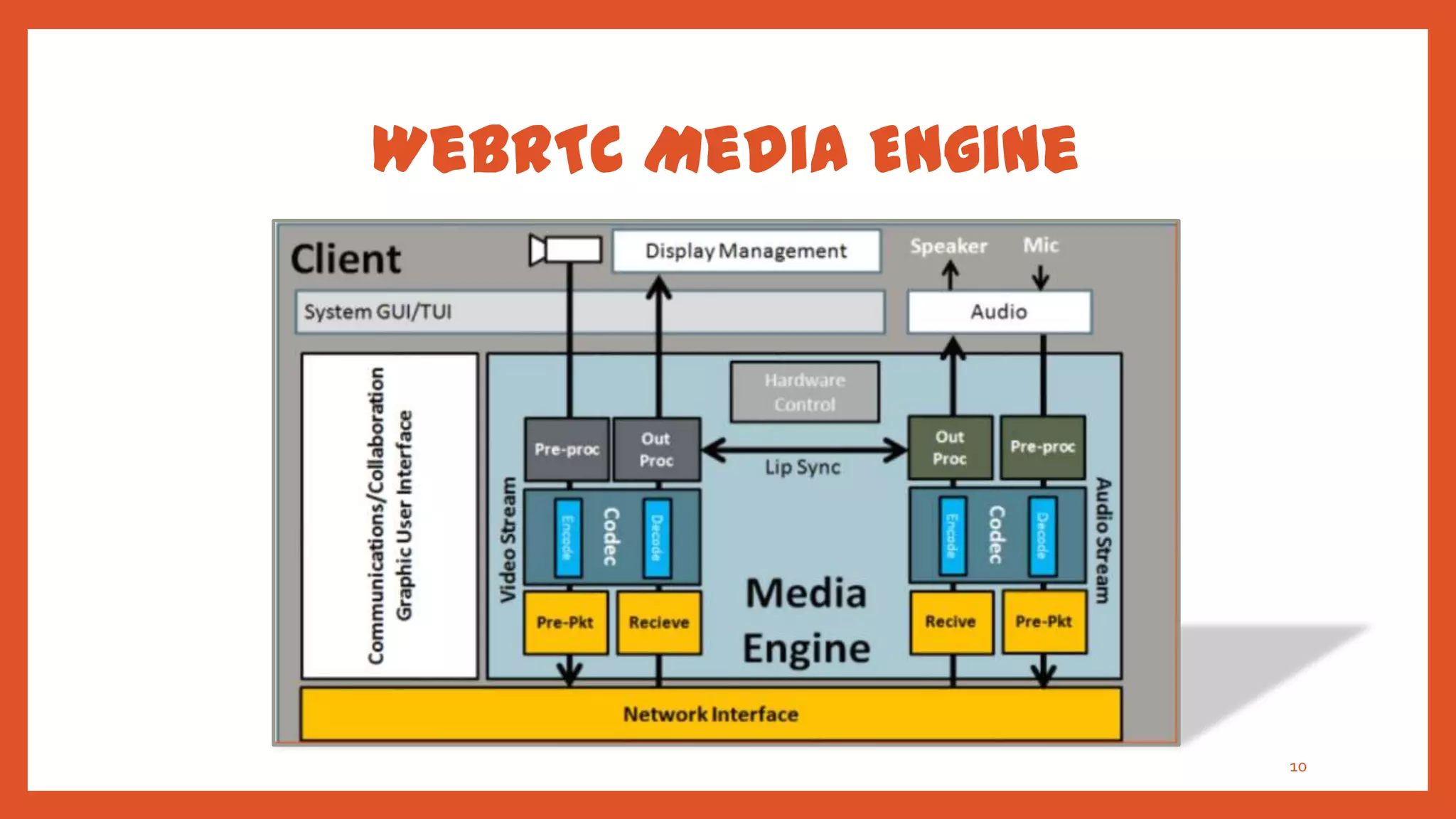
WebRTC Media Engine


                      10
WebRTC App. Need TO
•   Get streaming audio, video or other data.

•   Get network information such as IP address and port, and
    exchange this with other WebRTC clients (known as peers ).

•   Coordinate signaling communication to report errors and
    initiate or close sessions.

•   Exchange information about media and client capability,
    such as resolution and codecs.
                                                                 11
•   Communicate streaming audio, video or data.
Signaling
•   Mechanism to coordinate communication and to send control
    messages.

•   Signaling methods and protocols are not specified by WebRTC
    but by application developer.

•   Signaling is used to exchange three types of information :
    •   Session control messages : to initialize or close
        communication and report errors.
    •   Network configuration : what's my computer's IP address
                                                              12

        and port?
Signaling
•   The original idea to exchange Session Description
    information was in the form of Session Description
    Protocol (SDP) ‚blobs‛.
•   This approach had several shortcomings some of which
    would be difficult to address.
•   IETF is standardizing the JavaScript Session Establishment
    Protocol (JSEP).
•   JSEP provides the interface an application needs to deal
    with the negotiated local and remote session descriptions.
•   The JSEP approach leaves the responsibility for driving the
    signaling state machine entirely to the application.       13
WebRTC API
• getUserMedia   (MediaStream)

• RTCPeerConnection


• RTCDataChannel


                                 14
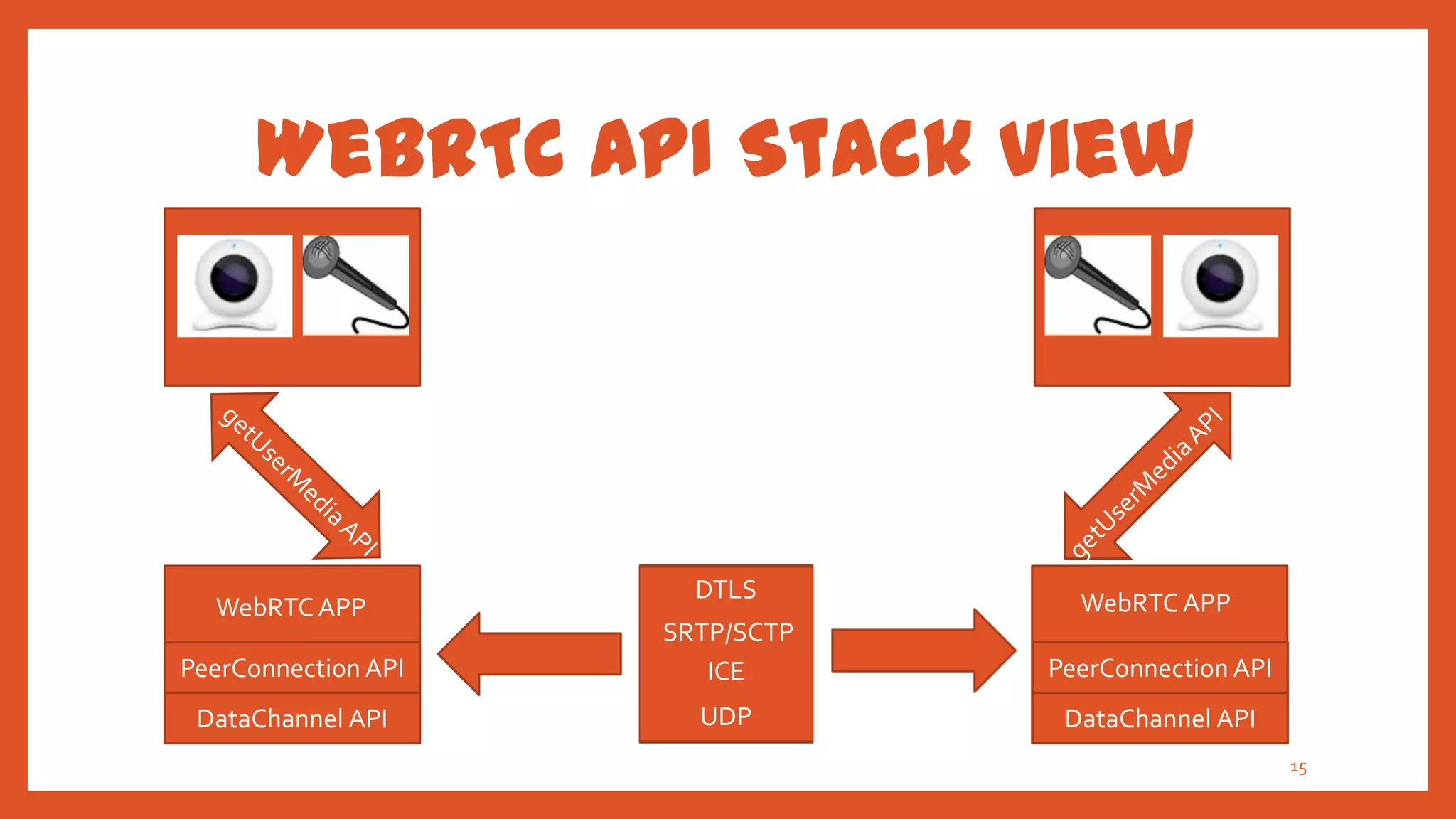
WebRTC API Stack View


                       DTLS        WebRTC APP
  WebRTC APP
                     SRTP/SCTP
PeerConnection API      ICE      PeerConnection API
 DataChannel API       UDP        DataChannel API
                                                      15
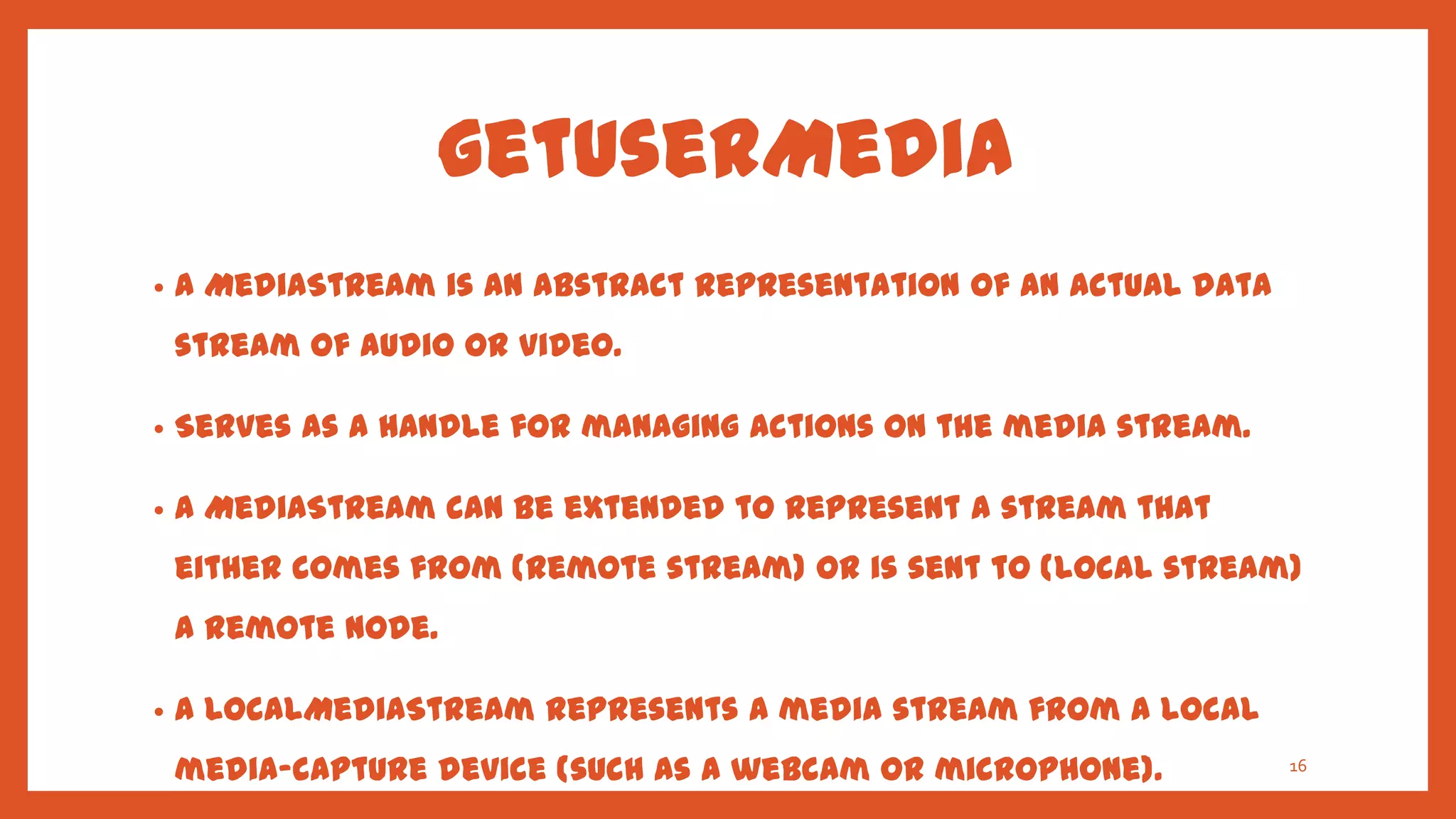
getUserMedia
•   A MediaStream is an abstract representation of an actual data
    stream of audio or video.

•   Serves as a handle for managing actions on the media stream.

•   A MediaStream can be extended to represent a stream that
    either comes from (remote stream) or is sent to (local stream)
    a remote node.

•   A LocalMediaStream represents a media stream from a local
    media-capture device (such as a webcam or microphone).          16
getUserMedia
•   The MediaStream represents synchronized streams of media.
    For example, a stream taken from camera and microphone
    input has synchronized video and audio tracks.

•   The getUserMedia() method takes three parameters:
    •   A constraints object.
    •   A success callback which, if called, is passed a LocalMediaStream.
    •   A failure callback which, if called, is passed an error object.

•   In Chrome, the URL.createObjectURL () method converts a
    LocalMediaStream to a Blob URL which can be set as the src of a17
getUserMedia

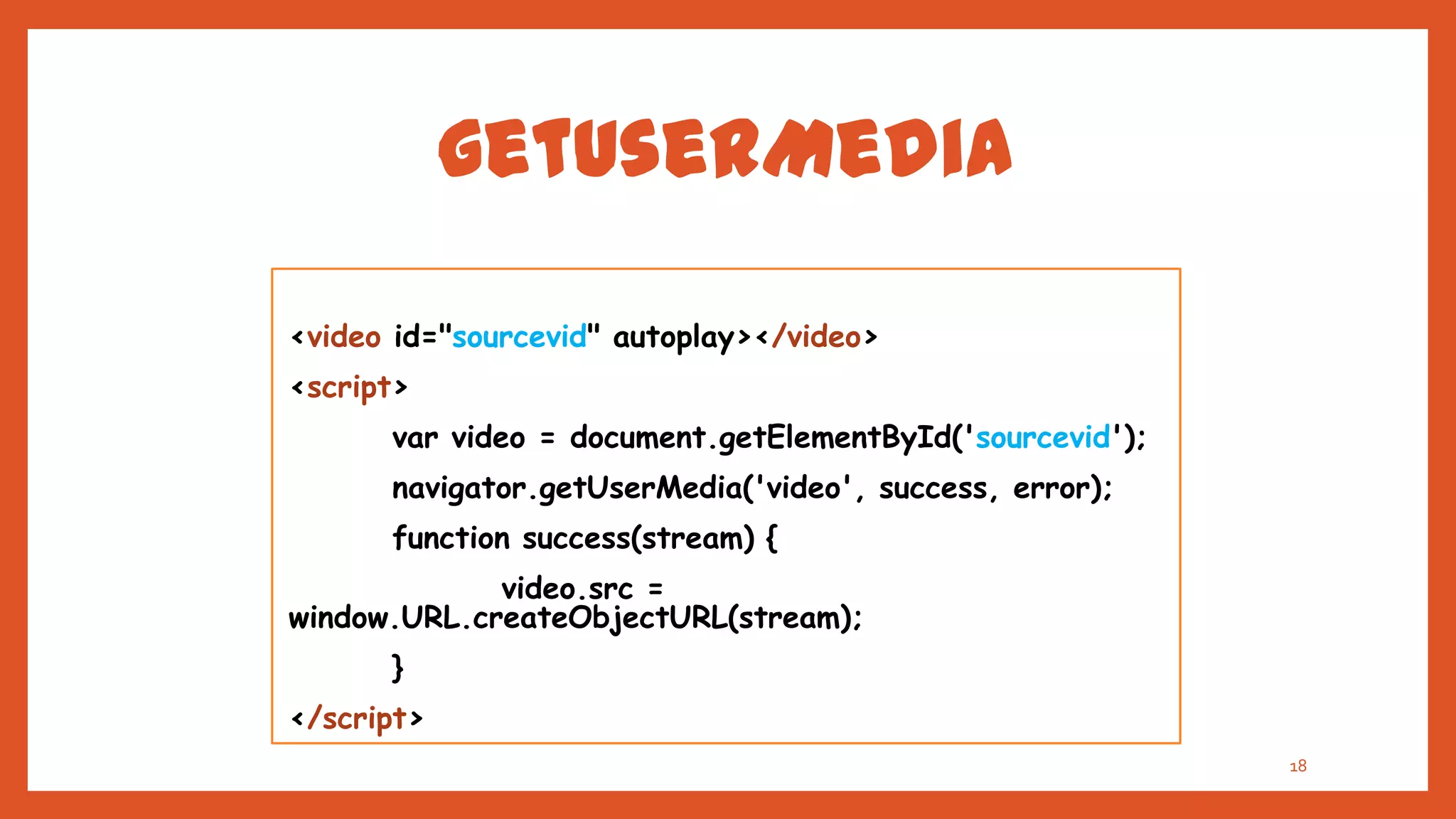
<video id="sourcevid" autoplay></video>
<script>
      var video = document.getElementById('sourcevid');
      navigator.getUserMedia('video', success, error);
      function success(stream) {
             video.src =
window.URL.createObjectURL(stream);
      }
</script>
                                                          18
RTCPeerConnection
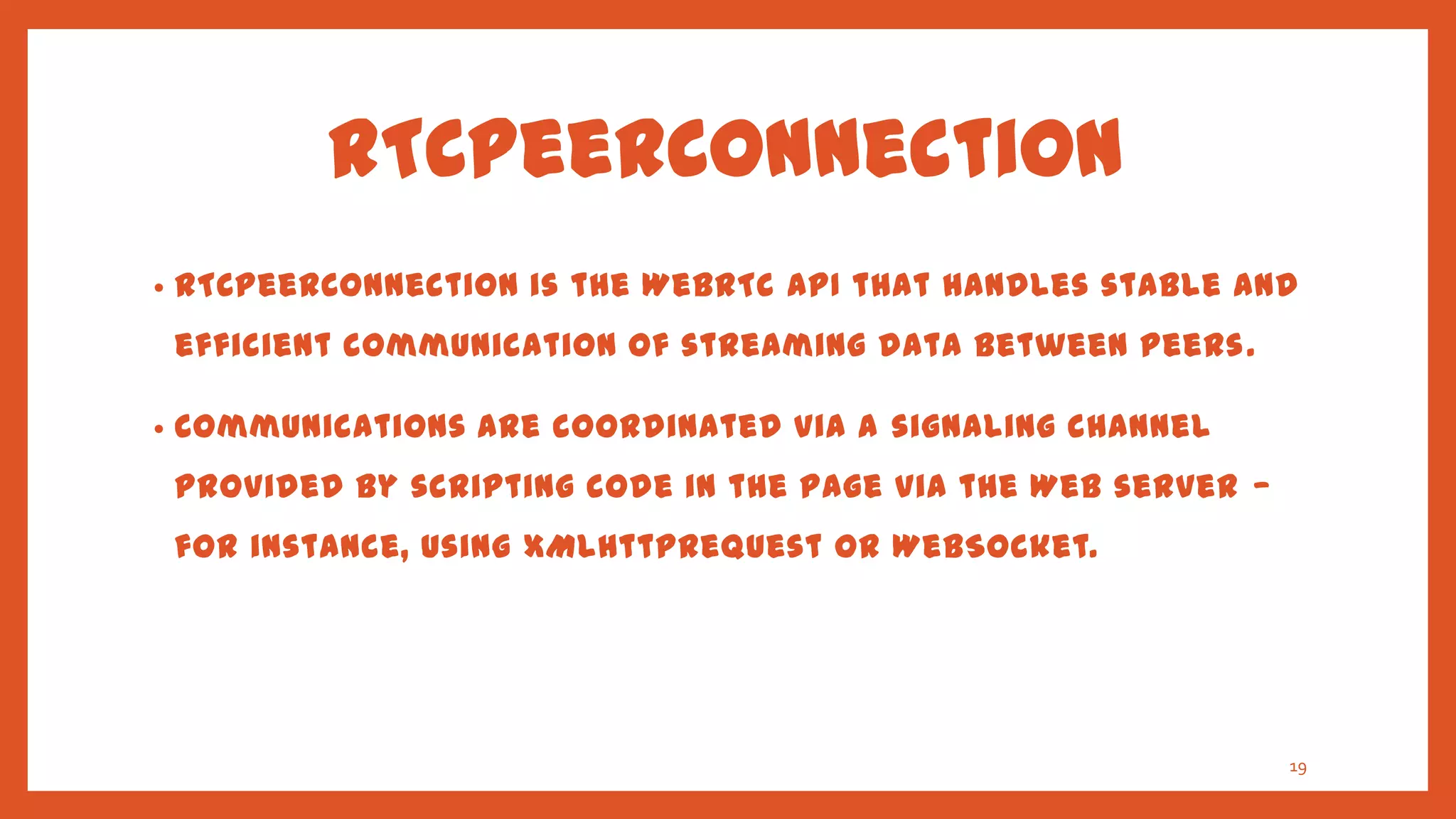
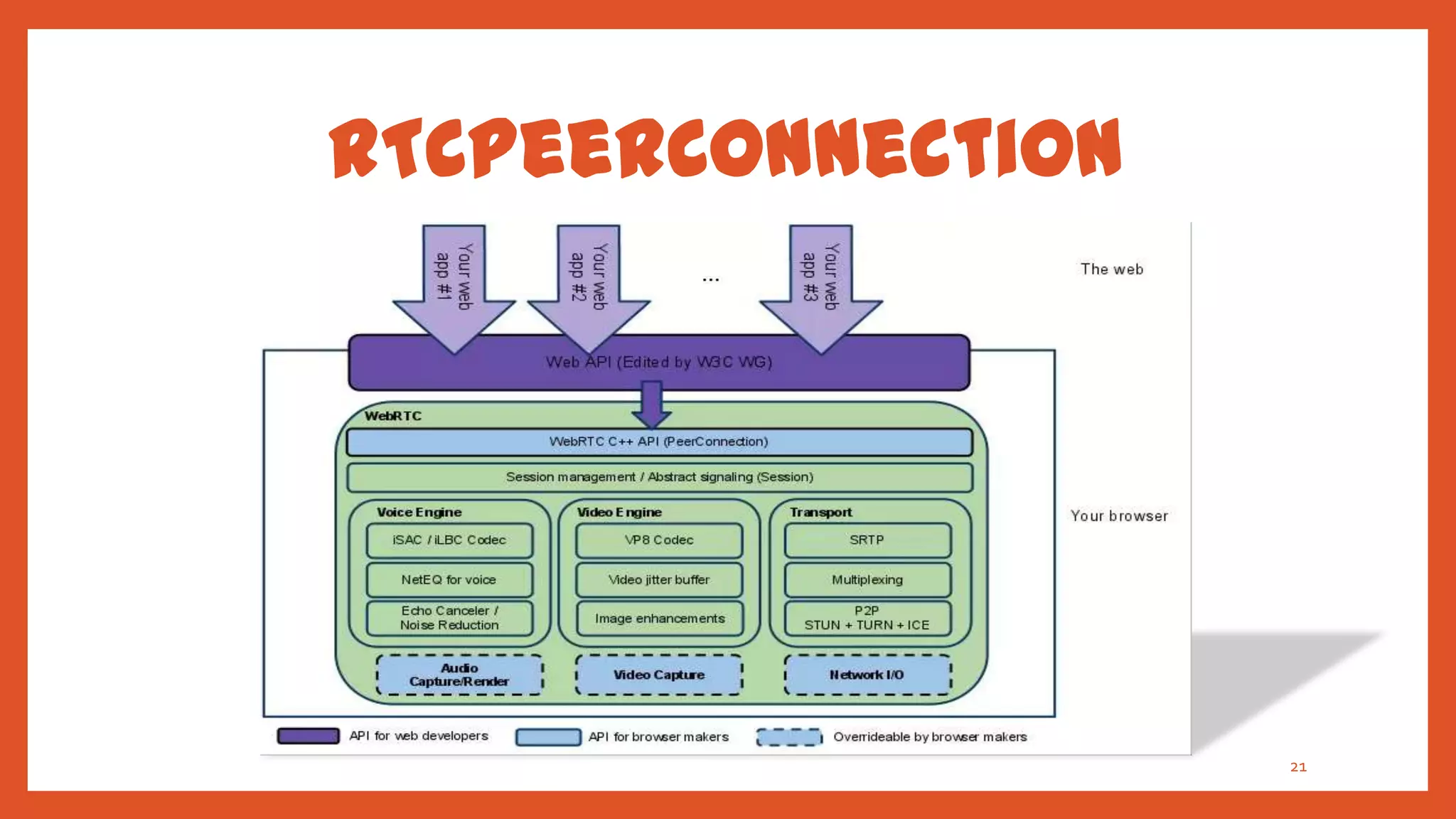
•   RTCPeerConnection is the WebRTC API that handles stable and
    efficient communication of streaming data between peers .

•   Communications are coordinated via a signaling channel
    provided by scripting code in the page via the Web server —
    for instance, using XMLHttpRequest or WebSocket.


                                                                  19
RTCPeerConnection
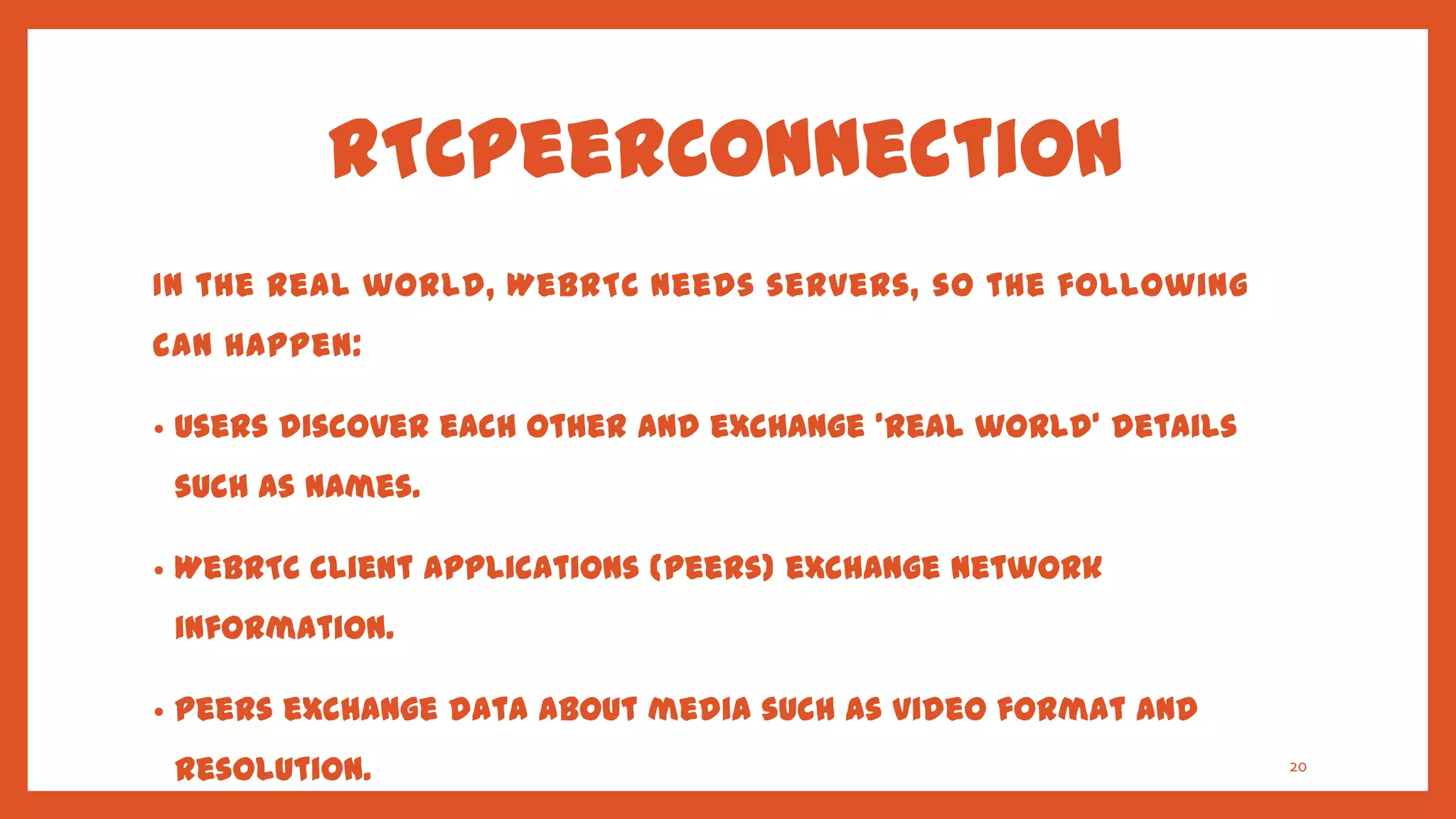
In the real world, WebRTC needs servers, so the following
can happen:

•   Users discover each other and exchange 'real world' details
    such as names.

•   WebRTC client applications (peers) exchange network
    information.

•   Peers exchange data about media such as video format and
    resolution.                                                   20
RTCPeerConnection


                    21
NAT Traversal
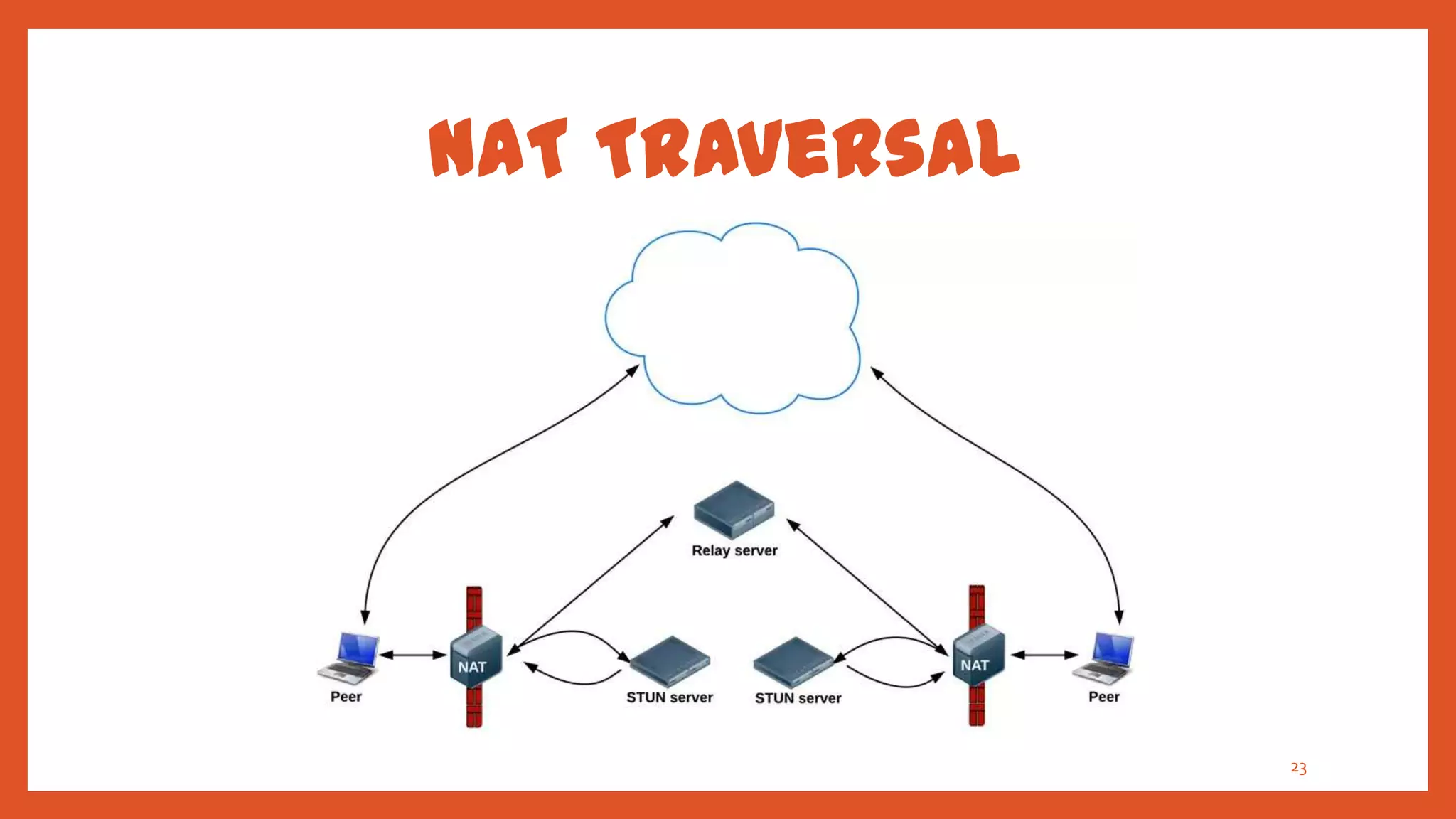
•   Suffice to say that the STUN protocol and its extension
    TURN are used by the ICE framework to enable
    RTCPeerConnection to cope with NAT traversal.

•   Initially, ICE tries to connect peers directly , with the
    lowest possible latency, via UDP. In this process, STUN
    servers have a single task: to enable a peer behind a NAT
    to find out its public address and port.
                                                                22
NAT Traversal


                23
NAT Traversal
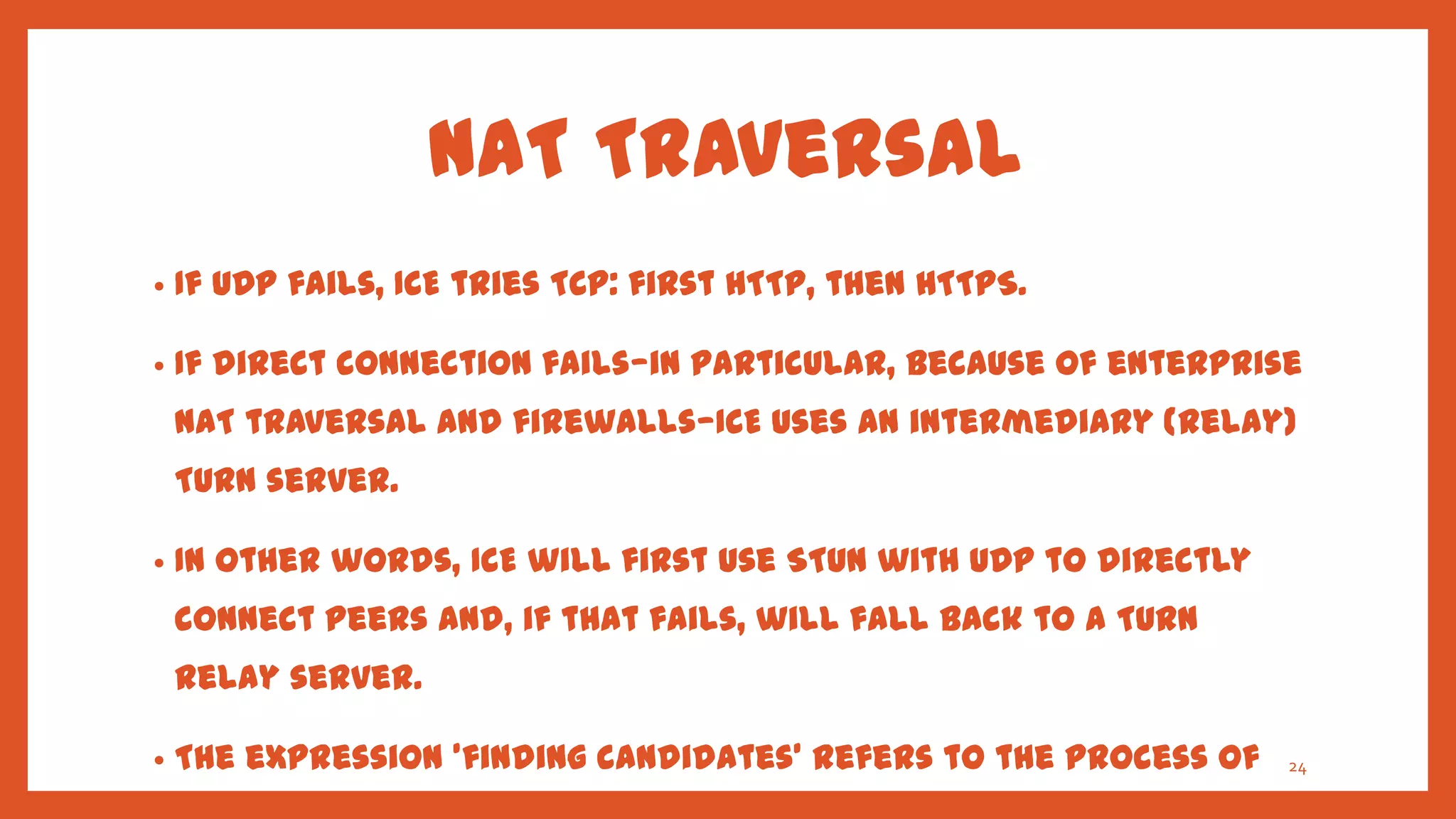
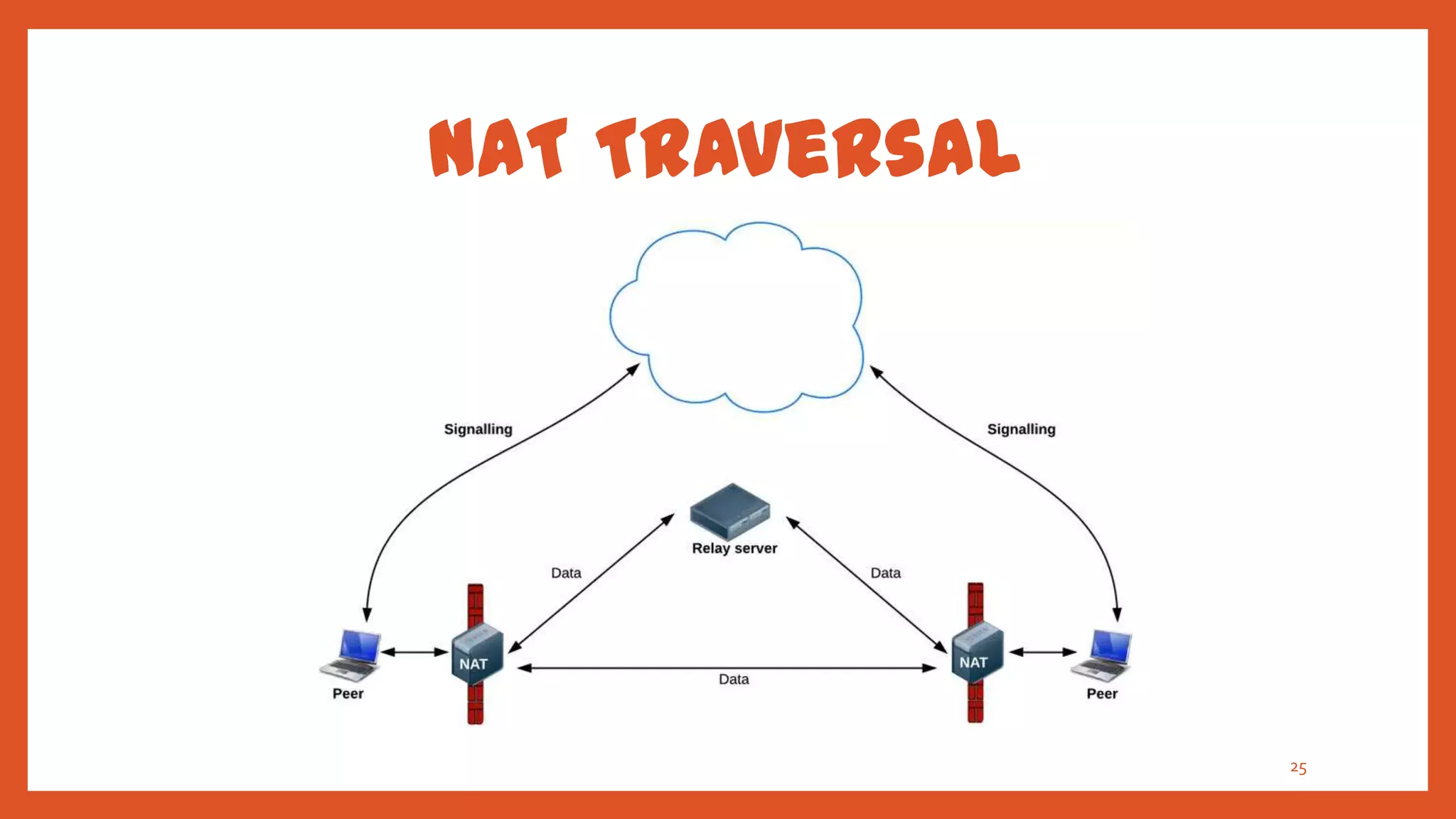
•   If UDP fails, ICE tries TCP: first HTTP, then HTTPS.

•   If direct connection fails—in particular, because of enterprise
    NAT traversal and firewalls—ICE uses an intermediary (relay)
    TURN server.

•   In other words, ICE will first use STUN with UDP to directly
    connect peers and, if that fails, will fall back to a TURN
    relay server.

•   The expression 'finding candidates' refers to the process of   24
NAT Traversal


                25
RTCDataChannel
•   As well as audio and video, WebRTC supports real-time
    communication for other types of data.

•   The RTCDataChannel API will enable peer-to-peer
    exchange of arbitrary data, with low latency and high
    throughput.

•   The API has several features to make the most of
    RTCPeerConnection and enable powerful and flexible
    peer-to-peer communication.                             26
RTCDataChannel
•   Stream Control Transmission Protocol (SCTP)
    encapsulated in DTLS is used to handle DataChannel Data.

•   DataChannel API is bidirectional, which means that each
    DataChannel bundles an incoming and an outgoing SCTP
    stream.

•   Encapsulating "SCTP over DTLS over ICE over UDP"
    provides a NAT traversal solution together with
    confidentiality, source authentication, and integrity-
                                                               27
    protected transfers.
Security
There are several ways a real-time communication application
or plugin might compromise security. For example:
 •   Unencrypted media or data might be intercepted en route
     between browsers, or between a browser and a server.

 •   An application might record and distribute video or audio
     without the user knowing.

 •   Malware or viruses might be installed alongside an
     apparently innocuous plugin or application.
                                                                 28
Security
WebRTC has several features to avoid these problems:
 •   WebRTC implementations use secure protocols such
     as DTLS and SRTP.

 •   Encryption is mandatory for all WebRTC components, including
     signaling mechanisms.

 •   WebRTC is not a plugin: its components run in the browser
     sandbox and not in a separate process, components do not
     require separate installation, and are updated whenever the
     browser is updated.                                            29
Current Limitations
•   Cloud Infrastructure – A server is required by WebRTC to complete
    four tasks: User discovery, Signalling and NAT/firewall traversal.

•   Native Applications – WebRTC enables real-time communication
    between web browsers. It is not a software development kit that can
    be used in native iOS or Android applications or in native desktop
    applications.

•   Multiparty Conferencing – WebRTC is peer-to-peer by nature which
    allows WebRTC to be extremely scalable, but it is very inefficient
    when setting up communications between more than two end users.
                                                                          30

•   Recording – WebRTC does not support recording as of now.
Conclusion
•   The APIs and standards of WebRTC can democratize and
    decentralize tools for content creation and
    communication — for telephony, gaming, video production,
    music making, news gathering and many other
    applications.

•   WebRTC will have great impact on open web and
    interoperable browser technologies including the
    existing enterprise solutions.                         31
References
•   Salvatore Loreto, Simon Pietro Romano (2012) ‘Real-Time
    Communications in the Web’
    - IEEE paper October, 2012
•   IETF.org
•   WebRTC book by Alan B. Johnston and Daniel C. Burnett
    : webrtcbook.com .
•   Video of Justin Uberti's WebRTC session at Google I/O, 27 June 2012.
•   webrtc.org
•   Google Developers Google Talk documentation, which gives more
    information about NAT traversal, STUN, relay servers and candidate
    gathering.
•   WebPlatform.org                                                 32

    (http://docs.webplatform.org/wiki/concepts/internet_and_web/web

WebRTC

  • 1.
    Web Real TimeCommunication 1
  • 2.
    What’s WebRTC? “ WebRTCis a new front in the long war for an open and unencumbered web. — Brendan Eich , inventor of JavaScript 2
  • 3.
    What’s WebRTC? • Web Real-Time Communication (WebRTC) is an upcoming standard that aims to enable real-time communication among Web browsers in a peer-to-peer fashion. • WebRTC project (opensource) aims to allow browsers to natively support interactive peer to peer communications and real time data collaboration. • Provide state of art audio/video communication stack in your browser. 3
  • 4.
    Earlier Efforts • Many web services already use RTC, but need downloads, native apps or plugins. These includes Skype, Facebook (uses Skype) and Google Hangouts (uses Google Talk plugin). • Downloading, installing and updating plugins can be complex, error prone and annoying. • Plugins can be difficult to deploy, debug, troubleshoot, test and maintain—and may require licensing and integration with complex, expensive technology. 4 • Integrating RTC technology with existing content, data and
  • 5.
    What does itchange? • No licenses or other fees. • Integration via simple, standardized Web APIs. • No Proprietary plugins. • No Security issues. • No downloads, no installation. • Just surf to the right address! 5
  • 6.
    Aims of WebRTC • State of art audio/video communication stack in your browser. • Seamless person-to-person communication. • Specification to achieve inter-operability among Web browsers. • Interoperability with legacy systems. • Low cost and highly efficient communication solution 6
  • 7.
  • 8.
    Architecture • At startup, browsers do not know each other. • JavaScript mediates the setup process through server. • Media flows through the shortest possible path for latency. 8
  • 9.
  • 10.
  • 11.
    WebRTC App. NeedTO • Get streaming audio, video or other data. • Get network information such as IP address and port, and exchange this with other WebRTC clients (known as peers ). • Coordinate signaling communication to report errors and initiate or close sessions. • Exchange information about media and client capability, such as resolution and codecs. 11 • Communicate streaming audio, video or data.
  • 12.
    Signaling • Mechanism to coordinate communication and to send control messages. • Signaling methods and protocols are not specified by WebRTC but by application developer. • Signaling is used to exchange three types of information : • Session control messages : to initialize or close communication and report errors. • Network configuration : what's my computer's IP address 12 and port?
  • 13.
    Signaling • The original idea to exchange Session Description information was in the form of Session Description Protocol (SDP) ‚blobs‛. • This approach had several shortcomings some of which would be difficult to address. • IETF is standardizing the JavaScript Session Establishment Protocol (JSEP). • JSEP provides the interface an application needs to deal with the negotiated local and remote session descriptions. • The JSEP approach leaves the responsibility for driving the signaling state machine entirely to the application. 13
  • 14.
    WebRTC API • getUserMedia (MediaStream) • RTCPeerConnection • RTCDataChannel 14
  • 15.
    WebRTC API StackView DTLS WebRTC APP WebRTC APP SRTP/SCTP PeerConnection API ICE PeerConnection API DataChannel API UDP DataChannel API 15
  • 16.
    getUserMedia • A MediaStream is an abstract representation of an actual data stream of audio or video. • Serves as a handle for managing actions on the media stream. • A MediaStream can be extended to represent a stream that either comes from (remote stream) or is sent to (local stream) a remote node. • A LocalMediaStream represents a media stream from a local media-capture device (such as a webcam or microphone). 16
  • 17.
    getUserMedia • The MediaStream represents synchronized streams of media. For example, a stream taken from camera and microphone input has synchronized video and audio tracks. • The getUserMedia() method takes three parameters: • A constraints object. • A success callback which, if called, is passed a LocalMediaStream. • A failure callback which, if called, is passed an error object. • In Chrome, the URL.createObjectURL () method converts a LocalMediaStream to a Blob URL which can be set as the src of a17
  • 18.
    getUserMedia <video id="sourcevid" autoplay></video> <script> var video = document.getElementById('sourcevid'); navigator.getUserMedia('video', success, error); function success(stream) { video.src = window.URL.createObjectURL(stream); } </script> 18
  • 19.
    RTCPeerConnection • RTCPeerConnection is the WebRTC API that handles stable and efficient communication of streaming data between peers . • Communications are coordinated via a signaling channel provided by scripting code in the page via the Web server — for instance, using XMLHttpRequest or WebSocket. 19
  • 20.
    RTCPeerConnection In the realworld, WebRTC needs servers, so the following can happen: • Users discover each other and exchange 'real world' details such as names. • WebRTC client applications (peers) exchange network information. • Peers exchange data about media such as video format and resolution. 20
  • 21.
  • 22.
    NAT Traversal • Suffice to say that the STUN protocol and its extension TURN are used by the ICE framework to enable RTCPeerConnection to cope with NAT traversal. • Initially, ICE tries to connect peers directly , with the lowest possible latency, via UDP. In this process, STUN servers have a single task: to enable a peer behind a NAT to find out its public address and port. 22
  • 23.
  • 24.
    NAT Traversal • If UDP fails, ICE tries TCP: first HTTP, then HTTPS. • If direct connection fails—in particular, because of enterprise NAT traversal and firewalls—ICE uses an intermediary (relay) TURN server. • In other words, ICE will first use STUN with UDP to directly connect peers and, if that fails, will fall back to a TURN relay server. • The expression 'finding candidates' refers to the process of 24
  • 25.
  • 26.
    RTCDataChannel • As well as audio and video, WebRTC supports real-time communication for other types of data. • The RTCDataChannel API will enable peer-to-peer exchange of arbitrary data, with low latency and high throughput. • The API has several features to make the most of RTCPeerConnection and enable powerful and flexible peer-to-peer communication. 26
  • 27.
    RTCDataChannel • Stream Control Transmission Protocol (SCTP) encapsulated in DTLS is used to handle DataChannel Data. • DataChannel API is bidirectional, which means that each DataChannel bundles an incoming and an outgoing SCTP stream. • Encapsulating "SCTP over DTLS over ICE over UDP" provides a NAT traversal solution together with confidentiality, source authentication, and integrity- 27 protected transfers.
  • 28.
    Security There are severalways a real-time communication application or plugin might compromise security. For example: • Unencrypted media or data might be intercepted en route between browsers, or between a browser and a server. • An application might record and distribute video or audio without the user knowing. • Malware or viruses might be installed alongside an apparently innocuous plugin or application. 28
  • 29.
    Security WebRTC has severalfeatures to avoid these problems: • WebRTC implementations use secure protocols such as DTLS and SRTP. • Encryption is mandatory for all WebRTC components, including signaling mechanisms. • WebRTC is not a plugin: its components run in the browser sandbox and not in a separate process, components do not require separate installation, and are updated whenever the browser is updated. 29
  • 30.
    Current Limitations • Cloud Infrastructure – A server is required by WebRTC to complete four tasks: User discovery, Signalling and NAT/firewall traversal. • Native Applications – WebRTC enables real-time communication between web browsers. It is not a software development kit that can be used in native iOS or Android applications or in native desktop applications. • Multiparty Conferencing – WebRTC is peer-to-peer by nature which allows WebRTC to be extremely scalable, but it is very inefficient when setting up communications between more than two end users. 30 • Recording – WebRTC does not support recording as of now.
  • 31.
    Conclusion • The APIs and standards of WebRTC can democratize and decentralize tools for content creation and communication — for telephony, gaming, video production, music making, news gathering and many other applications. • WebRTC will have great impact on open web and interoperable browser technologies including the existing enterprise solutions. 31
  • 32.
    References • Salvatore Loreto, Simon Pietro Romano (2012) ‘Real-Time Communications in the Web’ - IEEE paper October, 2012 • IETF.org • WebRTC book by Alan B. Johnston and Daniel C. Burnett : webrtcbook.com . • Video of Justin Uberti's WebRTC session at Google I/O, 27 June 2012. • webrtc.org • Google Developers Google Talk documentation, which gives more information about NAT traversal, STUN, relay servers and candidate gathering. • WebPlatform.org 32 (http://docs.webplatform.org/wiki/concepts/internet_and_web/web