Moving the OS
to the Web
George Lawton
W
ith the increasing
use of high-speed
Internet technolo-
gies during the past
few years, the con-
cept of cloud computing has become
more popular. In cloud computing,
users work with Web-based, rather
than local, storage and software.
These applications are accessible
via a browser and look and act like
desktop programs.
With this approach, users can
work with their applications from
multiple computers. In addition,
organizations can more easily con-
trol corporate data and reduce mal-
ware infections. Also, cloud comput-
ing makes collaboration easier and
can reduce platform-incompatibility
problems.
Now, a growing number of orga-
nizations are adding to the cloud
concept by releasing commercial
and open source Web-based oper-
ating systems. While the idea isn’t
new, the proliferation of users and
applications distributed over the
Web, including those at scattered
corporate sites, has made it more
interesting, relevant, and, vendors
hope, commercially viable.
The Web OS goes beyond basic
desktop functionality. It also
includes many of a traditional OS’s
capabilities, including a file system,
file management, and productivity
and communications applications.
As is the case with Web-based
applications, the Web OS functions
across platforms from any device
with Internet access. In addition,
distributed groups can collaborate
via the technology.
Currently, available Web OSs
include G.ho.st Inc.’s Global Hosted
Operating System (http://g.ho.st),
Fearsome Engine’s Zimdesk (www.
zimdesk.com), WebShaka Inc.’s
experimental YouOS (www.youos.
com), the eyeOS Project’s open
source eyeOS (www.eyeos.com),
Sun Microsystems’ Secure Global
Desktop (SGD, www.sun.com/
software/products/sgd/index.jsp),
and Sapotek’s Desktoptwo (Eng-
lish language, https://desktoptwo.
com) and Computadora.de (Span-
ish, https://computadora.de).
Of course, the Web OS won’t
replace the traditional operating
system any time soon. But as users
become more comfortable working
over the Web, the Web OS could
become more popular.
Nonetheless, the technology still
has several important shortcomings
that proponents must address.
driving the web os
The Web OS—which functions
much like a traditional operating
system, although it doesn’t include
drivers for computer hardware—is
becoming a subject of increasing
interest. One contributing factor
is Internet technologies’ increas-
ing bandwidth, which enables the
faster movement of applications
and data via the Internet to and
from Web OSs.
Early developments
One of the Web OS’s predecessors
was Tarantella, which the Santa
Cruz Operation launched in 1993.
It was a Unix-based X Window
System that worked over corporate
networks and let PCs display a Unix
desktop. However, the technology
never caught on commercially. Sun
acquired Tarantella in 2005 and
integrated it into the SGD.
In 1992, University of California,
Berkeley, researchers began work
on what, four years later, became
WebOS. The system delivered OS-
like functionality via the Internet.
The effort demonstrated the fea-
sibility of technologies that could
be used in Web-based operating
systems, such as a file system that
identifies data by URLs, a location-
independent resource-naming sys-
tem, and secure remote execution,
noted UC Berkeley professor David
Culler, who worked on the project.
Advent of Web apps
A key driving force behind the
development of Web OSs has been
the rise of Web-based applications.
Several of these applications have
started gaining traction in recent
years, particularly those for e-
mail (such as Hotmail and Gmail),
instant messaging, and storage (like
Xdrive). Recently, there have also
been Web-based word-processing
and spreadsheet applications (such
as Google Docs and Numbler).
With the first generation of
Web applications, implementing
even some modest functions—
like dragging and dropping files,
making minor changes to docu-
ments without having to refresh
the entire page, and caching data
locally—was difficult.
T E C H N O L O G Y N E W S
	 16	 Computer	 Published by the IEEE Computer Society
March 2008	 17
However, this has changed with
technologies such as Ajax (Asyn-
chronous JavaScript and XML),
Adobe Flash, Adobe Integrated
Runtime (AIR), Google Gears, and
Microsoft Silverlight, which enable
the development of rich Web appli-
cations, noted Guy Creese, analyst
with the Burton Group, a market
research firm.
One of the Web OS’s key challenges
has been working around security
limits, such as browsers’ sandbox
functionality, designed to restrict the
local execution of Web applications.
Inside the Web OS
Web OSs bring together Web-
based applications using the browser
as the interface, which is designed to
look like a traditional operating sys-
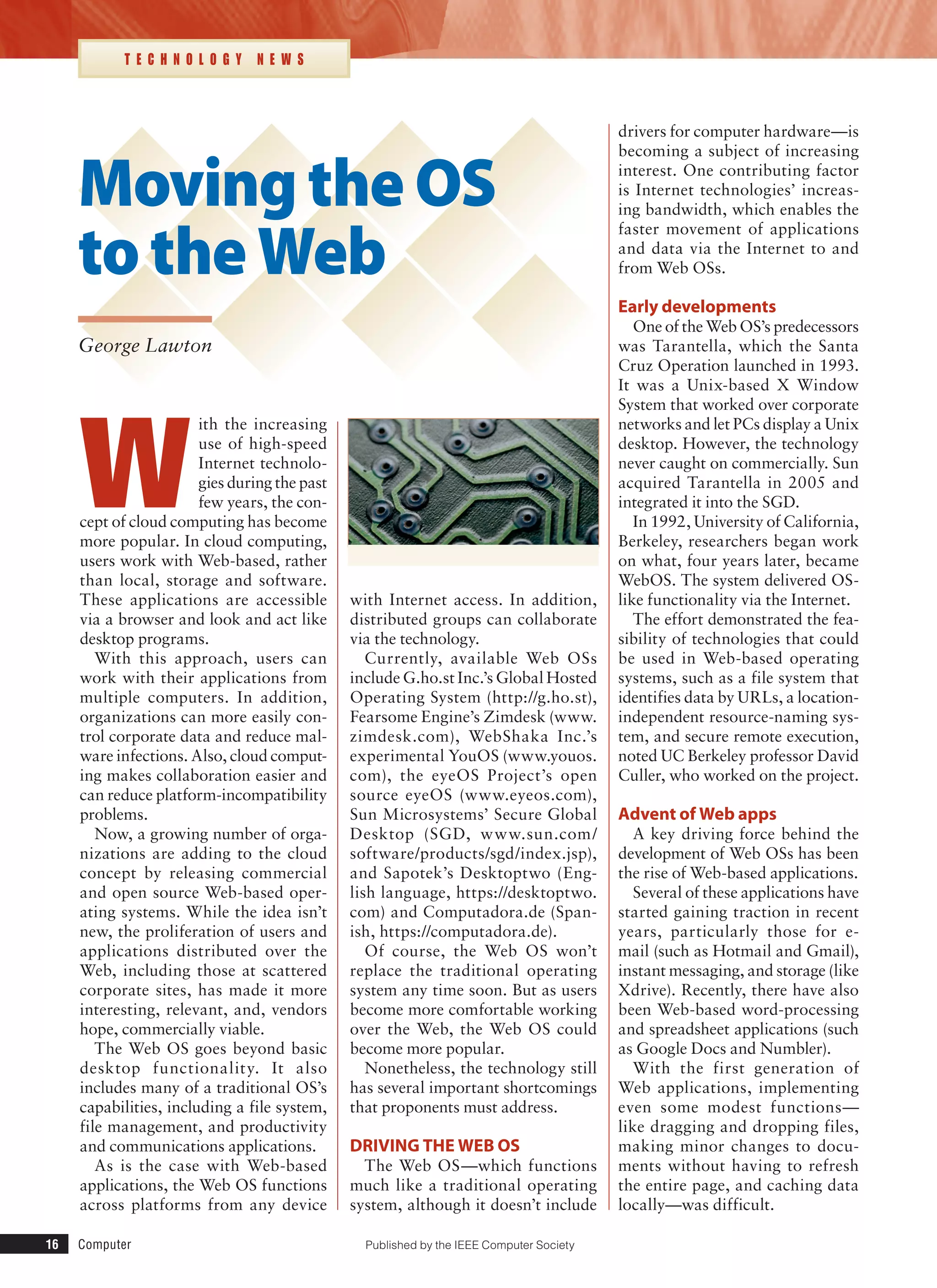
tem’s interface, as Figure 1 shows.
They work with a URL-based file
system that lets a Web-based applica-
tionaccessfilesfromtheOSprovider’s
server online via a domain-name-sys-
tem query. Similarly, the technology
uses a location-independent resource-
naming system that lets applications
make calls to services and resources
on remote severs.
Architecture
Web OSs use variations on the
same basic architecture.
The SGD uses a three-tier archi-
tecture, noted Mark Thacker, Sun’s
group product manager for security
and virtualization. The application
server hosts virtual machines that
run programs and push them to a
presentation server, which manages
the client connection. The thin client
runs the application and passes user
input back to the application server.
Either the Web OS provider or
a host company or data center can
house the application and presenta-
tion servers.
Simpler Web operating systems
such as eyeOS use a two-tier archi-
tecture in which one machine acts as
both application and presentation
server. The client is the second tier.
More complex systems, such as
G.ho.st, use a group of servers in
place of a single application server
and a single presentation server. In
this case, the group of servers looks
like one machine to the user. This
type of system leverages the mul-
tiple servers’ computing and storage
capacity to provide more scalability
and reliability.
Nuts and bolts
Because browsers are built to work
across different operating systems,
the Web OSs that run on them are
also platform-independent.
Depending on the OS, the user can
either execute applications locally
via a program such as Flash, or the
Web OS servers can execute the pro-
gram remotely and display it in the
client’s browser window.
Either way, users modify data
locally and the client uploads the
modified data via the Internet back
to the Web OS server.
When Web applications need over-
all changes or updates, the Web OS
provider uploads them within its serv-
ers. These changes appear the next
time clients download the programs,
without users having to do anything.
In G.ho.st, users have the option
of storing data in a local cache so
that they can work with it offline.
Communications between the
browser-based interface and the
Web OS server, between the server
and applications being used, and
between programs that must inter-
act with one another while clients
are working with them occur via
standard protocols such as HTTP
and FTP.
Generally, the Web OS providers’
back-end servers handle file manage-
ment and security, and help integrate
applications with one another so that
they can interact.
Web OSs use encryption to obfus-
cate data sent between the client
and server. The providers also run a
standard suite of intrusion detection
and antivirus applications. Users add
security to their Web OS operations
via their own applications.
Unless users choose to run appli-
cations or save data locally, they
leave no trace of their work on the
computers they use.
Applications
Most Web OSs, such as eyeOS and
Desktoptwo, feature APIs that let
programmers write new programs
for the operating system.
Figure 1. Web-based operating systems, such as eyeOS, have interfaces designed to
look like those of traditional OSs, to make using them easier and more familiar.
18	 Computer
T E C H N O L O G Y N E W S
Sapotek sponsors the Sapodesk
open source software community.
About 50 projects are under way to
develop desktop-like customer-rela-
tionship-management, calculator,
and other Web-based applications,
including those that work with the
company’s two Web OSs, noted
Sapotek CEO Joshua Rand.
Some Web OSs, such as the SGD,
deploy standard Windows or Unix
applications online via servers that
run the programs in virtual machines
that handle them as if they were in
their native OS.
G.ho.st works with various Web
applications already on the Inter-
net, such as Zoho for word-process-
ing, spreadsheet, presentation, and
other office-productivity functions;
Zimbra for calendaring and mes-
saging; Pandora for playing music;
and Flickr for displaying and man-
aging photos, noted G.ho.st CEO
Zvi Schreiber.
The Burton Group’s Creese said
Microsoft’s release of Silverlight—a
cross-browser, cross-platform plug-
in that allows development of rich
Web applications—could encourage
the many programmers familiar with
Microsoft-based development tools
to also begin creating software for
Web OSs.
ADVANTAGES
A Web OS runs on any Internet-
enabled computer or device. This
is important for mobile workers or
people who don’t have their own
computers and must work out of
Internet cafes, libraries, or schools.
Also, Web OS users can work, log
out, and then log in later from a dif-
ferent computer.
In addition, because the same Web
OS can run on different computers,
the technology facilitates collabora-
tion among multiple work centers.
The traditional OS runs on only
one computer. Extensions such as
the Network File System—a way
for different machines to import and
export local files—and remote desk-
top—a way to control one computer
by using another device—allow eas-
ier access to information from mul-
tiple locations and better user collab-
oration. However, these techniques
are limited to a set of machines on
the same network or specific com-
puters that have been linked.
With a Web OS, users can store,
find, and otherwise manage files and
services, such as calendars and e-
mail, from a Web desktop. And stor-
ing applications, files, and services on
an OS provider’s servers, rather than
on the user’s computer, makes them
harder for a PC or laptop thief to use.
Web OS users don’t have to back
up or archive work because the pro-
vider’s remote server handles these
functions.
The technology also promises to
reduce users’ long-term computer
and device costs because much of
the heavy processing is concentrated
in providers’ remote servers, Sun’s
Thacker said.
Because the Web OS operates
across platforms, it eliminates com-
patibility issues between applica-
tions and operating systems. Thus,
the same Web OS will run on a Win-
dows, Mac, or Linux machine.
Application developers create an
application only once for a Web OS,
rather than many times for each of
the traditional operating systems.
And system administrators have to
deploy an application only once for a
given Web OS. They can then easily
distribute it online to users.
Because the Web OS and its appli-
cations are generally based in servers
that can be monitored and secured
from one location, they provide cen-
tralized malware protection.
SHORTCOMINGS
Anumberofshortcomingsthreaten
to slow the adoption of Web OSs.
For example, they face network
bandwidth and latency constraints
that traditional OSs don’t encoun-
ter. They also require extra lay-
ers of overhead—including power
demands and the additional pro-
cessing of keyboard, mouse, audio,
and video inputs—because they
operate via a browser that runs on
top of the host machine’s operating
system.
If Web OS users choose to locally
cache data they’re working with,
the browser would have access to
the information. This could cause
security concerns if a hacker com-
promises the browser.
Web OSs generally come with
a limited number of applications.
And, the Burton Group’s Creese
said, the applications might not have
features that users like in their tradi-
tional programs. Also, users may be
too unfamiliar with the software to
want to use it.
Web OS platforms are relatively
immature and don’t always offer as
much functionality, such as native
device-driver access, as traditional
OSs. This has hurt the Web OS’s
adoption by corporations, accord-
ing to Creese.
Most users can’t easily transfer
data and settings between different
Web OSs because they don’t use the
same data formats, although some
technically sophisticated users could
manually do so. Proponents still
must develop standards and tools
to handle interoperability. Compa-
nies such as G.ho.st and Sapotek are
working on such projects.
Most Web OS providers are small
companies, and corporations might
be reluctant to trust their sensitive
data to such firms, Thacker said.
And they may not want to either
use an unfamiliar OS or trust their
applications and data to a third par-
ty’s computers.
Generally, users must be online to
work with a Web OS, a major prob-
lem for those who never or rarely
connect to the Internet or who lose
access temporarily.
C
ompanies such as Sapotek
and Zimdesk are working
with developers to add more
applications—such as photo albums,
jukeboxes, and personal-informa-
tion managers—to their Web OSs.
Currently, G.ho.st’s Schreiber said,
companies aren’t targeting their Web
March 2008	 19
OSs for mobile devices because their
screens and networks aren’t big or
fast enough to consistently deliver
an optimal experience. However, he
noted, this is beginning to change.
In the future, UC Berkeley’s Culler
predicted, the Web OS may be based
in a distributed set of servers, rather
than just a single server. This creates
redundancy that helps if problems
occur somewhere in the system, and
moves applications closer to users to
reduce latency.
The Web OS’s success may depend
on how easy it is for developers to
create applications for the various
platforms, said Sapotek’s Rand.
Initially, he added, younger people
might be more willing than others to
adopt the technology because they’re
already familiar with the Web and
Web-based systems. But as Web-
based applications gain popularity,
other users may become more com-
fortable with the Web OS.
Amin Vahdat, professor at the
University of California, San Diego,
said, “I think that right now, we are
at an inflection point with respect
to the ability to deliver rich func-
tionality over the network. The lack
of ubiquitous, high-performance
network connectivity will keep the
[Web OS] infrastructure from being
widely adopted in the next few years.
I believe that most people will use
traditional operating systems over
the next five-year period but that
increasingly, people will transition
many of their productivity applica-
tions to Web operating systems.” ■
George Lawton is a freelance technol-
ogy writer based in San Francisco,
California. Contact him at glawton@
glawton.com.
Editor: Lee Garber, Computer,
l.garber@computer.org
One more reason to become an
IEEE Computer Society member
Further your
career or just
increase your
knowledge
The e-Learning
campus provides
easy access to
online learning
materials to IEEE
Computer Society
members. These
resources are
either included in
your membership
or offered at a
special discount
price to members.
Online Courses
Over 1,300 technical courses available
online for Computer Society members.
IEEE Computer Society Digital Library
The Digital Library provides decades of
authoritative peer-reviewed research at your
fingertips: Have online access to 25 society
magazines and transactions, and more than
1,700 selected conference proceedings.
Books/Technical Papers
Members can access over 500 quality online
books and technical papers anytime they
want them.
IEEE ReadyNotes are guidebooks and tuto-
rials that serve as a quick-start reference for
busy computing professionals. They are
available as an immediate PDF download.
Certifications
The CSDP (Certified Software Development
Professional) is a professional certification
meant for experienced software
professionals.
Brainbench exams available free for
Computer Society members, provide solid
measurements of skills commonly requested
by employers. Official Brainbench
certificates are also available at a discounted
price.
Visit http://computer.org/elearning
for more information
I E E E C O M P U T E R S O C I E T Y
e-learning campus
Advance your career and improve your knowledge
with online resources
I E E E C O M P U T E R S O C I E T Y
e-learning campus
Advance your career and improve your knowledge
with online resources

Webos

  • 1.
    Moving the OS tothe Web George Lawton W ith the increasing use of high-speed Internet technolo- gies during the past few years, the con- cept of cloud computing has become more popular. In cloud computing, users work with Web-based, rather than local, storage and software. These applications are accessible via a browser and look and act like desktop programs. With this approach, users can work with their applications from multiple computers. In addition, organizations can more easily con- trol corporate data and reduce mal- ware infections. Also, cloud comput- ing makes collaboration easier and can reduce platform-incompatibility problems. Now, a growing number of orga- nizations are adding to the cloud concept by releasing commercial and open source Web-based oper- ating systems. While the idea isn’t new, the proliferation of users and applications distributed over the Web, including those at scattered corporate sites, has made it more interesting, relevant, and, vendors hope, commercially viable. The Web OS goes beyond basic desktop functionality. It also includes many of a traditional OS’s capabilities, including a file system, file management, and productivity and communications applications. As is the case with Web-based applications, the Web OS functions across platforms from any device with Internet access. In addition, distributed groups can collaborate via the technology. Currently, available Web OSs include G.ho.st Inc.’s Global Hosted Operating System (http://g.ho.st), Fearsome Engine’s Zimdesk (www. zimdesk.com), WebShaka Inc.’s experimental YouOS (www.youos. com), the eyeOS Project’s open source eyeOS (www.eyeos.com), Sun Microsystems’ Secure Global Desktop (SGD, www.sun.com/ software/products/sgd/index.jsp), and Sapotek’s Desktoptwo (Eng- lish language, https://desktoptwo. com) and Computadora.de (Span- ish, https://computadora.de). Of course, the Web OS won’t replace the traditional operating system any time soon. But as users become more comfortable working over the Web, the Web OS could become more popular. Nonetheless, the technology still has several important shortcomings that proponents must address. driving the web os The Web OS—which functions much like a traditional operating system, although it doesn’t include drivers for computer hardware—is becoming a subject of increasing interest. One contributing factor is Internet technologies’ increas- ing bandwidth, which enables the faster movement of applications and data via the Internet to and from Web OSs. Early developments One of the Web OS’s predecessors was Tarantella, which the Santa Cruz Operation launched in 1993. It was a Unix-based X Window System that worked over corporate networks and let PCs display a Unix desktop. However, the technology never caught on commercially. Sun acquired Tarantella in 2005 and integrated it into the SGD. In 1992, University of California, Berkeley, researchers began work on what, four years later, became WebOS. The system delivered OS- like functionality via the Internet. The effort demonstrated the fea- sibility of technologies that could be used in Web-based operating systems, such as a file system that identifies data by URLs, a location- independent resource-naming sys- tem, and secure remote execution, noted UC Berkeley professor David Culler, who worked on the project. Advent of Web apps A key driving force behind the development of Web OSs has been the rise of Web-based applications. Several of these applications have started gaining traction in recent years, particularly those for e- mail (such as Hotmail and Gmail), instant messaging, and storage (like Xdrive). Recently, there have also been Web-based word-processing and spreadsheet applications (such as Google Docs and Numbler). With the first generation of Web applications, implementing even some modest functions— like dragging and dropping files, making minor changes to docu- ments without having to refresh the entire page, and caching data locally—was difficult. T E C H N O L O G Y N E W S 16 Computer Published by the IEEE Computer Society
  • 2.
    March 2008 17 However,this has changed with technologies such as Ajax (Asyn- chronous JavaScript and XML), Adobe Flash, Adobe Integrated Runtime (AIR), Google Gears, and Microsoft Silverlight, which enable the development of rich Web appli- cations, noted Guy Creese, analyst with the Burton Group, a market research firm. One of the Web OS’s key challenges has been working around security limits, such as browsers’ sandbox functionality, designed to restrict the local execution of Web applications. Inside the Web OS Web OSs bring together Web- based applications using the browser as the interface, which is designed to look like a traditional operating sys- tem’s interface, as Figure 1 shows. They work with a URL-based file system that lets a Web-based applica- tionaccessfilesfromtheOSprovider’s server online via a domain-name-sys- tem query. Similarly, the technology uses a location-independent resource- naming system that lets applications make calls to services and resources on remote severs. Architecture Web OSs use variations on the same basic architecture. The SGD uses a three-tier archi- tecture, noted Mark Thacker, Sun’s group product manager for security and virtualization. The application server hosts virtual machines that run programs and push them to a presentation server, which manages the client connection. The thin client runs the application and passes user input back to the application server. Either the Web OS provider or a host company or data center can house the application and presenta- tion servers. Simpler Web operating systems such as eyeOS use a two-tier archi- tecture in which one machine acts as both application and presentation server. The client is the second tier. More complex systems, such as G.ho.st, use a group of servers in place of a single application server and a single presentation server. In this case, the group of servers looks like one machine to the user. This type of system leverages the mul- tiple servers’ computing and storage capacity to provide more scalability and reliability. Nuts and bolts Because browsers are built to work across different operating systems, the Web OSs that run on them are also platform-independent. Depending on the OS, the user can either execute applications locally via a program such as Flash, or the Web OS servers can execute the pro- gram remotely and display it in the client’s browser window. Either way, users modify data locally and the client uploads the modified data via the Internet back to the Web OS server. When Web applications need over- all changes or updates, the Web OS provider uploads them within its serv- ers. These changes appear the next time clients download the programs, without users having to do anything. In G.ho.st, users have the option of storing data in a local cache so that they can work with it offline. Communications between the browser-based interface and the Web OS server, between the server and applications being used, and between programs that must inter- act with one another while clients are working with them occur via standard protocols such as HTTP and FTP. Generally, the Web OS providers’ back-end servers handle file manage- ment and security, and help integrate applications with one another so that they can interact. Web OSs use encryption to obfus- cate data sent between the client and server. The providers also run a standard suite of intrusion detection and antivirus applications. Users add security to their Web OS operations via their own applications. Unless users choose to run appli- cations or save data locally, they leave no trace of their work on the computers they use. Applications Most Web OSs, such as eyeOS and Desktoptwo, feature APIs that let programmers write new programs for the operating system. Figure 1. Web-based operating systems, such as eyeOS, have interfaces designed to look like those of traditional OSs, to make using them easier and more familiar.
  • 3.
    18 Computer T EC H N O L O G Y N E W S Sapotek sponsors the Sapodesk open source software community. About 50 projects are under way to develop desktop-like customer-rela- tionship-management, calculator, and other Web-based applications, including those that work with the company’s two Web OSs, noted Sapotek CEO Joshua Rand. Some Web OSs, such as the SGD, deploy standard Windows or Unix applications online via servers that run the programs in virtual machines that handle them as if they were in their native OS. G.ho.st works with various Web applications already on the Inter- net, such as Zoho for word-process- ing, spreadsheet, presentation, and other office-productivity functions; Zimbra for calendaring and mes- saging; Pandora for playing music; and Flickr for displaying and man- aging photos, noted G.ho.st CEO Zvi Schreiber. The Burton Group’s Creese said Microsoft’s release of Silverlight—a cross-browser, cross-platform plug- in that allows development of rich Web applications—could encourage the many programmers familiar with Microsoft-based development tools to also begin creating software for Web OSs. ADVANTAGES A Web OS runs on any Internet- enabled computer or device. This is important for mobile workers or people who don’t have their own computers and must work out of Internet cafes, libraries, or schools. Also, Web OS users can work, log out, and then log in later from a dif- ferent computer. In addition, because the same Web OS can run on different computers, the technology facilitates collabora- tion among multiple work centers. The traditional OS runs on only one computer. Extensions such as the Network File System—a way for different machines to import and export local files—and remote desk- top—a way to control one computer by using another device—allow eas- ier access to information from mul- tiple locations and better user collab- oration. However, these techniques are limited to a set of machines on the same network or specific com- puters that have been linked. With a Web OS, users can store, find, and otherwise manage files and services, such as calendars and e- mail, from a Web desktop. And stor- ing applications, files, and services on an OS provider’s servers, rather than on the user’s computer, makes them harder for a PC or laptop thief to use. Web OS users don’t have to back up or archive work because the pro- vider’s remote server handles these functions. The technology also promises to reduce users’ long-term computer and device costs because much of the heavy processing is concentrated in providers’ remote servers, Sun’s Thacker said. Because the Web OS operates across platforms, it eliminates com- patibility issues between applica- tions and operating systems. Thus, the same Web OS will run on a Win- dows, Mac, or Linux machine. Application developers create an application only once for a Web OS, rather than many times for each of the traditional operating systems. And system administrators have to deploy an application only once for a given Web OS. They can then easily distribute it online to users. Because the Web OS and its appli- cations are generally based in servers that can be monitored and secured from one location, they provide cen- tralized malware protection. SHORTCOMINGS Anumberofshortcomingsthreaten to slow the adoption of Web OSs. For example, they face network bandwidth and latency constraints that traditional OSs don’t encoun- ter. They also require extra lay- ers of overhead—including power demands and the additional pro- cessing of keyboard, mouse, audio, and video inputs—because they operate via a browser that runs on top of the host machine’s operating system. If Web OS users choose to locally cache data they’re working with, the browser would have access to the information. This could cause security concerns if a hacker com- promises the browser. Web OSs generally come with a limited number of applications. And, the Burton Group’s Creese said, the applications might not have features that users like in their tradi- tional programs. Also, users may be too unfamiliar with the software to want to use it. Web OS platforms are relatively immature and don’t always offer as much functionality, such as native device-driver access, as traditional OSs. This has hurt the Web OS’s adoption by corporations, accord- ing to Creese. Most users can’t easily transfer data and settings between different Web OSs because they don’t use the same data formats, although some technically sophisticated users could manually do so. Proponents still must develop standards and tools to handle interoperability. Compa- nies such as G.ho.st and Sapotek are working on such projects. Most Web OS providers are small companies, and corporations might be reluctant to trust their sensitive data to such firms, Thacker said. And they may not want to either use an unfamiliar OS or trust their applications and data to a third par- ty’s computers. Generally, users must be online to work with a Web OS, a major prob- lem for those who never or rarely connect to the Internet or who lose access temporarily. C ompanies such as Sapotek and Zimdesk are working with developers to add more applications—such as photo albums, jukeboxes, and personal-informa- tion managers—to their Web OSs. Currently, G.ho.st’s Schreiber said, companies aren’t targeting their Web
  • 4.
    March 2008 19 OSsfor mobile devices because their screens and networks aren’t big or fast enough to consistently deliver an optimal experience. However, he noted, this is beginning to change. In the future, UC Berkeley’s Culler predicted, the Web OS may be based in a distributed set of servers, rather than just a single server. This creates redundancy that helps if problems occur somewhere in the system, and moves applications closer to users to reduce latency. The Web OS’s success may depend on how easy it is for developers to create applications for the various platforms, said Sapotek’s Rand. Initially, he added, younger people might be more willing than others to adopt the technology because they’re already familiar with the Web and Web-based systems. But as Web- based applications gain popularity, other users may become more com- fortable with the Web OS. Amin Vahdat, professor at the University of California, San Diego, said, “I think that right now, we are at an inflection point with respect to the ability to deliver rich func- tionality over the network. The lack of ubiquitous, high-performance network connectivity will keep the [Web OS] infrastructure from being widely adopted in the next few years. I believe that most people will use traditional operating systems over the next five-year period but that increasingly, people will transition many of their productivity applica- tions to Web operating systems.” ■ George Lawton is a freelance technol- ogy writer based in San Francisco, California. Contact him at glawton@ glawton.com. Editor: Lee Garber, Computer, l.garber@computer.org One more reason to become an IEEE Computer Society member Further your career or just increase your knowledge The e-Learning campus provides easy access to online learning materials to IEEE Computer Society members. These resources are either included in your membership or offered at a special discount price to members. Online Courses Over 1,300 technical courses available online for Computer Society members. IEEE Computer Society Digital Library The Digital Library provides decades of authoritative peer-reviewed research at your fingertips: Have online access to 25 society magazines and transactions, and more than 1,700 selected conference proceedings. Books/Technical Papers Members can access over 500 quality online books and technical papers anytime they want them. IEEE ReadyNotes are guidebooks and tuto- rials that serve as a quick-start reference for busy computing professionals. They are available as an immediate PDF download. Certifications The CSDP (Certified Software Development Professional) is a professional certification meant for experienced software professionals. Brainbench exams available free for Computer Society members, provide solid measurements of skills commonly requested by employers. Official Brainbench certificates are also available at a discounted price. Visit http://computer.org/elearning for more information I E E E C O M P U T E R S O C I E T Y e-learning campus Advance your career and improve your knowledge with online resources I E E E C O M P U T E R S O C I E T Y e-learning campus Advance your career and improve your knowledge with online resources