Tips and Tricks on Website Security


                        Making the internet safer, one website at a time.tm
Agenda


1. Introduction

2. Why is website security important

3. Methods Hackers use

4. How to protect your website

5. Q&A


                                       Making the internet safer, one website at a time.tm
Agenda


1. Introduction

2. Why website security is important

3. Methods Hackers use

4. How to protect your website

5. Q&A


                                       Making the internet safer, one website at a time.tm
StopBadware


• Nonprofit organization that makes the Web
  safer by fighting badware
• Helps webmasters learn how to clean up their
  sites and get off malware blacklists
• Runs a community forum,
  BadwareBusters.org, where owners of
  hacked sites can get free help from security
  experts
• Our Partners include companies like Google,
  Mozilla, Verizon, and StopTheHacker!


                                                 Making the internet safer, one website at a time.tm
StopTheHacker

• Founded in 2009
• Based in San Francisco
• Partner of StopBadware in the fight against evil ;)
• Focused on web malware detection and removal. Additional services
  include Vulnerability assessment, Reputation protection & Facebook
  protection
   • StopTheHacker‟s Artificial Intelligence
          Funded by the National Science Foundation USA.
          Won multiple awards since 2009

• Partners & Customers worldwide, e.g. US, Australia, Canada,
  Germany, Portugal, Latvia, UK, Belgium, Singapore, Bulgaria, Russia


                                                            Making the internet safer, one website at a time.tm
Agenda


1. Introduction

2. Why website security is important

3. Methods Hackers use

4. How to protect your website

5. Q&A


                                       Making the internet safer, one website at a time.tm
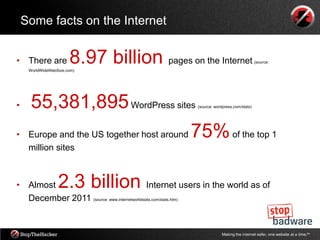
Some facts on the Internet


• There are            8.97 billion pages on the Internet
     WorldWideWebSize.com)
                                                                                       (source:


•    55,381,895 WordPress sites                        (source: wordpress.com/stats)


•    Europe and the US together host around 75% of the top 1
     million sites


• Almost          2.3 billion                Internet users in the world as of
  December 2011 (source: www.internetworldstats.com/stats.htm)


                                                                   Making the internet safer, one website at a time.tm
The Threat

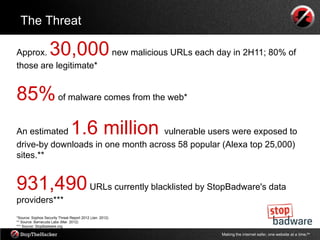
Approx.            30,000 new malicious URLs each day in 2H11; 80% of
those are legitimate*


85% of malware comes from the web*
An estimated                    1.6 million
                                    vulnerable users were exposed to
drive-by downloads in one month across 58 popular (Alexa top 25,000)
sites.**


931,490 URLs currently blacklisted by StopBadware's data
providers***
*Source: Sophos Security Threat Report 2012 (Jan. 2012)
** Source: Barracuda Labs (Mar. 2012)
*** Source: StopBadware.org

                                                          Making the internet safer, one website at a time.tm
Why protect my website?


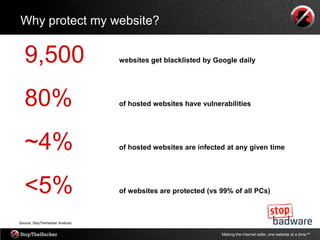
   9,500                         websites get blacklisted by Google daily


   80%                           of hosted websites have vulnerabilities


   ~4%                           of hosted websites are infected at any given time


   <5%                           of websites are protected (vs 99% of all PCs)


Source: StopTheHacker Analysis


                                                               Making the internet safer, one website at a time.tm
Results of being hacked

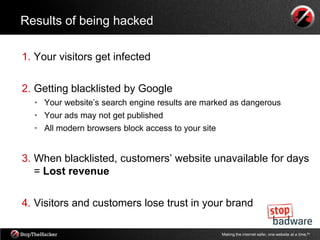
1. Your visitors get infected

2. Getting blacklisted by Google
  • Your website‟s search engine results are marked as dangerous
  • Your ads may not get published
  • All modern browsers block access to your site


3. When blacklisted, customers‟ website unavailable for days
   = Lost revenue

4. Visitors and customers lose trust in your brand

                                                    Making the internet safer, one website at a time.tm
Agenda


1. Introduction

2. Why website security is important

3. Methods Hackers use

4. How to protect your website

5. Q&A


                                       Making the internet safer, one website at a time.tm
Top reasons why website get hacked

1. Poor choice of passwords

2. Insecure FTP connections

3. Web application vulnerabilities

4. Third party add-ons

5. Server level vulnerabilities

6. Infected PCs

                                     Making the internet safer, one website at a time.tm
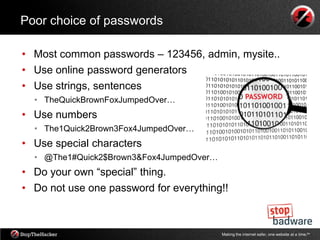
Poor choice of passwords

• Most common passwords – 123456, admin, mysite..
• Use online password generators
• Use strings, sentences
  • TheQuickBrownFoxJumpedOver…
• Use numbers
  • The1Quick2Brown3Fox4JumpedOver…
• Use special characters
  • @The1#Quick2$Brown3&Fox4JumpedOver…
• Do your own “special” thing.
• Do not use one password for everything!!


                                          Making the internet safer, one website at a time.tm
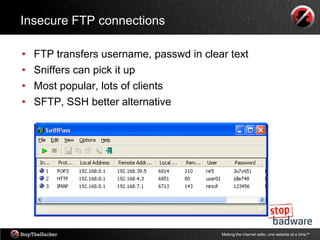
Insecure FTP connections

•   FTP transfers username, passwd in clear text
•   Sniffers can pick it up
•   Most popular, lots of clients
•   SFTP, SSH better alternative


                                          Making the internet safer, one website at a time.tm
Web application vulnerabilities

• Cross Site Scripting
  •   Persistent, temporary
• SQL Injection
  •   Database injections (title tags)
• Forms, blog comment area vulnerable
  •   Your code used against you
• Cross Site Request Forgery
  •   Insufficient input santization
• Wordpress, Drupal, Joomla
  •   Custom code needs to be audited
• Web application filters, Snort, only as good as signatures


                                           Making the internet safer, one website at a time.tm
Third party add-ons

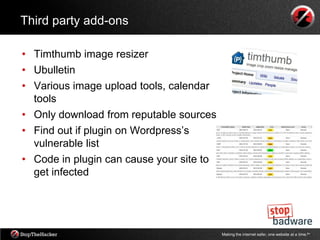
• Timthumb image resizer
• Ubulletin
• Various image upload tools, calendar
  tools
• Only download from reputable sources
• Find out if plugin on Wordpress‟s
  vulnerable list
• Code in plugin can cause your site to
  get infected


                                          Making the internet safer, one website at a time.tm
Server level vulnerabilities

•   Remote File Inclusion
•   OS patches outdated
•   Vulnerable software (old FTP server running)
•   Old PHP versions
•   Use sandboxing of accounts
    •   Apache – separate user
    •   Database – separate user
    •   Files owned by different user
    •   Disallow root access
    •   Use sudo


                                          Making the internet safer, one website at a time.tm
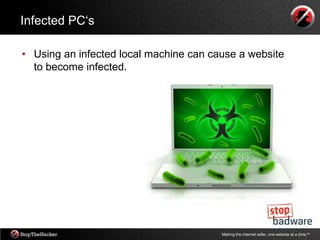
Infected PC„s

• Using an infected local machine can cause a website
  to become infected.


                                        Making the internet safer, one website at a time.tm
Agenda


1. Introduction

2. Why website security is important

3. Methods Hackers use

4. How to protect your website

5. Q&A


                                       Making the internet safer, one website at a time.tm
Top tips to protect your website

Passwords
• Never store credentials, like your FTP password, on your local PC.
• Use strong passwords and try to set up difficult-to-guess usernames
  (such as “av21bx” instead of “Alex”)


FTP connections
• If you use FTP, consider switching to a more secure solution, like
  ssh/SCP/SFTP.


                                                  Making the internet safer, one website at a time.tm
Top tips to protect your website

Web Application Vulnerabilities
• Make sure to check your website frequently for web application
  vulnerabilities and malicious code. Vigilance can protect your visitors.
• Use a website protection service that scans your site regularly for
  vulnerabilities and malware infections


Third party add-ons
• Install only reputable plugins.
• Make a list of all third party plugins you use, and be sure to update
  them regularly.
• Both the software you use to run your website and all your plugins
  should be kept current!


                                                    Making the internet safer, one website at a time.tm
Top tips to protect your website

Server level vulnerabilities
• Set appropriate file permissions on your web server


Infected PC’s
• Make sure you regularly scan your local PC with at least one, and
  preferably more than one, antivirus engine.
• Antivirus software for your PC won‟t detect website infections, but
  using an infected local machine can cause a website to become
  infected.
• It‟s important to protect your PC, too!


                                                   Making the internet safer, one website at a time.tm
Important Technologies
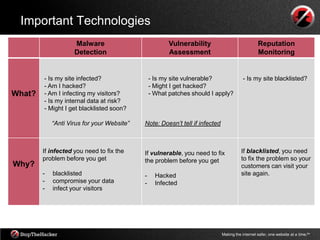
                    Malware                            Vulnerability                             Reputation
                    Detection                          Assessment                                Monitoring


        - Is my site infected?                  - Is my site vulnerable?                 - Is my site blacklisted?
        - Am I hacked?                          - Might I get hacked?
What?   - Am I infecting my visitors?           - What patches should I apply?
        - Is my internal data at risk?
        - Might I get blacklisted soon?

            “Anti Virus for your Website”   Note: Doesn’t tell if infected


        If infected you need to fix the     If vulnerable, you need to fix              If blacklisted, you need
        problem before you get              the problem before you get                  to fix the problem so your
Why?                                                                                    customers can visit your
        -   blacklisted                     -     Hacked                                site again.
        -   compromise your data            -     Infected
        -   infect your visitors


                                                                             Making the internet safer, one website at a time.tm
More information


  • Blog: blog.stopbadware.org
  • Facebook: facebook.com/StopBadware
  • Twitter: @stopbadware & @badwarebusters


  • Blog: stopthehacker.com/blog
  • Facebook: facebook.com/StopTheHacker
  • Twitter: @stopthehacker


                                              Making the internet safer, one website at a time.tm
Agenda


1. Introduction

2. Why website security is important

3. Methods Hackers use

4. How to protect your website

5. Q&A


                                       Making the internet safer, one website at a time.tm
Thank you


            Making the internet safer, one website at a time.tm

Webinar - Tips and Tricks on Website Security

  • 1.
    Tips and Trickson Website Security Making the internet safer, one website at a time.tm
  • 2.
    Agenda 1. Introduction 2. Whyis website security important 3. Methods Hackers use 4. How to protect your website 5. Q&A Making the internet safer, one website at a time.tm
  • 3.
    Agenda 1. Introduction 2. Whywebsite security is important 3. Methods Hackers use 4. How to protect your website 5. Q&A Making the internet safer, one website at a time.tm
  • 4.
    StopBadware • Nonprofit organizationthat makes the Web safer by fighting badware • Helps webmasters learn how to clean up their sites and get off malware blacklists • Runs a community forum, BadwareBusters.org, where owners of hacked sites can get free help from security experts • Our Partners include companies like Google, Mozilla, Verizon, and StopTheHacker! Making the internet safer, one website at a time.tm
  • 5.
    StopTheHacker • Founded in2009 • Based in San Francisco • Partner of StopBadware in the fight against evil ;) • Focused on web malware detection and removal. Additional services include Vulnerability assessment, Reputation protection & Facebook protection • StopTheHacker‟s Artificial Intelligence  Funded by the National Science Foundation USA.  Won multiple awards since 2009 • Partners & Customers worldwide, e.g. US, Australia, Canada, Germany, Portugal, Latvia, UK, Belgium, Singapore, Bulgaria, Russia Making the internet safer, one website at a time.tm
  • 6.
    Agenda 1. Introduction 2. Whywebsite security is important 3. Methods Hackers use 4. How to protect your website 5. Q&A Making the internet safer, one website at a time.tm
  • 7.
    Some facts onthe Internet • There are 8.97 billion pages on the Internet WorldWideWebSize.com) (source: • 55,381,895 WordPress sites (source: wordpress.com/stats) • Europe and the US together host around 75% of the top 1 million sites • Almost 2.3 billion Internet users in the world as of December 2011 (source: www.internetworldstats.com/stats.htm) Making the internet safer, one website at a time.tm
  • 8.
    The Threat Approx. 30,000 new malicious URLs each day in 2H11; 80% of those are legitimate* 85% of malware comes from the web* An estimated 1.6 million vulnerable users were exposed to drive-by downloads in one month across 58 popular (Alexa top 25,000) sites.** 931,490 URLs currently blacklisted by StopBadware's data providers*** *Source: Sophos Security Threat Report 2012 (Jan. 2012) ** Source: Barracuda Labs (Mar. 2012) *** Source: StopBadware.org Making the internet safer, one website at a time.tm
  • 9.
    Why protect mywebsite? 9,500 websites get blacklisted by Google daily 80% of hosted websites have vulnerabilities ~4% of hosted websites are infected at any given time <5% of websites are protected (vs 99% of all PCs) Source: StopTheHacker Analysis Making the internet safer, one website at a time.tm
  • 10.
    Results of beinghacked 1. Your visitors get infected 2. Getting blacklisted by Google • Your website‟s search engine results are marked as dangerous • Your ads may not get published • All modern browsers block access to your site 3. When blacklisted, customers‟ website unavailable for days = Lost revenue 4. Visitors and customers lose trust in your brand Making the internet safer, one website at a time.tm
  • 11.
    Agenda 1. Introduction 2. Whywebsite security is important 3. Methods Hackers use 4. How to protect your website 5. Q&A Making the internet safer, one website at a time.tm
  • 12.
    Top reasons whywebsite get hacked 1. Poor choice of passwords 2. Insecure FTP connections 3. Web application vulnerabilities 4. Third party add-ons 5. Server level vulnerabilities 6. Infected PCs Making the internet safer, one website at a time.tm
  • 13.
    Poor choice ofpasswords • Most common passwords – 123456, admin, mysite.. • Use online password generators • Use strings, sentences • TheQuickBrownFoxJumpedOver… • Use numbers • The1Quick2Brown3Fox4JumpedOver… • Use special characters • @The1#Quick2$Brown3&Fox4JumpedOver… • Do your own “special” thing. • Do not use one password for everything!! Making the internet safer, one website at a time.tm
  • 14.
    Insecure FTP connections • FTP transfers username, passwd in clear text • Sniffers can pick it up • Most popular, lots of clients • SFTP, SSH better alternative Making the internet safer, one website at a time.tm
  • 15.
    Web application vulnerabilities •Cross Site Scripting • Persistent, temporary • SQL Injection • Database injections (title tags) • Forms, blog comment area vulnerable • Your code used against you • Cross Site Request Forgery • Insufficient input santization • Wordpress, Drupal, Joomla • Custom code needs to be audited • Web application filters, Snort, only as good as signatures Making the internet safer, one website at a time.tm
  • 16.
    Third party add-ons •Timthumb image resizer • Ubulletin • Various image upload tools, calendar tools • Only download from reputable sources • Find out if plugin on Wordpress‟s vulnerable list • Code in plugin can cause your site to get infected Making the internet safer, one website at a time.tm
  • 17.
    Server level vulnerabilities • Remote File Inclusion • OS patches outdated • Vulnerable software (old FTP server running) • Old PHP versions • Use sandboxing of accounts • Apache – separate user • Database – separate user • Files owned by different user • Disallow root access • Use sudo Making the internet safer, one website at a time.tm
  • 18.
    Infected PC„s • Usingan infected local machine can cause a website to become infected. Making the internet safer, one website at a time.tm
  • 19.
    Agenda 1. Introduction 2. Whywebsite security is important 3. Methods Hackers use 4. How to protect your website 5. Q&A Making the internet safer, one website at a time.tm
  • 20.
    Top tips toprotect your website Passwords • Never store credentials, like your FTP password, on your local PC. • Use strong passwords and try to set up difficult-to-guess usernames (such as “av21bx” instead of “Alex”) FTP connections • If you use FTP, consider switching to a more secure solution, like ssh/SCP/SFTP. Making the internet safer, one website at a time.tm
  • 21.
    Top tips toprotect your website Web Application Vulnerabilities • Make sure to check your website frequently for web application vulnerabilities and malicious code. Vigilance can protect your visitors. • Use a website protection service that scans your site regularly for vulnerabilities and malware infections Third party add-ons • Install only reputable plugins. • Make a list of all third party plugins you use, and be sure to update them regularly. • Both the software you use to run your website and all your plugins should be kept current! Making the internet safer, one website at a time.tm
  • 22.
    Top tips toprotect your website Server level vulnerabilities • Set appropriate file permissions on your web server Infected PC’s • Make sure you regularly scan your local PC with at least one, and preferably more than one, antivirus engine. • Antivirus software for your PC won‟t detect website infections, but using an infected local machine can cause a website to become infected. • It‟s important to protect your PC, too! Making the internet safer, one website at a time.tm
  • 23.
    Important Technologies Malware Vulnerability Reputation Detection Assessment Monitoring - Is my site infected? - Is my site vulnerable? - Is my site blacklisted? - Am I hacked? - Might I get hacked? What? - Am I infecting my visitors? - What patches should I apply? - Is my internal data at risk? - Might I get blacklisted soon? “Anti Virus for your Website” Note: Doesn’t tell if infected If infected you need to fix the If vulnerable, you need to fix If blacklisted, you need problem before you get the problem before you get to fix the problem so your Why? customers can visit your - blacklisted - Hacked site again. - compromise your data - Infected - infect your visitors Making the internet safer, one website at a time.tm
  • 24.
    More information • Blog: blog.stopbadware.org • Facebook: facebook.com/StopBadware • Twitter: @stopbadware & @badwarebusters • Blog: stopthehacker.com/blog • Facebook: facebook.com/StopTheHacker • Twitter: @stopthehacker Making the internet safer, one website at a time.tm
  • 25.
    Agenda 1. Introduction 2. Whywebsite security is important 3. Methods Hackers use 4. How to protect your website 5. Q&A Making the internet safer, one website at a time.tm
  • 26.
    Thank you Making the internet safer, one website at a time.tm