WEB PUSH
NOTIFICATIONS
DONE RIGHT
Maxim Salnikov
@webmaxru
What is web push
and how to start using it the right way
Maxim Salnikov
• Developer Engagement Lead at Microsoft
• Web Platform tech speaker, writer, trainer
TWITTER: @WEBMAXRU GITHUB: @WEBMAXRU SETTINGS
webmax.ru
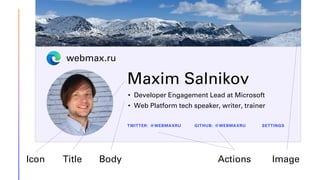
Icon Title Body Actions Image
Why Push Notifications?
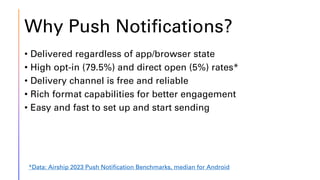
• Delivered regardless of app/browser state
• High opt-in (79.5%) and direct open (5%) rates*
• Delivery channel is free and reliable
• Rich format capabilities for better engagement
• Easy and fast to set up and start sending
*Data: Airship 2023 Push Notification Benchmarks, median for Android
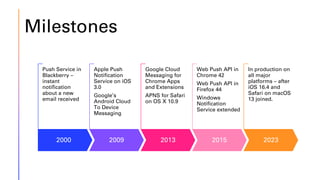
Milestones
2000
Push Service in
Blackberry –
instant
notification
about a new
email received
2009
Apple Push
Notification
Service on iOS
3.0
Google’s
Android Cloud
To Device
Messaging
2013
Google Cloud
Messaging for
Chrome Apps
and Extensions
APNS for Safari
on OS X 10.9
2015
Web Push API in
Chrome 42
Web Push API in
Firefox 44
Windows
Notification
Service extended
2023
In production on
all major
platforms – after
iOS 16.4 and
Safari on macOS
13 joined.
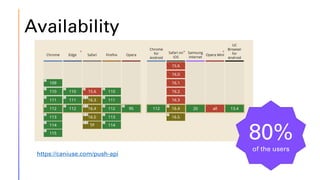
https://caniuse.com/push-api
80%
of the users
Availability
Web Push prerequisites
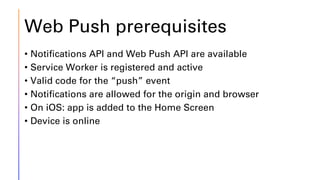
• Notifications API and Web Push API are available
• Service Worker is registered and active
• Valid code for the “push” event
• Notifications are allowed for the origin and browser
• On iOS: app is added to the Home Screen
• Device is online
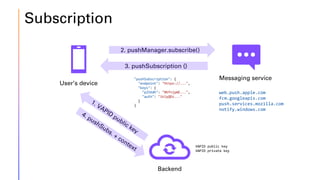
Subscription
User’s device
Backend
2. pushManager.subscribe()
3. pushSubscription {}
"pushSubscription": {
"endpoint": "https://...",
"keys": {
"p256dh": "BKfnjyWE...",
"auth": "iklyQDz..."
}
}
web.push.apple.com
fcm.googleapis.com
push.services.mozilla.com
notify.windows.com
Messaging service
VAPID public key
VAPID private key
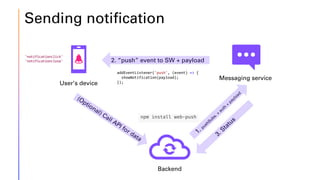
Sending notification
User’s device
Backend
Messaging service
2. “push” event to SW + payload
addEventListener('push', (event) => {
showNotification(payload);
});
npm install web-push
'notificationclick'
'notificationclose'
LET’S SUBSCRIBE
Notification permission request -> Subscribing -> Saving subscription
9/3/20XX
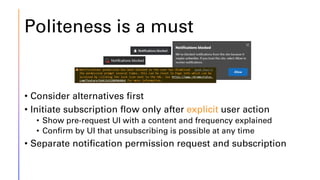
Politeness is a must
• Consider alternatives first
• Initiate subscription flow only after explicit user action
• Show pre-request UI with a content and frequency explained
• Confirm by UI that unsubscribing is possible at any time
• Separate notification permission request and subscription
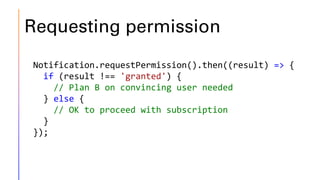
Requesting permission
Notification.requestPermission().then((result) => {
if (result !== 'granted') {
// Plan B on convincing user needed
} else {
// OK to proceed with subscription
}
});
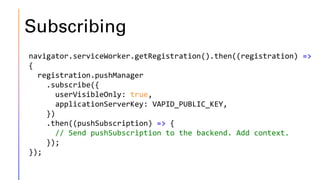
Subscribing
navigator.serviceWorker.getRegistration().then((registration) =>
{
registration.pushManager
.subscribe({
userVisibleOnly: true,
applicationServerKey: VAPID_PUBLIC_KEY,
})
.then((pushSubscription) => {
// Send pushSubscription to the backend. Add context.
});
});
TIME TO PUSH!
Call messaging service -> Process “push” event -> Process actions
9/3/20XX
Notification object
{
"title": "Push.Foo Notification Title",
"actions": [
{
"action": "open_project_repo",
"title": "Show source code"
}
],
"body": "Test notification body",
"image": "https://push.foo/images/social.png",
"icon": "https://push.foo/images/logo.jpg",
"badge": "https://push.foo/images/logo-mask.png",
"requireInteraction": "true",
"tag": "tag"
}
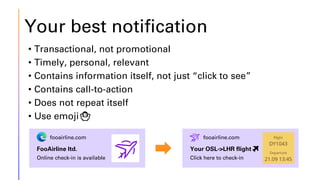
Your best notification
• Transactional, not promotional
• Timely, personal, relevant
• Contains information itself, not just “click to see”
• Contains call-to-action
• Does not repeat itself
• Use emoji🤷
Your OSL->LHR flight✈️
Click here to check-in
fooairline.com
FooAirline ltd.
Online check-in is available
fooairline.com
You can use “push” event to
• Fetch extra data from the backend to use in the notification
• Message a client – for example, to update app UI or icon via
Badging API
• Gather analytics
• Call self.registration.showNotification() – it’s the
only required action
In the service worker
self.addEventListener('push', (event) => {
notification = event.data.json();
const showNotificationPromise = self.registration.showNotification(
notificationData.title,
notificationData
);
const promiseChain = Promise.allSettled([
messageClientPromise,
showNotificationPromise,
]);
event.waitUntil(promiseChain);
});
Use “notificationclick” to
• Open a browser or installed app
• Focus an existing tab with the app
• Use feature detection to check if multiple actions are
available
if ('actions' in window.Notification?.prototype) {}
• Attach analytics code
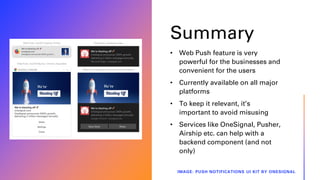
Summary
• Web Push feature is very
powerful for the businesses and
convenient for the users
• Currently available on all major
platforms
• To keep it relevant, it’s
important to avoid misusing
• Services like OneSignal, Pusher,
Airship etc. can help with a
backend component (and not
only)
IMAGE: PUSH NOTIFICATIONS UI KIT BY ONESIGNAL
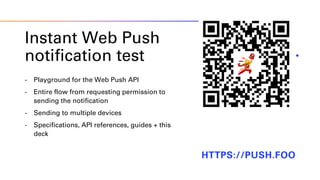
Instant Web Push
notification test
- Playground for the Web Push API
- Entire flow from requesting permission to
sending the notification
- Sending to multiple devices
- Specifications, API references, guides + this
deck
HTTPS://PUSH.FOO
LET’S CONNECT
AND CHAT
Maxim Salnikov
salnikov@gmail.com
@webmaxru

Web Push Notifications done right

  • 1.
  • 2.
    What is webpush and how to start using it the right way
  • 3.
    Maxim Salnikov • DeveloperEngagement Lead at Microsoft • Web Platform tech speaker, writer, trainer TWITTER: @WEBMAXRU GITHUB: @WEBMAXRU SETTINGS webmax.ru Icon Title Body Actions Image
  • 4.
    Why Push Notifications? •Delivered regardless of app/browser state • High opt-in (79.5%) and direct open (5%) rates* • Delivery channel is free and reliable • Rich format capabilities for better engagement • Easy and fast to set up and start sending *Data: Airship 2023 Push Notification Benchmarks, median for Android
  • 5.
    Milestones 2000 Push Service in Blackberry– instant notification about a new email received 2009 Apple Push Notification Service on iOS 3.0 Google’s Android Cloud To Device Messaging 2013 Google Cloud Messaging for Chrome Apps and Extensions APNS for Safari on OS X 10.9 2015 Web Push API in Chrome 42 Web Push API in Firefox 44 Windows Notification Service extended 2023 In production on all major platforms – after iOS 16.4 and Safari on macOS 13 joined.
  • 6.
  • 7.
    Web Push prerequisites •Notifications API and Web Push API are available • Service Worker is registered and active • Valid code for the “push” event • Notifications are allowed for the origin and browser • On iOS: app is added to the Home Screen • Device is online
  • 8.
    Subscription User’s device Backend 2. pushManager.subscribe() 3.pushSubscription {} "pushSubscription": { "endpoint": "https://...", "keys": { "p256dh": "BKfnjyWE...", "auth": "iklyQDz..." } } web.push.apple.com fcm.googleapis.com push.services.mozilla.com notify.windows.com Messaging service VAPID public key VAPID private key
  • 9.
    Sending notification User’s device Backend Messagingservice 2. “push” event to SW + payload addEventListener('push', (event) => { showNotification(payload); }); npm install web-push 'notificationclick' 'notificationclose'
  • 10.
    LET’S SUBSCRIBE Notification permissionrequest -> Subscribing -> Saving subscription 9/3/20XX
  • 11.
    Politeness is amust • Consider alternatives first • Initiate subscription flow only after explicit user action • Show pre-request UI with a content and frequency explained • Confirm by UI that unsubscribing is possible at any time • Separate notification permission request and subscription
  • 12.
    Requesting permission Notification.requestPermission().then((result) =>{ if (result !== 'granted') { // Plan B on convincing user needed } else { // OK to proceed with subscription } });
  • 13.
    Subscribing navigator.serviceWorker.getRegistration().then((registration) => { registration.pushManager .subscribe({ userVisibleOnly: true, applicationServerKey:VAPID_PUBLIC_KEY, }) .then((pushSubscription) => { // Send pushSubscription to the backend. Add context. }); });
  • 14.
    TIME TO PUSH! Callmessaging service -> Process “push” event -> Process actions 9/3/20XX
  • 15.
    Notification object { "title": "Push.FooNotification Title", "actions": [ { "action": "open_project_repo", "title": "Show source code" } ], "body": "Test notification body", "image": "https://push.foo/images/social.png", "icon": "https://push.foo/images/logo.jpg", "badge": "https://push.foo/images/logo-mask.png", "requireInteraction": "true", "tag": "tag" }
  • 16.
    Your best notification •Transactional, not promotional • Timely, personal, relevant • Contains information itself, not just “click to see” • Contains call-to-action • Does not repeat itself • Use emoji🤷 Your OSL->LHR flight✈️ Click here to check-in fooairline.com FooAirline ltd. Online check-in is available fooairline.com
  • 17.
    You can use“push” event to • Fetch extra data from the backend to use in the notification • Message a client – for example, to update app UI or icon via Badging API • Gather analytics • Call self.registration.showNotification() – it’s the only required action
  • 18.
    In the serviceworker self.addEventListener('push', (event) => { notification = event.data.json(); const showNotificationPromise = self.registration.showNotification( notificationData.title, notificationData ); const promiseChain = Promise.allSettled([ messageClientPromise, showNotificationPromise, ]); event.waitUntil(promiseChain); });
  • 19.
    Use “notificationclick” to •Open a browser or installed app • Focus an existing tab with the app • Use feature detection to check if multiple actions are available if ('actions' in window.Notification?.prototype) {} • Attach analytics code
  • 20.
    Summary • Web Pushfeature is very powerful for the businesses and convenient for the users • Currently available on all major platforms • To keep it relevant, it’s important to avoid misusing • Services like OneSignal, Pusher, Airship etc. can help with a backend component (and not only) IMAGE: PUSH NOTIFICATIONS UI KIT BY ONESIGNAL
  • 21.
    Instant Web Push notificationtest - Playground for the Web Push API - Entire flow from requesting permission to sending the notification - Sending to multiple devices - Specifications, API references, guides + this deck HTTPS://PUSH.FOO
  • 22.
    LET’S CONNECT AND CHAT MaximSalnikov salnikov@gmail.com @webmaxru