P.W.A.
with
LitHTML
/razvan-rosu
/razvan-rosu
@rzvn_rosuRăzvan Roșu
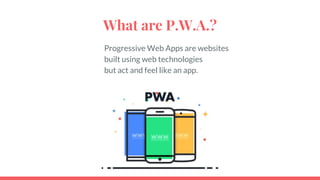
What are P.W.A.?
Progressive Web Apps are websites
built using web technologies
but act and feel like an app.
Why P.W.A.?
“Progressive Web Apps are a new way
to deliver amazing user experience on the web”
- Google
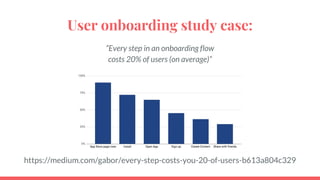
User onboarding study case:
“Every step in an onboarding flow
costs 20% of users (on average)”
https://medium.com/gabor/every-step-costs-you-20-of-users-b613a804c329
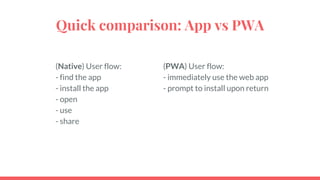
Quick comparison: App vs PWA
(Native) User flow:
- find the app
- install the app
- open
- use
- share
(PWA) User flow:
- immediately use the web app
- prompt to install upon return
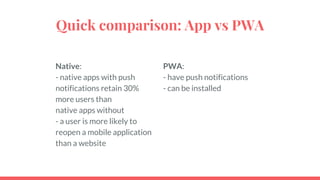
Quick comparison: App vs PWA
Native:
- native apps with push
notifications retain 30%
more users than
native apps without
- a user is more likely to
reopen a mobile application
than a website
PWA:
- have push notifications
- can be installed
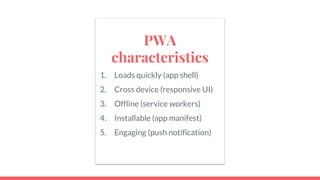
PWA
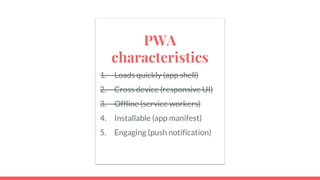
characteristics
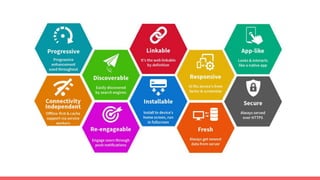
1. Loads quickly (app shell)
2. Cross device (responsive UI)
3. Offline (service workers)
4. Installable (app manifest)
5. Engaging (push notification)
1. Loads quickly (app shell)
The key feature is to progressively load the app.
Initially, we load an empty app shell with a loader.
Afterwards, we lazy load the content.
PWA
characteristics
1. Loads quickly (app shell)
2. Cross device (responsive UI)
3. Offline (service workers)
4. Installable (app manifest)
5. Engaging (push notification)
2. Cross device (responsive UI)
Progressive Web Apps run on any device
within a browser engine.
The user interface can scale accordingly using
Responsive Web Design techniques.
PWA
characteristics
1. Loads quickly (app shell)
2. Cross device (responsive UI)
3. Offline (service workers)
4. Installable (app manifest)
5. Engaging (push notification)
3. Offline (service workers)
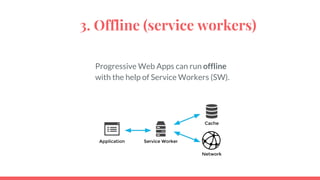
Progressive Web Apps can run offline
with the help of Service Workers (SW).
3. Offline (service workers)
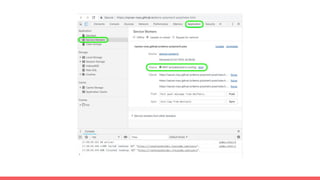
Service Worker (SW):
- it is a script
- it runs in the background, separate from the webpage
- it can synchronize offline content
- it has a lifecycle
Service Workers require a server with HTTPS
3. Offline (service workers)
Service Workers generators:
- sw-precache
https://github.com/GoogleChromeLabs/sw-precache
- workbox
https://developers.google.com/web/tools/workbox/
Or, we can build a sw from scratch:
https://developer.mozilla.org/en-US/docs/Web/API/Service
_Worker_API
PWA
characteristics
1. Loads quickly (app shell)
2. Cross device (responsive UI)
3. Offline (service workers)
4. Installable (app manifest)
5. Engaging (push notification)
4. Installable (app manifest)
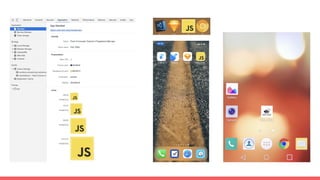
Progressive Web Apps can be installed with
the help of a manifest.
https://developers.google.com/web/fundamentals/web-app-manifest/
4. Installable (app manifest)
<link rel="manifest" href="./manifest.json">
{
"name": "Proof of Concept: Polymer 3 Progressive Web App",
"short_name": "PoC: PWA",
"description": "a demo of a progressive web app",
"icons": [
{
"src": "assets/android-launchericon-144-144.png",
"sizes": "144x144",
"type": "image/png"
},
…
],
"start_url": "/",
"display": "standalone",
"orientation": "portrait",
"background_color": "#FE7A22",
"theme_color": "#FE7A22"
}
name: defines how the application will be listed
short_name: in Chrome for Android, it is the name to accompany the icon
on the home screen
description: general description of the app
icons: array of images serving as a set of icons and splash screens
start_url: starting URL of the application
display: defines the default display mode (fullscreen, standalone,
minimal-ui, browser)
orientation: portrait or landscape
theme_color: on Android, status bar color
background_color: background color of the app; in Chrome, also
background color of the splashscreen
4. Installable (app manifest)
There is an alternative to the manual declarations: PWACompat.
PWACompat is a library that will generate the meta tags.
<link rel="manifest" href="manifest.webmanifest">
<!-- include PWACompat _after_ your manifest →
<script async src="https://cdn.jsdelivr.net/npm/pwacompat@2.0.6/pwacompat.min.js"
integrity="sha384-GOaSLecPIMCJksN83HLuYf9FToOiQ2Df0+0ntv7ey8zjUHESXhthwvq9hXAZTifA"
crossorigin="anonymous"></script>
! Both manifest.json and manifest.webmanifest seem to work just
fine with PWAcompat.
https://github.com/GoogleChromeLabs/pwacompat
https://www.npmjs.com/package/pwacompat
PWA
characteristics
1. Loads quickly (app shell)
2. Cross device (responsive UI)
3. Offline (service workers)
4. Installable (app manifest)
5. Engaging (push notification)
5. Engaging (push notifications)
Push notifications were initially available only in native apps.
A user would still receive web push notifications
even if the PWA is not open in a browser tab,
and even if the browser is closed.
5. Engaging (push notifications)
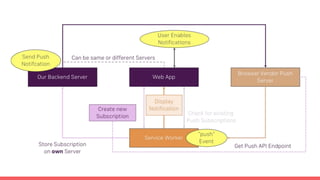
The PWA will ask the user for permissions
to display notifications.
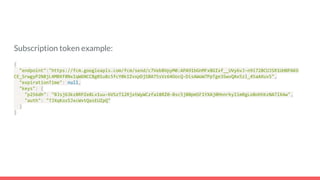
The PWA also needs to be subscribed to a Push server,
in order to receive the notifications.
Each browser vendor has his own Push server.
Subscription token example:
{
"endpoint":"https://fcm.googleapis.com/fcm/send/c7Veb8VpyM0:APA91bGnMFx8GIxf__UVy6vJ-n9i728CUJSR1UHBPAKO
CE_SrwgyP2N8jL4MBXf8NxIqW6NCCBg01u8c5fcY0kIZvxpDjSBA75sVz64OocQ-DisAWoW7PpTge3SwvQAx5zl_45aAXuvS",
"expirationTime": null,
"keys": {
"p256dh": "BJsj63kz8RPZe8Lv1uu-6VSzT12RjxtWyWCzfa18RZ0-8sc5j80pmSF1YXAj0HnnrkyIimRgLo8ohhkzNA7lX4w",
"auth": "TJXqKozSJxcWvtQasEUZpQ"
}
}
PWA
characteristics
1. Loads quickly (app shell)
2. Cross device (responsive UI)
3. Offline (service workers)
4. Installable (app manifest)
5. Engaging (push notification)
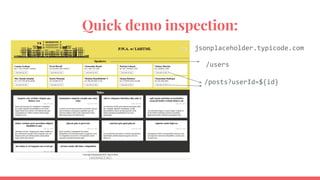
Quick demo inspection:
jsonplaceholder.typicode.com
/users
/posts?userId=${id}
DEMO
PWA Installation MacOS: https://vimeo.com/320142145
PWA notifications MacOS: https://vimeo.com/320142268
PWA offline (SW) MacOS: https://vimeo.com/320141344
PWA iOS: https://vimeo.com/320148762
https://razvan-rosu.github.io/demo-polymer3-pwa/
Important mentions:
In March 2018, Google announced .app TLD for PWAs https://get.app/
In March 2018, iOS started supporting PWAs. (Probably since then) the App Store
allows PWAs
https://medium.com/@firt/progressive-web-apps-on-ios-are-here-d00430dee3a7
In June 2018, Microsoft started allowing PWAs in the Microsoft Store
https://docs.microsoft.com/en-us/microsoft-edge/progressive-web-apps/microsoft-stor
e
In January 2019, Google started allowing PWAs in the Google Play Store
https://medium.com/@firt/google-play-store-now-open-for-progressive-web-apps-ec6f3c6ff3cc
LitHTML
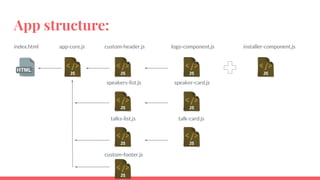
App structure:
index.html app-core.js custom-header.js
speakers-list.js
talks-list.js
custom-footer.js
logo-component.js
speaker-card.js
talk-card.js
installer-component.js
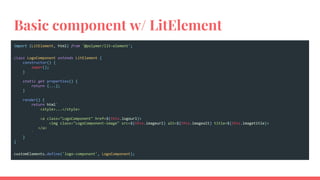
Basic component w/ LitElement
import {LitElement, html} from '@polymer/lit-element';
class LogoComponent extends LitElement {
constructor() {
super();
}
static get properties() {
return {...};
}
render() {
return html`
<style>...</style>
<a class="LogoComponent" href=${this.logourl}>
<img class="LogoComponent-image" src=${this.imageurl} alt=${this.imagealt} title=${this.imagetitle}>
</a>
`
}
}
customElements.define('logo-component', LogoComponent);
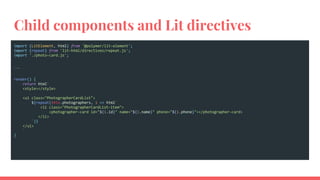
Child components and Lit directives
import {LitElement, html} from '@polymer/lit-element';
import {repeat} from 'lit-html/directives/repeat.js';
import './photo-card.js';
...
render() {
return html`
<style></style>
<ul class="PhotographerCardList">
${repeat(this.photographers, i => html`
<li class="PhotographerCardList-item">
<photographer-card id="${i.id}" name="${i.name}" phone="${i.phone}"></photographer-card>
</li>
`)}
</ul>
`
}
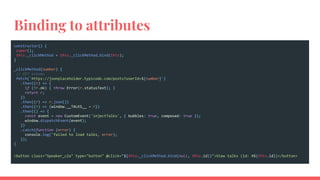
Binding to attributes
constructor() {
super();
this._clickMethod = this._clickMethod.bind(this);
}
_clickMethod(number) {
// GET albums
fetch(`https://jsonplaceholder.typicode.com/posts?userId=${number}`)
.then((r) => {
if (!r.ok) { throw Error(r.statusText); }
return r;
})
.then((r) => r.json())
.then((r) => {window.__TALKS__ = r})
.then(() => {
const event = new CustomEvent('injectTalks', { bubbles: true, composed: true });
window.dispatchEvent(event);
})
.catch(function (error) {
console.log('failed to load talks, error);
});
}
<button class="Speaker_c2a" type="button" @click="${this._clickMethod.bind(null, this.id)}">View talks (id: #${this.id})</button>
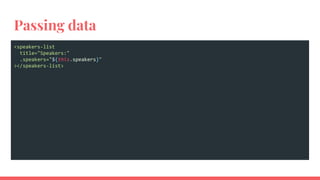
Passing data
<speakers-list
title="Speakers:"
.speakers="${this.speakers}"
></speakers-list>
Thank you!
Questions
?
References
● PWA examples:
https://pwa.rocks
● PWA:
https://developers.google.com/web/progressive-web-apps/
● Workbox:
https://developers.google.com/web/tools/workbox/
● PWAcompat:
https://developers.google.com/web/updates/2018/07/pwacompat
● LitHTML:
https://lit-html.polymer-project.org/
● Demo:
https://razvan-rosu.github.io/demo-polymer3-pwa/

Progressive Web Apps with LitHTML (BucharestJS Meetup)

  • 1.
  • 2.
    What are P.W.A.? ProgressiveWeb Apps are websites built using web technologies but act and feel like an app.
  • 3.
    Why P.W.A.? “Progressive WebApps are a new way to deliver amazing user experience on the web” - Google
  • 5.
    User onboarding studycase: “Every step in an onboarding flow costs 20% of users (on average)” https://medium.com/gabor/every-step-costs-you-20-of-users-b613a804c329
  • 6.
    Quick comparison: Appvs PWA (Native) User flow: - find the app - install the app - open - use - share (PWA) User flow: - immediately use the web app - prompt to install upon return
  • 7.
    Quick comparison: Appvs PWA Native: - native apps with push notifications retain 30% more users than native apps without - a user is more likely to reopen a mobile application than a website PWA: - have push notifications - can be installed
  • 8.
    PWA characteristics 1. Loads quickly(app shell) 2. Cross device (responsive UI) 3. Offline (service workers) 4. Installable (app manifest) 5. Engaging (push notification)
  • 9.
    1. Loads quickly(app shell) The key feature is to progressively load the app. Initially, we load an empty app shell with a loader. Afterwards, we lazy load the content.
  • 10.
    PWA characteristics 1. Loads quickly(app shell) 2. Cross device (responsive UI) 3. Offline (service workers) 4. Installable (app manifest) 5. Engaging (push notification)
  • 11.
    2. Cross device(responsive UI) Progressive Web Apps run on any device within a browser engine. The user interface can scale accordingly using Responsive Web Design techniques.
  • 12.
    PWA characteristics 1. Loads quickly(app shell) 2. Cross device (responsive UI) 3. Offline (service workers) 4. Installable (app manifest) 5. Engaging (push notification)
  • 13.
    3. Offline (serviceworkers) Progressive Web Apps can run offline with the help of Service Workers (SW).
  • 14.
    3. Offline (serviceworkers) Service Worker (SW): - it is a script - it runs in the background, separate from the webpage - it can synchronize offline content - it has a lifecycle Service Workers require a server with HTTPS
  • 16.
    3. Offline (serviceworkers) Service Workers generators: - sw-precache https://github.com/GoogleChromeLabs/sw-precache - workbox https://developers.google.com/web/tools/workbox/ Or, we can build a sw from scratch: https://developer.mozilla.org/en-US/docs/Web/API/Service _Worker_API
  • 17.
    PWA characteristics 1. Loads quickly(app shell) 2. Cross device (responsive UI) 3. Offline (service workers) 4. Installable (app manifest) 5. Engaging (push notification)
  • 18.
    4. Installable (appmanifest) Progressive Web Apps can be installed with the help of a manifest. https://developers.google.com/web/fundamentals/web-app-manifest/
  • 19.
    4. Installable (appmanifest) <link rel="manifest" href="./manifest.json"> { "name": "Proof of Concept: Polymer 3 Progressive Web App", "short_name": "PoC: PWA", "description": "a demo of a progressive web app", "icons": [ { "src": "assets/android-launchericon-144-144.png", "sizes": "144x144", "type": "image/png" }, … ], "start_url": "/", "display": "standalone", "orientation": "portrait", "background_color": "#FE7A22", "theme_color": "#FE7A22" } name: defines how the application will be listed short_name: in Chrome for Android, it is the name to accompany the icon on the home screen description: general description of the app icons: array of images serving as a set of icons and splash screens start_url: starting URL of the application display: defines the default display mode (fullscreen, standalone, minimal-ui, browser) orientation: portrait or landscape theme_color: on Android, status bar color background_color: background color of the app; in Chrome, also background color of the splashscreen
  • 20.
    4. Installable (appmanifest) There is an alternative to the manual declarations: PWACompat. PWACompat is a library that will generate the meta tags. <link rel="manifest" href="manifest.webmanifest"> <!-- include PWACompat _after_ your manifest → <script async src="https://cdn.jsdelivr.net/npm/pwacompat@2.0.6/pwacompat.min.js" integrity="sha384-GOaSLecPIMCJksN83HLuYf9FToOiQ2Df0+0ntv7ey8zjUHESXhthwvq9hXAZTifA" crossorigin="anonymous"></script> ! Both manifest.json and manifest.webmanifest seem to work just fine with PWAcompat. https://github.com/GoogleChromeLabs/pwacompat https://www.npmjs.com/package/pwacompat
  • 22.
    PWA characteristics 1. Loads quickly(app shell) 2. Cross device (responsive UI) 3. Offline (service workers) 4. Installable (app manifest) 5. Engaging (push notification)
  • 23.
    5. Engaging (pushnotifications) Push notifications were initially available only in native apps. A user would still receive web push notifications even if the PWA is not open in a browser tab, and even if the browser is closed.
  • 24.
    5. Engaging (pushnotifications) The PWA will ask the user for permissions to display notifications. The PWA also needs to be subscribed to a Push server, in order to receive the notifications. Each browser vendor has his own Push server.
  • 26.
  • 27.
    PWA characteristics 1. Loads quickly(app shell) 2. Cross device (responsive UI) 3. Offline (service workers) 4. Installable (app manifest) 5. Engaging (push notification)
  • 28.
  • 29.
    DEMO PWA Installation MacOS:https://vimeo.com/320142145 PWA notifications MacOS: https://vimeo.com/320142268 PWA offline (SW) MacOS: https://vimeo.com/320141344 PWA iOS: https://vimeo.com/320148762 https://razvan-rosu.github.io/demo-polymer3-pwa/
  • 30.
    Important mentions: In March2018, Google announced .app TLD for PWAs https://get.app/ In March 2018, iOS started supporting PWAs. (Probably since then) the App Store allows PWAs https://medium.com/@firt/progressive-web-apps-on-ios-are-here-d00430dee3a7 In June 2018, Microsoft started allowing PWAs in the Microsoft Store https://docs.microsoft.com/en-us/microsoft-edge/progressive-web-apps/microsoft-stor e In January 2019, Google started allowing PWAs in the Google Play Store https://medium.com/@firt/google-play-store-now-open-for-progressive-web-apps-ec6f3c6ff3cc
  • 31.
  • 32.
    App structure: index.html app-core.jscustom-header.js speakers-list.js talks-list.js custom-footer.js logo-component.js speaker-card.js talk-card.js installer-component.js
  • 33.
    Basic component w/LitElement import {LitElement, html} from '@polymer/lit-element'; class LogoComponent extends LitElement { constructor() { super(); } static get properties() { return {...}; } render() { return html` <style>...</style> <a class="LogoComponent" href=${this.logourl}> <img class="LogoComponent-image" src=${this.imageurl} alt=${this.imagealt} title=${this.imagetitle}> </a> ` } } customElements.define('logo-component', LogoComponent);
  • 34.
    Child components andLit directives import {LitElement, html} from '@polymer/lit-element'; import {repeat} from 'lit-html/directives/repeat.js'; import './photo-card.js'; ... render() { return html` <style></style> <ul class="PhotographerCardList"> ${repeat(this.photographers, i => html` <li class="PhotographerCardList-item"> <photographer-card id="${i.id}" name="${i.name}" phone="${i.phone}"></photographer-card> </li> `)} </ul> ` }
  • 35.
    Binding to attributes constructor(){ super(); this._clickMethod = this._clickMethod.bind(this); } _clickMethod(number) { // GET albums fetch(`https://jsonplaceholder.typicode.com/posts?userId=${number}`) .then((r) => { if (!r.ok) { throw Error(r.statusText); } return r; }) .then((r) => r.json()) .then((r) => {window.__TALKS__ = r}) .then(() => { const event = new CustomEvent('injectTalks', { bubbles: true, composed: true }); window.dispatchEvent(event); }) .catch(function (error) { console.log('failed to load talks, error); }); } <button class="Speaker_c2a" type="button" @click="${this._clickMethod.bind(null, this.id)}">View talks (id: #${this.id})</button>
  • 36.
  • 37.
  • 38.
    References ● PWA examples: https://pwa.rocks ●PWA: https://developers.google.com/web/progressive-web-apps/ ● Workbox: https://developers.google.com/web/tools/workbox/ ● PWAcompat: https://developers.google.com/web/updates/2018/07/pwacompat ● LitHTML: https://lit-html.polymer-project.org/ ● Demo: https://razvan-rosu.github.io/demo-polymer3-pwa/