Web Building Blocks
HTML, CSS, and Content
Management Systems
Why Learn the Building
Blocks?
“The idea that you could make a website
and not know HTML blows my mind
because it’s like building a building and not
knowing what a brick is…You can be a CSS
wizard or you can know the basics, but you
should at least have some foundational
knowledge of what your building material is.”
- Ryan Singer,
37Signals
Building Blocks
http://bit.ly/aJWAu6
What we’ll make
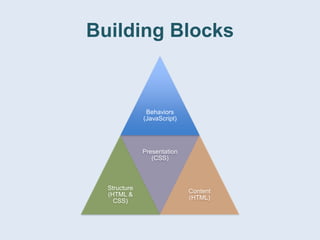
Building Blocks
• Content (text, images, video)
• Structure (layout, order)
• Presentation/style (color, size, margins,
typeface)
• Behaviors (clicking, submitting forms,
dragging)
Building Blocks
Behaviors
(JavaScript)
Structure
(HTML &
CSS)
Presentation
(CSS)
Content
(HTML)
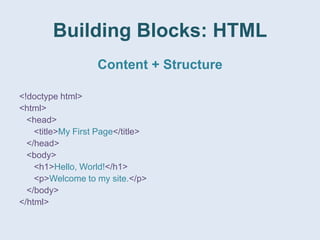
Building Blocks: HTML
Content + Structure
<!doctype html>
<html>
<head>
<title>My First Page</title>
</head>
<body>
<h1>Hello, World!</h1>
<p>Welcome to my site.</p>
</body>
</html>
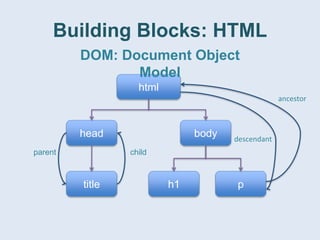
Building Blocks: HTML
html
bodyhead
title h1 p
DOM: Document Object
Model
childparent
ancestor
descendant
Building Blocks: HTML
Elements, Nodes, Tags,
Attributes, IDs, and Classes
<p id=“welcome” class=“notice”>
<span class=“first intro-word”>Welcome</span> to my site.
</p>
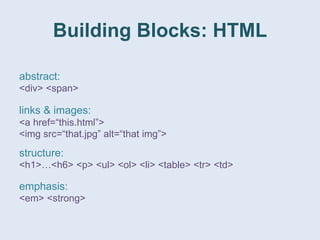
Building Blocks: HTML
links & images:
<a href=“this.html”>
<img src=“that.jpg” alt=“that img”>
abstract:
<div> <span>
structure:
<h1>…<h6> <p> <ul> <ol> <li> <table> <tr> <td>
emphasis:
<em> <strong>
Building Blocks: HTML
Play around!
http://bit.ly/cGI3Jk
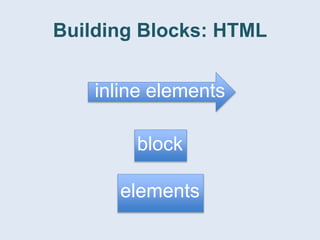
Building Blocks: HTML
inline elements
block
elements
Building Blocks: HTML
Structure of an XHTML
Document
Building Blocks: HTML
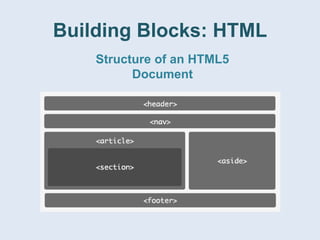
Structure of an HTML5
Document
Building Blocks
http://bit.ly/c0B4VS
Building Blocks: CSS
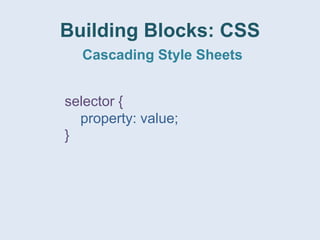
Cascading Style Sheets
selector {
property: value;
}
Building Blocks: CSS
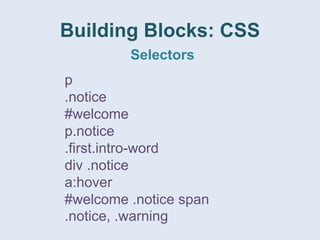
Selectors
p
.notice
#welcome
p.notice
.first.intro-word
div .notice
a:hover
#welcome .notice span
.notice, .warning
Building Blocks: CSS
Selectors: going down?
#welcome
.notice
span
Building Blocks: CSS
Inheritance
span
.notice
p .notice
#top-note
p #top-note
Building Blocks: CSS
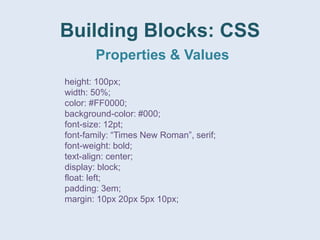
Properties & Values
height: 100px;
width: 50%;
color: #FF0000;
background-color: #000;
font-size: 12pt;
font-family: “Times New Roman”, serif;
font-weight: bold;
text-align: center;
display: block;
float: left;
padding: 3em;
margin: 10px 20px 5px 10px;
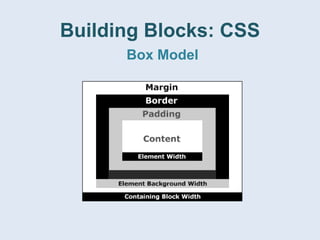
Building Blocks: CSS
Box Model
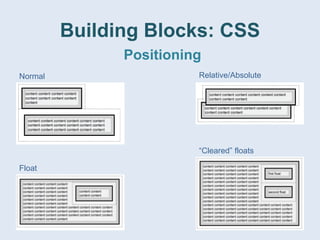
Building Blocks: CSS
Positioning
Normal Relative/Absolute
Float
“Cleared” floats
Building Blocks
http://bit.ly/9S35oq
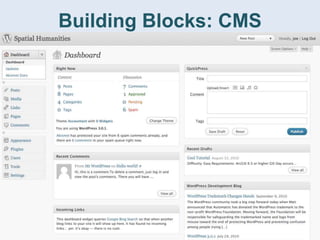
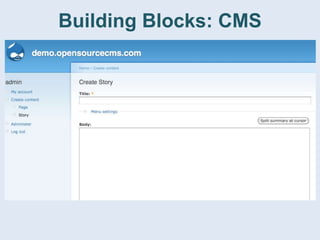
Building Blocks: CMS
“I don’t want to write HTML for every
minor website update.”
“Our site has too many pages to manage
them all by hand.”
“We have a bunch of content creators
who need different levels of access.”
“I’m not a programmer, and my site
needs custom functionality that HTML &
CSS alone can’t provide.”
Building Blocks: CMS
• Create content (static pages, time-stamped
posts, images, video)
• Organize content (order, categories, tags)
• Add consistent presentation/style
(templates)
• Add new functionality (plugins, extensions,
modules)
Building Blocks: CMS
WordPress
Drupal
SilverStripe
Joomla!
ExpressionEngine
opensourcecms.com
Building Blocks: CMS
Building Blocks: Resources
• Tutorials/Reference
– W3Schools: w3schools.com
– HTML Dog: htmldog.com
• Design
– A List Apart: alistapart.com
– Smashing Magazine: smashingmagazine.com
– Boxes and Arrows: boxesandarrows.com
– Pattern Tap: patterntap.com
• Tools
– Firebug (getfirebug.com), Chrome Developer Toolbar, IE
Developer Toolbar
– validator.w3.org
– TextWrangler, Notepad++, CSS Edit

Web Building Blocks

Editor's Notes

  • #2 Pillars of the web; getting content up and managing content
  • #3 signal vs. noise; not entirely true, but greater understandings of our media is always a good thing!
  • #4 simple, clean, something to build on.
  • #5 browsers have defaults (as we shall see), but we usually want to modify those defaults
  • #6 structure vs. layout. brief overview of JS
  • #7 content, things going “inside” other things, hierarchy
  • #8 DOM (structure) vs. syntax (XML, etc.) ‘traversal’
  • #9 elements vs. nodes. opening and closing tags. IDs vs classes
  • #11 add h2, ul, li, button
  • #12 span and <a> vs div and <p>
  • #13 <div id=“header”>a site</div> <div id=“nav”>my nav</div> <div class=“article”>article text</div> <div id=“footer”>copyright</div> in w3schools
  • #14 <header>a site</header> <nav>my nav</nav> <article>article text</article> <footer>copyright</footer> in w3schools
  • #15 default browser style
  • #16 simple syntax! complex stylesheets. browser issues. http://www.w3schools.com/css/tryit.asp?filename=trycss_default
  • #17 elements classes ids element.class class.class descendants pseudo-selectors multiple descendants multiple selectors
  • #18 we can only go right to left (down the tree) though browsers match right-to-left! inheritance! (cascading)
  • #19 span { color: red; } .notice {color: green;} p .notice {color: yellow;} #top-note {color: blue;} p #top-note {color: orange;}
  • #20 measuring units (px, pt, em, %) color hex font stacks inline vs block box model
  • #23 and when you put it all together…
  • #31 themes and add-ons