Web Apps Without the Internet
Offline pages and offline ajax
the joy of web apps
• They work everywhere
• They work on any device
• Centralised deployment
• No « store »
• HTML5 + JavaScript + CSS
• AJAX creates great experiences
• …
the bane of web apps
• Technologies keep on changing
• Each browser works differently
• Iphone, ipad, android, windows phone, windows 8, mac…
• The internet is required
demo
• Online experience
• Offline data
• Offline pages
offline web apps
• Pages come from the offline cache if they are available
• Pages get refreshed if their manifest changes
• HTML5 events exist to detect the process, everything happens in the
background
• A manifest lists :
– Files to download offline
– Files to always go online for
– Exception management
• Each app has a maximum amount of cachable data
– IE is limited to 1000 things
• Chrome : chrome://appcache-internals/
offline web apps - manifest
• The manifest appears in the html page
<HTML Manifest=“/home/manifest”>…
• If the manifest generates a 404, the offline cache is destroyed
• Can be generated using MVC us cshtml if you trim the output and set
the mime type to « text/cache-manifest »
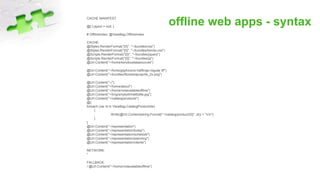
offline web apps - syntaxCACHE MANIFEST
@{ Layout = null; }
# OfflineIndex: @ViewBag.OfflineIndex
CACHE:
@Styles.RenderFormat("{0}", "~/bundles/css")
@Styles.RenderFormat("{0}", "~/bundles/kendo-css")
@Scripts.RenderFormat("{0}", "~/bundles/jquery")
@Scripts.RenderFormat("{0}", "~/bundles/js")
@Url.Content("~/home/kendouidatasources")
@Url.Content("~/fonts/glyphicons-halflings-regular.ttf")
@Url.Content("~/bundles/Bootstrap/sprite_2x.png")
@Url.Content("~/")
@Url.Content("~/home/about")
@Url.Content("~/home/notavailableoffline")
@Url.Content("~/img/emptyWineBottle.jpg")
@Url.Content("~/catalog/products")
@{
foreach (var id in ViewBag.CatalogProductIds)
{
Write(@Url.Content(string.Format("~/catalog/product/{0}", id)) + "rn");
}
}
@Url.Content("~/representation")
@Url.Content("~/representation/today")
@Url.Content("~/representation/schedule")
@Url.Content("~/representation/planning")
@Url.Content("~/representation/clients")
NETWORK:
*
FALLBACK:
/ @Url.Content("~/home/notavailableoffline")
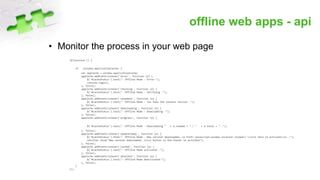
offline web apps - api
• Monitor the process in your web page
$(function () {
if (window.applicationCache) {
var appCache = window.applicationCache;
appCache.addEventListener('error', function (e) {
$('#cacheStatus').text("- Offline Mode - Error-");
console.log(e);
}, false);
appCache.addEventListener('checking', function (e) {
$('#cacheStatus').text("- Offline Mode - Verifying -");
}, false);
appCache.addEventListener('noupdate', function (e) {
$('#cacheStatus').text("- Offline Mode - You have the lastest version -");
}, false);
appCache.addEventListener('downloading', function (e) {
$('#cacheStatus').text("- Offline Mode - Downloading -");
}, false);
appCache.addEventListener('progress', function (e) {
$('#cacheStatus').text("- Offline Mode - Downloading " + e.loaded + " / " + e.total + " -");
}, false);
appCache.addEventListener('updateready', function (e) {
$('#cacheStatus').html("- Offline Mode - New version downloaded, <a href='javascript:window.location.reload()'>click here to activate</a> -");
notifier.show("New version downloaded, click button in the footer to activate");
}, false);
appCache.addEventListener('cached', function (e) {
$('#cacheStatus').text("- Offline Mode activated -");
}, false);
appCache.addEventListener('obsolete', function (e) {
$('#cacheStatus').text("- Offline Mode Deactivated-");
}, false);
}
});
demo
• Go see demo code
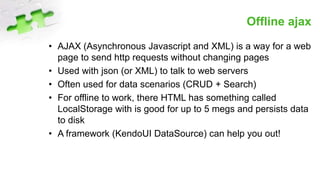
Offline ajax
• AJAX (Asynchronous Javascript and XML) is a way for a web
page to send http requests without changing pages
• Used with json (or XML) to talk to web servers
• Often used for data scenarios (CRUD + Search)
• For offline to work, there HTML has something called
LocalStorage with is good for up to 5 megs and persists data
to disk
• A framework (KendoUI DataSource) can help you out!
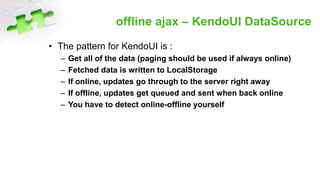
offline ajax – KendoUI DataSource
• The pattern for KendoUI is :
– Get all of the data (paging should be used if always online)
– Fetched data is written to LocalStorage
– If online, updates go through to the server right away
– If offline, updates get queued and sent when back online
– You have to detect online-offline yourself
demo
• Go see demo code
Thank you !
http://www.modelon.net/2014/10/html5-offline-pages-and-offline-data/
erik.renaud@modelon.net
Erik Renaud – Modelon Solutions

Web apps without internet

  • 1.
    Web Apps Withoutthe Internet Offline pages and offline ajax
  • 2.
    the joy ofweb apps • They work everywhere • They work on any device • Centralised deployment • No « store » • HTML5 + JavaScript + CSS • AJAX creates great experiences • …
  • 3.
    the bane ofweb apps • Technologies keep on changing • Each browser works differently • Iphone, ipad, android, windows phone, windows 8, mac… • The internet is required
  • 4.
    demo • Online experience •Offline data • Offline pages
  • 5.
    offline web apps •Pages come from the offline cache if they are available • Pages get refreshed if their manifest changes • HTML5 events exist to detect the process, everything happens in the background • A manifest lists : – Files to download offline – Files to always go online for – Exception management • Each app has a maximum amount of cachable data – IE is limited to 1000 things • Chrome : chrome://appcache-internals/
  • 6.
    offline web apps- manifest • The manifest appears in the html page <HTML Manifest=“/home/manifest”>… • If the manifest generates a 404, the offline cache is destroyed • Can be generated using MVC us cshtml if you trim the output and set the mime type to « text/cache-manifest »
  • 7.
    offline web apps- syntaxCACHE MANIFEST @{ Layout = null; } # OfflineIndex: @ViewBag.OfflineIndex CACHE: @Styles.RenderFormat("{0}", "~/bundles/css") @Styles.RenderFormat("{0}", "~/bundles/kendo-css") @Scripts.RenderFormat("{0}", "~/bundles/jquery") @Scripts.RenderFormat("{0}", "~/bundles/js") @Url.Content("~/home/kendouidatasources") @Url.Content("~/fonts/glyphicons-halflings-regular.ttf") @Url.Content("~/bundles/Bootstrap/sprite_2x.png") @Url.Content("~/") @Url.Content("~/home/about") @Url.Content("~/home/notavailableoffline") @Url.Content("~/img/emptyWineBottle.jpg") @Url.Content("~/catalog/products") @{ foreach (var id in ViewBag.CatalogProductIds) { Write(@Url.Content(string.Format("~/catalog/product/{0}", id)) + "rn"); } } @Url.Content("~/representation") @Url.Content("~/representation/today") @Url.Content("~/representation/schedule") @Url.Content("~/representation/planning") @Url.Content("~/representation/clients") NETWORK: * FALLBACK: / @Url.Content("~/home/notavailableoffline")
  • 8.
    offline web apps- api • Monitor the process in your web page $(function () { if (window.applicationCache) { var appCache = window.applicationCache; appCache.addEventListener('error', function (e) { $('#cacheStatus').text("- Offline Mode - Error-"); console.log(e); }, false); appCache.addEventListener('checking', function (e) { $('#cacheStatus').text("- Offline Mode - Verifying -"); }, false); appCache.addEventListener('noupdate', function (e) { $('#cacheStatus').text("- Offline Mode - You have the lastest version -"); }, false); appCache.addEventListener('downloading', function (e) { $('#cacheStatus').text("- Offline Mode - Downloading -"); }, false); appCache.addEventListener('progress', function (e) { $('#cacheStatus').text("- Offline Mode - Downloading " + e.loaded + " / " + e.total + " -"); }, false); appCache.addEventListener('updateready', function (e) { $('#cacheStatus').html("- Offline Mode - New version downloaded, <a href='javascript:window.location.reload()'>click here to activate</a> -"); notifier.show("New version downloaded, click button in the footer to activate"); }, false); appCache.addEventListener('cached', function (e) { $('#cacheStatus').text("- Offline Mode activated -"); }, false); appCache.addEventListener('obsolete', function (e) { $('#cacheStatus').text("- Offline Mode Deactivated-"); }, false); } });
  • 9.
    demo • Go seedemo code
  • 10.
    Offline ajax • AJAX(Asynchronous Javascript and XML) is a way for a web page to send http requests without changing pages • Used with json (or XML) to talk to web servers • Often used for data scenarios (CRUD + Search) • For offline to work, there HTML has something called LocalStorage with is good for up to 5 megs and persists data to disk • A framework (KendoUI DataSource) can help you out!
  • 11.
    offline ajax –KendoUI DataSource • The pattern for KendoUI is : – Get all of the data (paging should be used if always online) – Fetched data is written to LocalStorage – If online, updates go through to the server right away – If offline, updates get queued and sent when back online – You have to detect online-offline yourself
  • 12.
    demo • Go seedemo code
  • 13.