OFFLINE FIRST
Better UX, faster apps
Software Engineer
PhD in Computer Science
Codemotion speaker
Rollnext Co-founder
Salvatore A. Romeo
» The problem
» Our goals
» Some examples
» UX e DX
» Making an offline first app: dev techniques
» Shared Data VS User Data
» The future
Something in common?
Goal
Make the user never break the experience
Some examples
UX: Why offline?
UX: Why offline?
1. Progressive enhancement
UX: Why offline?
1. Progressive enhancement
2. Fast / No lags
What about DX?
Is it really more complicated?
Making an app: a public news room
» The user can publish news with images
» The user sees the news published by all users
» The user has a private profile
» Syncing Shared data VS Syncing Private data
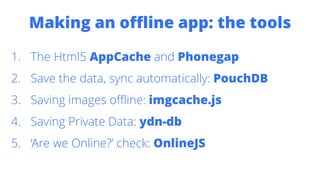
Making an offline app: the tools
1. The Html5 AppCache and Phonegap
2. Save the data, sync automatically: PouchDB
3. Saving images offline: imgcache.js
4. Saving Private Data: ydn-db
5. ‘Are we Online?’ check: OnlineJS
Step 1: the app must work offline
=
Step 1: the app must work offline
=
Step 1: the app must work offline
=
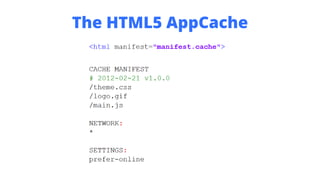
The HTML5 AppCache
The HTML5 AppCache
Waiting for the ServiceWorker… a javascript module:
1. Enable/Disable the offline resources
2. Specify the resources to save offline
3. Clean the manifest
The HTML5 AppCache
1. Enable/Disable the offline resources (iframe)
The HTML5 AppCache
1. Enable/Disable the offline resources (iframe)
The HTML5 AppCache
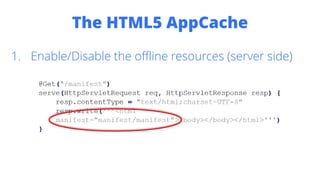
1. Enable/Disable the offline resources (server side)
The HTML5 AppCache
1. Enable/Disable the offline resources (server side)
The HTML5 AppCache
2. Specify the resources to save offline (cookies)
The HTML5 AppCache
2. Specify the resources to save offline (cookies)
The HTML5 AppCache
The HTML5 AppCache
3. Clean the manifest (iframe + cookies)
The HTML5 AppCache
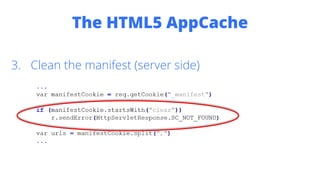
3. Clean the manifest (server side)
The HTML5 AppCache
1.
2. The cookie _manifest is set with those resources
3. An iframe is set and points to the server
4. The server parsers the resources in the cookie and
returns the corresponding manifest file
5. Available as an angular service at
https://github.com/plugback/angular/blob/master/manifest
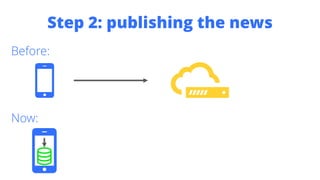
Step 2: publishing the news
Before:
Step 2: publishing the news
Before:
Now:
Step 2: publishing the news
Before:
Now:
Step 2: publishing the news
Before:
Now:
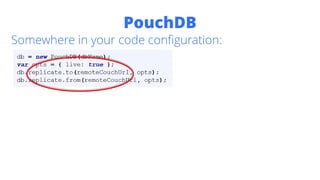
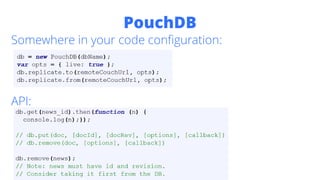
PouchDB
Somewhere in your code configuration:
PouchDB
Somewhere in your code configuration:
PouchDB
Somewhere in your code configuration:
PouchDB
Somewhere in your code configuration:
API:
Step 3: reading the news
Before:
Now:
Step 3: reading the news
Before:
Now:
Step 4: saving the images
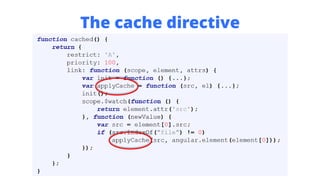
We will use imgcache.js and a directive for img tags
https://github.com/chrisben/imgcache.js
Step 4: saving the images
We will use imgcache.js and a directive for img tags
https://github.com/chrisben/imgcache.js
Step 4: saving the images
We will use imgcache.js and a directive for img tags
https://github.com/chrisben/imgcache.js
Step 4: saving the images
We will use imgcache.js and a directive for img tags
https://github.com/chrisben/imgcache.js
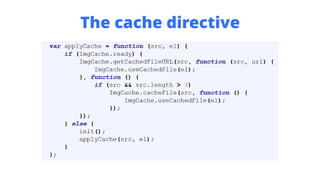
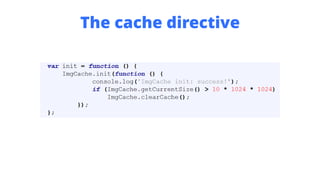
The cache directive
The cache directive
The cache directive
The cache directive
The cache directive
The cache directive
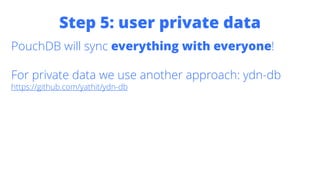
Step 5: user private data
PouchDB will sync everything with everyone!
Step 5: user private data
PouchDB will sync everything with everyone!
Step 5: user private data
PouchDB will sync everything with everyone!
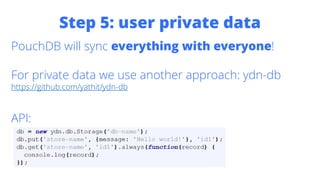
Step 5: user private data
PouchDB will sync everything with everyone!
Step 5: user private data
PouchDB will sync everything with everyone!
For private data we use another approach: ydn-db
https://github.com/yathit/ydn-db
Step 5: user private data
PouchDB will sync everything with everyone!
For private data we use another approach: ydn-db
https://github.com/yathit/ydn-db
API:
Step 5: user private data
Private data should be synchronized when online.
Step 5: user private data
Private data should be synchronized when online.
navigator.onLine is not trustable!
Step 5: user private data
Private data should be synchronized when online.
navigator.onLine is not trustable!
https://github.com/PixelsCommander/OnlineJS will set the variable
window.onLine to true when the user is really
online!
Step 5: user private data
Private data should be synchronized when online.
navigator.onLine is not trustable!
https://github.com/PixelsCommander/OnlineJS will set the variable
window.onLine to true when the user is really
online!
You can use it also for online only tasks (search, real
time data, chat, …)
The Future
Internet everywhere?
References
https://github.com/plugback/angular/blob/master/manifest
http://pouchdb.com/
http://www.iriscouch.com/
https://github.com/chrisben/imgcache.js
https://github.com/yathit/ydn-db
https://github.com/PixelsCommander/OnlineJS
http://www.html5rocks.com/en/features/offline
https://plus.google.com/+IlyaGrigorik/posts/WPZsWr4QGqR
http://www.theodo.fr/blog/2014/11/how-to-build-web-applications-work-offline-
pouchdb/
http://nolanlawson.com/2014/10/03/offline-first-is-people-first
http://www.lukew.com/ff/entry.asp?1902
https://github.com/pazguille/offline-first
github.com/salvatoreromeo
me@salvatoreromeo.com
@romeosalv
linkedin.com/in/salvatoreromeo
THANK YOU

Tech Webinar: Offline First: Creare un'app Phonegap che funzioni offline e si sincronizzi automaticamente