Web accessibility:
it’s everyone’s responsibility
Natalie Collins
Deputy CEO, Media Access Australia
Digital engagement and inclusion
Everyone should have the potential to
interact with the economy and society via
the internet in some way that addresses
their needs
Twitter: @accessiq2
Digital accessibility
• Creating online experiences that are
accessible to people of all abilities and ages
• Social changes in our society will make
digital accessibility a necessity
Twitter: @accessiq3
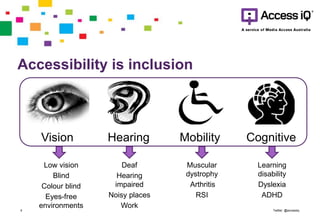
Accessibility is inclusion
Twitter: @accessiq4
Vision Hearing Mobility Cognitive
Low vision
Blind
Colour blind
Eyes-free
environments
Deaf
Hearing
impaired
Noisy places
Work
Muscular
dystrophy
Arthritis
RSI
Learning
disability
Dyslexia
ADHD
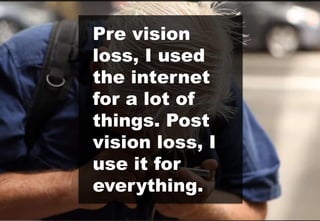
Pre vision
loss, I used
the internet
for a lot of
things. Post
vision loss, I
use it for
everything.
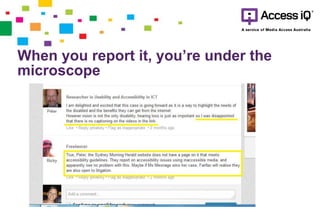
When you report it, you’re under the
microscope
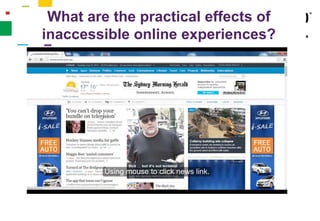
What are the practical effects of
inaccessible online experiences?
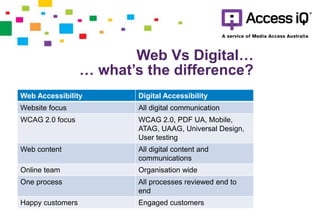
Web Vs Digital…
… what’s the difference?
Web Accessibility Digital Accessibility
Website focus All digital communication
WCAG 2.0 focus WCAG 2.0, PDF UA, Mobile,
ATAG, UAAG, Universal Design,
User testing
Web content All digital content and
communications
Online team Organisation wide
One process All processes reviewed end to
end
Happy customers Engaged customers
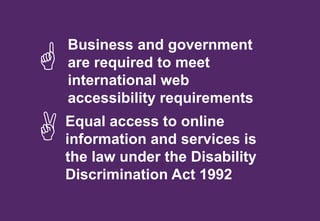
Business and government
are required to meet
international web
accessibility requirements

 Equal access to online
information and services is
the law under the Disability
Discrimination Act 1992
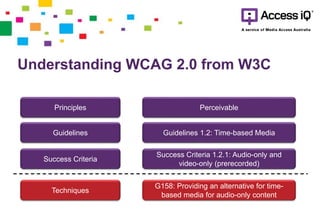
Understanding WCAG 2.0 from W3C
Principles
Guidelines
Success Criteria
Techniques
Perceivable
Guidelines 1.2: Time-based Media
Success Criteria 1.2.1: Audio-only and
video-only (prerecorded)
G158: Providing an alternative for time-
based media for audio-only content
Your customers are growing
older
Australia’s population is ageing—
the number of people aged 65 years or
older are projected to almost double in the
next 15 years.
Your older customers are online
Baby Boomers are big users of the web
In 2012:
• 80%of Younger Boomers (aged 47-56)
• 75% of Older Boomers (aged 57-65)
Your older customers hold
significant purchasing power
• Boomers spend more time online than
watching TV
• Boomers consumer goods and services
online
• Top level buy-in
• Accessibility is a standard business practice
• Accessibility awareness
• Education tailored to a person’s role
Accessibility is your key to
happy customers who
love to engage with content
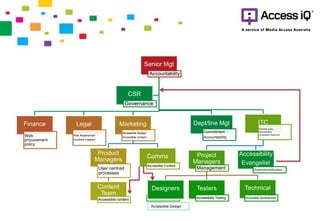
Senior Mgt
Accountability
Finance
Web
procurement
policy
Legal
Risk Assessment
Contract creation
Marketing
Accessible Design
Accessible content
Product
Managers
User centred
processes
Content
Team
Accessible content
Comms
Accessible Content
ITC
Web tech policy
Web prod stds
Accessibility Statement
Project
Managers
Management
TechnicalTesters
Accessibility Testing
Designers
Accessible development
Accessibility
Evangelist
Governance/education
Dept/line Mgt
Commitment
Accountability
CSR
Governance
Accessible Design
So what can you do?
Take responsibility for what you do
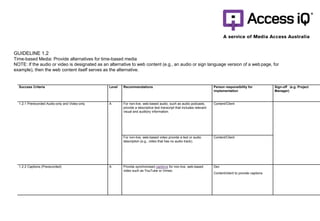
Success Criteria Level Recommendations Person responsibility for
implementation
Sign-off (e.g. Project
Manager)
1.2.1 Prerecorded Audio-only and Video-only A For non-live, web-based audio, such as audio podcasts,
provide a descriptive text transcript that includes relevant
visual and auditory information.
Content/Client
For non-live, web-based video provide a text or audio
description (e.g., video that has no audio track).
Content/Client
1.2.2 Captions (Prerecorded) A Provide synchronised captions for non-live, web-based
video such as YouTube or Vimeo.
Dev
Content/client to provide captions
GUIDELINE 1.2
Time-based Media: Provide alternatives for time-based media
NOTE: If the audio or video is designated as an alternative to web content (e.g., an audio or sign language version of a web page, for
example), then the web content itself serves as the alternative.
Tackle low hanging fruit
Changes that fix issues
across the website
Address easy
changes first
Quick wins
• Test for colour contrast
• Alternative text on images
• Structured headings
• Captions for videos (not just auto captions)
• Labels on form fields
• Web development - best approach is to “bake
it in from the start”
• Accessibility checks at key milestones
• User testing with people with disabilities
across all devices
• Remediation, after go live, can be costly
• Make sure your suppliers are on board
Accessibility = Best Practice
Form a Plan of Action
• Pro-accessibility culture in all product and
service development
• Accessibility Policy and statement
• Disability Action Plan
• Lodge with Australian Human Rights
Commission
• Manage actively
Money, Time, Patience and
maybe a bit more money
• It’s a journey
• Benefits can be monetised in a business case,
however losses will be apparent
Need to talk?
Natalie Collins
natalie.collins@mediaaccess.org.au
0401 009 202
Geoff Knight
Geoff.knight@mediaaccess.org.au
0432 407117
Web accessibility know how
Level 3, 616-620 Harris St
Ultimo NSW 2007
t: +61 2 8218 9320
e: knowhow@accessiq.org
@accessiq
accessiq.org
A service by Media Access Australia

Web accessibility: It's everyone's responsibility

  • 1.
    Web accessibility: it’s everyone’sresponsibility Natalie Collins Deputy CEO, Media Access Australia
  • 2.
    Digital engagement andinclusion Everyone should have the potential to interact with the economy and society via the internet in some way that addresses their needs Twitter: @accessiq2
  • 3.
    Digital accessibility • Creatingonline experiences that are accessible to people of all abilities and ages • Social changes in our society will make digital accessibility a necessity Twitter: @accessiq3
  • 4.
    Accessibility is inclusion Twitter:@accessiq4 Vision Hearing Mobility Cognitive Low vision Blind Colour blind Eyes-free environments Deaf Hearing impaired Noisy places Work Muscular dystrophy Arthritis RSI Learning disability Dyslexia ADHD
  • 5.
    Pre vision loss, Iused the internet for a lot of things. Post vision loss, I use it for everything.
  • 7.
    When you reportit, you’re under the microscope
  • 8.
    What are thepractical effects of inaccessible online experiences?
  • 9.
    Web Vs Digital… …what’s the difference? Web Accessibility Digital Accessibility Website focus All digital communication WCAG 2.0 focus WCAG 2.0, PDF UA, Mobile, ATAG, UAAG, Universal Design, User testing Web content All digital content and communications Online team Organisation wide One process All processes reviewed end to end Happy customers Engaged customers
  • 10.
    Business and government arerequired to meet international web accessibility requirements   Equal access to online information and services is the law under the Disability Discrimination Act 1992
  • 11.
    Understanding WCAG 2.0from W3C Principles Guidelines Success Criteria Techniques Perceivable Guidelines 1.2: Time-based Media Success Criteria 1.2.1: Audio-only and video-only (prerecorded) G158: Providing an alternative for time- based media for audio-only content
  • 13.
    Your customers aregrowing older Australia’s population is ageing— the number of people aged 65 years or older are projected to almost double in the next 15 years.
  • 14.
    Your older customersare online Baby Boomers are big users of the web In 2012: • 80%of Younger Boomers (aged 47-56) • 75% of Older Boomers (aged 57-65)
  • 15.
    Your older customershold significant purchasing power • Boomers spend more time online than watching TV • Boomers consumer goods and services online
  • 16.
    • Top levelbuy-in • Accessibility is a standard business practice • Accessibility awareness • Education tailored to a person’s role Accessibility is your key to happy customers who love to engage with content
  • 17.
    Senior Mgt Accountability Finance Web procurement policy Legal Risk Assessment Contractcreation Marketing Accessible Design Accessible content Product Managers User centred processes Content Team Accessible content Comms Accessible Content ITC Web tech policy Web prod stds Accessibility Statement Project Managers Management TechnicalTesters Accessibility Testing Designers Accessible development Accessibility Evangelist Governance/education Dept/line Mgt Commitment Accountability CSR Governance Accessible Design
  • 18.
    So what canyou do? Take responsibility for what you do
  • 19.
    Success Criteria LevelRecommendations Person responsibility for implementation Sign-off (e.g. Project Manager) 1.2.1 Prerecorded Audio-only and Video-only A For non-live, web-based audio, such as audio podcasts, provide a descriptive text transcript that includes relevant visual and auditory information. Content/Client For non-live, web-based video provide a text or audio description (e.g., video that has no audio track). Content/Client 1.2.2 Captions (Prerecorded) A Provide synchronised captions for non-live, web-based video such as YouTube or Vimeo. Dev Content/client to provide captions GUIDELINE 1.2 Time-based Media: Provide alternatives for time-based media NOTE: If the audio or video is designated as an alternative to web content (e.g., an audio or sign language version of a web page, for example), then the web content itself serves as the alternative.
  • 20.
    Tackle low hangingfruit Changes that fix issues across the website Address easy changes first
  • 21.
    Quick wins • Testfor colour contrast • Alternative text on images • Structured headings • Captions for videos (not just auto captions) • Labels on form fields
  • 22.
    • Web development- best approach is to “bake it in from the start” • Accessibility checks at key milestones • User testing with people with disabilities across all devices • Remediation, after go live, can be costly • Make sure your suppliers are on board Accessibility = Best Practice
  • 23.
    Form a Planof Action • Pro-accessibility culture in all product and service development • Accessibility Policy and statement • Disability Action Plan • Lodge with Australian Human Rights Commission • Manage actively
  • 24.
    Money, Time, Patienceand maybe a bit more money • It’s a journey • Benefits can be monetised in a business case, however losses will be apparent
  • 25.
    Need to talk? NatalieCollins natalie.collins@mediaaccess.org.au 0401 009 202 Geoff Knight Geoff.knight@mediaaccess.org.au 0432 407117
  • 26.
    Web accessibility knowhow Level 3, 616-620 Harris St Ultimo NSW 2007 t: +61 2 8218 9320 e: knowhow@accessiq.org @accessiq accessiq.org A service by Media Access Australia