Web 2.0
Cool Tools for Grades 3-5
Presented by Kellie Eckert
Gregory, E. (2014). Nature-Outside-Laptop-Macbook. CC0 License.
All About Me:
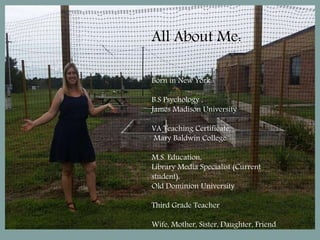
Born in New York.
B.S Psychology ,
James Madison University
VA Teaching Certificate,
Mary Baldwin College
M.S. Education,
Library Media Specialist (Current
student),
Old Dominion University
Third Grade Teacher
Wife, Mother, Sister, Daughter, Friend
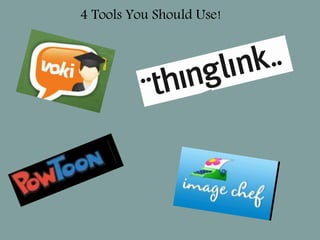
4 Tools You Should Use!
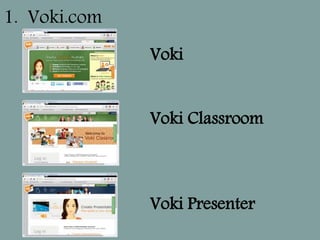
Voki
Voki Classroom
Voki Presenter
1. Voki.com
Classroom Applications
• Digital Storytelling
• Retelling/Summarizing
• Reports
• Presentations
VA SOL 3.12 Use available
technology for reading and
writing.
VA SOL 3.6 F. Summarizing
Fiction
VA SOL 3.11 b) identifying
the contributions of George
Washington; Thomas
Jefferson; Abraham Lincoln;
Rosa Parks; Thurgood
Marshall; Martin Luther
King, Jr.; and Cesar Chavez.
2. Thinglink.com
Classroom Applications
VA SOL 3.12 Use
available technology
for reading and
writing.
VA Science Sol 3.5
The student will
investigate and
understand
relationships among
organisms in aquatic
and terrestrial food
chains.
3. Image Chef
Classroom Applications
VA English SOL 3.12 Use
available technology for
reading and writing.
VA English SOL
3.10 j) Use correct spelling
for frequently used sight
words, including irregular
plurals.
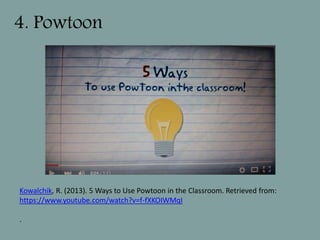
4. Powtoon
Kowalchik, R. (2013). 5 Ways to Use Powtoon in the Classroom. Retrieved from:
https://www.youtube.com/watch?v=f-fXKOIWMqI
.
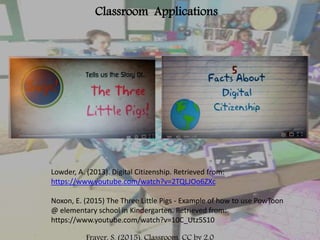
Classroom Applications
Lowder, A. (2013). Digital Citizenship. Retrieved from:
https://www.youtube.com/watch?v=2TQLJOo6ZXc
Noxon, E. (2015) The Three Little Pigs - Example of how to use PowToon
@ elementary school in Kindergarten. Retrieved from:
https://www.youtube.com/watch?v=10C_Utz5S10
Krebs, D. 2011. Technology Use. CC by 2.0

Web 2.0 tools

  • 1.
    Web 2.0 Cool Toolsfor Grades 3-5 Presented by Kellie Eckert Gregory, E. (2014). Nature-Outside-Laptop-Macbook. CC0 License.
  • 2.
    All About Me: Bornin New York. B.S Psychology , James Madison University VA Teaching Certificate, Mary Baldwin College M.S. Education, Library Media Specialist (Current student), Old Dominion University Third Grade Teacher Wife, Mother, Sister, Daughter, Friend
  • 3.
    4 Tools YouShould Use!
  • 4.
  • 5.
    Classroom Applications • DigitalStorytelling • Retelling/Summarizing • Reports • Presentations VA SOL 3.12 Use available technology for reading and writing. VA SOL 3.6 F. Summarizing Fiction VA SOL 3.11 b) identifying the contributions of George Washington; Thomas Jefferson; Abraham Lincoln; Rosa Parks; Thurgood Marshall; Martin Luther King, Jr.; and Cesar Chavez.
  • 6.
  • 7.
    Classroom Applications VA SOL3.12 Use available technology for reading and writing. VA Science Sol 3.5 The student will investigate and understand relationships among organisms in aquatic and terrestrial food chains.
  • 8.
  • 9.
    Classroom Applications VA EnglishSOL 3.12 Use available technology for reading and writing. VA English SOL 3.10 j) Use correct spelling for frequently used sight words, including irregular plurals.
  • 10.
    4. Powtoon Kowalchik, R.(2013). 5 Ways to Use Powtoon in the Classroom. Retrieved from: https://www.youtube.com/watch?v=f-fXKOIWMqI .
  • 11.
    Classroom Applications Lowder, A.(2013). Digital Citizenship. Retrieved from: https://www.youtube.com/watch?v=2TQLJOo6ZXc Noxon, E. (2015) The Three Little Pigs - Example of how to use PowToon @ elementary school in Kindergarten. Retrieved from: https://www.youtube.com/watch?v=10C_Utz5S10
  • 12.
    Krebs, D. 2011.Technology Use. CC by 2.0

Editor's Notes

  • #2 Welcome to Web 2.0 Cool Tools for Grades 3-5.
  • #3 2 mins. A little bit about me, as you can see I was born in NY and I lived there until I left for college at 18. While at school I was minoring in Education, working towards a teaching certificate in PreK-6th grade. Upon graduation however I decided to take some time to travel and visited several countries and traveled back and forth across the states 3 or 4 time. I settled in California for a few years, living in San Francisco and San Diego. Eventually my passion for and desire to be teaching reemerged. I moved back to VA, earned my license and became a third grade teacher. Which is my current position. As an educator, I feel it is important to always be learning. I decided to go into Library Sciences because as I was reviewing the program I felt that this was me. I love helping to instill a love for reading and writing in my students, I also believe that is my job as an educator to teach information literacy. I think hands-on exploratory learning with technology as an aid is the way education should be today. In addition to my education and professional career, I am a wife to my wonderful husband David. We have 2 daughters, (4 and 2.5) Chloe and Olivia. Family is extremely important to me, and I am close with my 3 sisters and our awesome mother. Enough about me…lets get to the good stuff.
  • #4 1-2 Minutes As I reviewed the many 2.0 tools available these 4 really stick out to me. 1. Voki is an educational tool that allows users to create their very own talking character. 2. With Thinglink you can turn any image into an interactive graphic. 3. Image Chef is a tool that allows you to take words and transforms them into a graphical image. 4. With Powtoon you can create animated presentation, cartoons.
  • #5 5 min. The first tool I will talk about is Voki. Voki has these 3 products. With Voki the user can create fun and unique Voki characters that speak in many languages. You can customize their appearance and what they say, and share with others! You can email your voki or embed thm into your wikis, blogs or websites. This free web 2.0 tool is a great way to motivate learners of any age. Click on link…show webpage and spend 3-4 minutes showing how to start creating. Voki classroom was designed for teachers as a tool help manage your students’ Voki assignments. It is meant to be a companion to Voki. There is a cost of 30/year or 50 for 2 years. Voki presenter allows your voki to give longer presentations. Presenter has the same cost as classroom, or you can bundle and save a little money.
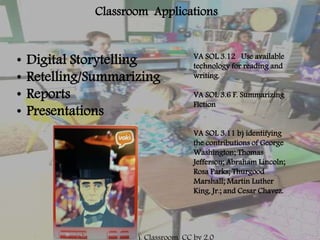
  • #6 5 min. Why should we use Voki? This tool can Motative Students To Participate Introduce Avatar Technology in an Educational Way Effective language tool with over 25 languages improve students' speaking and listening skills in an engaging and innovative way. How can we use Voki in the classroom? Because the Voki are customizable you can use them in so many ways in the classroom and the can lend almost any SOL in science and SS. As I was researching I saw a teacher had her students develop characters for digital storytelling projects. They created a Voki character as the main character in a digital story. Pretty neat. Just to give you an idea of what a finished Voki with voice looks like, here a sample Voki giving a short presentation. (show Lincoln Voki) One could also add a recommendation page to a website, and students can create voki’s giving summaries and/or recommendations as well. It really can be used in so many ways.  
  • #7 5 min. Thinglink is really awesome! One of my favorite tools. Thinglink is free although registration is required. There is an option to upgrade and have more features for 35/year. Once registered you can drag and drop or upload a picture and tag the picture with links to different websites. As someone is looking at your photo they can move the cursor over different parts to see the tag and then click to get to a website. This is so cool! I created one here (click on link) that reminds me of a digital travel book (well the start of one anyway).  This technology fits into the world of augmented reality and is truly an amazing advancement in technology. Thinglink could enhance learning in the classroom or library. Students could upload a creative commons image of a famous person they are studying and create tags to video clips, speeches, or presentation they have made.
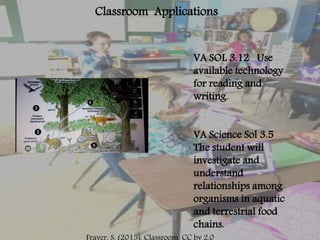
  • #8 5 min.  There are many ways to use thinglink in the classroom or library. Create images that correlate to SOL’s such as this one here and post on website. (Click on link and spend 2 mins. Exploring the thinglink.) Students can get invovled in the process too. A great idea would be to copy book jackets and have students record reviews and share with one another.
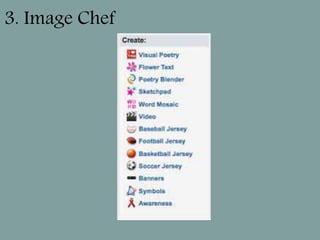
  • #9 6 min. Image Chef is a free tool where the user can create custom graphics that add context and interest to instruction.  A great way to grab the reader’s attention and/or make a statement. It can easily be added to web site, blogs and/or a variety of projects—presentations, reports, newsletters, homework, etc. I will give a quick overview of the tool and show a few things that can be used in the classroom. (Click on link – give 4 min. intro to image chef – show poetry blender and word mosaic)
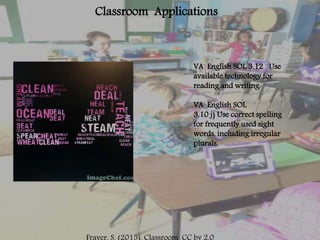
  • #10 1. Min. Imagechef could be used to meet SOL 3.12 and 3.10j. I created this word mosaic on the word study feature ea. Students could do this as in class to practice spelling their words or at home as a homework assignment. This is was quick and easy to do, and just one of many uses of Image Chef.
  • #11 5 min. Powtoon allows users to create animated presentations by manipulating pre-created objects, imported images, provided music and user created voice-overs. It is easy to use and the result is a cool cartoon graphic presentation. Teachers could use PowToon to create engaging and fun lessons for students to watch at home or school. (Click Link and watch 1.50 min video about how to use powtoon in the classroom). The video has shown how to use powtoon to improve instructional delivery, which is awesome, but powtoon can also be used by students to create their own presentations. Students can also sign up as a student and post powtoons on their teachers site.
  • #12 6 min. Students could easily write stories and create powtoons to tell that story. They could also use powtoon to summarize something they are reading. Here is one of the 3 little pigs. (Watch Powtoon) It could also be tied into science or social studies. Students could create a powtoon of a famous American or demonstrate the life cycle of a frog. I came across this one here that a Librarian could use to teach digital citizenship. (Watch Powtoon) There are so many ways to use this tool in the classroom and library.