FOR OFFICIAL USE ONLY. DO NOT DISTRIBUTE.
AN INTRODUCTION TO ROBOTIC WEAPONS SYSTEMS
Weapons Grade
React
DISCLAIMER: I HAVE LITTLE TO
NO KNOWLEDGE ABOUT ROBOTIC
WEAPONS SYSTEMS
HOWEVER, I BUILT A TOTALLY
SWEET ROBOT CROSSBOW
INTRODUCING
THE CROSSBRO
0:00 / 1:39
SPECS
Arduino Based
50lb draw weight
Shoots 150FPS
Powered by a single 9v battery
Remote Controlled via Bluetooth
Controller App written in React Native
Frickin laser beams
WHY?
I LOVE CROSSBOWS
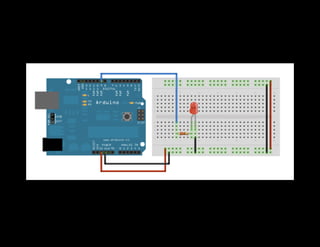
I LOVE ARDUINOS
Whats an Arduino?
Open source electronics board
ATMega microcontroller
C/C++ based language & API
IDE and bootloader
How to
build one
Bow Selection
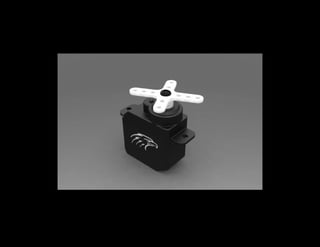
Pan/Tilt with Servos
Pulling The Trigger
Powering it up
Arduino runs on 5v
Communication
HM-10
Receives data wirelessly
Sends to Arduino via Serial I/O
TX/RX
What does any of this
have to do with React?
Software
Things it needs to do
Move the crossbow
Shoot the crossbow
All of this via Bluetooth
React Hardware
render() {
const { pan, tilt, joystick, laserPin, actuator, speed} = this.props;
const { panValue, tiltValue, laserValue, actuator } = this.state;
return [
<Servo {...pan} value={panValue} />,
<Servo {...tilt} value={tiltValue} />,
<Laser pin={laserPin} mode="OUTPUT" value={laserValue} />,
<pin mode="OUTPUT" pin={actuator.pins[0]} value={actuator[0]} />,
<pin mode="OUTPUT" pin={actuator.pins[1]} value={actuator[1]} />,
];
}
Basic Arduino
void setup() {
// Setup stuff goes here
}
void loop() {
// Control stuff goes here
}
void setup() {
pinMode(1, OUTPUT); // Activate pin
}
void loop() {
digitalWrite(LED_BUILTIN, HIGH); // On
delay(1000);
digitalWrite(LED_BUILTIN, LOW); // Off
delay(1000);
}
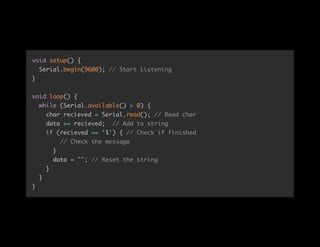
Serial Communication
void setup() {
Serial.begin(9600); // Start Listening
}
void loop() {
while (Serial.available() > 0) {
char recieved = Serial.read(); // Read char
data += recieved; // Add to string
if (recieved == '$') { // Check if finished
// Check the message
}
data = ""; // Reset the string
}
}
}
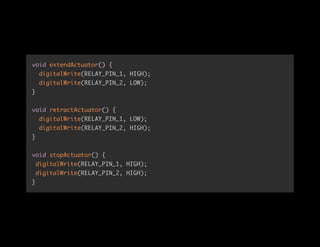
Firing The Bow
if (data == "FIRE$") {
extendActuator(); // Turn motor on
delay(1500);
retractActuator(); // Reverse Polarity
delay(1500);
stopActuator(); // Turn motor off
}
void extendActuator() {
digitalWrite(RELAY_PIN_1, HIGH);
digitalWrite(RELAY_PIN_2, LOW);
}
void retractActuator() {
digitalWrite(RELAY_PIN_1, LOW);
digitalWrite(RELAY_PIN_2, HIGH);
}
void stopActuator() {
digitalWrite(RELAY_PIN_1, HIGH);
digitalWrite(RELAY_PIN_2, HIGH);
}
Moving the bow
Servo panServo, tiltServo; // Create servo objects
void setup() {
panServo.attach(PAN_PIN, PAN_MIN, PAN_MAX);
tiltServo.attach(TILT_PIN, TILT_MIN, TILT_MAX);
}
void loop() {
...
} else {
if (data.indexOf('|') != -1) { // If Pipe
int pipeIndex = data.indexOf('|'); // Find indexes
int dollarIndex = data.indexOf('$');
String xVal = data.substring(0, pipeIndex); // Get substrings
String yVal = data.substring(pipeIndex + 1, dollarIndex);
phoneX = xVal.toInt(); // Convert to int
phoneY = yVal.toInt();
}
}
}
void loop() {
...
// Map values to servo positions
panValue = phoneX + map(phoneX, 0, 1023, -speed, speed);
tiltValue = phoneY + map(phoneY, 0, 1023, -speed, speed);
panServo.writeMicroseconds(panValue); // Write servo positions
tiltServo.writeMicroseconds(tiltValue);
delay(15); // Waits for servos
}
React Native
User Interface
Connect
Joystick
Fire Button
react-native-bluetooth-
serial
export default class CrossBro extends Component {
constructor(props) {
super(props);
this.state = {
connected: false,
isEnabled: false,
devices: []
};
}
}
componentWillMount() { // Get enabled, device list
Promise.all([ BluetoothSerial.isEnabled(),BluetoothSerial.list() ])
.then((values) => {
const [ isEnabled, devices ] = values; // Destructure values
this.setState({ isEnabled, devices }); // Set state
BluetoothSerial.isConnected() // Check if connected
.then(connected => {
if (!connected) { If not connected, connect
BluetoothSerial.connect(this.state.devices[0].id).then((res) => {
this.setState({connected: true});
}).catch((err) => console.log(err));
}
})
});
}
handleJoyStick = ({x,y}) => { // Handle joystick move
BluetoothSerial.write(x.toFixed() + '|' + y.toFixed() + '$');
}
handleButton = () => { // Handle Fire Button
BluetoothSerial.write('FIRE$');
}
Joystick
<Joystick
handleSize={88}
size={300}
onMove={this.handleJoyStick}
onRelease={this.handleRelease}
xRange={[0, 1023]}
yRange={[0, 1023]}
/>
render() {
return (
<View style={this.getContainerStyles()}>
<View style={this.getXStyles()} />
<View style={this.getYStyles()} />
<View
style={this.getHandleStyles()}
{...this._panResponder.panHandlers}
/>
</View>
);
}
componentDidMount() {
this.interval = setInterval(this.outputLoop, 200);
}
componentWillUnmount() {
if (this.interval) {
clearInterval(this.interval);
}
}
outputLoop = () => {
if (this.state.pressed === true) {
const coords = this.outputTranslatedValues();
this.props.onMove(coords);
}
};
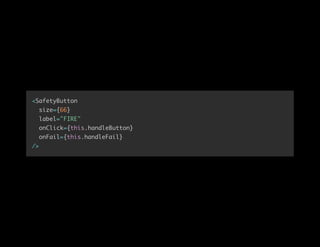
Fire Button
<SafetyButton
size={66}
label="FIRE"
onClick={this.handleButton}
onFail={this.handleFail}
/>
render() {
return (
<View style={this.getContainerStyles()}>
<View style={this.getLeftStyles()} />
<View style={this.getRightStyles()} />
<View style={this.getHandleStyles()} {...this._panResponder.panHandlers
<Text style={this.getTextStyles()}>{this.props.label}</Text>
</View>
</View>
);
}
onPanResponderRelease: (evt, gestureState) => {
if (this.state.hitLeft && this.state.hitRight) {
this.props.onClick();
} else {
this.props.onFail();
}
this.setState({
position: 0,
pressed: false,
hitRight: false,
hitLeft: false
});
},
Again, why?
DEMO

Weapons grade React by Ken Wheeler