Introducing Features
of WatchOS 2
Joe
2015/7/17
Outline
• Architecture of WatchOS 2
• A bunch of new interface elements.
• Complications. (ClockKit)
• Taptic Engine.
• Accessibility
• Open System URL
• Hints of building Watch app
Architecture of
WatchOS 2
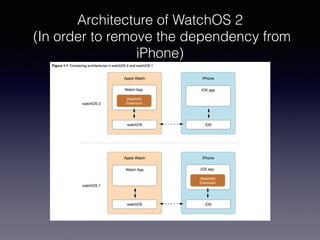
Architecture of WatchOS 2
(In order to remove the dependency from
iPhone)
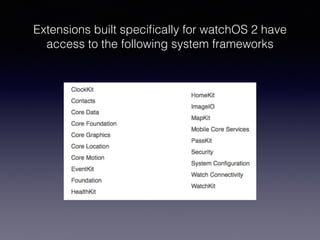
Extensions built specifically for watchOS 2 have
access to the following system frameworks
WatchOS 2 provides ways for communicating with
iOS app or network
• Communicate with network:NSURLSession
• Communicate with iOS app:Watch Connectivity
Watch App communicates with iOS App
and vice versa
(Watch Connectivity)
• Precondition:WCSession.isSupported()
• Communication categories
• Background transfers
• Interactive messaging
Background transfers
• Best when information isn’t needed immediately
• Operating system determines the most suitable
time to send the data
• Content is queued up for transfer
Three ways of communicating
for background transfers
• Application Context:Information waiting in a
transfer queue will get overridden by the latest
data.
• User Info Transfer:Information waiting in a
transfer queue will deliver one by one in FIFO
order.(Like openParentApplication)
• File Transfer:Transfer files
Interactive messaging
• Precondition:iOS and watch App must be in
reachable state.(They must be connected via
Bluetooth) and watch app must be running in
the foreground.
Demo
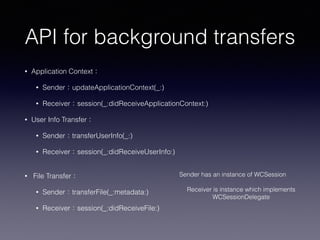
API for background transfers
• Application Context:
• Sender:updateApplicationContext(_:)
• Receiver:session(_:didReceiveApplicationContext:)
• User Info Transfer:
• Sender:transferUserInfo(_:)
• Receiver:session(_:didReceiveUserInfo:)

• File Transfer:
• Sender:transferFile(_:metadata:)
• Receiver:session(_:didReceiveFile:)
Sender has an instance of WCSession

Receiver is instance which implements 

WCSessionDelegate
API for interactive
messaging
• Sender
• sendMessage(_:replyHandler: errorHandler:)
• sendMessageData(_:replyHandler: errorHandler:)
• Receiver
• session(_:didReceiveMessage:replyHandler:)
• session(_:didReceiveMessageData:replyHandler:)
A bunch of new
interface elements
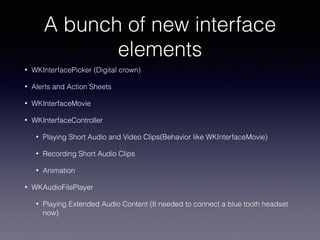
A bunch of new interface
elements
• WKInterfacePicker (Digital crown)
• Alerts and Action Sheets
• WKInterfaceMovie
• WKInterfaceController
• Playing Short Audio and Video Clips(Behavior like WKInterfaceMovie)
• Recording Short Audio Clips
• Animation
• WKAudioFilePlayer
• Playing Extended Audio Content (It needed to connect a blue tooth headset
now)
Demo
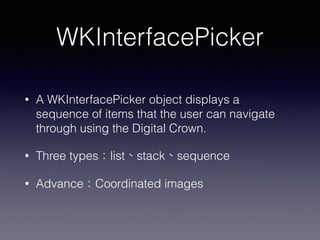
WKInterfacePicker
• A WKInterfacePicker object displays a
sequence of items that the user can navigate
through using the Digital Crown.
• Three types:list、stack、sequence
• Advance:Coordinated images
Alerts and Action Sheets
• Alerts and action sheets offer a standard interface for
displaying messages to the user.When tapped, the buttons
call blocks of code that you provide.
• WKInterfaceController:
presentAlertControllerWithTitle:message:preferredStyle:acti
ons:
• WKAlertControllerStyle:Alert, ActionSheet,
SideBySideButtonAlert
• WKAlertAction:Default, Cancel, Destructive

WKInterfaceMovie
• A WKInterfaceMovie object lets you embed short
audio or video clips directly into your interface.
• setMovieURL(URL: NSURL)
• setVideoGravity(videoGravity: WKVideoGravity)
• setLoops(loops: Bool)
• setPosterImage(posterImage: WKImage?)
Playing Short Audio and
Video Clips
• presentMediaPlayerControllerWithURL(URL:
NSURL, options: [NSObject : AnyObject]?,
completion: (Bool, NSTimeInterval, NSError?) ->
Void)
• dismissMediaPlayerController
Recording Short Audio Clips
• presentAudioRecordingControllerWithOutputUR
L(URL: NSURL, preset:
WKAudioRecordingPreset, maximumDuration:
NSTimeInterval, actionTitle: String?, completion:
(Bool, NSError?) -> Void)
• dismissAudioRecordingController
Animation
• WKInterfaceController
• animateWithDuration:
Playing Extended Audio Content
(WKAudioFilePlayer)
• Precondition: It needed to connect a Bluetooth
Headset with watch.
• WKAudioFilePlayer play WKAudioFilePlayerItem
which contains WKAudioFileAsset(URL, title,
albumTitle, artist, duration)
Complications.
(ClockKit)
Four ways to show
information from your app
• Watch app
• Glance
• Notification
• Complication
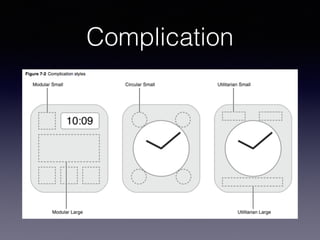
Complication
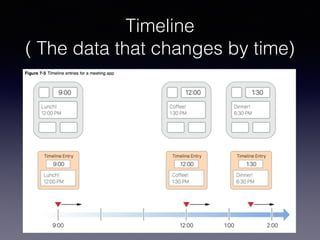
Timeline
( The data that changes by time)
CLKComplicationDataSource
• getSupportedTimeTravelDirectionsForComplication
• getTimelineStartDateForComplication
• getTimelineEndDateForComplication
• getPrivacyBehaviorForComplication
• getCurrentTimelineEntryForComplication
• getTimelineEntriesForComplication
• getNextRequestedUpdateDateWithHandler
• getPlaceholderTemplateForComplication
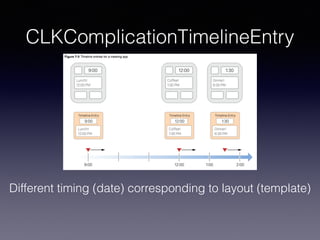
CLKComplicationTimelineEntry
Different timing (date) corresponding to layout (template)
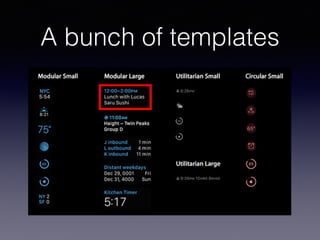
A bunch of templates
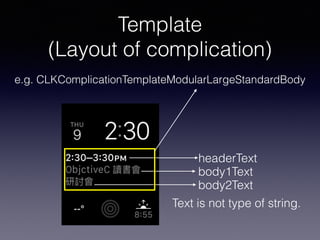
Template
(Layout of complication)
e.g. CLKComplicationTemplateModularLargeStandardBody
headerText
body2Text
body1Text
Text is not type of string.
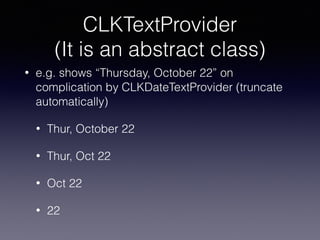
CLKTextProvider
(It is an abstract class)
• e.g. shows “Thursday, October 22” on
complication by CLKDateTextProvider (truncate
automatically)
• Thur, October 22
• Thur, Oct 22
• Oct 22
• 22
Demo
Taptic Engine
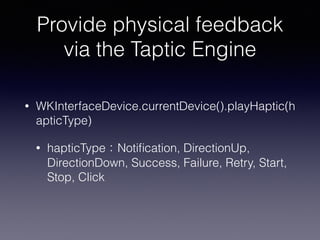
Provide physical feedback
via the Taptic Engine
• WKInterfaceDevice.currentDevice().playHaptic(h
apticType)
• hapticType:Notification, DirectionUp,
DirectionDown, Success, Failure, Retry, Start,
Stop, Click
Accessibility
Apple Watch Accessibility
• setAccessibilityLabel(accessibilityLabel: String?)
• setAccessibilityHint(accessibilityHint: String?)
• setAccessibilityValue(accessibilityValue: String?)
• setIsAccessibilityElement(isAccessibilityElement: Bool)
• setAccessibilityTraits(accessibilityTraits:
UIAccessibilityTraits)
• setAccessibilityImageRegions(accessibilityImageRegions
: [WKAccessibilityImageRegion])
Open System URL
Open System URL
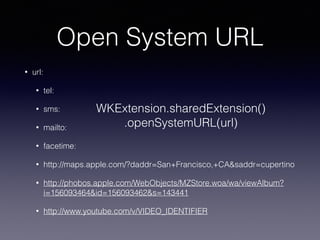
• url:
• tel:
• sms:
• mailto:
• facetime:
• http://maps.apple.com/?daddr=San+Francisco,+CA&saddr=cupertino
• http://phobos.apple.com/WebObjects/MZStore.woa/wa/viewAlbum?
i=156093464&id=156093462&s=143441
• http://www.youtube.com/v/VIDEO_IDENTIFIER
WKExtension.sharedExtension()
.openSystemURL(url)
Hints of building
Watch app
Hints of building Watch app
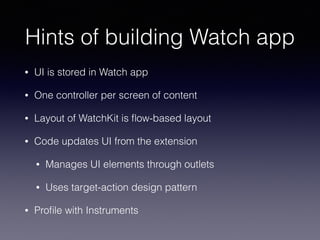
• UI is stored in Watch app
• One controller per screen of content
• Layout of WatchKit is flow-based layout
• Code updates UI from the extension
• Manages UI elements through outlets
• Uses target-action design pattern
• Profile with Instruments
Reference
• https://developer.apple.com/watch/human-
interface-guidelines/
• http://www.kristinathai.com/watchos-2-how-to-
communicate-between-devices-using-watch-
connectivity/
• watchOS 2 Transition Guide
• https://github.com/joehsieh/watchOS-2-Sampler
Q & A

WatchOS2

  • 1.
  • 2.
    Outline • Architecture ofWatchOS 2 • A bunch of new interface elements. • Complications. (ClockKit) • Taptic Engine. • Accessibility • Open System URL • Hints of building Watch app
  • 3.
  • 4.
    Architecture of WatchOS2 (In order to remove the dependency from iPhone)
  • 5.
    Extensions built specificallyfor watchOS 2 have access to the following system frameworks
  • 6.
    WatchOS 2 providesways for communicating with iOS app or network • Communicate with network:NSURLSession • Communicate with iOS app:Watch Connectivity
  • 7.
    Watch App communicateswith iOS App and vice versa (Watch Connectivity) • Precondition:WCSession.isSupported() • Communication categories • Background transfers • Interactive messaging
  • 8.
    Background transfers • Bestwhen information isn’t needed immediately • Operating system determines the most suitable time to send the data • Content is queued up for transfer
  • 9.
    Three ways ofcommunicating for background transfers • Application Context:Information waiting in a transfer queue will get overridden by the latest data. • User Info Transfer:Information waiting in a transfer queue will deliver one by one in FIFO order.(Like openParentApplication) • File Transfer:Transfer files
  • 10.
    Interactive messaging • Precondition:iOSand watch App must be in reachable state.(They must be connected via Bluetooth) and watch app must be running in the foreground.
  • 11.
  • 12.
    API for backgroundtransfers • Application Context: • Sender:updateApplicationContext(_:) • Receiver:session(_:didReceiveApplicationContext:) • User Info Transfer: • Sender:transferUserInfo(_:) • Receiver:session(_:didReceiveUserInfo:)
 • File Transfer: • Sender:transferFile(_:metadata:) • Receiver:session(_:didReceiveFile:) Sender has an instance of WCSession
 Receiver is instance which implements 
 WCSessionDelegate
  • 13.
    API for interactive messaging •Sender • sendMessage(_:replyHandler: errorHandler:) • sendMessageData(_:replyHandler: errorHandler:) • Receiver • session(_:didReceiveMessage:replyHandler:) • session(_:didReceiveMessageData:replyHandler:)
  • 14.
    A bunch ofnew interface elements
  • 15.
    A bunch ofnew interface elements • WKInterfacePicker (Digital crown) • Alerts and Action Sheets • WKInterfaceMovie • WKInterfaceController • Playing Short Audio and Video Clips(Behavior like WKInterfaceMovie) • Recording Short Audio Clips • Animation • WKAudioFilePlayer • Playing Extended Audio Content (It needed to connect a blue tooth headset now)
  • 16.
  • 17.
    WKInterfacePicker • A WKInterfacePickerobject displays a sequence of items that the user can navigate through using the Digital Crown. • Three types:list、stack、sequence • Advance:Coordinated images
  • 18.
    Alerts and ActionSheets • Alerts and action sheets offer a standard interface for displaying messages to the user.When tapped, the buttons call blocks of code that you provide. • WKInterfaceController: presentAlertControllerWithTitle:message:preferredStyle:acti ons: • WKAlertControllerStyle:Alert, ActionSheet, SideBySideButtonAlert • WKAlertAction:Default, Cancel, Destructive

  • 19.
    WKInterfaceMovie • A WKInterfaceMovieobject lets you embed short audio or video clips directly into your interface. • setMovieURL(URL: NSURL) • setVideoGravity(videoGravity: WKVideoGravity) • setLoops(loops: Bool) • setPosterImage(posterImage: WKImage?)
  • 20.
    Playing Short Audioand Video Clips • presentMediaPlayerControllerWithURL(URL: NSURL, options: [NSObject : AnyObject]?, completion: (Bool, NSTimeInterval, NSError?) -> Void) • dismissMediaPlayerController
  • 21.
    Recording Short AudioClips • presentAudioRecordingControllerWithOutputUR L(URL: NSURL, preset: WKAudioRecordingPreset, maximumDuration: NSTimeInterval, actionTitle: String?, completion: (Bool, NSError?) -> Void) • dismissAudioRecordingController
  • 22.
  • 23.
    Playing Extended AudioContent (WKAudioFilePlayer) • Precondition: It needed to connect a Bluetooth Headset with watch. • WKAudioFilePlayer play WKAudioFilePlayerItem which contains WKAudioFileAsset(URL, title, albumTitle, artist, duration)
  • 24.
  • 25.
    Four ways toshow information from your app • Watch app • Glance • Notification • Complication
  • 26.
  • 27.
    Timeline ( The datathat changes by time)
  • 28.
    CLKComplicationDataSource • getSupportedTimeTravelDirectionsForComplication • getTimelineStartDateForComplication •getTimelineEndDateForComplication • getPrivacyBehaviorForComplication • getCurrentTimelineEntryForComplication • getTimelineEntriesForComplication • getNextRequestedUpdateDateWithHandler • getPlaceholderTemplateForComplication
  • 29.
    CLKComplicationTimelineEntry Different timing (date)corresponding to layout (template)
  • 30.
    A bunch oftemplates
  • 31.
    Template (Layout of complication) e.g.CLKComplicationTemplateModularLargeStandardBody headerText body2Text body1Text Text is not type of string.
  • 32.
    CLKTextProvider (It is anabstract class) • e.g. shows “Thursday, October 22” on complication by CLKDateTextProvider (truncate automatically) • Thur, October 22 • Thur, Oct 22 • Oct 22 • 22
  • 33.
  • 34.
  • 35.
    Provide physical feedback viathe Taptic Engine • WKInterfaceDevice.currentDevice().playHaptic(h apticType) • hapticType:Notification, DirectionUp, DirectionDown, Success, Failure, Retry, Start, Stop, Click
  • 36.
  • 37.
    Apple Watch Accessibility •setAccessibilityLabel(accessibilityLabel: String?) • setAccessibilityHint(accessibilityHint: String?) • setAccessibilityValue(accessibilityValue: String?) • setIsAccessibilityElement(isAccessibilityElement: Bool) • setAccessibilityTraits(accessibilityTraits: UIAccessibilityTraits) • setAccessibilityImageRegions(accessibilityImageRegions : [WKAccessibilityImageRegion])
  • 38.
  • 39.
    Open System URL •url: • tel: • sms: • mailto: • facetime: • http://maps.apple.com/?daddr=San+Francisco,+CA&saddr=cupertino • http://phobos.apple.com/WebObjects/MZStore.woa/wa/viewAlbum? i=156093464&id=156093462&s=143441 • http://www.youtube.com/v/VIDEO_IDENTIFIER WKExtension.sharedExtension() .openSystemURL(url)
  • 40.
  • 41.
    Hints of buildingWatch app • UI is stored in Watch app • One controller per screen of content • Layout of WatchKit is flow-based layout • Code updates UI from the extension • Manages UI elements through outlets • Uses target-action design pattern • Profile with Instruments
  • 42.
  • 43.