






“warpdrive”, making Python
web application
deployment magically easy.
Graham Dumpleton
@GrahamDumpleton
PyCon New Zealand - September 2016
Is deploying Python web
applications too hard?
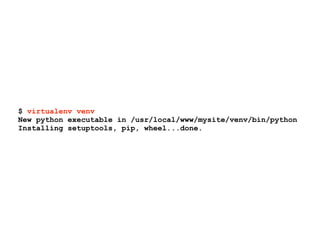
$ virtualenv venv
New python executable in /usr/local/www/mysite/venv/bin/python
Installing setuptools, pip, wheel...done.
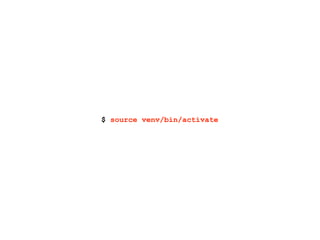
$ source venv/bin/activate
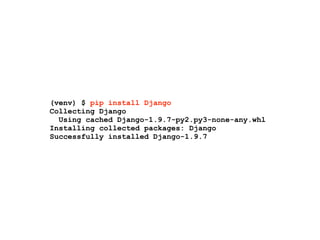
(venv) $ pip install Django
Collecting Django
Using cached Django-1.9.7-py2.py3-none-any.whl
Installing collected packages: Django
Successfully installed Django-1.9.7
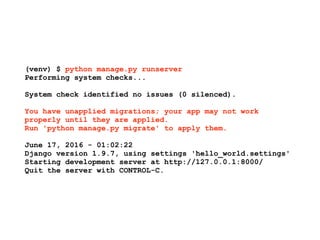
(venv) $ python manage.py runserver
Performing system checks...
System check identified no issues (0 silenced).
You have unapplied migrations; your app may not work
properly until they are applied.
Run 'python manage.py migrate' to apply them.
June 17, 2016 - 01:02:22
Django version 1.9.7, using settings 'hello_world.settings'
Starting development server at http://127.0.0.1:8000/
Quit the server with CONTROL-C.
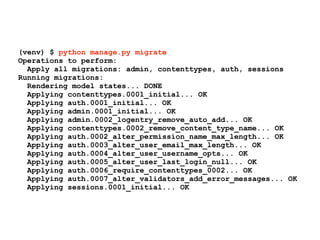
(venv) $ python manage.py migrate
Operations to perform:
Apply all migrations: admin, contenttypes, auth, sessions
Running migrations:
Rendering model states... DONE
Applying contenttypes.0001_initial... OK
Applying auth.0001_initial... OK
Applying admin.0001_initial... OK
Applying admin.0002_logentry_remove_auto_add... OK
Applying contenttypes.0002_remove_content_type_name... OK
Applying auth.0002_alter_permission_name_max_length... OK
Applying auth.0003_alter_user_email_max_length... OK
Applying auth.0004_alter_user_username_opts... OK
Applying auth.0005_alter_user_last_login_null... OK
Applying auth.0006_require_contenttypes_0002... OK
Applying auth.0007_alter_validators_add_error_messages... OK
Applying sessions.0001_initial... OK
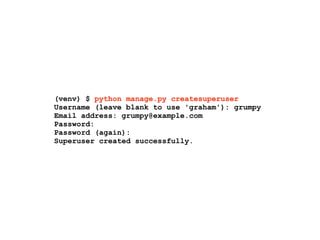
(venv) $ python manage.py createsuperuser
Username (leave blank to use 'graham'): grumpy
Email address: grumpy@example.com
Password:
Password (again):
Superuser created successfully.
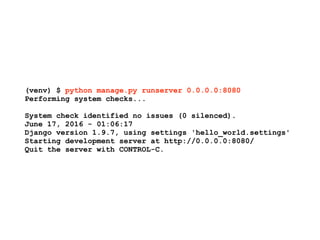
(venv) $ python manage.py runserver 0.0.0.0:8080
Performing system checks...
System check identified no issues (0 silenced).
June 17, 2016 - 01:06:17
Django version 1.9.7, using settings 'hello_world.settings'
Starting development server at http://0.0.0.0:8080/
Quit the server with CONTROL-C.
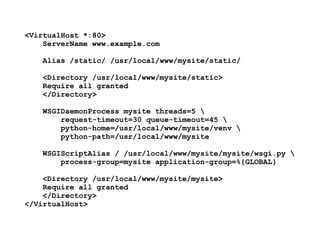
<VirtualHost *:80>
ServerName www.example.com
Alias /static/ /usr/local/www/mysite/static/
<Directory /usr/local/www/mysite/static>
Require all granted
</Directory>


WSGIDaemonProcess mysite threads=5 
request-timeout=30 queue-timeout=45 
python-home=/usr/local/www/mysite/venv 

python-path=/usr/local/www/mysite
WSGIScriptAlias / /usr/local/www/mysite/mysite/wsgi.py 

process-group=mysite application-group=%{GLOBAL}
<Directory /usr/local/www/mysite/mysite>
Require all granted
</Directory>
</VirtualHost>
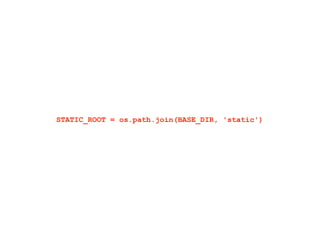
STATIC_ROOT = os.path.join(BASE_DIR, 'static')
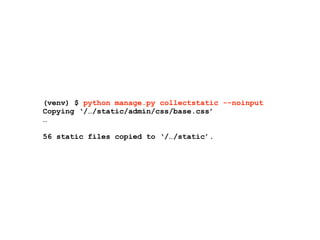
(venv) $ python manage.py collectstatic --noinput
Copying ‘/…/static/admin/css/base.css’
…
56 static files copied to ‘/…/static’.
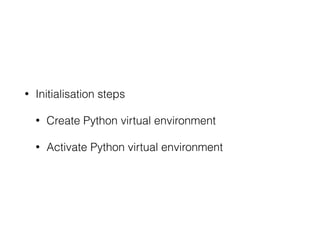
• Initialisation steps
• Create Python virtual environment
• Activate Python virtual environment
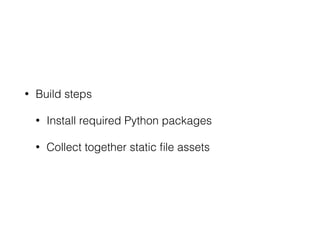
• Build steps
• Install required Python packages
• Collect together static file assets
• Deployment steps
• Initialise or migrate database data
• Configure and start the WSGI server
Why should you need to
care about the details?
What if all the build and
deployment steps were
managed for you?
“warpdrive” is the

magic glue that can
make that possible!
For local development,
as well as production
deployments.
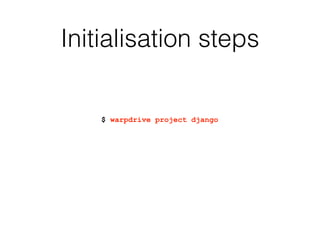
Initialisation steps
$ warpdrive project django
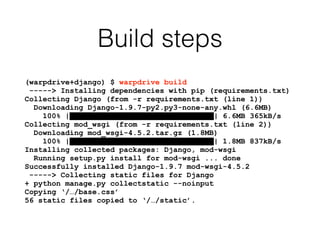
Build steps
(warpdrive+django) $ warpdrive build
-----> Installing dependencies with pip (requirements.txt)
Collecting Django (from -r requirements.txt (line 1))
Downloading Django-1.9.7-py2.py3-none-any.whl (6.6MB)
100% |████████████████████████████████| 6.6MB 365kB/s
Collecting mod_wsgi (from -r requirements.txt (line 2))
Downloading mod_wsgi-4.5.2.tar.gz (1.8MB)
100% |████████████████████████████████| 1.8MB 837kB/s
Installing collected packages: Django, mod-wsgi
Running setup.py install for mod-wsgi ... done
Successfully installed Django-1.9.7 mod-wsgi-4.5.2
-----> Collecting static files for Django
+ python manage.py collectstatic --noinput
Copying ‘/…/base.css’
56 static files copied to ‘/…/static’.
Configure and start the
WSGI server
(warpdrive+django) $ warpdrive start
-----> Configuring for deployment type of 'auto'
-----> Default WSGI server type is 'mod_wsgi'
-----> Running server script start-mod_wsgi
-----> Executing server command 'mod_wsgi-express start-server
--log-to-terminal --startup-log --port 8080 --application-type
module --entry-point hello_world.wsgi --callable-object
application --url-alias /static/ /usr/local/www/mysite/static'
[Sun Jun 19 22:00:59.819762 2016] [mpm_prefork:notice] [pid
67483] AH00163: Apache/2.4.18 (Unix) mod_wsgi/4.5.2 Python/2.7.10
configured -- resuming normal operations
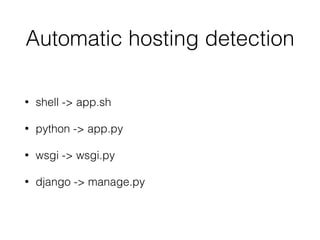
Automatic hosting detection
• shell -> app.sh
• python -> app.py
• wsgi -> wsgi.py
• django -> manage.py
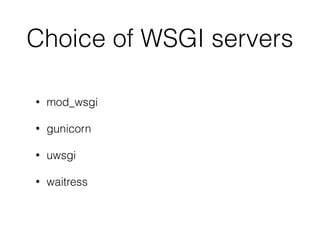
Choice of WSGI servers
• mod_wsgi
• gunicorn
• uwsgi
• waitress
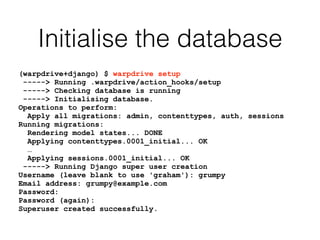
Initialise the database
(warpdrive+django) $ warpdrive setup
-----> Running .warpdrive/action_hooks/setup
-----> Checking database is running
-----> Initialising database.
Operations to perform:
Apply all migrations: admin, contenttypes, auth, sessions
Running migrations:
Rendering model states... DONE
Applying contenttypes.0001_initial... OK
…
Applying sessions.0001_initial... OK
-----> Running Django super user creation
Username (leave blank to use 'graham'): grumpy
Email address: grumpy@example.com
Password:
Password (again):
Superuser created successfully.
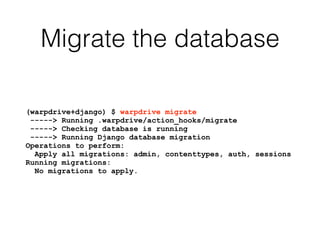
Migrate the database
(warpdrive+django) $ warpdrive migrate
-----> Running .warpdrive/action_hooks/migrate
-----> Checking database is running
-----> Running Django database migration
Operations to perform:
Apply all migrations: admin, contenttypes, auth, sessions
Running migrations:
No migrations to apply.
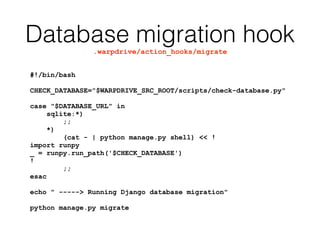
Database migration hook.warpdrive/action_hooks/migrate
#!/bin/bash
CHECK_DATABASE="$WARPDRIVE_SRC_ROOT/scripts/check-database.py"
case "$DATABASE_URL" in
sqlite:*)
;;
*)
(cat - | python manage.py shell) << !
import runpy
_ = runpy.run_path('$CHECK_DATABASE')
!
;;
esac
echo " -----> Running Django database migration"
python manage.py migrate
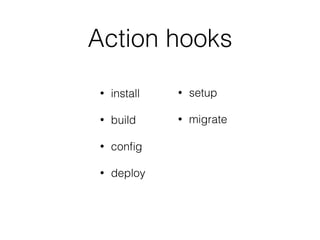
Action hooks
• pre-build
• build-env
• build
• deploy-env
• deploy-cfg
• deploy
• setup
• migrate
• verify
• ready
• alive
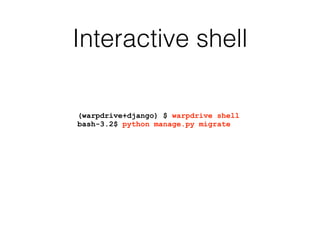
Interactive shell
(warpdrive+django) $ warpdrive shell
bash-3.2$ python manage.py migrate
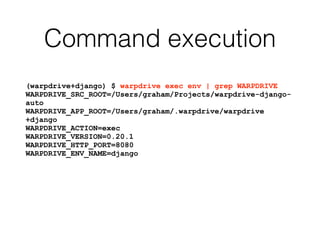
Command execution
(warpdrive+django) $ warpdrive exec env | grep WARPDRIVE
WARPDRIVE_SRC_ROOT=/Users/graham/Projects/warpdrive-django-
auto
WARPDRIVE_APP_ROOT=/Users/graham/.warpdrive/warpdrive
+django
WARPDRIVE_ACTION=exec
WARPDRIVE_VERSION=0.20.1
WARPDRIVE_HTTP_PORT=8080
WARPDRIVE_ENV_NAME=django
Create Docker image
(warpdrive+django) $ warpdrive image django
I0619 22:14:22.783544 67609 install.go:251] Using "assemble" installed from
"image:///opt/app-root/s2i/bin/assemble"
I0619 22:14:22.783688 67609 install.go:251] Using "run" installed from
"image:///opt/app-root/s2i/bin/run"
I0619 22:14:22.783712 67609 install.go:251] Using "save-artifacts" installed
from "image:///opt/app-root/s2i/bin/save-artifacts"
---> Installing application source
---> Building application from source
-----> Installing dependencies with pip (requirements.txt)
Collecting Django (from -r requirements.txt (line 1))
Downloading Django-1.9.7-py2.py3-none-any.whl (6.6MB)
Installing collected packages: Django
Successfully installed Django-1.9.7
-----> Collecting static files for Django
Copying ‘…/urlify.js’
…
56 static files copied to '/opt/app-root/src/static'.
---> Fix permissions on application source
Run Docker image
$ docker run --rm -p 8080:8080 django
---> Executing the start up script
-----> Configuring for deployment type of 'auto'
-----> Default WSGI server type is 'mod_wsgi'
-----> Running server script start-mod_wsgi
-----> Executing server command 'mod_wsgi-express start-server --log-to-terminal --
startup-log --port 8080 --application-type module --entry-point hello_world.wsgi --
callable-object application --url-alias /static/ /opt/app-root/src/static/'
[Sun Jun 19 07:44:57.955455 2016] [mpm_event:notice] [pid 48:tid 139683988789312]
AH00489: Apache/2.4.6 (CentOS) mod_wsgi/4.5.2 Python/3.4.2 configured -- resuming
normal operations
Manually build image
FROM grahamdumpleton/warp0-centos7-python34
COPY . ${WARPDRIVE_SRC_ROOT}
RUN warpdrive build
CMD [ "warpdrive", "start" ]
Source to Image (S2I)
https://github.com/openshift/source-to-image
$ s2i build https://github.com/GrahamDumpleton/warpdrive-django-auto.git
grahamdumpleton/warp0-centos7-python34 django
I0619 17:34:38.784337 66356 docker.go:352] Image "grahamdumpleton/warp0-centos7-
python34:latest" not available locally, pulling ...
I0619 17:40:23.793610 66356 clone.go:32] Downloading "https://github.com/
GrahamDumpleton/warpdrive-django-modwsgi.git" ...
I0619 17:40:25.979028 66356 install.go:251] Using "assemble" installed from
"image:///opt/app-root/s2i/bin/assemble"
I0619 17:40:25.979075 66356 install.go:251] Using "run" installed from "image:///
opt/app-root/s2i/bin/run"
I0619 17:40:25.979099 66356 install.go:251] Using "save-artifacts" installed from
"image:///opt/app-root/s2i/bin/save-artifacts"
---> Installing application source
---> Building application from source
-----> Installing dependencies with pip (requirements.txt)
Collecting Django (from -r requirements.txt (line 1))
Downloading Django-1.9.7-py2.py3-none-any.whl (6.6MB)
…
E0619 17:40:51.152317 66356 util.go:91] + python manage.py collectstatic --noinput
-----> Collecting static files for Django
Copying ‘/…/urlify.js’
…
56 static files copied to '/opt/app-root/src/static'.
---> Fix permissions on application source
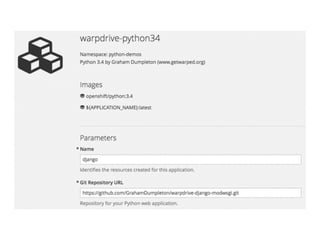
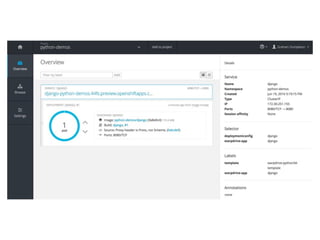
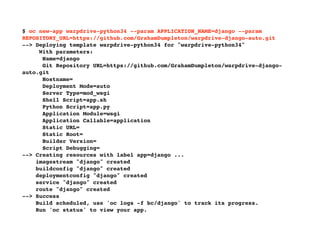
$ oc new-app warpdrive-python34 --param APPLICATION_NAME=django --param
REPOSITORY_URL=https://github.com/GrahamDumpleton/warpdrive-django-auto.git
--> Deploying template warpdrive-python34 for "warpdrive-python34"
With parameters:
Name=django
Git Repository URL=https://github.com/GrahamDumpleton/warpdrive-django-
auto.git
Hostname=
Deployment Mode=auto
Server Type=mod_wsgi
Shell Script=app.sh
Python Script=app.py
Application Module=wsgi
Application Callable=application
Static URL=
Static Root=
Builder Version=
Script Debugging=
--> Creating resources with label app=django ...
imagestream "django" created
buildconfig "django" created
deploymentconfig "django" created
service "django" created
route "django" created
--> Success
Build scheduled, use 'oc logs -f bc/django' to track its progress.
Run 'oc status' to view your app.
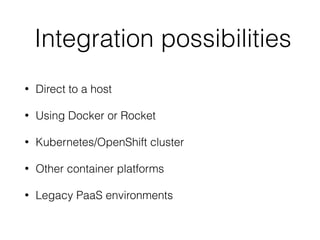
Integration possibilities
• Direct to a host
• Using Docker or Rocket
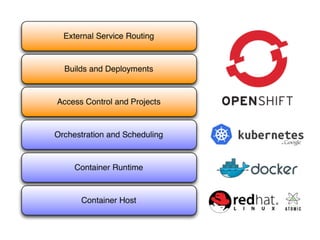
• Kubernetes/OpenShift cluster
• Other container platforms
• Legacy PaaS environments
The goals!
Best of breed Docker
image for Python web
application deployment
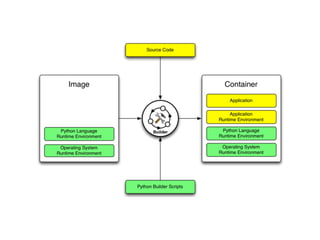
Integrated builder scripts which
handle application image creation
and running of the application
Local development

using the same scripts
and workflow
Works with major
hosting services
What I am looking for!
Feedback.
Reviewers.
Graham.Dumpleton@gmail.com
@GrahamDumpleton
www.getwarped.org
https://github.com/GrahamDumpleton/warpdrive
blog.dscpl.com.au
https://www.openshift.com/promotions/for-developers.html

“warpdrive”, making Python web application deployment magically easy.

  • 1.
    “warpdrive”, making Python webapplication deployment magically easy. Graham Dumpleton @GrahamDumpleton PyCon New Zealand - September 2016
  • 2.
    Is deploying Pythonweb applications too hard?
  • 4.
    $ virtualenv venv Newpython executable in /usr/local/www/mysite/venv/bin/python Installing setuptools, pip, wheel...done.
  • 5.
  • 6.
    (venv) $ pipinstall Django Collecting Django Using cached Django-1.9.7-py2.py3-none-any.whl Installing collected packages: Django Successfully installed Django-1.9.7
  • 7.
    (venv) $ pythonmanage.py runserver Performing system checks... System check identified no issues (0 silenced). You have unapplied migrations; your app may not work properly until they are applied. Run 'python manage.py migrate' to apply them. June 17, 2016 - 01:02:22 Django version 1.9.7, using settings 'hello_world.settings' Starting development server at http://127.0.0.1:8000/ Quit the server with CONTROL-C.
  • 8.
    (venv) $ pythonmanage.py migrate Operations to perform: Apply all migrations: admin, contenttypes, auth, sessions Running migrations: Rendering model states... DONE Applying contenttypes.0001_initial... OK Applying auth.0001_initial... OK Applying admin.0001_initial... OK Applying admin.0002_logentry_remove_auto_add... OK Applying contenttypes.0002_remove_content_type_name... OK Applying auth.0002_alter_permission_name_max_length... OK Applying auth.0003_alter_user_email_max_length... OK Applying auth.0004_alter_user_username_opts... OK Applying auth.0005_alter_user_last_login_null... OK Applying auth.0006_require_contenttypes_0002... OK Applying auth.0007_alter_validators_add_error_messages... OK Applying sessions.0001_initial... OK
  • 9.
    (venv) $ pythonmanage.py createsuperuser Username (leave blank to use 'graham'): grumpy Email address: grumpy@example.com Password: Password (again): Superuser created successfully.
  • 10.
    (venv) $ pythonmanage.py runserver 0.0.0.0:8080 Performing system checks... System check identified no issues (0 silenced). June 17, 2016 - 01:06:17 Django version 1.9.7, using settings 'hello_world.settings' Starting development server at http://0.0.0.0:8080/ Quit the server with CONTROL-C.
  • 13.
    <VirtualHost *:80> ServerName www.example.com Alias/static/ /usr/local/www/mysite/static/ <Directory /usr/local/www/mysite/static> Require all granted </Directory>
 
 WSGIDaemonProcess mysite threads=5 request-timeout=30 queue-timeout=45 python-home=/usr/local/www/mysite/venv 
 python-path=/usr/local/www/mysite WSGIScriptAlias / /usr/local/www/mysite/mysite/wsgi.py 
 process-group=mysite application-group=%{GLOBAL} <Directory /usr/local/www/mysite/mysite> Require all granted </Directory> </VirtualHost>
  • 14.
  • 15.
    (venv) $ pythonmanage.py collectstatic --noinput Copying ‘/…/static/admin/css/base.css’ … 56 static files copied to ‘/…/static’.
  • 16.
    • Initialisation steps •Create Python virtual environment • Activate Python virtual environment
  • 17.
    • Build steps •Install required Python packages • Collect together static file assets
  • 18.
    • Deployment steps •Initialise or migrate database data • Configure and start the WSGI server
  • 19.
    Why should youneed to care about the details?
  • 20.
    What if allthe build and deployment steps were managed for you?
  • 21.
    “warpdrive” is the
 magicglue that can make that possible!
  • 22.
    For local development, aswell as production deployments.
  • 23.
  • 24.
    Build steps (warpdrive+django) $warpdrive build -----> Installing dependencies with pip (requirements.txt) Collecting Django (from -r requirements.txt (line 1)) Downloading Django-1.9.7-py2.py3-none-any.whl (6.6MB) 100% |████████████████████████████████| 6.6MB 365kB/s Collecting mod_wsgi (from -r requirements.txt (line 2)) Downloading mod_wsgi-4.5.2.tar.gz (1.8MB) 100% |████████████████████████████████| 1.8MB 837kB/s Installing collected packages: Django, mod-wsgi Running setup.py install for mod-wsgi ... done Successfully installed Django-1.9.7 mod-wsgi-4.5.2 -----> Collecting static files for Django + python manage.py collectstatic --noinput Copying ‘/…/base.css’ 56 static files copied to ‘/…/static’.
  • 25.
    Configure and startthe WSGI server (warpdrive+django) $ warpdrive start -----> Configuring for deployment type of 'auto' -----> Default WSGI server type is 'mod_wsgi' -----> Running server script start-mod_wsgi -----> Executing server command 'mod_wsgi-express start-server --log-to-terminal --startup-log --port 8080 --application-type module --entry-point hello_world.wsgi --callable-object application --url-alias /static/ /usr/local/www/mysite/static' [Sun Jun 19 22:00:59.819762 2016] [mpm_prefork:notice] [pid 67483] AH00163: Apache/2.4.18 (Unix) mod_wsgi/4.5.2 Python/2.7.10 configured -- resuming normal operations
  • 26.
    Automatic hosting detection •shell -> app.sh • python -> app.py • wsgi -> wsgi.py • django -> manage.py
  • 27.
    Choice of WSGIservers • mod_wsgi • gunicorn • uwsgi • waitress
  • 28.
    Initialise the database (warpdrive+django)$ warpdrive setup -----> Running .warpdrive/action_hooks/setup -----> Checking database is running -----> Initialising database. Operations to perform: Apply all migrations: admin, contenttypes, auth, sessions Running migrations: Rendering model states... DONE Applying contenttypes.0001_initial... OK … Applying sessions.0001_initial... OK -----> Running Django super user creation Username (leave blank to use 'graham'): grumpy Email address: grumpy@example.com Password: Password (again): Superuser created successfully.
  • 29.
    Migrate the database (warpdrive+django)$ warpdrive migrate -----> Running .warpdrive/action_hooks/migrate -----> Checking database is running -----> Running Django database migration Operations to perform: Apply all migrations: admin, contenttypes, auth, sessions Running migrations: No migrations to apply.
  • 30.
    Database migration hook.warpdrive/action_hooks/migrate #!/bin/bash CHECK_DATABASE="$WARPDRIVE_SRC_ROOT/scripts/check-database.py" case"$DATABASE_URL" in sqlite:*) ;; *) (cat - | python manage.py shell) << ! import runpy _ = runpy.run_path('$CHECK_DATABASE') ! ;; esac echo " -----> Running Django database migration" python manage.py migrate
  • 31.
    Action hooks • pre-build •build-env • build • deploy-env • deploy-cfg • deploy • setup • migrate • verify • ready • alive
  • 32.
    Interactive shell (warpdrive+django) $warpdrive shell bash-3.2$ python manage.py migrate
  • 33.
    Command execution (warpdrive+django) $warpdrive exec env | grep WARPDRIVE WARPDRIVE_SRC_ROOT=/Users/graham/Projects/warpdrive-django- auto WARPDRIVE_APP_ROOT=/Users/graham/.warpdrive/warpdrive +django WARPDRIVE_ACTION=exec WARPDRIVE_VERSION=0.20.1 WARPDRIVE_HTTP_PORT=8080 WARPDRIVE_ENV_NAME=django
  • 35.
    Create Docker image (warpdrive+django)$ warpdrive image django I0619 22:14:22.783544 67609 install.go:251] Using "assemble" installed from "image:///opt/app-root/s2i/bin/assemble" I0619 22:14:22.783688 67609 install.go:251] Using "run" installed from "image:///opt/app-root/s2i/bin/run" I0619 22:14:22.783712 67609 install.go:251] Using "save-artifacts" installed from "image:///opt/app-root/s2i/bin/save-artifacts" ---> Installing application source ---> Building application from source -----> Installing dependencies with pip (requirements.txt) Collecting Django (from -r requirements.txt (line 1)) Downloading Django-1.9.7-py2.py3-none-any.whl (6.6MB) Installing collected packages: Django Successfully installed Django-1.9.7 -----> Collecting static files for Django Copying ‘…/urlify.js’ … 56 static files copied to '/opt/app-root/src/static'. ---> Fix permissions on application source
  • 36.
    Run Docker image $docker run --rm -p 8080:8080 django ---> Executing the start up script -----> Configuring for deployment type of 'auto' -----> Default WSGI server type is 'mod_wsgi' -----> Running server script start-mod_wsgi -----> Executing server command 'mod_wsgi-express start-server --log-to-terminal -- startup-log --port 8080 --application-type module --entry-point hello_world.wsgi -- callable-object application --url-alias /static/ /opt/app-root/src/static/' [Sun Jun 19 07:44:57.955455 2016] [mpm_event:notice] [pid 48:tid 139683988789312] AH00489: Apache/2.4.6 (CentOS) mod_wsgi/4.5.2 Python/3.4.2 configured -- resuming normal operations
  • 38.
    Manually build image FROMgrahamdumpleton/warp0-centos7-python34 COPY . ${WARPDRIVE_SRC_ROOT} RUN warpdrive build CMD [ "warpdrive", "start" ]
  • 39.
    Source to Image(S2I) https://github.com/openshift/source-to-image $ s2i build https://github.com/GrahamDumpleton/warpdrive-django-auto.git grahamdumpleton/warp0-centos7-python34 django I0619 17:34:38.784337 66356 docker.go:352] Image "grahamdumpleton/warp0-centos7- python34:latest" not available locally, pulling ... I0619 17:40:23.793610 66356 clone.go:32] Downloading "https://github.com/ GrahamDumpleton/warpdrive-django-modwsgi.git" ... I0619 17:40:25.979028 66356 install.go:251] Using "assemble" installed from "image:///opt/app-root/s2i/bin/assemble" I0619 17:40:25.979075 66356 install.go:251] Using "run" installed from "image:/// opt/app-root/s2i/bin/run" I0619 17:40:25.979099 66356 install.go:251] Using "save-artifacts" installed from "image:///opt/app-root/s2i/bin/save-artifacts" ---> Installing application source ---> Building application from source -----> Installing dependencies with pip (requirements.txt) Collecting Django (from -r requirements.txt (line 1)) Downloading Django-1.9.7-py2.py3-none-any.whl (6.6MB) … E0619 17:40:51.152317 66356 util.go:91] + python manage.py collectstatic --noinput -----> Collecting static files for Django Copying ‘/…/urlify.js’ … 56 static files copied to '/opt/app-root/src/static'. ---> Fix permissions on application source
  • 44.
    $ oc new-appwarpdrive-python34 --param APPLICATION_NAME=django --param REPOSITORY_URL=https://github.com/GrahamDumpleton/warpdrive-django-auto.git --> Deploying template warpdrive-python34 for "warpdrive-python34" With parameters: Name=django Git Repository URL=https://github.com/GrahamDumpleton/warpdrive-django- auto.git Hostname= Deployment Mode=auto Server Type=mod_wsgi Shell Script=app.sh Python Script=app.py Application Module=wsgi Application Callable=application Static URL= Static Root= Builder Version= Script Debugging= --> Creating resources with label app=django ... imagestream "django" created buildconfig "django" created deploymentconfig "django" created service "django" created route "django" created --> Success Build scheduled, use 'oc logs -f bc/django' to track its progress. Run 'oc status' to view your app.
  • 45.
    Integration possibilities • Directto a host • Using Docker or Rocket • Kubernetes/OpenShift cluster • Other container platforms • Legacy PaaS environments
  • 46.
  • 47.
    Best of breedDocker image for Python web application deployment
  • 48.
    Integrated builder scriptswhich handle application image creation and running of the application
  • 49.
    Local development
 using thesame scripts and workflow
  • 50.
  • 51.
    What I amlooking for!
  • 52.
  • 53.
  • 54.