VSC 7.1
SE Training Presentation
Steven Cortéz
Virtualization Technical Marketing Engineer
January 2018
Agenda
© 2018 NetApp, Inc. All rights reserved. --- NETAPP CONFIDENTIAL ---2
1) Unified Appliance Overview
2) Virtual Storage Console 7.1
3) VASA Provider 7.1
4) Storage Replication Adapter 7.1
5) SnapCenter 4.0 Plug-in for VMware
6) Import Utility for SnapCenter &
Virtual Storage Console
Unified Appliance Overview
 Consolidation of software products for VMware:
 Virtual Storage Console (VSC)
 vStorage APIs for Storage Awareness (VASA)
 Storage Replication Adaptor (SRA)
 Simple and easy method of deploying and maintaining the VSC, VASA & SRA products.
 No need for the products to be registered with each other as they all run in the same
appliance.
 Scalable, capable of catering to small, medium and large deployments.
 Reduced license burden as the OVA appliance runs on a Linux OS.
 Application High Availability via the virtual appliance watchdog process.
 All three products can be individually configured via a unified interface.
© 2018 NetApp, Inc. All rights reserved. --- NETAPP CONFIDENTIAL ---3
Appliance High Availability
 New Appliance Watchdogs
 In addition to the VMware vSphere HA solution and vSphere FT solution, the virtual appliance also helps keep the VSC, VASA
Provider, and SRA services running at all times. The virtual appliance watchdog process periodically monitors all three services,
and restarts them automatically when any kind of failure is detected. This helps the services have no downtime.
 vCPUs of UA are reduced to 2 (from 4) - To allow UA deployment in vSphere FT configuration with Standard or Enterprise license
 Two watchdogs have been implemented which monitors the below services:
 VSC service
 On detecting a VSC service crash or hang, the vscserver_watchdog automatically dumps the logs and restarted the VSC service as can
be seen below. This watchdog monitors the services for every minute.
 VP and SRA Service
 Derby Database Service
 On detecting a crash or hang of the VP/SRA service or the Derby database service, the vpserver_watchdog automatically dumps the logs
and restarts both the services.
 Additionally, both these watchdogs have been enhanced to delete any old or redundant logs
 The hung_restart, dead_restart, hprof dumps were occupying extensive amount of disk space earlier. These watchdogs ensure
that these files are either zipped or deleted periodically so that customer does not run out of disk space.
Application Monitoring
© 2018 NetApp, Inc. All rights reserved. --- NETAPP CONFIDENTIAL ---4
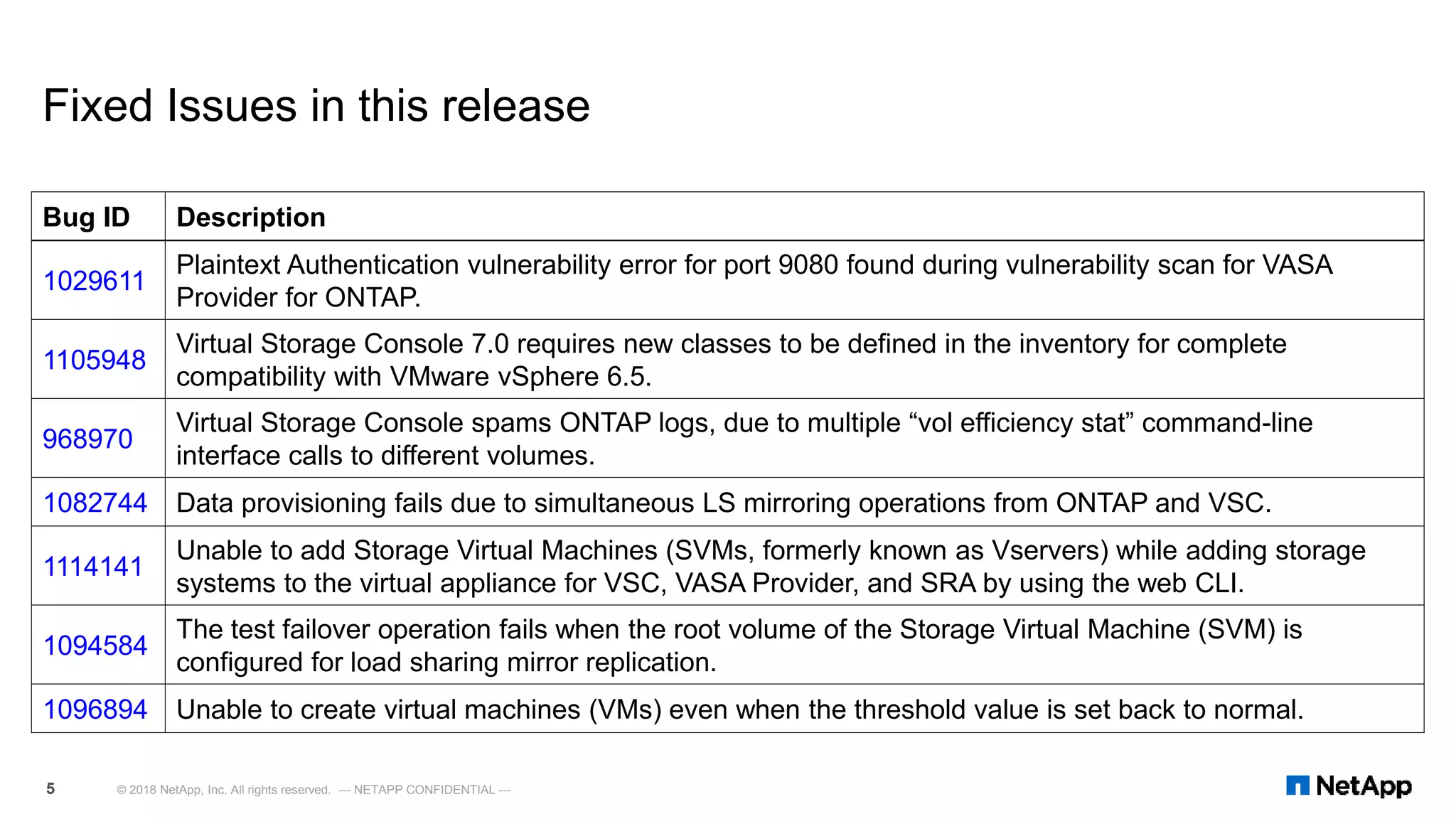
Fixed Issues in this release
Bug ID Description
1029611
Plaintext Authentication vulnerability error for port 9080 found during vulnerability scan for VASA
Provider for ONTAP.
1105948
Virtual Storage Console 7.0 requires new classes to be defined in the inventory for complete
compatibility with VMware vSphere 6.5.
968970
Virtual Storage Console spams ONTAP logs, due to multiple “vol efficiency stat” command-line
interface calls to different volumes.
1082744 Data provisioning fails due to simultaneous LS mirroring operations from ONTAP and VSC.
1114141
Unable to add Storage Virtual Machines (SVMs, formerly known as Vservers) while adding storage
systems to the virtual appliance for VSC, VASA Provider, and SRA by using the web CLI.
1094584
The test failover operation fails when the root volume of the Storage Virtual Machine (SVM) is
configured for load sharing mirror replication.
1096894 Unable to create virtual machines (VMs) even when the threshold value is set back to normal.
© 2018 NetApp, Inc. All rights reserved. --- NETAPP CONFIDENTIAL ---5
Virtual Storage Console 7.1
© 2018 NetApp, Inc. All rights reserved. --- NETAPP CONFIDENTIAL ---6
VSC 7.1 Performance Dashboard
© 2018 NetApp, Inc. All rights reserved. --- NETAPP CONFIDENTIAL ---7
8 © 2018 NetApp, Inc. All rights reserved. --- NETAPP CONFIDENTIAL ---
VSC 7.1 Reporting: Datastore Report
9 © 2018 NetApp, Inc. All rights reserved. --- NETAPP CONFIDENTIAL ---
VSC 7.1 Reporting: Virtual Machine Report
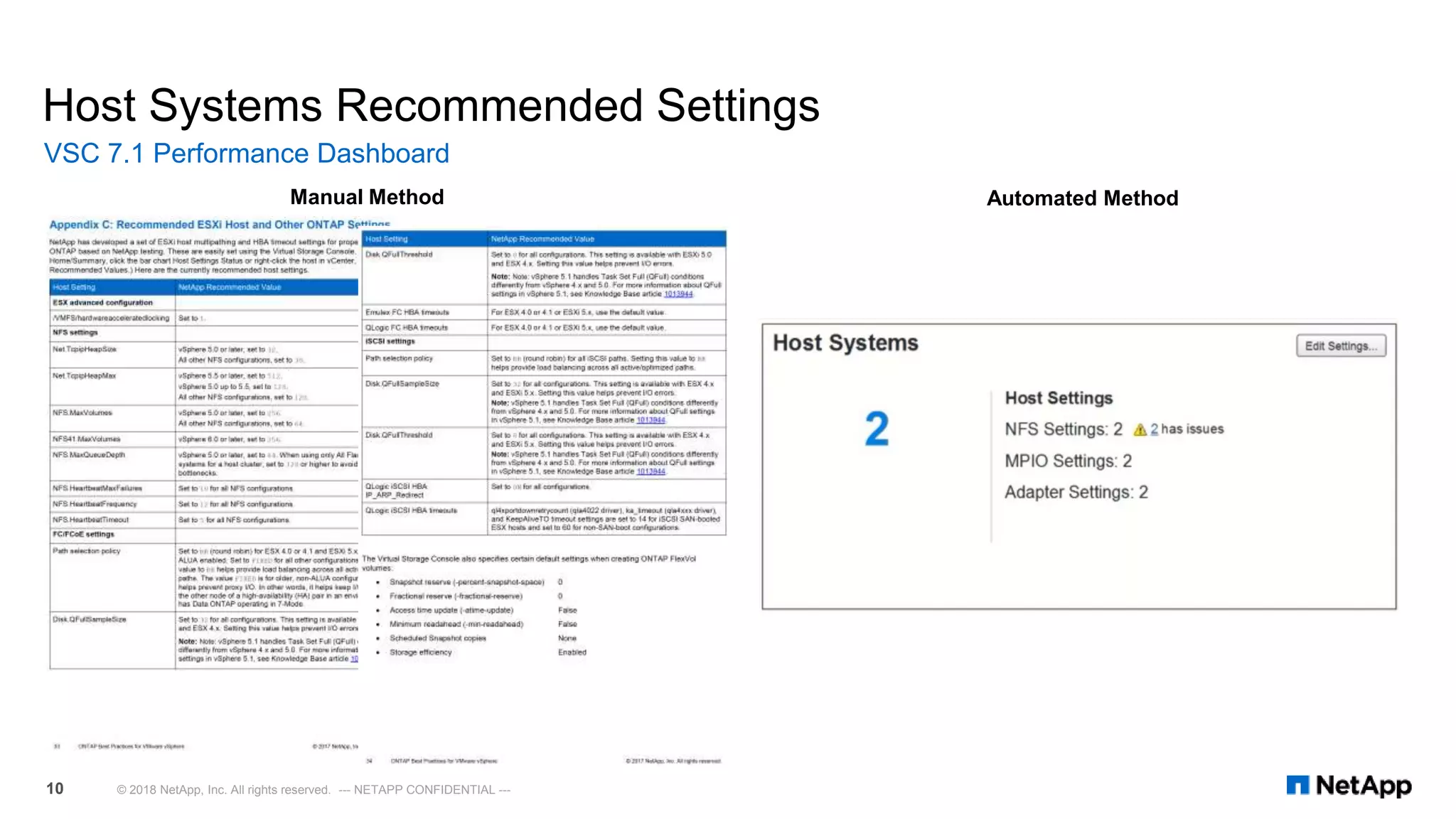
Host Systems Recommended Settings
VSC 7.1 Performance Dashboard
© 2018 NetApp, Inc. All rights reserved. --- NETAPP CONFIDENTIAL ---10
Manual Method Automated Method
Host Systems Recommended Settings
VSC 7.1 Performance Dashboard
© 2018 NetApp, Inc. All rights reserved. --- NETAPP CONFIDENTIAL ---11
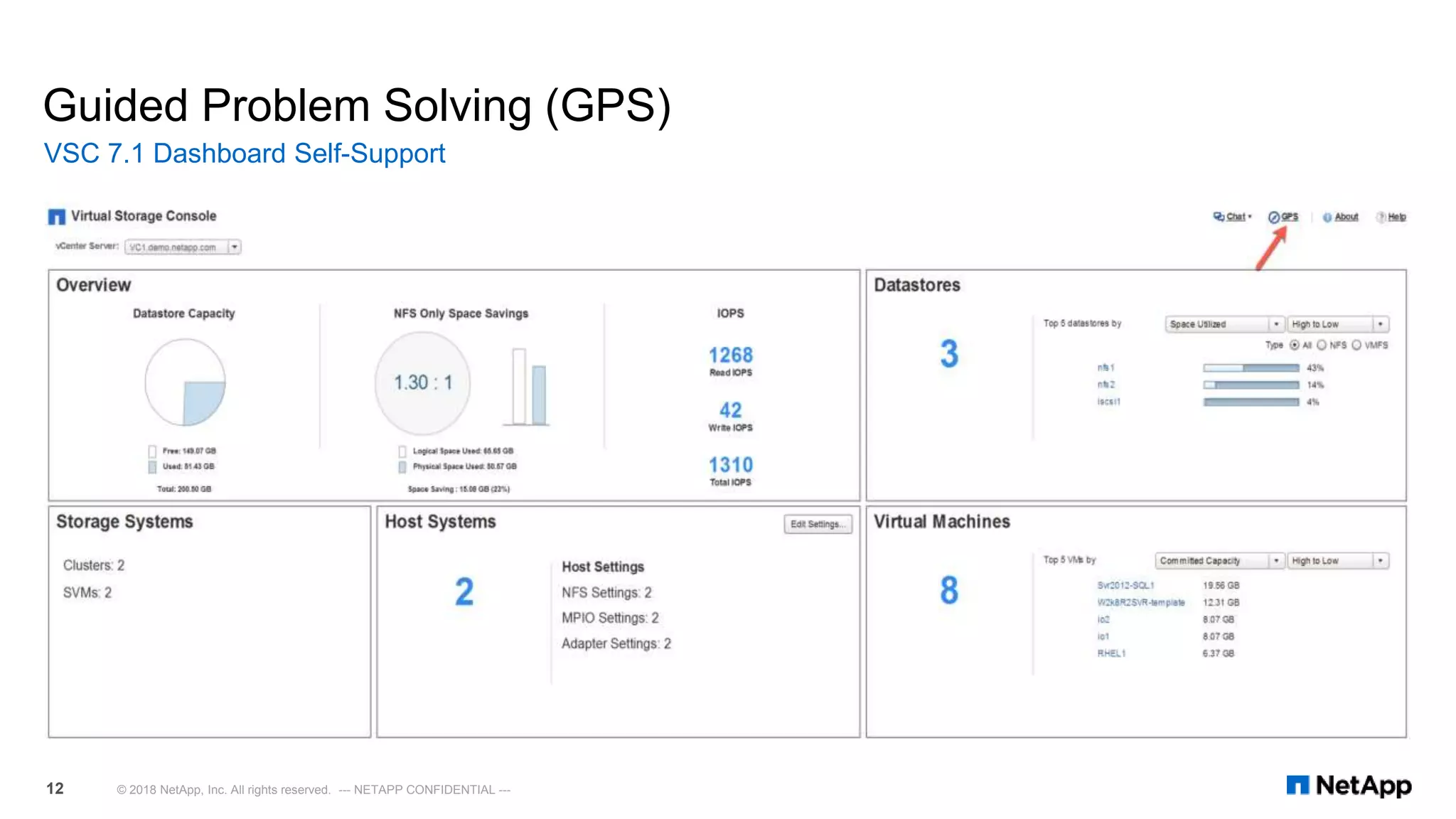
Guided Problem Solving (GPS)
VSC 7.1 Dashboard Self-Support
© 2018 NetApp, Inc. All rights reserved. --- NETAPP CONFIDENTIAL ---12
 English-language chat is available globally
for all technical and non-technical issues
Monday through Friday, 24 x 5
 Customers with urgent P1 issues or with
secure serial numbers should continue to
use the traditional NetApp® technical
support process.
Live Chat
VSC 7.1 Dashboard Self-Support
© 2018 NetApp, Inc. All rights reserved. --- NETAPP CONFIDENTIAL ---13
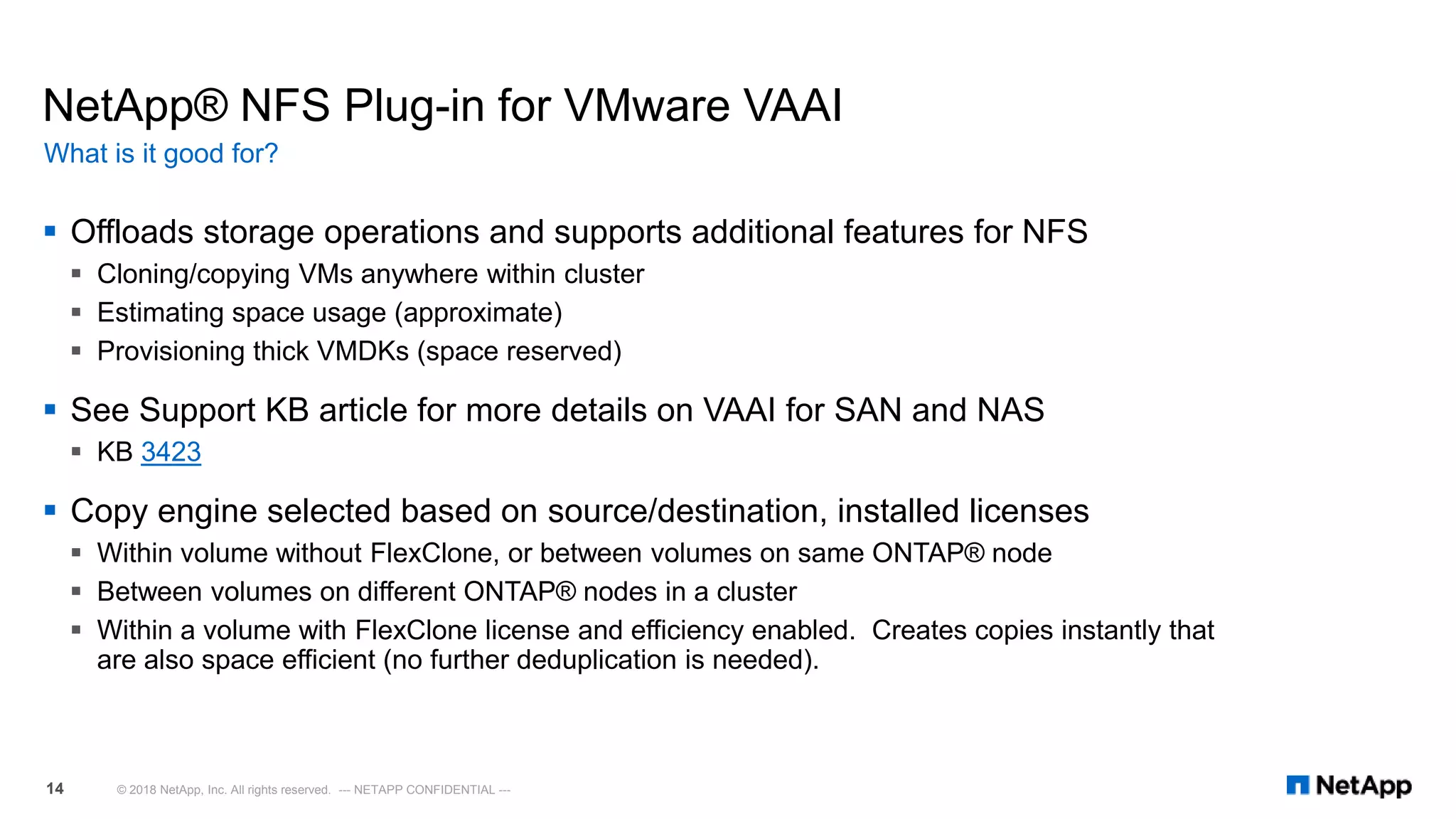
NetApp® NFS Plug-in for VMware VAAI
 Offloads storage operations and supports additional features for NFS
 Cloning/copying VMs anywhere within cluster
 Estimating space usage (approximate)
 Provisioning thick VMDKs (space reserved)
 See Support KB article for more details on VAAI for SAN and NAS
 KB 3423
 Copy engine selected based on source/destination, installed licenses
 Within volume without FlexClone, or between volumes on same ONTAP® node
 Between volumes on different ONTAP® nodes in a cluster
 Within a volume with FlexClone license and efficiency enabled. Creates copies instantly that
are also space efficient (no further deduplication is needed).
What is it good for?
© 2018 NetApp, Inc. All rights reserved. --- NETAPP CONFIDENTIAL ---14
NetApp® NFS Plug-in for VMware VAAI
Installation Steps
© 2018 NetApp, Inc. All rights reserved. --- NETAPP CONFIDENTIAL ---15
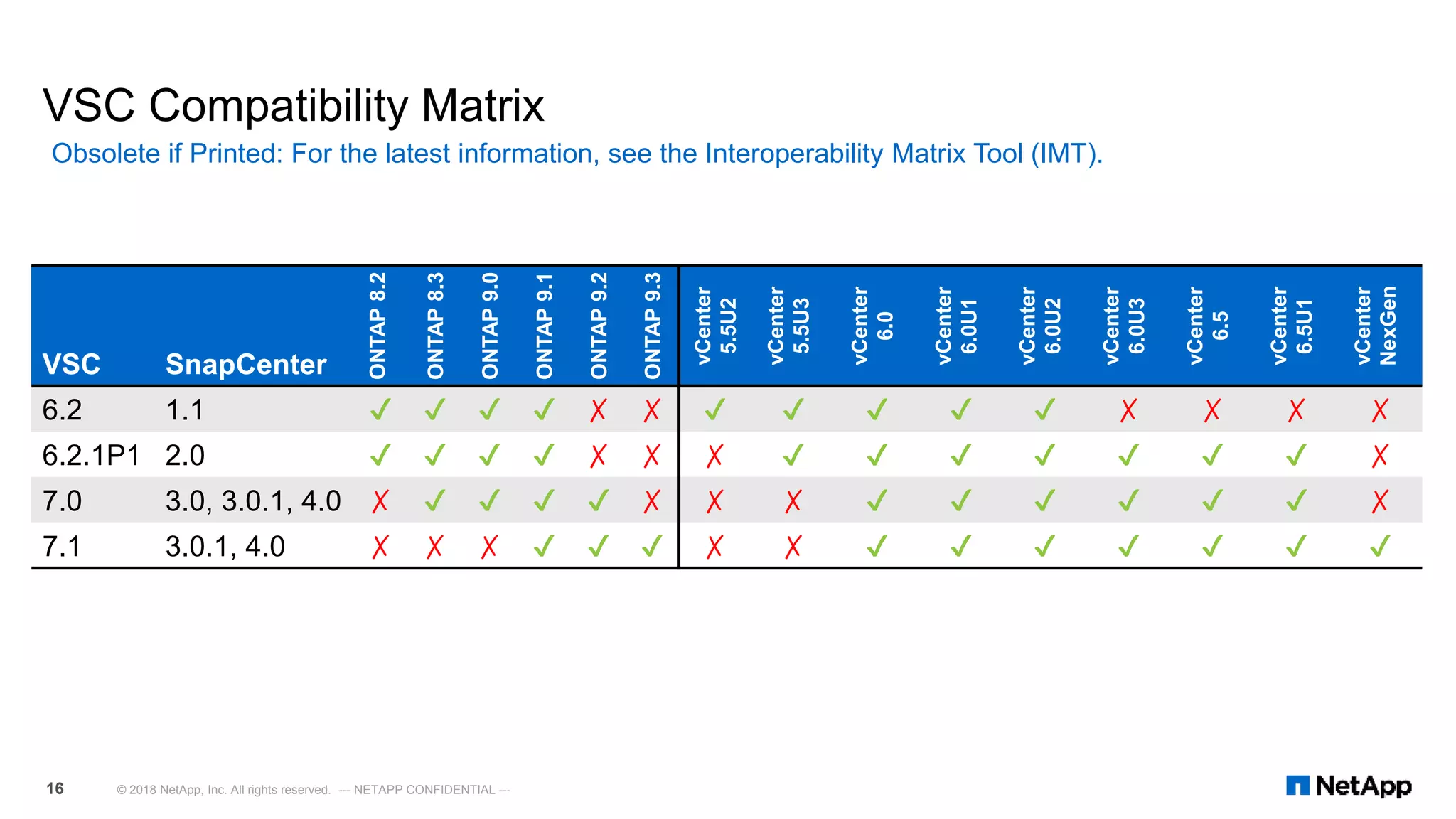
VSC Compatibility Matrix
Obsolete if Printed: For the latest information, see the Interoperability Matrix Tool (IMT).
© 2018 NetApp, Inc. All rights reserved. --- NETAPP CONFIDENTIAL ---16
VSC SnapCenter ONTAP8.2
ONTAP8.3
ONTAP9.0
ONTAP9.1
ONTAP9.2
ONTAP9.3
vCenter
5.5U2
vCenter
5.5U3
vCenter
6.0
vCenter
6.0U1
vCenter
6.0U2
vCenter
6.0U3
vCenter
6.5
vCenter
6.5U1
vCenter
NexGen
6.2 1.1 ✔ ✔ ✔ ✔ ✗ ✗ ✔ ✔ ✔ ✔ ✔ ✗ ✗ ✗ ✗
6.2.1P1 2.0 ✔ ✔ ✔ ✔ ✗ ✗ ✗ ✔ ✔ ✔ ✔ ✔ ✔ ✔ ✗
7.0 3.0, 3.0.1, 4.0 ✗ ✔ ✔ ✔ ✔ ✗ ✗ ✗ ✔ ✔ ✔ ✔ ✔ ✔ ✗
7.1 3.0.1, 4.0 ✗ ✗ ✗ ✔ ✔ ✔ ✗ ✗ ✔ ✔ ✔ ✔ ✔ ✔ ✔
VASA Provider 7.1
© 2018 NetApp, Inc. All rights reserved. --- NETAPP CONFIDENTIAL ---18
 VVol 2.0 API (VASA 3.0) API support
 Appliance can be configured for high
availability
 Using VMware High Availability (restarts) or Fault
Tolerance (no downtime)
 The virtual appliance watchdog process
 Updated storage capability profiles
 VM granular performance and capacity
 Individual VM VVol QoS
VASA Provider 7.1
VVol 2.0 support and VM/VVol level QoS
© 2018 NetApp, Inc. All rights reserved. --- NETAPP CONFIDENTIAL ---19
VASA 7.1 Performance Dashboard
© 2018 NetApp, Inc. All rights reserved. --- NETAPP CONFIDENTIAL ---20
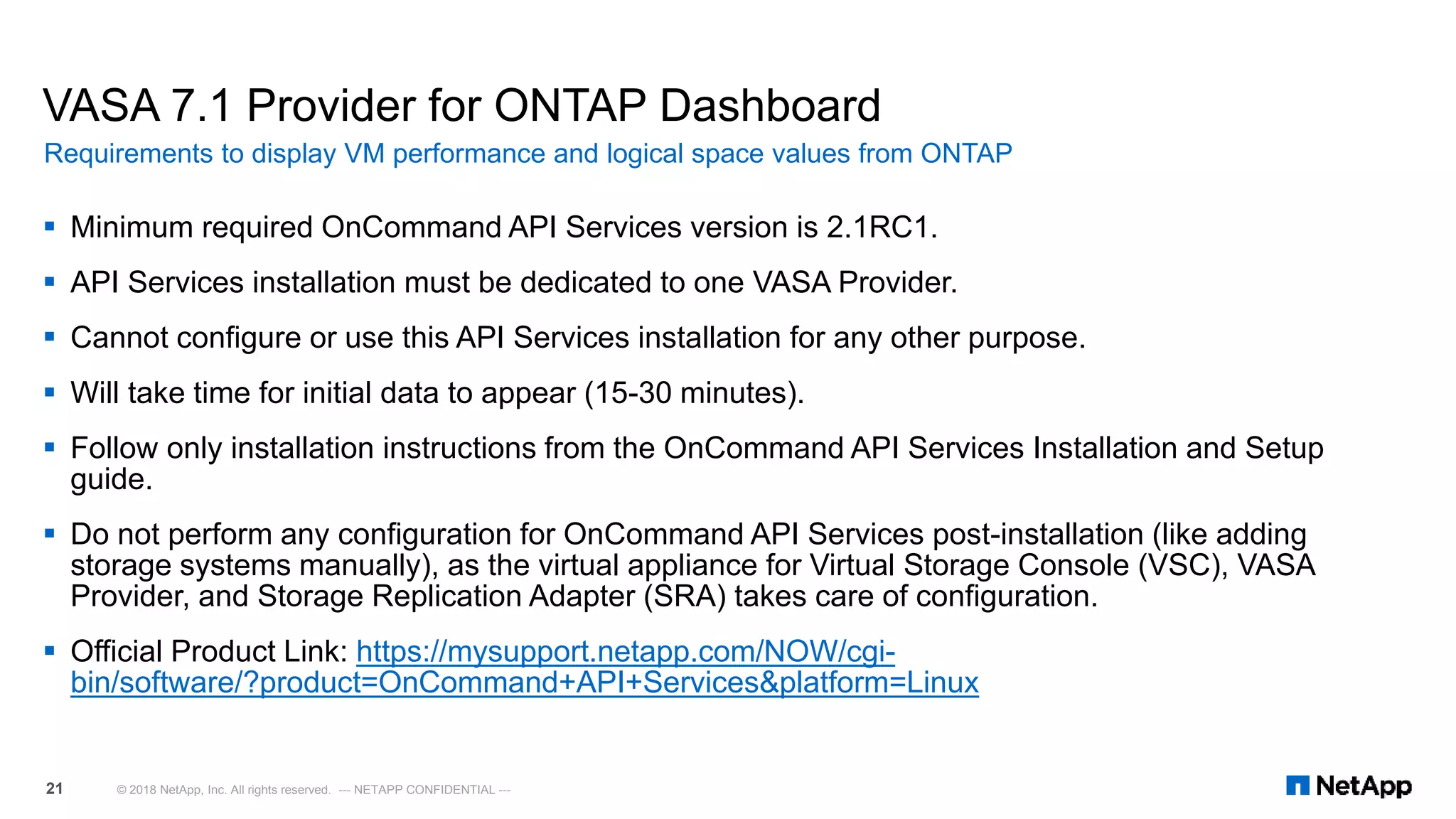
VASA 7.1 Provider for ONTAP Dashboard
 Minimum required OnCommand API Services version is 2.1RC1.
 API Services installation must be dedicated to one VASA Provider.
 Cannot configure or use this API Services installation for any other purpose.
 Will take time for initial data to appear (15-30 minutes).
 Follow only installation instructions from the OnCommand API Services Installation and Setup
guide.
 Do not perform any configuration for OnCommand API Services post-installation (like adding
storage systems manually), as the virtual appliance for Virtual Storage Console (VSC), VASA
Provider, and Storage Replication Adapter (SRA) takes care of configuration.
 Official Product Link: https://mysupport.netapp.com/NOW/cgi-
bin/software/?product=OnCommand+API+Services&platform=Linux
Requirements to display VM performance and logical space values from ONTAP
© 2018 NetApp, Inc. All rights reserved. --- NETAPP CONFIDENTIAL ---21
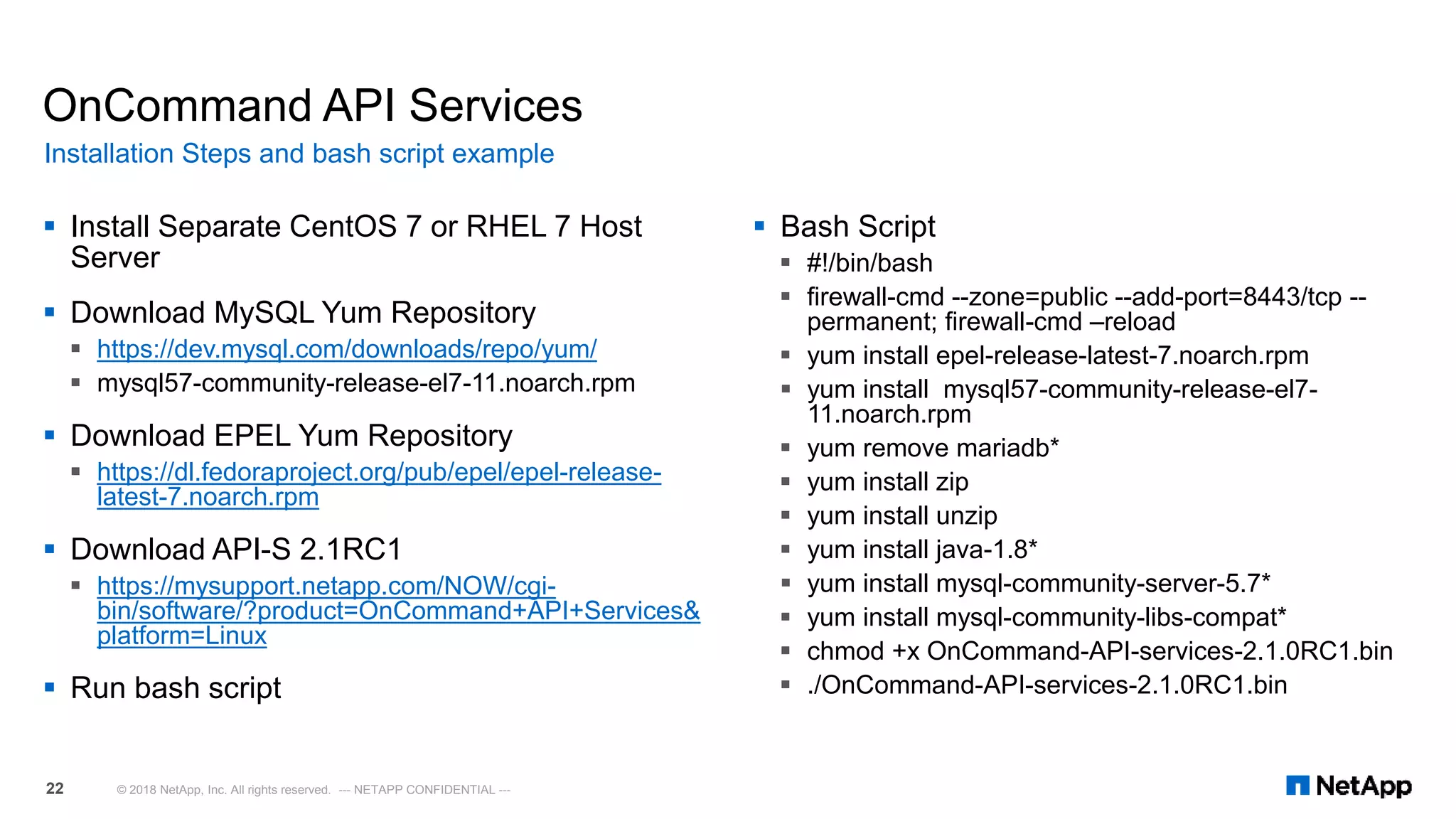
 Install Separate CentOS 7 or RHEL 7 Host
Server
 Download MySQL Yum Repository
 https://dev.mysql.com/downloads/repo/yum/
 mysql57-community-release-el7-11.noarch.rpm
 Download EPEL Yum Repository
 https://dl.fedoraproject.org/pub/epel/epel-release-
latest-7.noarch.rpm
 Download API-S 2.1RC1
 https://mysupport.netapp.com/NOW/cgi-
bin/software/?product=OnCommand+API+Services&
platform=Linux
 Run bash script
OnCommand API Services
 Bash Script
 #!/bin/bash
 firewall-cmd --zone=public --add-port=8443/tcp --
permanent; firewall-cmd –reload
 yum install epel-release-latest-7.noarch.rpm
 yum install mysql57-community-release-el7-
11.noarch.rpm
 yum remove mariadb*
 yum install zip
 yum install unzip
 yum install java-1.8*
 yum install mysql-community-server-5.7*
 yum install mysql-community-libs-compat*
 chmod +x OnCommand-API-services-2.1.0RC1.bin
 ./OnCommand-API-services-2.1.0RC1.bin
Installation Steps and bash script example
© 2018 NetApp, Inc. All rights reserved. --- NETAPP CONFIDENTIAL ---22
OnCommand API Services Installation Demo
• OnCommand API services installation workflow overview:
https://www.youtube.com/watch?v=1i2pARZmmDY&index=2&list=PLdXI3bZJEw7nm52N
HfyjJKrVvhoycQPGf
© 2018 NetApp, Inc. All rights reserved. --- NETAPP CONFIDENTIAL ---23
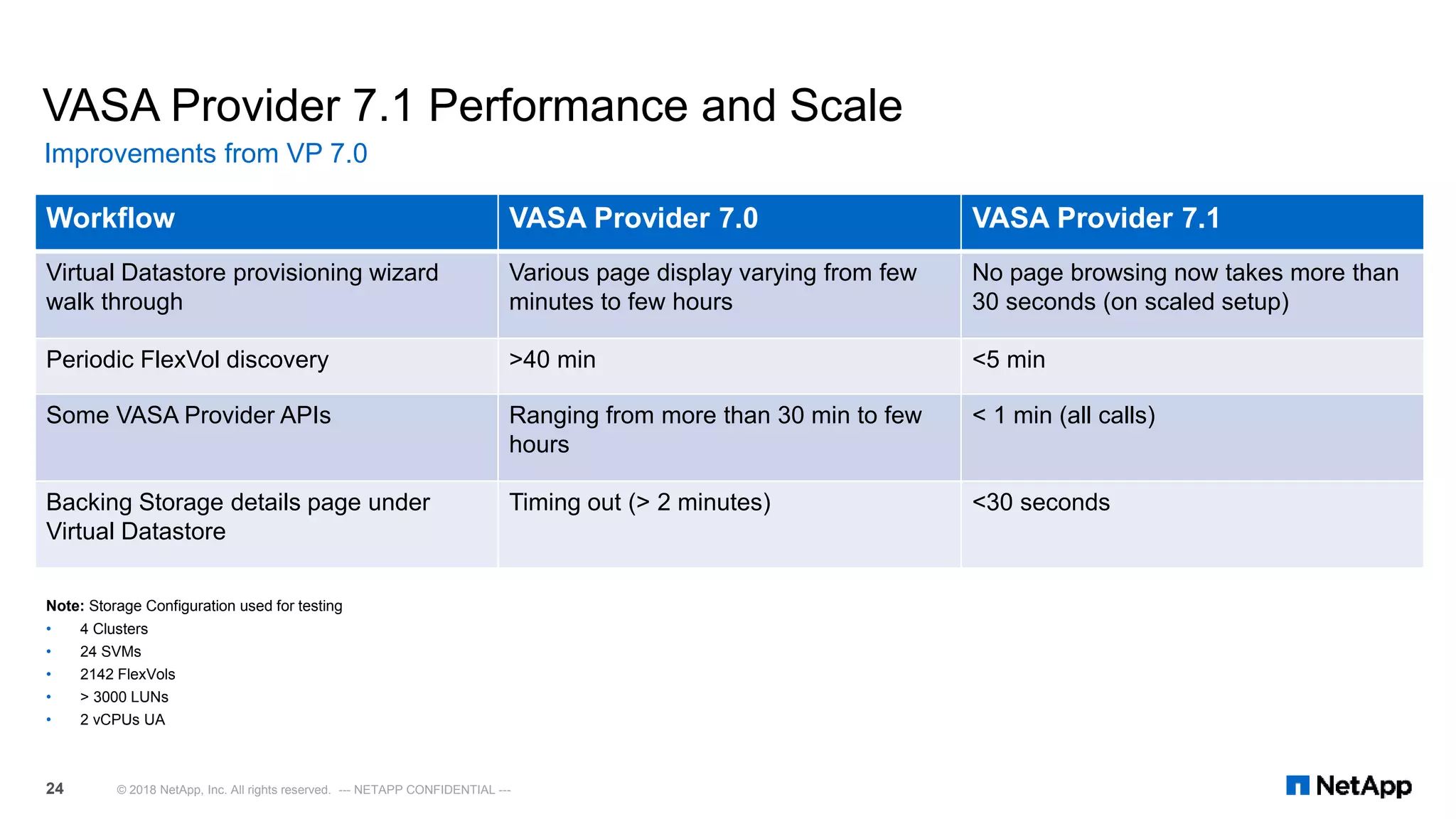
VASA Provider 7.1 Performance and Scale
Improvements from VP 7.0
© 2018 NetApp, Inc. All rights reserved. --- NETAPP CONFIDENTIAL ---24
Workflow VASA Provider 7.0 VASA Provider 7.1
Virtual Datastore provisioning wizard
walk through
Various page display varying from few
minutes to few hours
No page browsing now takes more than
30 seconds (on scaled setup)
Periodic FlexVol discovery >40 min <5 min
Some VASA Provider APIs Ranging from more than 30 min to few
hours
< 1 min (all calls)
Backing Storage details page under
Virtual Datastore
Timing out (> 2 minutes) <30 seconds
Note: Storage Configuration used for testing
• 4 Clusters
• 24 SVMs
• 2142 FlexVols
• > 3000 LUNs
• 2 vCPUs UA
Storage Replication Adapter 7.1
© 2018 NetApp, Inc. All rights reserved. --- NETAPP CONFIDENTIAL ---25
Storage Replication Adapter 7.1
For the latest information, see the Interoperability Matrix Tool (IMT).
© 2018 NetApp, Inc. All rights reserved. --- NETAPP CONFIDENTIAL ---26
 Less complicated installation &
configuration
 Enhanced Scalability
 No dependency on VASA provider
 VMware Linked Mode support
 Multi Tenancy support
 Support for ONTAP® 9.1+ & SRM 6.0+
Storage Replication Adapter 7.1
Item
SRM 6.5
Maximum
NetApp
SRA 7.1
Total number of virtual machines configured for protection (array-based replication, vSphere Replication, and storage policy
protection combined)
5,000 N/A
Total number of virtual machines configured for protection using array-based replication 5,000 5,000
Total number of virtual machines configured for protection using vSphere Replication 2,000 N/A
Total number of virtual machines configured for storage policy protection 2,000 N/A
Total number of virtual machines configured for storage policy protection with stretched storage 1,000 N/A
Total number of virtual machines per protection group 500 500
Total number of protection groups for array-based replication protection groups and vSphere Replication protection groups
combined
250 250
Total number of storage policy protection groups 32 N/A
Total number of recovery plans 250 250
Total number of protection groups per recovery plan 250 100
Total number of virtual machines per recovery plan 2,000 2,000
Total number of replicated datastores (using array-based replication) 255
255 (SRA
4.0 was 100)
Scalability
© 2018 NetApp, Inc. All rights reserved. --- NETAPP CONFIDENTIAL ---27
SnapCenter Plug-in for VMware vSphere
SnapCenter and VMware
Backup and Recovery
© 2018 NetApp, Inc. All rights reserved. --- NETAPP CONFIDENTIAL ---28
 Scalable NetApp®
SnapCenter Server
architecture
 Common GUI: centralized
point of management
 Role-based access control
(RBAC)
 Lightweight application,
database, and OS plug-ins
 Designed to support
multiple storage platforms
NetApp® SnapCenter Software
Unified, scalable software for data protection and clone management
© 2018 NetApp, Inc. All rights reserved. --- NETAPP CONFIDENTIAL ---29
SnapCenter
Server(s)SnapCenter
Server(s)
NetApp® storage platforms
Management
Data
NetApp
SnapCenter®
Server
Host Host Host
Plug-In Plug-In Plug-In
IIS
Server
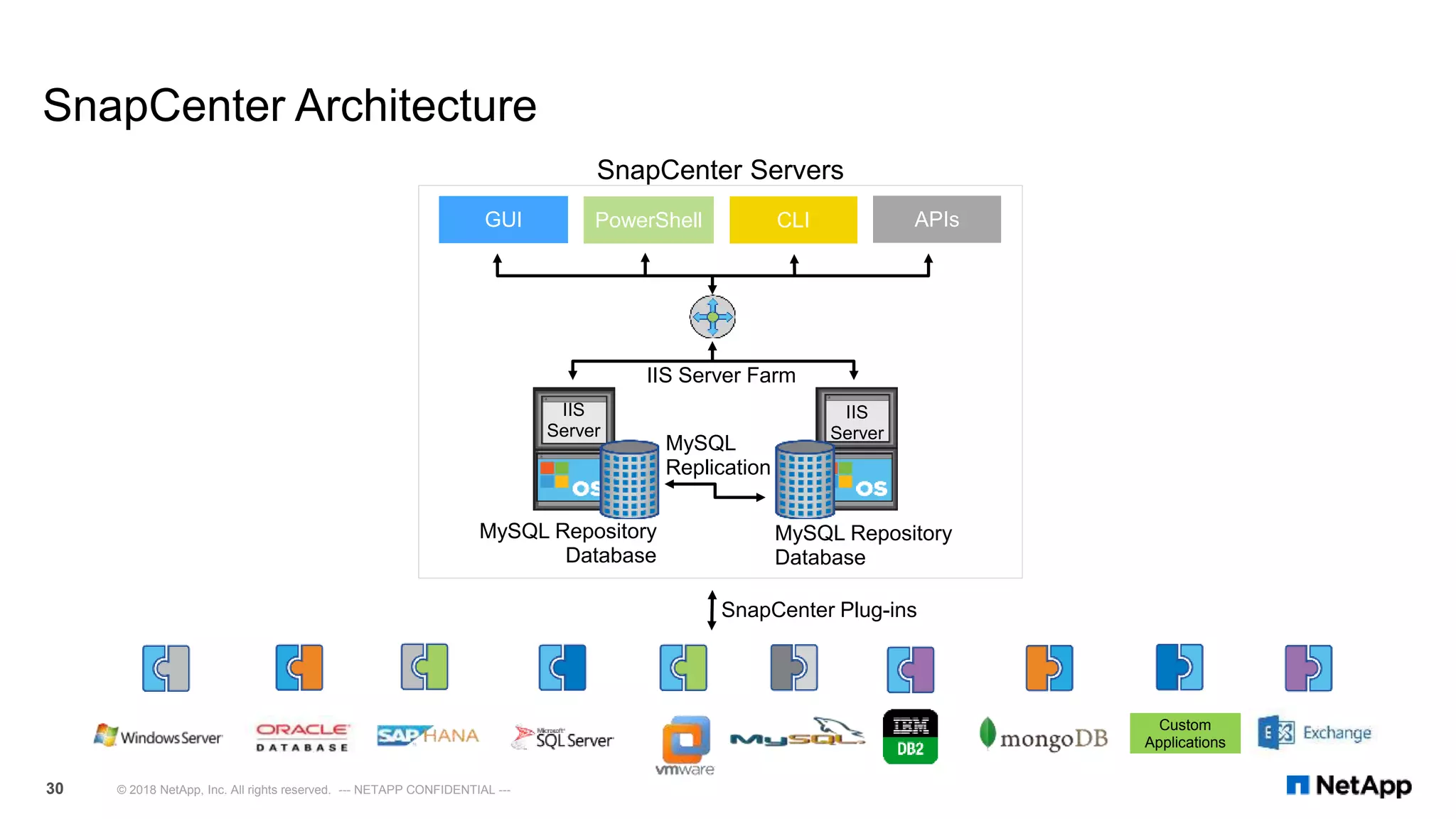
SnapCenter Architecture
© 2018 NetApp, Inc. All rights reserved. --- NETAPP CONFIDENTIAL ---30
SnapCenter Servers
IIS Server Farm
CLI APIsGUI PowerShell
IIS
Server
MySQL Repository
Database
MySQL Repository
Database
MySQL
Replication
Custom
Applications
SnapCenter Plug-ins
SnapCenter Deployment: SnapCenter Plug-in for VMware vSphere
© 2018 NetApp, Inc. All rights reserved. --- NETAPP CONFIDENTIAL ---
Data ONTAP® Storage System
vCenter
host or
appliance
ESXi
Option 1
Option 2
VMDK RDM
SnapCenter
Plug-in for
VMware
DB/AppP
lug-In
Host
Plug-In
OS
SnapCenter®
Server
Dedicated
Server
SCV Plug-in installed on SnapCenter Server
SnapCenter® Server
SnapCenter
Plug-in for
VMware
Dedicated
Server
SCV Plug-in installed on Dedicated Server
VMDK RDM
DB/AppPlug
-In
Host Plug-
In
OS
Dedicated
Server
SnapCenter Plug-in for VMware
vSphere (SCV) Communication Path
I. Installation Options:
I. Option 1: SCV is to be
pushed out to SnapCenter
itself
II. Option 2: SCV is pushed out
to a dedicate Windows host.
II. SCV and Database Plug-in(s)
(MS-SQL/Oracle) interacts with
SnapCenter server
III. SCV connects to a vCenter
instance
IV. vCenter communicates to ESXi
V. ESXi communicated to NetApp
Storage
Note: One SCV Plug-in instance is
required per instance of vCenter
SnapCenter 4.0 Plug-in for VMware vSphere
 Guest file or folder (single or multiple) restore support for Windows guest operating
system.
 Efficient storage-based restores from primary and secondary Snapshot copies through
Single File SnapRestore (SFSR).
 New dashboard and reports that provide visibility into protected versus unprotected VMs
and status of backup, restore, and mount jobs.
 New options to attach or detach virtual disks from secondary Snapshot copies.
 New option to attach virtual disks to an alternate VM.
What’s New
© 2018 NetApp, Inc. All rights reserved. --- NETAPP CONFIDENTIAL ---33
SnapCenter 4.0 Plug-in for VMware vSphere
 This plug-in is integrated into the vSphere Web Client. All VM backup & restore tasks are preformed via
the web client GUI.
 Utilizing the SnapCenter Plug-in for VMware in vCenter you can:
 Create policies, resource groups & backup schedules for VMs.
 Backup Virtual Machines, VMDKs and Datastores
 Backup virtualized databases and file systems
 Mount / unmount datastore
 Restore Virtual Machines, VMDKs, file(s) / folder(s) (on Windows guest OS)
 Attach / detach VMDK
 Monitor and report data protection operations on VMs and datastores
 RBAC supported security and centralized role delegation
Continued Capabilities
© 2018 NetApp, Inc. All rights reserved. --- NETAPP CONFIDENTIAL ---34
SnapCenter 4.0 Plug-in for VMware vSphere
New Dashboard View
© 2018 NetApp, Inc. All rights reserved. --- NETAPP CONFIDENTIAL ---35
SnapCenter 4.0 Plug-in for VMware vSphere Requirements
Obsolete if printed: For the latest information, see the Interoperability Matrix Tool (IMT).
© 2018 NetApp, Inc. All rights reserved. --- NETAPP CONFIDENTIAL ---36
NetApp® SnapCenter® Plug-in for VMware vSphere
Operating system(s): Versions of Microsoft Windows (check IMT for versions)
Memory requirements: • Dedicated host: Minimum 4 GB; recommended 8 GB
• SnapCenter host: Minimum 8 GB; recommended 32 GB
CPU requirements: • Dedicated host: Minimum 1 vCPU; recommended 2 vCPU
• SnapCenter host: 4 vCPU
Install space needed: 2 GB
Required software packages:  NET 4.5.2 +
 If using 2008R2 - Windows Management Framework (WMF) 4.0 for PowerShell 4.0
Other requirements:  Do not install any other SnapCenter plug-ins for applications and databases on the
Plug-in for VMware vSphere host
 If multiple vCenter Servers exist, register one instance of SnapCenter Plug-in for
VMware vSphere with each vCenter Server so that there is a 1:1 pairing
Best practice:  A dedicated host for the SnapCenter Plug-in for VMware vSphere is recommended
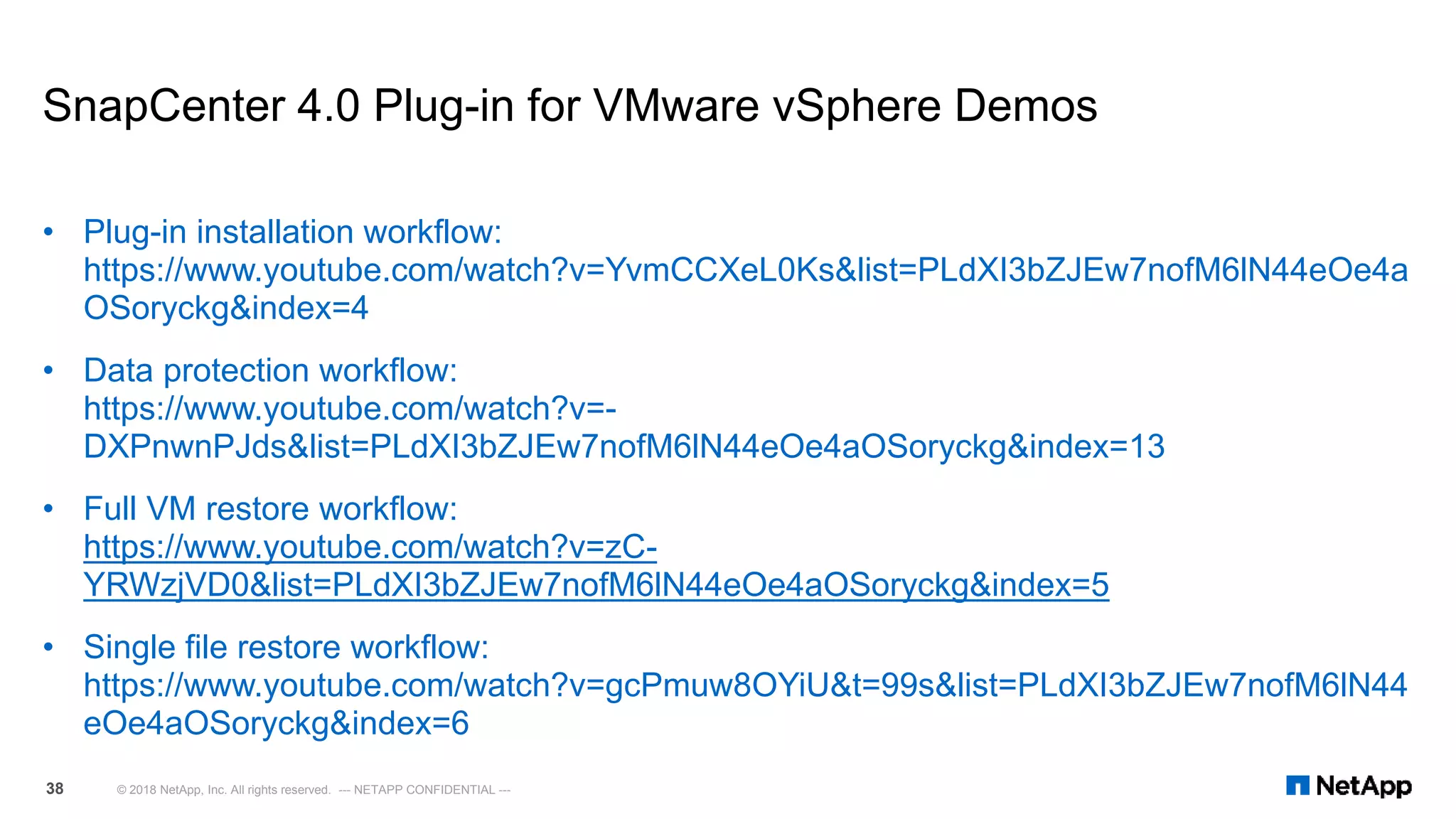
SnapCenter 4.0 Plug-in for VMware vSphere Demos
• Plug-in installation workflow:
https://www.youtube.com/watch?v=YvmCCXeL0Ks&list=PLdXI3bZJEw7nofM6lN44eOe4a
OSoryckg&index=4
• Data protection workflow:
https://www.youtube.com/watch?v=-
DXPnwnPJds&list=PLdXI3bZJEw7nofM6lN44eOe4aOSoryckg&index=13
• Full VM restore workflow:
https://www.youtube.com/watch?v=zC-
YRWzjVD0&list=PLdXI3bZJEw7nofM6lN44eOe4aOSoryckg&index=5
• Single file restore workflow:
https://www.youtube.com/watch?v=gcPmuw8OYiU&t=99s&list=PLdXI3bZJEw7nofM6lN44
eOe4aOSoryckg&index=6
© 2018 NetApp, Inc. All rights reserved. --- NETAPP CONFIDENTIAL ---38
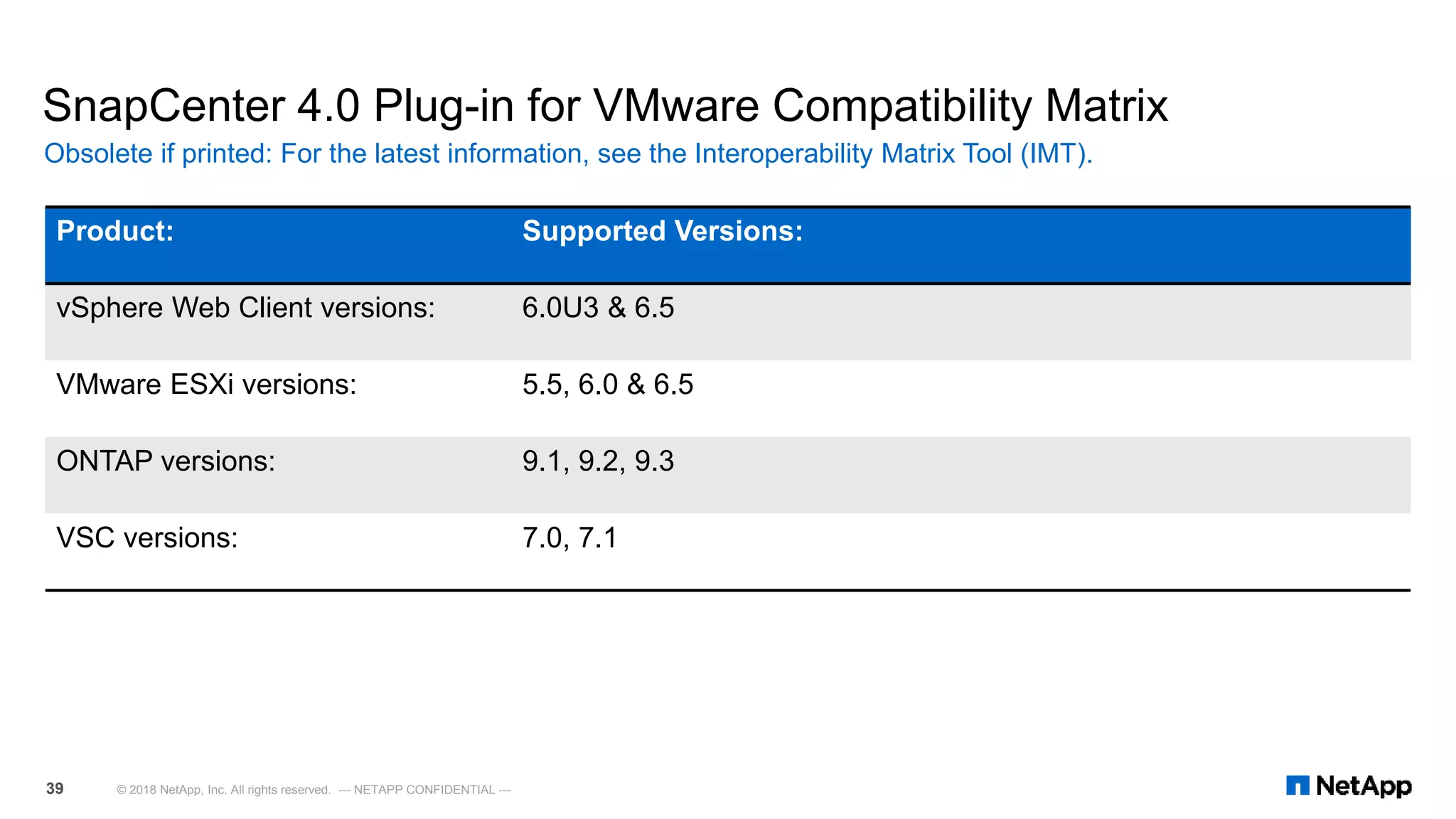
SnapCenter 4.0 Plug-in for VMware Compatibility Matrix
Obsolete if printed: For the latest information, see the Interoperability Matrix Tool (IMT).
© 2018 NetApp, Inc. All rights reserved. --- NETAPP CONFIDENTIAL ---39
Product: Supported Versions:
vSphere Web Client versions: 6.0U3 & 6.5
VMware ESXi versions: 5.5, 6.0 & 6.5
ONTAP versions: 9.1, 9.2, 9.3
VSC versions: 7.0, 7.1
SnapCenter Plug-in for VMware vSphere Vs Virtual Storage Console
© 2018 NetApp, Inc. All rights reserved. NetApp Proprietary – Internal Use Only40
VSC
6.x
Capabilities*
Detailed reporting
vCenter RBAC support
Restore/ mount from primary snapshot
Restore Datastore
Detailed Job Monitoring dashboard
Attach VMDK from Primary/ Secondary
Guest File Restore (Windows Guest OS)
Multiple Schedules per Backup Job
Restore/ mount from secondary snapshot
Backup VMs, VMDKs, Datastores
Clone VMs
Restore VMs/ VMDKs
Protocols
VSC 6.x
NFSiSCSI FC/ FCoE
VSC 6.2.1
vCenter
Backup Datacenter
Snap Creator Oracle Plug-in
VSC 6.1/ 6.2/ 6.2.1
Clustered 8.2.x~/ 8.3.x7-Mode ONTAP® ONTAP 9
Data ONTAP®
SCV
3.x/
4.x
SCV 3.x/ 4.x
SCV 3.x/ 4.x
SCV 3.x/ 4.x
vCenter 6.5vCenter 5.5U2+ vCenter 6.0*
Hypervisor
SCV 3.x/ 4.x
VSC 6.2.1
ESXi 5.1 ESXi 5.5 ESXi 6.0 ESXi 6.5
* SCV 3.x/ 4.x supported on vCenter 6.0U3+
Policy-based backup management
* Captures Backup & Recovery functionality comparison of erstwhile VSC (with SMVI/ SC 2.x)
with SCV plug-in. Starting VSC 7.0, the B/R functionality has moved to SCV plug-in.
VSC 6.0/ 6.1/ 6.2
VSC 6.0/ 6.1/ 6.2
VSC 6.0
~SCV 3.x supported
on cDOT 8.2.2+
VSC upgrade recommendation cases
© 2018 NetApp, Inc. All rights reserved. --- NETAPP CONFIDENTIAL ---41
Product Mix cDOT Backup
Jobs
7-Mode Backup
Jobs
Recommendation Notes
VSC 6.2.1 Y N 1. Register with SC 2.0
2. Re-create backup jobs based on SC policies
3. Upgrade to SC 3.0
4. Migrate backup jobs to SCV
5. Install/Upgrade to VSC 7.0 for non-B&R features
• Cannot register VSC 6.2.1 with SC 3.0
• If customer needs to keep retention for old VSC backup jobs,
they should suspend the jobs and the retention should be set to
age based (for automatic cleanup of backups)
• If using linked-mode, follow steps for each VSC instance
VSC 6.2.1 Y Y • Stay on VSC 6.2.1 until rid of 7-Mode backup jobs
• Optional: Register with SC 2.0 to run cDOT backup
jobs, however will not be able to upgrade to SC 3.0
until rid of 7-Mode backup jobs
• Upgrading to SC 3.0 will break all backup jobs and will be an
unsupported configuration
VSC 6.2.1 N Y • Stay on VSC 6.2.1 until rid of 7-Mode backup jobs • No SnapCenter integration
VSC 6.2.1 + SC 2.0 Y N 1. After registering with SC 2.0, re-create backup jobs
based on SC policies
2. Upgrade to SC 3.0 and migrate backup jobs to SCV
3. Install/Upgrade to VSC 7.0 for non-B&R features
• Backup jobs not re-created with SC policies will break after
upgrading to SC 3.0
• VSC 6.2.1 will be disabled from vCenter after migrating backup
jobs to SCV
• If customers re-enable VSC 6.2.1 then it will not be a supported
configuration
• If using linked-mode, follow steps for each VSC instance
VSC 6.2.1 + SC 2.0 Y Y • Do not upgrade to SC 3.0 and continue using VSC
6.2.1 + SC 2.0 until rid of 7-Mode backup jobs
• If they do upgrade to SC 3.0, it will be an unsupported
configuration and they will need to downgrade to SC 2.0 for
support
SCV 3.0 + VSC 7.0 Y N/A • Recommended configuration for optimal features &
support
• SCV and VSC 6.2.1 will not be supported in the same vCenter
• If using linked-mode, deploy an SCV instance for each vCenter
SCV 4.0 + VSC 7.1 Y N/A • Recommended configuration for optimal features &
support
• SCV and VSC 6.2.1 will not be supported in the same vCenter
• If using linked-mode, deploy an SCV instance for each vCenter
NetApp® Import Utility for SnapCenter and Virtual Storage Console
Overview:
 The NetApp Import Utility for SnapCenter and Virtual Storage Console for VMware vSphere (VSC) is a
standalone utility that helps customers using VSC 6.x import metadata to SnapCenter 3.0.1 or higher
versions and to VSC Appliance 7.0 or higher versions.
Key Benefits:
 This tool imports metadata from VSC 6.x and provides the following commands:
 SCV-Import command imports storage and backup metadata to SnapCenter Plug-in for VMware vSphere 3.0.1 or higher versions.
 Appliance-Import command imports storage metadata to VSC Appliance 7.0 or higher versions.
System Requirements:
 Needs to be copied and run on the windows host where VSC 6.x is installed.
 Official Product Link:
https://mysupport.netapp.com/tools/info/ECMLP2840096I.html?productID=62135&pcfContentID=ECMLP
2840096
Migration Tool
© 2018 NetApp, Inc. All rights reserved. --- NETAPP CONFIDENTIAL ---42
NetApp® Import Utility for SnapCenter and Virtual Storage Console
 Java Needs to be installed and in the systems PATH
 You must run these scripts from the Windows server that hosts VSC 6.x
 Included Scripts:
• Appliance-Import:
• Imports Storage Systems from VSC 6.x to NetApp VSC Appliance
• SCV-Import:
• Imports backup metadata from NetApp Virtual Storage Console(VSC) to NetApp SnapCenter Plug-in for
VMware VSphere
Requirements
© 2018 NetApp, Inc. All rights reserved. --- NETAPP CONFIDENTIAL ---43
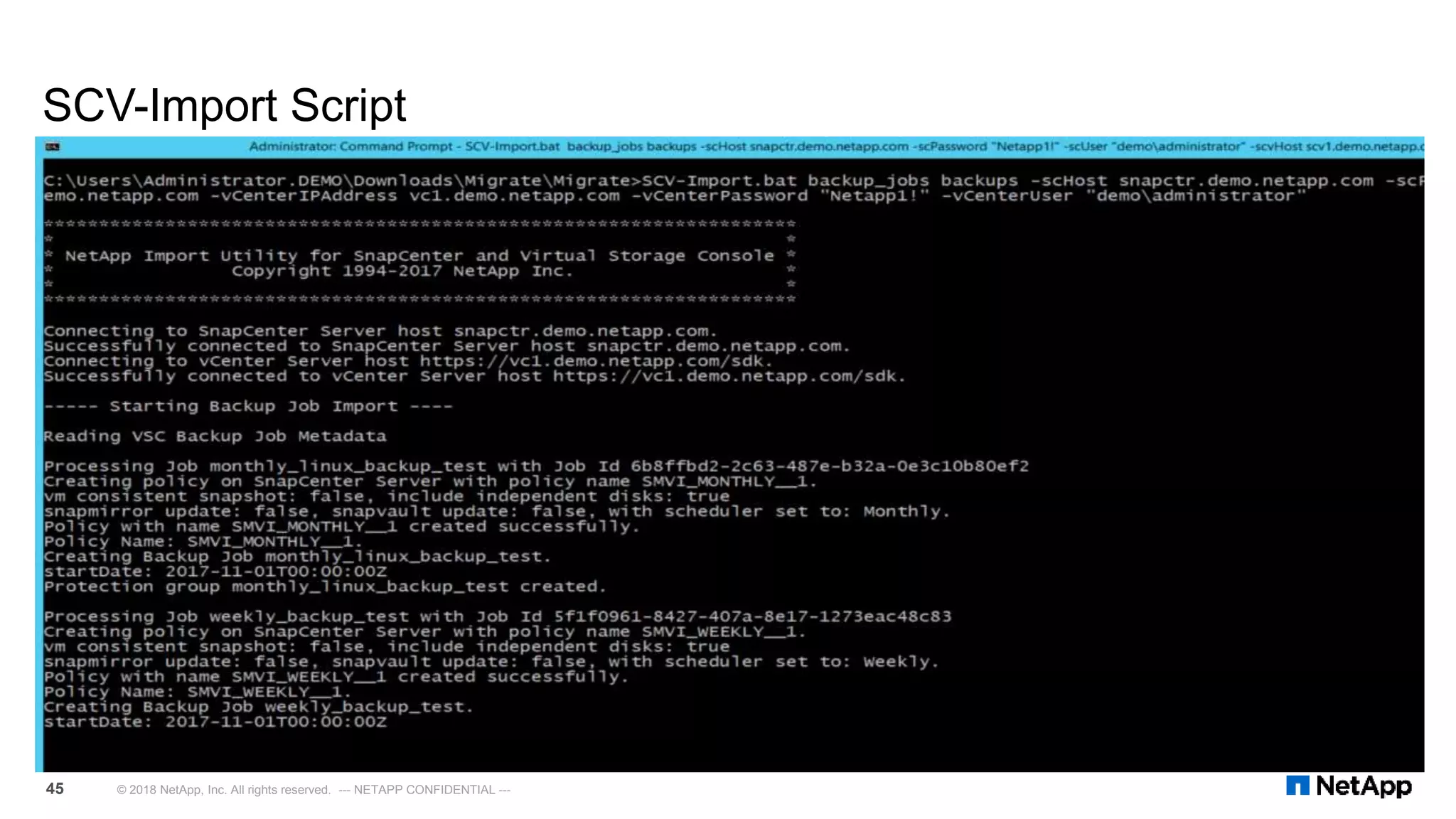
SCV-Import Script
© 2018 NetApp, Inc. All rights reserved. --- NETAPP CONFIDENTIAL ---44
Imports backup metadata from NetApp Virtual Storage Console(VSC) to NetApp® SnapCenter Plug-in for VMware VSphere.
usage: SCV-Import [storage_systems|backup_jobs|backups|all] [-backupEndTime <backup end time>] [-backupJobList <job name
list>] [-backupList <backup name list>] [-backupStartTime <backup start time>] [-dryrun] [-force] [-help]
[-scHost <hostname>] [-scPassword <password>] [-scPort <port>] [-scUser <username>] [-scvHost <hostname>]
[-storageSystemList <ip list>] [-vCenterIPAddress <hostname>] [-vCenterPassword <password>] [-vCenterPort <port>]
[-vCenterUser <username>] [-vscInstallationPath <vsc path>]
Commands
storage_systems: Imports Storage Systems; C-Mode SVM 8.2.2 or higher
backup_jobs: Imports Backup Jobs.
backups: Imports Backups.
all: Imports all three types of backup metadata.
Options
-backupEndTime <backup end time> Backup end time in YYYY-MM-DDThh:mm:ss format. Example "2017-10-10T10:10:10". Used with the command backups.
-backupJobList <job name list> Colon : separated Backup Job Name list to be imported. Used with the command backup_jobs
-backupList <backup name list> Colon : separated Backup Name list to be imported. Used with the command backups
-backupStartTime <backup start time> Backup start time in YYYY-MM-DDThh:mm:ss format. Example "2017-10-10T10:10:10". Used with the command backups.
-dryrun Dry run the command without importing data to the SnapCenter Server.
-force Import data to SnapCenter Server even if it has been imported before.
-help Prints out command help.
-scHost <hostname> SnapCenter Server Hostname or IP.
-scPassword <password> SnapCenter Server Password.
-scPort <port> SnapCenter Server Port Number when non-default is used.
-scUser <username> SnapCenter Server Username.
-scvHost <hostname> SnapCenter Plugin for VMware vSphere (SCV) Hostname or IP.
-storageSystemList <ip list> Colon ':' separated Storage IP address list to be imported. Used with the command storage_systems
-vCenterIPAddress <hostname> vCenter IP Address.
-vCenterPassword <password> vCenter password.
-vCenterPort <port> vCenter port.
-vCenterUser <username> vCenter administrator user name.
-vscInstallationPath <vsc path> VSC installation path if it was installed on non-default path.
SCV-Import Script
© 2018 NetApp, Inc. All rights reserved. --- NETAPP CONFIDENTIAL ---45
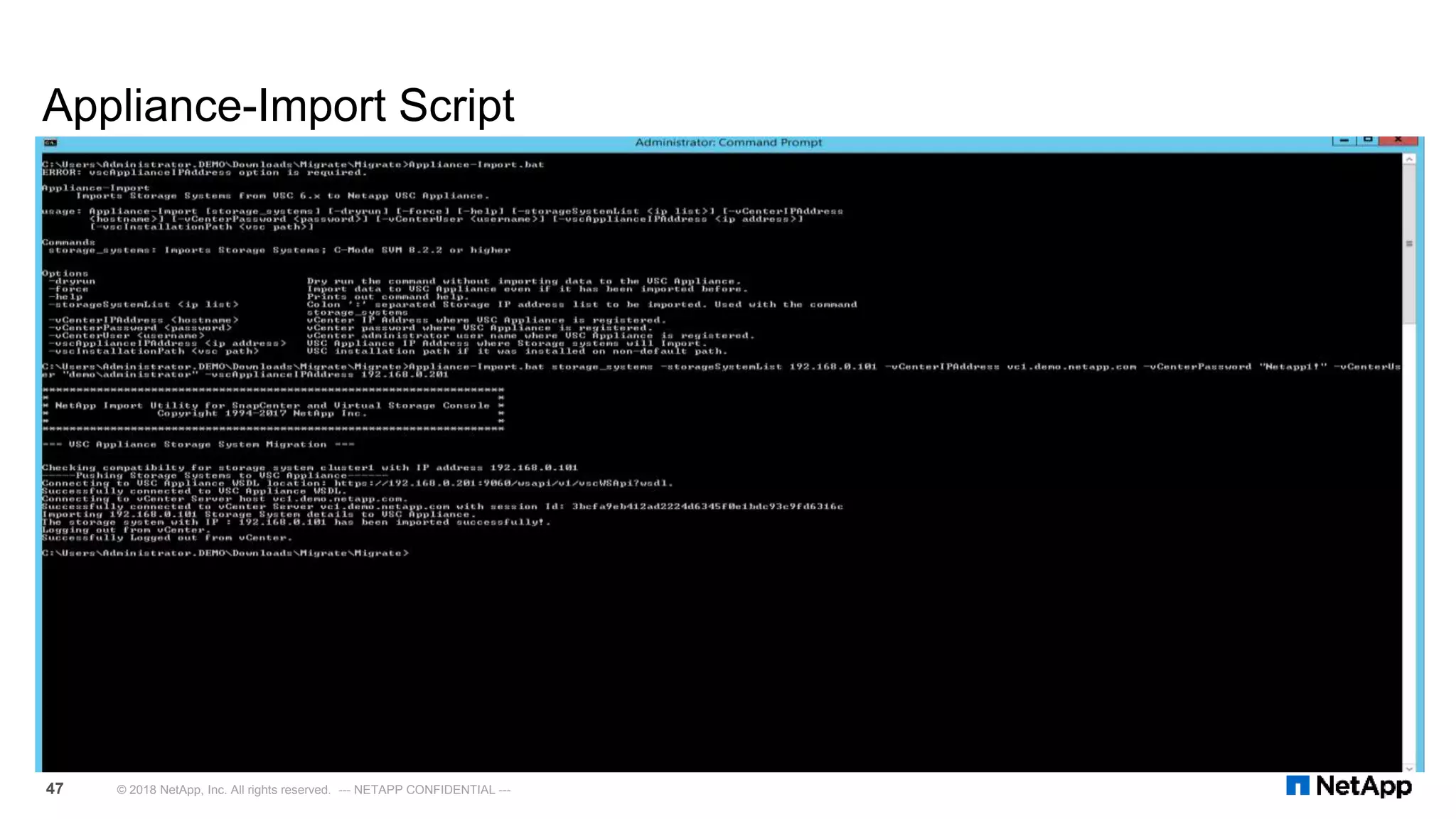
Appliance-Import Script
© 2018 NetApp, Inc. All rights reserved. --- NETAPP CONFIDENTIAL ---46
Imports Storage Systems from VSC 6.x to NetApp® VSC Appliance.
usage: Appliance-Import [storage_systems] [-dryrun] [-force] [-help] [-storageSystemList <ip list>]
[-vCenterIPAddress <hostname>] [-vCenterPassword <password>] [-vCenterUser <username>]
[-vscApplianceIPAddress <ip address>] [-vscInstallationPath <vsc path>]
Commands
storage_systems: Imports Storage Systems; C-Mode SVM 8.2.2 or higher
Options:
-dryrun Dry run the command without importing data to the VSC Appliance.
-force Import data to VSC Appliance even if it has been imported before.
-help Prints out command help.
-storageSystemList <ip list> Colon ':' separated Storage IP address list to be imported.
Used with the command storage_systems
-vCenterIPAddress <hostname> vCenter IP Address where VSC Appliance is registered.
-vCenterPassword <password> vCenter password where VSC Appliance is registered.
-vCenterUser <username> vCenter administrator user name where VSC Appliance is registered.
-vscApplianceIPAddress <ip address> VSC Appliance IP Address where Storage systems will Import.
-vscInstallationPath <vsc path> VSC installation path if it was installed on non-default path.
Appliance-Import Script
© 2018 NetApp, Inc. All rights reserved. --- NETAPP CONFIDENTIAL ---47
NetApp Import Utility for SnapCenter & Virtual Storage Console
Demo
• Migration tool workflow overview:
https://www.youtube.com/watch?v=CEQmIEzNVfA&index=1&list=PLdXI3bZJEw7nm52N
HfyjJKrVvhoycQPGf
© 2018 NetApp, Inc. All rights reserved. --- NETAPP CONFIDENTIAL ---48
Demo Resources
 Live demos can be performed using the Lab on Demand.
 Note: For links below to work you must already be signed into Lab on Demand.
 VMware SRM Backup and Recovery with NetApp SRA including SnapCenter v1.6
 This lab has an optional task for VMware backup and recovery using the SnapCenter 3.0 Plug-in for VMware vSphere
 https://labondemand.netapp.com/lab/sl10325-0
 Virtual Storage Console for VMware vSphere 6.5 v1.0
 This lab has a backup and recovery component using the SnapCenter 3.0 Plug-in for VMware. This includes creating
policies and resource groups for VMs and Datastores as well as mounting a VMDK and restoring a virtual machine.
 https://labondemand.netapp.com/lab/sl10327-0
 Data Protection Management with NetApp SnapCenter and SnapCenter Plug-in using SnapCenter 2.0.
 SnapCenter Server, SQL Server, and Oracle Database
 https://labondemand.netapp.com/lab/sl10301
Lab on Demand
© 2017 NetApp, Inc. All rights reserved. --- NETAPP CONFIDENTIAL ---49
Thank You.

Vsc 71-se-presentation-training

  • 1.
    VSC 7.1 SE TrainingPresentation Steven Cortéz Virtualization Technical Marketing Engineer January 2018
  • 2.
    Agenda © 2018 NetApp,Inc. All rights reserved. --- NETAPP CONFIDENTIAL ---2 1) Unified Appliance Overview 2) Virtual Storage Console 7.1 3) VASA Provider 7.1 4) Storage Replication Adapter 7.1 5) SnapCenter 4.0 Plug-in for VMware 6) Import Utility for SnapCenter & Virtual Storage Console
  • 3.
    Unified Appliance Overview Consolidation of software products for VMware:  Virtual Storage Console (VSC)  vStorage APIs for Storage Awareness (VASA)  Storage Replication Adaptor (SRA)  Simple and easy method of deploying and maintaining the VSC, VASA & SRA products.  No need for the products to be registered with each other as they all run in the same appliance.  Scalable, capable of catering to small, medium and large deployments.  Reduced license burden as the OVA appliance runs on a Linux OS.  Application High Availability via the virtual appliance watchdog process.  All three products can be individually configured via a unified interface. © 2018 NetApp, Inc. All rights reserved. --- NETAPP CONFIDENTIAL ---3
  • 4.
    Appliance High Availability New Appliance Watchdogs  In addition to the VMware vSphere HA solution and vSphere FT solution, the virtual appliance also helps keep the VSC, VASA Provider, and SRA services running at all times. The virtual appliance watchdog process periodically monitors all three services, and restarts them automatically when any kind of failure is detected. This helps the services have no downtime.  vCPUs of UA are reduced to 2 (from 4) - To allow UA deployment in vSphere FT configuration with Standard or Enterprise license  Two watchdogs have been implemented which monitors the below services:  VSC service  On detecting a VSC service crash or hang, the vscserver_watchdog automatically dumps the logs and restarted the VSC service as can be seen below. This watchdog monitors the services for every minute.  VP and SRA Service  Derby Database Service  On detecting a crash or hang of the VP/SRA service or the Derby database service, the vpserver_watchdog automatically dumps the logs and restarts both the services.  Additionally, both these watchdogs have been enhanced to delete any old or redundant logs  The hung_restart, dead_restart, hprof dumps were occupying extensive amount of disk space earlier. These watchdogs ensure that these files are either zipped or deleted periodically so that customer does not run out of disk space. Application Monitoring © 2018 NetApp, Inc. All rights reserved. --- NETAPP CONFIDENTIAL ---4
  • 5.
    Fixed Issues inthis release Bug ID Description 1029611 Plaintext Authentication vulnerability error for port 9080 found during vulnerability scan for VASA Provider for ONTAP. 1105948 Virtual Storage Console 7.0 requires new classes to be defined in the inventory for complete compatibility with VMware vSphere 6.5. 968970 Virtual Storage Console spams ONTAP logs, due to multiple “vol efficiency stat” command-line interface calls to different volumes. 1082744 Data provisioning fails due to simultaneous LS mirroring operations from ONTAP and VSC. 1114141 Unable to add Storage Virtual Machines (SVMs, formerly known as Vservers) while adding storage systems to the virtual appliance for VSC, VASA Provider, and SRA by using the web CLI. 1094584 The test failover operation fails when the root volume of the Storage Virtual Machine (SVM) is configured for load sharing mirror replication. 1096894 Unable to create virtual machines (VMs) even when the threshold value is set back to normal. © 2018 NetApp, Inc. All rights reserved. --- NETAPP CONFIDENTIAL ---5
  • 6.
    Virtual Storage Console7.1 © 2018 NetApp, Inc. All rights reserved. --- NETAPP CONFIDENTIAL ---6
  • 7.
    VSC 7.1 PerformanceDashboard © 2018 NetApp, Inc. All rights reserved. --- NETAPP CONFIDENTIAL ---7
  • 8.
    8 © 2018NetApp, Inc. All rights reserved. --- NETAPP CONFIDENTIAL --- VSC 7.1 Reporting: Datastore Report
  • 9.
    9 © 2018NetApp, Inc. All rights reserved. --- NETAPP CONFIDENTIAL --- VSC 7.1 Reporting: Virtual Machine Report
  • 10.
    Host Systems RecommendedSettings VSC 7.1 Performance Dashboard © 2018 NetApp, Inc. All rights reserved. --- NETAPP CONFIDENTIAL ---10 Manual Method Automated Method
  • 11.
    Host Systems RecommendedSettings VSC 7.1 Performance Dashboard © 2018 NetApp, Inc. All rights reserved. --- NETAPP CONFIDENTIAL ---11
  • 12.
    Guided Problem Solving(GPS) VSC 7.1 Dashboard Self-Support © 2018 NetApp, Inc. All rights reserved. --- NETAPP CONFIDENTIAL ---12
  • 13.
     English-language chatis available globally for all technical and non-technical issues Monday through Friday, 24 x 5  Customers with urgent P1 issues or with secure serial numbers should continue to use the traditional NetApp® technical support process. Live Chat VSC 7.1 Dashboard Self-Support © 2018 NetApp, Inc. All rights reserved. --- NETAPP CONFIDENTIAL ---13
  • 14.
    NetApp® NFS Plug-infor VMware VAAI  Offloads storage operations and supports additional features for NFS  Cloning/copying VMs anywhere within cluster  Estimating space usage (approximate)  Provisioning thick VMDKs (space reserved)  See Support KB article for more details on VAAI for SAN and NAS  KB 3423  Copy engine selected based on source/destination, installed licenses  Within volume without FlexClone, or between volumes on same ONTAP® node  Between volumes on different ONTAP® nodes in a cluster  Within a volume with FlexClone license and efficiency enabled. Creates copies instantly that are also space efficient (no further deduplication is needed). What is it good for? © 2018 NetApp, Inc. All rights reserved. --- NETAPP CONFIDENTIAL ---14
  • 15.
    NetApp® NFS Plug-infor VMware VAAI Installation Steps © 2018 NetApp, Inc. All rights reserved. --- NETAPP CONFIDENTIAL ---15
  • 16.
    VSC Compatibility Matrix Obsoleteif Printed: For the latest information, see the Interoperability Matrix Tool (IMT). © 2018 NetApp, Inc. All rights reserved. --- NETAPP CONFIDENTIAL ---16 VSC SnapCenter ONTAP8.2 ONTAP8.3 ONTAP9.0 ONTAP9.1 ONTAP9.2 ONTAP9.3 vCenter 5.5U2 vCenter 5.5U3 vCenter 6.0 vCenter 6.0U1 vCenter 6.0U2 vCenter 6.0U3 vCenter 6.5 vCenter 6.5U1 vCenter NexGen 6.2 1.1 ✔ ✔ ✔ ✔ ✗ ✗ ✔ ✔ ✔ ✔ ✔ ✗ ✗ ✗ ✗ 6.2.1P1 2.0 ✔ ✔ ✔ ✔ ✗ ✗ ✗ ✔ ✔ ✔ ✔ ✔ ✔ ✔ ✗ 7.0 3.0, 3.0.1, 4.0 ✗ ✔ ✔ ✔ ✔ ✗ ✗ ✗ ✔ ✔ ✔ ✔ ✔ ✔ ✗ 7.1 3.0.1, 4.0 ✗ ✗ ✗ ✔ ✔ ✔ ✗ ✗ ✔ ✔ ✔ ✔ ✔ ✔ ✔
  • 17.
    VASA Provider 7.1 ©2018 NetApp, Inc. All rights reserved. --- NETAPP CONFIDENTIAL ---18
  • 18.
     VVol 2.0API (VASA 3.0) API support  Appliance can be configured for high availability  Using VMware High Availability (restarts) or Fault Tolerance (no downtime)  The virtual appliance watchdog process  Updated storage capability profiles  VM granular performance and capacity  Individual VM VVol QoS VASA Provider 7.1 VVol 2.0 support and VM/VVol level QoS © 2018 NetApp, Inc. All rights reserved. --- NETAPP CONFIDENTIAL ---19
  • 19.
    VASA 7.1 PerformanceDashboard © 2018 NetApp, Inc. All rights reserved. --- NETAPP CONFIDENTIAL ---20
  • 20.
    VASA 7.1 Providerfor ONTAP Dashboard  Minimum required OnCommand API Services version is 2.1RC1.  API Services installation must be dedicated to one VASA Provider.  Cannot configure or use this API Services installation for any other purpose.  Will take time for initial data to appear (15-30 minutes).  Follow only installation instructions from the OnCommand API Services Installation and Setup guide.  Do not perform any configuration for OnCommand API Services post-installation (like adding storage systems manually), as the virtual appliance for Virtual Storage Console (VSC), VASA Provider, and Storage Replication Adapter (SRA) takes care of configuration.  Official Product Link: https://mysupport.netapp.com/NOW/cgi- bin/software/?product=OnCommand+API+Services&platform=Linux Requirements to display VM performance and logical space values from ONTAP © 2018 NetApp, Inc. All rights reserved. --- NETAPP CONFIDENTIAL ---21
  • 21.
     Install SeparateCentOS 7 or RHEL 7 Host Server  Download MySQL Yum Repository  https://dev.mysql.com/downloads/repo/yum/  mysql57-community-release-el7-11.noarch.rpm  Download EPEL Yum Repository  https://dl.fedoraproject.org/pub/epel/epel-release- latest-7.noarch.rpm  Download API-S 2.1RC1  https://mysupport.netapp.com/NOW/cgi- bin/software/?product=OnCommand+API+Services& platform=Linux  Run bash script OnCommand API Services  Bash Script  #!/bin/bash  firewall-cmd --zone=public --add-port=8443/tcp -- permanent; firewall-cmd –reload  yum install epel-release-latest-7.noarch.rpm  yum install mysql57-community-release-el7- 11.noarch.rpm  yum remove mariadb*  yum install zip  yum install unzip  yum install java-1.8*  yum install mysql-community-server-5.7*  yum install mysql-community-libs-compat*  chmod +x OnCommand-API-services-2.1.0RC1.bin  ./OnCommand-API-services-2.1.0RC1.bin Installation Steps and bash script example © 2018 NetApp, Inc. All rights reserved. --- NETAPP CONFIDENTIAL ---22
  • 22.
    OnCommand API ServicesInstallation Demo • OnCommand API services installation workflow overview: https://www.youtube.com/watch?v=1i2pARZmmDY&index=2&list=PLdXI3bZJEw7nm52N HfyjJKrVvhoycQPGf © 2018 NetApp, Inc. All rights reserved. --- NETAPP CONFIDENTIAL ---23
  • 23.
    VASA Provider 7.1Performance and Scale Improvements from VP 7.0 © 2018 NetApp, Inc. All rights reserved. --- NETAPP CONFIDENTIAL ---24 Workflow VASA Provider 7.0 VASA Provider 7.1 Virtual Datastore provisioning wizard walk through Various page display varying from few minutes to few hours No page browsing now takes more than 30 seconds (on scaled setup) Periodic FlexVol discovery >40 min <5 min Some VASA Provider APIs Ranging from more than 30 min to few hours < 1 min (all calls) Backing Storage details page under Virtual Datastore Timing out (> 2 minutes) <30 seconds Note: Storage Configuration used for testing • 4 Clusters • 24 SVMs • 2142 FlexVols • > 3000 LUNs • 2 vCPUs UA
  • 24.
    Storage Replication Adapter7.1 © 2018 NetApp, Inc. All rights reserved. --- NETAPP CONFIDENTIAL ---25
  • 25.
    Storage Replication Adapter7.1 For the latest information, see the Interoperability Matrix Tool (IMT). © 2018 NetApp, Inc. All rights reserved. --- NETAPP CONFIDENTIAL ---26  Less complicated installation & configuration  Enhanced Scalability  No dependency on VASA provider  VMware Linked Mode support  Multi Tenancy support  Support for ONTAP® 9.1+ & SRM 6.0+
  • 26.
    Storage Replication Adapter7.1 Item SRM 6.5 Maximum NetApp SRA 7.1 Total number of virtual machines configured for protection (array-based replication, vSphere Replication, and storage policy protection combined) 5,000 N/A Total number of virtual machines configured for protection using array-based replication 5,000 5,000 Total number of virtual machines configured for protection using vSphere Replication 2,000 N/A Total number of virtual machines configured for storage policy protection 2,000 N/A Total number of virtual machines configured for storage policy protection with stretched storage 1,000 N/A Total number of virtual machines per protection group 500 500 Total number of protection groups for array-based replication protection groups and vSphere Replication protection groups combined 250 250 Total number of storage policy protection groups 32 N/A Total number of recovery plans 250 250 Total number of protection groups per recovery plan 250 100 Total number of virtual machines per recovery plan 2,000 2,000 Total number of replicated datastores (using array-based replication) 255 255 (SRA 4.0 was 100) Scalability © 2018 NetApp, Inc. All rights reserved. --- NETAPP CONFIDENTIAL ---27
  • 27.
    SnapCenter Plug-in forVMware vSphere SnapCenter and VMware Backup and Recovery © 2018 NetApp, Inc. All rights reserved. --- NETAPP CONFIDENTIAL ---28
  • 28.
     Scalable NetApp® SnapCenterServer architecture  Common GUI: centralized point of management  Role-based access control (RBAC)  Lightweight application, database, and OS plug-ins  Designed to support multiple storage platforms NetApp® SnapCenter Software Unified, scalable software for data protection and clone management © 2018 NetApp, Inc. All rights reserved. --- NETAPP CONFIDENTIAL ---29 SnapCenter Server(s)SnapCenter Server(s) NetApp® storage platforms Management Data NetApp SnapCenter® Server Host Host Host Plug-In Plug-In Plug-In
  • 29.
    IIS Server SnapCenter Architecture © 2018NetApp, Inc. All rights reserved. --- NETAPP CONFIDENTIAL ---30 SnapCenter Servers IIS Server Farm CLI APIsGUI PowerShell IIS Server MySQL Repository Database MySQL Repository Database MySQL Replication Custom Applications SnapCenter Plug-ins
  • 30.
    SnapCenter Deployment: SnapCenterPlug-in for VMware vSphere © 2018 NetApp, Inc. All rights reserved. --- NETAPP CONFIDENTIAL --- Data ONTAP® Storage System vCenter host or appliance ESXi Option 1 Option 2 VMDK RDM SnapCenter Plug-in for VMware DB/AppP lug-In Host Plug-In OS SnapCenter® Server Dedicated Server SCV Plug-in installed on SnapCenter Server SnapCenter® Server SnapCenter Plug-in for VMware Dedicated Server SCV Plug-in installed on Dedicated Server VMDK RDM DB/AppPlug -In Host Plug- In OS Dedicated Server SnapCenter Plug-in for VMware vSphere (SCV) Communication Path I. Installation Options: I. Option 1: SCV is to be pushed out to SnapCenter itself II. Option 2: SCV is pushed out to a dedicate Windows host. II. SCV and Database Plug-in(s) (MS-SQL/Oracle) interacts with SnapCenter server III. SCV connects to a vCenter instance IV. vCenter communicates to ESXi V. ESXi communicated to NetApp Storage Note: One SCV Plug-in instance is required per instance of vCenter
  • 31.
    SnapCenter 4.0 Plug-infor VMware vSphere  Guest file or folder (single or multiple) restore support for Windows guest operating system.  Efficient storage-based restores from primary and secondary Snapshot copies through Single File SnapRestore (SFSR).  New dashboard and reports that provide visibility into protected versus unprotected VMs and status of backup, restore, and mount jobs.  New options to attach or detach virtual disks from secondary Snapshot copies.  New option to attach virtual disks to an alternate VM. What’s New © 2018 NetApp, Inc. All rights reserved. --- NETAPP CONFIDENTIAL ---33
  • 32.
    SnapCenter 4.0 Plug-infor VMware vSphere  This plug-in is integrated into the vSphere Web Client. All VM backup & restore tasks are preformed via the web client GUI.  Utilizing the SnapCenter Plug-in for VMware in vCenter you can:  Create policies, resource groups & backup schedules for VMs.  Backup Virtual Machines, VMDKs and Datastores  Backup virtualized databases and file systems  Mount / unmount datastore  Restore Virtual Machines, VMDKs, file(s) / folder(s) (on Windows guest OS)  Attach / detach VMDK  Monitor and report data protection operations on VMs and datastores  RBAC supported security and centralized role delegation Continued Capabilities © 2018 NetApp, Inc. All rights reserved. --- NETAPP CONFIDENTIAL ---34
  • 33.
    SnapCenter 4.0 Plug-infor VMware vSphere New Dashboard View © 2018 NetApp, Inc. All rights reserved. --- NETAPP CONFIDENTIAL ---35
  • 34.
    SnapCenter 4.0 Plug-infor VMware vSphere Requirements Obsolete if printed: For the latest information, see the Interoperability Matrix Tool (IMT). © 2018 NetApp, Inc. All rights reserved. --- NETAPP CONFIDENTIAL ---36 NetApp® SnapCenter® Plug-in for VMware vSphere Operating system(s): Versions of Microsoft Windows (check IMT for versions) Memory requirements: • Dedicated host: Minimum 4 GB; recommended 8 GB • SnapCenter host: Minimum 8 GB; recommended 32 GB CPU requirements: • Dedicated host: Minimum 1 vCPU; recommended 2 vCPU • SnapCenter host: 4 vCPU Install space needed: 2 GB Required software packages:  NET 4.5.2 +  If using 2008R2 - Windows Management Framework (WMF) 4.0 for PowerShell 4.0 Other requirements:  Do not install any other SnapCenter plug-ins for applications and databases on the Plug-in for VMware vSphere host  If multiple vCenter Servers exist, register one instance of SnapCenter Plug-in for VMware vSphere with each vCenter Server so that there is a 1:1 pairing Best practice:  A dedicated host for the SnapCenter Plug-in for VMware vSphere is recommended
  • 35.
    SnapCenter 4.0 Plug-infor VMware vSphere Demos • Plug-in installation workflow: https://www.youtube.com/watch?v=YvmCCXeL0Ks&list=PLdXI3bZJEw7nofM6lN44eOe4a OSoryckg&index=4 • Data protection workflow: https://www.youtube.com/watch?v=- DXPnwnPJds&list=PLdXI3bZJEw7nofM6lN44eOe4aOSoryckg&index=13 • Full VM restore workflow: https://www.youtube.com/watch?v=zC- YRWzjVD0&list=PLdXI3bZJEw7nofM6lN44eOe4aOSoryckg&index=5 • Single file restore workflow: https://www.youtube.com/watch?v=gcPmuw8OYiU&t=99s&list=PLdXI3bZJEw7nofM6lN44 eOe4aOSoryckg&index=6 © 2018 NetApp, Inc. All rights reserved. --- NETAPP CONFIDENTIAL ---38
  • 36.
    SnapCenter 4.0 Plug-infor VMware Compatibility Matrix Obsolete if printed: For the latest information, see the Interoperability Matrix Tool (IMT). © 2018 NetApp, Inc. All rights reserved. --- NETAPP CONFIDENTIAL ---39 Product: Supported Versions: vSphere Web Client versions: 6.0U3 & 6.5 VMware ESXi versions: 5.5, 6.0 & 6.5 ONTAP versions: 9.1, 9.2, 9.3 VSC versions: 7.0, 7.1
  • 37.
    SnapCenter Plug-in forVMware vSphere Vs Virtual Storage Console © 2018 NetApp, Inc. All rights reserved. NetApp Proprietary – Internal Use Only40 VSC 6.x Capabilities* Detailed reporting vCenter RBAC support Restore/ mount from primary snapshot Restore Datastore Detailed Job Monitoring dashboard Attach VMDK from Primary/ Secondary Guest File Restore (Windows Guest OS) Multiple Schedules per Backup Job Restore/ mount from secondary snapshot Backup VMs, VMDKs, Datastores Clone VMs Restore VMs/ VMDKs Protocols VSC 6.x NFSiSCSI FC/ FCoE VSC 6.2.1 vCenter Backup Datacenter Snap Creator Oracle Plug-in VSC 6.1/ 6.2/ 6.2.1 Clustered 8.2.x~/ 8.3.x7-Mode ONTAP® ONTAP 9 Data ONTAP® SCV 3.x/ 4.x SCV 3.x/ 4.x SCV 3.x/ 4.x SCV 3.x/ 4.x vCenter 6.5vCenter 5.5U2+ vCenter 6.0* Hypervisor SCV 3.x/ 4.x VSC 6.2.1 ESXi 5.1 ESXi 5.5 ESXi 6.0 ESXi 6.5 * SCV 3.x/ 4.x supported on vCenter 6.0U3+ Policy-based backup management * Captures Backup & Recovery functionality comparison of erstwhile VSC (with SMVI/ SC 2.x) with SCV plug-in. Starting VSC 7.0, the B/R functionality has moved to SCV plug-in. VSC 6.0/ 6.1/ 6.2 VSC 6.0/ 6.1/ 6.2 VSC 6.0 ~SCV 3.x supported on cDOT 8.2.2+
  • 38.
    VSC upgrade recommendationcases © 2018 NetApp, Inc. All rights reserved. --- NETAPP CONFIDENTIAL ---41 Product Mix cDOT Backup Jobs 7-Mode Backup Jobs Recommendation Notes VSC 6.2.1 Y N 1. Register with SC 2.0 2. Re-create backup jobs based on SC policies 3. Upgrade to SC 3.0 4. Migrate backup jobs to SCV 5. Install/Upgrade to VSC 7.0 for non-B&R features • Cannot register VSC 6.2.1 with SC 3.0 • If customer needs to keep retention for old VSC backup jobs, they should suspend the jobs and the retention should be set to age based (for automatic cleanup of backups) • If using linked-mode, follow steps for each VSC instance VSC 6.2.1 Y Y • Stay on VSC 6.2.1 until rid of 7-Mode backup jobs • Optional: Register with SC 2.0 to run cDOT backup jobs, however will not be able to upgrade to SC 3.0 until rid of 7-Mode backup jobs • Upgrading to SC 3.0 will break all backup jobs and will be an unsupported configuration VSC 6.2.1 N Y • Stay on VSC 6.2.1 until rid of 7-Mode backup jobs • No SnapCenter integration VSC 6.2.1 + SC 2.0 Y N 1. After registering with SC 2.0, re-create backup jobs based on SC policies 2. Upgrade to SC 3.0 and migrate backup jobs to SCV 3. Install/Upgrade to VSC 7.0 for non-B&R features • Backup jobs not re-created with SC policies will break after upgrading to SC 3.0 • VSC 6.2.1 will be disabled from vCenter after migrating backup jobs to SCV • If customers re-enable VSC 6.2.1 then it will not be a supported configuration • If using linked-mode, follow steps for each VSC instance VSC 6.2.1 + SC 2.0 Y Y • Do not upgrade to SC 3.0 and continue using VSC 6.2.1 + SC 2.0 until rid of 7-Mode backup jobs • If they do upgrade to SC 3.0, it will be an unsupported configuration and they will need to downgrade to SC 2.0 for support SCV 3.0 + VSC 7.0 Y N/A • Recommended configuration for optimal features & support • SCV and VSC 6.2.1 will not be supported in the same vCenter • If using linked-mode, deploy an SCV instance for each vCenter SCV 4.0 + VSC 7.1 Y N/A • Recommended configuration for optimal features & support • SCV and VSC 6.2.1 will not be supported in the same vCenter • If using linked-mode, deploy an SCV instance for each vCenter
  • 39.
    NetApp® Import Utilityfor SnapCenter and Virtual Storage Console Overview:  The NetApp Import Utility for SnapCenter and Virtual Storage Console for VMware vSphere (VSC) is a standalone utility that helps customers using VSC 6.x import metadata to SnapCenter 3.0.1 or higher versions and to VSC Appliance 7.0 or higher versions. Key Benefits:  This tool imports metadata from VSC 6.x and provides the following commands:  SCV-Import command imports storage and backup metadata to SnapCenter Plug-in for VMware vSphere 3.0.1 or higher versions.  Appliance-Import command imports storage metadata to VSC Appliance 7.0 or higher versions. System Requirements:  Needs to be copied and run on the windows host where VSC 6.x is installed.  Official Product Link: https://mysupport.netapp.com/tools/info/ECMLP2840096I.html?productID=62135&pcfContentID=ECMLP 2840096 Migration Tool © 2018 NetApp, Inc. All rights reserved. --- NETAPP CONFIDENTIAL ---42
  • 40.
    NetApp® Import Utilityfor SnapCenter and Virtual Storage Console  Java Needs to be installed and in the systems PATH  You must run these scripts from the Windows server that hosts VSC 6.x  Included Scripts: • Appliance-Import: • Imports Storage Systems from VSC 6.x to NetApp VSC Appliance • SCV-Import: • Imports backup metadata from NetApp Virtual Storage Console(VSC) to NetApp SnapCenter Plug-in for VMware VSphere Requirements © 2018 NetApp, Inc. All rights reserved. --- NETAPP CONFIDENTIAL ---43
  • 41.
    SCV-Import Script © 2018NetApp, Inc. All rights reserved. --- NETAPP CONFIDENTIAL ---44 Imports backup metadata from NetApp Virtual Storage Console(VSC) to NetApp® SnapCenter Plug-in for VMware VSphere. usage: SCV-Import [storage_systems|backup_jobs|backups|all] [-backupEndTime <backup end time>] [-backupJobList <job name list>] [-backupList <backup name list>] [-backupStartTime <backup start time>] [-dryrun] [-force] [-help] [-scHost <hostname>] [-scPassword <password>] [-scPort <port>] [-scUser <username>] [-scvHost <hostname>] [-storageSystemList <ip list>] [-vCenterIPAddress <hostname>] [-vCenterPassword <password>] [-vCenterPort <port>] [-vCenterUser <username>] [-vscInstallationPath <vsc path>] Commands storage_systems: Imports Storage Systems; C-Mode SVM 8.2.2 or higher backup_jobs: Imports Backup Jobs. backups: Imports Backups. all: Imports all three types of backup metadata. Options -backupEndTime <backup end time> Backup end time in YYYY-MM-DDThh:mm:ss format. Example "2017-10-10T10:10:10". Used with the command backups. -backupJobList <job name list> Colon : separated Backup Job Name list to be imported. Used with the command backup_jobs -backupList <backup name list> Colon : separated Backup Name list to be imported. Used with the command backups -backupStartTime <backup start time> Backup start time in YYYY-MM-DDThh:mm:ss format. Example "2017-10-10T10:10:10". Used with the command backups. -dryrun Dry run the command without importing data to the SnapCenter Server. -force Import data to SnapCenter Server even if it has been imported before. -help Prints out command help. -scHost <hostname> SnapCenter Server Hostname or IP. -scPassword <password> SnapCenter Server Password. -scPort <port> SnapCenter Server Port Number when non-default is used. -scUser <username> SnapCenter Server Username. -scvHost <hostname> SnapCenter Plugin for VMware vSphere (SCV) Hostname or IP. -storageSystemList <ip list> Colon ':' separated Storage IP address list to be imported. Used with the command storage_systems -vCenterIPAddress <hostname> vCenter IP Address. -vCenterPassword <password> vCenter password. -vCenterPort <port> vCenter port. -vCenterUser <username> vCenter administrator user name. -vscInstallationPath <vsc path> VSC installation path if it was installed on non-default path.
  • 42.
    SCV-Import Script © 2018NetApp, Inc. All rights reserved. --- NETAPP CONFIDENTIAL ---45
  • 43.
    Appliance-Import Script © 2018NetApp, Inc. All rights reserved. --- NETAPP CONFIDENTIAL ---46 Imports Storage Systems from VSC 6.x to NetApp® VSC Appliance. usage: Appliance-Import [storage_systems] [-dryrun] [-force] [-help] [-storageSystemList <ip list>] [-vCenterIPAddress <hostname>] [-vCenterPassword <password>] [-vCenterUser <username>] [-vscApplianceIPAddress <ip address>] [-vscInstallationPath <vsc path>] Commands storage_systems: Imports Storage Systems; C-Mode SVM 8.2.2 or higher Options: -dryrun Dry run the command without importing data to the VSC Appliance. -force Import data to VSC Appliance even if it has been imported before. -help Prints out command help. -storageSystemList <ip list> Colon ':' separated Storage IP address list to be imported. Used with the command storage_systems -vCenterIPAddress <hostname> vCenter IP Address where VSC Appliance is registered. -vCenterPassword <password> vCenter password where VSC Appliance is registered. -vCenterUser <username> vCenter administrator user name where VSC Appliance is registered. -vscApplianceIPAddress <ip address> VSC Appliance IP Address where Storage systems will Import. -vscInstallationPath <vsc path> VSC installation path if it was installed on non-default path.
  • 44.
    Appliance-Import Script © 2018NetApp, Inc. All rights reserved. --- NETAPP CONFIDENTIAL ---47
  • 45.
    NetApp Import Utilityfor SnapCenter & Virtual Storage Console Demo • Migration tool workflow overview: https://www.youtube.com/watch?v=CEQmIEzNVfA&index=1&list=PLdXI3bZJEw7nm52N HfyjJKrVvhoycQPGf © 2018 NetApp, Inc. All rights reserved. --- NETAPP CONFIDENTIAL ---48
  • 46.
    Demo Resources  Livedemos can be performed using the Lab on Demand.  Note: For links below to work you must already be signed into Lab on Demand.  VMware SRM Backup and Recovery with NetApp SRA including SnapCenter v1.6  This lab has an optional task for VMware backup and recovery using the SnapCenter 3.0 Plug-in for VMware vSphere  https://labondemand.netapp.com/lab/sl10325-0  Virtual Storage Console for VMware vSphere 6.5 v1.0  This lab has a backup and recovery component using the SnapCenter 3.0 Plug-in for VMware. This includes creating policies and resource groups for VMs and Datastores as well as mounting a VMDK and restoring a virtual machine.  https://labondemand.netapp.com/lab/sl10327-0  Data Protection Management with NetApp SnapCenter and SnapCenter Plug-in using SnapCenter 2.0.  SnapCenter Server, SQL Server, and Oracle Database  https://labondemand.netapp.com/lab/sl10301 Lab on Demand © 2017 NetApp, Inc. All rights reserved. --- NETAPP CONFIDENTIAL ---49
  • 47.

Editor's Notes

  • #2 Virtual appliance for Virtual Storage Console (VSC), VASA Provider, and Storage Replication Adapter (SRA) for VMware vSphere SE Technical Deck. Please view in slideshow view to see all animations.
  • #4 New VVOL Performance dashboard VVOL 2.0 support Application Monitoring No longer included Create Rapid Clones Optimization and Migration Backup and Restore Replaced by SnapCenter Plug-in for VMware
  • #5 Log locations: /opt/netapp/vscserver/log /opt/netapp/vpserver/logs
  • #7 Next few slides walk through the updated user interface in VSC 7.1
  • #8 1st we see a clear overview of what’s going on in your environment not only from a Capacity perspective, but also Space Savings efficiencies and IOPS being generated. You will also notice 2 new self support options in the top right. We will cover these more in depth in a bit. [click] 3rd we see Datastore and Virtual Machine top 5 metrics which can display IOPS, Latency, Uptime or Space Used by utilizing the drop down menus. [click] Next we see on the bottom left how many Storage Systems are under VSC’s control and how many ESX hosts have had NetApp’s recommended settings applied too. Lets explore further the features of VSC 7.1
  • #9 VSC provides two elementary reports, one detailing Datastores and the other detailing VMs. There is an option to dump the Report as a CSV file and also to sort the Report in the increasing or decreasing order of any of the Columns. These Reports are generated when accessed, providing data as close to real time as possible. The Datastore Report has the fields Name, Free Space, Used Space, Space Utilized (%), Space Available (%), IOPS and Latency.
  • #10 The VM Report has the fields Name, Capacity Committed, Latency, Uptime and Power State.
  • #11 A top use case for the VSC over the years has been for it to set and maintain best practices for host settings. As you can see here we have 2 methods to apply NetApp’s Recommended Settings to your ESXi servers Both methods are based on TR-4597 (Appendix C) which was recently updated The manual method has some 2+ pages worth of settings to apply to each ESXi host… Great information for those one-off environments if you need it, but not really scalable when you have many ESXi hosts. Many people use host profiles, which does a similar thing to the automated method that we're going to show you. the nice thing is that if you use our methods to populate the host profile template, you get all the right settings with minimal effort, and then you can distribute it using your own methodologies. How about if we can apply all these settings cluster wide with just a few clicks? Lets take a walk through the process.
  • #12 1st thing we do is click on the number next to the yellow caution symbol [click] This shows us how many systems need the recommended settings applied to….click Edit Settings [click] Here we select the hosts we want to apply the recommended settings to…NOTE…you can select which types of setting to apply…then click ok to start the process [click] Now we see the recommended settings being applied to the selected ESXi hosts As you can see all settings have been applied, just a reboot is required to enable them. Of course, you will have migrated active VM’s off that host prior to reboot so it’s non disruptive, right?  After the reboot is complete you can now see you have a happy compliant system. Nice and easy right! 
  • #13 Another new item we’ve added are the two self help links in the top right of the VSC Dashboard. If you click on the GPS link you will see the following page. There you can get more information regarding: Setup & Configuration questions or Troubleshooting tips All without having to hunt around for the correct information and its updated with the latest content
  • #14 The 2nd self help link in the top right of the VSC Dashboard is for Live Chat Support. We’ve set it up so that it goes straight into our support center. If you click on the Chat link you will see the following page. Why did we incorporate a Live Chat function? Reaching technical support through chat has become a customer expectation. By using NetApp technical support chat, you can take your troubleshooting to the next level without having to open a case or wait on the phone to speak to a support engineer.
  • #15 The biggest advantage to use the NFS Plug-in for VAAI is, that it helps offload from your ESXi hosts onto the ONTAP controller: copying operations, whether within a volume or between nodes in a cluster. By offloading tasks to storage, you save your much needed vSphere resources for more important things like your applications. The copy engine type is automatically selected so no work for you.  But be aware that a FlexClone license is required to create instantly available, space efficient VM clones – which helps speed up operations and save space/money! This plug-in just like the Recommended settings can be applied to all ESXi hosts from a single click….lets go over the installation process.
  • #16 Installation Steps In the Virtual Storage Console Click on NFS VAAI Tools Link Click on Select File to upload the VAAI Plug-in Click on Upload (You will see an uploaded successfully message) Click Install on Host link Choose the ESXi hosts you wish to install on and click install then ok Reboot ESXi hosts to enable the NetAppNasPlugin
  • #18 So overall, why does the VSC matter? VSC supports the entire lifecycle of VM storage management right inside vCenter. Not only provision, monitor, and decommission, but also ensure ESX host settings are optimal. That alone is a great reason to use VSC – recent study showed 75% of support calls were related to host settings. VSC is really our number 1 best practice – use it to ensure ESX and ONTAP are properly configured for optimal performance and availability.
  • #27 Less complicated Installation and Configuration ->SRA 7.1 is now a part of the Unified Appliance which also contains VSC 7.1 and VP 7.1. SRA 7.1 can be started and stopped on the vApp using a web interface. This also eliminates the need to register SRA with many other products. Hence all the steps in the installation and setup are reduced and further simplified.   Enhanced Scale -> SRA 7.1 has improved scale as compared to SRA 4.0 and offers a better proposition to those customers who are growing their DR footprint or those who already are managing a large DR setup   No dependency on VASA Provider -> Earlier versions of SRA depended on the VASA Provider to complete the installation and needed to be registered to it. With SRA 4.0, the need for a separate VASA Provider and registering with it was eliminated. With SRA 7.1, the VASA Provider is co-located with SRA and can be independently turned on or off. Customers can deploy SRA with or without VP in their environment and all dependencies have been eliminated.   VMware linked mode support SRA 7.1 continues to support Linked Mode which allows Customers to manage remote vCenter instances.   Multi Tenancy support SRA 7.1 has a well tested, secure multi tenancy capability which allows service providers or large enterprises to carve out independent DR domains or offer DR as a service. Configuration of disaster recovery for load sharing (LS) mirrored root volumes by using SRA
  • #28 Great improvements to scalability have been made in the recent release of The Unified Appliance – VSC/VP/SRA.   The scale requirements will be different for the two different components VSC and SRA. This is because SRA works at the SRM level which has its own operational limits while VSC works at the vCenter level which has a different set of limits.
  • #29 Why is SnapCenter Plug-in for VMware vSphere important to VSC 7.1? Well since the Backup & Recovery feature has been removed from VSC and incorporated into a far more robust solution that is SnapCenter. The following slides will demonstrate SnapCenter’s feature rich set of options for VMware vSphere Backup and Recovery.
  • #30 What is SnapCenter? SnapCenter is End-to-end data protection It’s Simple, scalable, has a single interface to protect enterprise data (both physical and virtualized) across the data fabric We can Meet SLAs easily by leveraging NetApp technologies SnapCenter has Efficient in-place copy data management Which Provides visibility of data set copies across the data fabric It also Enables you to reuse these data set copies for test/dev, DR, and analytics
  • #31 Here is a more detailed look at the SnapCenter Architecture. In the center we have two SnapCenter Servers in a HA configuration. SnapCenter Server runs on Windows operating system and uses IIS to host the SnapCenter GUI. To support HA and Load Balancing of the SnapCenter Server, Native Windows Server Network Load Balancing and Application Request Routing is used. The SnapCenter MySQL database repository is also HA capable using MySQL Master/Master replication. The SnapCenter Server is capable of pushing out Plug-ins to remote hosts from the SnapCenter Server. Making installation very, very easy. Not only can we backup and recover the VM itself, but with the use of the following plugins [CLICK] we can ALSO backup and recover the data inside the VM’s, which is what truly drives your business. These Plug-ins enable features like application-consistent backup, restore and cloning
  • #32 This slide shows a potential production environment. In the center you have the SnapCenter Server. [1] SnapCenter connects to the remote host via plug-ins. As before there is a Database or application plug-in as well as a host plug-in that is pushed out from SnapCenter to the remote host. Windows as well as Linux environments are supported. [2] The SnapCenter plug-in for VMware vSphere can be used for integration into the VMware environment. This can be used to seamlessly backup databases backed by VMDKs or RDM LUNs or to directly backup virtual machines and datastores through VMware vSphere. [3] SnapCenter connects to Cluster Data ONTAP Storage Systems to create Snapshot copies or to perform clone or restore operations. [4] SnapCenter can update long-term retention with multiple points of recovery with NetApp SnapMirror Backup, AKA SnapVault. [5] For disaster recovery purposes, SnapCenter can provide updates to the DR site using SnapMirror. Note: SnapCenter does not create or initialize SnapVault or SnapMirror relationships with the SnapCenter Standard license. It only updates them and facilitates clones if desired. This is true for use cases like SQL Server or Oracle Database. Installation of the SCV plug-in can also be installed directly onto the SnapCenter Host Server.
  • #34 The SnapCenter Plug-in for VMware has been enhanced to replace the Virtual Storage Console (VSC) for Virtual Machine and Datastore backup and restore functions. Starting with SCV 3.0, SnapCenter is no longer integrated with VSC. Note that SnapCenter 4.0 cannot be used with versions of VSC older than 7.0. Data protection for virtualized databases & virtualized windows file systems remains the same. Utilizing the new SnapCenter Plug-in for VMware GUI interface in vCenter you can: Create policies, resource groups & backup schedules for VMs. Backup, mount, and restore VMs and/or VMDKs. This plug-in is integrated into the vSphere Web Client. All VM backup & restore tasks are preformed via the web client GUI. New: Guest file or folder (single or multiple) restore support for Windows guest operating system. Efficient storage-based restores from primary and secondary Snapshot copies through Single File SnapRestore (SFSR). New dashboard and reports that provide visibility into protected versus unprotected VMs and status of backup, restore, and mount jobs. New options to attach or detach virtual disks from secondary Snapshot copies. New option to attach virtual disks to an alternate VM.
  • #35 The SnapCenter Plug-in for VMware has been enhanced to replace the Virtual Storage Console (VSC) for Virtual Machine and Datastore backup and restore functions. Note that SnapCenter 4.0 cannot be used with versions of VSC older than 7.0. Data protection for virtualized databases & virtualized windows file systems remains the same. Utilizing the new SnapCenter Plug-in for VMware GUI interface in vCenter you can: Create policies, resource groups & backup schedules for VMs. Backup, mount, and restore VMs and/or VMDKs. This plug-in is integrated into the vSphere Web Client. All VM backup & restore tasks are preformed via the web client GUI.
  • #36 New dashboard and reports that provide visibility into protected versus unprotected VMs and status of backup, restore, and mount jobs.
  • #42 Columns 2 + 3 are meant to be read as a decision tree question. If [Product Mix] and/or column 2/3 is true or false the recommendation is column 4.
  • #43 Add YouTube demo video link
  • #45 Used in Demo: C:\Users\Administrator.DEMO\Downloads\Migrate\Migrate>SCV-Import.bat backup_jobs backups -scHost snapctr.demo.netapp.com -scPassword "Netapp1!" -scUser "demo\administrator" -scvHost scv1.demo.netapp.com -vCenterIPAddress vc1.demo.netapp.com -vCenterPassword "Netapp1!" -vCenterUser "demo\administrator"
  • #47 Used in Demo: C:\Users\Administrator.DEMO\Downloads\Migrate\Migrate>Appliance-Import storage_systems -storageSystemList 192.168.0.101 -vCenterIPAddress vc1.demo.netapp.com -vCenterPassword "Netapp1!" -vCenterUser "demo\administrator" -vscApplianceIPAddress 192.168.0.201
  • #50 Update with updated LOD labs