EMC SRDF and TimeFinder on Symmetrix with Open Systems
Agenda SRDF Introduction SRDF Overview SRDF/S and SRDF/A  SRDF/AR Single-Hop SRDF Consistency Groups SRDF Migrate Option TimeFinder Introduction TimeFinder Overview Update on TimeFinder/Mirror TimeFinder/Clone TimeFinder/Snap
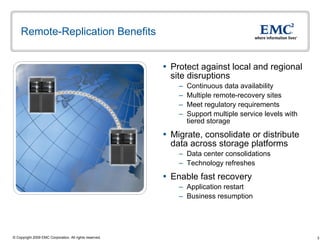
Remote-Replication Benefits Protect against local and regional site disruptions Continuous data availability Multiple remote-recovery sites Meet regulatory requirements Support multiple service levels with tiered storage Migrate, consolidate or distribute data across storage platforms Data center consolidations Technology refreshes Enable fast recovery Application restart  Business resumption
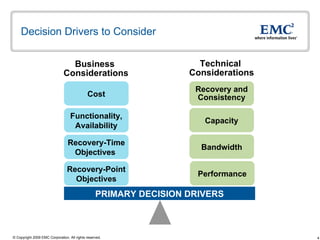
Decision Drivers to Consider Recovery-Point Objectives PRIMARY DECISION DRIVERS Business  Considerations Technical  Considerations Cost Recovery-Time Objectives  Performance Bandwidth Capacity Recovery and Consistency Functionality, Availability
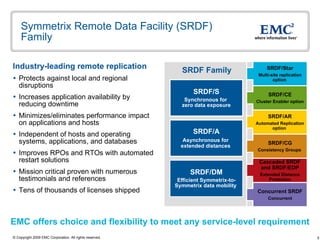
Symmetrix Remote Data Facility (SRDF) Family  Industry-leading remote replication Protects against local and regional disruptions Increases application availability by reducing downtime  Minimizes/eliminates performance impact on applications and hosts Independent of hosts and operating systems, applications, and databases Improves RPOs and RTOs with automated restart solutions Mission critical proven with numerous testimonials and references Tens of thousands of licenses shipped SRDF Family SRDF/Star Multi-site replication option  SRDF/AR Automated Replication option  SRDF/CE Cluster Enabler option SRDF/CG Consistency Groups  SRDF/S Synchronous for  zero data exposure SRDF/A Asynchronous for  extended distances  SRDF/DM Efficient Symmetrix-to-Symmetrix data mobility  Cascaded SRDF and SRDF/EDP Extended Distance Protection Concurrent   SRDF Concurrent EMC offers choice and flexibility to meet any service-level requirement
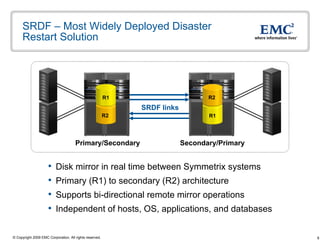
SRDF – Most Widely Deployed Disaster Restart Solution Disk mirror in real time between Symmetrix systems Primary (R1) to secondary (R2) architecture Supports bi-directional remote mirror operations Independent of hosts, OS, applications, and databases SRDF links Primary/Secondary Secondary/Primary R2 R1 R1 R2
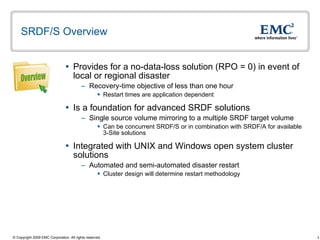
SRDF/S Overview Provides for a no-data-loss solution (RPO = 0) in event of local or regional disaster  Recovery-time objective of less than one hour  Restart times are application dependent  Is a foundation for advanced SRDF solutions Single source volume mirroring to a multiple SRDF target volume Can be concurrent SRDF/S or in combination with SRDF/A for available 3-Site solutions Integrated with UNIX and Windows open system cluster solutions Automated and semi-automated disaster restart Cluster design will determine restart methodology Overview
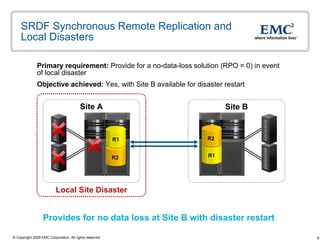
SRDF Synchronous Remote Replication and Local Disasters Primary requirement:  Provide for a no-data-loss solution (RPO = 0) in event of local disaster Objective achieved:  Yes, with Site B available for disaster restart  Site B Site A Provides for no data loss at Site B with disaster restart  Local Site Disaster R2 R1 R1 R2
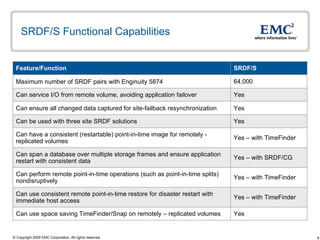
SRDF/S Functional Capabilities Yes – with TimeFinder Can use consistent remote point-in-time restore for disaster restart with immediate host access Yes – with SRDF/CG Can span a database over multiple storage frames and ensure application restart with consistent data  64,000 Maximum number of SRDF pairs with Enginuity 5874 Yes Can ensure all changed data captured for site-failback resynchronization Yes  Can use space saving TimeFinder/Snap on remotely – replicated volumes Yes – with TimeFinder Can perform remote point-in-time operations (such as point-in-time splits) nondisruptively Yes – with TimeFinder Can have a consistent (restartable) point-in-time image for remotely - replicated volumes Yes Can be used with three site SRDF solutions  Yes Can service I/O from remote volume, avoiding application failover SRDF/S Feature/Function
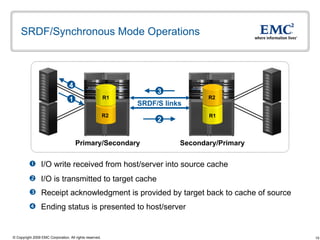
SRDF/Synchronous Mode Operations I/O write received from host/server into source cache I/O is transmitted to target cache Receipt acknowledgment is provided by target back to cache of source Ending status is presented to host/server SRDF/S links Primary/Secondary Secondary/Primary 1 4 2 3 R2 R1 R1 R2
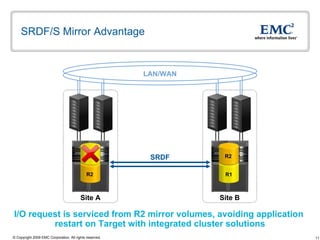
SRDF/S Mirror Advantage Site B Site A I/O request is serviced from R2 mirror volumes, avoiding application  restart on Target with integrated cluster solutions LAN/WAN SRDF R2 R1 R1 R2
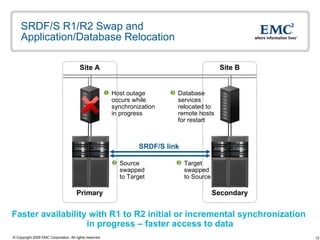
SRDF/S R1/R2 Swap and Application/Database Relocation Site A Site B Faster availability with R1 to R2 initial or incremental synchronization  in progress – faster access to data Source swapped to Target Target swapped to Source Database services relocated to remote hosts for restart Host outage occurs while synchronization in progress SRDF/S link Secondary Primary
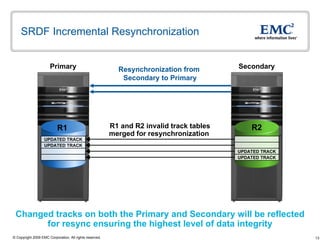
SRDF Incremental Resynchronization R1 and R2 invalid track tables merged for resynchronization  Changed tracks on both the Primary and Secondary will be reflected for resync ensuring the highest level of data integrity Resynchronization from  Secondary to Primary R1 UPDATED TRACK UPDATED TRACK Primary Secondary R1 R2 UPDATED TRACK UPDATED TRACK
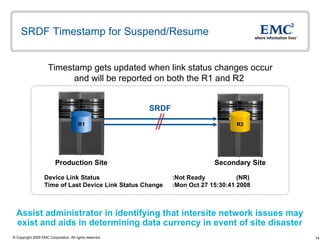
SRDF Timestamp for Suspend/Resume SRDF Device Link Status :Not Ready (NR)  Time of Last Device Link Status Change :Mon Oct 27 15:30:41 2008 Assist administrator in identifying that intersite network issues may exist and aids in determining data currency in event of site disaster Secondary Site Production Site Timestamp gets updated when link status changes occur and will be reported on both the R1 and R2  R2 R1
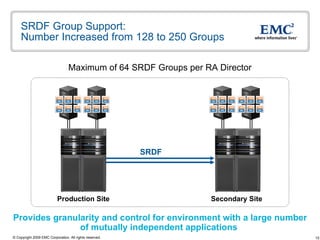
SRDF Group Support: Number Increased from 128 to 250 Groups Provides granularity and control for environment with a large number  of mutually independent applications  Maximum of 64 SRDF Groups per RA Director SRDF Secondary Site Production Site
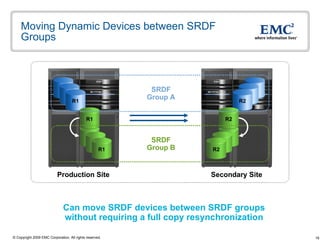
Moving Dynamic Devices between SRDF Groups SRDF Group A SRDF Group B Can move SRDF devices between SRDF groups without requiring a full copy resynchronization Production Site Secondary Site R1 R1 R1 R1 R1 R1 R1 R2 R2 R2 R2 R2 R2 R2
SRDF/S and SRDF/A Automated Restart  Automatic session restart is attempted if session failure is detected Based on preconfigured settings in the SRDF automated restart options file Control process that is initiated by a SymCLI command Available with Solutions Enabler  Runs as a background operations and monitors SRDF session Monitors SRDF/S and SRDF/A sessions Can be run manually from the command line Error logging and event notification also provided by options file Notification can be through email SRDF R2 restartable point-in-time volumes Can use TimeFinder/Clone  Can be run from either the SRDF Source or Target Symmetrix Must be run from the SRDF Source if concurrent SRDF Not currently supported on Cascaded SRDF and SRDF/EDP
Benefits and Advantages of SRDF/S No server resource contention for remote mirroring operation  CPUs, host memory, and host bus adapters Can perform restoration of primary site with minimal impact to application performance on remote site Resynchronization is from Symmetrix to Symmetrix  Supports a highly scalable environment Up to 64,000 SRDF pairs Enterprise disaster restart for mixed operating system environment Consistency technology applies across multiple-operating systems and across Symmetrix systems Cluster integration support for automated and semi-automated failover HP MetroCluster, Solaris Geographic Edition, and SRDF/CE for Microsoft Disaster restart integration with VMware and Hyper-V  SRDF with VMware vCenter Site Recovery Manager and support for Hyper-V with SRDF/CE for Microsoft
SRDF/A Overview Provides for minimal data-loss solution (RPO<1 minute) in event of local disaster  Recovery-time objective of less than one hour  Restart times are application dependent  Provide measurable and predictable data currency timeframes Software provides minimum time for SRDF/A Delta Sets Delta Set intervals can be as low as 1 second Host independent asynchronous remote mirroring solution No additional local host application latency for remote mirror operation Application response time not impacted by distance Integrated with UNIX and Windows open system cluster solutions Automated and semi-automated disaster restart Cluster design will determine restart methodology Overview
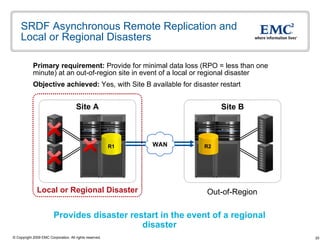
SRDF Asynchronous Remote Replication and Local or Regional Disasters Primary requirement:  Provide for minimal data loss (RPO = less than one minute) at an out-of-region site in event of a local or regional disaster Objective achieved:  Yes, with Site B available for disaster restart  Provides disaster restart in the event of a regional disaster Site B Site A Local or Regional Disaster Out-of-Region WAN R1 R2
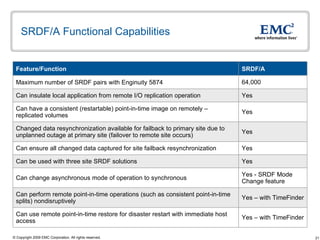
SRDF/A Functional Capabilities Yes Can be used with three site SRDF solutions  64,000 Maximum number of SRDF pairs with Enginuity 5874 Yes Changed data resynchronization available for failback to primary site due to unplanned outage at primary site (failover to remote site occurs) Yes - SRDF Mode Change feature Can change asynchronous mode of operation to synchronous Yes Can have a consistent (restartable) point-in-time image on remotely –  replicated volumes Yes – with TimeFinder Can perform remote point-in-time operations (such as consistent point-in-time splits) nondisruptively Yes – with TimeFinder Can use remote point-in-time restore for disaster restart with immediate host access Yes Can ensure all changed data captured for site failback resynchronization Yes Can insulate local application from remote I/O replication operation SRDF/A Feature/Function
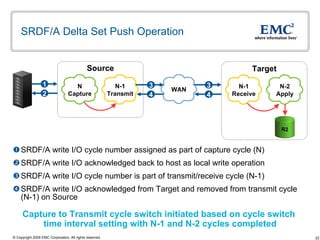
SRDF/A Delta Set Push Operation  SRDF/A write I/O cycle number assigned as part of capture cycle (N) SRDF/A write I/O acknowledged back to host as local write operation  SRDF/A write I/O cycle number is part of transmit/receive cycle (N-1) SRDF/A write I/O acknowledged from Target and removed from transmit cycle (N-1) on Source Capture to Transmit cycle switch initiated based on cycle switch  time interval setting with N-1 and N-2 cycles completed Source Target 2 1 4 3 N-1 Transmit N Capture WAN N-2 Apply 4 3 N-1 Receive R2 WAN
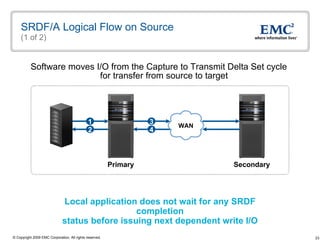
SRDF/A Logical Flow on Source (1 of 2) Software moves I/O from the Capture to Transmit Delta Set cycle  for transfer from source to target Local application does not wait for any SRDF completion status before issuing next dependent write I/O Secondary Primary 4 3 2 1 WAN
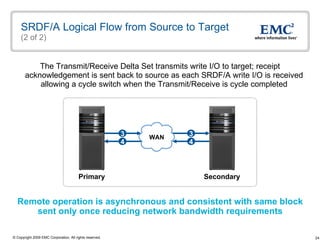
SRDF/A Logical Flow from Source to Target  (2 of 2) The Transmit/Receive Delta Set transmits write I/O to target; receipt acknowledgement is sent back to source as each SRDF/A write I/O is received allowing a cycle switch when the Transmit/Receive is cycle completed Remote operation is asynchronous and consistent with same block  sent only once reducing network bandwidth requirements Secondary Primary 4 3 4 3 WAN
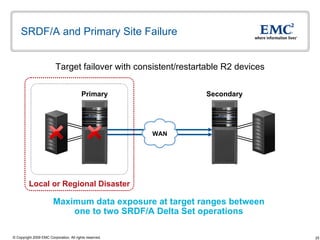
SRDF/A and Primary Site Failure Target failover with consistent/restartable R2 devices Maximum data exposure at target ranges between  one to two SRDF/A Delta Set operations  Local or Regional Disaster Secondary Primary WAN
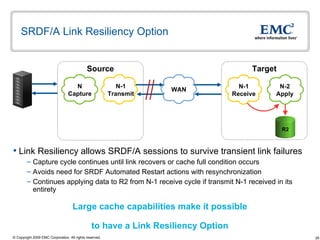
SRDF/A Link Resiliency Option Target Source N-1 Receive N-2 Apply N Capture N-1 Transmit Link Resiliency allows SRDF/A sessions to survive transient link failures Capture cycle continues until link recovers or cache full condition occurs Avoids need for SRDF Automated Restart actions with resynchronization Continues applying data to R2 from N-1 receive cycle if transmit N-1 received in its entirety Large cache capabilities make it possible  to have a Link Resiliency Option R2 WAN
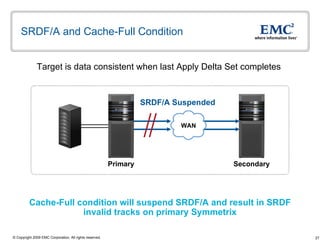
SRDF/A and Cache-Full Condition Target is data consistent when last Apply Delta Set completes  Cache-Full condition will suspend SRDF/A and result in SRDF invalid tracks on primary Symmetrix SRDF/A Suspended Secondary Primary WAN
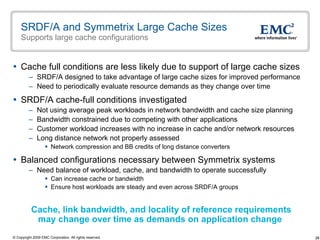
SRDF/A and Symmetrix Large Cache Sizes Supports large cache configurations Cache full conditions are less likely due to support of large cache sizes SRDF/A designed to take advantage of large cache sizes for improved performance Need to periodically evaluate resource demands as they change over time  SRDF/A cache-full conditions investigated Not using average peak workloads in network bandwidth and cache size planning Bandwidth constrained due to competing with other applications Customer workload increases with no increase in cache and/or network resources Long distance network not properly assessed Network compression and BB credits of long distance converters Balanced configurations necessary between Symmetrix systems  Need balance of workload, cache, and bandwidth to operate successfully Can increase cache or bandwidth  Ensure host workloads are steady and even across SRDF/A groups Cache, link bandwidth, and locality of reference requirements  may change over time as demands on application change
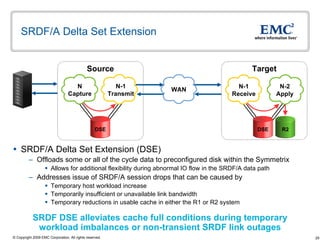
SRDF/A Delta Set Extension  SRDF/A Delta Set Extension (DSE) Offloads some or all of the cycle data to preconfigured disk within the Symmetrix  Allows for additional flexibility during abnormal IO flow in the SRDF/A data path Addresses issue of SRDF/A session drops that can be caused by Temporary host workload increase  Temporarily insufficient or unavailable link bandwidth  Temporary reductions in usable cache in either the R1 or R2 system Target Source N-1 Receive R2 N-2 Apply N Capture N-1 Transmit DSE DSE WAN SRDF DSE alleviates cache full conditions during temporary  workload imbalances or non-transient SRDF link outages
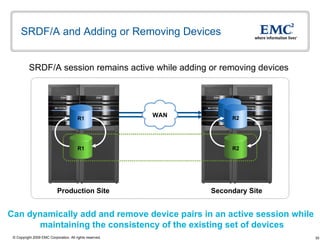
SRDF/A and Adding or Removing Devices SRDF/A session remains active while adding or removing devices  Production Site Secondary Site R1 R1 R2 R2 Can dynamically add and remove device pairs in an active session while  maintaining the consistency of the existing set of devices WAN R2
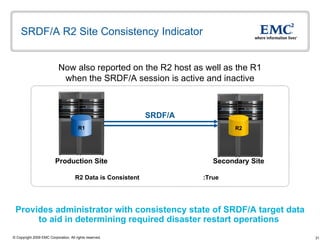
SRDF/A R2 Site Consistency Indicator SRDF/A R2 Data is Consistent :True Production Site Secondary Site Provides administrator with consistency state of SRDF/A target data to aid in determining required disaster restart operations  Now also reported on the R2 host as well as the R1 when the SRDF/A session is active and inactive R1 R2
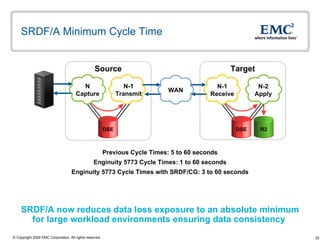
SRDF/A Minimum Cycle Time  SRDF/A now reduces data loss exposure to an absolute minimum  for large workload environments ensuring data consistency  Previous Cycle Times: 5 to 60 seconds Enginuity 5773 Cycle Times: 1 to 60 seconds Enginuity 5773 Cycle Times with SRDF/CG: 3 to 60 seconds Target Source N-1 Receive N-2 Apply N Capture N-1 Transmit R2 DSE DSE WAN
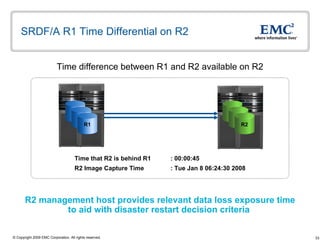
SRDF/A R1 Time Differential on R2  Time difference between R1 and R2 available on R2 R2 management host provides relevant data loss exposure time  to aid with disaster restart decision criteria  Time that R2 is behind R1 : 00:00:45 R2 Image Capture Time : Tue Jan 8 06:24:30 2008 R1 R1 R1 R2 R2 R2
SRDF Compression in Enginuity  Enginuity based SRDF compression, independent of remote adapter hardware and protocol (Fiber Channel or GigE) Supported for use with SRDF/S, SRDF/A, and SRDF/DM  Enabled or disabled at the SRDF group level SRDF primary and secondary Symmetrix systems must be at Enginuity 5874 Q4 SR or higher Reduces intersite network costs associated with SRDF replication  Requires less bandwidth making additional network bandwidth available to other applications New
Benefits and Advantages of SRDF/A SRDF/A predefined timed cycles allow for measurable and predictable data currency timeframes  Provides for a known data timeframe for disaster restart Can be used concurrently with SRDF/S to meet customer requirements of providing for out of region disaster recovery  Changed track resynchronization provided if failover to either site due to a failure or fault event  Supports a highly scalable environment Up to 64,000 SRDF pairs Enginuity based SRDF compression for reduced costs  Requires less bandwidth making additional network bandwidth available to other applications Cluster integration support for automated and semi-automated failover HP MetroCluster, Solaris Geographic Edition, and SRDF/CE for Microsoft Disaster restart integration with VMware and Hyper-V  SRDF with VMware vCenter Site Recovery Manager and support for Hyper-V with SRDF/CE for Microsoft
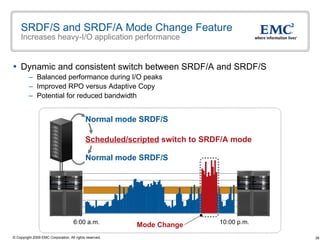
SRDF/S and SRDF/A Mode Change Feature Increases heavy-I/O application performance Dynamic and consistent switch between SRDF/A and SRDF/S Balanced performance during I/O peaks Improved RPO versus Adaptive Copy  Potential for reduced bandwidth Scheduled/scripted  switch to SRDF/A mode Normal mode SRDF/S Normal mode SRDF/S 10:00 p.m. 6:00 a.m. Mode Change
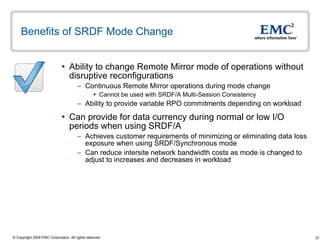
Benefits of SRDF Mode Change Ability to change Remote Mirror mode of operations without disruptive reconfigurations Continuous Remote Mirror operations during mode change Cannot be used with SRDF/A Multi-Session Consistency Ability to provide variable RPO commitments depending on workload  Can provide for data currency during normal or low I/O periods when using SRDF/A Achieves customer requirements of minimizing or eliminating data loss exposure when using SRDF/Synchronous mode Can reduce intersite network bandwidth costs as mode is changed to adjust to increases and decreases in workload
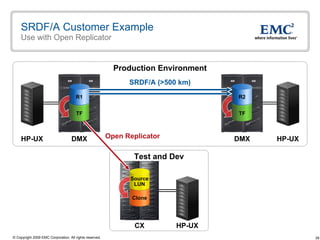
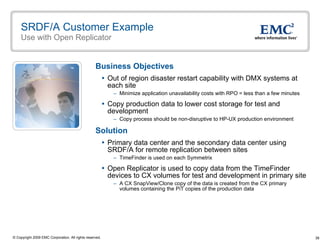
SRDF/A Customer Example Use with Open Replicator Business Objectives Out of region disaster restart capability with DMX systems at each site Minimize application unavailability costs with RPO = less than a few minutes  Copy production data to lower cost storage for test and development Copy process should be non-disruptive to HP-UX production environment Solution Primary data center and the secondary data center using SRDF/A for remote replication between sites TimeFinder is used on each Symmetrix  Open Replicator is used to copy data from the TimeFinder devices to CX volumes for test and development in primary site A CX SnapView/Clone copy of the data is created from the CX primary volumes containing the PiT copies of the production data
SRDF/A Customer Example Use with Open Replicator DMX HP-UX DMX HP-UX SRDF/A (>500 km) Production Environment Test and Dev CX HP-UX Open Replicator Clone Source LUN TF R2 TF R1
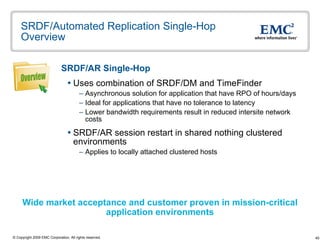
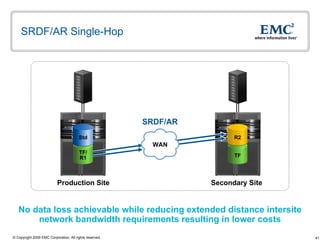
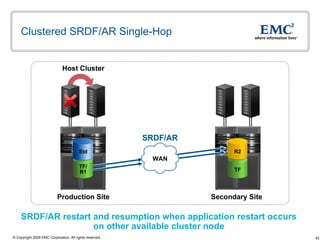
SRDF/Automated Replication Single-Hop Overview SRDF/AR Single-Hop   Uses combination of SRDF/DM and TimeFinder Asynchronous solution for application that have RPO of hours/days  Ideal for applications that have no tolerance to latency Lower bandwidth requirements result in reduced intersite network costs SRDF/AR session restart in shared nothing clustered environments Applies to locally attached clustered hosts  Wide market acceptance and customer proven in mission-critical  application environments Overview
SRDF/AR Single-Hop  No data loss achievable while reducing extended distance intersite network bandwidth requirements resulting in lower costs SRDF/AR Secondary Site Production Site TF R2 WAN TF/ R1 Std
Clustered SRDF/AR Single-Hop SRDF/AR restart and resumption when application restart occurs  on other available cluster node  Host Cluster SRDF/AR Secondary Site Production Site TF R2 WAN TF/ R1 Std
SRDF/AR Single-Hop Benefits  Allows for asynchronous mirroring operation to secondary site  Single-Hop mirroring operation performed independent of real-time processing No application response time impact to production host Secondary site may be deployed at out-of-region location for disaster recovery operations Most beneficial when Recovery Point Objective is hours/days vs. seconds/minutes Single-hop mirroring operation for changed tracks only  Symmetrix maintains invalid track information, reducing resynchronization time Also reduces intersite network bandwidth requirements resulting in lower costs  Consistent point-in-time TimeFinder devices at out-of-region site ready to provide a restore operation if necessary Allows for immediate host access while the restore occurs from the remote Clone to the R2 volume Reduced intersite network costs and possible no data loss solution
SRDF/Consistency Groups Overview Preserves dependent-write consistency of devices  Ensures application dependent write consistency of the application data remotely mirrored by SRDF operations in the event of a rolling disaster Across multiple Symmetrix systems and/or multiple SRDF groups within a Symmetrix system A composite group comprised of SRDF R1 or R2 devices Configured to act in unison to maintain the integrity of a database or application distributed across Symmetrix systems  Included with SRDF/S and SRDF/A SRDF/S using Enginuity Consistency Assist (ECA) SRDF/A using Multi Session Consistency (MSC) Ensures dependent-write consistency of the data remotely mirrored by SRDF  Overview
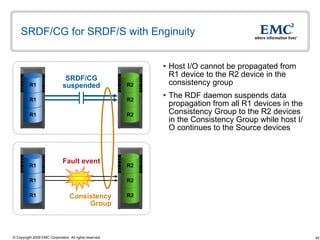
SRDF/CG for SRDF/S with Enginuity Host I/O cannot be propagated from R1 device to the R2 device in the consistency group The RDF daemon suspends data propagation from all R1 devices in the Consistency Group to the R2 devices in the Consistency Group while host I/O continues to the Source devices Consistency  Group  SRDF/CG suspended Fault event R2 R2 R2 R1 R1 R1 R2 R2 R2 R1 R1 R1
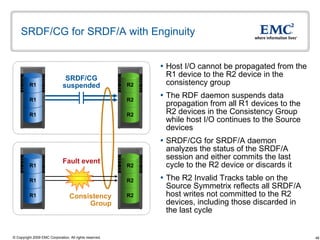
SRDF/CG for SRDF/A with Enginuity Host I/O cannot be propagated from the R1 device to the R2 device in the consistency group The RDF daemon suspends data propagation from all R1 devices to the R2 devices in the Consistency Group while host I/O continues to the Source devices SRDF/CG for SRDF/A daemon analyzes the status of the SRDF/A session and either commits the last cycle to the R2 device or discards it The R2 Invalid Tracks table on the Source Symmetrix reflects all SRDF/A host writes not committed to the R2 devices, including those discarded in the last cycle Consistency  Group  SRDF/CG suspended Fault event R1 R1 R1 R2 R2 R2 R1 R1 R1 R2 R2 R2
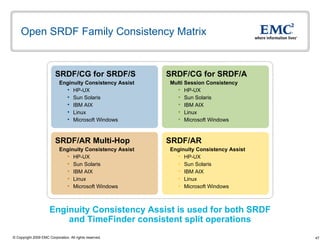
Open SRDF Family Consistency Matrix Enginuity Consistency Assist is used for both SRDF and TimeFinder consistent split operations SRDF/CG for SRDF/S Enginuity Consistency Assist HP-UX Sun Solaris IBM AIX Linux Microsoft Windows SRDF/AR Multi-Hop Enginuity Consistency Assist HP-UX Sun Solaris IBM AIX Linux Microsoft Windows SRDF/CG for SRDF/A Multi Session Consistency HP-UX Sun Solaris IBM AIX Linux Microsoft Windows SRDF/AR Enginuity Consistency Assist  HP-UX Sun Solaris IBM AIX Linux Microsoft Windows
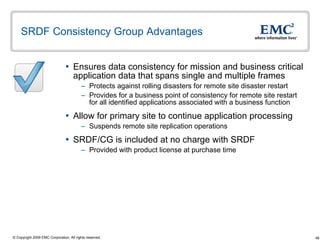
SRDF Consistency Group Advantages  Ensures data consistency for mission and business critical application data that spans single and multiple frames Protects against rolling disasters for remote site disaster restart Provides for a business point of consistency for remote site restart for all identified applications associated with a business function Allow for primary site to continue application processing  Suspends remote site replication operations  SRDF/CG is included at no charge with SRDF Provided with product license at purchase time
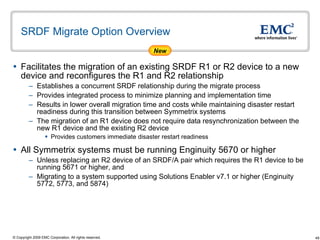
SRDF Migrate Option Overview Facilitates the migration of an existing SRDF R1 or R2 device to a new device and reconfigures the R1 and R2 relationship Establishes a concurrent SRDF relationship during the migrate process  Provides integrated process to minimize planning and implementation time  Results in lower overall migration time and costs while maintaining disaster restart readiness during this transition between Symmetrix systems The migration of an R1 device does not require data resynchronization between the new R1 device and the existing R2 device  Provides customers immediate disaster restart readiness All Symmetrix systems must be running Enginuity 5670 or higher Unless replacing an R2 device of an SRDF/A pair which requires the R1 device to be running 5671 or higher, and  Migrating to a system supported using Solutions Enabler v7.1 or higher (Enginuity 5772, 5773, and 5874) New
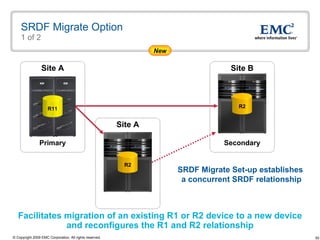
SRDF Migrate Option 1 of 2 Site A Site A Primary Secondary Facilitates migration of an existing R1 or R2 device to a new device and reconfigures the R1 and R2 relationship SRDF Migrate Set-up establishes  a concurrent SRDF relationship New Site B R11 R2 R2
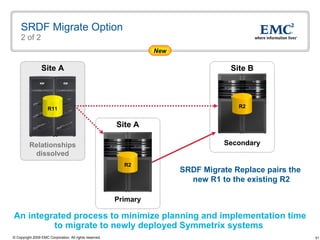
SRDF Migrate Option 2 of 2 Site A SRDF Migrate Replace pairs the  new R1 to the existing R2 An integrated process to minimize planning and implementation time to migrate to newly deployed Symmetrix systems  New Site A Primary Secondary Site B Relationships dissolved R11 R2 R2
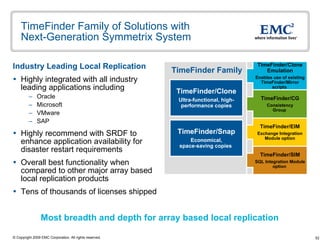
TimeFinder Family of Solutions with  Next-Generation Symmetrix System Industry Leading Local Replication Highly integrated with all industry leading applications including Oracle  Microsoft  VMware  SAP Highly recommend with SRDF to enhance application availability for disaster restart requirements Overall best functionality when compared to other major array based local replication products  Tens of thousands of licenses shipped  Most breadth and depth for array based local replication TimeFinder Family TimeFinder/Clone Emulation Enables use of existing TimeFinder/Mirror   scripts  TimeFinder/EIM Exchange Integration Module option TimeFinder/CG Consistency Group   TimeFinder/SIM SQL Integration Module option   TimeFinder/Clone Ultra-functional, high-performance copies TimeFinder/Snap Economical, space-saving copies
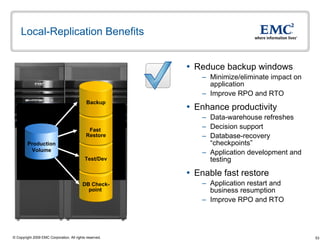
Local-Replication Benefits Reduce backup windows  Minimize/eliminate impact on application  Improve RPO and RTO  Enhance productivity  Data-warehouse refreshes Decision support Database-recovery “checkpoints”  Application development and testing Enable fast restore Application restart and business resumption Improve RPO and RTO DB Check- point  Test/Dev Fast  Restore Backup Production Volume
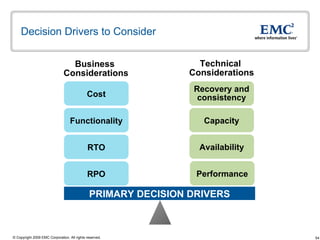
Decision Drivers to Consider RPO PRIMARY DECISION DRIVERS Business  Considerations Technical  Considerations Cost RTO Performance Availability Capacity Recovery and consistency Functionality
TimeFinder/Mirror and Enginuity 5874 TimeFinder/Mirror will not be orderable with the Next Generation Symmetrix system with Enginuity 5874  Customers can continue using their TimeFinder/Mirror scripts  Enabled by TimeFinder/Clone emulation provided with TimeFinder/Clone license Provides investment protection for existing TimeFinder/Mirror scripts More customer are deploying TimeFinder/Clone and TimeFinder/Snap Ability to provide protection of PiT operations with Raid-1, RAID-5, and RAID-6 Advanced SRDF solutions require use of TimeFinder/Clone and/or TimeFinder/Snap  Recently announced enhancements for TimeFinder/Clone and TimeFinder/Snap Cascaded TimeFinder/Clone Remote TimeFinder/Clone to SRDF R1 Restore TimeFinder/Clone control commands and copy operations performance and scalability improvements  Support for up to 128 TimeFinder/Snap devices per standard device TimeFinder/Snap with No Write Penalty
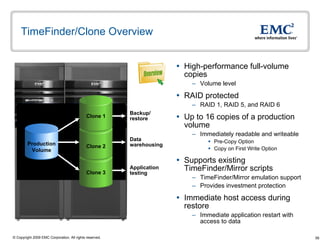
TimeFinder/Clone Overview High-performance full-volume copies Volume level RAID protected RAID 1, RAID 5, and RAID 6 Up to 16 copies of a production volume Immediately readable and writeable Pre-Copy Option  Copy on First Write Option Supports existing TimeFinder/Mirror scripts TimeFinder/Mirror emulation support Provides investment protection Immediate host access during restore  Immediate application restart with access to data  Backup/ restore Data warehousing Application testing Production Volume Clone 3 Clone 2 Clone 1 Overview
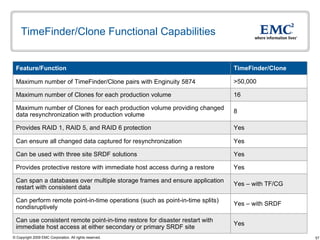
TimeFinder/Clone Functional Capabilities 16 Maximum number of Clones for each production volume 8 Maximum number of Clones for each production volume providing changed data resynchronization with production volume Yes  Can use consistent remote point-in-time restore for disaster restart with immediate host access at either secondary or primary SRDF site Yes – with TF/CG Can span a databases over multiple storage frames and ensure application restart with consistent data  >50,000 Maximum number of TimeFinder/Clone pairs with Enginuity 5874 Yes Can ensure all changed data captured for resynchronization Yes – with SRDF Can perform remote point-in-time operations (such as point-in-time splits) nondisruptively Yes  Provides protective restore with immediate host access during a restore  Yes Can be used with three site SRDF solutions  Yes Provides RAID 1, RAID 5, and RAID 6 protection  TimeFinder/Clone Feature/Function
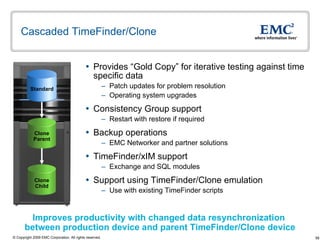
Cascaded TimeFinder/Clone  Provides “Gold Copy” for iterative testing against time specific data Patch updates for problem resolution Operating system upgrades Consistency Group support  Restart with restore if required  Backup operations EMC Networker and partner solutions TimeFinder/xIM support Exchange and SQL modules Support using TimeFinder/Clone emulation Use with existing TimeFinder scripts Improves productivity with changed data resynchronization  between production device and parent TimeFinder/Clone device Clone Parent Clone Child Standard
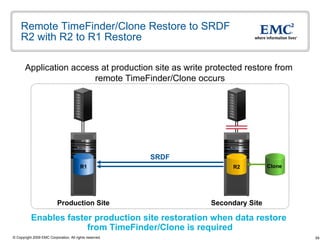
Remote TimeFinder/Clone Restore to SRDF R2 with R2 to R1 Restore Application access at production site as write protected restore from  remote TimeFinder/Clone occurs Enables faster production site restoration when data restore  from TimeFinder/Clone is required Secondary Site Production Site SRDF R1 R2 Clone
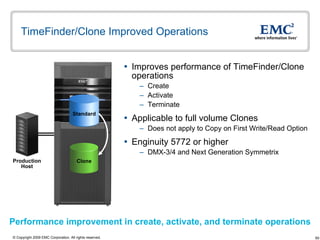
TimeFinder/Clone Improved Operations Improves performance of TimeFinder/Clone operations Create Activate Terminate Applicable to full volume Clones Does not apply to Copy on First Write/Read Option Enginuity 5772 or higher DMX-3/4 and Next Generation Symmetrix Production Host Performance improvement in create, activate, and terminate operations Clone Standard
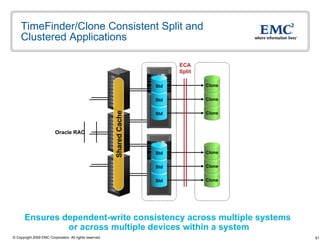
TimeFinder/Clone Consistent Split and Clustered Applications Ensures dependent-write consistency across multiple systems  or across multiple devices within a system Oracle RAC Shared Cache Std Std Std Clone Clone Clone Std Std Std Clone Clone Clone ECA Split
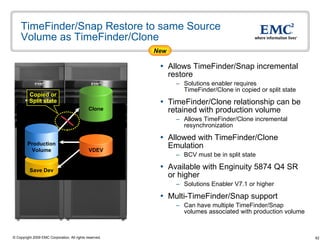
TimeFinder/Snap Restore to same Source Volume as TimeFinder/Clone  Allows TimeFinder/Snap incremental restore Solutions enabler requires TimeFinder/Clone in copied or split state TimeFinder/Clone relationship can be retained with production volume Allows TimeFinder/Clone incremental resynchronization  Allowed with TimeFinder/Clone Emulation  BCV must be in split state Available with Enginuity 5874 Q4 SR or higher  Solutions Enabler V7.1 or higher  Multi-TimeFinder/Snap support Can have multiple TimeFinder/Snap volumes associated with production volume Clone Copied or Split state New Save Dev VDEV Production Volume
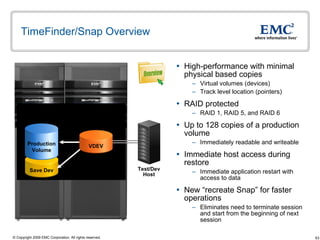
TimeFinder/Snap Overview High-performance with minimal physical based copies Virtual volumes (devices) Track level location (pointers) RAID protected RAID 1, RAID 5, and RAID 6 Up to 128 copies of a production volume Immediately readable and writeable Immediate host access during restore  Immediate application restart with access to data New “recreate Snap” for faster operations Eliminates need to terminate session and start from the beginning of next session Test/Dev Host Overview Save Dev Production Volume VDEV
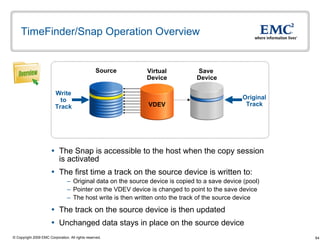
TimeFinder/Snap Operation Overview The Snap is accessible to the host when the copy session is activated The first time a track on the source device is written to:  Original data on the source device is copied to a save device (pool)  Pointer on the VDEV device is changed to point to the save device The host write is then written onto the track of the source device The track on the source device is then updated  Unchanged data stays in place on the source device Source Save  Device Write to Track Virtual Device Original Track Overview VDEV
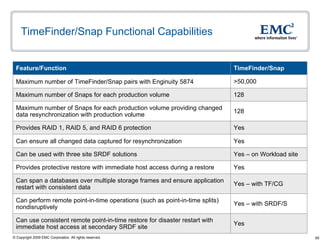
TimeFinder/Snap Functional Capabilities 128 Maximum number of Snaps for each production volume 128 Maximum number of Snaps for each production volume providing changed data resynchronization with production volume Yes  Can use consistent remote point-in-time restore for disaster restart with immediate host access at secondary SRDF site Yes – with TF/CG Can span a databases over multiple storage frames and ensure application restart with consistent data  >50,000 Maximum number of TimeFinder/Snap pairs with Enginuity 5874 Yes Can ensure all changed data captured for resynchronization Yes – with SRDF/S Can perform remote point-in-time operations (such as point-in-time splits) nondisruptively Yes  Provides protective restore with immediate host access during a restore  Yes – on Workload site Can be used with three site SRDF solutions  Yes Provides RAID 1, RAID 5, and RAID 6 protection  TimeFinder/Snap Feature/Function
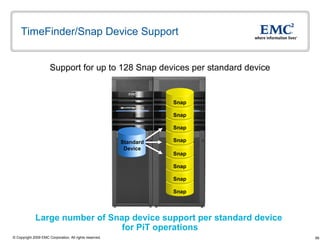
TimeFinder/Snap Device Support Large number of Snap device support per standard device  for PiT operations Support for up to 128 Snap devices per standard device Snap Snap Snap Snap Snap Snap Snap Snap Standard Device
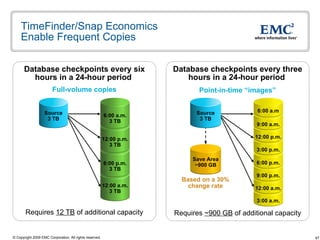
TimeFinder/Snap Economics  Enable Frequent Copies 12:00 p.m. 9:00 a.m. 6:00 a.m Based on a 30% change rate Database checkpoints every three hours in a 24-hour period   Point-in-time “images” Requires  ~900 GB  of additional capacity 3:00 a.m. 12:00 a.m. 9:00 p.m. 6:00 p.m. 3:00 p.m. Full-volume copies Database checkpoints every six hours in a 24-hour period  Requires  12 TB  of additional capacity Source 3 TB 12:00 a.m. 3 TB 6:00 p.m. 3 TB 12:00 p.m. 3 TB 6:00 a.m. 3 TB Source 3 TB Save Area ~900 GB
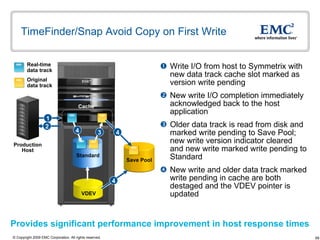
TimeFinder/Snap Avoid Copy on First Write Write I/O from host to Symmetrix with new data track cache slot marked as version write pending  New write I/O completion immediately acknowledged back to the host application Older data track is read from disk and marked write pending to Save Pool; new write version indicator cleared and new write marked write pending to Standard  New write and older data track marked write pending in cache are both destaged and the VDEV pointer is updated  Provides significant performance improvement in host response times Real-time data track Original data track Production Host Cache 3 1 2 4 4 4 Standard Save Pool VDEV
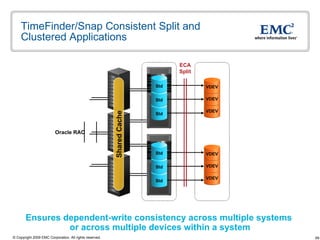
TimeFinder/Snap Consistent Split and Clustered Applications Ensures dependent-write consistency across multiple systems  or across multiple devices within a system Oracle RAC Shared Cache ECA Split Std Std Std Std Std Std VDEV VDEV VDEV VDEV VDEV VDEV
TimeFinder Family Advantages  Restore allows host application I/O access Application access available while restore operation in progress TimeFinder/Clone can support up to 16 volumes per standard volume Incremental resynchronization for up to 8 Clones for time-sensitive operations TimeFinder/Snap can support up to 128 volumes per standard volume Iterative Snap copies for time-sensitive or frequent operations Provides protected restore to preserve PiT volume contents Guards against possible data corruption during restore operation TimeFinder/Snap for point in time using less disk space Saves on disk capacity and energy usage  TF/Consistency Groups can span multiple Symmetrix frames Ensures dependent-write consistency across multiple systems or across multiple devices within a system
 

Time finder

  • 1.
    EMC SRDF andTimeFinder on Symmetrix with Open Systems
  • 2.
    Agenda SRDF IntroductionSRDF Overview SRDF/S and SRDF/A SRDF/AR Single-Hop SRDF Consistency Groups SRDF Migrate Option TimeFinder Introduction TimeFinder Overview Update on TimeFinder/Mirror TimeFinder/Clone TimeFinder/Snap
  • 3.
    Remote-Replication Benefits Protectagainst local and regional site disruptions Continuous data availability Multiple remote-recovery sites Meet regulatory requirements Support multiple service levels with tiered storage Migrate, consolidate or distribute data across storage platforms Data center consolidations Technology refreshes Enable fast recovery Application restart Business resumption
  • 4.
    Decision Drivers toConsider Recovery-Point Objectives PRIMARY DECISION DRIVERS Business Considerations Technical Considerations Cost Recovery-Time Objectives Performance Bandwidth Capacity Recovery and Consistency Functionality, Availability
  • 5.
    Symmetrix Remote DataFacility (SRDF) Family Industry-leading remote replication Protects against local and regional disruptions Increases application availability by reducing downtime Minimizes/eliminates performance impact on applications and hosts Independent of hosts and operating systems, applications, and databases Improves RPOs and RTOs with automated restart solutions Mission critical proven with numerous testimonials and references Tens of thousands of licenses shipped SRDF Family SRDF/Star Multi-site replication option SRDF/AR Automated Replication option SRDF/CE Cluster Enabler option SRDF/CG Consistency Groups SRDF/S Synchronous for zero data exposure SRDF/A Asynchronous for extended distances SRDF/DM Efficient Symmetrix-to-Symmetrix data mobility Cascaded SRDF and SRDF/EDP Extended Distance Protection Concurrent SRDF Concurrent EMC offers choice and flexibility to meet any service-level requirement
  • 6.
    SRDF – MostWidely Deployed Disaster Restart Solution Disk mirror in real time between Symmetrix systems Primary (R1) to secondary (R2) architecture Supports bi-directional remote mirror operations Independent of hosts, OS, applications, and databases SRDF links Primary/Secondary Secondary/Primary R2 R1 R1 R2
  • 7.
    SRDF/S Overview Providesfor a no-data-loss solution (RPO = 0) in event of local or regional disaster Recovery-time objective of less than one hour Restart times are application dependent Is a foundation for advanced SRDF solutions Single source volume mirroring to a multiple SRDF target volume Can be concurrent SRDF/S or in combination with SRDF/A for available 3-Site solutions Integrated with UNIX and Windows open system cluster solutions Automated and semi-automated disaster restart Cluster design will determine restart methodology Overview
  • 8.
    SRDF Synchronous RemoteReplication and Local Disasters Primary requirement: Provide for a no-data-loss solution (RPO = 0) in event of local disaster Objective achieved: Yes, with Site B available for disaster restart Site B Site A Provides for no data loss at Site B with disaster restart Local Site Disaster R2 R1 R1 R2
  • 9.
    SRDF/S Functional CapabilitiesYes – with TimeFinder Can use consistent remote point-in-time restore for disaster restart with immediate host access Yes – with SRDF/CG Can span a database over multiple storage frames and ensure application restart with consistent data 64,000 Maximum number of SRDF pairs with Enginuity 5874 Yes Can ensure all changed data captured for site-failback resynchronization Yes Can use space saving TimeFinder/Snap on remotely – replicated volumes Yes – with TimeFinder Can perform remote point-in-time operations (such as point-in-time splits) nondisruptively Yes – with TimeFinder Can have a consistent (restartable) point-in-time image for remotely - replicated volumes Yes Can be used with three site SRDF solutions Yes Can service I/O from remote volume, avoiding application failover SRDF/S Feature/Function
  • 10.
    SRDF/Synchronous Mode OperationsI/O write received from host/server into source cache I/O is transmitted to target cache Receipt acknowledgment is provided by target back to cache of source Ending status is presented to host/server SRDF/S links Primary/Secondary Secondary/Primary 1 4 2 3 R2 R1 R1 R2
  • 11.
    SRDF/S Mirror AdvantageSite B Site A I/O request is serviced from R2 mirror volumes, avoiding application restart on Target with integrated cluster solutions LAN/WAN SRDF R2 R1 R1 R2
  • 12.
    SRDF/S R1/R2 Swapand Application/Database Relocation Site A Site B Faster availability with R1 to R2 initial or incremental synchronization in progress – faster access to data Source swapped to Target Target swapped to Source Database services relocated to remote hosts for restart Host outage occurs while synchronization in progress SRDF/S link Secondary Primary
  • 13.
    SRDF Incremental ResynchronizationR1 and R2 invalid track tables merged for resynchronization Changed tracks on both the Primary and Secondary will be reflected for resync ensuring the highest level of data integrity Resynchronization from Secondary to Primary R1 UPDATED TRACK UPDATED TRACK Primary Secondary R1 R2 UPDATED TRACK UPDATED TRACK
  • 14.
    SRDF Timestamp forSuspend/Resume SRDF Device Link Status :Not Ready (NR) Time of Last Device Link Status Change :Mon Oct 27 15:30:41 2008 Assist administrator in identifying that intersite network issues may exist and aids in determining data currency in event of site disaster Secondary Site Production Site Timestamp gets updated when link status changes occur and will be reported on both the R1 and R2 R2 R1
  • 15.
    SRDF Group Support:Number Increased from 128 to 250 Groups Provides granularity and control for environment with a large number of mutually independent applications Maximum of 64 SRDF Groups per RA Director SRDF Secondary Site Production Site
  • 16.
    Moving Dynamic Devicesbetween SRDF Groups SRDF Group A SRDF Group B Can move SRDF devices between SRDF groups without requiring a full copy resynchronization Production Site Secondary Site R1 R1 R1 R1 R1 R1 R1 R2 R2 R2 R2 R2 R2 R2
  • 17.
    SRDF/S and SRDF/AAutomated Restart Automatic session restart is attempted if session failure is detected Based on preconfigured settings in the SRDF automated restart options file Control process that is initiated by a SymCLI command Available with Solutions Enabler Runs as a background operations and monitors SRDF session Monitors SRDF/S and SRDF/A sessions Can be run manually from the command line Error logging and event notification also provided by options file Notification can be through email SRDF R2 restartable point-in-time volumes Can use TimeFinder/Clone Can be run from either the SRDF Source or Target Symmetrix Must be run from the SRDF Source if concurrent SRDF Not currently supported on Cascaded SRDF and SRDF/EDP
  • 18.
    Benefits and Advantagesof SRDF/S No server resource contention for remote mirroring operation CPUs, host memory, and host bus adapters Can perform restoration of primary site with minimal impact to application performance on remote site Resynchronization is from Symmetrix to Symmetrix Supports a highly scalable environment Up to 64,000 SRDF pairs Enterprise disaster restart for mixed operating system environment Consistency technology applies across multiple-operating systems and across Symmetrix systems Cluster integration support for automated and semi-automated failover HP MetroCluster, Solaris Geographic Edition, and SRDF/CE for Microsoft Disaster restart integration with VMware and Hyper-V SRDF with VMware vCenter Site Recovery Manager and support for Hyper-V with SRDF/CE for Microsoft
  • 19.
    SRDF/A Overview Providesfor minimal data-loss solution (RPO<1 minute) in event of local disaster Recovery-time objective of less than one hour Restart times are application dependent Provide measurable and predictable data currency timeframes Software provides minimum time for SRDF/A Delta Sets Delta Set intervals can be as low as 1 second Host independent asynchronous remote mirroring solution No additional local host application latency for remote mirror operation Application response time not impacted by distance Integrated with UNIX and Windows open system cluster solutions Automated and semi-automated disaster restart Cluster design will determine restart methodology Overview
  • 20.
    SRDF Asynchronous RemoteReplication and Local or Regional Disasters Primary requirement: Provide for minimal data loss (RPO = less than one minute) at an out-of-region site in event of a local or regional disaster Objective achieved: Yes, with Site B available for disaster restart Provides disaster restart in the event of a regional disaster Site B Site A Local or Regional Disaster Out-of-Region WAN R1 R2
  • 21.
    SRDF/A Functional CapabilitiesYes Can be used with three site SRDF solutions 64,000 Maximum number of SRDF pairs with Enginuity 5874 Yes Changed data resynchronization available for failback to primary site due to unplanned outage at primary site (failover to remote site occurs) Yes - SRDF Mode Change feature Can change asynchronous mode of operation to synchronous Yes Can have a consistent (restartable) point-in-time image on remotely – replicated volumes Yes – with TimeFinder Can perform remote point-in-time operations (such as consistent point-in-time splits) nondisruptively Yes – with TimeFinder Can use remote point-in-time restore for disaster restart with immediate host access Yes Can ensure all changed data captured for site failback resynchronization Yes Can insulate local application from remote I/O replication operation SRDF/A Feature/Function
  • 22.
    SRDF/A Delta SetPush Operation SRDF/A write I/O cycle number assigned as part of capture cycle (N) SRDF/A write I/O acknowledged back to host as local write operation SRDF/A write I/O cycle number is part of transmit/receive cycle (N-1) SRDF/A write I/O acknowledged from Target and removed from transmit cycle (N-1) on Source Capture to Transmit cycle switch initiated based on cycle switch time interval setting with N-1 and N-2 cycles completed Source Target 2 1 4 3 N-1 Transmit N Capture WAN N-2 Apply 4 3 N-1 Receive R2 WAN
  • 23.
    SRDF/A Logical Flowon Source (1 of 2) Software moves I/O from the Capture to Transmit Delta Set cycle for transfer from source to target Local application does not wait for any SRDF completion status before issuing next dependent write I/O Secondary Primary 4 3 2 1 WAN
  • 24.
    SRDF/A Logical Flowfrom Source to Target (2 of 2) The Transmit/Receive Delta Set transmits write I/O to target; receipt acknowledgement is sent back to source as each SRDF/A write I/O is received allowing a cycle switch when the Transmit/Receive is cycle completed Remote operation is asynchronous and consistent with same block sent only once reducing network bandwidth requirements Secondary Primary 4 3 4 3 WAN
  • 25.
    SRDF/A and PrimarySite Failure Target failover with consistent/restartable R2 devices Maximum data exposure at target ranges between one to two SRDF/A Delta Set operations Local or Regional Disaster Secondary Primary WAN
  • 26.
    SRDF/A Link ResiliencyOption Target Source N-1 Receive N-2 Apply N Capture N-1 Transmit Link Resiliency allows SRDF/A sessions to survive transient link failures Capture cycle continues until link recovers or cache full condition occurs Avoids need for SRDF Automated Restart actions with resynchronization Continues applying data to R2 from N-1 receive cycle if transmit N-1 received in its entirety Large cache capabilities make it possible to have a Link Resiliency Option R2 WAN
  • 27.
    SRDF/A and Cache-FullCondition Target is data consistent when last Apply Delta Set completes Cache-Full condition will suspend SRDF/A and result in SRDF invalid tracks on primary Symmetrix SRDF/A Suspended Secondary Primary WAN
  • 28.
    SRDF/A and SymmetrixLarge Cache Sizes Supports large cache configurations Cache full conditions are less likely due to support of large cache sizes SRDF/A designed to take advantage of large cache sizes for improved performance Need to periodically evaluate resource demands as they change over time SRDF/A cache-full conditions investigated Not using average peak workloads in network bandwidth and cache size planning Bandwidth constrained due to competing with other applications Customer workload increases with no increase in cache and/or network resources Long distance network not properly assessed Network compression and BB credits of long distance converters Balanced configurations necessary between Symmetrix systems Need balance of workload, cache, and bandwidth to operate successfully Can increase cache or bandwidth Ensure host workloads are steady and even across SRDF/A groups Cache, link bandwidth, and locality of reference requirements may change over time as demands on application change
  • 29.
    SRDF/A Delta SetExtension SRDF/A Delta Set Extension (DSE) Offloads some or all of the cycle data to preconfigured disk within the Symmetrix Allows for additional flexibility during abnormal IO flow in the SRDF/A data path Addresses issue of SRDF/A session drops that can be caused by Temporary host workload increase Temporarily insufficient or unavailable link bandwidth Temporary reductions in usable cache in either the R1 or R2 system Target Source N-1 Receive R2 N-2 Apply N Capture N-1 Transmit DSE DSE WAN SRDF DSE alleviates cache full conditions during temporary workload imbalances or non-transient SRDF link outages
  • 30.
    SRDF/A and Addingor Removing Devices SRDF/A session remains active while adding or removing devices Production Site Secondary Site R1 R1 R2 R2 Can dynamically add and remove device pairs in an active session while maintaining the consistency of the existing set of devices WAN R2
  • 31.
    SRDF/A R2 SiteConsistency Indicator SRDF/A R2 Data is Consistent :True Production Site Secondary Site Provides administrator with consistency state of SRDF/A target data to aid in determining required disaster restart operations Now also reported on the R2 host as well as the R1 when the SRDF/A session is active and inactive R1 R2
  • 32.
    SRDF/A Minimum CycleTime SRDF/A now reduces data loss exposure to an absolute minimum for large workload environments ensuring data consistency Previous Cycle Times: 5 to 60 seconds Enginuity 5773 Cycle Times: 1 to 60 seconds Enginuity 5773 Cycle Times with SRDF/CG: 3 to 60 seconds Target Source N-1 Receive N-2 Apply N Capture N-1 Transmit R2 DSE DSE WAN
  • 33.
    SRDF/A R1 TimeDifferential on R2 Time difference between R1 and R2 available on R2 R2 management host provides relevant data loss exposure time to aid with disaster restart decision criteria Time that R2 is behind R1 : 00:00:45 R2 Image Capture Time : Tue Jan 8 06:24:30 2008 R1 R1 R1 R2 R2 R2
  • 34.
    SRDF Compression inEnginuity Enginuity based SRDF compression, independent of remote adapter hardware and protocol (Fiber Channel or GigE) Supported for use with SRDF/S, SRDF/A, and SRDF/DM Enabled or disabled at the SRDF group level SRDF primary and secondary Symmetrix systems must be at Enginuity 5874 Q4 SR or higher Reduces intersite network costs associated with SRDF replication Requires less bandwidth making additional network bandwidth available to other applications New
  • 35.
    Benefits and Advantagesof SRDF/A SRDF/A predefined timed cycles allow for measurable and predictable data currency timeframes Provides for a known data timeframe for disaster restart Can be used concurrently with SRDF/S to meet customer requirements of providing for out of region disaster recovery Changed track resynchronization provided if failover to either site due to a failure or fault event Supports a highly scalable environment Up to 64,000 SRDF pairs Enginuity based SRDF compression for reduced costs Requires less bandwidth making additional network bandwidth available to other applications Cluster integration support for automated and semi-automated failover HP MetroCluster, Solaris Geographic Edition, and SRDF/CE for Microsoft Disaster restart integration with VMware and Hyper-V SRDF with VMware vCenter Site Recovery Manager and support for Hyper-V with SRDF/CE for Microsoft
  • 36.
    SRDF/S and SRDF/AMode Change Feature Increases heavy-I/O application performance Dynamic and consistent switch between SRDF/A and SRDF/S Balanced performance during I/O peaks Improved RPO versus Adaptive Copy Potential for reduced bandwidth Scheduled/scripted switch to SRDF/A mode Normal mode SRDF/S Normal mode SRDF/S 10:00 p.m. 6:00 a.m. Mode Change
  • 37.
    Benefits of SRDFMode Change Ability to change Remote Mirror mode of operations without disruptive reconfigurations Continuous Remote Mirror operations during mode change Cannot be used with SRDF/A Multi-Session Consistency Ability to provide variable RPO commitments depending on workload Can provide for data currency during normal or low I/O periods when using SRDF/A Achieves customer requirements of minimizing or eliminating data loss exposure when using SRDF/Synchronous mode Can reduce intersite network bandwidth costs as mode is changed to adjust to increases and decreases in workload
  • 38.
    SRDF/A Customer ExampleUse with Open Replicator Business Objectives Out of region disaster restart capability with DMX systems at each site Minimize application unavailability costs with RPO = less than a few minutes Copy production data to lower cost storage for test and development Copy process should be non-disruptive to HP-UX production environment Solution Primary data center and the secondary data center using SRDF/A for remote replication between sites TimeFinder is used on each Symmetrix Open Replicator is used to copy data from the TimeFinder devices to CX volumes for test and development in primary site A CX SnapView/Clone copy of the data is created from the CX primary volumes containing the PiT copies of the production data
  • 39.
    SRDF/A Customer ExampleUse with Open Replicator DMX HP-UX DMX HP-UX SRDF/A (>500 km) Production Environment Test and Dev CX HP-UX Open Replicator Clone Source LUN TF R2 TF R1
  • 40.
    SRDF/Automated Replication Single-HopOverview SRDF/AR Single-Hop Uses combination of SRDF/DM and TimeFinder Asynchronous solution for application that have RPO of hours/days Ideal for applications that have no tolerance to latency Lower bandwidth requirements result in reduced intersite network costs SRDF/AR session restart in shared nothing clustered environments Applies to locally attached clustered hosts Wide market acceptance and customer proven in mission-critical application environments Overview
  • 41.
    SRDF/AR Single-Hop No data loss achievable while reducing extended distance intersite network bandwidth requirements resulting in lower costs SRDF/AR Secondary Site Production Site TF R2 WAN TF/ R1 Std
  • 42.
    Clustered SRDF/AR Single-HopSRDF/AR restart and resumption when application restart occurs on other available cluster node Host Cluster SRDF/AR Secondary Site Production Site TF R2 WAN TF/ R1 Std
  • 43.
    SRDF/AR Single-Hop Benefits Allows for asynchronous mirroring operation to secondary site Single-Hop mirroring operation performed independent of real-time processing No application response time impact to production host Secondary site may be deployed at out-of-region location for disaster recovery operations Most beneficial when Recovery Point Objective is hours/days vs. seconds/minutes Single-hop mirroring operation for changed tracks only Symmetrix maintains invalid track information, reducing resynchronization time Also reduces intersite network bandwidth requirements resulting in lower costs Consistent point-in-time TimeFinder devices at out-of-region site ready to provide a restore operation if necessary Allows for immediate host access while the restore occurs from the remote Clone to the R2 volume Reduced intersite network costs and possible no data loss solution
  • 44.
    SRDF/Consistency Groups OverviewPreserves dependent-write consistency of devices Ensures application dependent write consistency of the application data remotely mirrored by SRDF operations in the event of a rolling disaster Across multiple Symmetrix systems and/or multiple SRDF groups within a Symmetrix system A composite group comprised of SRDF R1 or R2 devices Configured to act in unison to maintain the integrity of a database or application distributed across Symmetrix systems Included with SRDF/S and SRDF/A SRDF/S using Enginuity Consistency Assist (ECA) SRDF/A using Multi Session Consistency (MSC) Ensures dependent-write consistency of the data remotely mirrored by SRDF Overview
  • 45.
    SRDF/CG for SRDF/Swith Enginuity Host I/O cannot be propagated from R1 device to the R2 device in the consistency group The RDF daemon suspends data propagation from all R1 devices in the Consistency Group to the R2 devices in the Consistency Group while host I/O continues to the Source devices Consistency Group SRDF/CG suspended Fault event R2 R2 R2 R1 R1 R1 R2 R2 R2 R1 R1 R1
  • 46.
    SRDF/CG for SRDF/Awith Enginuity Host I/O cannot be propagated from the R1 device to the R2 device in the consistency group The RDF daemon suspends data propagation from all R1 devices to the R2 devices in the Consistency Group while host I/O continues to the Source devices SRDF/CG for SRDF/A daemon analyzes the status of the SRDF/A session and either commits the last cycle to the R2 device or discards it The R2 Invalid Tracks table on the Source Symmetrix reflects all SRDF/A host writes not committed to the R2 devices, including those discarded in the last cycle Consistency Group SRDF/CG suspended Fault event R1 R1 R1 R2 R2 R2 R1 R1 R1 R2 R2 R2
  • 47.
    Open SRDF FamilyConsistency Matrix Enginuity Consistency Assist is used for both SRDF and TimeFinder consistent split operations SRDF/CG for SRDF/S Enginuity Consistency Assist HP-UX Sun Solaris IBM AIX Linux Microsoft Windows SRDF/AR Multi-Hop Enginuity Consistency Assist HP-UX Sun Solaris IBM AIX Linux Microsoft Windows SRDF/CG for SRDF/A Multi Session Consistency HP-UX Sun Solaris IBM AIX Linux Microsoft Windows SRDF/AR Enginuity Consistency Assist HP-UX Sun Solaris IBM AIX Linux Microsoft Windows
  • 48.
    SRDF Consistency GroupAdvantages Ensures data consistency for mission and business critical application data that spans single and multiple frames Protects against rolling disasters for remote site disaster restart Provides for a business point of consistency for remote site restart for all identified applications associated with a business function Allow for primary site to continue application processing Suspends remote site replication operations SRDF/CG is included at no charge with SRDF Provided with product license at purchase time
  • 49.
    SRDF Migrate OptionOverview Facilitates the migration of an existing SRDF R1 or R2 device to a new device and reconfigures the R1 and R2 relationship Establishes a concurrent SRDF relationship during the migrate process Provides integrated process to minimize planning and implementation time Results in lower overall migration time and costs while maintaining disaster restart readiness during this transition between Symmetrix systems The migration of an R1 device does not require data resynchronization between the new R1 device and the existing R2 device Provides customers immediate disaster restart readiness All Symmetrix systems must be running Enginuity 5670 or higher Unless replacing an R2 device of an SRDF/A pair which requires the R1 device to be running 5671 or higher, and Migrating to a system supported using Solutions Enabler v7.1 or higher (Enginuity 5772, 5773, and 5874) New
  • 50.
    SRDF Migrate Option1 of 2 Site A Site A Primary Secondary Facilitates migration of an existing R1 or R2 device to a new device and reconfigures the R1 and R2 relationship SRDF Migrate Set-up establishes a concurrent SRDF relationship New Site B R11 R2 R2
  • 51.
    SRDF Migrate Option2 of 2 Site A SRDF Migrate Replace pairs the new R1 to the existing R2 An integrated process to minimize planning and implementation time to migrate to newly deployed Symmetrix systems New Site A Primary Secondary Site B Relationships dissolved R11 R2 R2
  • 52.
    TimeFinder Family ofSolutions with Next-Generation Symmetrix System Industry Leading Local Replication Highly integrated with all industry leading applications including Oracle Microsoft VMware SAP Highly recommend with SRDF to enhance application availability for disaster restart requirements Overall best functionality when compared to other major array based local replication products Tens of thousands of licenses shipped Most breadth and depth for array based local replication TimeFinder Family TimeFinder/Clone Emulation Enables use of existing TimeFinder/Mirror scripts TimeFinder/EIM Exchange Integration Module option TimeFinder/CG Consistency Group TimeFinder/SIM SQL Integration Module option TimeFinder/Clone Ultra-functional, high-performance copies TimeFinder/Snap Economical, space-saving copies
  • 53.
    Local-Replication Benefits Reducebackup windows Minimize/eliminate impact on application Improve RPO and RTO Enhance productivity Data-warehouse refreshes Decision support Database-recovery “checkpoints” Application development and testing Enable fast restore Application restart and business resumption Improve RPO and RTO DB Check- point Test/Dev Fast Restore Backup Production Volume
  • 54.
    Decision Drivers toConsider RPO PRIMARY DECISION DRIVERS Business Considerations Technical Considerations Cost RTO Performance Availability Capacity Recovery and consistency Functionality
  • 55.
    TimeFinder/Mirror and Enginuity5874 TimeFinder/Mirror will not be orderable with the Next Generation Symmetrix system with Enginuity 5874 Customers can continue using their TimeFinder/Mirror scripts Enabled by TimeFinder/Clone emulation provided with TimeFinder/Clone license Provides investment protection for existing TimeFinder/Mirror scripts More customer are deploying TimeFinder/Clone and TimeFinder/Snap Ability to provide protection of PiT operations with Raid-1, RAID-5, and RAID-6 Advanced SRDF solutions require use of TimeFinder/Clone and/or TimeFinder/Snap Recently announced enhancements for TimeFinder/Clone and TimeFinder/Snap Cascaded TimeFinder/Clone Remote TimeFinder/Clone to SRDF R1 Restore TimeFinder/Clone control commands and copy operations performance and scalability improvements Support for up to 128 TimeFinder/Snap devices per standard device TimeFinder/Snap with No Write Penalty
  • 56.
    TimeFinder/Clone Overview High-performancefull-volume copies Volume level RAID protected RAID 1, RAID 5, and RAID 6 Up to 16 copies of a production volume Immediately readable and writeable Pre-Copy Option Copy on First Write Option Supports existing TimeFinder/Mirror scripts TimeFinder/Mirror emulation support Provides investment protection Immediate host access during restore Immediate application restart with access to data Backup/ restore Data warehousing Application testing Production Volume Clone 3 Clone 2 Clone 1 Overview
  • 57.
    TimeFinder/Clone Functional Capabilities16 Maximum number of Clones for each production volume 8 Maximum number of Clones for each production volume providing changed data resynchronization with production volume Yes Can use consistent remote point-in-time restore for disaster restart with immediate host access at either secondary or primary SRDF site Yes – with TF/CG Can span a databases over multiple storage frames and ensure application restart with consistent data >50,000 Maximum number of TimeFinder/Clone pairs with Enginuity 5874 Yes Can ensure all changed data captured for resynchronization Yes – with SRDF Can perform remote point-in-time operations (such as point-in-time splits) nondisruptively Yes Provides protective restore with immediate host access during a restore Yes Can be used with three site SRDF solutions Yes Provides RAID 1, RAID 5, and RAID 6 protection TimeFinder/Clone Feature/Function
  • 58.
    Cascaded TimeFinder/Clone Provides “Gold Copy” for iterative testing against time specific data Patch updates for problem resolution Operating system upgrades Consistency Group support Restart with restore if required Backup operations EMC Networker and partner solutions TimeFinder/xIM support Exchange and SQL modules Support using TimeFinder/Clone emulation Use with existing TimeFinder scripts Improves productivity with changed data resynchronization between production device and parent TimeFinder/Clone device Clone Parent Clone Child Standard
  • 59.
    Remote TimeFinder/Clone Restoreto SRDF R2 with R2 to R1 Restore Application access at production site as write protected restore from remote TimeFinder/Clone occurs Enables faster production site restoration when data restore from TimeFinder/Clone is required Secondary Site Production Site SRDF R1 R2 Clone
  • 60.
    TimeFinder/Clone Improved OperationsImproves performance of TimeFinder/Clone operations Create Activate Terminate Applicable to full volume Clones Does not apply to Copy on First Write/Read Option Enginuity 5772 or higher DMX-3/4 and Next Generation Symmetrix Production Host Performance improvement in create, activate, and terminate operations Clone Standard
  • 61.
    TimeFinder/Clone Consistent Splitand Clustered Applications Ensures dependent-write consistency across multiple systems or across multiple devices within a system Oracle RAC Shared Cache Std Std Std Clone Clone Clone Std Std Std Clone Clone Clone ECA Split
  • 62.
    TimeFinder/Snap Restore tosame Source Volume as TimeFinder/Clone Allows TimeFinder/Snap incremental restore Solutions enabler requires TimeFinder/Clone in copied or split state TimeFinder/Clone relationship can be retained with production volume Allows TimeFinder/Clone incremental resynchronization Allowed with TimeFinder/Clone Emulation BCV must be in split state Available with Enginuity 5874 Q4 SR or higher Solutions Enabler V7.1 or higher Multi-TimeFinder/Snap support Can have multiple TimeFinder/Snap volumes associated with production volume Clone Copied or Split state New Save Dev VDEV Production Volume
  • 63.
    TimeFinder/Snap Overview High-performancewith minimal physical based copies Virtual volumes (devices) Track level location (pointers) RAID protected RAID 1, RAID 5, and RAID 6 Up to 128 copies of a production volume Immediately readable and writeable Immediate host access during restore Immediate application restart with access to data New “recreate Snap” for faster operations Eliminates need to terminate session and start from the beginning of next session Test/Dev Host Overview Save Dev Production Volume VDEV
  • 64.
    TimeFinder/Snap Operation OverviewThe Snap is accessible to the host when the copy session is activated The first time a track on the source device is written to: Original data on the source device is copied to a save device (pool) Pointer on the VDEV device is changed to point to the save device The host write is then written onto the track of the source device The track on the source device is then updated Unchanged data stays in place on the source device Source Save Device Write to Track Virtual Device Original Track Overview VDEV
  • 65.
    TimeFinder/Snap Functional Capabilities128 Maximum number of Snaps for each production volume 128 Maximum number of Snaps for each production volume providing changed data resynchronization with production volume Yes Can use consistent remote point-in-time restore for disaster restart with immediate host access at secondary SRDF site Yes – with TF/CG Can span a databases over multiple storage frames and ensure application restart with consistent data >50,000 Maximum number of TimeFinder/Snap pairs with Enginuity 5874 Yes Can ensure all changed data captured for resynchronization Yes – with SRDF/S Can perform remote point-in-time operations (such as point-in-time splits) nondisruptively Yes Provides protective restore with immediate host access during a restore Yes – on Workload site Can be used with three site SRDF solutions Yes Provides RAID 1, RAID 5, and RAID 6 protection TimeFinder/Snap Feature/Function
  • 66.
    TimeFinder/Snap Device SupportLarge number of Snap device support per standard device for PiT operations Support for up to 128 Snap devices per standard device Snap Snap Snap Snap Snap Snap Snap Snap Standard Device
  • 67.
    TimeFinder/Snap Economics Enable Frequent Copies 12:00 p.m. 9:00 a.m. 6:00 a.m Based on a 30% change rate Database checkpoints every three hours in a 24-hour period Point-in-time “images” Requires ~900 GB of additional capacity 3:00 a.m. 12:00 a.m. 9:00 p.m. 6:00 p.m. 3:00 p.m. Full-volume copies Database checkpoints every six hours in a 24-hour period Requires 12 TB of additional capacity Source 3 TB 12:00 a.m. 3 TB 6:00 p.m. 3 TB 12:00 p.m. 3 TB 6:00 a.m. 3 TB Source 3 TB Save Area ~900 GB
  • 68.
    TimeFinder/Snap Avoid Copyon First Write Write I/O from host to Symmetrix with new data track cache slot marked as version write pending New write I/O completion immediately acknowledged back to the host application Older data track is read from disk and marked write pending to Save Pool; new write version indicator cleared and new write marked write pending to Standard New write and older data track marked write pending in cache are both destaged and the VDEV pointer is updated Provides significant performance improvement in host response times Real-time data track Original data track Production Host Cache 3 1 2 4 4 4 Standard Save Pool VDEV
  • 69.
    TimeFinder/Snap Consistent Splitand Clustered Applications Ensures dependent-write consistency across multiple systems or across multiple devices within a system Oracle RAC Shared Cache ECA Split Std Std Std Std Std Std VDEV VDEV VDEV VDEV VDEV VDEV
  • 70.
    TimeFinder Family Advantages Restore allows host application I/O access Application access available while restore operation in progress TimeFinder/Clone can support up to 16 volumes per standard volume Incremental resynchronization for up to 8 Clones for time-sensitive operations TimeFinder/Snap can support up to 128 volumes per standard volume Iterative Snap copies for time-sensitive or frequent operations Provides protected restore to preserve PiT volume contents Guards against possible data corruption during restore operation TimeFinder/Snap for point in time using less disk space Saves on disk capacity and energy usage TF/Consistency Groups can span multiple Symmetrix frames Ensures dependent-write consistency across multiple systems or across multiple devices within a system
  • 71.