RobertoStefanetti,
MVP BusinessSolutions- NAV
MicrosoftEducationInfluencer
Webinar Topics
Customizations Vs Extensions
Dynamics NAV
Allows customization of application logic to
deliver customer, industry, or region specific
functionality
How?
Customizations: modification of base tables,
code, and other objects
Extensions: addition of well-defined modules
that are invoked alongside the base application
Why?
Upgrade … and …
v2
Modern Development Environment - Why ?
http://aka.ms/navdeveloperpreview
https://blogs.msdn.microsoft.com/nav/2016/12/20/announcing-the-preview-of-development-tools-for-dynamics-nav/
https://robertostefanettinavblog.com/2017/07/13/nav-development-preview-updated-documentation/
Extensions Topics
EXTENSIONS
 Extensions are the way to build for Software as a Service (SaaS)
 Allow you to sell your product in Microsoft AppSource - free
advertising! Increase your sales volume!
 Takes advantage of our upgrade investments
 Offer additional protection of your IP compared to the very “open
source” nature of classic NAV
 Platform stability
 Reduced time to deployment
Extensions are customizations ?
So, extensions are customizations?
Yes! If you're familiar with the Dynamics NAV customization model,
then you're probably used to making changes directly on objects.
The extension model asks you to design your changes differently –
namely make those changes by extending the core objects and
linking to code using events. For example, instead of adding a new
field that represents the customer’s birthday to the customer table,
put that field into a table extension. And if you want to write code
then put it in an event subscriber which can then check the birthday
and then do something about it.
https://blogs.msdn.microsoft.com/nav/2016/12/13/more-information-about-the-developer-preview-for-dynamics-nav/
Extensions 2.0
https://www.slideshare.
net/RobertoStefanetti/n
av-2016-events-and-
extensions
https://robertostefanett
inavblog.com/2016/07/
14/new-nav-2016-
videos-about-
extensions/
https://msdn.microsoft.
com/en-us/dynamics-
nav/extending-
microsoft-dynamics-
nav-using-extension-
packages
Extensions 2.0
https://blogs.msdn.microsoft.com/nav/2016/12/13/more-information-about-the-developer-preview-for-dynamics-nav/
Extensions 2.0 is the name we use for the new versions of extensions -
ones that aren't based on the DELTA file design. Making extensions with
the new tools is much easier than the current tools suite you may be
familiar with.
With Extensions 2.0, you code and write new objects that describe
the additional capabilities you want in the system. You’ll use Table
Extension and Page Extension objects to describe new fields and UI
elements, and you'll use the in-client page designer to make those
changes in a WYSIWIG way – all of which are stored as extensions under
the cover.
VS (Visual Studio Code)
“VS: Not Visual Studio !”
 Free
 Open source (MIT license)
 Code optimized
 Now part of Visual Studio
 Debugger
 Native Git support
 Always updated – monthly/nightly build
 Apple iOS and Linux platforms
 Extensions
 Community
https://code.visualstudio.com/
https://code.visualstudio.com/docs/customization/userdefinedsnippets
https://blogs.msdn.microsoft.com/nav/tag/dyndev365/
VS: Open Source, Cross Platform, Git
“Open source, cross-platform, multi-language development
environment that puts writing code at its center”
https://code.visualstudio.com/
VS: Commands
 NO-INVOKE compilers (no dll / exe)
 NO-DESIGNERS (no UI based development)
 NO-AL DEBUGGER (built-in Node.js)
 NO-DESKTOP APP (targeted for Web App)
VS: Editing Features
1. Syntax coloring
2. Bracket Matching
3. Intellisense
4. Parameter hints
5. Code block folding
6. Go To Definition (F12)
7. Tooltips
8. Find All References (SHIFT+F12)
VS: Workspace and UI
Code Editor / Status – View – Side bars
[Code Editor] 3 files open side by side (e.g. Merge)
[Code Editor] Zoom (CTRL+/CTRL-) / Navigate (CTRL+TAB)
[Status] Encoding / EOF / GoTo (CTRL+G)
[Side]
1. EXPLORER
2. SEARCH
3. GIT
4. DEBUG
5. EXTENSIONS
VS: GIT (Version Control)
GIT (open-source distributed version control engine)
- GIT local repository COMMIT to GitHub / VSTS
- CMD : git remote add origin master <repo url>
- CMD : git push –u origin master
VS LINKSBOOKS
https://robertostefanettinavblog.com/2017/09/06/nice-to-have-books-
for-the-new-development-environment/
DEMO TIME
MDE - Developer Tools Preview
START FROM HERE:
https://blogs.msdn.microsoft.com/nav/2016/12/20/announcing-the-preview-of-
development-tools-for-dynamics-nav/
About “Preview” (from Foundation Post)
https://blogs.msdn.microsoft.com/nav/2016/12/13/more-information-about-the-developer-preview-for-dynamics-nav/
Rebuilding the development tools for Dynamics NAV and Dynamics 365 for Financials is a long-term investment.
We're not done with everything yet but we did want to give you a chance to see what we've done so far and to comment
on it.
Here’s some things to pay attention to:
- The release is made available on an Azure Gallery image.
- The preview is for you to play with and test - don't expect to write production code with it and don’t use it in
production.
- Don't try to take your existing solution and convert it - there are unfinished features and you'll probably be more
frustrated than anything that the code doesn't work.
- Do notice that not all procedures in the application will be available to call. We have blocked access to procedures which
may run unsafe .NET or insecure methods.
- Do write event/subscriber solutions - follow the existing guidelines on building extensions for the general design
principles.
- Do try the sample code we’ve published to get familiar with the syntax.
Etc. etc. etc….
BUT WE ARE WORKING…
AL Language - Coding Objects
https://msdn.microsoft.com/en-us/dynamics-nav/developer/devenv-programming-in-al
https://msdn.microsoft.com/en-us/dynamics-nav/developer/devenv-dev-overview
https://robertostefanettinavblog.com/2016/11/29/microsoft-al-al-language-code-samples-for-developing-extensions/
Visual Studio Code and NAV Extensions
AL Development Env. Vs C/SIDE
https://msdn.microsoft.com/en-us/dynamics-nav/developer/devenv-get-started
https://msdn.microsoft.com/en-us/dynamics-nav/developer/devenv-dev-overview
https://msdn.microsoft.com/en-us/dynamics-nav/developer/devenv-programming-in-al
https://msdn.microsoft.com/en-us/dynamics-nav/developer/devenv-txt2al-tool
https://msdn.microsoft.com/en-us/dynamics-nav/developer/devenv-reference-overview
Differences in the Development Environments
Coming from the Dynamics NAV Development Environment and C/SIDE, there are some
differences and optimizations that you should familiarize yourself with. The following
sections go through these changes.
C/SIDE AL Development Environment
Dates are parsed based on culture settings. Locale independent and supports only: yyyy-mm-dd.
Boolean values could be expressed as yes/no. Boolean values are expressed as true/false.
https://msdn.microsoft.com/en-us/dynamics-nav/developer/devenv-differences
GitHUB – Microsoft AL
https://github.com/Microsoft/AL
https://github.com/Microsoft/AL/tree/master/samples
https://msdn.microsoft.com/en-us/dynamics-nav/developer/devenv-programming-in-al
https://msdn.microsoft.com/en-us/dynamics-nav/developer/devenv-dev-overview
Samples @Microsoft/AL
AL Language and Coding using Snippets
Isolation and Security - Concepts
Isolation and Security - Limitations
In Client Designer
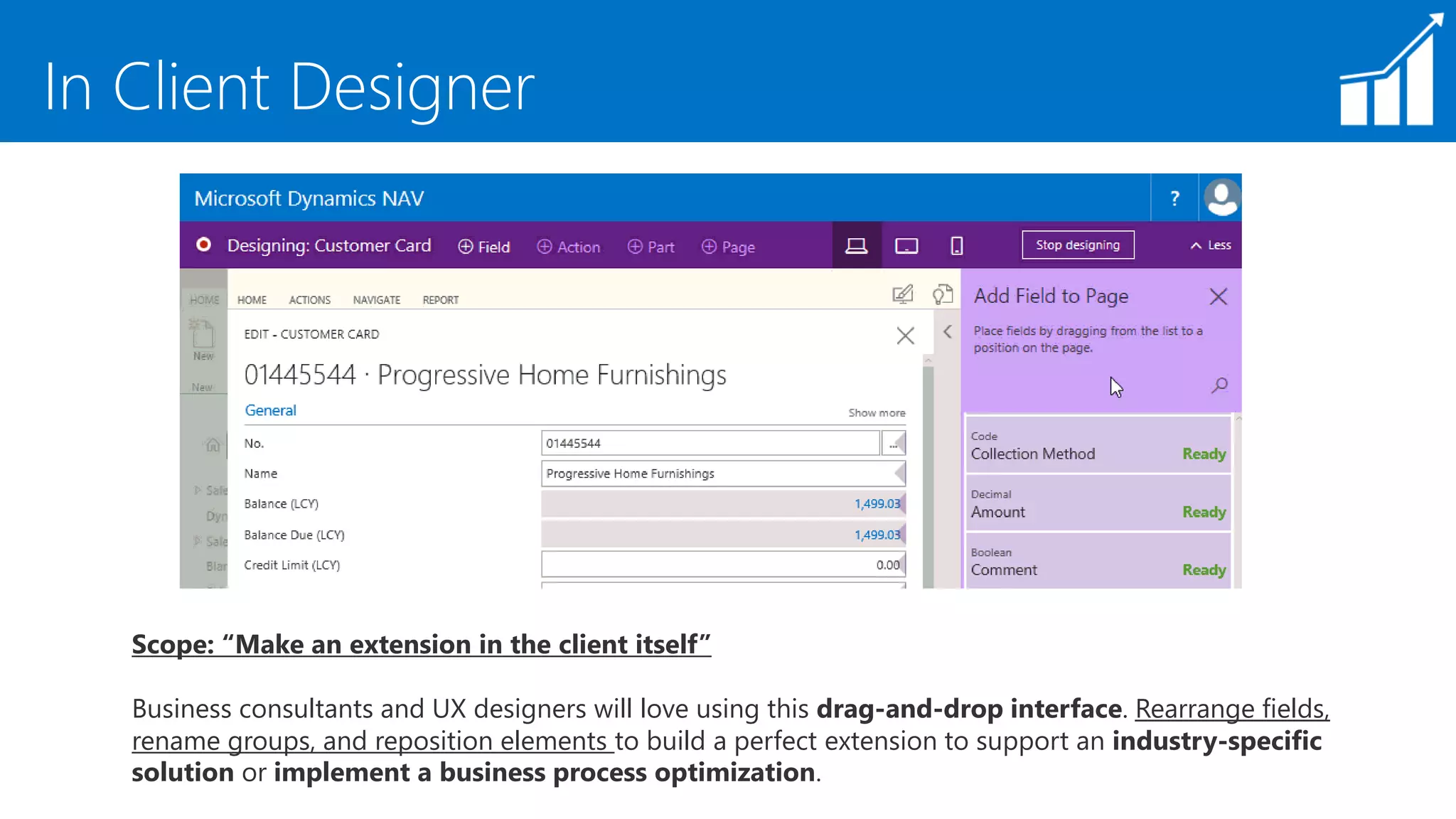
Scope: “Make an extension in the client itself”
Business consultants and UX designers will love using this drag-and-drop interface. Rearrange fields,
rename groups, and reposition elements to build a perfect extension to support an industry-specific
solution or implement a business process optimization.
In Client Designer
https://msdn.microsoft.com/en-us/dynamics-nav/developer/devenv-inclient-designer
Keyboard Shortcuts
https://msdn.microsoft.com/en-us/dynamics-nav/developer/devenv-keyboard-shortcuts
Keyboard Shortcuts
The following table provides an overview of some of the shortcut key combinations that you can use
when you're working with Dynamics 365 for Financials in Visual Studio Code.
About Reports in VS Code
GREAT POST BY STEVEN RENDERS HERE
http://thinkaboutit.be/2017/08/how-do-i-create-a-report-and-layout-in-vscode/
HOW DO I : CREATE A REPORT AND LAYOUT, IN VS CODE?
“A question I get asked frequently is: Ho Do I Create a Report in VSCode, and to me more
specific, How Do I Create the Layout, being an RDLC or Word layout?
The answer is that you need to create the report object as an .al file, then you create and
export the layout(s) and reference them from within the .al file.”
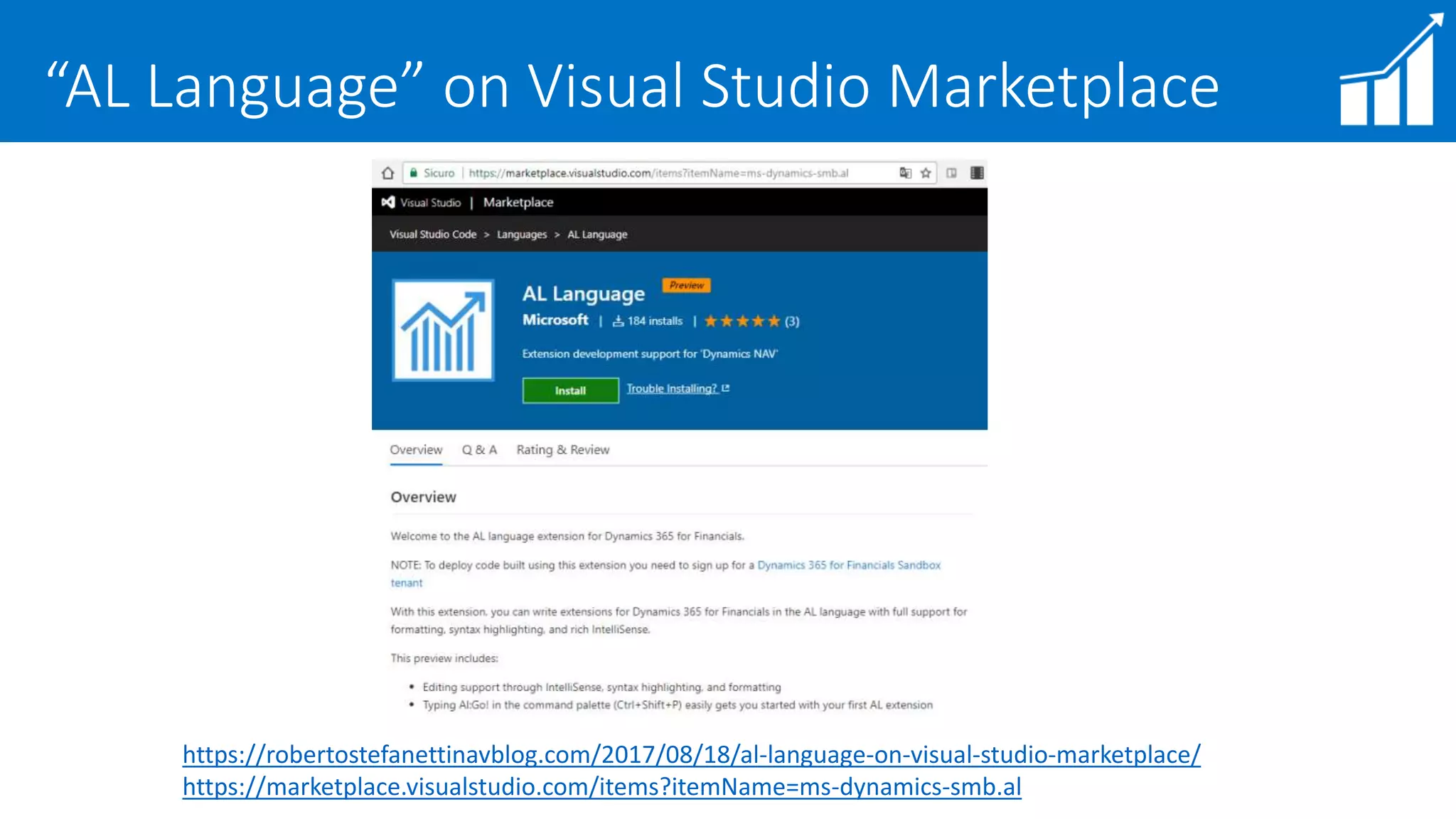
“AL Language” on Visual Studio Marketplace
https://robertostefanettinavblog.com/2017/08/18/al-language-on-visual-studio-marketplace/
https://marketplace.visualstudio.com/items?itemName=ms-dynamics-smb.al
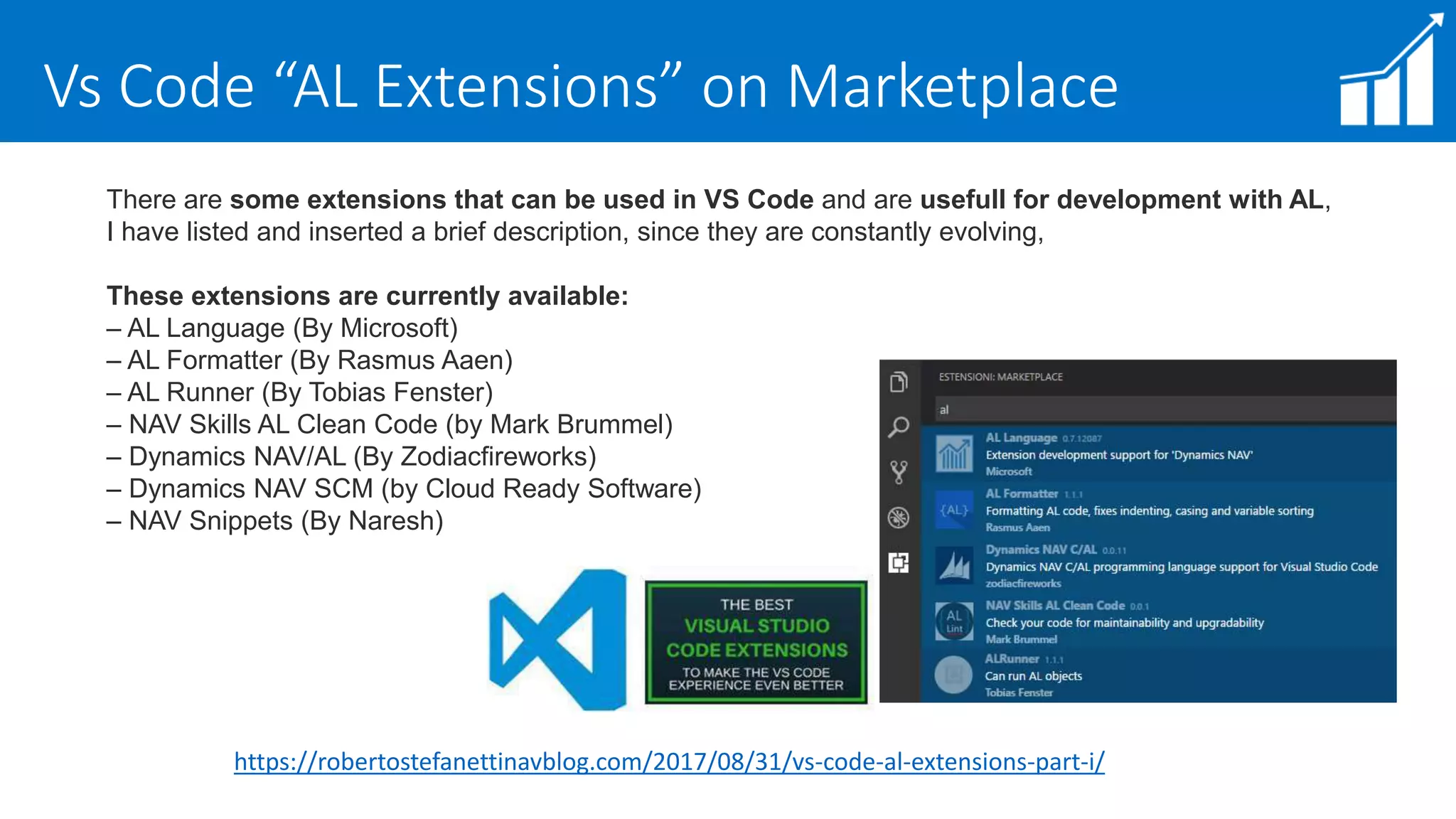
Vs Code “AL Extensions” on Marketplace
https://robertostefanettinavblog.com/2017/08/31/vs-code-al-extensions-part-i/
There are some extensions that can be used in VS Code and are usefull for development with AL,
I have listed and inserted a brief description, since they are constantly evolving,
These extensions are currently available:
– AL Language (By Microsoft)
– AL Formatter (By Rasmus Aaen)
– AL Runner (By Tobias Fenster)
– NAV Skills AL Clean Code (by Mark Brummel)
– Dynamics NAV/AL (By Zodiacfireworks)
– Dynamics NAV SCM (by Cloud Ready Software)
– NAV Snippets (By Naresh)
Modern Development Environment - Links
LINKS
http://github.com/microsoft/al/
https://blogs.msdn.microsoft.com/nav/tag/dyndev365/
https://blogs.msdn.microsoft.com/nav/2016/11/04/dynamics-nav-and-help-a-new-world/
https://robertostefanettinavblog.com/2017/07/13/nav-development-preview-updated-documentation/
http://www.waldo.be/2017/02/20/make-the-new-developer-tools-available-on-a-local-machine/
VIDEOS
Install Visual Studio Code With Al Compiler
https://www.youtube.com/watch?v=aeE-C3z_qkI&t=53s
Dynamics NAV - Getting Started With Visual Studio Code
https://www.youtube.com/watch?v=d2GoSQUCuxE
Visual Studio Code - Getting Started with Git(Hub)
https://www.youtube.com/watch?v=NTY5VELbCWI
Inside AL for Visual Studio Code | Where are we
https://www.youtube.com/watch?v=xjceqM6V7BM&t=1483s
Visual Studio Code Building Publishing and Debugging AL Projects
https://www.youtube.com/watch?v=hpZcdqx0udA
Visual Studio Code - Convert C/AL to AL
https://www.youtube.com/watch?v=HCaooHKxBrM&t=239s
DEMO TIME
FAQ TIME
FAQ #1
Some FAQ from MicrosoftEvents Sessions
Question: What is Visual Studio Code?
Answer: Visual Studio Code is the environment in which development of NAV apps will happen in the
future.
https://code.visualstudio.com/
Question: What is a snippet?
Answer: Code snippets are templates that make it easier to enter repeating code patterns, such as loops or
conditional-statements.
https://code.visualstudio.com/docs/customization/userdefinedsnippets
Question: What is a symbol?
Answer: Instead of having the complete source code for NAV base app and other apps, you only have the
symbols in order to know what you allowed to call/use/subscribe to
Question: Where can i get the Object ID's
Answer: http://aka.ms/AppsForFinancials
FAQ #2
Question: How to set up al.json to work with visual studio code, outside a azure environment?
Answer: Currently NAV only supports Windows Authentication for the new development environment,
meaning it isn't easy
Question: Is this only available on the VM, or can it be downloaded/installed locally?
Answer: The advantage of using the VM is that you can remove and renew when we have new releases
every month. You can shut down your VM to stop the cost for the VM.
Question: I cannot find "AL Language" in VS Code, what do I do wrong?
Answer: It is not publicly available, it is available on an Azure Gallery Image.
use http://aka.ms/navdeveloperpreview to provision a VM with a new NAV version with visual studio code
AND the AL addin
Question: How to open Design Mode?
Answer: Design Mode is only available in the Development Preview environments:
use http://aka.ms/navdeveloperpreview to provision a VM with a new NAV version with visual studio code AND
the AL addin
Question: How does the In Client Designer works together with VSCode?
Answer: all the changes in the "In App Designer" get saved as an extension.
If you select "Save as files", then you can download them and keep working in VS Code. Otherwise you can save
them as a change to the entire tenant.
FAQ #3
Links
For more information about the Dynamics NAV Developer Preview and extensions, see the
following resources:
Microsoft MSDN
https://msdn.microsoft.com/en-us/dynamics-nav/extending-microsoft-dynamics-nav-using-
extension-packages
https://msdn.microsoft.com/en-us/dynamics-nav/developer/devenv-get-started
https://msdn.microsoft.com/en-us/dynamics-nav/developer/devenv-dev-overview
https://msdn.microsoft.com/en-us/dynamics-nav/developer/devenv-programming-in-al
https://msdn.microsoft.com/en-us/dynamics-nav/developer/devenv-inclient-designer
https://msdn.microsoft.com/en-us/dynamics-nav/developer/devenv-differences
https://msdn.microsoft.com/en-us/dynamics-nav/developer/devenv-keyboard-shortcuts
My Blog
https://robertostefanettinavblog.com/2017/08/18/al-language-on-visual-studio-marketplace/
https://robertostefanettinavblog.com/2016/12/20/announcing-the-preview-of-development-
tools-for-dynamics-nav-dynamics-nav-team-blog
https://robertostefanettinavblog.com/2017/02/11/all-about-microsoft-dynamics-365-for-
financials
Announcing C/AL Open Library
https://robertostefanettinavblog.com/2017/08/18/al-language-on-visual-studio-marketplace/
https://github.com/Microsoft/cal-open-library
About Project “C/AL Open Library”
About Project : “C/AL Open Library”
“The purpose of this repository is to build a C/AL library based on community
contributions that will serve as an accelerator for adoption of the Extensions V2
technology. The source code from this library will be included in the base application of
‘Dynamics 365 for Financials’ on a monthly basis.
The primary goal is to enable creation of .NET type wrappers written in C/AL that can
then be subsequently used from Extensions V2. DotNet types must not be part of the
definition of public functions in the submitted code to be callable by Extensions V2.
All contributions will be reviewed by Microsoft and assessed for the overall fit into the
product, for reusability and for following the general coding style that is present in the
other base application objects.”
NAV ON DOCKER
https://robertostefanettinavblog.com/2017/07/30/nav-on-docker-nav-blog/
https://www.navtechdays.com/2017/sessions#easier_and_devops_friendly_dynamics_nav_e
nvironments_using_docker_windows_c
NAV TechDays Session
Q/A TIME
RobertoStefanetti,
MVP BusinessSolutions- NAV
MicrosoftEducationInfluencer

VS Code and Modern Development Environment Preview

  • 1.
  • 2.
  • 3.
    Customizations Vs Extensions DynamicsNAV Allows customization of application logic to deliver customer, industry, or region specific functionality How? Customizations: modification of base tables, code, and other objects Extensions: addition of well-defined modules that are invoked alongside the base application Why? Upgrade … and … v2
  • 4.
    Modern Development Environment- Why ? http://aka.ms/navdeveloperpreview https://blogs.msdn.microsoft.com/nav/2016/12/20/announcing-the-preview-of-development-tools-for-dynamics-nav/ https://robertostefanettinavblog.com/2017/07/13/nav-development-preview-updated-documentation/
  • 5.
    Extensions Topics EXTENSIONS  Extensionsare the way to build for Software as a Service (SaaS)  Allow you to sell your product in Microsoft AppSource - free advertising! Increase your sales volume!  Takes advantage of our upgrade investments  Offer additional protection of your IP compared to the very “open source” nature of classic NAV  Platform stability  Reduced time to deployment
  • 6.
    Extensions are customizations? So, extensions are customizations? Yes! If you're familiar with the Dynamics NAV customization model, then you're probably used to making changes directly on objects. The extension model asks you to design your changes differently – namely make those changes by extending the core objects and linking to code using events. For example, instead of adding a new field that represents the customer’s birthday to the customer table, put that field into a table extension. And if you want to write code then put it in an event subscriber which can then check the birthday and then do something about it. https://blogs.msdn.microsoft.com/nav/2016/12/13/more-information-about-the-developer-preview-for-dynamics-nav/
  • 7.
  • 8.
    Extensions 2.0 https://blogs.msdn.microsoft.com/nav/2016/12/13/more-information-about-the-developer-preview-for-dynamics-nav/ Extensions 2.0is the name we use for the new versions of extensions - ones that aren't based on the DELTA file design. Making extensions with the new tools is much easier than the current tools suite you may be familiar with. With Extensions 2.0, you code and write new objects that describe the additional capabilities you want in the system. You’ll use Table Extension and Page Extension objects to describe new fields and UI elements, and you'll use the in-client page designer to make those changes in a WYSIWIG way – all of which are stored as extensions under the cover.
  • 9.
    VS (Visual StudioCode) “VS: Not Visual Studio !”  Free  Open source (MIT license)  Code optimized  Now part of Visual Studio  Debugger  Native Git support  Always updated – monthly/nightly build  Apple iOS and Linux platforms  Extensions  Community https://code.visualstudio.com/ https://code.visualstudio.com/docs/customization/userdefinedsnippets https://blogs.msdn.microsoft.com/nav/tag/dyndev365/
  • 10.
    VS: Open Source,Cross Platform, Git “Open source, cross-platform, multi-language development environment that puts writing code at its center” https://code.visualstudio.com/
  • 11.
    VS: Commands  NO-INVOKEcompilers (no dll / exe)  NO-DESIGNERS (no UI based development)  NO-AL DEBUGGER (built-in Node.js)  NO-DESKTOP APP (targeted for Web App)
  • 12.
    VS: Editing Features 1.Syntax coloring 2. Bracket Matching 3. Intellisense 4. Parameter hints 5. Code block folding 6. Go To Definition (F12) 7. Tooltips 8. Find All References (SHIFT+F12)
  • 13.
    VS: Workspace andUI Code Editor / Status – View – Side bars [Code Editor] 3 files open side by side (e.g. Merge) [Code Editor] Zoom (CTRL+/CTRL-) / Navigate (CTRL+TAB) [Status] Encoding / EOF / GoTo (CTRL+G) [Side] 1. EXPLORER 2. SEARCH 3. GIT 4. DEBUG 5. EXTENSIONS
  • 14.
    VS: GIT (VersionControl) GIT (open-source distributed version control engine) - GIT local repository COMMIT to GitHub / VSTS - CMD : git remote add origin master <repo url> - CMD : git push –u origin master
  • 15.
  • 16.
  • 17.
    MDE - DeveloperTools Preview START FROM HERE: https://blogs.msdn.microsoft.com/nav/2016/12/20/announcing-the-preview-of- development-tools-for-dynamics-nav/
  • 18.
    About “Preview” (fromFoundation Post) https://blogs.msdn.microsoft.com/nav/2016/12/13/more-information-about-the-developer-preview-for-dynamics-nav/ Rebuilding the development tools for Dynamics NAV and Dynamics 365 for Financials is a long-term investment. We're not done with everything yet but we did want to give you a chance to see what we've done so far and to comment on it. Here’s some things to pay attention to: - The release is made available on an Azure Gallery image. - The preview is for you to play with and test - don't expect to write production code with it and don’t use it in production. - Don't try to take your existing solution and convert it - there are unfinished features and you'll probably be more frustrated than anything that the code doesn't work. - Do notice that not all procedures in the application will be available to call. We have blocked access to procedures which may run unsafe .NET or insecure methods. - Do write event/subscriber solutions - follow the existing guidelines on building extensions for the general design principles. - Do try the sample code we’ve published to get familiar with the syntax. Etc. etc. etc…. BUT WE ARE WORKING…
  • 19.
    AL Language -Coding Objects https://msdn.microsoft.com/en-us/dynamics-nav/developer/devenv-programming-in-al https://msdn.microsoft.com/en-us/dynamics-nav/developer/devenv-dev-overview https://robertostefanettinavblog.com/2016/11/29/microsoft-al-al-language-code-samples-for-developing-extensions/
  • 20.
    Visual Studio Codeand NAV Extensions
  • 21.
    Visual Studio Codeand NAV Extensions
  • 22.
    AL Development Env.Vs C/SIDE https://msdn.microsoft.com/en-us/dynamics-nav/developer/devenv-get-started https://msdn.microsoft.com/en-us/dynamics-nav/developer/devenv-dev-overview https://msdn.microsoft.com/en-us/dynamics-nav/developer/devenv-programming-in-al https://msdn.microsoft.com/en-us/dynamics-nav/developer/devenv-txt2al-tool https://msdn.microsoft.com/en-us/dynamics-nav/developer/devenv-reference-overview Differences in the Development Environments Coming from the Dynamics NAV Development Environment and C/SIDE, there are some differences and optimizations that you should familiarize yourself with. The following sections go through these changes. C/SIDE AL Development Environment Dates are parsed based on culture settings. Locale independent and supports only: yyyy-mm-dd. Boolean values could be expressed as yes/no. Boolean values are expressed as true/false. https://msdn.microsoft.com/en-us/dynamics-nav/developer/devenv-differences
  • 23.
    GitHUB – MicrosoftAL https://github.com/Microsoft/AL https://github.com/Microsoft/AL/tree/master/samples https://msdn.microsoft.com/en-us/dynamics-nav/developer/devenv-programming-in-al https://msdn.microsoft.com/en-us/dynamics-nav/developer/devenv-dev-overview
  • 24.
  • 25.
    AL Language andCoding using Snippets
  • 26.
    AL Language andCoding using Snippets
  • 27.
  • 28.
  • 29.
    In Client Designer Scope:“Make an extension in the client itself” Business consultants and UX designers will love using this drag-and-drop interface. Rearrange fields, rename groups, and reposition elements to build a perfect extension to support an industry-specific solution or implement a business process optimization.
  • 30.
  • 31.
    Keyboard Shortcuts https://msdn.microsoft.com/en-us/dynamics-nav/developer/devenv-keyboard-shortcuts Keyboard Shortcuts Thefollowing table provides an overview of some of the shortcut key combinations that you can use when you're working with Dynamics 365 for Financials in Visual Studio Code.
  • 32.
    About Reports inVS Code GREAT POST BY STEVEN RENDERS HERE http://thinkaboutit.be/2017/08/how-do-i-create-a-report-and-layout-in-vscode/ HOW DO I : CREATE A REPORT AND LAYOUT, IN VS CODE? “A question I get asked frequently is: Ho Do I Create a Report in VSCode, and to me more specific, How Do I Create the Layout, being an RDLC or Word layout? The answer is that you need to create the report object as an .al file, then you create and export the layout(s) and reference them from within the .al file.”
  • 33.
    “AL Language” onVisual Studio Marketplace https://robertostefanettinavblog.com/2017/08/18/al-language-on-visual-studio-marketplace/ https://marketplace.visualstudio.com/items?itemName=ms-dynamics-smb.al
  • 34.
    Vs Code “ALExtensions” on Marketplace https://robertostefanettinavblog.com/2017/08/31/vs-code-al-extensions-part-i/ There are some extensions that can be used in VS Code and are usefull for development with AL, I have listed and inserted a brief description, since they are constantly evolving, These extensions are currently available: – AL Language (By Microsoft) – AL Formatter (By Rasmus Aaen) – AL Runner (By Tobias Fenster) – NAV Skills AL Clean Code (by Mark Brummel) – Dynamics NAV/AL (By Zodiacfireworks) – Dynamics NAV SCM (by Cloud Ready Software) – NAV Snippets (By Naresh)
  • 35.
    Modern Development Environment- Links LINKS http://github.com/microsoft/al/ https://blogs.msdn.microsoft.com/nav/tag/dyndev365/ https://blogs.msdn.microsoft.com/nav/2016/11/04/dynamics-nav-and-help-a-new-world/ https://robertostefanettinavblog.com/2017/07/13/nav-development-preview-updated-documentation/ http://www.waldo.be/2017/02/20/make-the-new-developer-tools-available-on-a-local-machine/ VIDEOS Install Visual Studio Code With Al Compiler https://www.youtube.com/watch?v=aeE-C3z_qkI&t=53s Dynamics NAV - Getting Started With Visual Studio Code https://www.youtube.com/watch?v=d2GoSQUCuxE Visual Studio Code - Getting Started with Git(Hub) https://www.youtube.com/watch?v=NTY5VELbCWI Inside AL for Visual Studio Code | Where are we https://www.youtube.com/watch?v=xjceqM6V7BM&t=1483s Visual Studio Code Building Publishing and Debugging AL Projects https://www.youtube.com/watch?v=hpZcdqx0udA Visual Studio Code - Convert C/AL to AL https://www.youtube.com/watch?v=HCaooHKxBrM&t=239s
  • 36.
  • 37.
  • 38.
    FAQ #1 Some FAQfrom MicrosoftEvents Sessions Question: What is Visual Studio Code? Answer: Visual Studio Code is the environment in which development of NAV apps will happen in the future. https://code.visualstudio.com/ Question: What is a snippet? Answer: Code snippets are templates that make it easier to enter repeating code patterns, such as loops or conditional-statements. https://code.visualstudio.com/docs/customization/userdefinedsnippets Question: What is a symbol? Answer: Instead of having the complete source code for NAV base app and other apps, you only have the symbols in order to know what you allowed to call/use/subscribe to Question: Where can i get the Object ID's Answer: http://aka.ms/AppsForFinancials
  • 39.
    FAQ #2 Question: Howto set up al.json to work with visual studio code, outside a azure environment? Answer: Currently NAV only supports Windows Authentication for the new development environment, meaning it isn't easy Question: Is this only available on the VM, or can it be downloaded/installed locally? Answer: The advantage of using the VM is that you can remove and renew when we have new releases every month. You can shut down your VM to stop the cost for the VM. Question: I cannot find "AL Language" in VS Code, what do I do wrong? Answer: It is not publicly available, it is available on an Azure Gallery Image. use http://aka.ms/navdeveloperpreview to provision a VM with a new NAV version with visual studio code AND the AL addin
  • 40.
    Question: How toopen Design Mode? Answer: Design Mode is only available in the Development Preview environments: use http://aka.ms/navdeveloperpreview to provision a VM with a new NAV version with visual studio code AND the AL addin Question: How does the In Client Designer works together with VSCode? Answer: all the changes in the "In App Designer" get saved as an extension. If you select "Save as files", then you can download them and keep working in VS Code. Otherwise you can save them as a change to the entire tenant. FAQ #3
  • 41.
    Links For more informationabout the Dynamics NAV Developer Preview and extensions, see the following resources: Microsoft MSDN https://msdn.microsoft.com/en-us/dynamics-nav/extending-microsoft-dynamics-nav-using- extension-packages https://msdn.microsoft.com/en-us/dynamics-nav/developer/devenv-get-started https://msdn.microsoft.com/en-us/dynamics-nav/developer/devenv-dev-overview https://msdn.microsoft.com/en-us/dynamics-nav/developer/devenv-programming-in-al https://msdn.microsoft.com/en-us/dynamics-nav/developer/devenv-inclient-designer https://msdn.microsoft.com/en-us/dynamics-nav/developer/devenv-differences https://msdn.microsoft.com/en-us/dynamics-nav/developer/devenv-keyboard-shortcuts My Blog https://robertostefanettinavblog.com/2017/08/18/al-language-on-visual-studio-marketplace/ https://robertostefanettinavblog.com/2016/12/20/announcing-the-preview-of-development- tools-for-dynamics-nav-dynamics-nav-team-blog https://robertostefanettinavblog.com/2017/02/11/all-about-microsoft-dynamics-365-for- financials
  • 42.
    Announcing C/AL OpenLibrary https://robertostefanettinavblog.com/2017/08/18/al-language-on-visual-studio-marketplace/ https://github.com/Microsoft/cal-open-library
  • 43.
    About Project “C/ALOpen Library” About Project : “C/AL Open Library” “The purpose of this repository is to build a C/AL library based on community contributions that will serve as an accelerator for adoption of the Extensions V2 technology. The source code from this library will be included in the base application of ‘Dynamics 365 for Financials’ on a monthly basis. The primary goal is to enable creation of .NET type wrappers written in C/AL that can then be subsequently used from Extensions V2. DotNet types must not be part of the definition of public functions in the submitted code to be callable by Extensions V2. All contributions will be reviewed by Microsoft and assessed for the overall fit into the product, for reusability and for following the general coding style that is present in the other base application objects.”
  • 44.
  • 45.
  • 46.