ThingLink
VideoThingLink
Useful web 2.0 toolsUseful web 2.0 tools
With Voki you can:
Create fun and unique Voki characters
(Avatars) that speak in many languages.
Customize their appearance and what they
say, and
share with others!
 Steps:
 Go to http://www.voki.com
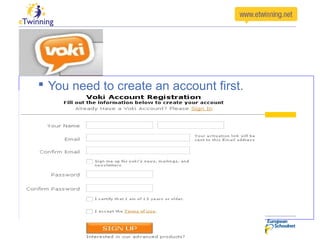
 You need to create an account first.
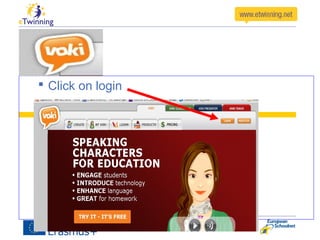
 Click on login
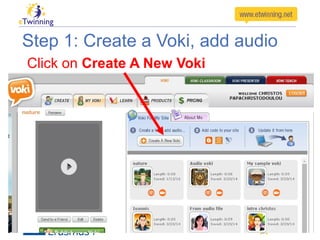
Step 1: Create a Voki, add audio
Click on Create A New Voki
Step 1: Create a Voki, add audio
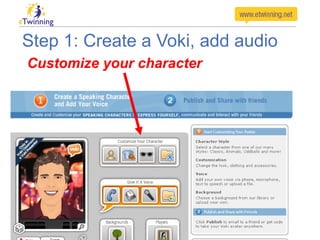
Customize your character
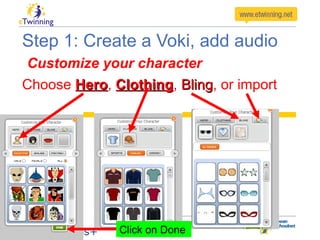
Step 1: Create a Voki, add audio
Customize your character
Choose HeroHero, ClothingClothing, BlingBling, or import
Click on Done
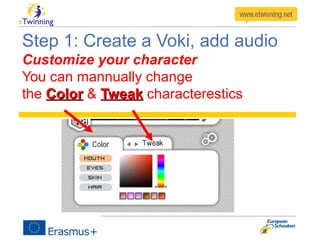
Step 1: Create a Voki, add audio
Customize your character
You can mannually change
the ColorColor & TweakTweak characterestics
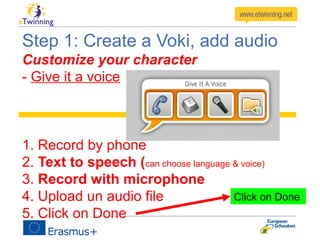
Step 1: Create a Voki, add audio
Customize your character
- Give it a voice
1. Record by phone
2. Text to speech (can choose language & voice)
3. Record with microphone
4. Upload un audio file
5. Click on Done
Click on Done
Step 1: Create a Voki, add audio
Customize your character
You can also change the
- BackgroundsBackgrounds
- PlayersPlayers themes
Step 1: Create a Voki, add audio
Click on Publish
Give a name
and save
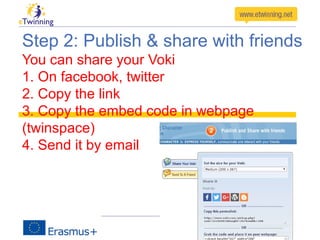
Step 2: Publish & share with friends
You can share your Voki
1. On facebook, twitter
2. Copy the link
3. Copy the embed code in webpage
(twinspace)
4. Send it by email
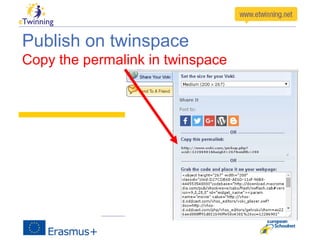
Publish on twinspace
Copy the permalink in twinspace
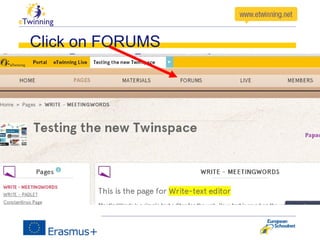
Click on FORUMS
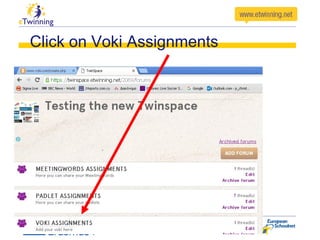
Click on Voki Assignments
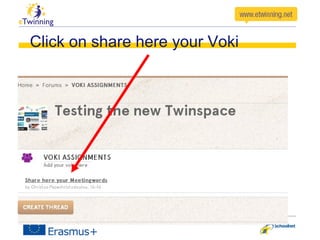
Click on share here your Voki
Voki
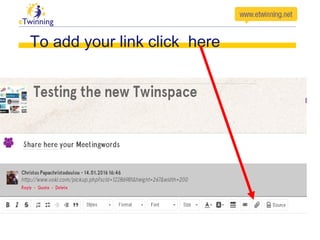
To add your link click here
Voki
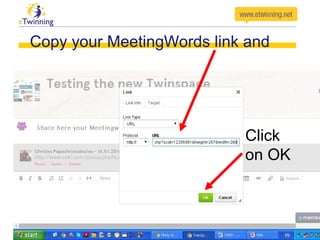
Copy your Voki link and
Click
on OK
Voki
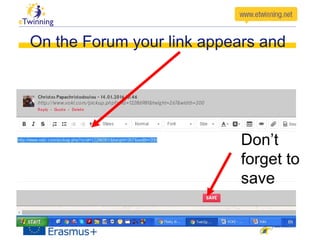
On the Forum your link appears and
Don’t
forget to
save
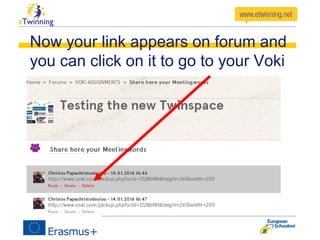
Now your link appears on forum and
you can click on it to go to your Voki
Voki
AssignmentAssignment
After watching the Voki’ presentation
participants should create their own recordings
and upload them in the Forum of the
Twinspace
Sample twinspace
– …..
Thanks for your attention
Christos Papachristodoulou
(eTwinning ambassador in Cyprus)

Voki

  • 1.
    ThingLink VideoThingLink Useful web 2.0toolsUseful web 2.0 tools
  • 2.
    Useful web 2.0toolsUseful web 2.0 tools
  • 3.
    With Voki youcan: Create fun and unique Voki characters (Avatars) that speak in many languages. Customize their appearance and what they say, and share with others!
  • 4.
     Steps:  Goto http://www.voki.com
  • 5.
     You needto create an account first.
  • 6.
  • 7.
    Step 1: Createa Voki, add audio Click on Create A New Voki
  • 8.
    Step 1: Createa Voki, add audio Customize your character
  • 9.
    Step 1: Createa Voki, add audio Customize your character Choose HeroHero, ClothingClothing, BlingBling, or import Click on Done
  • 10.
    Step 1: Createa Voki, add audio Customize your character You can mannually change the ColorColor & TweakTweak characterestics
  • 11.
    Step 1: Createa Voki, add audio Customize your character - Give it a voice 1. Record by phone 2. Text to speech (can choose language & voice) 3. Record with microphone 4. Upload un audio file 5. Click on Done Click on Done
  • 12.
    Step 1: Createa Voki, add audio Customize your character You can also change the - BackgroundsBackgrounds - PlayersPlayers themes
  • 13.
    Step 1: Createa Voki, add audio Click on Publish Give a name and save
  • 14.
    Step 2: Publish& share with friends You can share your Voki 1. On facebook, twitter 2. Copy the link 3. Copy the embed code in webpage (twinspace) 4. Send it by email
  • 15.
    Publish on twinspace Copythe permalink in twinspace
  • 16.
  • 17.
    Click on VokiAssignments
  • 18.
    Click on sharehere your Voki Voki
  • 19.
    To add yourlink click here Voki
  • 20.
    Copy your Vokilink and Click on OK Voki
  • 21.
    On the Forumyour link appears and Don’t forget to save
  • 22.
    Now your linkappears on forum and you can click on it to go to your Voki Voki
  • 23.
    AssignmentAssignment After watching theVoki’ presentation participants should create their own recordings and upload them in the Forum of the Twinspace Sample twinspace – …..
  • 24.
    Thanks for yourattention Christos Papachristodoulou (eTwinning ambassador in Cyprus)