VNX OverviewPresenter:    Allan Trotman	       EMC – Unified Infrastructure GroupAdvisory Technical Consultant
IT Challenges: Tougher than Ever Four central themes facing every decision maker todayOvercome flat budgetsManage escalating complexityCope with relentless data growthMeet increased business demands
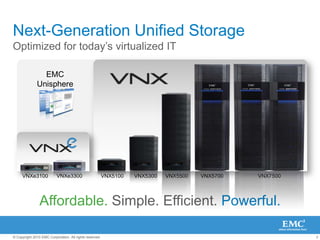
EMC UnisphereNext-Generation Unified StorageOptimized for today’s virtualized ITVNXe3100VNX7500VNX5700VNXe3300VNX5100VNX5500VNX5300Affordable.Simple. Efficient.Powerful.
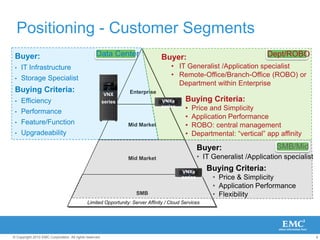
Positioning - Customer SegmentsData CenterDept/ROBOBuyer: IT Infrastructure
Storage SpecialistBuying Criteria:Efficiency
Performance
Feature/Function
UpgradeabilityBuyer:  IT Generalist /Application specialist
Remote-Office/Branch-Office (ROBO) or Department within EnterpriseBuying Criteria:Price and Simplicity
Application Performance
ROBO: central management
Departmental: “vertical” app affinityEnterpriseVNXseriesVNXe seriesVNXe seriesMid MarketSMB/MidBuyer:  IT Generalist /Application specialistBuying Criteria:Price & Simplicity
Application Performance
FlexibilityMid MarketSMBLimited Opportunity: Server Affinity / Cloud Services
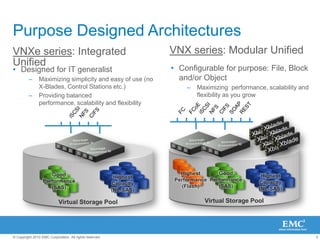
Purpose Designed ArchitecturesVNX series: Modular UnifiedVNXe series: Integrated UnifiedConfigurable for purpose: File, Block and/or Object
Maximizing  performance, scalability and flexibility as you growDesigned for IT generalistMaximizing simplicity and easy of use (no X-Blades, Control Stations etc.)Providing balanced performance, scalability and flexibilitySOAPiSCSIRESTFCoECIFSNFSFCiSCSIXbladeXbladeXbladeXbladeXbladeXbladeXbladeXbladeCIFSNFSStorage Processor AStorage Processor AStorage Processor BStorage Processor BHighestCapacity (NL-SAS)HighestCapacity (NL-SAS)GoodPerformance(SAS)GoodPerformance(SAS)HighestPerformance(Flash)Virtual Storage PoolVirtual Storage Pool
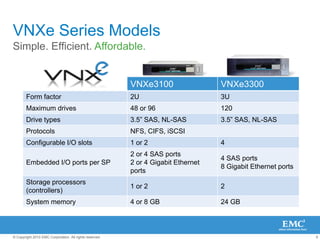
VNXe SeriesModelsSimple. Efficient. Affordable.
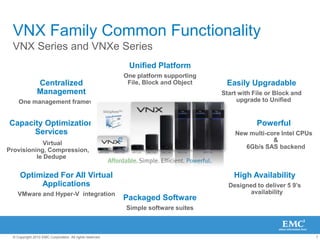
VNX Family Common FunctionalityVNX Series and VNXe SeriesUnified PlatformOne platform supporting File, Block and ObjectEasily UpgradableStart with File or Block and upgrade to UnifiedCentralized ManagementOne management frameworkCapacity Optimization ServicesVirtual Provisioning, Compression, File DedupePowerfulNew multi-core Intel CPUs &6Gb/s SAS backendHigh Availability Designed to deliver 5 9’s availabilityOptimized For All Virtual ApplicationsVMware and Hyper-V  integration Packaged SoftwareSimple software suites
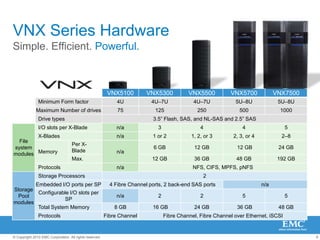
VNX Series HardwareSimple. Efficient. Powerful.
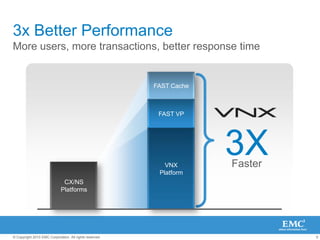
3x Better Performance More users, more transactions, better response timeFAST CacheFAST VP 3XVNXPlatformFasterCX/NS Platforms
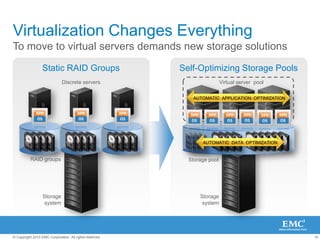
Virtualization Changes EverythingTo move to virtual servers demands new storage solutionsSelf-Optimizing Storage PoolsStatic RAID GroupsVirtual server  poolDiscrete serversRAID groupsStorage poolStoragesystemStoragesystemAUTOMATIC  APPLICATION  OPTIMIZATION AUTOMATIC  DATA  OPTIMIZATION
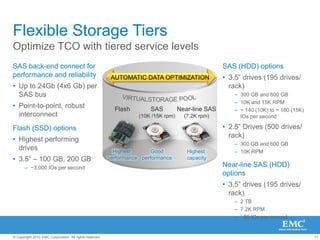
Flexible Storage TiersOptimize TCO with tiered service levelsSAS back-end connect for performance and reliabilityUp to 24Gb (4x6 Gb) per SAS busPoint-to-point, robust interconnectFlash (SSD) optionsHighest performing drives3.5” – 100 GB, 200 GB~3,000 IOs per secondSAS (HDD) options3.5” drives (195 drives/ rack)
300 GB and 600 GB
10K and 15K RPM
~ 140 (10K) to ~ 180 (15K) IOs per second
2.5” Drives (500 drives/ rack)
300 GB and 600 GB
10K RPMNear-line SAS (HDD) options3.5” drives (195 drives/ rack)
2 TB
7.2K RPM
˜ 90 IOs per secondAUTOMATIC DATA OPTIMIZATIONNear-line SAS(7.2K rpm)SAS(10K /15K rpm)FlashVIRTUALSTORAGE POOLHighest capacityGood performanceHighest performance
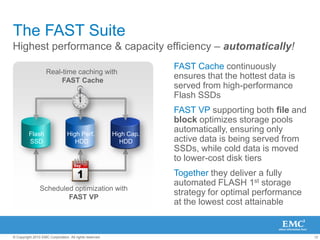
The FAST SuiteHighest performance & capacity efficiency – automatically!FAST Cache continuously ensures that the hottest data is served from high-performance Flash SSDs
FAST VPsupporting both file and block optimizes storage pools automatically, ensuring only active data is being served from SSDs, while cold data is moved to lower-cost disk tiers
Togetherthey deliver a fully automated FLASH 1st storage strategy for optimal performance at the lowest cost attainableReal-time caching withFAST Cache  FlashSSDHigh Perf. HDDHigh Cap.HDDScheduled optimization with FAST VP
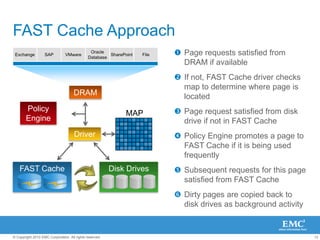
FAST Cache ApproachMAPPage requests satisfied from DRAM if available
If not, FAST Cachedriver checks map to determine where page is located
Page request satisfied from disk drive if not in FAST Cache
Policy Engine promotes a page to FAST Cache if it is being used frequently
Subsequent requests for this page satisfied from FAST Cache
Dirty pages are copied back to disk drives as background activityExchangeSharePointOracleDatabaseFileVMwareSAPDRAMPolicyEngineFAST CacheDriverDisk Drives
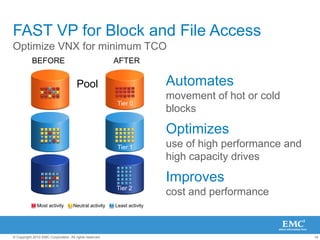
FAST VP for Block and File AccessOptimize VNX for minimum TCOBEFOREAFTERAutomatesmovement of hot or cold blocksOptimizesuse of high performance and high capacity drivesImprovescost and performancePoolLUN 1Tier 0LUN 2Tier 1Tier 2Most activityNeutral activity Least activity
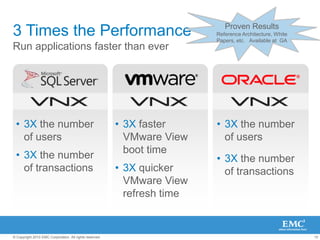
Proven ResultsReference Architecture, White Papers, etc.   Available at  GARun applications faster than ever3 Times the Performance3Xthe number of users
3X the number of transactions
3X faster VMware View boot time
3X quicker  VMware View refresh time
3Xthe number of users
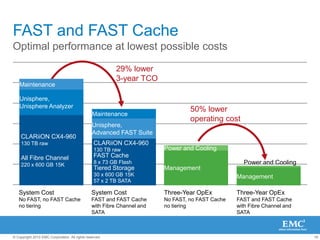
3X the number of transactionsFAST and FAST Cache Optimal performance at lowest possible costs29% lower 3-year TCOMaintenanceUnisphere,Unisphere Analyzer50% lower operating costMaintenanceCLARiiON CX4-960130 TB rawAll Fibre Channel220 x 600 GB 15KUnisphere,Advanced FAST SuiteCLARiiON CX4-960130 TB rawFAST Cache8 x 73 GB FlashTiered Storage30 x 600 GB 15K57 x 2 TB SATAPower and CoolingManagementPower and CoolingManagementSystem CostNo FAST, no FAST Cacheno tieringThree-Year OpExNo FAST, no FAST Cacheno tieringThree-Year OpExFAST and FAST Cachewith Fibre Channel andSATASystem Cost FAST and FAST Cachewith Fibre Channel andSATA
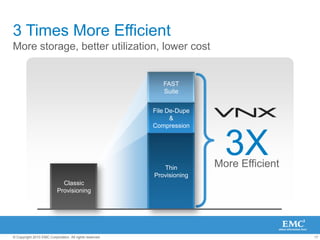
3 Times More EfficientMore storage, better utilization, lower costFASTSuiteFile De-Dupe &Compression3XThin ProvisioningMore EfficientClassicProvisioning
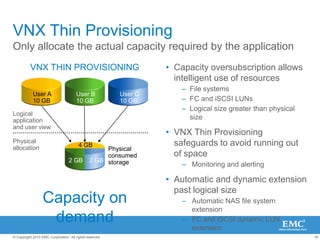
VNX Thin ProvisioningUser B10 GBUser A10 GBUser C10 GBLogical application and user viewPhysical allocation4 GBPhysical consumed storage2 GB2 GBOnly allocate the actual capacity required by the applicationVNX THIN PROVISIONINGCapacity oversubscription allows intelligent use of resourcesFile systemsFC and iSCSI LUNsLogical size greater than physical sizeVNX Thin Provisioning safeguards to avoid running out of spaceMonitoring and alertingAutomatic and dynamic extension past logical sizeAutomatic NAS file system extensionFC and iSCSI dynamic LUN extensionCapacity on demand
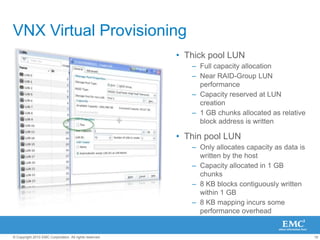
VNX Virtual ProvisioningThick pool LUNFull capacity allocationNear RAID-Group LUN performanceCapacity reserved at LUN creation1 GB chunks allocated as relative block address is writtenThin pool LUNOnly allocates capacity as data is written by the hostCapacity allocated in 1 GB chunks8 KB blocks contiguously written within 1 GB8 KB mapping incurs some performance overhead
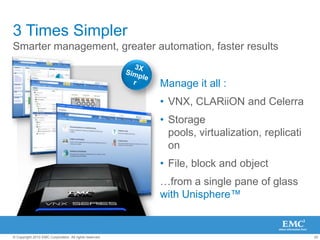
3 Times SimplerSmarter management, greater automation, faster results3XSimplerManage it all :VNX, CLARiiON and CelerraStorage pools, virtualization, replicationFile, block and object…from a single pane of glass with Unisphere™
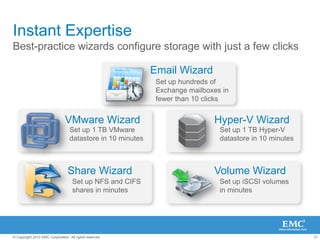
Instant Expertise Best-practice wizards configure storage with just a few clicksEmail WizardSet up hundreds of Exchange mailboxes in fewer than 10 clicksHyper-V WizardVMware WizardSet up 1 TB Hyper-V datastore in 10 minutes Set up 1 TB VMware datastore in 10 minutes Share WizardVolume WizardSet up NFS and CIFS shares in minutesSet up iSCSI volumes in minutes
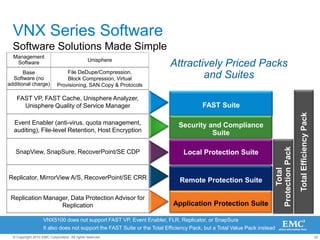
VNX Series SoftwareSoftware Solutions Made SimpleAttractively Priced Packsand SuitesTotal Efficiency PackFAST SuiteSecurity and Compliance SuiteTotalProtection Pack Local Protection SuiteRemote Protection SuiteApplication Protection SuiteVNX5100 does not support FAST VP, Event Enabler, FLR, Replicator, or SnapSureIt also does not support the FAST Suite or the Total Efficiency Pack, but a Total Value Pack instead
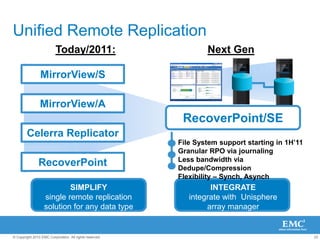
Unified Remote ReplicationNext GenToday/2011:MirrorView/SRecoverPoint/SEMirrorView/ACelerra ReplicatorFile System support starting in 1H’11Granular RPO via journalingLess bandwidth via Dedupe/CompressionFlexibility – Synch, AsynchRecoverPointSIMPLIFYsingle remote replication solution for any data typeINTEGRATEintegrate with  Unisphere array manager
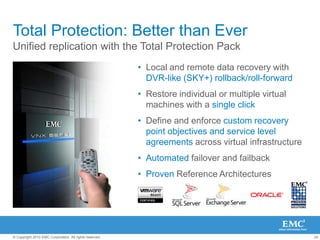
Total Protection: Better than EverLocal and remote data recovery with DVR-like (SKY+) rollback/roll-forwardRestore individual or multiple virtual machines with a single clickDefine and enforce custom recovery point objectives and service level agreementsacross virtual infrastructure Automated failover and failbackProven Reference Architectures Unified replication with the Total Protection Pack
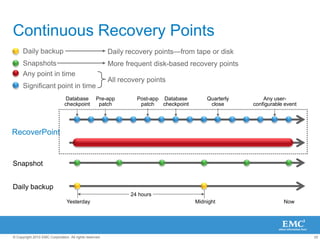
Any point in timeAll recovery pointsSignificant point in timeSignificantpoints in timeAny pointin timeContinuous Recovery PointsDatabasecheckpointPre-apppatchPost-apppatchDatabasecheckpointQuarterlycloseAny user-configurable eventDaily recovery points—from tape or diskDaily backupMore frequent disk-based recovery pointsSnapshotsRecoverPointSnapshotDaily backup24 hoursYesterdayMidnightNow
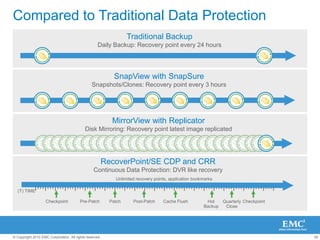
Traditional BackupDaily Backup: Recovery point every 24 hoursSnapView with SnapSureSnapshots/Clones: Recovery point every 3 hoursMirrorView with ReplicatorDisk Mirroring: Recovery point latest image replicatedRecoverPoint/SE CDP and CRRContinuous Data Protection: DVR like recoveryUnlimited recovery points, application bookmarks(T) TIMECheckpointPatchPost-PatchCache FlushQuarterlyCloseHotBackupCheckpointPre-PatchCompared to Traditional Data Protection
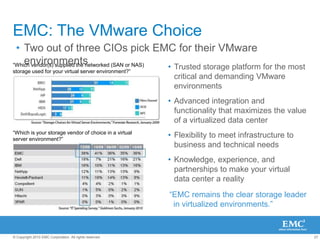
EMC: The VMware ChoiceTwo out of three CIOs pick EMC for their VMware environmentsTrusted storage platform for the most critical and demanding VMware environmentsAdvanced integration and functionality that maximizes the value of a virtualized data centerFlexibility to meet infrastructure to business and technical needsKnowledge, experience, and partnerships to make your virtual data center a reality“Which vendor(s) supplied the networked (SAN or NAS) storage used for your virtual server environment?”“Which is your storage vendor of choice in a virtual server environment?”“EMC remains the clear storage leader in virtualized environments.”
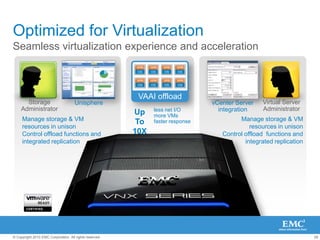
Optimized for VirtualizationSeamless virtualization experience and accelerationVAAI offloadVirtual Server AdministratorStorage AdministratorvCenter ServerintegrationUnisphereUp To10Xless net I/Omore VMsfaster responseManage storage & VMresources in unisonControl offload  functions andintegrated replicationManage storage & VMresources in unisonControl offload functions and integrated replication
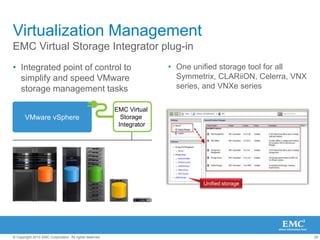
Virtualization ManagementEMC Virtual Storage Integrator plug-in EMC Virtual Storage IntegratorIntegrated point of control to simplify and speed VMware storage management tasksOne unified storage tool for all Symmetrix, CLARiiON, Celerra, VNX series, and VNXe seriesVMware vSphereUnified storage
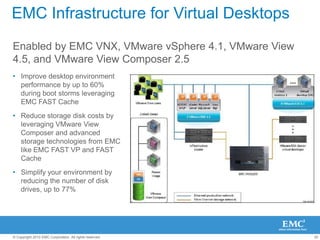
EMC Infrastructure for Virtual DesktopsEnabled by EMC VNX, VMware vSphere 4.1, VMware View 4.5, and VMware View Composer 2.5 Improve desktop environment performance by up to 60% during boot storms leveraging EMC FAST CacheReduce storage disk costs by leveraging VMware View Composer and advanced storage technologies from EMC like EMC FAST VP and FAST CacheSimplify your environment by reducing the number of disk drives, up to 77%
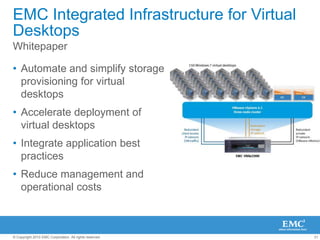
EMC Integrated Infrastructure for Virtual DesktopsWhitepaperAutomate and simplify storage provisioning for virtual desktopsAccelerate deployment of virtual desktopsIntegrate application best practicesReduce management and operational costs
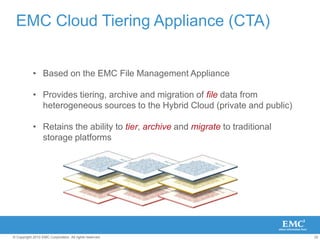
EMC Cloud Tiering Appliance (CTA)Based on the EMC File Management Appliance

VNX Overview

  • 1.
    VNX OverviewPresenter: Allan Trotman EMC – Unified Infrastructure GroupAdvisory Technical Consultant
  • 2.
    IT Challenges: Tougherthan Ever Four central themes facing every decision maker todayOvercome flat budgetsManage escalating complexityCope with relentless data growthMeet increased business demands
  • 3.
    EMC UnisphereNext-Generation UnifiedStorageOptimized for today’s virtualized ITVNXe3100VNX7500VNX5700VNXe3300VNX5100VNX5500VNX5300Affordable.Simple. Efficient.Powerful.
  • 4.
    Positioning - CustomerSegmentsData CenterDept/ROBOBuyer: IT Infrastructure
  • 5.
  • 6.
  • 7.
  • 8.
    UpgradeabilityBuyer: ITGeneralist /Application specialist
  • 9.
    Remote-Office/Branch-Office (ROBO) orDepartment within EnterpriseBuying Criteria:Price and Simplicity
  • 10.
  • 11.
  • 12.
    Departmental: “vertical” appaffinityEnterpriseVNXseriesVNXe seriesVNXe seriesMid MarketSMB/MidBuyer: IT Generalist /Application specialistBuying Criteria:Price & Simplicity
  • 13.
  • 14.
    FlexibilityMid MarketSMBLimited Opportunity:Server Affinity / Cloud Services
  • 15.
    Purpose Designed ArchitecturesVNXseries: Modular UnifiedVNXe series: Integrated UnifiedConfigurable for purpose: File, Block and/or Object
  • 16.
    Maximizing performance,scalability and flexibility as you growDesigned for IT generalistMaximizing simplicity and easy of use (no X-Blades, Control Stations etc.)Providing balanced performance, scalability and flexibilitySOAPiSCSIRESTFCoECIFSNFSFCiSCSIXbladeXbladeXbladeXbladeXbladeXbladeXbladeXbladeCIFSNFSStorage Processor AStorage Processor AStorage Processor BStorage Processor BHighestCapacity (NL-SAS)HighestCapacity (NL-SAS)GoodPerformance(SAS)GoodPerformance(SAS)HighestPerformance(Flash)Virtual Storage PoolVirtual Storage Pool
  • 17.
  • 18.
    VNX Family CommonFunctionalityVNX Series and VNXe SeriesUnified PlatformOne platform supporting File, Block and ObjectEasily UpgradableStart with File or Block and upgrade to UnifiedCentralized ManagementOne management frameworkCapacity Optimization ServicesVirtual Provisioning, Compression, File DedupePowerfulNew multi-core Intel CPUs &6Gb/s SAS backendHigh Availability Designed to deliver 5 9’s availabilityOptimized For All Virtual ApplicationsVMware and Hyper-V integration Packaged SoftwareSimple software suites
  • 19.
    VNX Series HardwareSimple.Efficient. Powerful.
  • 20.
    3x Better PerformanceMore users, more transactions, better response timeFAST CacheFAST VP 3XVNXPlatformFasterCX/NS Platforms
  • 21.
    Virtualization Changes EverythingTomove to virtual servers demands new storage solutionsSelf-Optimizing Storage PoolsStatic RAID GroupsVirtual server poolDiscrete serversRAID groupsStorage poolStoragesystemStoragesystemAUTOMATIC APPLICATION OPTIMIZATION AUTOMATIC DATA OPTIMIZATION
  • 22.
    Flexible Storage TiersOptimizeTCO with tiered service levelsSAS back-end connect for performance and reliabilityUp to 24Gb (4x6 Gb) per SAS busPoint-to-point, robust interconnectFlash (SSD) optionsHighest performing drives3.5” – 100 GB, 200 GB~3,000 IOs per secondSAS (HDD) options3.5” drives (195 drives/ rack)
  • 23.
  • 24.
  • 25.
    ~ 140 (10K)to ~ 180 (15K) IOs per second
  • 26.
    2.5” Drives (500drives/ rack)
  • 27.
    300 GB and600 GB
  • 28.
    10K RPMNear-line SAS(HDD) options3.5” drives (195 drives/ rack)
  • 29.
  • 30.
  • 31.
    ˜ 90 IOsper secondAUTOMATIC DATA OPTIMIZATIONNear-line SAS(7.2K rpm)SAS(10K /15K rpm)FlashVIRTUALSTORAGE POOLHighest capacityGood performanceHighest performance
  • 32.
    The FAST SuiteHighestperformance & capacity efficiency – automatically!FAST Cache continuously ensures that the hottest data is served from high-performance Flash SSDs
  • 33.
    FAST VPsupporting bothfile and block optimizes storage pools automatically, ensuring only active data is being served from SSDs, while cold data is moved to lower-cost disk tiers
  • 34.
    Togetherthey deliver afully automated FLASH 1st storage strategy for optimal performance at the lowest cost attainableReal-time caching withFAST Cache FlashSSDHigh Perf. HDDHigh Cap.HDDScheduled optimization with FAST VP
  • 35.
    FAST Cache ApproachMAPPagerequests satisfied from DRAM if available
  • 36.
    If not, FASTCachedriver checks map to determine where page is located
  • 37.
    Page request satisfiedfrom disk drive if not in FAST Cache
  • 38.
    Policy Engine promotesa page to FAST Cache if it is being used frequently
  • 39.
    Subsequent requests forthis page satisfied from FAST Cache
  • 40.
    Dirty pages arecopied back to disk drives as background activityExchangeSharePointOracleDatabaseFileVMwareSAPDRAMPolicyEngineFAST CacheDriverDisk Drives
  • 41.
    FAST VP forBlock and File AccessOptimize VNX for minimum TCOBEFOREAFTERAutomatesmovement of hot or cold blocksOptimizesuse of high performance and high capacity drivesImprovescost and performancePoolLUN 1Tier 0LUN 2Tier 1Tier 2Most activityNeutral activity Least activity
  • 42.
    Proven ResultsReference Architecture,White Papers, etc. Available at GARun applications faster than ever3 Times the Performance3Xthe number of users
  • 43.
    3X the numberof transactions
  • 44.
    3X faster VMwareView boot time
  • 45.
    3X quicker VMware View refresh time
  • 46.
  • 47.
    3X the numberof transactionsFAST and FAST Cache Optimal performance at lowest possible costs29% lower 3-year TCOMaintenanceUnisphere,Unisphere Analyzer50% lower operating costMaintenanceCLARiiON CX4-960130 TB rawAll Fibre Channel220 x 600 GB 15KUnisphere,Advanced FAST SuiteCLARiiON CX4-960130 TB rawFAST Cache8 x 73 GB FlashTiered Storage30 x 600 GB 15K57 x 2 TB SATAPower and CoolingManagementPower and CoolingManagementSystem CostNo FAST, no FAST Cacheno tieringThree-Year OpExNo FAST, no FAST Cacheno tieringThree-Year OpExFAST and FAST Cachewith Fibre Channel andSATASystem Cost FAST and FAST Cachewith Fibre Channel andSATA
  • 48.
    3 Times MoreEfficientMore storage, better utilization, lower costFASTSuiteFile De-Dupe &Compression3XThin ProvisioningMore EfficientClassicProvisioning
  • 49.
    VNX Thin ProvisioningUserB10 GBUser A10 GBUser C10 GBLogical application and user viewPhysical allocation4 GBPhysical consumed storage2 GB2 GBOnly allocate the actual capacity required by the applicationVNX THIN PROVISIONINGCapacity oversubscription allows intelligent use of resourcesFile systemsFC and iSCSI LUNsLogical size greater than physical sizeVNX Thin Provisioning safeguards to avoid running out of spaceMonitoring and alertingAutomatic and dynamic extension past logical sizeAutomatic NAS file system extensionFC and iSCSI dynamic LUN extensionCapacity on demand
  • 50.
    VNX Virtual ProvisioningThickpool LUNFull capacity allocationNear RAID-Group LUN performanceCapacity reserved at LUN creation1 GB chunks allocated as relative block address is writtenThin pool LUNOnly allocates capacity as data is written by the hostCapacity allocated in 1 GB chunks8 KB blocks contiguously written within 1 GB8 KB mapping incurs some performance overhead
  • 51.
    3 Times SimplerSmartermanagement, greater automation, faster results3XSimplerManage it all :VNX, CLARiiON and CelerraStorage pools, virtualization, replicationFile, block and object…from a single pane of glass with Unisphere™
  • 52.
    Instant Expertise Best-practicewizards configure storage with just a few clicksEmail WizardSet up hundreds of Exchange mailboxes in fewer than 10 clicksHyper-V WizardVMware WizardSet up 1 TB Hyper-V datastore in 10 minutes Set up 1 TB VMware datastore in 10 minutes Share WizardVolume WizardSet up NFS and CIFS shares in minutesSet up iSCSI volumes in minutes
  • 53.
    VNX Series SoftwareSoftwareSolutions Made SimpleAttractively Priced Packsand SuitesTotal Efficiency PackFAST SuiteSecurity and Compliance SuiteTotalProtection Pack Local Protection SuiteRemote Protection SuiteApplication Protection SuiteVNX5100 does not support FAST VP, Event Enabler, FLR, Replicator, or SnapSureIt also does not support the FAST Suite or the Total Efficiency Pack, but a Total Value Pack instead
  • 54.
    Unified Remote ReplicationNextGenToday/2011:MirrorView/SRecoverPoint/SEMirrorView/ACelerra ReplicatorFile System support starting in 1H’11Granular RPO via journalingLess bandwidth via Dedupe/CompressionFlexibility – Synch, AsynchRecoverPointSIMPLIFYsingle remote replication solution for any data typeINTEGRATEintegrate with Unisphere array manager
  • 55.
    Total Protection: Betterthan EverLocal and remote data recovery with DVR-like (SKY+) rollback/roll-forwardRestore individual or multiple virtual machines with a single clickDefine and enforce custom recovery point objectives and service level agreementsacross virtual infrastructure Automated failover and failbackProven Reference Architectures Unified replication with the Total Protection Pack
  • 56.
    Any point intimeAll recovery pointsSignificant point in timeSignificantpoints in timeAny pointin timeContinuous Recovery PointsDatabasecheckpointPre-apppatchPost-apppatchDatabasecheckpointQuarterlycloseAny user-configurable eventDaily recovery points—from tape or diskDaily backupMore frequent disk-based recovery pointsSnapshotsRecoverPointSnapshotDaily backup24 hoursYesterdayMidnightNow
  • 57.
    Traditional BackupDaily Backup:Recovery point every 24 hoursSnapView with SnapSureSnapshots/Clones: Recovery point every 3 hoursMirrorView with ReplicatorDisk Mirroring: Recovery point latest image replicatedRecoverPoint/SE CDP and CRRContinuous Data Protection: DVR like recoveryUnlimited recovery points, application bookmarks(T) TIMECheckpointPatchPost-PatchCache FlushQuarterlyCloseHotBackupCheckpointPre-PatchCompared to Traditional Data Protection
  • 58.
    EMC: The VMwareChoiceTwo out of three CIOs pick EMC for their VMware environmentsTrusted storage platform for the most critical and demanding VMware environmentsAdvanced integration and functionality that maximizes the value of a virtualized data centerFlexibility to meet infrastructure to business and technical needsKnowledge, experience, and partnerships to make your virtual data center a reality“Which vendor(s) supplied the networked (SAN or NAS) storage used for your virtual server environment?”“Which is your storage vendor of choice in a virtual server environment?”“EMC remains the clear storage leader in virtualized environments.”
  • 59.
    Optimized for VirtualizationSeamlessvirtualization experience and accelerationVAAI offloadVirtual Server AdministratorStorage AdministratorvCenter ServerintegrationUnisphereUp To10Xless net I/Omore VMsfaster responseManage storage & VMresources in unisonControl offload functions andintegrated replicationManage storage & VMresources in unisonControl offload functions and integrated replication
  • 60.
    Virtualization ManagementEMC VirtualStorage Integrator plug-in EMC Virtual Storage IntegratorIntegrated point of control to simplify and speed VMware storage management tasksOne unified storage tool for all Symmetrix, CLARiiON, Celerra, VNX series, and VNXe seriesVMware vSphereUnified storage
  • 61.
    EMC Infrastructure forVirtual DesktopsEnabled by EMC VNX, VMware vSphere 4.1, VMware View 4.5, and VMware View Composer 2.5 Improve desktop environment performance by up to 60% during boot storms leveraging EMC FAST CacheReduce storage disk costs by leveraging VMware View Composer and advanced storage technologies from EMC like EMC FAST VP and FAST CacheSimplify your environment by reducing the number of disk drives, up to 77%
  • 62.
    EMC Integrated Infrastructurefor Virtual DesktopsWhitepaperAutomate and simplify storage provisioning for virtual desktopsAccelerate deployment of virtual desktopsIntegrate application best practicesReduce management and operational costs
  • 63.
    EMC Cloud TieringAppliance (CTA)Based on the EMC File Management Appliance
  • 64.
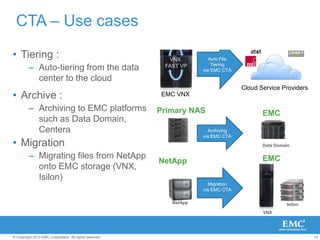
    Provides tiering, archiveand migration of file data from heterogeneous sources to the Hybrid Cloud (private and public)
  • 65.
    Retains the abilityto tier, archive and migrate to traditional storage platformsCTA – Use casesData CenterCloudTiering : Auto-tiering from the data center to the cloudArchive :Archiving to EMC platforms such as Data Domain, CenteraMigrationMigrating files from NetApp onto EMC storage (VNX, Isilon)VNX FAST VPArchivingvia EMC CTAAuto File Tiering via EMC CTAMigrationvia EMC CTACloud Service ProvidersEMC VNXEMCNetAppNetAppVNXIsilonPrimary NASEMCData Domain
  • 66.
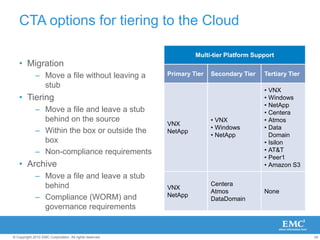
    CTA options fortiering to the CloudMigrationMove a file without leaving a stubTieringMove a file and leave a stub behind on the sourceWithin the box or outside the boxNon-compliance requirementsArchiveMove a file and leave a stub behindCompliance (WORM) and governance requirements
  • 67.
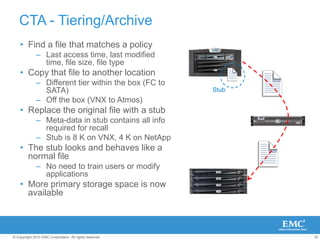
    CTA - Tiering/ArchiveFinda file that matches a policyLast access time, last modified time, file size, file typeCopy that file to another locationDifferent tier within the box (FC to SATA)Off the box (VNX to Atmos)Replace the original file with a stubMeta-data in stub contains all info required for recallStub is 8 K on VNX, 4 K on NetAppThe stub looks and behaves like a normal fileNo need to train users or modify applicationsMore primary storage space is now availableStub
  • 68.
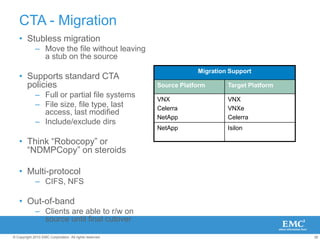
    CTA - MigrationStublessmigrationMove the file without leaving a stub on the sourceSupports standard CTA policiesFull or partial file systemsFile size, file type, last access, last modifiedInclude/exclude dirsThink “Robocopy” or “NDMPCopy” on steroidsMulti-protocolCIFS, NFSOut-of-bandClients are able to r/w on source until final cutover
  • 70.
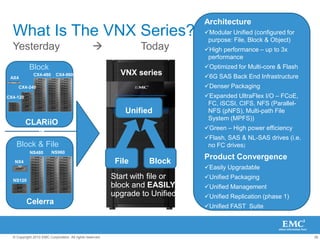
    What Is TheVNX Series?ArchitectureModular Unified (configured for purpose: File, Block & Object)
  • 71.
    High performance –up to 3x performance
  • 72.
  • 73.
    6G SAS BackEnd Infrastructure
  • 74.
  • 75.
    Expanded UltraFlex I/O– FCoE, FC, iSCSI, CIFS, NFS (Parallel-NFS (pNFS), Multi-path File System (MPFS))
  • 76.
    Green – Highpower efficiency
  • 77.
    Flash, SAS &NL-SAS drives (i.e. no FC drives)Product ConvergenceEasily Upgradable
  • 78.
  • 79.
  • 80.
  • 81.
    Unified FAST SuiteYesterday  TodayBlockVNX seriesCX4-960CX4-480AX4CX4-240CX4-120UnifiedCLARiiONBlock & File FileBlockNS960NS480NX4Start with file or block and EASILY upgrade to UnifiedNS120Celerra
  • 82.
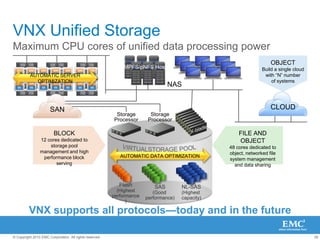
    VNX Unified StorageMaximumCPU cores of unified data processing powerOBJECTBuild a single cloud with “N” number of systemsMPFS/pNFS HostAUTOMATIC SERVER OPTIMIZATIONNASCLOUDX-bladeX-bladeX-bladeX-bladeX-bladeX-bladeX-bladeX-bladeBLOCK12 cores dedicated to storage pool management and high performance block servingFILE AND OBJECT48 cores dedicated to object, networked file system management and data sharingStorageProcessorStorageProcessorVIRTUALSTORAGE POOLAUTOMATIC DATA OPTIMIZATIONFlash (Highest performance)NL-SAS(Highest capacity)SAS(Good performance)VNX supports all protocols—today and in the futureSAN
  • 83.
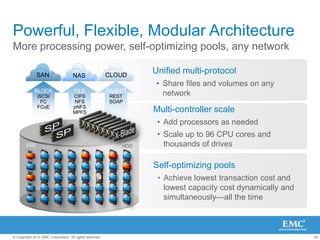
    Powerful, Flexible, ModularArchitectureMore processing power, self-optimizing pools, any networkX-BladeX-BladeX-BladeX-BladeX-BladeX-BladeX-BladeX-BladeSPSPCLOUDSANNASOBJECTRESTSOAPBLOCKiSCSIFCFCoEFILECIFSNFSpNFSMPFSMulti-controller scaleAdd processors as needed
  • 84.
    Scale up to96 CPU cores and thousands of drivesUnified multi-protocolShare files and volumes on any networkSelf-optimizing poolsAchieve lowest transaction cost and lowest capacity cost dynamically and simultaneously—all the timeSSDHDD
  • 85.
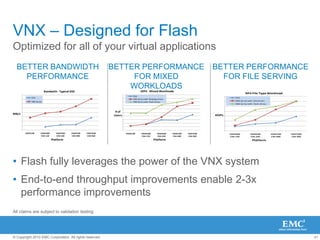
    VNX – Designedfor FlashOptimized for all of your virtual applicationsBETTER BANDWIDTH PERFORMANCEBETTER PERFORMANCE FOR MIXED WORKLOADSBETTER PERFORMANCE FOR FILE SERVINGFlash fully leverages the power of the VNX systemEnd-to-end throughput improvements enable 2-3x performance improvementsAll claims are subject to validation testing
  • 86.
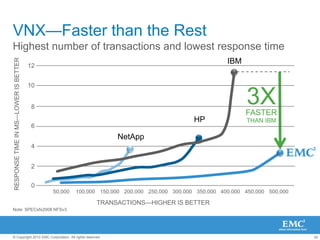
    VNX—Faster than theRest Highest number of transactions and lowest response timeIBM123XFASTERTHAN IBM108HPRESPONSE TIME IN MS—LOWER IS BETTER6NetApp42050,000100,000150,000200,000250,000300,000350,000400,000450,000500,000TRANSACTIONS—HIGHER IS BETTER Note: SPECsfs2008 NFSv3
  • 87.
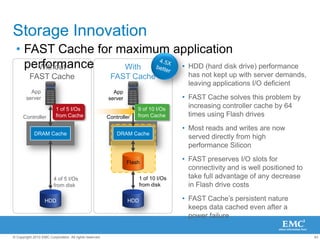
    HDDHDDWith FAST CacheAppserver9of 10 I/Os from CacheControllerDRAM CacheFlashStorage InnovationFAST Cache for maximum application performance4.5XbetterWithout FAST CacheHDD (hard disk drive) performance has not kept up with server demands, leaving applications I/O deficientFAST Cache solves this problem by increasing controller cache by 64 times using Flash drivesMost reads and writes are now served directly from high performance SiliconFAST preserves I/O slots for connectivity and is well positioned to take full advantage of any decrease in Flash drive costs FAST Cache’s persistent nature keeps data cached even after a power failureAppserver1 of 5 I/Os from CacheControllerDRAM Cache1 of 10 I/Os from disk4 of 5 I/Os from disk
  • 88.
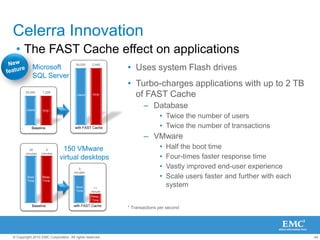
    Celerra InnovationThe FASTCache effect on applications50,0002,445NewfeatureMicrosoft SQL ServerUses system Flash drivesTurbo-charges applications with up to 2 TB of FAST CacheDatabaseTwice the number of usersTwice the number of transactionsVMware Half the boot time Four-times faster response timeVastly improved end-user experienceScale users faster and further with each system 24459minutes 25,0001,228TPS*UsersBootTime>1 minuteUsersTPS*Resp.Timewith FAST CacheBaselinewith FAST Cache150 VMwarevirtual desktops 4minutes20minutes2445Boot TimeResp.TimeBaseline* Transactions per second
  • 89.
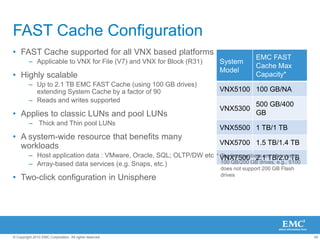
    FAST Cache ConfigurationFASTCache supported for all VNX based platformsApplicable to VNX for File (V7) and VNX for Block (R31)Highly scalableUp to 2.1 TB EMC FAST Cache (using 100 GB drives) extending System Cache by a factor of 90 Reads and writes supportedApplies to classic LUNs and pool LUNsThick and Thin pool LUNsA system-wide resource that benefits many workloadsHost application data : VMware, Oracle, SQL; OLTP/DW etcArray-based data services (e.g. Snaps, etc.)Two-click configuration in Unisphere* The two numbers are when using 100 GB/200 GB drives, e.g., 5100 does not support 200 GB Flash drives
  • 90.
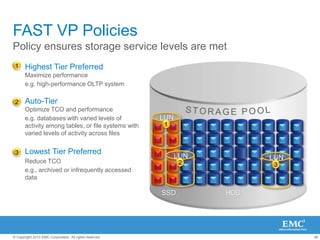
    Policy ensures storageservice levels are met1Highest Tier PreferredMaximize performancee.g. high-performance OLTP systemAuto-TierOptimize TCO and performancee.g. databases with varied levels of activity among tables, or file systems with varied levels of activity across files2LUN1STORAGE POOLLowest Tier PreferredReduce TCOe.g., archived or infrequently accessed data3LUNLUN23SSDHDDFAST VP Policies
  • 91.
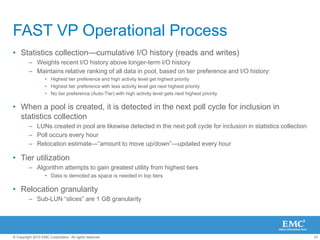
    FAST VP OperationalProcessStatistics collection—cumulative I/O history (reads and writes)Weights recent I/O history above longer-term I/O historyMaintains relative ranking of all data in pool, based on tier preference and I/O history:Highest tier preference and high activity level get highest priorityHighest tier preference with less activity level get next highest priorityNo tier preference (Auto-Tier) with high activity level gets next highest priorityWhen a pool is created, it is detected in the next poll cycle for inclusion in statistics collectionLUNs created in pool are likewise detected in the next poll cycle for inclusion in statistics collectionPoll occurs every hourRelocation estimate—“amount to move up/down”—updated every hourTier utilizationAlgorithm attempts to gain greatest utility from highest tiersData is demoted as space is needed in top tiers Relocation granularitySub-LUN “slices” are 1 GB granularity
  • 92.
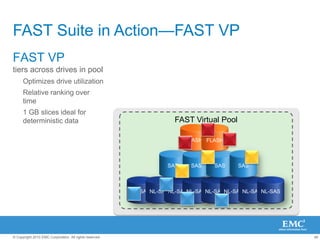
    NL-SASNL-SASNL-SASNL-SASNL-SASNL-SASNL-SASNL-SASFAST Virtual PoolFASTSuite in Action—FAST VPFAST VPtiers across drives in poolOptimizes drive utilization
  • 93.
  • 94.
    1 GB slicesideal for deterministic dataFLASHFLASHSASSASSASSAS
  • 95.
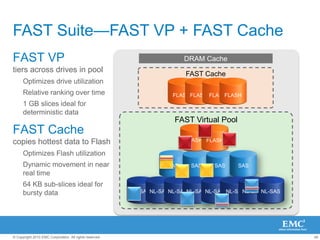
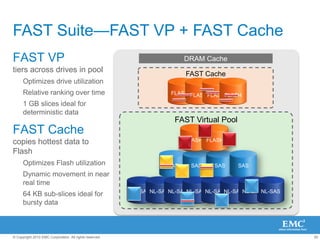
    FAST Suite—FAST VP+ FAST CacheNL-SASNL-SASNL-SASNL-SASNL-SASNL-SASNL-SASNL-SASFAST VP tiers across drives in poolOptimizes drive utilization
  • 96.
  • 97.
    1 GB slicesideal for deterministic dataFAST Cache copies hottest data to FlashOptimizes Flash utilization
  • 98.
    Dynamic movement innear real time
  • 99.
    64 KB sub-slicesideal for bursty dataDRAM CacheFAST CacheFAST Virtual PoolFLASHFLASHFLASHFLASHFLASHFLASHSASSASSASSAS
  • 100.
    FAST Suite—FAST VP+ FAST CacheNL-SASNL-SASNL-SASNL-SASNL-SASNL-SASNL-SASNL-SASFAST VP tiers across drives in poolOptimizes drive utilization
  • 101.
  • 102.
    1 GB slicesideal for deterministic dataFAST Cachecopies hottest data to FlashOptimizes Flash utilization
  • 103.
    Dynamic movement innear real time
  • 104.
    64 KB sub-slicesideal for bursty dataDRAM CacheFAST CacheFAST Virtual PoolFLASHFLASHFLASHFLASHFLASHFLASHSASSASSASSAS
  • 105.
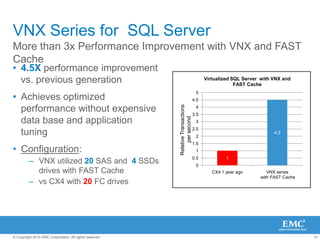
    VNX Series for SQL Server More than 3x Performance Improvement with VNX and FAST Cache4.5X performance improvement vs. previous generationAchieves optimized performance without expensive data base and application tuning Configuration: VNX utilized 20 SAS and 4 SSDs drives with FAST Cache vs CX4 with 20 FC drivesRelative Transactions per second
  • 106.
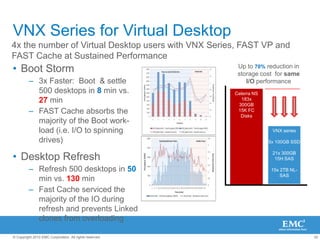
    VNX Series forVirtual Desktop4x the number of Virtual Desktop users with VNX Series, FAST VP and FAST Cache at Sustained PerformanceUp to 70% reduction in storage cost for same I/O performanceBoot Storm3x Faster: Boot & settle 500 desktops in 8 min vs. 27 minFAST Cache absorbs the majority of the Boot work-load (i.e. I/O to spinning drives)Desktop RefreshRefresh 500 desktops in 50min vs. 130minFast Cache serviced the majority of the IO during refresh and prevents Linked clones from overloadingCelerra NS183x 300GB 15K FC DisksVNX series5x 100GB SSD21x 300GB 15H SAS15x 2TB NL-SAS
  • 107.
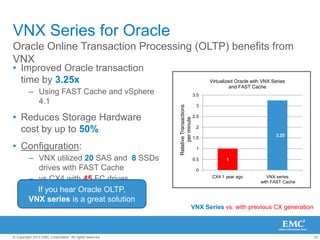
    VNX Series forOracleOracle Online Transaction Processing (OLTP) benefits from VNXImproved Oracle transaction time by 3.25xUsing FAST Cache and vSphere 4.1Reduces Storage Hardware cost by up to 50%Configuration: VNX utilized 20 SAS and 8 SSDs drives with FAST Cache vs CX4 with 45 FC drivesRelative Transactions per minuteIf you hear Oracle OLTP, VNX series is a great solutionVNX Series vs. with previous CX generation
  • 108.
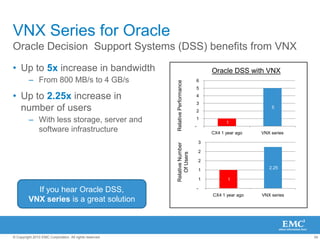
    VNX Series forOracleOracle Decision Support Systems (DSS) benefits from VNXUp to 5x increase in bandwidth From 800 MB/s to 4 GB/sUp to 2.25x increase in number of usersWith less storage, server and software infrastructureOracle DSS with VNXRelative Performance Relative NumberOf UsersIf you hear Oracle DSS, VNX series is a great solution
  • 109.
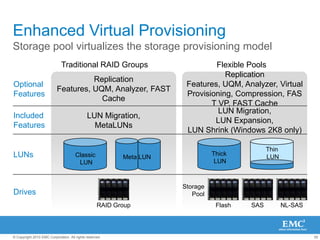
    Enhanced Virtual ProvisioningStoragepool virtualizes the storage provisioning modelTraditional RAID GroupsFlexible PoolsReplication Features, UQM, Analyzer, Virtual Provisioning, Compression, FAST VP, FAST CacheReplication Features, UQM, Analyzer, FAST CacheOptionalFeaturesLUN Migration, LUN Expansion,LUN Shrink (Windows 2K8 only)IncludedFeaturesLUN Migration, MetaLUNsThin LUNThickLUNClassic LUNLUNsMeta LUNStoragePoolDrivesRAID GroupFlashSASNL-SAS
  • 110.
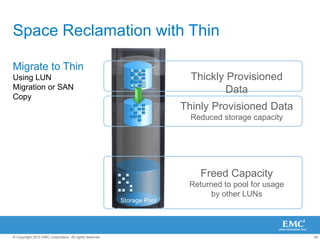
    Migrate to ThinUsingLUN Migration or SAN Copy Thickly Provisioned DataThinly Provisioned DataReduced storage capacityFreed CapacityReturned to pool for usage by other LUNsSpace Reclamation with ThinStorage Pool
  • 111.
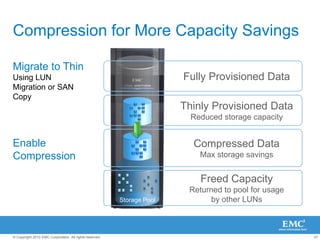
    Migrate to ThinUsingLUN Migration or SAN Copy Fully Provisioned DataThinly Provisioned DataReduced storage capacityEnable CompressionCompressed DataMax storage savingsFreed CapacityReturned to pool for usage by other LUNsStorage PoolCompression for More Capacity Savings
  • 112.
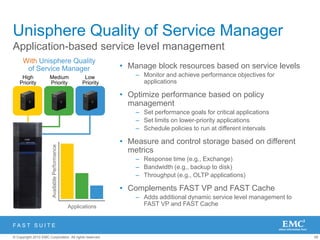
    Unisphere Quality ofService ManagerApplication-based service level managementWithUnisphere Qualityof Service ManagerAvailable PerformanceAvailable PerformanceApplicationsApplicationsBeforeUnisphere Qualityof Service ManagerManage block resources based on service levelsMonitor and achieve performance objectives for applications Optimize performance based on policy managementSet performance goals for critical applicationsSet limits on lower-priority applicationsSchedule policies to run at different intervalsMeasure and control storage based on different metrics Response time (e.g., Exchange) Bandwidth (e.g., backup to disk)Throughput (e.g., OLTP applications)Complements FAST VP and FAST CacheAdds additional dynamic service level management to FAST VP and FAST CacheMediumPriorityHighPriorityLow PriorityFAST SUITE
  • 113.
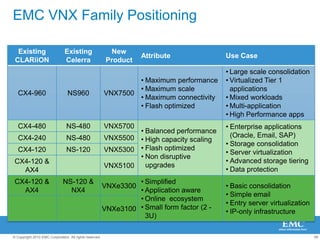
    EMC VNX FamilyPositioning
  • 114.
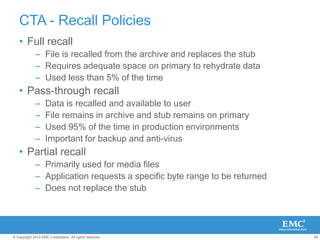
    CTA - RecallPoliciesFull recallFile is recalled from the archive and replaces the stubRequires adequate space on primary to rehydrate dataUsed less than 5% of the timePass-through recallData is recalled and available to userFile remains in archive and stub remains on primaryUsed 95% of the time in production environmentsImportant for backup and anti-virusPartial recallPrimarily used for media filesApplication requests a specific byte range to be returnedDoes not replace the stub
  • 115.
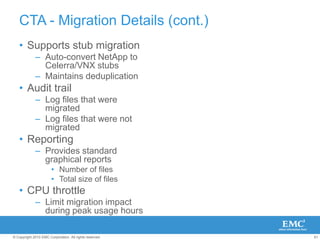
    CTA - MigrationDetails (cont.)Supports stub migrationAuto-convert NetApp to Celerra/VNX stubsMaintains deduplicationAudit trailLog files that were migratedLog files that were not migratedReportingProvides standard graphical reports Number of filesTotal size of filesCPU throttleLimit migration impact during peak usage hours
  • 116.
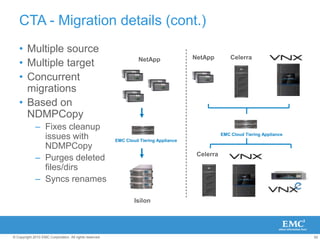
    CTA - Migrationdetails (cont.)Multiple sourceMultiple targetConcurrent migrationsBased on NDMPCopyFixes cleanup issues with NDMPCopyPurges deleted files/dirsSyncs renamesCelerraNetAppNetAppEMC Cloud Tiering ApplianceEMC Cloud Tiering ApplianceCelerraIsilon
  • 117.
    ‘Try before youbuy’Blue Chip and EMC are offering a 45 day no obligation trial on VNX/e*Contact your account manager or email ict@bluechip.uk.com for further details.*Terms and conditions apply

Editor's Notes

  • #3 Whether a shrinking or expanding economy, and whether in mature or emerging markets, key IT challenges remain and traditional approaches to building and managing IT infrastructure no longer make economic sense.As EMC talks to customers about their IT infrastructure challenges, we find four recurring themes:Budgets remain flat to slightly up and are not growing nearly fast enough to meet IT demands using traditional approaches.Companies are struggling to manage increasing complexity and are looking for new tools and methodologies.Companies see no end in sight to relentless data growth and are looking for ways to keep up.Finally, fast-changing business models, competitive pressures, and other factors are putting increased demand on IT operations.It is with these challenges in mind that EMC designed the guiding principles for its next-generation platforms.
  • #4 With these challenges and requirements in mind, EMC is introducing a new record-breaking unified storage platform—the EMC VNX family.These hardware and software solutions are simple to provision, efficient with lower-capacity requirements, affordable for any budget, and powerful enough to handle the demands of virtual applications.In fact, the new family delivers the world’s simplest array to manage and the world's highest midtier performance.The VNX family is designed from the ground up for virtual application environments—from simple, money-saving server and storage consolidation for small business, to the next-generation virtual data center applications.The VNX family is comprised of two series: VNXe series and VNX series. The VNXe series represents the entry point of the VNX family, and is designed specifically for small-to-medium businesses (SMB), remote offices or branch offices (ROBO), or departmental applications where traditional storage administration skills may not be available.The VNX series is the next-generation midrange platform. For those of you familiar with EMC’s current CLARiiON and Celerra platforms,the VNX series combines the capabilities of these systems into a single modular unified storage offering.While new, the entire VNX family shares the tradition and builds on years of know-how of the world’s most popular SAN and NAS platforms—CLARiiON and Celerra. Everything EMC has learned about high performance and high reliability culminates with the VNX family.EMC Unisphere provides a common unified management capability for EMC’s VNX family and CLARiiON and Celerra products. And as you will see, Unisphere also provides a way to simplify and automate other common storage management tasks, such as replication and backup reporting.
  • #6 Two system models—one management environment. The VNXe series provides a choice of hardware platforms and capabilities to meet you specific needs.Common capabilities include:6 Gb/s SAS disk interface delivers the highest bandwidth for high performance and full redundancy for high availabilitySupport for15k rpm high-performance and high-capacity 7,200 rpm near-line disks.1 Gigabit Ethernet ports for shared iSCSI and NAS connectivityI/O expansion slotsManagement and protocols: Unisphere, CIFS, NFS, iSCSIAdvanced functionality: Thin provisioning, and File Deduplication with CompressionChoose:VNXe3100 for compact, highly integrated solutions with class-leading features and the option of single or dual controllers to achieve the right combination of price, performance, and availability.VNXe3300 for greater storage scalability and performance, and optional 10 Gigabit Ethernet connectivity
  • #9 The new VNX series is of course much faster than the older CLARiiON and Celerra. The new processers makes that happen. And with all that processing power we now can take full advantage of Flash technology. By combining the VNX architecture with EMC’s industry leading Fully Automated Storage Tiered virtual pools and FAST Cache, VNX is unstoppable. Never before has this level of performance been available in a mid-tier platform. With the VNX series you now can do 3 times more than before. More users. More transactions and much faster response times. VNX supercharges your applications more than ever. No more storage bottlenecks. No more disk-bound systems. Your world can now be three-times faster.
  • #10 Note to Presenter: View in Slide Show mode for animation. One of the biggest shifts in IT is, of course, the move to server virtualization. It continues to have a profound impact on how we look at storage provisioning today.In the “good old days,” we typically had a single application running on a server. To meet performance objectives, we would create a RAID group and then carve out LUNs statically. With virtualization, that all has changed.Note to Presenter: Click now in Slide Show mode for animation. Virtualization enables you to save on infrastructure and run more applications on fewer physical servers. To meet the growing and dynamic needs of the business, server virtualization pools server resources and enables dynamic provisioning and optimization of compute power and applications according to shifting business needs. To stay relevant, storage had to embrace this same pooling paradigm. Just like VMware vMotion allows you to move things around on the server side, EMC saw the need to allow data to move dynamically across different tiers of drives (from high performance to lower cost/high capacity) according to its business activity. Not only did such data movement make sense, it also had to be fully automated and self-managing.As the storage system takes on more and more automation and ongoing optimization, it needs more processing power. EMC knew this to be a central requirement for its next-generation midtier storage systems.
  • #13 The FAST Suite improves performance and maximizes storage efficiency by deploying this FLASH 1st strategy. FAST Cache, an extendable cache of up to 2 TB, gives a real-time performance boost by ensuring the hottest data is served from the highest performing Flash drives for as long as needed. FAST VP then complements FAST Cache by optimizing storage pools on a regular, scheduled basis. You define how and when data is tiered using policies that dynamically move the most active data to high-performance drives (e.g., Flash), and less active data to high-capacity drives, all in one-gigabyte increments for both block and file data.Together, they automatically optimize for the highest system performance and the lowest storage cost simultaneously.
  • #15 The second feature provided in the FAST Suite, which is highly complementary to FAST Cache is FAST for Virtual Pools. The combination of FAST Cache and FAST VP addresses the perennial storage management problem: the cost of optimizing the storage system. In many cases prior to FAST and FAST Cache, it was simply too resource intensive to perform manual optimization and many customers simply overprovisioned storage to ensure the performance requirements of a data set were met. With the arrival of Flash drives and the FAST Suite, we have a better way to achieve this fine cost/performance balance:The classic approach to storage provisioning can be repetitive and time-consuming and often produces uncertain results. It is not always obvious how to match capacity to the performance requirements of a workload’s data. Even when a match is achieved, requirements change, and a storage system’s provisioning may require constant adjustment. Storage tiering is one solution. Storage tiering puts several different types of storage devices into an automatically managed storage pool. LUNs use the storage capacity they need from the pool, on the devices with the performance they need. Fully Automated Storage Tiering for Virtual Pools (FAST VP) is the EMC® VNX® feature that allows a single LUN to leverage the advantages of Flash, SAS, and Near-line SAS drives through the use of pools.  FAST solves theses issues by providing automated sub-LUN-level tiering. FAST collects I/O activity statistics at the 1 GB granularity level (known as a slice). The relative activity level of each slice is used to determine which slices should be promoted to higher tiers of storage. Relocation is initiated at the user’s discretion through either manual initiation or an automated scheduler.  Through the frequent relocation of 1 GB slices, FAST continuously adjusts to the dynamic nature of modern storage environments. This removes the need for manual, resource-intensive LUN Migrations while still providing the performance levels required by the most active dataset, thereby optimizing for cost and performance simultaneously.
  • #16 The industry-leading innovations of the VNX series and the FAST Suite translate into compelling improvements in real-world virtualized application environments. For Microsoft SQL Server, the VNX series supports more than three-times the number of users and transactions versus the CLARiiON CX4.In environments running VMware View, the VNX series can boot 500 virtual desktops in eight minutes versus 27 minutes with EMC’s previous generation (without Flash or FAST Suite). Likewise in virtualized Oracle environments, the VNX series can support more than three-times the number of users and transactions.
  • #18 Storage must be lean and highly efficient to satisfy the rigorous demands of today’s IT. Data is simply growing faster than IT budgets can keep up. Relentless efficiency is mandatory. Gone are the practices of wasteful thick LUNs and file systems. Over the last couple of years EMC has seen IT move to a just-in-time provisioning model where storage capacity is allocated upon consumption. This practice is commonly referred to as thin LUNs or thin provisioning.In thin LUNs, capacity from the system’s storage pool is only used when new and additional data is written. If data is erased, the capacity is given back to the pool. Liberating IT from having to “guess” the right amount of storage needed for each user and application in advance has yielded much higher utilization rates. EMC typically sees a shift from 60 percent storage utilization to 90 percent or higher. This means you actually can store more data without having to buy more storage. With classic thick LUNs, IT shops had no choice but to live with 40 percent wasted resources. This is now a thing of the past. Thin LUNs prevent it.But thin LUNs are not the only capacity-efficiency feature that the VNX series offers to challenge rising storage costs. The VNX series also offers file-level de-duplication and storage pool LUN compression. Combining both with thin provisioning amplifies system efficiency by up to three times. This means you get three-times the usable capacity per IT dollar spent. Your budget effectively stretches three-times further.This is an important aspect of the efficiency strategy. With the VNX series’ efficiency technologies, IT is ready to meet new and increasing demands. The VNX series’ capacity and performance efficiency technologies are designed to work together and may be combined to achieve the ideal, highly efficient mix of performance, capacity, power, and footprint.
  • #21 The VNX series is managed by EMC Unisphere 1.1, which enables a single system view of unified, file, and block systems with all features and functions available in a single interface. Unisphere 1.1 will also be compatible with older systems, including CLARiiON and Celerra systems running DART 6.0 or higher.Unisphere offers a new approach to storage management. It is an easy-to-use, sleek interface that provides a simple integrated management experience for the VNX series, VNXe series, CLARiiON, and Celerra. It is extensible and supports other EMC mid-tier products such as RecoverPoint, Replication Manager, Data Protection Advisor, and Atmos Virtual Edition.Log on to Unisphere once and discover all the systems in your environment. Unisphere offers built-in contextual access to the support ecosystem and is your one-stop shop for all your support and service needs. To leverage all these benefits, you don’t need to make any radical changes to your existing infrastructure. Unisphere can be seamlessly added to your current environment. Let’s take a closer look at each of these capabilities…Common experience for SAN and NAS:One look and you know what’s going onSingle sign-onAggregated alertsSummary viewsReports with sorting and filteringData exportable to 3’rd party tools Tight VMware integrationAutomatic discovery of virtual machines and ESX serversEnd-to-end virtual-to-physical mappingAutomated virtual infrastructure reportingBuilt-in access to support communityOne-click self service
  • #22 Note to Presenter: View in Slide Show mode for animation. The VNXe series was specifically designed to integrate with your server and application environments. The wizards for provisioning new storage do it in the context of the application, rather than as just generic capacity. There’s no need to be a RAID expert. Simply let the wizard be your guide. Gain instant expertise and let the system do the hard work.For example, the Microsoft Exchange wizard asks you for your Exchange version, how many mailboxes are needed, and what size, and then automatically creates the storage volumes needed for the data and log files. The wizards take the guesswork out provisioning storage and embodies years of EMC experience and best practices. If you are creating volumes using iSCSI, or file shares for CIFS or NFS, the appropriate wizard will create the storage, set up appropriate access, and enable snapshots and even external replication, all in less than 10 clicks. Simply confirm your selections or accept the defaults, and it is all done for you. With the VNXe series, storage is now easier than ever.
  • #24 Consolidation of the mid-tier data protection software, specifically providing a single solution for local and remote data protection, replication, failover and disaster recoveryNew packaging reduces number of SKUs to simplify ordering All titles now offered with array pricing, makes quoting and selling easierDifferentiated solution that bundles best of breed technologies at competitive price pointsTighter alignment with array business to drive software replication pen rates
  • #25 For simple peace of mind and total protection—whether it be local protection or remote protection, whether it be for encryption or for application protection—the VNX series protects your system better than ever.The VNX series provides unified replication for local and remote data recovery with DVR-like rollback capabilities for business continuity on block-based storage.By allowing recovery of production applications with minimal data exposure through rollback to a point in time abilities, you can now restore through a simple click.Simply define your recovery point objectives: set-it-and-forget-it.Automating processors for failover and failback further reduces risk exposure and simplifies ongoing protection management.
  • #28 EMC is the storage platform of choice in the virtualized server market. The reason that two out of three CIOs choose EMC for their VMware environments is simple—EMC delivers high-availability platforms that are critical in the virtual server market. High availability, advanced functionality, and excellent service place Celerra ahead of the nearest competitor.EMC Celerra provides the same I/O workload before and after a failure, which is a necessity when you have many virtual applications dependent on this I/O payload. With other vendors, a failure can cause serious degradation, resulting in all virtualized applications degrading concurrently.As shown in the Forrester Research and Goldman Sachs survey results on the slide, EMC is the number one vendor for VMware-attached storage.Note to Presenter: The quote on the slide comes from the Goldman Sachs “IT Spending Survey.”
  • #29 The VNX platform is optimized for virtualization with over 50 points of tight integration.Until today, one of the major challenges facing users in virtual environments was a management complexity gap. Storage administrators have access to detailed information on the array, but lack visibility into how the virtual server is configured and which virtual machines are consuming what for storage resources. VMware administrators, on the other hand, can see the details of the virtual server environment and virtual machines, but lack visibility into the storage system. On VNX, Unisphere together with vCenter Server integration makes storage management in a virtualized environment a seamless experience. Each administrator can use their familiar interface to gain full visibility into virtual and physical resources, transparently provision storage, integrate replication, and access and offload all storage functions to the storage system. To further drive efficiency in the VMware space, EMC has delivered on the VMware vStorage APIs for Array Integration (VAAI), allowing the VNX series is be fully optimized for virtualized environments. This technology offloads VMware storage-related functions from the server to the storage system, enabling more efficient use of server and network resources for increased performance and consolidation.Letting VNX perform common data management tasks like vMotion result in:10 times network I/O10 times more virtual machines10 times faster response timeVNX delivers unmatched VMware management integration and optimization and is a perfect match for anyone running VMware.
  • #31 EMC has several infrastructure solutions for a virtual desktop environment. Our most recent solution leverages EMC Symmetrix VMAX with Symmetrix Virtual Provisioning and VMware View Composer to significantly reduce storage costs – up to 50% while maintaining overall performance levels under load. Leveraging EMC Symmetrix Virtual Provisioning with VMware View Composer, you are able to minimize the storage requirements. EMC Virtual Provisioning A consistent end-user experience enables you to better support your business’ productivity. Finally, with centralized desktop management, you are able to better support your productivity as you are able to manage and maintain the environment from the data center instead of going to each device in your company.
  • #32 The EMC Integrated Infrastructure for VMware enables you to quickly deploy a virtualized infrastructure for VMware. This whitepaper demonstrates how to add VMware View to the infrastructure for a turnkey solution for virtual desktops. Leveraging the best practices in this whitepaper, you can effectively use the EMC Integrated Infrastructure for VMware to support your virtual desktop environment to reduce management and operational costs.
  • #37 The VNX series is based on an industry leading architecture that allows you to configure purpose built components that are designed specifically for the different workloads required. For different connectivity options the VNX platform supports each, concurrently with its purposed built modular architecture.VNX gives you the choice of low-cost IP or high-throughput Fibre Channel connectivity. VNX delivers both file and block protocols. For higher throughput, Fibre Channel is the growth path for iSCSI (block), and MPFS is the growth path for NAS (files).VNX lets you start small and scale throughput and capacity.Multi-protocol support NAS (CIFS and NFS), MPFS, native iSCSI, Fibre Channel and Fiber Channel over Ethernet as well as pNFS all within one unified platform, and at no additional cost, offer cost effective flexibility in deployment options and make VNX an easy purchasing decision. NAS—File-sharing protocol for Windows and UNIX systems. Typical use cases include: Traditional NAS - CAD/CAM Software engineering, Non-Traditional NAS - Oracle, VmwareMPFS—Multi-Path File System for improved performance and scalability. See pNFS for use casespNFS—Public domain equivalent of MPFS, supported on UNIX and Linux systems in conjunction with NFS V4.1. Support for pNFS for VNX is provided at no additional cost with the advanced protocol license option. Typical use cases for pNFS and MPFS include: Image processing, Bioengineering, Financial Analysis, Oil and gasiSCSI—Advanced iSCSI implementation using a familiar native CLARiiON Block LUN model with fast failover and full CLARiiON feature support. Similar use cases to Fibre channel, although more typically seen in the commercial and Small to medium business spaceFibre Channel—high-speed networking protocol primarily used in storage area networks providing full native CLARiiON feature set. Typical use cases include: Database/Data warehouse, VMware, High performance needsFiber Channel over Ethernet—High speed block protocol over converged (data center) Ethernet transport, is a new protocol appearing in data centers to reduce infrastructure costs by consolidating all storage and data networking needs onto a single Ethernet network. Similar use cases to Fibre Channel.Cloud: Cloud storage uses open protocols (REST and SOAP) to deliver public and private cloud solutions that leverage the proven back-end storage functionality of VNX. The cloud offering is based upon a solution leveraging Atmos VE running on VMware and using Block (FC or iSCSI) or File (NFS) connections to the VNX platform. Cloud is further supported within Unisphere via Link and Launch. Use cases include content-rich web applications, infrastructure as a service and archiving to the cloud. Note to Presenter: Further details are found later in this presentation.
  • #38 Note to Presenter: View in Slide Show mode for animation. In order to have enough processing power to run all the advanced data management functions and protocols simultaneously, the VNX series is based on an industry-leading modular architecture. This architecture allows you to scale purpose-built controllers that are designed specifically for the different workloads to processed.The VNX series modular architecture deliversmaximum flexibility and performance— without compromise. Storage processor modules manages the storage pool and provides SAN block-level access (iSCSI, Fibre Channel, or Fibre Channel over Ethernet). X-Blades add scale-out shared networked file system support (CIFS, NFS with pNFS, or Multi-Path File System) and can be added independently without impacting the overall system or require planned down time. In addition, VNX seamlessly supports EMC Atmos for cloud connectivity and object protocols (REST or SOAP).Storage resources are managed in virtual self-optimizing storage pools, ensuring no stranded unused resources. Frequently accessed data is automatically moved to high-performance Flash drives and infrequently accessed data is moved to high-capacity/low-cost disk drives. This way, active data is served as quickly as possible while keeping storage cost under control.The VNX modular architecture is open. EMC has packaged the X-Blades into a VNX NAS gateway with full support for EMC block storage (Symmetrix, VNX SPs, and CLARiiON) and enables scaling up to four storage arrays. So when more storage pool processing, or investment protection, is needed, the VNX modular architecture does not leave you behind.Note to Presenter:The slide graphic depicts the VNX series architecture. Pre-integrated VNX series systems scale to two storage processors and eight X-Blades. In order to scale the VNX architecture further, a separate configuration with VNX gateways front-ending four VNX series storage arrays is needed.
  • #39 The graphs on this slide show the significant improvements in throughput for the VNX series platforms compared with the prior generation CX4/NS series systems. The end to end architecture developments (faster CPU cores up to 6x2.8GHz, larger and faster memory with up to 24GB of DDR3 @1333MHz, faster internal memory buses at x8 PCI-e Gen 2) deliver performance improvements of 2-3x that of the prior platform.That performance improvement applies to all working sets and application types; Exchange, OLTP databases, Data warehouse, Virtualized environments as well as all File applications.One important thing to note is how the platforms only truly meet their full performance potential when implemented with Flash drives. The VNX is the first storage platform truly designed to take advantage of the game changing Flash technology.
  • #40 The EMC VNX Series also had the lowest overall response time (ORT) of systems tested, taking the top spot with a response time of .96 milliseconds. EMC’s response time is 3 times faster than the IBM offering in second place. Faster response times enable end-users to access information quicker and more efficiently. Chris Mellor in The Register blog entry EMC kills SPEC benchmark with all-flash VNX (http://www.theregister.co.uk/2011/02/23/enc_vnx_secsfs2008_benchmark/) writes about IBM, HP and NetApp: “For all three companies, any ideas they previously had of having top-level SPECsfs2008 results using disk drives have been blown out of the water by this EMC result. It is a watershed benchmark moment. ®”
  • #41 Note to Presenter: View in Slide Show mode for animation.While FAST provides automated and efficient tiering over time, FAST Cache leverages enterprise Flash drives to extend existing cache capacities to automatically absorb unpredicted spikes in application workloads, and thereby speeds system and application performance for data that is not already at the Flash tier.Where FAST with Sub-LUN Tiering works at a very granular level of 1 GB chucks, FAST Cache takes this concept one step further by working at the 64K I/O level. By doing so, FAST Cache acts more like dynamic, but persistent, controller cache. By extending controller cache with Flash, the cache-hit ratio is dramatically improved. As a result, the new goal for most application workloads is to strive for a 90 to 95 percent cache hit rate. This is achievable because the size of Flash-based cache is up to 64-times larger than the controller’s original DRAM (dynamic random access memory)cache.Cache hit rates will typically go from one out of five I/Os served from cache to nine out of 10 I/Os served from cache, a 4.5-times improvement.FAST Cache may be added to existing LUN configurations and acts as a system-wide resource. With FAST Cache, you now have multi-terabyte, read-write, non-volatile cache—an absolute first for storage platforms in the midtier market. The fact that data is written to enterprise Flash drives means that when the system returns from a power failure or planned outage, the cache is already warmed up and service levels can readily resume at the point they were before the disruption.The size of FAST Cache is more than ample to catch transitory spikes in I/O demand. Should large amounts of Flash be needed to meet service level agreements, it is important to know that FAST Cache works in unison with FAST Sub-LUN Tiering and that the two technologies complement each other fully.Note to Presenter: EMC’s FAST Cache works for both reads and writes. Competitors, like NetApp, frequently only implement Flash as proprietary read-only schemes.
  • #42 FAST will turbo-charge most applications since frequently accessed data automatically will be moved to cache in 64 KBchunks. EMC is one of the few companies offering both read and write acceleration using Flash drives. Two or more Flash drives may be used to form 2 TB (4 TB raw) of mirrored read and write cache.Both database and VMware datasets benefit from FAST Cache. There is little doubt that FASTCache will help any blend of applications. The only place where FAST Cache will be of little help is for 100 percent sequential workloads. To accelerate such workloads, add Flash drives to your FAST pools.
  • #43 FAST Cache can be enabled at the LUN level (for Classic RAID Group LUNs) or at the Pool level if using Thick or Thin Pool LUNs, in which case all LUNs in the pool will be enabled for FAST Cache. It is not recommended to enable FAST Cache for all LUNs in the system as some workloads do not experience sufficient cost/benefit from FAST Cache.The FAST Cache capacity options listed are the maximum sizes of FAST Cache for the specific platform. These capacities are presented in the form of maximum capacity based upon the drive type (capacity using 100GB drives/max capacity using 200GB drives) and represent the useable mirrored capacity. 100GB and 200GB drives cannot be mixed in a FAST Cache configuration.FAST Cache benefits most workloads as well as supporting internal functionality such as snaps, thin LUNs and compressed LUNsNote to Presenter: Be aware that VNX 5100 cannot support BOTH Thin Provisioning and FAST Cache at the same time due to physical memory constraints
  • #44 As its name implies, FAST is a completely automated feature and implements a set of user defined policies to ensure it is working to meet the data service levels required for the business. Typically FAST will move data between Flash, SAS and Near-Line SAS media as it ages and becomes less active, although customers may decided to configure a separate pool and use FAST with just a small amount of SAS and Near-Line SAS for optimized TCO for their 3rd Tier applications.FAST policies control how FAST should apply to individual LUNs in a storage pool via the following options:Auto-tier - Auto-tier is the default setting for all pool LUNs upon their creation. FAST will relocate slices of these LUNs based solely on their activity level after all slices with the highest/lowest available tier have been relocated. Highest available tier - Highest available tier should be selected for those LUNs which, although not always the most active, require high levels of performance whenever they are accessed. FAST will prioritize slices of a LUN with highest available tier selected above all other settings. Lowest available tier - Lowest available tier should be selected for LUNs that are not performance- or response-time-sensitive. FAST will maintain slices of these LUNs on the lowest storage tier available regardless of activity level. No data movement - No data movement may only be selected after a LUN that has already been created. FAST will not move slices from their current positions once the no data movement selection has been made.The tiering policy chosen, also affects the initial placement of a LUN’s slices within the available tiers. Initial placement with the pool set to auto-tier will result in the data being distributed across all storage tiers available within the pool, based upon the relative capacity of each tier available in the pool. LUNs set to highest available tier will have their component slices placed on the highest tier that has capacity available. LUNs set to lowest available tier will have their component slices placed on the lowest tier that has capacity available.Additionally, a relocation schedule is set and the rate of data relocation defined. This allows the relocation process to automatically run at a quiet time of the day and to minimize the impact to the ongoing workload. Typically the relocation process is scheduled every 24 hours but it is possible to relocate data as frequently as you want, although there is a tradeoff between system resources and frequency of re-location. FAST VP also supports manual relocation should a relocation be required outside of the regular schedule.
  • #45 The value of FAST is based upon its ability to drive as much of the highly accessed data components on to the highest tiers of storage (eg Flash) while optimizing for TCO by driving low accessed data to high capacity NL-SAS drives. It achieves this with a number of mechanisms:Statistics collection - One slice of data is deemed “hotter” (more activity) or “colder” (less activity) than another based on the relative activity level of those slices. Activity level is determined simply by counting the number of I/Os, reads and writes bound for each slice. FAST maintains a cumulative I/O count and weights each I/O by how recently it arrived. This weight deteriorates over time. New I/O is given full weight. After approximately 24 hours, the same I/O will carry only about half-weight. Over time the relative weighting continues to go down. Statistics collection happens continuously in the background on all pool LUNs.Analysis - Once per hour, the collected data is analyzed. This analysis produces a rank ordering of each slice within the pool. The ranking progresses from the “hottest” slices to the “coldest.” This ranking is relative to the pool. A “hot” slice in one pool may be “cold” by another pool’s ranking. There is no system-level threshold for activity level. The user can influence the ranking of a LUN and its component slices by changing the default policy from auto-tier to either highest or lowest tier preferred, in which case the tiering policy will take precedence over activity level.Relocation - During user-defined relocation windows, 1 GB slices are promoted according to the rank ordering performed in the analysis stage. During relocation, FAST will prioritize relocating slices to higher tiers. Slices are only relocated to lower tiers if the space they occupy is required for a higher priority slice. In this way, FAST will attempt to ensure the maximum utility from the highest tiers of storage so as data is added to the pool, it will initially be distributed across the tiers and then moved up to the higher tiers if space is available. 10% space is maintained in each of the tiers to absorb new allocations that are defined as “Highest Available Tier” between relocation cycles. Lower tier spindles are utilized as capacity demand grows. Relocation can be initiated either manually or by a user-configurable, automated scheduler.
  • #46 Slide 1 of 3 – The following three slides show a visual animation of FAST VP in conjunction with FAST Cache in operation. FAST Cache and FAST VP should be used together to yield high performance and TCO from the storage system. As an example, Flash drives can be used to create FAST Cache and FAST VP can be used on a pool consisting of Flash, SAS and NL-SAS disk drives. This slide shows activity levels changing, and subsequent scheduled data relocation.Note to Presenter :<click 4x> 4 blocks change color (activity level) in sequence<click 5th> two blocks moved, up, and two moved down
  • #47 Slide 2 of 3 – this shows heating up of sub-slice chunks of 64 KB Granularity, and being copied into FAST CacheNote to Presenter: <click 3x> sub-slice chunks turn red and are copied into FAST Cache, in sequence.
  • #48 Slide 3 of 3 – this shows swapping in of more active I/O into FAST CacheNote to Presenter: <click 3x> sub-slice chunks in FAST Cache cool off, relatively (turning yellow). When sub-slice chunks on disk warm up (turn red), they swap places in FAST Cache with cooler data, in sequenceThe combined benefit shown here is that FAST Cache will provide immediate performance benefit to any bursty data while FAST will move warmer data to SAS drives and colder data to NL-SAS drives. In addition to the performance benefit, there is also a TCO benefit in that FAST Cache with a small number of Flash drives serves the data that is accessed most frequently, while FAST VP with Flash, SAS and NL-SAS drives can optimize disk utilization and efficiency as well as providing for the vagaries of longer term data access patterns.