VM-Ware VirtualizationVM-Ware Virtualization
((Under the guidance of Prof. Sariga Raj )Under the guidance of Prof. Sariga Raj )
PRESENTATION BYPRESENTATION BY
ASHWANI KUMARASHWANI KUMAR
Reg. 14140018Reg. 14140018
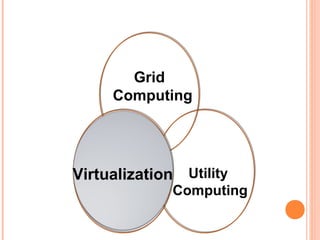
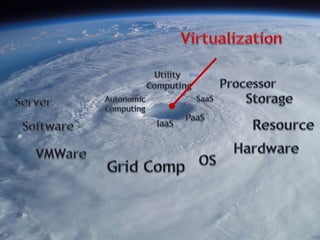
Grid
Computing
Virtualization Utility
Computing
Virtualization
WHAT IS VIRTUALIZATIONWHAT IS VIRTUALIZATION
 Virtualization is one of the hardware reducing,
cost saving and energy saving technology that is
rapidly transforming the IT landscape and
fundamentally changing the way that
people compute.
 With VMware virtualization solutions you
can reduce IT costs while increasing the
efficiency, utilization and flexibility of their
existing computer hardware.
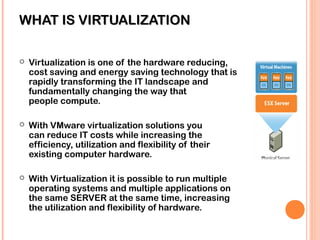
 With Virtualization it is possible to run multiple
operating systems and multiple applications on
the same SERVER at the same time, increasing
the utilization and flexibility of hardware.
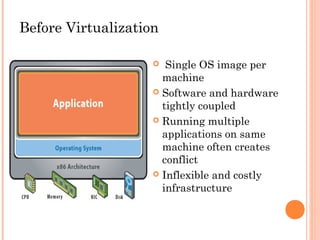
Before Virtualization
 Single OS image per
machine
 Software and hardware
tightly coupled
 Running multiple
applications on same
machine often creates
conflict
 Inflexible and costly
infrastructure
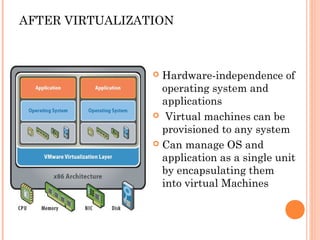
AFTER VIRTUALIZATION
 Hardware-independence of
operating system and
applications
 Virtual machines can be
provisioned to any system
 Can manage OS and
application as a single unit
by encapsulating them
into virtual Machines
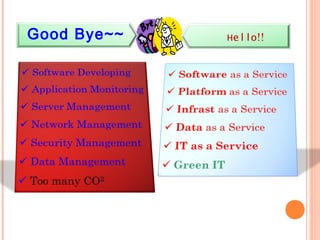
Good Bye~~ Hello!!
REDUCE ENERGY COSTS AND GOREDUCE ENERGY COSTS AND GO
GREEN WITH VMWAREGREEN WITH VMWARE
VIRTUALIZATIONVIRTUALIZATION
Reduce the energy demands of your datacenter by dynamic
management of computer capacity across a pool of servers.
VMware infrastructure delivers the resources your
infrastructure needs and enables you to:
-Reduce energy costs by 80%.
-Power down servers without affecting applications or
users.
-Green your datacenter while decreasing costs and
improving service levels.
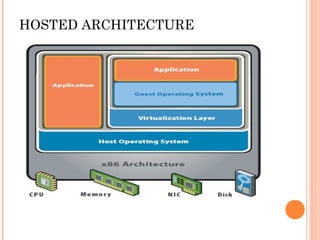
HOSTED ARCHITECTURE
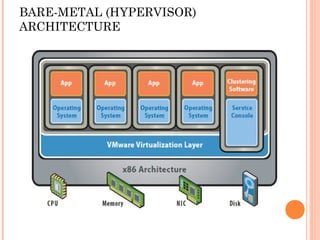
BARE-METAL (HYPERVISOR)
ARCHITECTURE
HYPERVISORHYPERVISOR
ADVANTAGESADVANTAGES
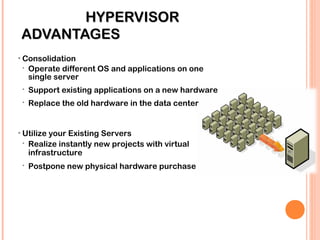
• Consolidation
 Operate different OS and applications on one
single server
 Support existing applications on a new hardware
 Replace the old hardware in the data center
• Utilize your Existing Servers
 Realize instantly new projects with virtual
infrastructure
 Postpone new physical hardware purchase
KEY FEATURES OF THEEY FEATURES OF THE VMWARE SERVERWARE SERVER
VIRTUALIZATIONVIRTUALIZATION
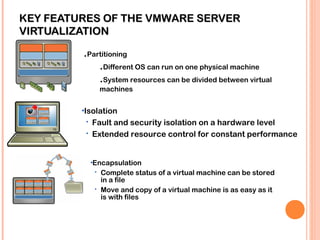
.Partitioning
.Different OS can run on one physical machine
.System resources can be divided between virtual
machines
•Isolation
 Fault and security isolation on a hardware level
 Extended resource control for constant performance
•Encapsulation
 Complete status of a virtual machine can be stored
in a file
 Move and copy of a virtual machine is as easy as it
is with files
VMWARE VMOTIONVMWARE VMOTION
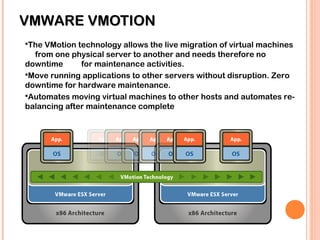
The VMotion technology allows the live migration of virtual machines
from one physical server to another and needs therefore no
downtime for maintenance activities.
Move running applications to other servers without disruption. Zero
downtime for hardware maintenance.
Automates moving virtual machines to other hosts and automates re-
balancing after maintenance complete
UNPLANNED DOWNTIME / SERVER FAILURE –UNPLANNED DOWNTIME / SERVER FAILURE –
VMWARE WORKS EVERYWHERE!!VMWARE WORKS EVERYWHERE!!
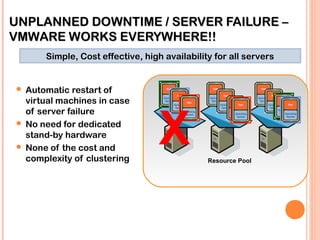
 Automatic restart of
virtual machines in case
of server failure
 No need for dedicated
stand-by hardware
 None of the cost and
complexity of clustering Resource Pool
X
Simple, Cost effective, high availability for all servers
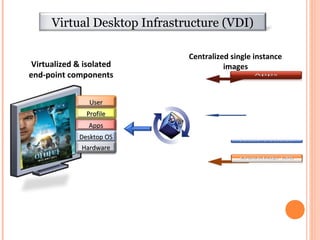
Virtualized & isolated
end-point components
Centralized single instance
images
AppsApps
Desktop OSDesktop OS
ProfileProfile
HardwareHardware
UserUser
Virtual Desktop Infrastructure (VDI)
16
BENEFITS OF VMWAREBENEFITS OF VMWARE
VIRTUALIZATIONVIRTUALIZATION
 Easier Manageability
 File, Server, OS, Data manage
 Fault Isolation
 Efficient use of Resources
 Portability
 Problem-Free Testing
 Reduced Costs
 The Ability to Separate Applications
 Easier Manageability
CONCLUSION
 One of the main cost-saving, hardware-reducing,
and energy-saving techniques used by cloud
providers is virtualization  
 With OS virtualization each VM can use a
different operating system (OS), and each OS is
isolated from the others. 
 Use VMs to enabling different services to run in
separate VMs on the same physical machine.
REFERENCES
 www.vmware.org/fundamentals.html
 www.wikipedia.org/vmware
 VM-ware white paper published.
 Science hub for IEEE papers.
 Virtualisation topic from Tanenbaum.
THANK YOU

VMware Virtualization

  • 1.
    VM-Ware VirtualizationVM-Ware Virtualization ((Underthe guidance of Prof. Sariga Raj )Under the guidance of Prof. Sariga Raj ) PRESENTATION BYPRESENTATION BY ASHWANI KUMARASHWANI KUMAR Reg. 14140018Reg. 14140018
  • 2.
  • 3.
    WHAT IS VIRTUALIZATIONWHATIS VIRTUALIZATION  Virtualization is one of the hardware reducing, cost saving and energy saving technology that is rapidly transforming the IT landscape and fundamentally changing the way that people compute.  With VMware virtualization solutions you can reduce IT costs while increasing the efficiency, utilization and flexibility of their existing computer hardware.  With Virtualization it is possible to run multiple operating systems and multiple applications on the same SERVER at the same time, increasing the utilization and flexibility of hardware.
  • 5.
    Before Virtualization  SingleOS image per machine  Software and hardware tightly coupled  Running multiple applications on same machine often creates conflict  Inflexible and costly infrastructure
  • 6.
    AFTER VIRTUALIZATION  Hardware-independenceof operating system and applications  Virtual machines can be provisioned to any system  Can manage OS and application as a single unit by encapsulating them into virtual Machines
  • 7.
  • 8.
    REDUCE ENERGY COSTSAND GOREDUCE ENERGY COSTS AND GO GREEN WITH VMWAREGREEN WITH VMWARE VIRTUALIZATIONVIRTUALIZATION Reduce the energy demands of your datacenter by dynamic management of computer capacity across a pool of servers. VMware infrastructure delivers the resources your infrastructure needs and enables you to: -Reduce energy costs by 80%. -Power down servers without affecting applications or users. -Green your datacenter while decreasing costs and improving service levels.
  • 9.
  • 10.
  • 11.
    HYPERVISORHYPERVISOR ADVANTAGESADVANTAGES • Consolidation  Operatedifferent OS and applications on one single server  Support existing applications on a new hardware  Replace the old hardware in the data center • Utilize your Existing Servers  Realize instantly new projects with virtual infrastructure  Postpone new physical hardware purchase
  • 12.
    KEY FEATURES OFTHEEY FEATURES OF THE VMWARE SERVERWARE SERVER VIRTUALIZATIONVIRTUALIZATION .Partitioning .Different OS can run on one physical machine .System resources can be divided between virtual machines •Isolation  Fault and security isolation on a hardware level  Extended resource control for constant performance •Encapsulation  Complete status of a virtual machine can be stored in a file  Move and copy of a virtual machine is as easy as it is with files
  • 13.
    VMWARE VMOTIONVMWARE VMOTION TheVMotion technology allows the live migration of virtual machines from one physical server to another and needs therefore no downtime for maintenance activities. Move running applications to other servers without disruption. Zero downtime for hardware maintenance. Automates moving virtual machines to other hosts and automates re- balancing after maintenance complete
  • 14.
    UNPLANNED DOWNTIME /SERVER FAILURE –UNPLANNED DOWNTIME / SERVER FAILURE – VMWARE WORKS EVERYWHERE!!VMWARE WORKS EVERYWHERE!!  Automatic restart of virtual machines in case of server failure  No need for dedicated stand-by hardware  None of the cost and complexity of clustering Resource Pool X Simple, Cost effective, high availability for all servers
  • 15.
    Virtualized & isolated end-pointcomponents Centralized single instance images AppsApps Desktop OSDesktop OS ProfileProfile HardwareHardware UserUser Virtual Desktop Infrastructure (VDI)
  • 16.
  • 17.
    BENEFITS OF VMWAREBENEFITSOF VMWARE VIRTUALIZATIONVIRTUALIZATION  Easier Manageability  File, Server, OS, Data manage  Fault Isolation  Efficient use of Resources  Portability  Problem-Free Testing  Reduced Costs  The Ability to Separate Applications  Easier Manageability
  • 18.
    CONCLUSION  One ofthe main cost-saving, hardware-reducing, and energy-saving techniques used by cloud providers is virtualization    With OS virtualization each VM can use a different operating system (OS), and each OS is isolated from the others.   Use VMs to enabling different services to run in separate VMs on the same physical machine.
  • 19.
    REFERENCES  www.vmware.org/fundamentals.html  www.wikipedia.org/vmware VM-ware white paper published.  Science hub for IEEE papers.  Virtualisation topic from Tanenbaum.
  • 21.

Editor's Notes

  • #3 Grid Computing 2. Utility Computing : 3. Virtualization :
  • #8 SasS = Sales Force.com, Google Dods PasS = Citrix Xen, VMware vSphare, MS Hyper-V IasS = Google AppEngine DaaS = Google