The People Tool
The VLE @ GSA
How to use…
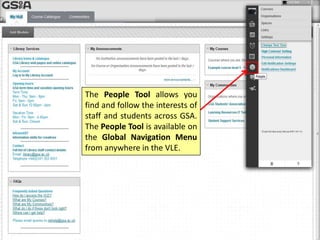
The People Tool allows you
find and follow the interests of
staff and students across GSA.
The People Tool is available on
the Global Navigation Menu
from anywhere in the VLE.
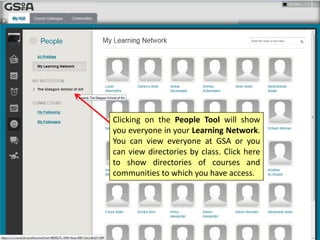
Clicking on the People Tool will show
you everyone in your Learning Network.
You can view everyone at GSA or you
can view directories by class. Click here
to show directories of courses and
communities to which you have access.
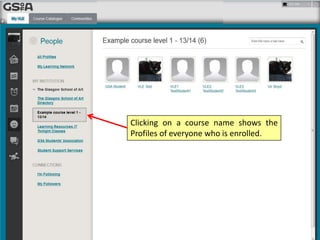
Clicking on a course name shows the
Profiles of everyone who is enrolled.
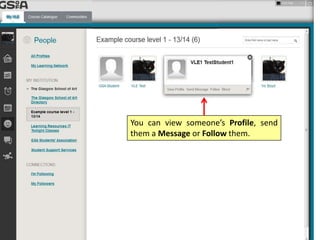
You can view someone’s Profile, send
them a Message or Follow them.
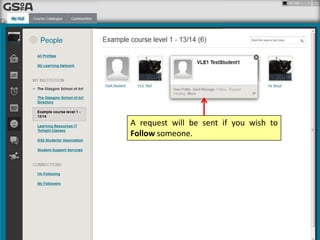
A request will be sent if you wish to
Follow someone.
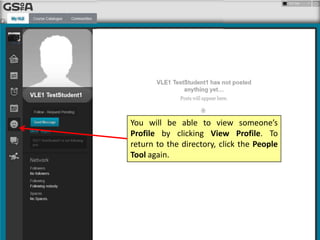
You will be able to view someone’s
Profile by clicking View Profile. To
return to the directory, click the People
Tool again.

VLE GSA - How to use the People Tool

  • 1.
    The People Tool TheVLE @ GSA How to use…
  • 2.
    The People Toolallows you find and follow the interests of staff and students across GSA. The People Tool is available on the Global Navigation Menu from anywhere in the VLE.
  • 3.
    Clicking on thePeople Tool will show you everyone in your Learning Network. You can view everyone at GSA or you can view directories by class. Click here to show directories of courses and communities to which you have access.
  • 4.
    Clicking on acourse name shows the Profiles of everyone who is enrolled.
  • 5.
    You can viewsomeone’s Profile, send them a Message or Follow them.
  • 6.
    A request willbe sent if you wish to Follow someone.
  • 7.
    You will beable to view someone’s Profile by clicking View Profile. To return to the directory, click the People Tool again.