Messages
The VLE @ GSA
How to use…
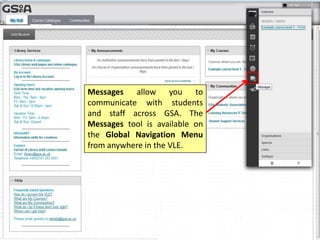
Messages allow you to
communicate with students
and staff across GSA. The
Messages tool is available on
the Global Navigation Menu
from anywhere in the VLE.
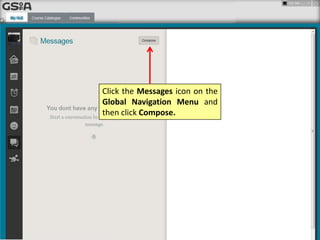
Click the Messages icon on the
Global Navigation Menu and
then click Compose.
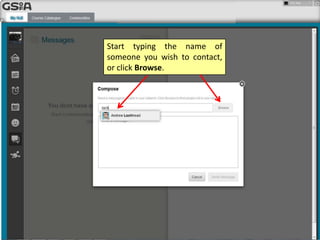
Start typing the name of
someone you wish to contact,
or click Browse.
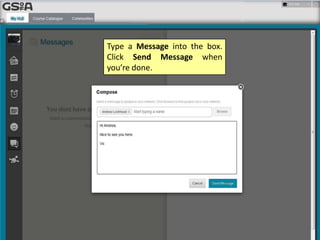
Type a Message into the box.
Click Send Message when
you’re done.
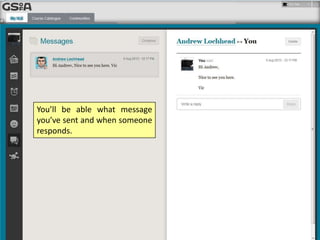
You’ll be able what message
you’ve sent and when someone
responds.
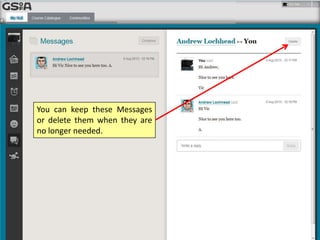
You can keep these Messages
or delete them when they are
no longer needed.

VLE GSA - How to use Messages

  • 1.
    Messages The VLE @GSA How to use…
  • 2.
    Messages allow youto communicate with students and staff across GSA. The Messages tool is available on the Global Navigation Menu from anywhere in the VLE.
  • 3.
    Click the Messagesicon on the Global Navigation Menu and then click Compose.
  • 4.
    Start typing thename of someone you wish to contact, or click Browse.
  • 5.
    Type a Messageinto the box. Click Send Message when you’re done.
  • 6.
    You’ll be ablewhat message you’ve sent and when someone responds.
  • 7.
    You can keepthese Messages or delete them when they are no longer needed.