Microsoft SharePoint MVP
Twitter: @AymanElHattab
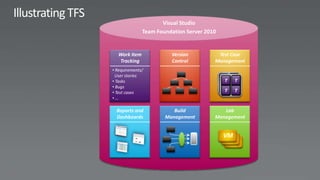
Visual Studio
              Team Foundation Server 2010


  Work Item             Version          Test Case
  Tracking              Control         Management
• Requirements/
 User stories
• Tasks
                                            TT   TT
• Bugs                                      TT   TT
• Test cases
•…

  Reports and            Build             Lab
  Dashboards          Management        Management


                                            VM
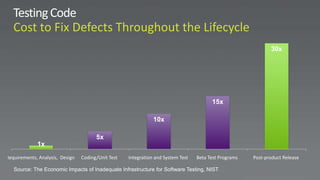
30x


                                                                                        15x

                                                               10x

                                       5x
             1x
Requirements, Analysis, Design   Coding/Unit Test   Integration and System Test   Beta Test Programs   Post-product Release

   Source: The Economic Impacts of Inadequate Infrastructure for Software Testing, NIST
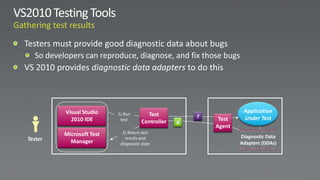
Visual Studio                                             Application
                          1) Run       Test           T
           2010 IDE        test                            Test    Under Test
                                     Controller   R
                                                          Agent
         Microsoft Test     2) Return test
Tester                       results and                          Diagnostic Data
           Manager         diagnostic data                        Adapters (DDAs)
System Center
Lab Manager      Lab Management    Virtual Machine
                                    Manager 2008
Microsoft Test   Team Foundation
  Manager            Server
                                        VM
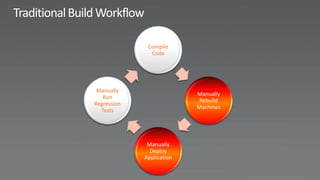
Compile
               Code


 Manually
                           Manually
   Run
                            Rebuild
Regression
                           Machines
  Tests


              Manually
               Deploy
             Application
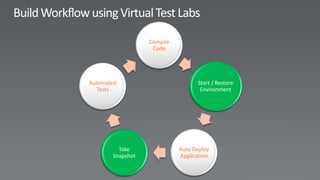
Compile
                   Code


Automated                         Start / Restore
   Tests                           Environment


         Take               Auto Deploy
       Snapshot             Application
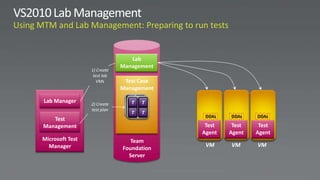
Lab
                             Management
                 1) Create
                  test lab
                    VMs       Test Case
                             Management

Lab Manager                    TT   T
                                    T
                 2) Create
                 test plan      T   T
                                T   T
                                           DDAs   DDAs    DDAs
   Test
Management                                 Test    Test    Test
                                          Agent   Agent   Agent
Microsoft Test                  Team
  Manager                                  VM     VM      VM
                             Foundation
                               Server
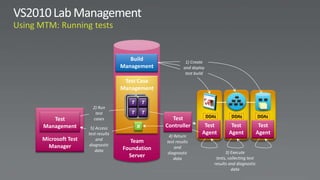
Build               1) Create
                                Management            and deploy
                                                       test build
                                 Test Case
                                Management

                                  TT   TT
                   2) Run
                    test
                                  TT   TT
                                               Test                 DDAs        DDAs             DDAs
   Test            cases
Management        5) Access            R     Controller         Test            Test          Test
                 test results                                  Agent           Agent         Agent
                                              4) Return
Microsoft Test       and           Team      test results
  Manager        diagnostic
                                Foundation       and
                     data                                                    3) Execute
                                             diagnostic
                                  Server         data                   tests, collecting test
                                                                       results and diagnostic
                                                                                 data
Active Directory
Development


Architecture                 Testing

                   Team
                Foundation
                  Server


Requirements                   Project Tracking
Are we making progress   How are our builds
                                           on running test plans?   doing over time?


       Requirement X                                                What’s the quality
                                             Are we fixing
                                                                    of our bug fixes?
                                             bugs?
  Task        Test Case

 Task           Test Case
                               Bug
Task             Test Case
                               Bug
                   Test Case

                                     Microsoft Confidential
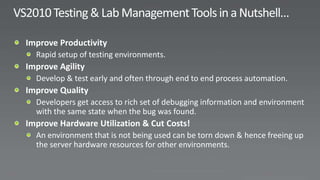
Visual Studio 2010 Testing & Lab Management Tools

Visual Studio 2010 Testing & Lab Management Tools

  • 1.
  • 4.
    Visual Studio Team Foundation Server 2010 Work Item Version Test Case Tracking Control Management • Requirements/ User stories • Tasks TT TT • Bugs TT TT • Test cases •… Reports and Build Lab Dashboards Management Management VM
  • 5.
    30x 15x 10x 5x 1x Requirements, Analysis, Design Coding/Unit Test Integration and System Test Beta Test Programs Post-product Release Source: The Economic Impacts of Inadequate Infrastructure for Software Testing, NIST
  • 8.
    Visual Studio Application 1) Run Test T 2010 IDE test Test Under Test Controller R Agent Microsoft Test 2) Return test Tester results and Diagnostic Data Manager diagnostic data Adapters (DDAs)
  • 14.
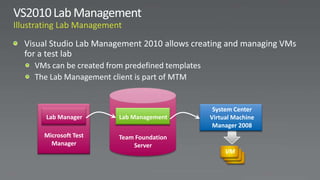
    System Center Lab Manager Lab Management Virtual Machine Manager 2008 Microsoft Test Team Foundation Manager Server VM
  • 16.
    Compile Code Manually Manually Run Rebuild Regression Machines Tests Manually Deploy Application
  • 17.
    Compile Code Automated Start / Restore Tests Environment Take Auto Deploy Snapshot Application
  • 18.
    Lab Management 1) Create test lab VMs Test Case Management Lab Manager TT T T 2) Create test plan T T T T DDAs DDAs DDAs Test Management Test Test Test Agent Agent Agent Microsoft Test Team Manager VM VM VM Foundation Server
  • 19.
    Build 1) Create Management and deploy test build Test Case Management TT TT 2) Run test TT TT Test DDAs DDAs DDAs Test cases Management 5) Access R Controller Test Test Test test results Agent Agent Agent 4) Return Microsoft Test and Team test results Manager diagnostic Foundation and data 3) Execute diagnostic Server data tests, collecting test results and diagnostic data
  • 20.
  • 22.
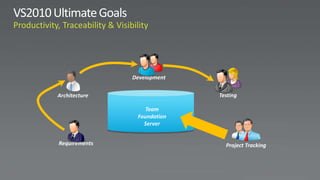
    Development Architecture Testing Team Foundation Server Requirements Project Tracking
  • 23.
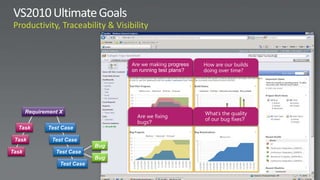
    Are we makingprogress How are our builds on running test plans? doing over time? Requirement X What’s the quality Are we fixing of our bug fixes? bugs? Task Test Case Task Test Case Bug Task Test Case Bug Test Case Microsoft Confidential

Editor's Notes

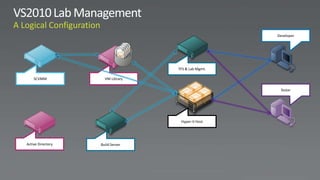
  • #21 Let’s take a closer look at the Visual Studio Lab Management solution. So what does a logical configuration look like if you want to leverage the Lab Management feature?<Click>It starts with having an Active Directory domain.<Click>Next, you’ll need a System Center Virtual Machine Manager 2008 R2, or just SCVMM, installation. This is also included in the Ultimate or Test Professional MSDN subscriptions.<Click>SCVMM can be configured a number of different ways from simple single server configurations to richer and more scalable configurations.<Click>For this example, I’ve got a main SCVMM server and second server to host my virtual machines. In SCVMM parlance, this is known as a library server and you have as many as you want or need.<Click>In order to work with virtual environments, you’ll need one or more Hyper-V hosts.<Click>SCVMM is the engine that manages your VMs. As needed you move VMs from your library server and deploy them on your Hyper-V hosts for used by test and development.<Click>You use Team Foundation Server, with Lab Management configured, and one or more build servers to orchestrate and execute your build-deploy-test workflows.<Click>Developers run Visual Studio 2010 Ultimate.<Click>Testers use Visual Studio Test Professional 2010.<Click>Developers write code and check it into TFS.<Click>A workflow build is started on a build server.<Click>As part of the build, the workflow snapshots the environment, deploys the build output, and runs tests—all based upon the build configuration.<Click>Once complete …<Click>Testers can connect to and use the newly updated environment.<Click>Using Microsoft Test Manager and the Microsoft Test Runner, testers can file rich actionable bugs with links to …<Click>… environment snapshots.<Click>The bug is assigned to a developer. The developer reviews the bug and IntelliTrace log if provided.<Click>Developer then can connect to the environment …<Click>… in the exact state at which the bug was filed to easily pinpoint and then ultimately …<Click>… fix he bug.