Accelerated Test Case Automation Using Rational
               Functional Tester

                  Anish Bhanu
        Manager, Software, Novellus Systems
                Anish.Bhanu@Novellus.com
                 Sriram Chakravarthi
       Sr. Engineer, Software, Novellus Systems
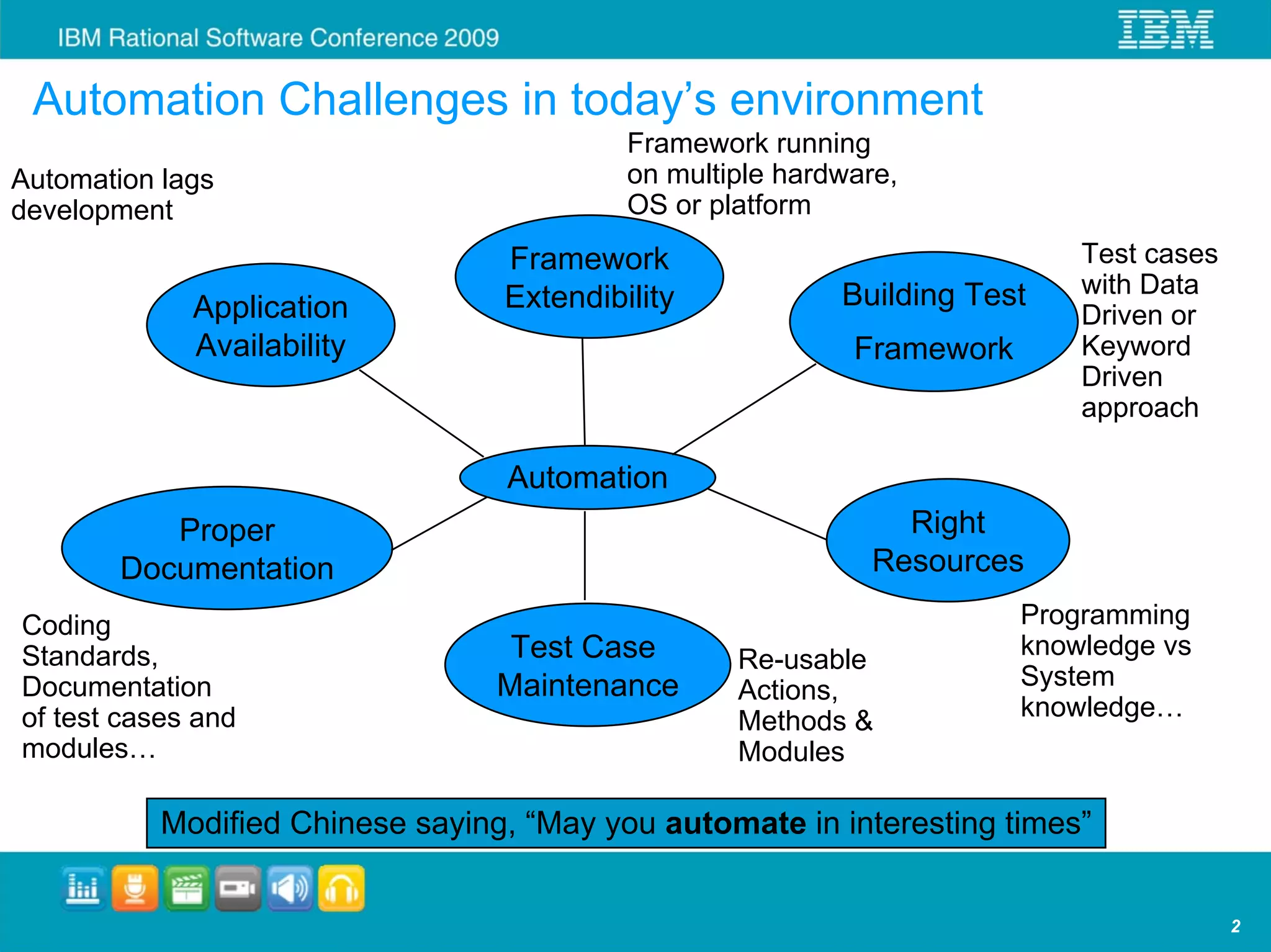
Automation Challenges in today’s environment
                                           Framework running
Automation lags                            on multiple hardware,
development                                OS or platform
                                  Framework                                 Test cases
                                  Extendibility            Building Test    with Data
             Application                                                    Driven or
             Availability                                   Framework       Keyword
                                                                            Driven
                                                                            approach

                                  Automation
           Proper                                               Right
        Documentation                                         Resources
Coding                                                                  Programming
Standards,                         Test Case       Re-usable            knowledge vs
Documentation                     Maintenance      Actions,             System
of test cases and                                  Methods &            knowledge…
modules…                                           Modules

           Modified Chinese saying, “May you automate in interesting times”


                                                                                         2
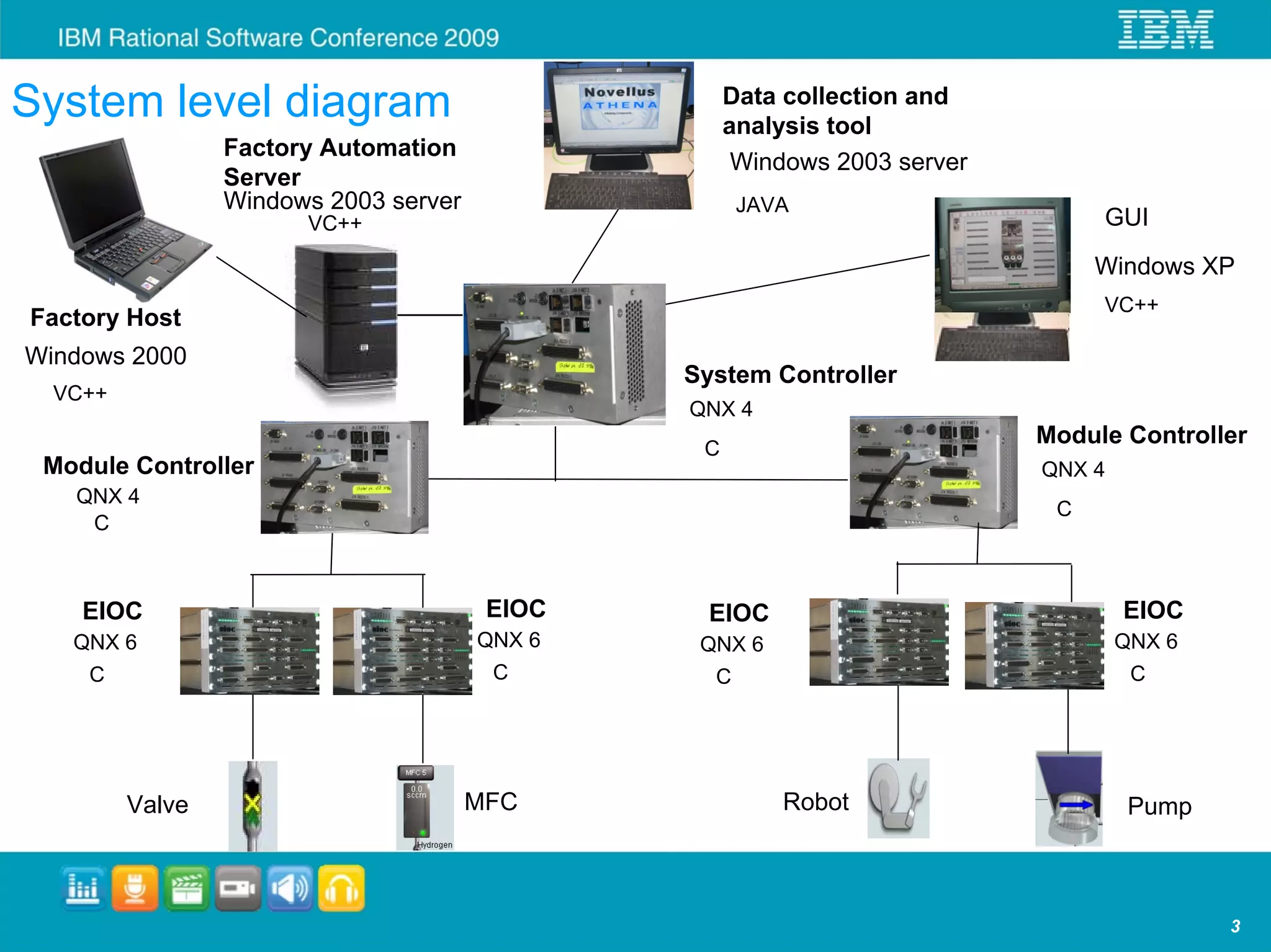
System level diagram                                        Data collection and
                                                            analysis tool
                         Factory Automation
                                                             Windows 2003 server
  No   vellu
             s           Server
        FA               Windows 2003 server                 JAVA
                               VC++                                                     GUI
                                                                                        Windows XP
                                                                                        VC++
Factory Host
Windows 2000
                                                       System Controller
  VC++
                                                       QNX 4
                                                        C
                                                                                   Module Controller
 Module Controller                                                                 QNX 4
       QNX 4
                                                                                    C
        C


        EIOC                                    EIOC     EIOC                              EIOC
   QNX 6                                       QNX 6    QNX 6                              QNX 6
         C                                      C        C                                  C


                 Valve                         MFC              Robot                       Pump


                                                                                                   3
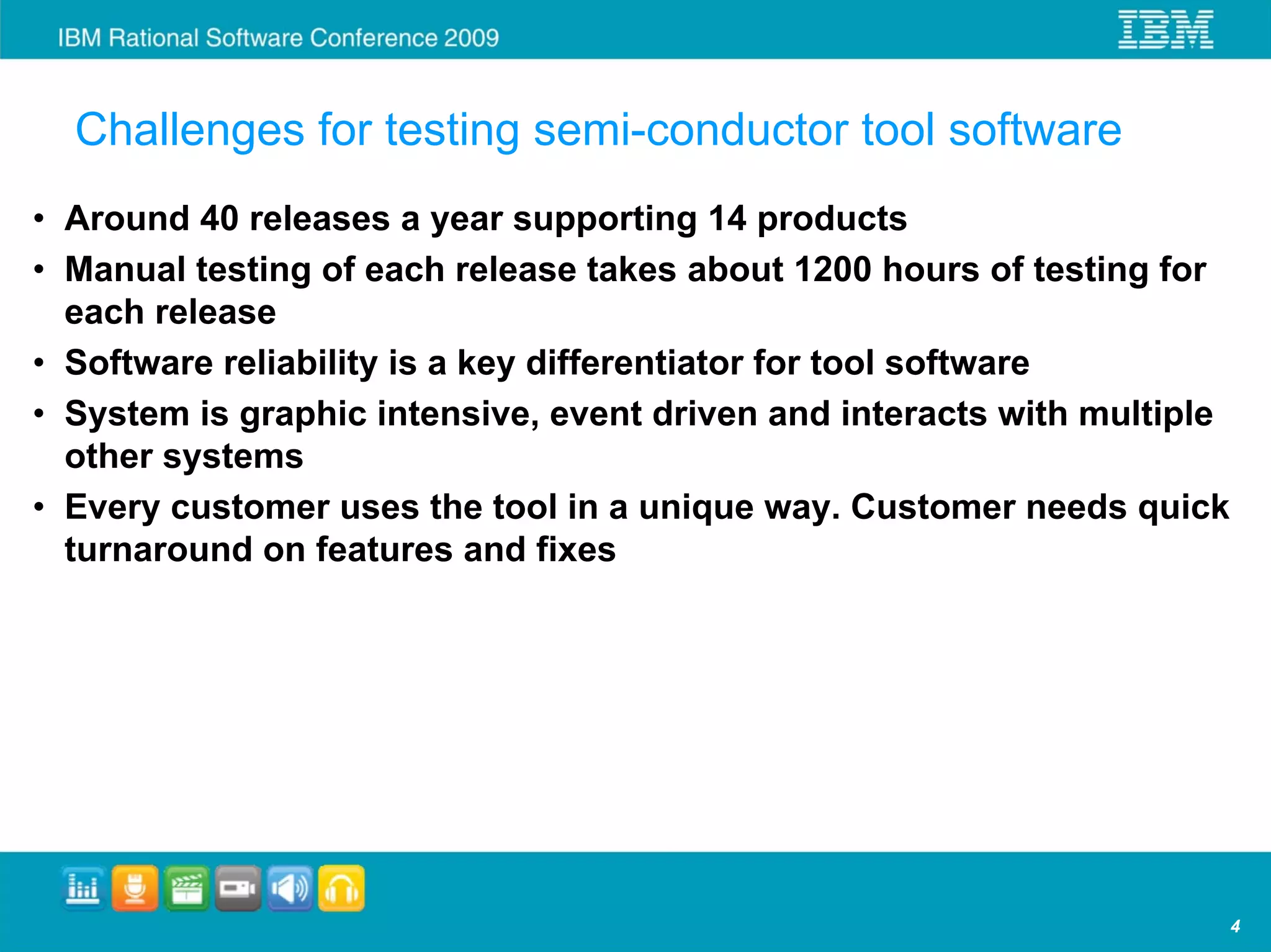
Challenges for testing semi-conductor tool software
• Around 40 releases a year supporting 14 products
• Manual testing of each release takes about 1200 hours of testing for
  each release
• Software reliability is a key differentiator for tool software
• System is graphic intensive, event driven and interacts with multiple
  other systems
• Every customer uses the tool in a unique way. Customer needs quick
  turnaround on features and fixes


                                                                          4
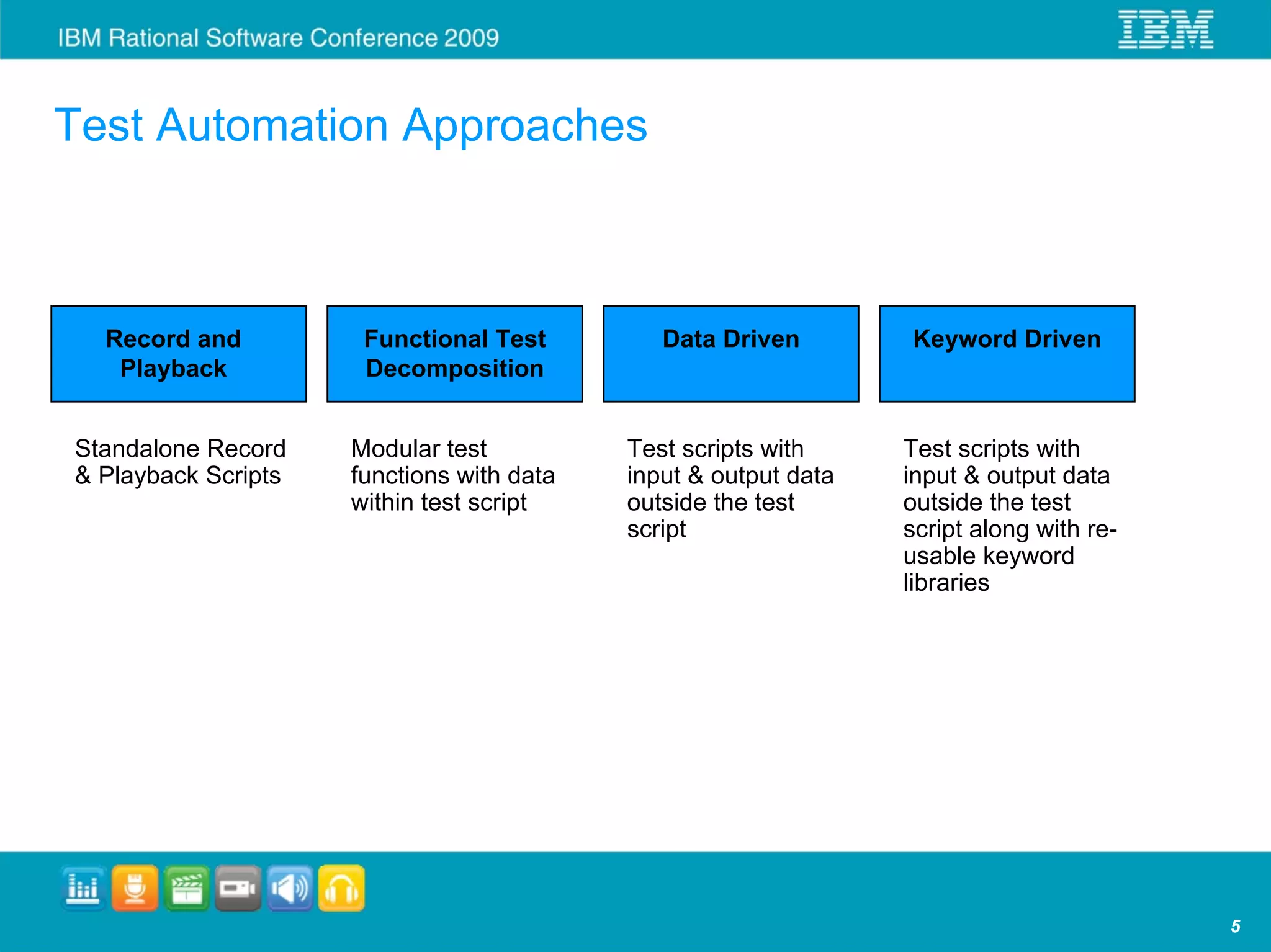
Test Automation Approaches


  Record and          Functional Test         Data Driven        Keyword Driven
   Playback           Decomposition


Standalone Record    Modular test          Test scripts with     Test scripts with
& Playback Scripts   functions with data   input & output data   input & output data
                     within test script    outside the test      outside the test
                                           script                script along with re-
                                                                 usable keyword
                                                                 libraries


                                                                                         5
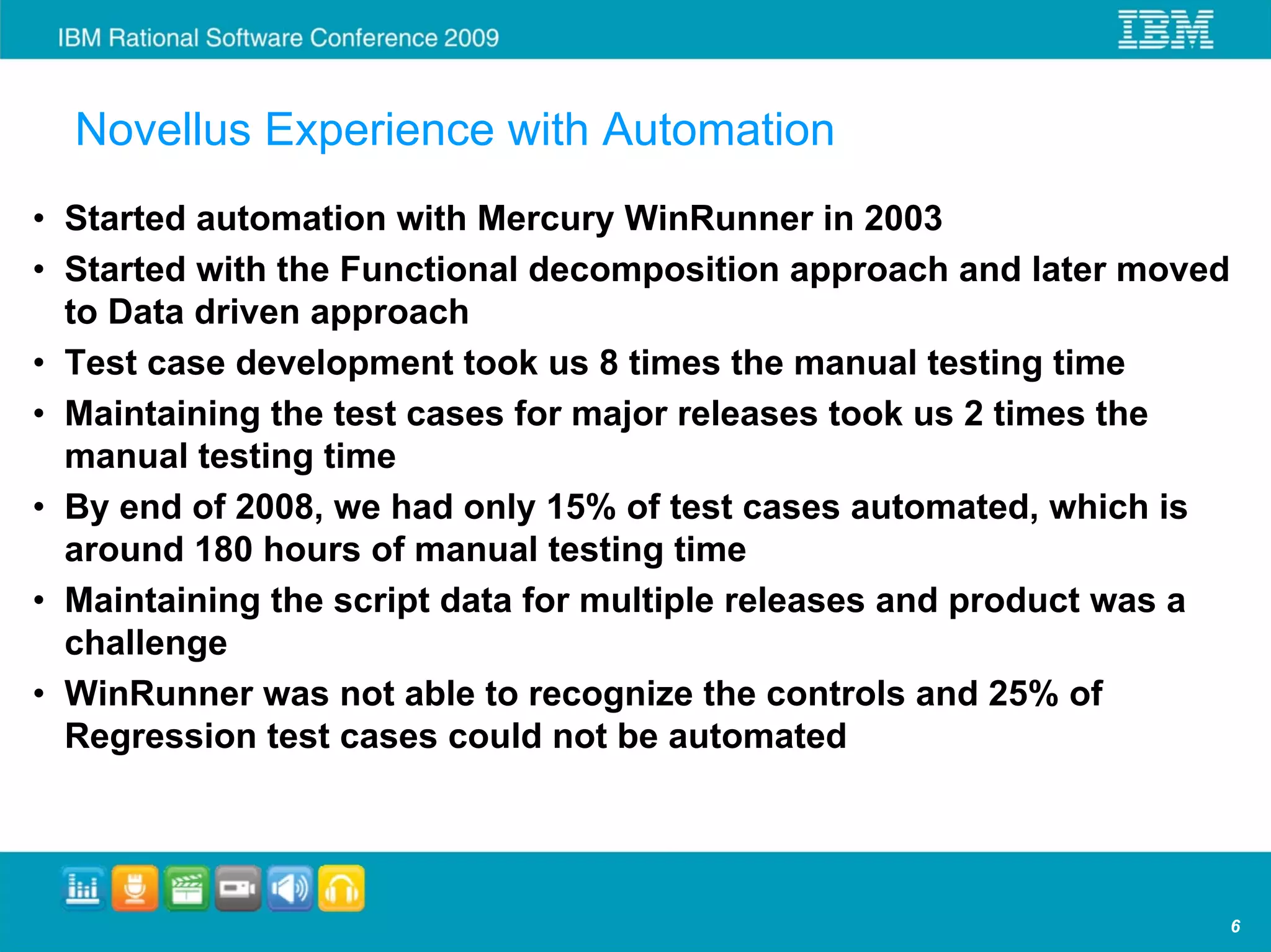
Novellus Experience with Automation
• Started automation with Mercury WinRunner in 2003
• Started with the Functional decomposition approach and later moved
  to Data driven approach
• Test case development took us 8 times the manual testing time
• Maintaining the test cases for major releases took us 2 times the
  manual testing time
• By end of 2008, we had only 15% of test cases automated, which is
  around 180 hours of manual testing time
• Maintaining the script data for multiple releases and product was a
  challenge
• WinRunner was not able to recognize the controls and 25% of
  Regression test cases could not be automated


                                                                        6
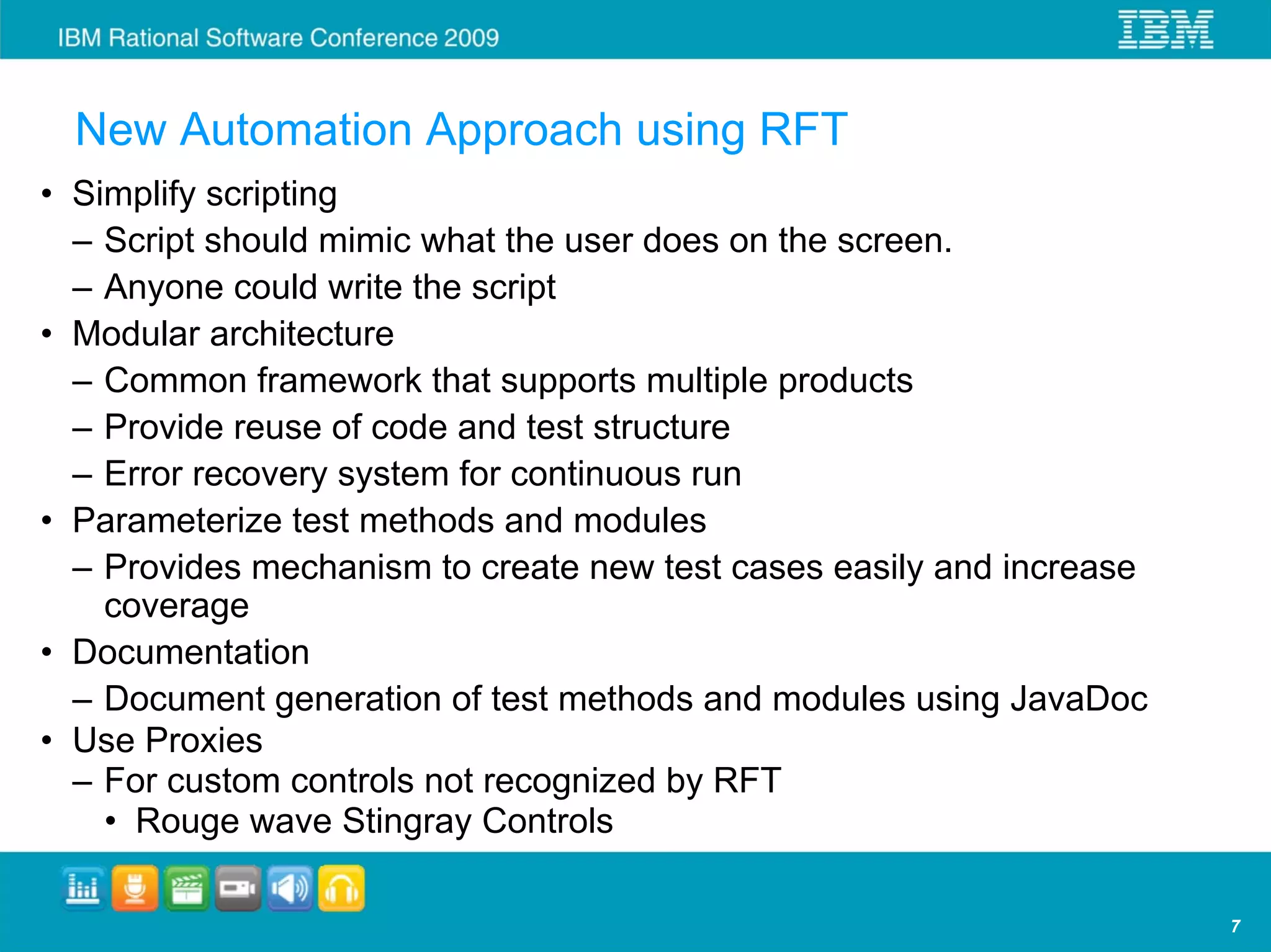
New Automation Approach using RFT
• Simplify scripting
  – Script should mimic what the user does on the screen.
  – Anyone could write the script
• Modular architecture
  – Common framework that supports multiple products
  – Provide reuse of code and test structure
  – Error recovery system for continuous run
• Parameterize test methods and modules
  – Provides mechanism to create new test cases easily and increase
    coverage
• Documentation
  – Document generation of test methods and modules using JavaDoc
• Use Proxies
  – For custom controls not recognized by RFT
    • Rouge wave Stingray Controls

                                                                      7
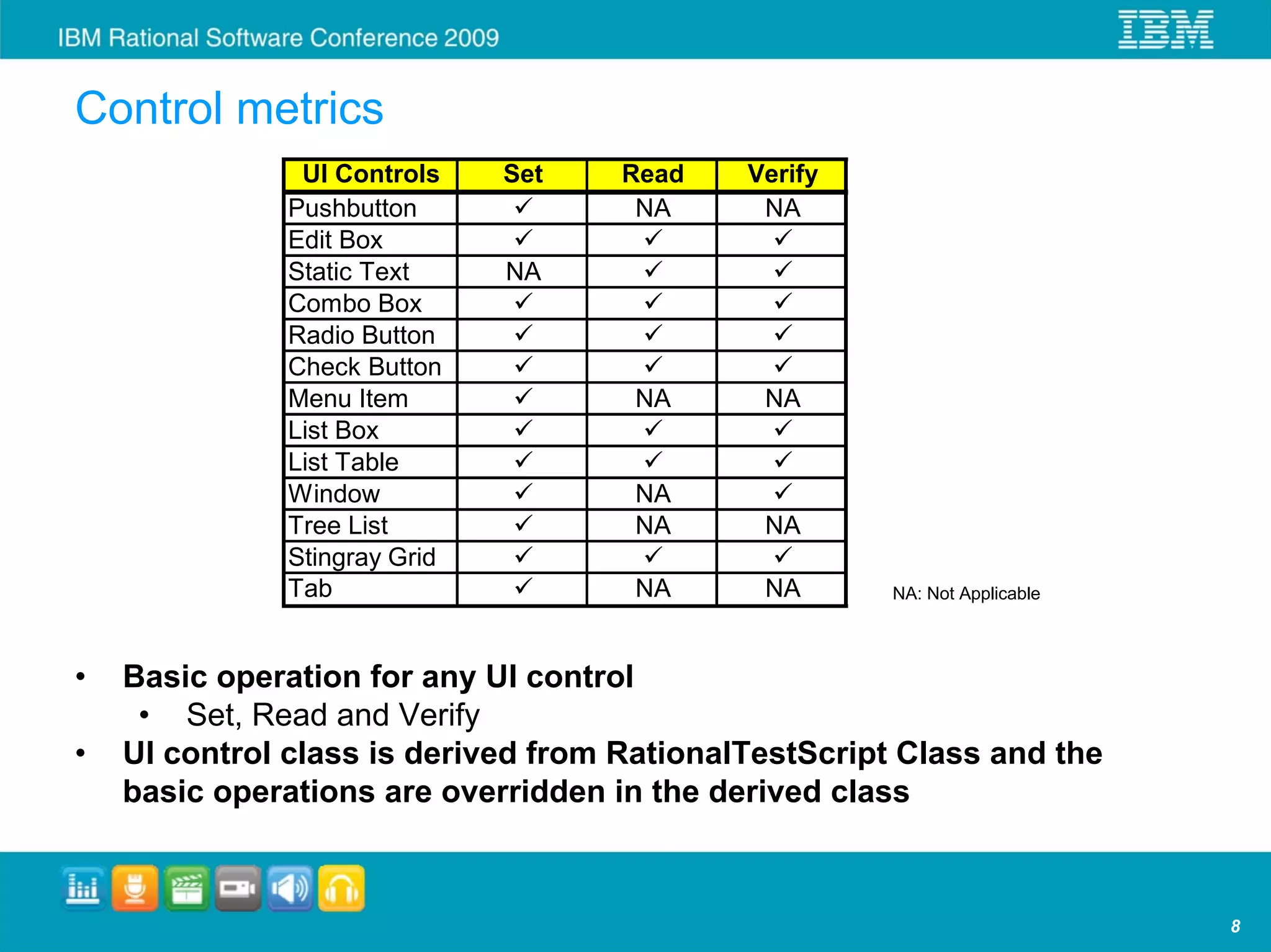
Control metrics
               UI Controls    Set    Read    Verify
              Pushbutton              NA      NA
              Edit Box
              Static Text     NA
              Combo Box
              Radio Button
              Check Button
              Menu Item              NA       NA
              List Box
              List Table
              Window                 NA
              Tree List              NA       NA
              Stingray Grid
              Tab                    NA       NA       NA: Not Applicable


•   Basic operation for any UI control
     • Set, Read and Verify
•   UI control class is derived from RationalTestScript Class and the
    basic operations are overridden in the derived class


                                                                            8
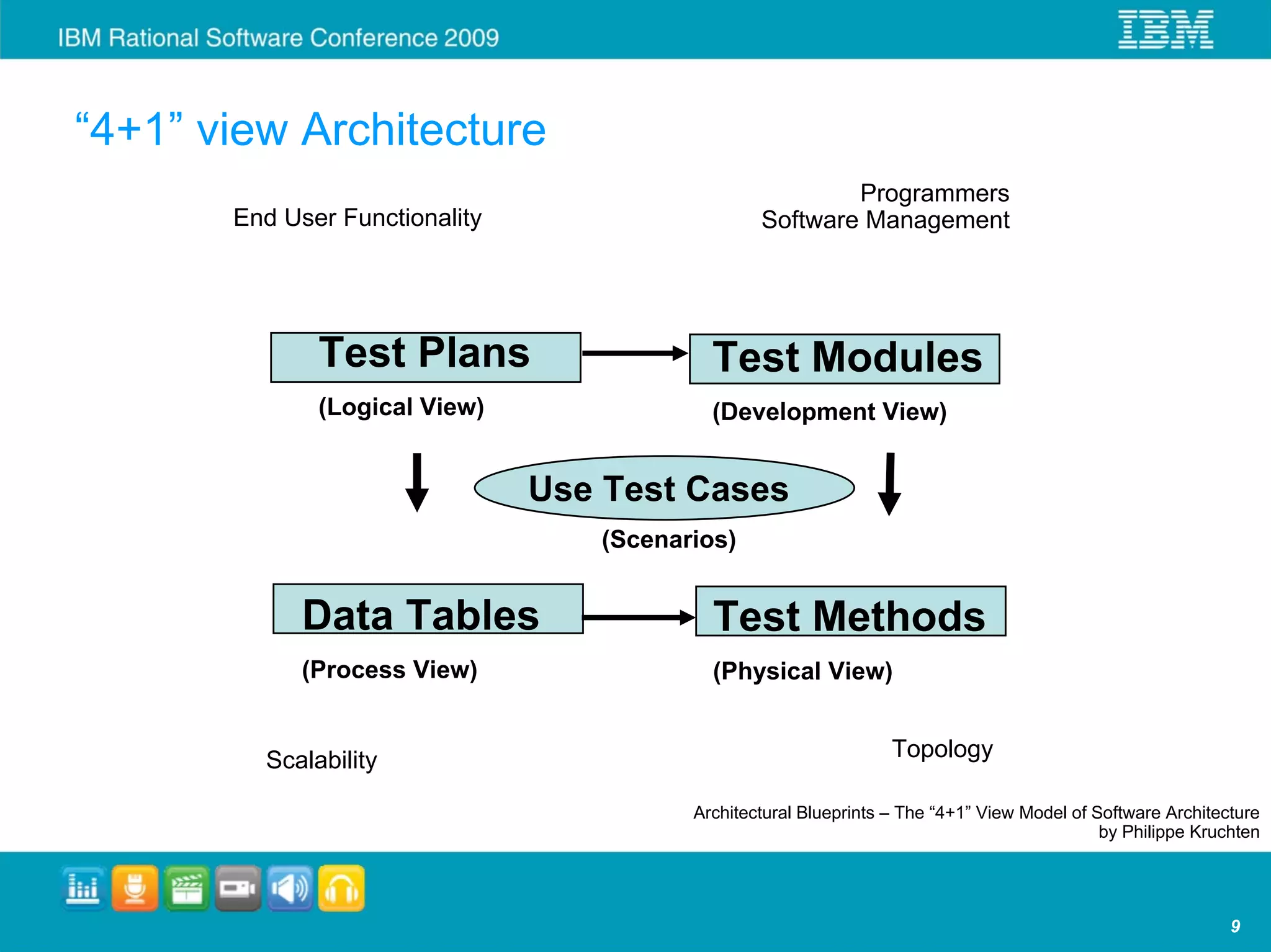
“4+1” view Architecture
                                                          Programmers
       End User Functionality                     Software Management


              Test Plans                    Test Modules
              (Logical View)                (Development View)


                                Use Test Cases
                                   (Scenarios)


             Data Tables                    Test Methods
             (Process View)                 (Physical View)


         Scalability                                               Topology

                                          Architectural Blueprints – The “4+1” View Model of Software Architecture
                                                                                              by Philippe Kruchten


                                                                                                              9
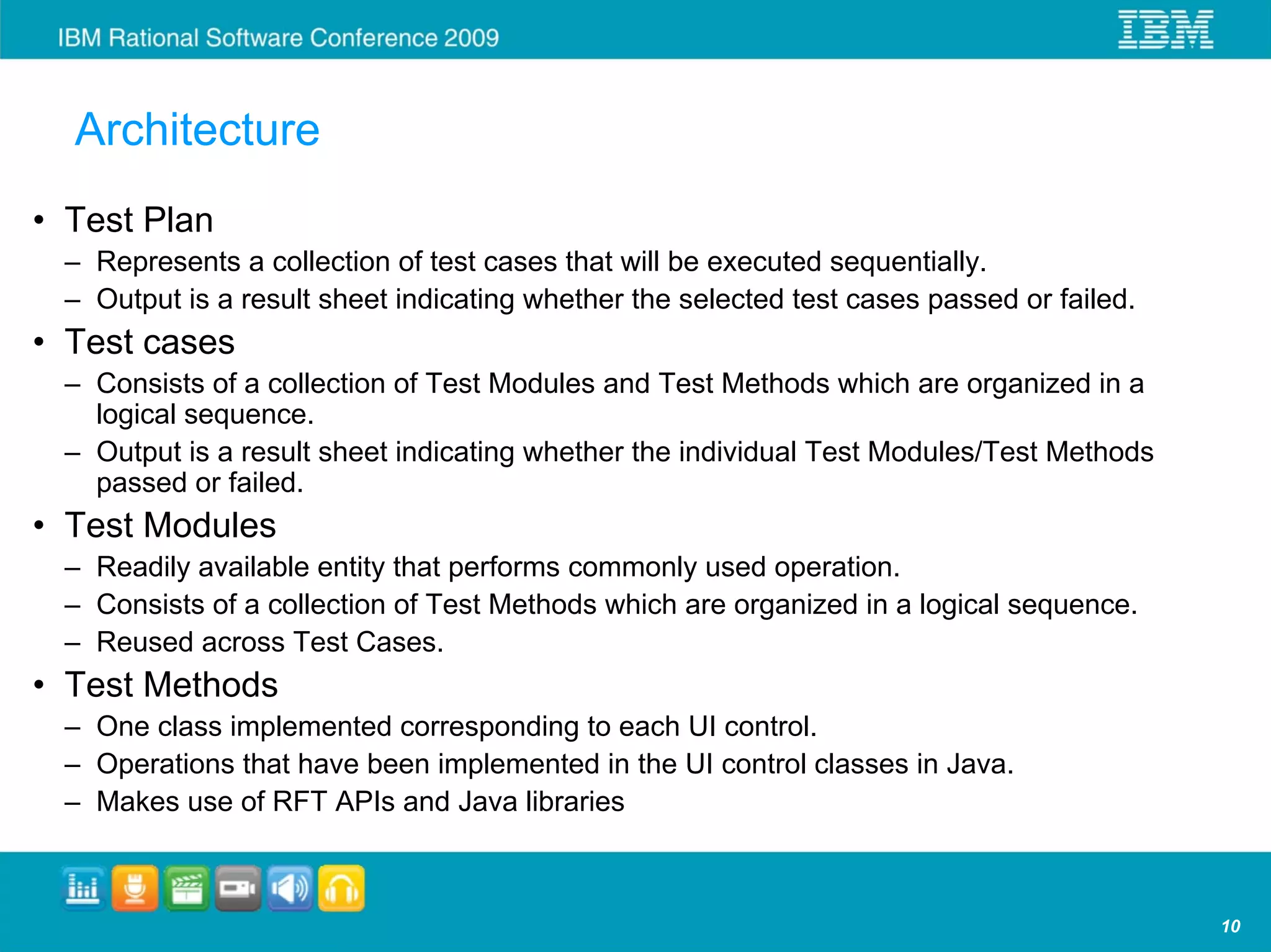
Architecture
• Test Plan
 – Represents a collection of test cases that will be executed sequentially.
 – Output is a result sheet indicating whether the selected test cases passed or failed.
• Test cases
 – Consists of a collection of Test Modules and Test Methods which are organized in a
   logical sequence.
 – Output is a result sheet indicating whether the individual Test Modules/Test Methods
   passed or failed.
• Test Modules
 – Readily available entity that performs commonly used operation.
 – Consists of a collection of Test Methods which are organized in a logical sequence.
 – Reused across Test Cases.
• Test Methods
 – One class implemented corresponding to each UI control.
 – Operations that have been implemented in the UI control classes in Java.
 – Makes use of RFT APIs and Java libraries


                                                                                           10
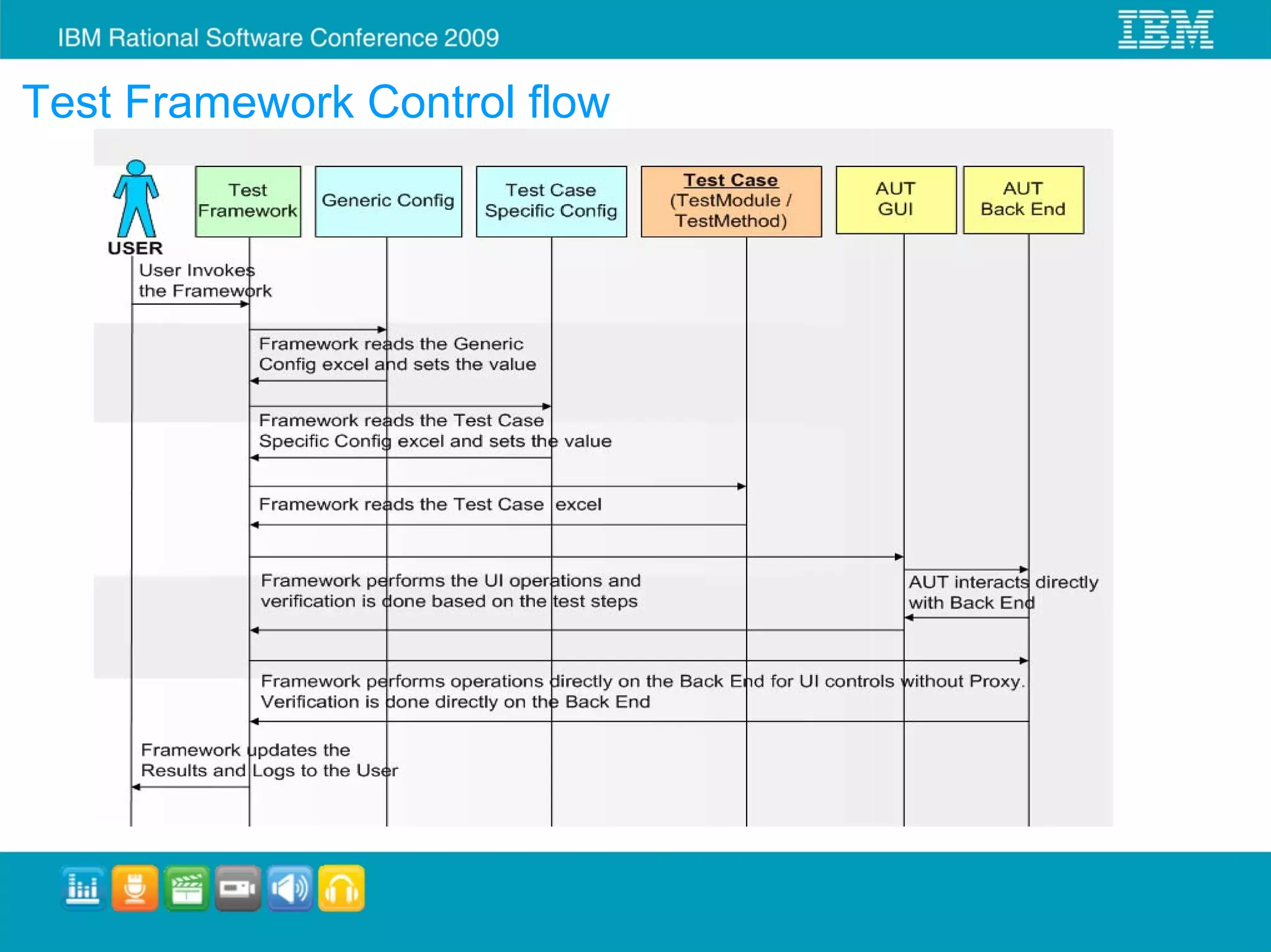
Test Framework Control flow
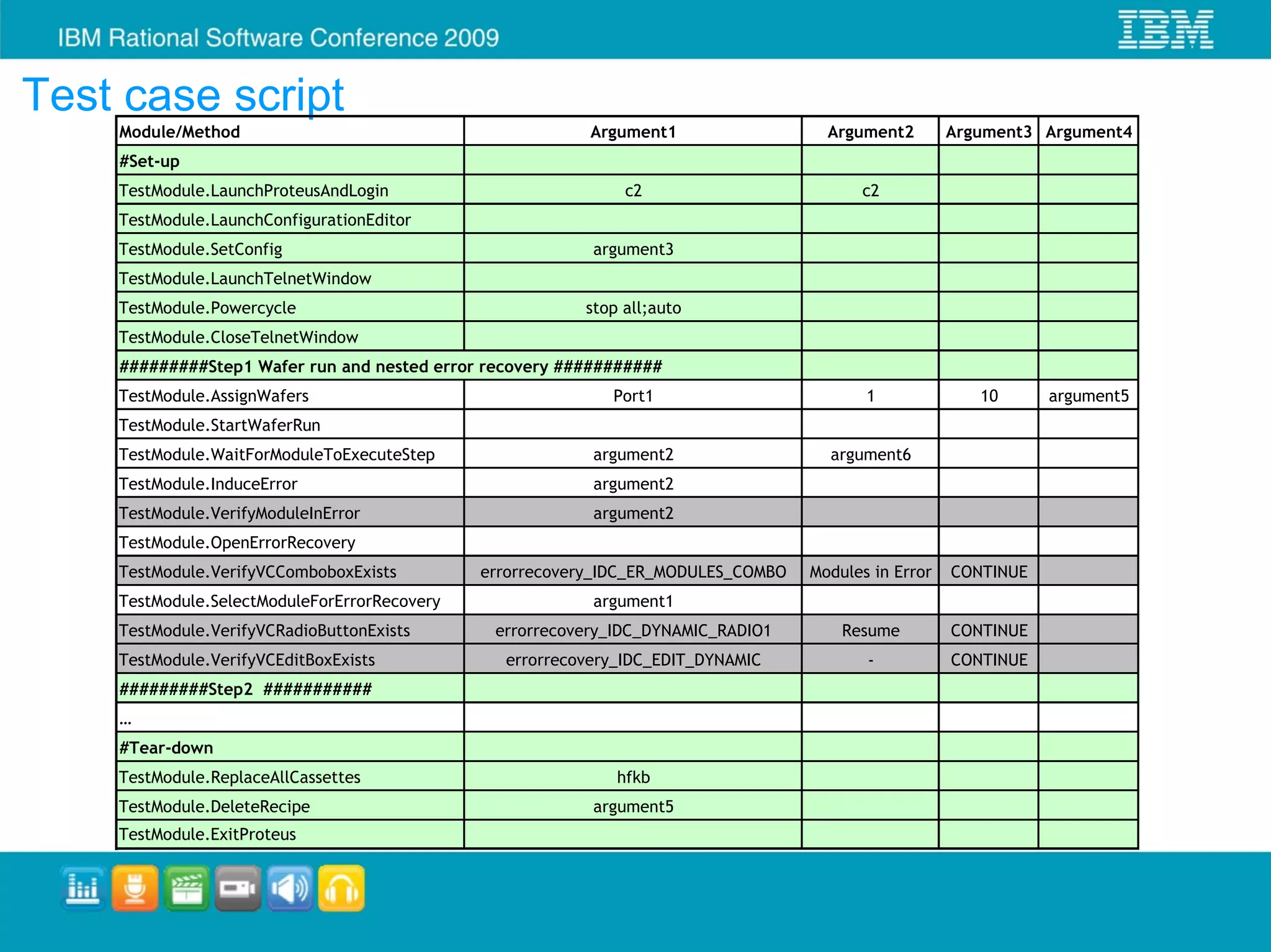
Test case script
    Module/Method                                         Argument1                  Argument2        Argument3 Argument4
    #Set-up
    TestModule.LaunchProteusAndLogin                          c2                         c2
    TestModule.LaunchConfigurationEditor
    TestModule.SetConfig                                  argument3
    TestModule.LaunchTelnetWindow
    TestModule.Powercycle                                stop all;auto
    TestModule.CloseTelnetWindow
    #########Step1 Wafer run and nested error recovery ###########
    TestModule.AssignWafers                                 Port1                         1              10      argument5
    TestModule.StartWaferRun
    TestModule.WaitForModuleToExecuteStep                 argument2                  argument6
    TestModule.InduceError                                argument2
    TestModule.VerifyModuleInError                        argument2
    TestModule.OpenErrorRecovery
    TestModule.VerifyVCComboboxExists         errorrecovery_IDC_ER_MODULES_COMBO   Modules in Error   CONTINUE
    TestModule.SelectModuleForErrorRecovery               argument1
    TestModule.VerifyVCRadioButtonExists       errorrecovery_IDC_DYNAMIC_RADIO1        Resume         CONTINUE
    TestModule.VerifyVCEditBoxExists            errorrecovery_IDC_EDIT_DYNAMIC            -           CONTINUE
    #########Step2 ###########
    …
    #Tear-down
    TestModule.ReplaceAllCassettes                           hfkb
    TestModule.DeleteRecipe                               argument5
    TestModule.ExitProteus
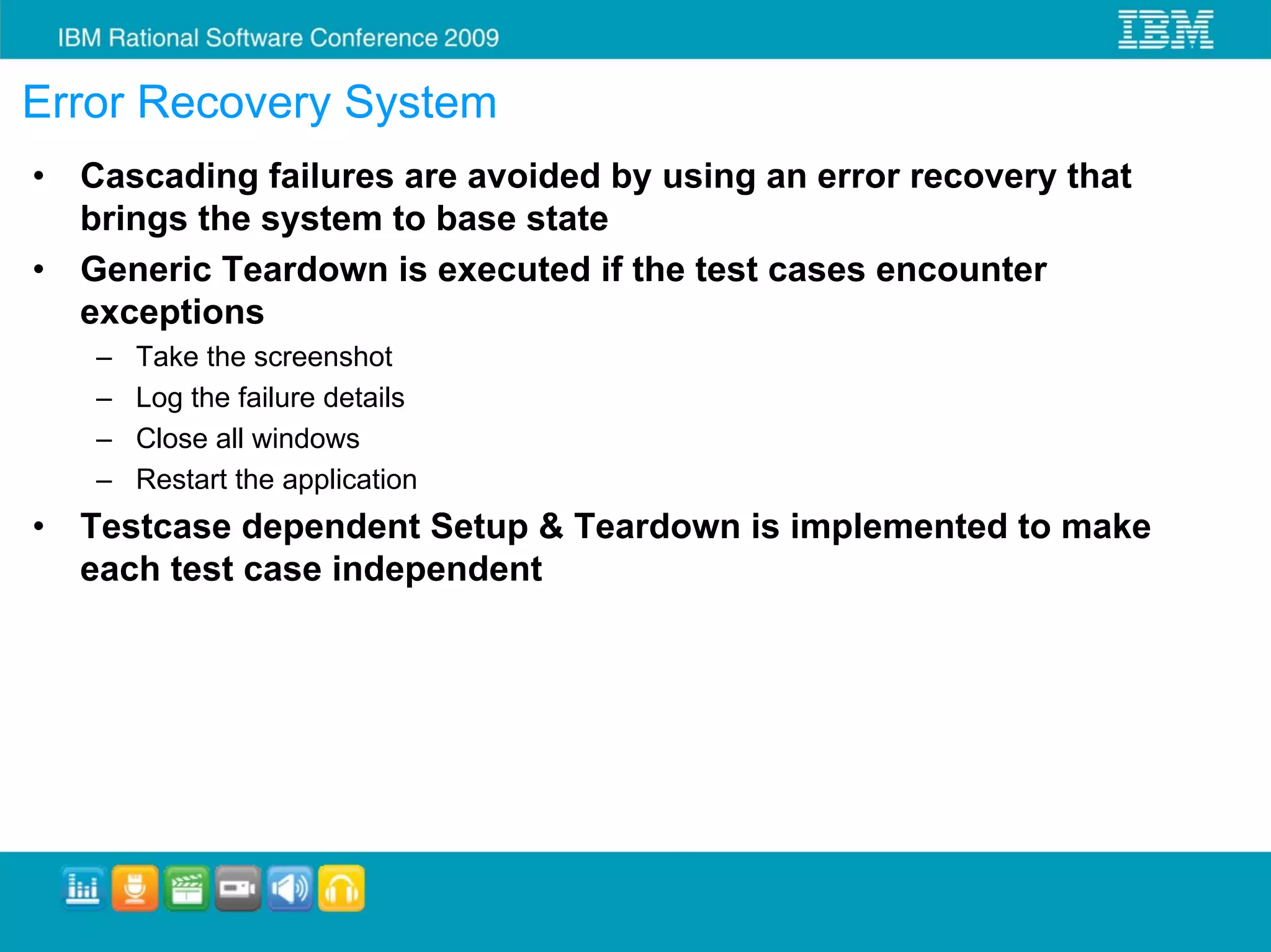
Error Recovery System
•   Cascading failures are avoided by using an error recovery that
    brings the system to base state
•   Generic Teardown is executed if the test cases encounter
    exceptions
    –   Take the screenshot
    –   Log the failure details
    –   Close all windows
    –   Restart the application
•   Testcase dependent Setup & Teardown is implemented to make
    each test case independent
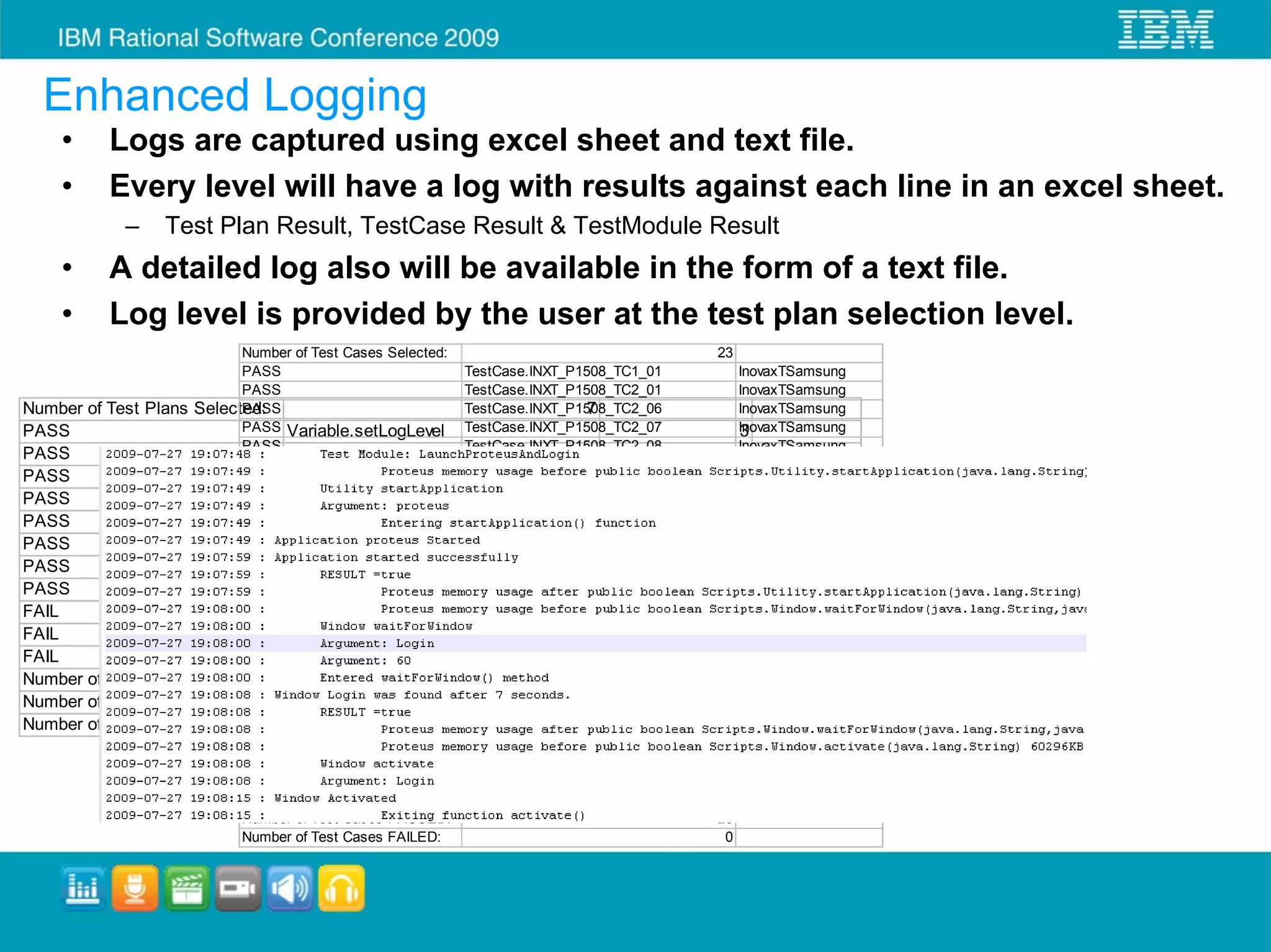
Enhanced Logging
    •     Logs are captured using excel sheet and text file.
    •     Every level will have a log with results against each line in an excel sheet.
            –      Test Plan Result, TestCase Result & TestModule Result
    •     A detailed log also will be available in the form of a text file.
    •     Log level is provided by the user at the test plan selection level.
                               Number of Test Cases Selected:                               23
                               PASS                           TestCase.INXT_P1508_TC1_01       InovaxTSamsung
                               PASS                           TestCase.INXT_P1508_TC2_01       InovaxTSamsung
Number of Test   Plans   Selected:
                               PASS                                            7
                                                              TestCase.INXT_P1508_TC2_06       InovaxTSamsung
PASS                           PASS Variable.setLogLevel TestCase.INXT_P1508_TC2_07            InovaxTSamsung
                                                                                               3
                               PASS                           TestCase.INXT_P1508_TC2_08       InovaxTSamsung
PASS                                Variable.setVariableValue                    IP_ADDRESS       192.168.1.10
                               PASS                           TestCase.INXT_P1508_TC7_01       InovaxTSamsung
PASS                           PASS Variable.setVariableValue                    PRODUCT_NAME INOVAxT
                                                              TestCase.INXT_P1508_TC8_02       InovaxTSamsung
PASS                           PASS Variable.setVariableValue                    MACHINE_NAMEInovaxTSamsung
                                                              TestCase.INXT_P1508_TC12_01         swe011qnx
PASS                           PASS TestPlan.INOVAxT_TP_1508  TestCase.INXT_P1508_TC12_02      InovaxTSamsung
PASS                           PASS TestPlan.INOVAxT_TP_INOVAxT_RTP
                                                              TestCase.INXT_P1508_TC12_03      InovaxTSamsung
                               PASS                           TestCase.INXT_P1508_TC11_02      InovaxTSamsungQFA
PASS                                TestPlan.INOVAxT_TP_1833
                               PASS                           TestCase.INXT_P1508_TC11_03      InovaxTSamsungQFA
PASS                           PASS TestPlan.INOVAxT_TP_2049  TestCase.INXT_P1508_TC11_04      InovaxTSamsungQFA
FAIL                           PASS TestPlan.Vector_TP_INOVAxT_RTP
                                                              TestCase.INXT_P1508_TC11_05      InovaxTSamsungQFA
FAIL                           PASS TestPlan.Vector_TP_2049   TestCase.INXT_P1508_TC11_06      InovaxTSamsungQFA
FAIL                           PASS TestPlan.Vector_TP_1508   TestCase.INXT_P1508_TC11_02      InovaxTSamsungAFA
                               PASS                           TestCase.INXT_P1508_TC11_03      InovaxTSamsungAFA
Number of Test   Plans   Executed:
                               PASS
                                                                               7
                                                              TestCase.INXT_P1508_TC11_04      InovaxTSamsungAFA
Number of Test   Plans   PASSED:
                               PASS                                            4
                                                              TestCase.INXT_P1508_TC11_05      InovaxTSamsungAFA
Number of Test   Plans   FAILED:
                               PASS                                            3
                                                              TestCase.INXT_P1508_TC11_06      InovaxTSamsungAFA
                               PASS                           TestCase.INXT_P1508_TC2_02       InovaxTSamsung
                               PASS                           TestCase.INXT_P1508_TC4_02       InovaxTSamsung
                               PASS                           TestCase.INXT_P1508_TC4_04       InovaxTSamsung
                               Number of Test Cases Executed:                               23
                               Number of Test Cases PASSED:                                 23
                               Number of Test Cases FAILED:                                  0
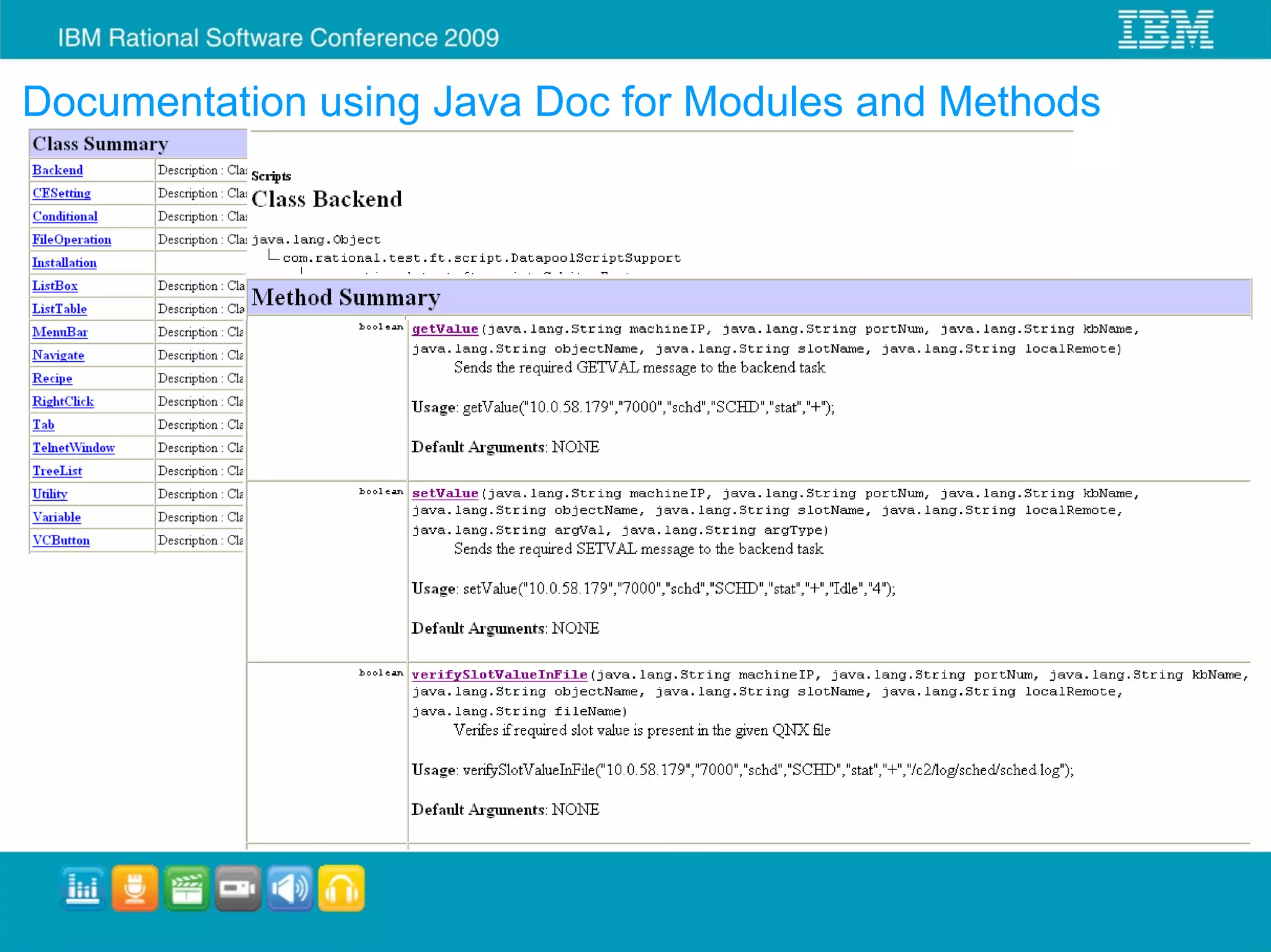
Documentation using Java Doc for Modules and Methods
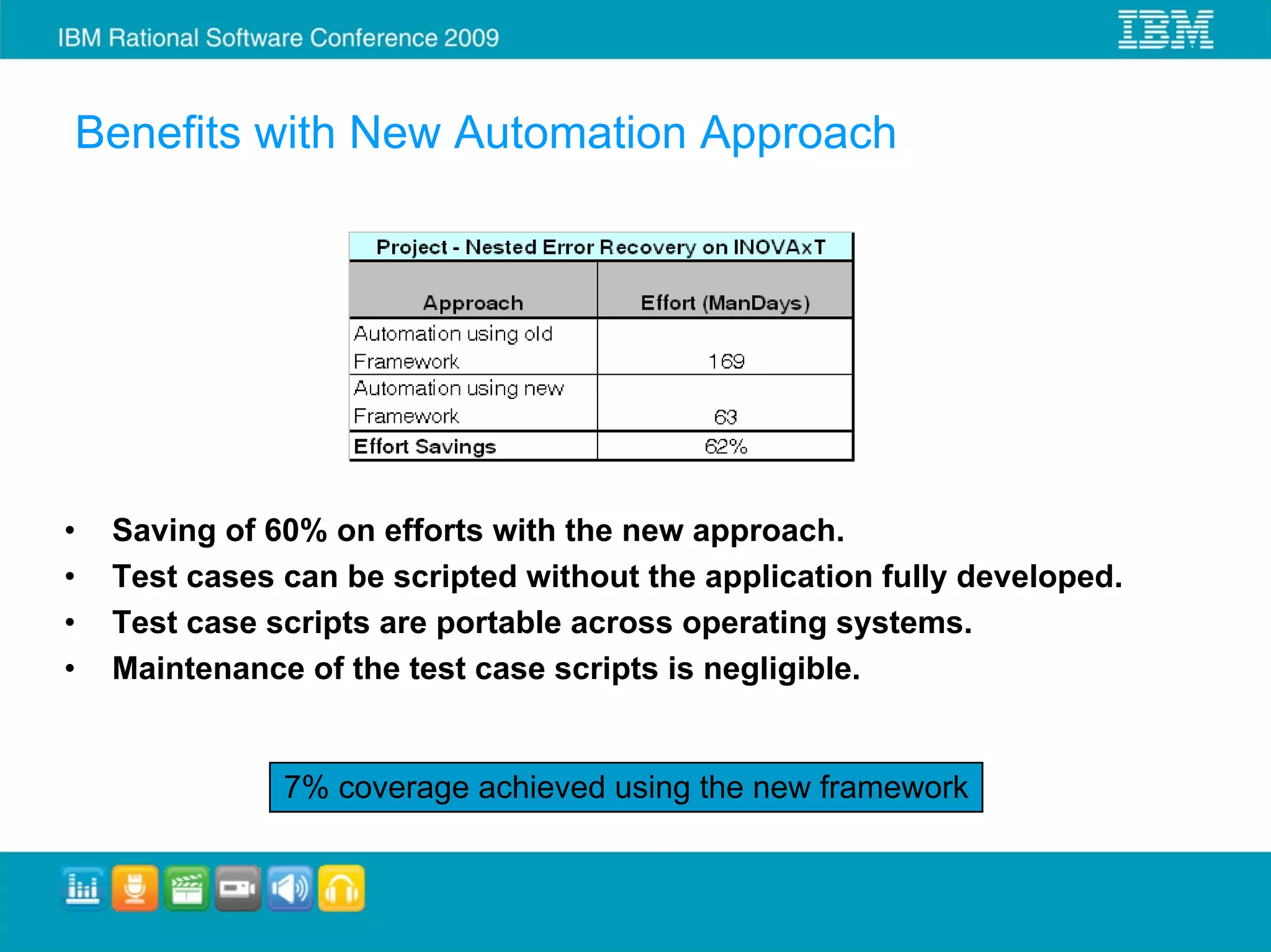
Benefits with New Automation Approach


•   Saving of 60% on efforts with the new approach.
•   Test cases can be scripted without the application fully developed.
•   Test case scripts are portable across operating systems.
•   Maintenance of the test case scripts is negligible.


               7% coverage achieved using the new framework
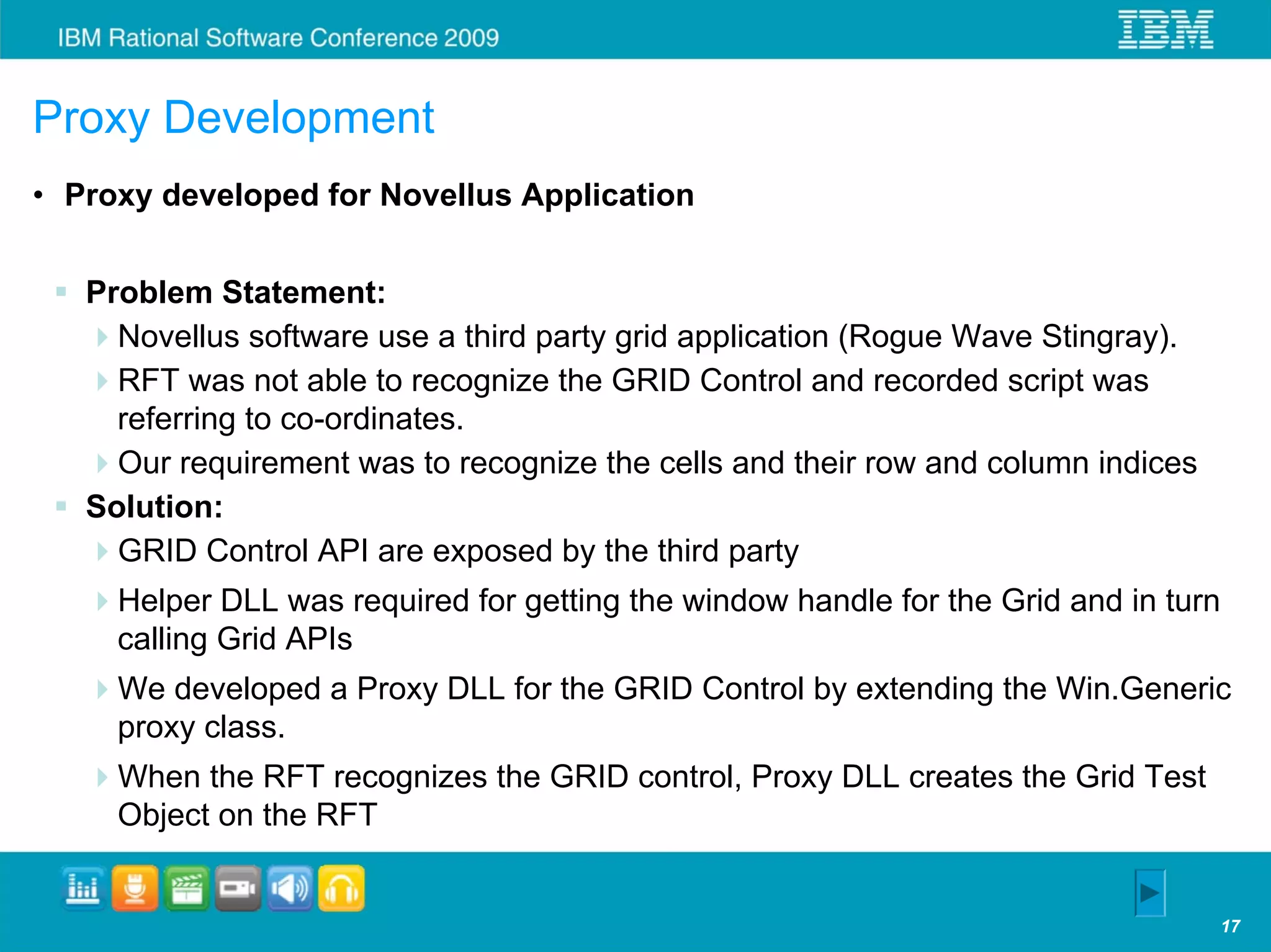
Proxy Development
• Proxy developed for Novellus Application


   Problem Statement:
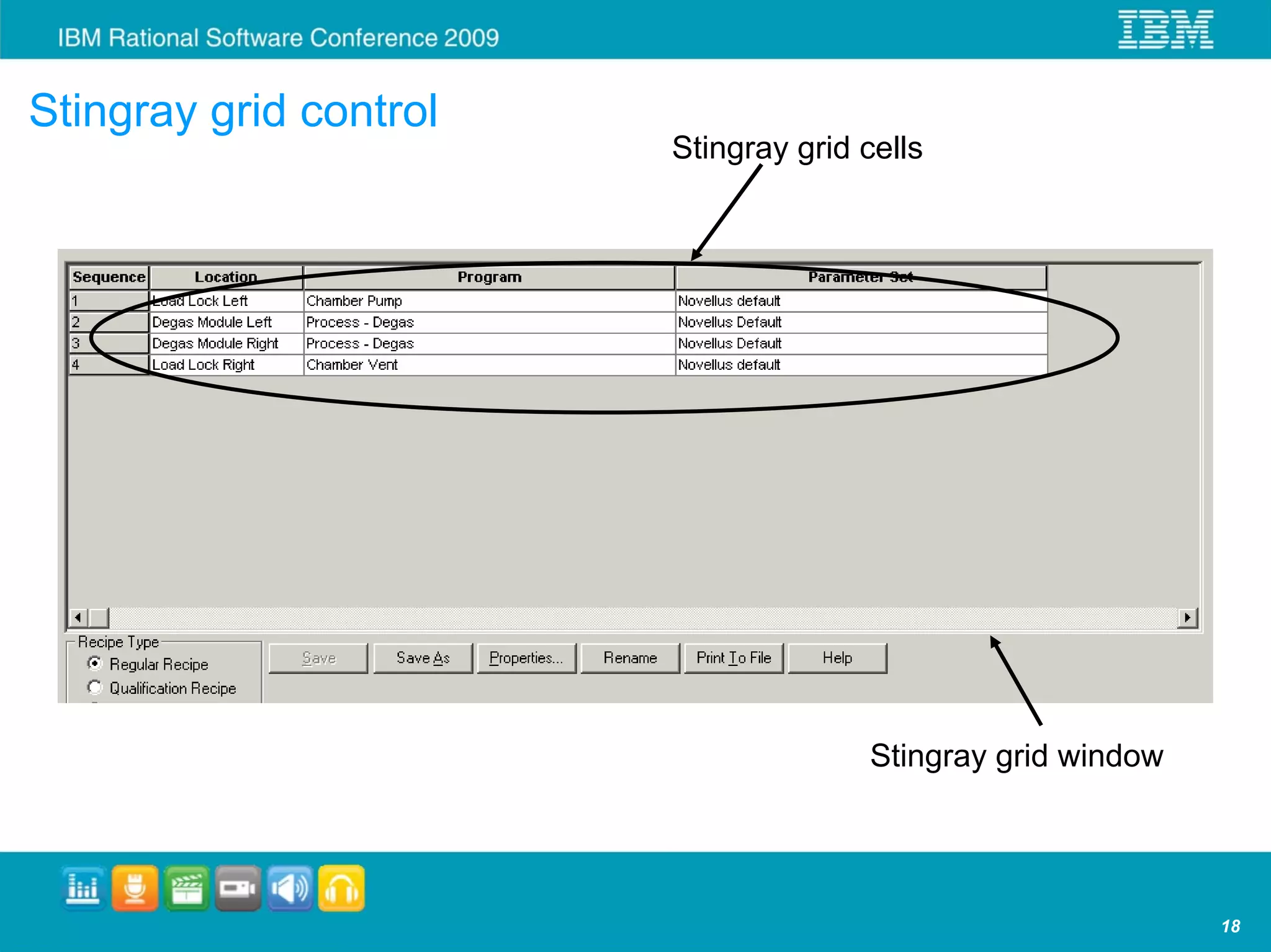
     Novellus software use a third party grid application (Rogue Wave Stingray).
     RFT was not able to recognize the GRID Control and recorded script was
     referring to co-ordinates.
     Our requirement was to recognize the cells and their row and column indices
   Solution:
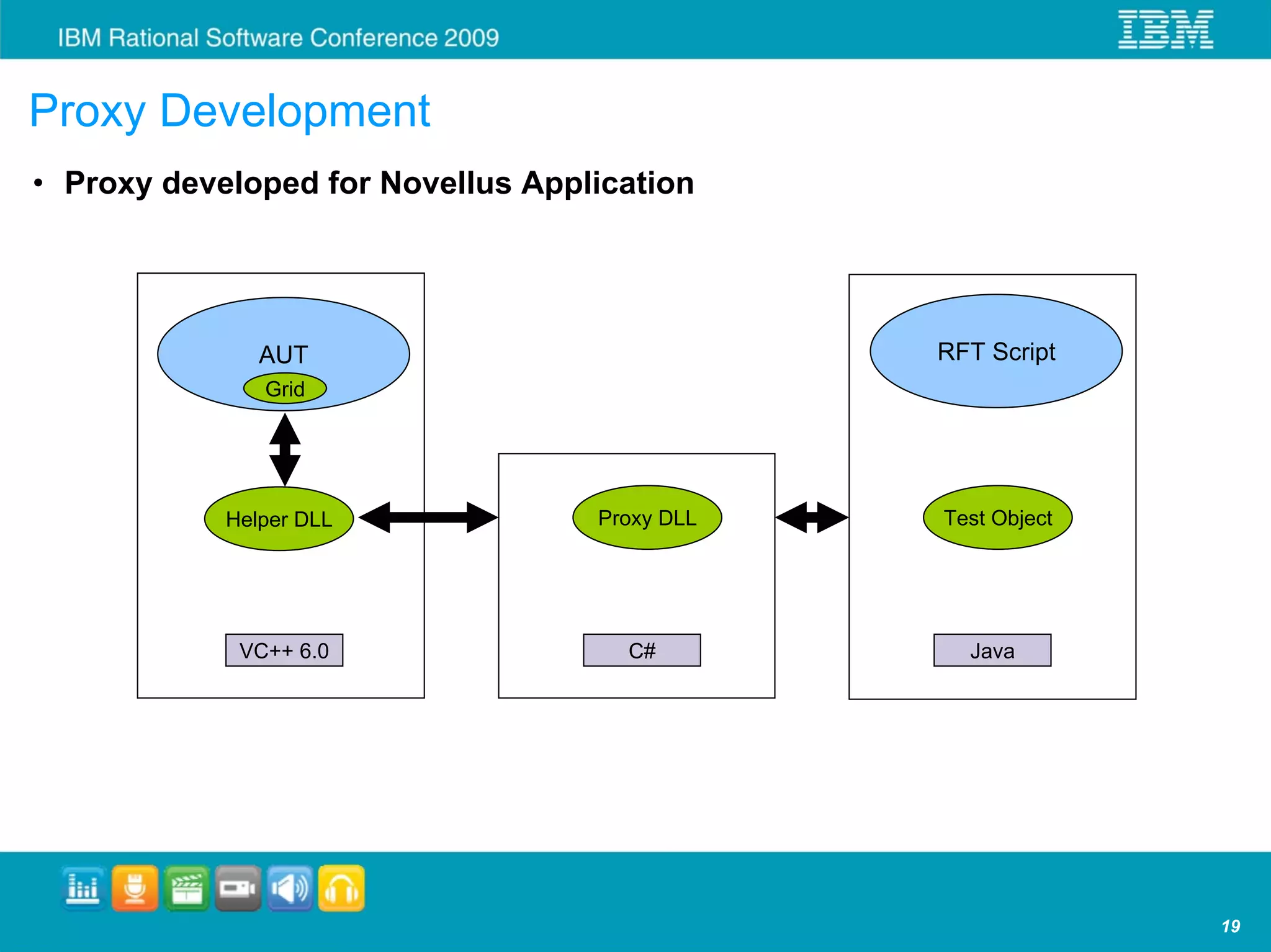
     GRID Control API are exposed by the third party
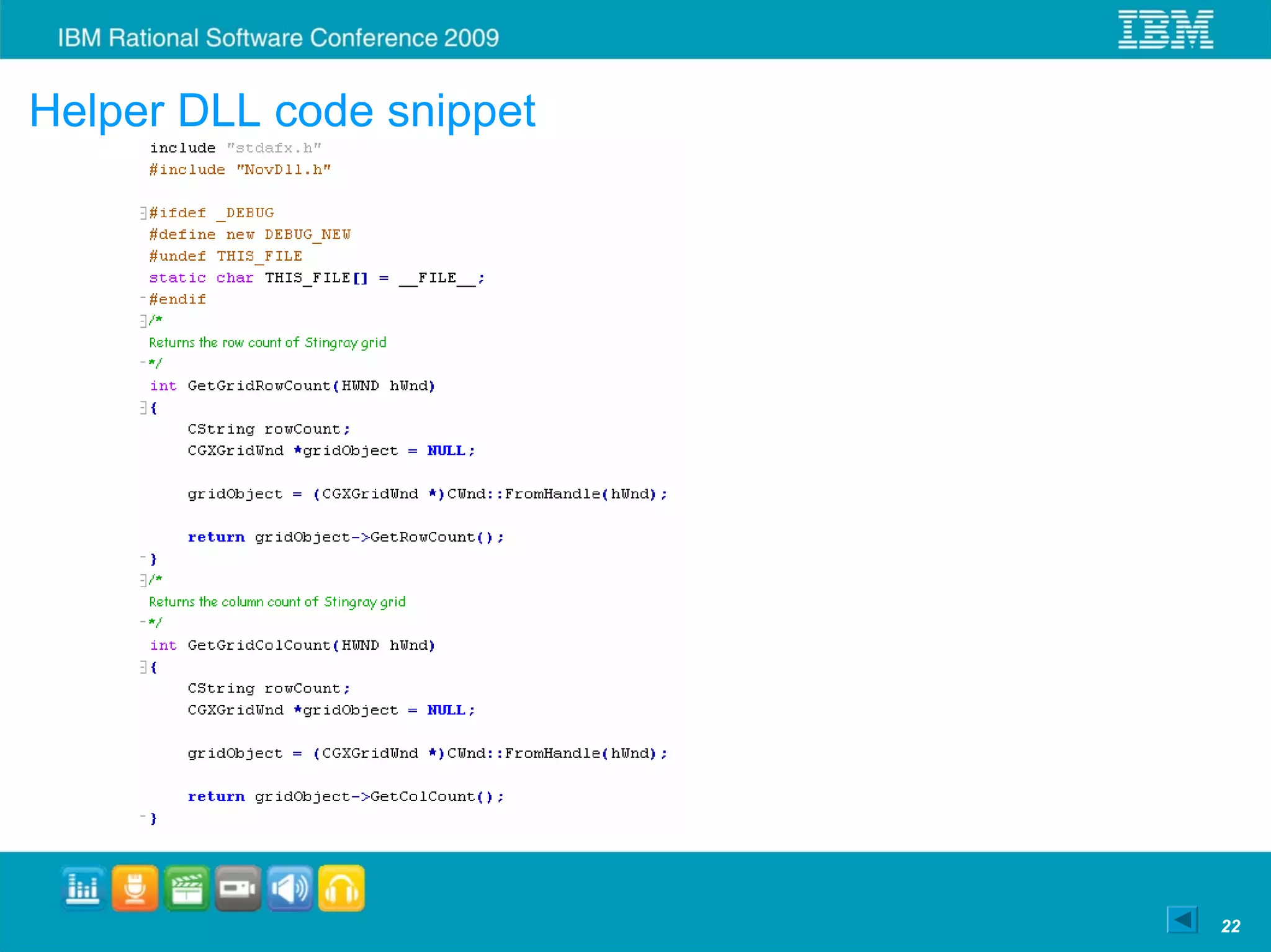
     Helper DLL was required for getting the window handle for the Grid and in turn
     calling Grid APIs
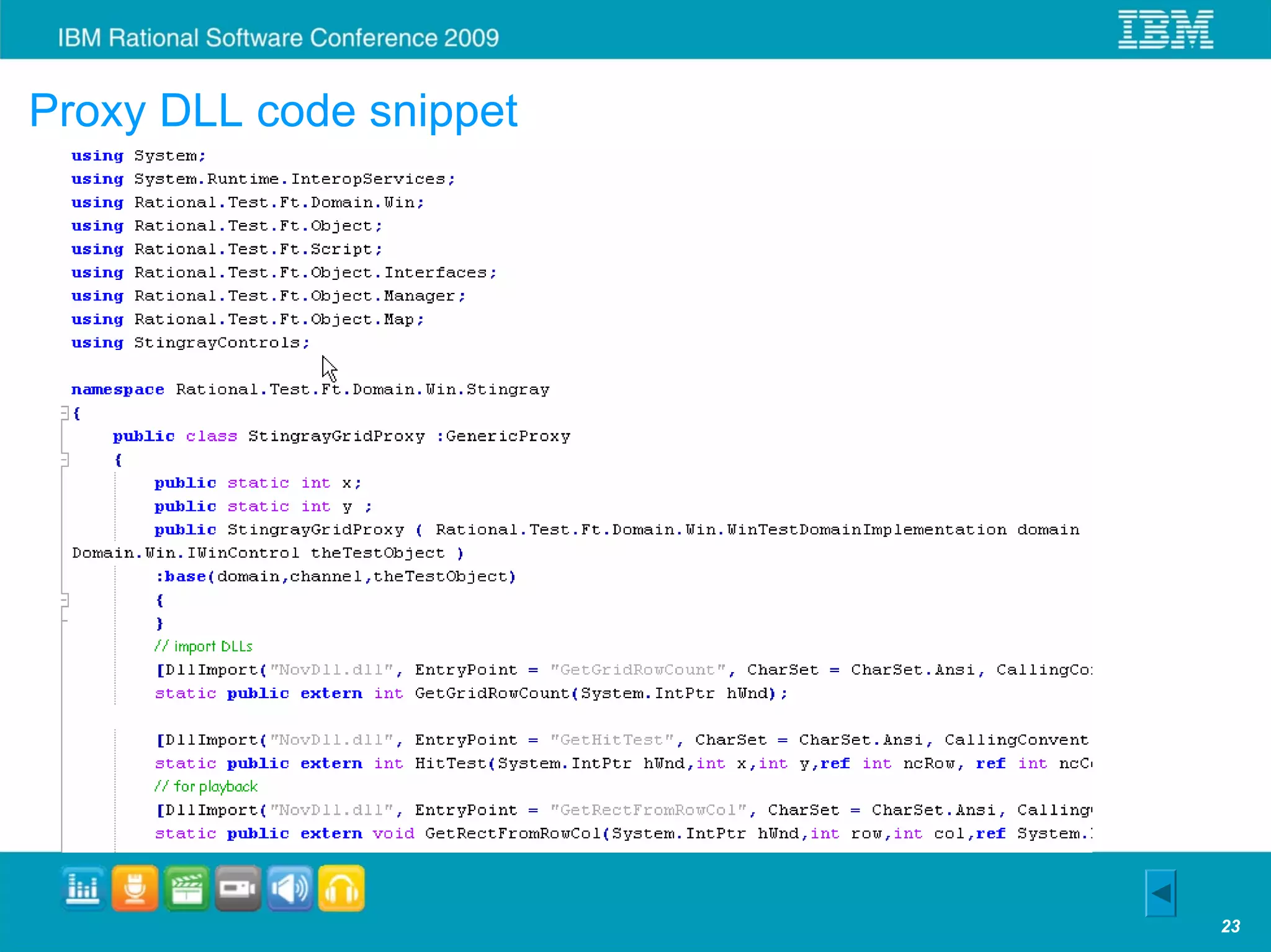
     We developed a Proxy DLL for the GRID Control by extending the Win.Generic
     proxy class.
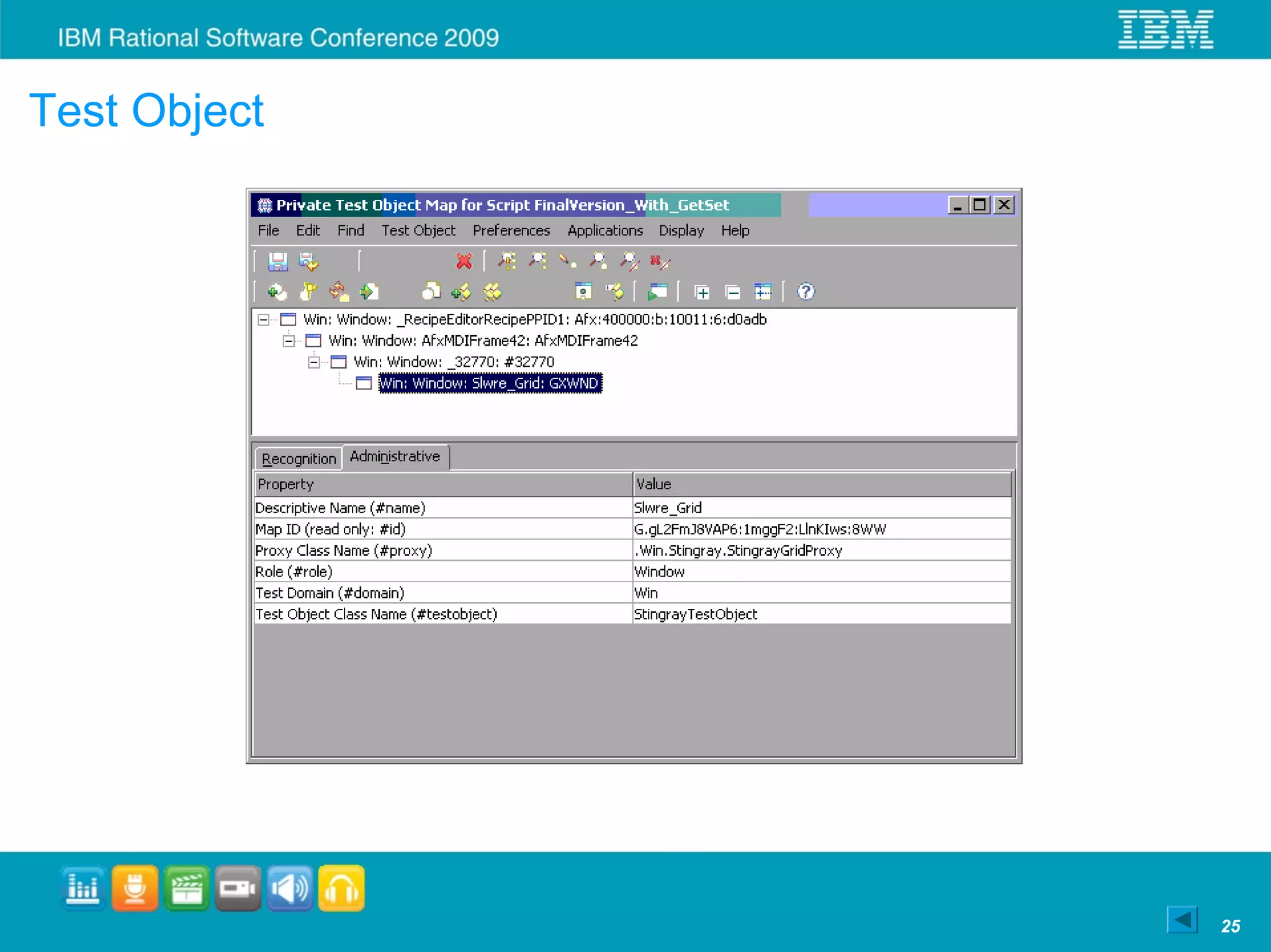
     When the RFT recognizes the GRID control, Proxy DLL creates the Grid Test
     Object on the RFT


                                                                                   17
Stingray grid control
                        Stingray grid cells


                                      Stingray grid window


                                                             18
Proxy Development
• Proxy developed for Novellus Application


               AUT                             RFT Script
               Grid


            Helper DLL             Proxy DLL   Test Object


             VC++ 6.0                C#          Java


                                                             19
Summary
• Test cases can be written faster to support quick turnaround.
• Everyone can write test cases, does not require programming skills.
• Framework is used to quickly write test scenarios to re-create
  customer issues
• Enables re-use of test methods and modules since the design is
  modular
• Java Doc helps in easy scripting
• Robust design and error recovery system
• Proxy SDK provides freedom to develop proxies for custom controls


                                                                        20
Helper DLL code snippet


                          22
Proxy DLL code snippet


                         23
Proxy DLL code snippet contd…


                                24
Test Object


              25
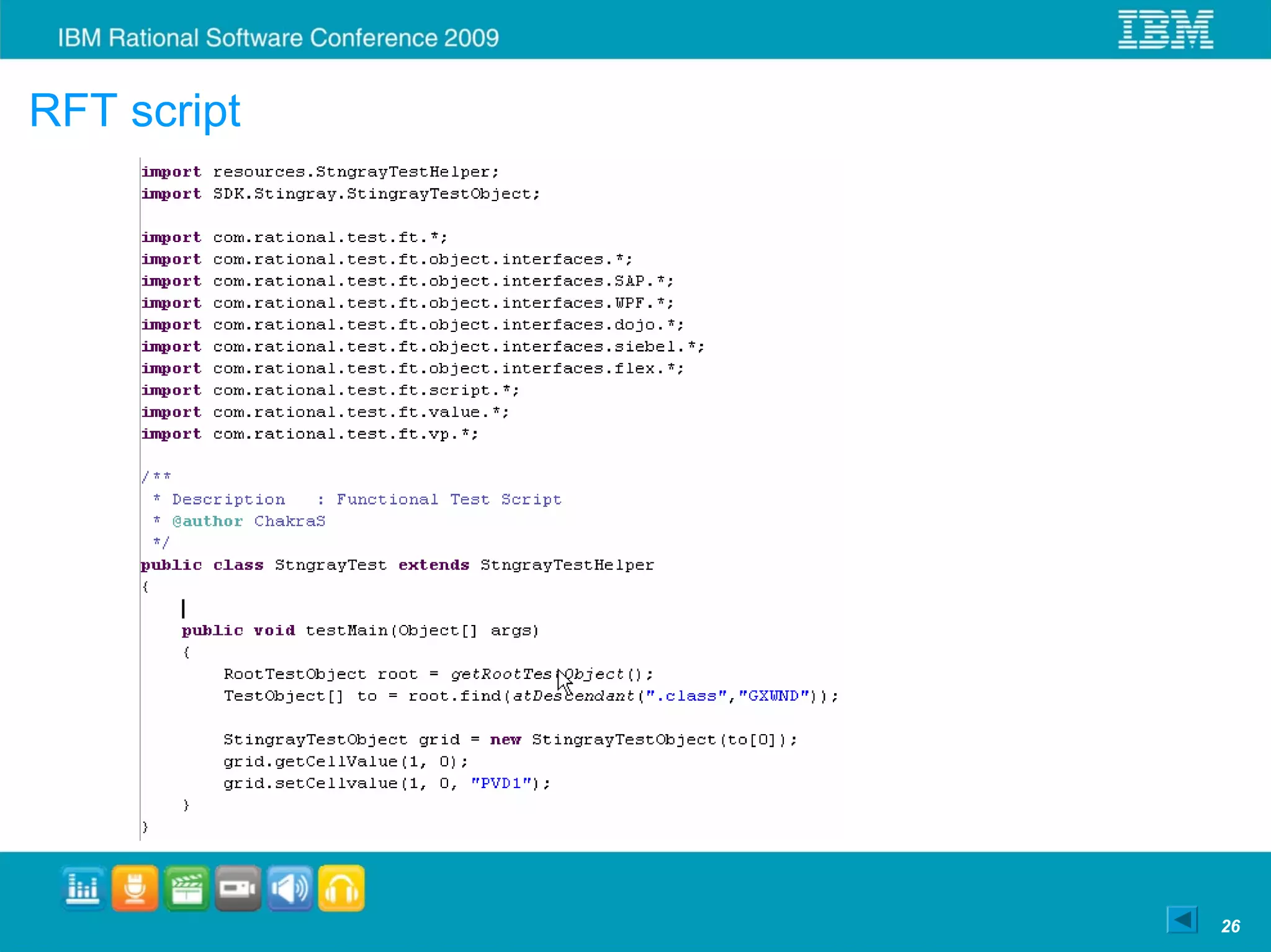
RFT script


             26
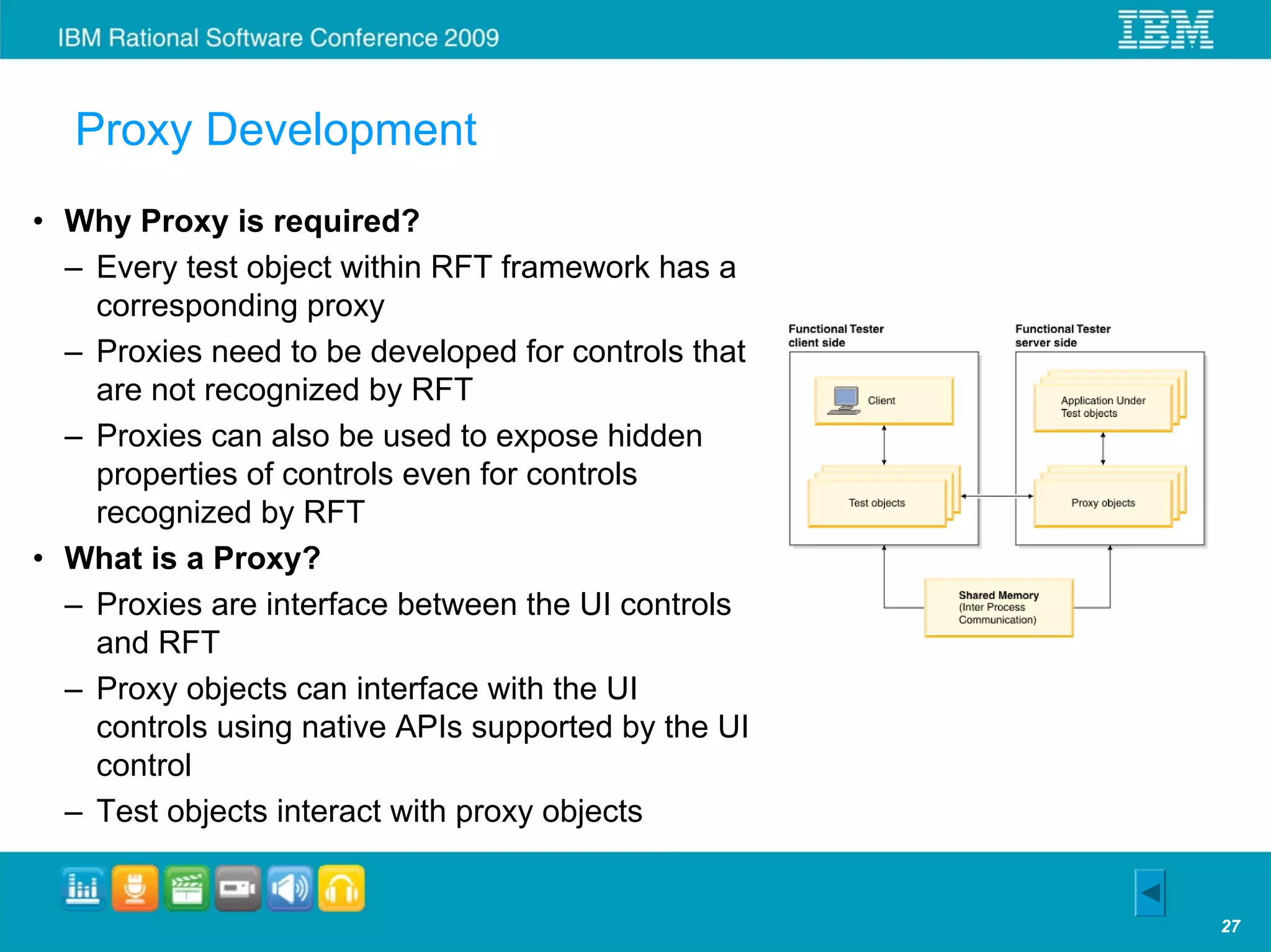
Proxy Development
• Why Proxy is required?
  – Every test object within RFT framework has a
    corresponding proxy
  – Proxies need to be developed for controls that
    are not recognized by RFT
  – Proxies can also be used to expose hidden
    properties of controls even for controls
    recognized by RFT
• What is a Proxy?
  – Proxies are interface between the UI controls
    and RFT
  – Proxy objects can interface with the UI
    controls using native APIs supported by the UI
    control
  – Test objects interact with proxy objects


                                                     27
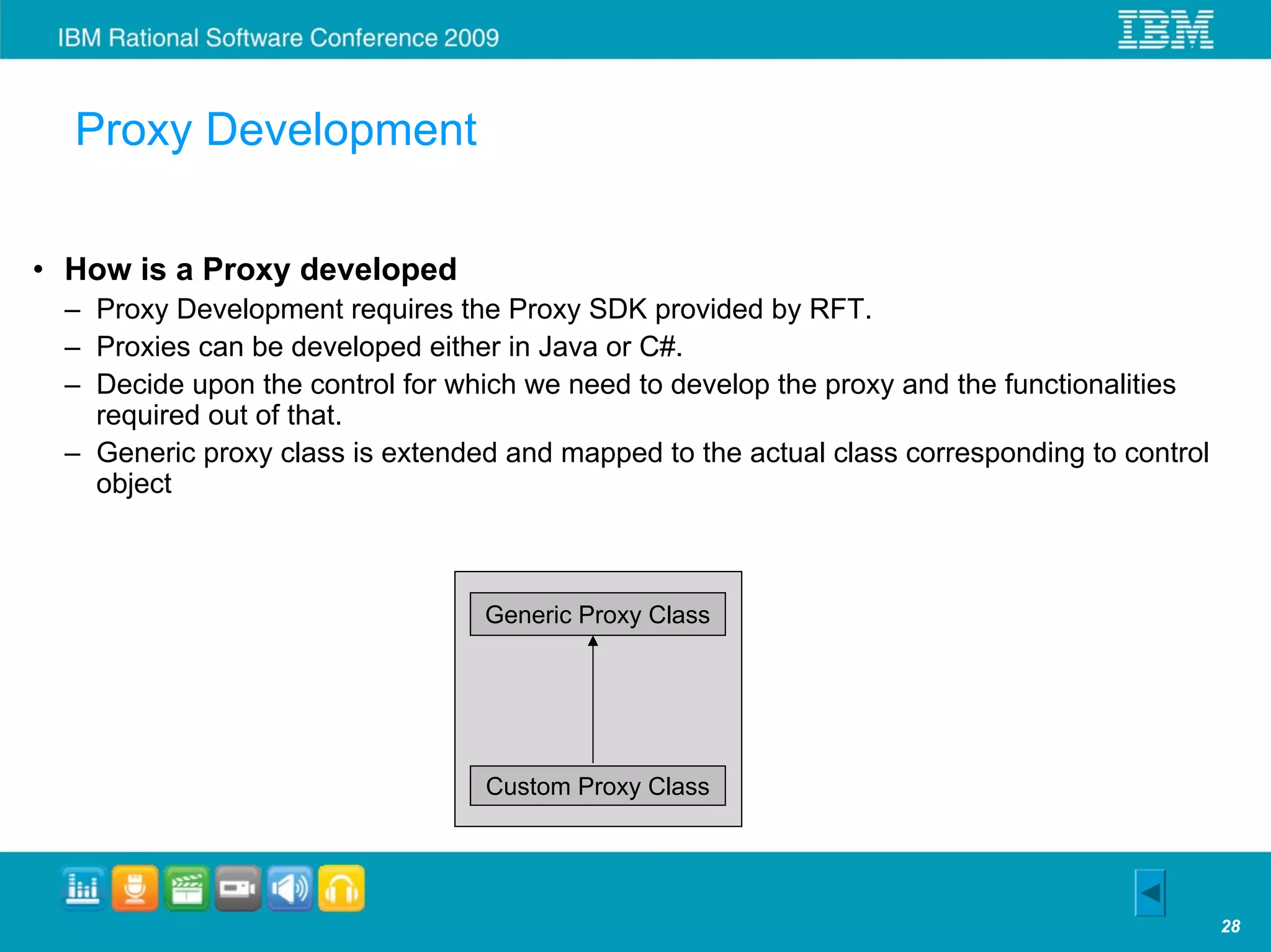
Proxy Development

• How is a Proxy developed
 – Proxy Development requires the Proxy SDK provided by RFT.
 – Proxies can be developed either in Java or C#.
 – Decide upon the control for which we need to develop the proxy and the functionalities
   required out of that.
 – Generic proxy class is extended and mapped to the actual class corresponding to control
   object


                                 Generic Proxy Class


                                 Custom Proxy Class


                                                                                             28

Accelerated test case - Anish bhanu

  • 1.
    Accelerated Test CaseAutomation Using Rational Functional Tester Anish Bhanu Manager, Software, Novellus Systems Anish.Bhanu@Novellus.com Sriram Chakravarthi Sr. Engineer, Software, Novellus Systems
  • 2.
    Automation Challenges intoday’s environment Framework running Automation lags on multiple hardware, development OS or platform Framework Test cases Extendibility Building Test with Data Application Driven or Availability Framework Keyword Driven approach Automation Proper Right Documentation Resources Coding Programming Standards, Test Case Re-usable knowledge vs Documentation Maintenance Actions, System of test cases and Methods & knowledge… modules… Modules Modified Chinese saying, “May you automate in interesting times” 2
  • 3.
    System level diagram Data collection and analysis tool Factory Automation Windows 2003 server No vellu s Server FA Windows 2003 server JAVA VC++ GUI Windows XP VC++ Factory Host Windows 2000 System Controller VC++ QNX 4 C Module Controller Module Controller QNX 4 QNX 4 C C EIOC EIOC EIOC EIOC QNX 6 QNX 6 QNX 6 QNX 6 C C C C Valve MFC Robot Pump 3
  • 4.
    Challenges for testingsemi-conductor tool software • Around 40 releases a year supporting 14 products • Manual testing of each release takes about 1200 hours of testing for each release • Software reliability is a key differentiator for tool software • System is graphic intensive, event driven and interacts with multiple other systems • Every customer uses the tool in a unique way. Customer needs quick turnaround on features and fixes 4
  • 5.
    Test Automation Approaches Record and Functional Test Data Driven Keyword Driven Playback Decomposition Standalone Record Modular test Test scripts with Test scripts with & Playback Scripts functions with data input & output data input & output data within test script outside the test outside the test script script along with re- usable keyword libraries 5
  • 6.
    Novellus Experience withAutomation • Started automation with Mercury WinRunner in 2003 • Started with the Functional decomposition approach and later moved to Data driven approach • Test case development took us 8 times the manual testing time • Maintaining the test cases for major releases took us 2 times the manual testing time • By end of 2008, we had only 15% of test cases automated, which is around 180 hours of manual testing time • Maintaining the script data for multiple releases and product was a challenge • WinRunner was not able to recognize the controls and 25% of Regression test cases could not be automated 6
  • 7.
    New Automation Approachusing RFT • Simplify scripting – Script should mimic what the user does on the screen. – Anyone could write the script • Modular architecture – Common framework that supports multiple products – Provide reuse of code and test structure – Error recovery system for continuous run • Parameterize test methods and modules – Provides mechanism to create new test cases easily and increase coverage • Documentation – Document generation of test methods and modules using JavaDoc • Use Proxies – For custom controls not recognized by RFT • Rouge wave Stingray Controls 7
  • 8.
    Control metrics UI Controls Set Read Verify Pushbutton NA NA Edit Box Static Text NA Combo Box Radio Button Check Button Menu Item NA NA List Box List Table Window NA Tree List NA NA Stingray Grid Tab NA NA NA: Not Applicable • Basic operation for any UI control • Set, Read and Verify • UI control class is derived from RationalTestScript Class and the basic operations are overridden in the derived class 8
  • 9.
    “4+1” view Architecture Programmers End User Functionality Software Management Test Plans Test Modules (Logical View) (Development View) Use Test Cases (Scenarios) Data Tables Test Methods (Process View) (Physical View) Scalability Topology Architectural Blueprints – The “4+1” View Model of Software Architecture by Philippe Kruchten 9
  • 10.
    Architecture • Test Plan – Represents a collection of test cases that will be executed sequentially. – Output is a result sheet indicating whether the selected test cases passed or failed. • Test cases – Consists of a collection of Test Modules and Test Methods which are organized in a logical sequence. – Output is a result sheet indicating whether the individual Test Modules/Test Methods passed or failed. • Test Modules – Readily available entity that performs commonly used operation. – Consists of a collection of Test Methods which are organized in a logical sequence. – Reused across Test Cases. • Test Methods – One class implemented corresponding to each UI control. – Operations that have been implemented in the UI control classes in Java. – Makes use of RFT APIs and Java libraries 10
  • 11.
  • 12.
    Test case script Module/Method Argument1 Argument2 Argument3 Argument4 #Set-up TestModule.LaunchProteusAndLogin c2 c2 TestModule.LaunchConfigurationEditor TestModule.SetConfig argument3 TestModule.LaunchTelnetWindow TestModule.Powercycle stop all;auto TestModule.CloseTelnetWindow #########Step1 Wafer run and nested error recovery ########### TestModule.AssignWafers Port1 1 10 argument5 TestModule.StartWaferRun TestModule.WaitForModuleToExecuteStep argument2 argument6 TestModule.InduceError argument2 TestModule.VerifyModuleInError argument2 TestModule.OpenErrorRecovery TestModule.VerifyVCComboboxExists errorrecovery_IDC_ER_MODULES_COMBO Modules in Error CONTINUE TestModule.SelectModuleForErrorRecovery argument1 TestModule.VerifyVCRadioButtonExists errorrecovery_IDC_DYNAMIC_RADIO1 Resume CONTINUE TestModule.VerifyVCEditBoxExists errorrecovery_IDC_EDIT_DYNAMIC - CONTINUE #########Step2 ########### … #Tear-down TestModule.ReplaceAllCassettes hfkb TestModule.DeleteRecipe argument5 TestModule.ExitProteus
  • 13.
    Error Recovery System • Cascading failures are avoided by using an error recovery that brings the system to base state • Generic Teardown is executed if the test cases encounter exceptions – Take the screenshot – Log the failure details – Close all windows – Restart the application • Testcase dependent Setup & Teardown is implemented to make each test case independent
  • 14.
    Enhanced Logging • Logs are captured using excel sheet and text file. • Every level will have a log with results against each line in an excel sheet. – Test Plan Result, TestCase Result & TestModule Result • A detailed log also will be available in the form of a text file. • Log level is provided by the user at the test plan selection level. Number of Test Cases Selected: 23 PASS TestCase.INXT_P1508_TC1_01 InovaxTSamsung PASS TestCase.INXT_P1508_TC2_01 InovaxTSamsung Number of Test Plans Selected: PASS 7 TestCase.INXT_P1508_TC2_06 InovaxTSamsung PASS PASS Variable.setLogLevel TestCase.INXT_P1508_TC2_07 InovaxTSamsung 3 PASS TestCase.INXT_P1508_TC2_08 InovaxTSamsung PASS Variable.setVariableValue IP_ADDRESS 192.168.1.10 PASS TestCase.INXT_P1508_TC7_01 InovaxTSamsung PASS PASS Variable.setVariableValue PRODUCT_NAME INOVAxT TestCase.INXT_P1508_TC8_02 InovaxTSamsung PASS PASS Variable.setVariableValue MACHINE_NAMEInovaxTSamsung TestCase.INXT_P1508_TC12_01 swe011qnx PASS PASS TestPlan.INOVAxT_TP_1508 TestCase.INXT_P1508_TC12_02 InovaxTSamsung PASS PASS TestPlan.INOVAxT_TP_INOVAxT_RTP TestCase.INXT_P1508_TC12_03 InovaxTSamsung PASS TestCase.INXT_P1508_TC11_02 InovaxTSamsungQFA PASS TestPlan.INOVAxT_TP_1833 PASS TestCase.INXT_P1508_TC11_03 InovaxTSamsungQFA PASS PASS TestPlan.INOVAxT_TP_2049 TestCase.INXT_P1508_TC11_04 InovaxTSamsungQFA FAIL PASS TestPlan.Vector_TP_INOVAxT_RTP TestCase.INXT_P1508_TC11_05 InovaxTSamsungQFA FAIL PASS TestPlan.Vector_TP_2049 TestCase.INXT_P1508_TC11_06 InovaxTSamsungQFA FAIL PASS TestPlan.Vector_TP_1508 TestCase.INXT_P1508_TC11_02 InovaxTSamsungAFA PASS TestCase.INXT_P1508_TC11_03 InovaxTSamsungAFA Number of Test Plans Executed: PASS 7 TestCase.INXT_P1508_TC11_04 InovaxTSamsungAFA Number of Test Plans PASSED: PASS 4 TestCase.INXT_P1508_TC11_05 InovaxTSamsungAFA Number of Test Plans FAILED: PASS 3 TestCase.INXT_P1508_TC11_06 InovaxTSamsungAFA PASS TestCase.INXT_P1508_TC2_02 InovaxTSamsung PASS TestCase.INXT_P1508_TC4_02 InovaxTSamsung PASS TestCase.INXT_P1508_TC4_04 InovaxTSamsung Number of Test Cases Executed: 23 Number of Test Cases PASSED: 23 Number of Test Cases FAILED: 0
  • 15.
    Documentation using JavaDoc for Modules and Methods
  • 16.
    Benefits with NewAutomation Approach • Saving of 60% on efforts with the new approach. • Test cases can be scripted without the application fully developed. • Test case scripts are portable across operating systems. • Maintenance of the test case scripts is negligible. 7% coverage achieved using the new framework
  • 17.
    Proxy Development • Proxydeveloped for Novellus Application Problem Statement: Novellus software use a third party grid application (Rogue Wave Stingray). RFT was not able to recognize the GRID Control and recorded script was referring to co-ordinates. Our requirement was to recognize the cells and their row and column indices Solution: GRID Control API are exposed by the third party Helper DLL was required for getting the window handle for the Grid and in turn calling Grid APIs We developed a Proxy DLL for the GRID Control by extending the Win.Generic proxy class. When the RFT recognizes the GRID control, Proxy DLL creates the Grid Test Object on the RFT 17
  • 18.
    Stingray grid control Stingray grid cells Stingray grid window 18
  • 19.
    Proxy Development • Proxydeveloped for Novellus Application AUT RFT Script Grid Helper DLL Proxy DLL Test Object VC++ 6.0 C# Java 19
  • 20.
    Summary • Test casescan be written faster to support quick turnaround. • Everyone can write test cases, does not require programming skills. • Framework is used to quickly write test scenarios to re-create customer issues • Enables re-use of test methods and modules since the design is modular • Java Doc helps in easy scripting • Robust design and error recovery system • Proxy SDK provides freedom to develop proxies for custom controls 20
  • 22.
    Helper DLL codesnippet 22
  • 23.
    Proxy DLL codesnippet 23
  • 24.
    Proxy DLL codesnippet contd… 24
  • 25.
  • 26.
  • 27.
    Proxy Development • WhyProxy is required? – Every test object within RFT framework has a corresponding proxy – Proxies need to be developed for controls that are not recognized by RFT – Proxies can also be used to expose hidden properties of controls even for controls recognized by RFT • What is a Proxy? – Proxies are interface between the UI controls and RFT – Proxy objects can interface with the UI controls using native APIs supported by the UI control – Test objects interact with proxy objects 27
  • 28.
    Proxy Development • Howis a Proxy developed – Proxy Development requires the Proxy SDK provided by RFT. – Proxies can be developed either in Java or C#. – Decide upon the control for which we need to develop the proxy and the functionalities required out of that. – Generic proxy class is extended and mapped to the actual class corresponding to control object Generic Proxy Class Custom Proxy Class 28