Technische Universität München

Visual Authentication
A Secure Single Step Authentication for User Authorization

Luis Roalter 1, Matthias Kranz 2, Andreas Möller 1, Stefan Diewald 1,
Tobias Stockinger 2, Marion Koelle 2, Patrick Lindemann 2
1 Technische

Universität München
2 Universität Passau
December 5th 2013

Mobile and Ubiquitous Multimedia (MUM 2013), Luleå, Sweden
Technische Universität München

mobile & usable
security
for interaction with
public terminals
05.12.2013

MUM 2013 Presentation: Visual Authentication – A Secure Single Step Authentication for User Authorization

2
Technische Universität München

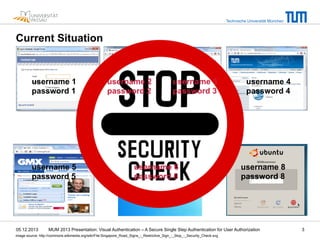
Current Situation

username 1
password 1

username 2
password 2

username 3
password 3

username 4
password 4

Different credentials

username 5
password 5

05.12.2013

username 6
password 6

username 8
password 8

MUM 2013 Presentation: Visual Authentication – A Secure Single Step Authentication for User Authorization

image source: http://commons.wikimedia.org/wiki/File:Singapore_Road_Signs_-_Restrictive_Sign_-_Stop_-_Security_Check.svg

3
Technische Universität München

Federated Authentication: Single Sign-On (SSO)
Related Work
• 

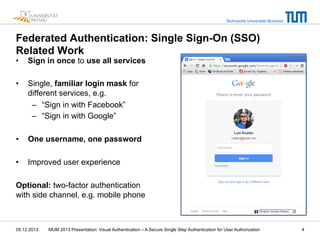
Sign in once to use all services

• 

Single, familiar login mask for
different services, e.g.
–  “Sign in with Facebook”
–  “Sign in with Google”

• 

One username, one password

• 

Improved user experience

Optional: two-factor authentication
with side channel, e.g. mobile phone

05.12.2013

MUM 2013 Presentation: Visual Authentication – A Secure Single Step Authentication for User Authorization

4
Technische Universität München

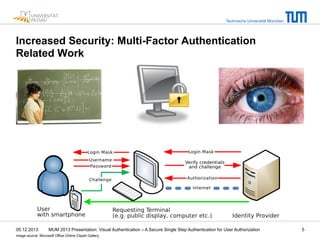
Increased Security: Multi-Factor Authentication
Related Work

05.12.2013

MUM 2013 Presentation: Visual Authentication – A Secure Single Step Authentication for User Authorization

image source: Microsoft Office Online Clipart Gallery

5
Technische Universität München

Problems in the Context of Mobile and Usable Security
• 

• 

Security-centered issues
–  Access credentials can be stolen, e .g.
•  man-in-the-middle attack
•  shoulder surfing
•  phishing
as the terminal usually does not authenticate towards the user
–  Trust relationship towards the device might be limited, even if the device
can prove its identity, e.g. if it is a shared device
à lack of trust, reluctant to use services, …
Device-centered issues
–  Limited capabilities of the input device (e.g. no keyboard)
–  Limited ergonomics (e.g. wall-mounted device)
–  hygiene concerns
à time-consuming, uncomfortable, …

05.12.2013

MUM 2013 Presentation: Visual Authentication – A Secure Single Step Authentication for User Authorization

6
Technische Universität München

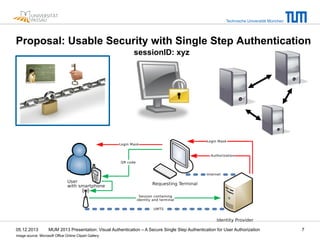
Proposal: Usable Security with Single Step Authentication
sessionID: xyz

05.12.2013

MUM 2013 Presentation: Visual Authentication – A Secure Single Step Authentication for User Authorization

image source: Microsoft Office Online Clipart Gallery

7
Technische Universität München

Proposal: Additional Benefits of the Mobile Authenticator
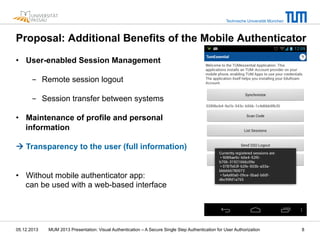
•  User-enabled Session Management
-  Remote session logout
-  Session transfer between systems
•  Maintenance of profile and personal
information
à Transparency to the user (full information)
•  Without mobile authenticator app:
can be used with a web-based interface

05.12.2013

MUM 2013 Presentation: Visual Authentication – A Secure Single Step Authentication for User Authorization

8
Technische Universität München

Example Use Case: Room Reservation and Access
• 

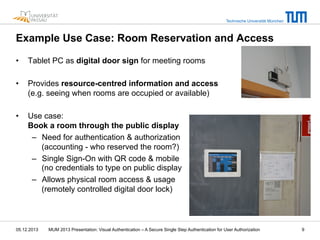
Tablet PC as digital door sign for meeting rooms

• 

Provides resource-centred information and access
(e.g. seeing when rooms are occupied or available)

• 

Use case:
Book a room through the public display
–  Need for authentication & authorization
(accounting - who reserved the room?)
–  Single Sign-On with QR code & mobile
(no credentials to type on public display
–  Allows physical room access & usage
(remotely controlled digital door lock)

05.12.2013

MUM 2013 Presentation: Visual Authentication – A Secure Single Step Authentication for User Authorization

9
Technische Universität München

Example Use Case: How does it work?
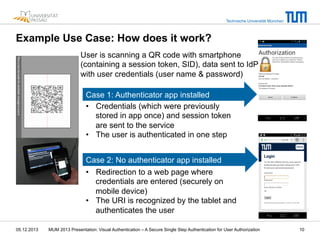
User is scanning a QR code with smartphone
(containing a session token, SID), data sent to IdP
with user credentials (user name & password)
Case 1: Authenticator app installed
•  Credentials (which were previously
stored in app once) and session token
are sent to the service
•  The user is authenticated in one step
Case 2: No authenticator app installed
•  Redirection to a web page where
credentials are entered (securely on
mobile device)
•  The URI is recognized by the tablet and
authenticates the user
05.12.2013

MUM 2013 Presentation: Visual Authentication – A Secure Single Step Authentication for User Authorization

10
Technische Universität München

Example Use Case: Initial User Study with “Room Access”
• 

Initial user survey with the prototype system (room access)
–  20 participants (18 males, 2 females) aged between 20 and 64 years
–  (non-balanced, non-representative, not providing statistically usable results)

• 

RQ1: Do users have security concerns when entering
personal credentials on a public display?
–  Participants agreed that they have security concerns entering personal
information on a publicly exposed display
–  Avg. 3.8 on 5-step Likert-Scale (fully disagree = 1, fully agree = 5), SD=1.3

• 

RQ2: Do users have security concerns when using the smartphone-based
visual authentication system in conjunction with a public display?
–  Participants agreed that they have security concerns in the smartphonebased authentication approach
–  Avg. 2.3 on 5-step Likert-Scale (fully disagree = 1, fully agree = 5), SD=1.4

05.12.2013

MUM 2013 Presentation: Visual Authentication – A Secure Single Step Authentication for User Authorization

11
Technische Universität München

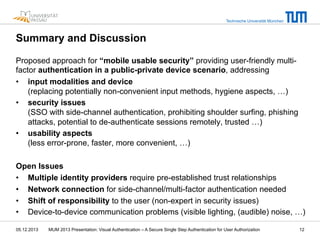
Summary and Discussion
Proposed approach for “mobile usable security” providing user-friendly multifactor authentication in a public-private device scenario, addressing
•  input modalities and device
(replacing potentially non-convenient input methods, hygiene aspects, …)
•  security issues
(SSO with side-channel authentication, prohibiting shoulder surfing, phishing
attacks, potential to de-authenticate sessions remotely, trusted …)
•  usability aspects
(less error-prone, faster, more convenient, …)
Open Issues
•  Multiple identity providers require pre-established trust relationships
•  Network connection for side-channel/multi-factor authentication needed
•  Shift of responsibility to the user (non-expert in security issues)
•  Device-to-device communication problems (visible lighting, (audible) noise, …)
05.12.2013

MUM 2013 Presentation: Visual Authentication – A Secure Single Step Authentication for User Authorization

12
Technische Universität München

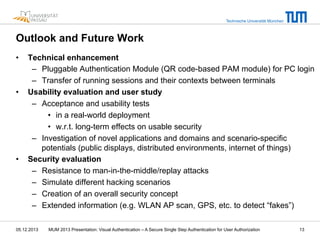
Outlook and Future Work
• 

• 

• 

Technical enhancement
–  Pluggable Authentication Module (QR code-based PAM module) for PC login
–  Transfer of running sessions and their contexts between terminals
Usability evaluation and user study
–  Acceptance and usability tests
•  in a real-world deployment
•  w.r.t. long-term effects on usable security
–  Investigation of novel applications and domains and scenario-specific
potentials (public displays, distributed environments, internet of things)
Security evaluation
–  Resistance to man-in-the-middle/replay attacks
–  Simulate different hacking scenarios
–  Creation of an overall security concept
–  Extended information (e.g. WLAN AP scan, GPS, etc. to detect “fakes”)

05.12.2013

MUM 2013 Presentation: Visual Authentication – A Secure Single Step Authentication for User Authorization

13
Technische Universität München

Thank you very much for your kind attention!
Questions?

?
?
Contact:
Luis Roalter (roalter@tum.de)
Matthias Kranz (matthias.kranz@uni-passau.de)
05.12.2013

MUM 2013 Presentation: Visual Authentication – A Secure Single Step Authentication for User Authorization

14
Technische Universität München

Citation Information
• 

Please cite this work as follows:
L. Roalter, M. Kranz, A. Möller, S. Diewald, T. Stockinger, M. Koelle, P. Lindemann: Visual
Authentication - A Secure Single Step Authentication for User Authorization. In: Proceedings of the
12th International Conference on Mobile and Ubiquitous Multimedia (MUM 2013), Luleå, Sweden,
2013

• 

Please use the following BibTex file:
@inproceedings{MUM2013Roalter,

author = {Roalter, Luis and Kranz, Matthias and M"{o}ller, Andreas and Diewald,
Stefan and Stockinger, Tobias and Koelle, Marion and Lindemann, Patrick},

title = {Visual Authentication – A Secure Single Step Authentication for User
Authorization},

booktitle = {Proceedings of the 12th International Conference on Mobile and Ubiquitous
Multimedia},

series = {MUM '13},

year = {2013},

location = {Luleaa, Sweden},

publisher = {ACM},

address = {New York, NY, USA},

} "

05.12.2013

MUM 2013 Presentation: Visual Authentication – A Secure Single Step Authentication for User Authorization

15

Visual Authentication - A Secure Single Step Authentication for User Authorization

  • 1.
    Technische Universität München VisualAuthentication A Secure Single Step Authentication for User Authorization Luis Roalter 1, Matthias Kranz 2, Andreas Möller 1, Stefan Diewald 1, Tobias Stockinger 2, Marion Koelle 2, Patrick Lindemann 2 1 Technische Universität München 2 Universität Passau December 5th 2013 Mobile and Ubiquitous Multimedia (MUM 2013), Luleå, Sweden
  • 2.
    Technische Universität München mobile& usable security for interaction with public terminals 05.12.2013 MUM 2013 Presentation: Visual Authentication – A Secure Single Step Authentication for User Authorization 2
  • 3.
    Technische Universität München CurrentSituation username 1 password 1 username 2 password 2 username 3 password 3 username 4 password 4 Different credentials username 5 password 5 05.12.2013 username 6 password 6 username 8 password 8 MUM 2013 Presentation: Visual Authentication – A Secure Single Step Authentication for User Authorization image source: http://commons.wikimedia.org/wiki/File:Singapore_Road_Signs_-_Restrictive_Sign_-_Stop_-_Security_Check.svg 3
  • 4.
    Technische Universität München FederatedAuthentication: Single Sign-On (SSO) Related Work •  Sign in once to use all services •  Single, familiar login mask for different services, e.g. –  “Sign in with Facebook” –  “Sign in with Google” •  One username, one password •  Improved user experience Optional: two-factor authentication with side channel, e.g. mobile phone 05.12.2013 MUM 2013 Presentation: Visual Authentication – A Secure Single Step Authentication for User Authorization 4
  • 5.
    Technische Universität München IncreasedSecurity: Multi-Factor Authentication Related Work 05.12.2013 MUM 2013 Presentation: Visual Authentication – A Secure Single Step Authentication for User Authorization image source: Microsoft Office Online Clipart Gallery 5
  • 6.
    Technische Universität München Problemsin the Context of Mobile and Usable Security •  •  Security-centered issues –  Access credentials can be stolen, e .g. •  man-in-the-middle attack •  shoulder surfing •  phishing as the terminal usually does not authenticate towards the user –  Trust relationship towards the device might be limited, even if the device can prove its identity, e.g. if it is a shared device à lack of trust, reluctant to use services, … Device-centered issues –  Limited capabilities of the input device (e.g. no keyboard) –  Limited ergonomics (e.g. wall-mounted device) –  hygiene concerns à time-consuming, uncomfortable, … 05.12.2013 MUM 2013 Presentation: Visual Authentication – A Secure Single Step Authentication for User Authorization 6
  • 7.
    Technische Universität München Proposal:Usable Security with Single Step Authentication sessionID: xyz 05.12.2013 MUM 2013 Presentation: Visual Authentication – A Secure Single Step Authentication for User Authorization image source: Microsoft Office Online Clipart Gallery 7
  • 8.
    Technische Universität München Proposal:Additional Benefits of the Mobile Authenticator •  User-enabled Session Management -  Remote session logout -  Session transfer between systems •  Maintenance of profile and personal information à Transparency to the user (full information) •  Without mobile authenticator app: can be used with a web-based interface 05.12.2013 MUM 2013 Presentation: Visual Authentication – A Secure Single Step Authentication for User Authorization 8
  • 9.
    Technische Universität München ExampleUse Case: Room Reservation and Access •  Tablet PC as digital door sign for meeting rooms •  Provides resource-centred information and access (e.g. seeing when rooms are occupied or available) •  Use case: Book a room through the public display –  Need for authentication & authorization (accounting - who reserved the room?) –  Single Sign-On with QR code & mobile (no credentials to type on public display –  Allows physical room access & usage (remotely controlled digital door lock) 05.12.2013 MUM 2013 Presentation: Visual Authentication – A Secure Single Step Authentication for User Authorization 9
  • 10.
    Technische Universität München ExampleUse Case: How does it work? User is scanning a QR code with smartphone (containing a session token, SID), data sent to IdP with user credentials (user name & password) Case 1: Authenticator app installed •  Credentials (which were previously stored in app once) and session token are sent to the service •  The user is authenticated in one step Case 2: No authenticator app installed •  Redirection to a web page where credentials are entered (securely on mobile device) •  The URI is recognized by the tablet and authenticates the user 05.12.2013 MUM 2013 Presentation: Visual Authentication – A Secure Single Step Authentication for User Authorization 10
  • 11.
    Technische Universität München ExampleUse Case: Initial User Study with “Room Access” •  Initial user survey with the prototype system (room access) –  20 participants (18 males, 2 females) aged between 20 and 64 years –  (non-balanced, non-representative, not providing statistically usable results) •  RQ1: Do users have security concerns when entering personal credentials on a public display? –  Participants agreed that they have security concerns entering personal information on a publicly exposed display –  Avg. 3.8 on 5-step Likert-Scale (fully disagree = 1, fully agree = 5), SD=1.3 •  RQ2: Do users have security concerns when using the smartphone-based visual authentication system in conjunction with a public display? –  Participants agreed that they have security concerns in the smartphonebased authentication approach –  Avg. 2.3 on 5-step Likert-Scale (fully disagree = 1, fully agree = 5), SD=1.4 05.12.2013 MUM 2013 Presentation: Visual Authentication – A Secure Single Step Authentication for User Authorization 11
  • 12.
    Technische Universität München Summaryand Discussion Proposed approach for “mobile usable security” providing user-friendly multifactor authentication in a public-private device scenario, addressing •  input modalities and device (replacing potentially non-convenient input methods, hygiene aspects, …) •  security issues (SSO with side-channel authentication, prohibiting shoulder surfing, phishing attacks, potential to de-authenticate sessions remotely, trusted …) •  usability aspects (less error-prone, faster, more convenient, …) Open Issues •  Multiple identity providers require pre-established trust relationships •  Network connection for side-channel/multi-factor authentication needed •  Shift of responsibility to the user (non-expert in security issues) •  Device-to-device communication problems (visible lighting, (audible) noise, …) 05.12.2013 MUM 2013 Presentation: Visual Authentication – A Secure Single Step Authentication for User Authorization 12
  • 13.
    Technische Universität München Outlookand Future Work •  •  •  Technical enhancement –  Pluggable Authentication Module (QR code-based PAM module) for PC login –  Transfer of running sessions and their contexts between terminals Usability evaluation and user study –  Acceptance and usability tests •  in a real-world deployment •  w.r.t. long-term effects on usable security –  Investigation of novel applications and domains and scenario-specific potentials (public displays, distributed environments, internet of things) Security evaluation –  Resistance to man-in-the-middle/replay attacks –  Simulate different hacking scenarios –  Creation of an overall security concept –  Extended information (e.g. WLAN AP scan, GPS, etc. to detect “fakes”) 05.12.2013 MUM 2013 Presentation: Visual Authentication – A Secure Single Step Authentication for User Authorization 13
  • 14.
    Technische Universität München Thankyou very much for your kind attention! Questions? ? ? Contact: Luis Roalter (roalter@tum.de) Matthias Kranz (matthias.kranz@uni-passau.de) 05.12.2013 MUM 2013 Presentation: Visual Authentication – A Secure Single Step Authentication for User Authorization 14
  • 15.
    Technische Universität München CitationInformation •  Please cite this work as follows: L. Roalter, M. Kranz, A. Möller, S. Diewald, T. Stockinger, M. Koelle, P. Lindemann: Visual Authentication - A Secure Single Step Authentication for User Authorization. In: Proceedings of the 12th International Conference on Mobile and Ubiquitous Multimedia (MUM 2013), Luleå, Sweden, 2013 •  Please use the following BibTex file: @inproceedings{MUM2013Roalter,
 author = {Roalter, Luis and Kranz, Matthias and M"{o}ller, Andreas and Diewald, Stefan and Stockinger, Tobias and Koelle, Marion and Lindemann, Patrick},
 title = {Visual Authentication – A Secure Single Step Authentication for User Authorization},
 booktitle = {Proceedings of the 12th International Conference on Mobile and Ubiquitous Multimedia},
 series = {MUM '13},
 year = {2013},
 location = {Luleaa, Sweden},
 publisher = {ACM},
 address = {New York, NY, USA},
 } " 05.12.2013 MUM 2013 Presentation: Visual Authentication – A Secure Single Step Authentication for User Authorization 15