XCAL series
Guide for Auto Call
Setting for Ping and
Trace Route Test
Version 3.X.XX
2008-3-11
XCAL series AutoCall Setting Ping and Trace Route Test
Unit 206, 2/F., No. 8 Science Park West Avenue Page 2
Hong Kong Science Park, Shatin, Couei APAC Ltd
New Territories, Hong Kong www.couei.com
TEL: +852-2210-7004
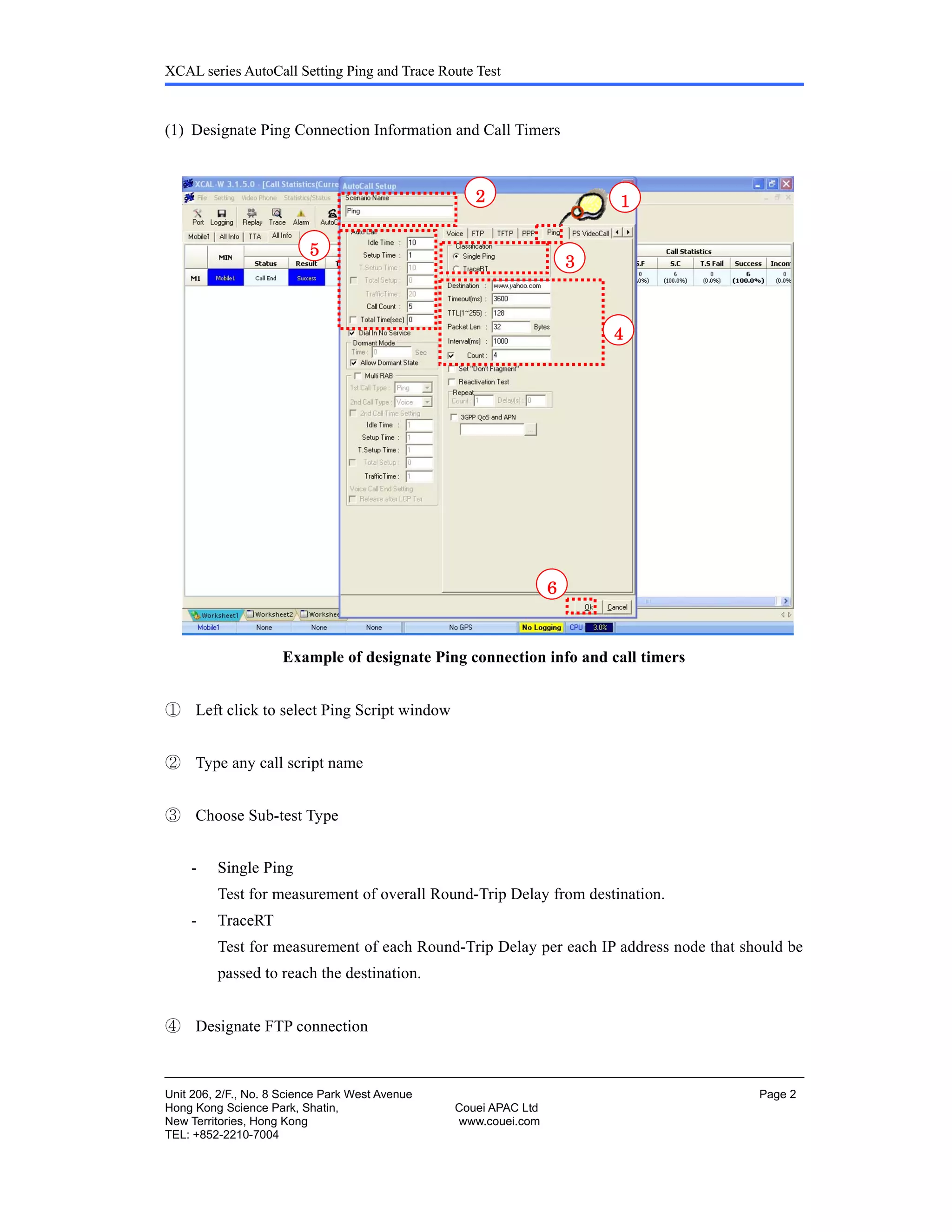
(1) Designate Ping Connection Information and Call Timers
Example of designate Ping connection info and call timers
① Left click to select Ping Script window
② Type any call script name
③ Choose Sub-test Type
- Single Ping
Test for measurement of overall Round-Trip Delay from destination.
- TraceRT
Test for measurement of each Round-Trip Delay per each IP address node that should be
passed to reach the destination.
④ Designate FTP connection
12
3
5
6
4
XCAL series AutoCall Setting Ping and Trace Route Test
Unit 206, 2/F., No. 8 Science Park West Avenue Page 3
Hong Kong Science Park, Shatin, Couei APAC Ltd
New Territories, Hong Kong www.couei.com
TEL: +852-2210-7004
- Destination : www.yahoo.com (Target URL)
- Timeout : 3600 (ms)
Timer for getting response of ICMP
If Timer expires without response, Time out will be made in ping status and mark as
‘Packet Loss’.
- TTL (1~255) : 128 (node)
Maximum Time to Live
Maximum allowable number of IP nodes to reach the destination.
- Packet Len : 32 (Bytes)
ICMP packet size to send to target destination
- Count : 4 (Counts of Ping or TraceRT Attempts)
With Tick on & values, each call will be terminated after Ping or TraceRT attempts
as many times as the numbers designated.
(Traffic Timer will be disabled automatically)
Without Tick on & values, Ping or TraceRT attempts will be made many as possible
in given Traffic Timer.
⑤ Designate Call Timers in unit of second
- Idle Time : 10 (seconds, Recommended value)
- Setup Time : 1 (second, It will be ignored.)
- Traffic Time : It is only valid in case Count Check box is not ticked.
- Call Count : 5 (It can be changed with your test propose.)
For more details, please refer to Call Timers Diagram in appendix.
⑥ Click OK to save the configuration
⑦ Then you may start the logging process by pressing the Logging button.
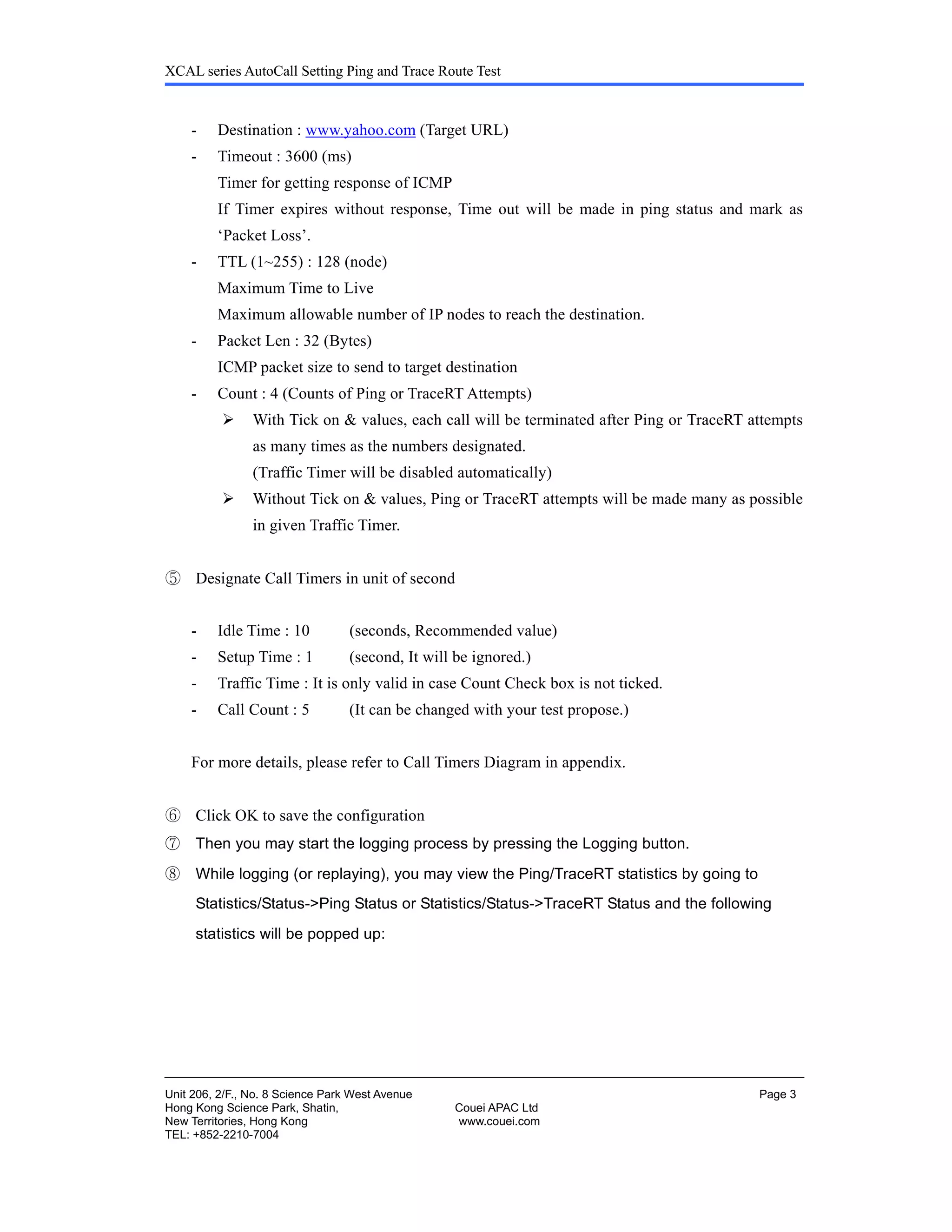
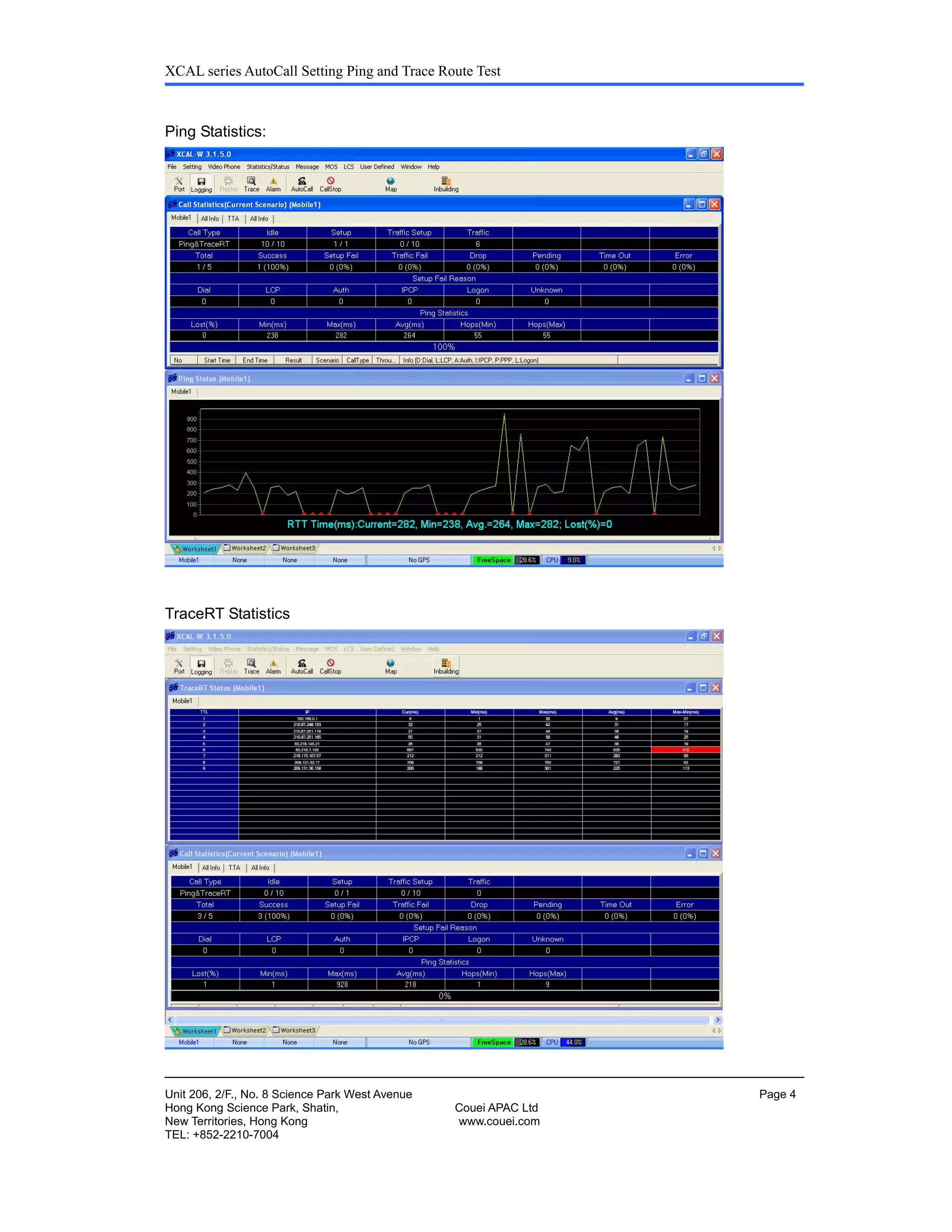
⑧ While logging (or replaying), you may view the Ping/TraceRT statistics by going to
Statistics/Status->Ping Status or Statistics/Status->TraceRT Status and the following
statistics will be popped up:
XCAL series AutoCall Setting Ping and Trace Route Test
Unit 206, 2/F., No. 8 Science Park West Avenue Page 4
Hong Kong Science Park, Shatin, Couei APAC Ltd
New Territories, Hong Kong www.couei.com
TEL: +852-2210-7004
Ping Statistics:
TraceRT Statistics
XCAL series AutoCall Setting Ping and Trace Route Test
Unit 206, 2/F., No. 8 Science Park West Avenue Page 5
Hong Kong Science Park, Shatin, Couei APAC Ltd
New Territories, Hong Kong www.couei.com
TEL: +852-2210-7004
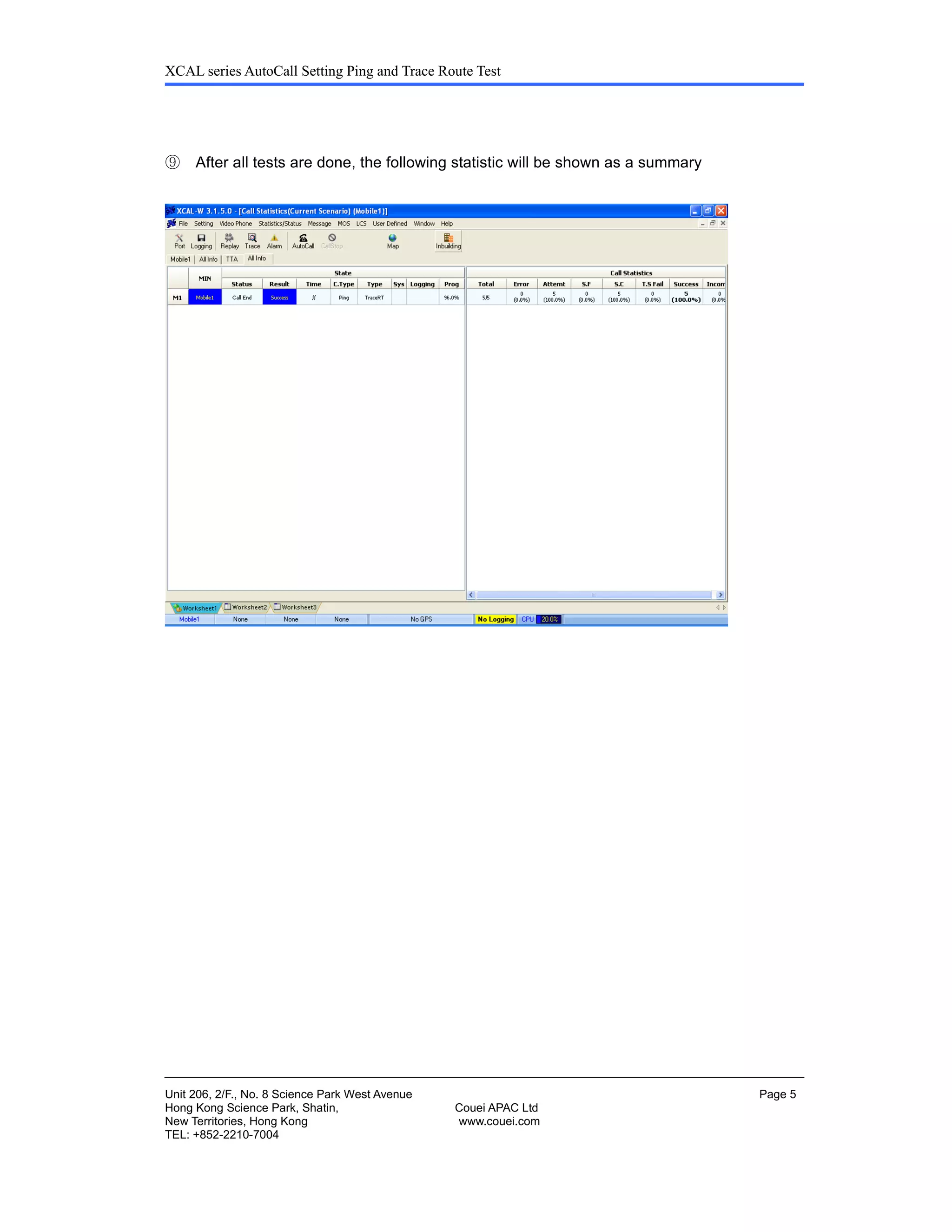
⑨ After all tests are done, the following statistic will be shown as a summary

Auto call setup for xcal series 3.x.xx ping tracert

  • 1.
    XCAL series Guide forAuto Call Setting for Ping and Trace Route Test Version 3.X.XX 2008-3-11
  • 2.
    XCAL series AutoCallSetting Ping and Trace Route Test Unit 206, 2/F., No. 8 Science Park West Avenue Page 2 Hong Kong Science Park, Shatin, Couei APAC Ltd New Territories, Hong Kong www.couei.com TEL: +852-2210-7004 (1) Designate Ping Connection Information and Call Timers Example of designate Ping connection info and call timers ① Left click to select Ping Script window ② Type any call script name ③ Choose Sub-test Type - Single Ping Test for measurement of overall Round-Trip Delay from destination. - TraceRT Test for measurement of each Round-Trip Delay per each IP address node that should be passed to reach the destination. ④ Designate FTP connection 12 3 5 6 4
  • 3.
    XCAL series AutoCallSetting Ping and Trace Route Test Unit 206, 2/F., No. 8 Science Park West Avenue Page 3 Hong Kong Science Park, Shatin, Couei APAC Ltd New Territories, Hong Kong www.couei.com TEL: +852-2210-7004 - Destination : www.yahoo.com (Target URL) - Timeout : 3600 (ms) Timer for getting response of ICMP If Timer expires without response, Time out will be made in ping status and mark as ‘Packet Loss’. - TTL (1~255) : 128 (node) Maximum Time to Live Maximum allowable number of IP nodes to reach the destination. - Packet Len : 32 (Bytes) ICMP packet size to send to target destination - Count : 4 (Counts of Ping or TraceRT Attempts) With Tick on & values, each call will be terminated after Ping or TraceRT attempts as many times as the numbers designated. (Traffic Timer will be disabled automatically) Without Tick on & values, Ping or TraceRT attempts will be made many as possible in given Traffic Timer. ⑤ Designate Call Timers in unit of second - Idle Time : 10 (seconds, Recommended value) - Setup Time : 1 (second, It will be ignored.) - Traffic Time : It is only valid in case Count Check box is not ticked. - Call Count : 5 (It can be changed with your test propose.) For more details, please refer to Call Timers Diagram in appendix. ⑥ Click OK to save the configuration ⑦ Then you may start the logging process by pressing the Logging button. ⑧ While logging (or replaying), you may view the Ping/TraceRT statistics by going to Statistics/Status->Ping Status or Statistics/Status->TraceRT Status and the following statistics will be popped up:
  • 4.
    XCAL series AutoCallSetting Ping and Trace Route Test Unit 206, 2/F., No. 8 Science Park West Avenue Page 4 Hong Kong Science Park, Shatin, Couei APAC Ltd New Territories, Hong Kong www.couei.com TEL: +852-2210-7004 Ping Statistics: TraceRT Statistics
  • 5.
    XCAL series AutoCallSetting Ping and Trace Route Test Unit 206, 2/F., No. 8 Science Park West Avenue Page 5 Hong Kong Science Park, Shatin, Couei APAC Ltd New Territories, Hong Kong www.couei.com TEL: +852-2210-7004 ⑨ After all tests are done, the following statistic will be shown as a summary