Video in learning process Veronika Rogalevich [email_address]
What is video? Video  is the technology of electronically capturing, recording, processing, storing, transmitting, and reconstructing a sequence of still images representing scenes in motion. Video - „I see“, visual motion, picture and sound  Video is actively used in education and has a great pedagogical value Video helps to engage students, it can be used as social learning activity...
Types Analog video (VHS, Betamax) Digital video (DVD, Blu Ray Disk, QuickTime, AVI, WMV, MPEG4), recorded with digital video cameras Digital video provides better quality and sharing opportunities(video is a file!)
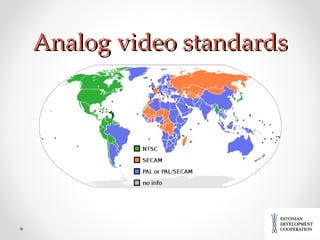
Analog video standards
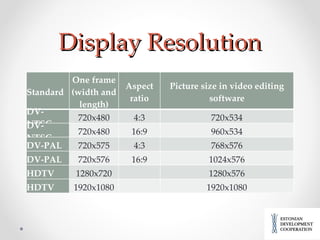
Display Resolution Standard One frame (width and length) Aspect ratio Picture size in video editing software DV-NTSC 720x480 4:3 720x534 DV-NTSC 720x480 16:9 960x534 DV-PAL 720x575 4:3 768x576 DV-PAL 720x576 16:9 1024x576 HDTV 1280x720   1280x576 HDTV 1920x1080   1920x1080
Aspect ratio 4:3 : traditional television uses that, it can be used if You plan to put some slides or pictures beside the video picture (videolectures) 16:9: HDTV uses that, try to prefer this, because  but pixels used in  digital video  often have non-square aspect ratios  and DV standard corresponds to wide-screen formats.
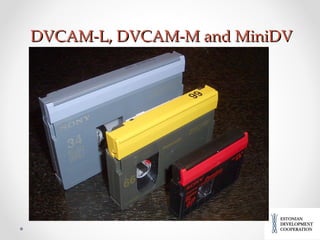
Video cameras and medias Analog or digital, from 1990-nties DV is dominating) Web-cameras (webcams), on laptops, iMacs etc. Different cassetes DV (Digital Video):  small, medium  ( DVCPRO, Panasonic) , large  ( DVCAM)  and extra-large  ( DVCPRO XL ) .  All DV cassettes use tape that is ¼ inch (6.35 mm) wide. Small or S-size is MiniDV cassette, most popular,  are used for recording baseline DV, DVCAM as well as  HDV
DVCAM-L, DVCAM-M and MiniDV
File-based media Tapeless recording Optical discs (DVD, Mini DVD) Flash memory cards (SD cards) Hard-disk drives Sony  XDCAM  family of cameras can record DV onto either  Professional Disc  or  SxS  cards. Panasonic DVCPRO HD and AVC-Intra camcorders onto  P2  cards. Panasonic  AVCHD  camcorders record DV video onto  Secure Digital  memory cards. JVC GY-HM750 records  onto  Secure Digita l (SD)  or SxS memory cards.
Raw video Most DV and  HDV  camcorders can feed live DV stream over  IEEE 1394 interface    also called FireWire,  to an external file-based recorder  (i.e. computer) . Video is stored either as native DIF bitstream or wrapped into an audio/video  container  such as  AVI ,  QuickTime  and  MXF . DV-DIF  is the raw form of DV video. The files usually have extensions *.dv or *.dif.
Main raw formats DV-AVI  is Microsoft's implementation of DV video file, which is wrapped into an AVI container. This container is used primarily on Windows-based computers, though Sony offers two tapeless recorders, the HDD-based HVR-DR60 [16]  and the CompactFlash-based HVR-MRC1K, [17] for use with DV/HDV camcorders that can record in DV-AVI  Quicktime -DV  is DV video wrapped into Quicktime container. This container is used primarily on Apple computers  (MOV-files). MXF -DV  wraps DV video into MXF container, which is presently used on P2-based camcorders (Panasonic) and on XDCAM/XDCAM EX camcorders (Sony).
Additional accessories Cables (USB, FireWire) Microphones (wireless with transmitters, directional, condencer microphones) Tripods Chargers and batteries Bags http://www.tlu.ee/opmat/eope/videokoolitus/kaamerate_lisaseadmed.html#
Types of educational videos Video lectures  („ Talking head s“,  tutorials ):  main focus is the teacher who speaks directly to a live audience or the camera ,  with slides or without ) Using authentic archive video material :  digitized materials from libraries (europeana.eu), archives Animated screenshots :  animated screenshots of using software together with a soundtrack in the form of ‘mini-movies’ Instructional 'how to videos' of a  practical activity :   to show the process, procedures and different stages of doing something concrete
Interviewing an expert  or expert presentation :  guest speakers, who  present an alternative viewpoint , used for  further discussion s with students. Video blogs 'think aloud‘:  personal reflection of learner or teacher on some subject,   record their thoughts and actions , tone, humour and spontaneity. Video case studies/simulations/role plays:   the intention is to simulate an event such as a lab experiment where safety might potentially be at risk or to engage in a role-playing situation in the form of a case study where the students can experiment with different responses and behaviors .  Video in this case provides ‘real life’ context, and/or emotional impact
Videoing real events and situations:  The purpose is to capture an action that cannot be physically brought into the classroom  ( any outdoor event or situation, trips  etc.) Presentation/performance skills and feedback:  The aim is to capture, review and enhance performance of individuals and groups through reflection and discussion . Recorded perfomances. Students create their own video :  the most interactive and pedagogically effective variant. Students create their own portfolios, participate in projects on concrete topics and record videos (upload them on the web).
Main processes Idea, purpose and  scenario Technical preparation Flming Importing video to computer Editing Publishing and distributing (usually online) Embeding videos into learning environments, blogs, web-pages etc.
Technical preparation Charged batteries Camera(s) in bags Tapes or flash memory cards Tripod Microphones (charged) and properly adjusted Light (if needed)
Filming Use the tripod! Follow the scenario ( if you have one) Make a number of scenes (do not film all the movie without stop) Shoot one scene at least 2-3 times (so You can choose the best one) Try different compositions and corners, general, portrait and detailed perspectives. Film also some cover plans (some neutral objects around) to insert them in some long or boring places. Zooming should be slow and smooth
Imorting your clips to computer Connect camera to your computer using FireWire or USB cables  or take out memory card and insert to the card-reader Open video editing program Choose Import video (Capture video, Add video) Or just copy and paste clips from camera (phone) to hard disk of the computer.
Editing software Free  and easy to use:  Windows Live Movie Maker ,  iMovie ,  Pinnacle VideoSpin ,  Cinerella Commercial  and professional: Avid   – most popular, for PC and Mac Adobe Premiere   – compatiable with other  Adobe products, for Mac and PC. Pinnacle Studio   – easy to use, enough possibilities Apple  Final  Cut   – professional software for Mac-platform Cyberlink  PowerDirector  – new, easy to use, PC-platform Corel VideoStudio  – animation, 3D possibilities, PC.
Remember, commercial software manufacuters offer free trials for 30 days!
Publish your video Choose the putput file in your video editing program : wmv in Movie Maker, avi, mov, mpeg2, mpeg4, flv Digital video requires a lot of space: 1 frame is 1 MB, 1 hour is 12,9 GB (uncompressed). DVD capacity is usually 4 GB Blu-Ray disks: from 25 GB to 200 GB (good for HD video) Make a good quality file for DVD (AVI, MP4, MOV) and compressed smaller files for web (wmv, flv, mp2)
Compression standards H.264/MPEG-4 Part 10  or  AVC  :  standard for  recording, compression, and distribution of high definition video  (HDV) MPEG-2 : lossy compression, used in DV broadcasting (satellite TV), DVD, Blu-Ray. MPEG-4 :  compression of AV data for web (streaming media) and CD distribution, voice (telephone, videophone) and broadcast television applications  ,  Mobile phones (3GP ).
Share! YouTube :  www.youtube.com  (2 GB, 15 minutes) Vimeo :  www.vimeo.com  (500 MB per week, no time limits) Veoh :  http://www.veoh.com  (no time limits, 1 GB without Veoh Web Player and no limits if You have one!) DailyMotion :  http://www.dailymotion.com/  (150 MB, 20 minutes) TeacherTube:   http://teachertube.com/  (100 MB)
Embed! Every video channel has embedding oppotunities (codes). Copy the code and paste it to Your blog, website, learning environment in HTML-editor. Let’s try:  http://www.youtube.com/watch?v=nJ0nlh5FU5A Find and click the Share-button below videoclip and then Embed-button – you can see the code below, just copy it and paste to Your blog in HTML-view.
If You have some questions or comments, get in touch! Veronika Rogalevich Educational technologist Tallinn University Center of E-learning [email_address]

Video in learning process

  • 1.
    Video in learningprocess Veronika Rogalevich [email_address]
  • 2.
    What is video?Video is the technology of electronically capturing, recording, processing, storing, transmitting, and reconstructing a sequence of still images representing scenes in motion. Video - „I see“, visual motion, picture and sound Video is actively used in education and has a great pedagogical value Video helps to engage students, it can be used as social learning activity...
  • 3.
    Types Analog video(VHS, Betamax) Digital video (DVD, Blu Ray Disk, QuickTime, AVI, WMV, MPEG4), recorded with digital video cameras Digital video provides better quality and sharing opportunities(video is a file!)
  • 4.
  • 5.
    Display Resolution StandardOne frame (width and length) Aspect ratio Picture size in video editing software DV-NTSC 720x480 4:3 720x534 DV-NTSC 720x480 16:9 960x534 DV-PAL 720x575 4:3 768x576 DV-PAL 720x576 16:9 1024x576 HDTV 1280x720   1280x576 HDTV 1920x1080   1920x1080
  • 6.
    Aspect ratio 4:3: traditional television uses that, it can be used if You plan to put some slides or pictures beside the video picture (videolectures) 16:9: HDTV uses that, try to prefer this, because but pixels used in  digital video  often have non-square aspect ratios and DV standard corresponds to wide-screen formats.
  • 7.
    Video cameras andmedias Analog or digital, from 1990-nties DV is dominating) Web-cameras (webcams), on laptops, iMacs etc. Different cassetes DV (Digital Video): small, medium ( DVCPRO, Panasonic) , large ( DVCAM) and extra-large ( DVCPRO XL ) . All DV cassettes use tape that is ¼ inch (6.35 mm) wide. Small or S-size is MiniDV cassette, most popular, are used for recording baseline DV, DVCAM as well as  HDV
  • 8.
  • 9.
    File-based media Tapelessrecording Optical discs (DVD, Mini DVD) Flash memory cards (SD cards) Hard-disk drives Sony  XDCAM  family of cameras can record DV onto either  Professional Disc  or  SxS  cards. Panasonic DVCPRO HD and AVC-Intra camcorders onto  P2  cards. Panasonic  AVCHD  camcorders record DV video onto  Secure Digital  memory cards. JVC GY-HM750 records onto Secure Digita l (SD) or SxS memory cards.
  • 10.
    Raw video MostDV and  HDV  camcorders can feed live DV stream over  IEEE 1394 interface   also called FireWire, to an external file-based recorder (i.e. computer) . Video is stored either as native DIF bitstream or wrapped into an audio/video  container  such as  AVI ,  QuickTime  and  MXF . DV-DIF  is the raw form of DV video. The files usually have extensions *.dv or *.dif.
  • 11.
    Main raw formatsDV-AVI  is Microsoft's implementation of DV video file, which is wrapped into an AVI container. This container is used primarily on Windows-based computers, though Sony offers two tapeless recorders, the HDD-based HVR-DR60 [16]  and the CompactFlash-based HVR-MRC1K, [17] for use with DV/HDV camcorders that can record in DV-AVI Quicktime -DV  is DV video wrapped into Quicktime container. This container is used primarily on Apple computers (MOV-files). MXF -DV  wraps DV video into MXF container, which is presently used on P2-based camcorders (Panasonic) and on XDCAM/XDCAM EX camcorders (Sony).
  • 12.
    Additional accessories Cables(USB, FireWire) Microphones (wireless with transmitters, directional, condencer microphones) Tripods Chargers and batteries Bags http://www.tlu.ee/opmat/eope/videokoolitus/kaamerate_lisaseadmed.html#
  • 13.
    Types of educationalvideos Video lectures („ Talking head s“, tutorials ): main focus is the teacher who speaks directly to a live audience or the camera , with slides or without ) Using authentic archive video material : digitized materials from libraries (europeana.eu), archives Animated screenshots : animated screenshots of using software together with a soundtrack in the form of ‘mini-movies’ Instructional 'how to videos' of a practical activity :  to show the process, procedures and different stages of doing something concrete
  • 14.
    Interviewing an expert or expert presentation : guest speakers, who present an alternative viewpoint , used for further discussion s with students. Video blogs 'think aloud‘: personal reflection of learner or teacher on some subject,  record their thoughts and actions , tone, humour and spontaneity. Video case studies/simulations/role plays:  the intention is to simulate an event such as a lab experiment where safety might potentially be at risk or to engage in a role-playing situation in the form of a case study where the students can experiment with different responses and behaviors . Video in this case provides ‘real life’ context, and/or emotional impact
  • 15.
    Videoing real eventsand situations: The purpose is to capture an action that cannot be physically brought into the classroom ( any outdoor event or situation, trips etc.) Presentation/performance skills and feedback: The aim is to capture, review and enhance performance of individuals and groups through reflection and discussion . Recorded perfomances. Students create their own video : the most interactive and pedagogically effective variant. Students create their own portfolios, participate in projects on concrete topics and record videos (upload them on the web).
  • 16.
    Main processes Idea,purpose and scenario Technical preparation Flming Importing video to computer Editing Publishing and distributing (usually online) Embeding videos into learning environments, blogs, web-pages etc.
  • 17.
    Technical preparation Chargedbatteries Camera(s) in bags Tapes or flash memory cards Tripod Microphones (charged) and properly adjusted Light (if needed)
  • 18.
    Filming Use thetripod! Follow the scenario ( if you have one) Make a number of scenes (do not film all the movie without stop) Shoot one scene at least 2-3 times (so You can choose the best one) Try different compositions and corners, general, portrait and detailed perspectives. Film also some cover plans (some neutral objects around) to insert them in some long or boring places. Zooming should be slow and smooth
  • 19.
    Imorting your clipsto computer Connect camera to your computer using FireWire or USB cables or take out memory card and insert to the card-reader Open video editing program Choose Import video (Capture video, Add video) Or just copy and paste clips from camera (phone) to hard disk of the computer.
  • 20.
    Editing software Free and easy to use: Windows Live Movie Maker , iMovie , Pinnacle VideoSpin , Cinerella Commercial and professional: Avid – most popular, for PC and Mac Adobe Premiere – compatiable with other Adobe products, for Mac and PC. Pinnacle Studio – easy to use, enough possibilities Apple Final Cut – professional software for Mac-platform Cyberlink PowerDirector – new, easy to use, PC-platform Corel VideoStudio – animation, 3D possibilities, PC.
  • 21.
    Remember, commercial softwaremanufacuters offer free trials for 30 days!
  • 22.
    Publish your videoChoose the putput file in your video editing program : wmv in Movie Maker, avi, mov, mpeg2, mpeg4, flv Digital video requires a lot of space: 1 frame is 1 MB, 1 hour is 12,9 GB (uncompressed). DVD capacity is usually 4 GB Blu-Ray disks: from 25 GB to 200 GB (good for HD video) Make a good quality file for DVD (AVI, MP4, MOV) and compressed smaller files for web (wmv, flv, mp2)
  • 23.
    Compression standards H.264/MPEG-4Part 10  or  AVC : standard for recording, compression, and distribution of high definition video (HDV) MPEG-2 : lossy compression, used in DV broadcasting (satellite TV), DVD, Blu-Ray. MPEG-4 : compression of AV data for web (streaming media) and CD distribution, voice (telephone, videophone) and broadcast television applications , Mobile phones (3GP ).
  • 24.
    Share! YouTube : www.youtube.com (2 GB, 15 minutes) Vimeo : www.vimeo.com (500 MB per week, no time limits) Veoh : http://www.veoh.com (no time limits, 1 GB without Veoh Web Player and no limits if You have one!) DailyMotion : http://www.dailymotion.com/ (150 MB, 20 minutes) TeacherTube: http://teachertube.com/ (100 MB)
  • 25.
    Embed! Every videochannel has embedding oppotunities (codes). Copy the code and paste it to Your blog, website, learning environment in HTML-editor. Let’s try: http://www.youtube.com/watch?v=nJ0nlh5FU5A Find and click the Share-button below videoclip and then Embed-button – you can see the code below, just copy it and paste to Your blog in HTML-view.
  • 26.
    If You havesome questions or comments, get in touch! Veronika Rogalevich Educational technologist Tallinn University Center of E-learning [email_address]