Video Workshop


Gráinne McGrath & Sharon Flynn,
Centre for Excellence in Learning and Teaching
Overview
Part 1: Video
• An introduction to video
• The elements, considerations and guidelines for
  creating video
• Plan and storyboard a video
• Record our footage
• Edit and publish our video footage
Part 2: Screen casting
• Demo using Jing
Over 35 hours of video is being uploaded to YouTube every minute
              http://youtube-global.blogspot.com
3 key elements
• Pre-production
  – Preparation, testing, planning, storyboarding
• Production
  – Recording your video footage
• Post-production
  – Editing video footage, publishing your video


                  Keep it simple!
Considerations and guidelines
•   Always plan and storyboard
•   Keep your audience in mind
•   Get consent from participants
•   Think of the context
•   Test your video equipment
•   Location, location, location
•   Audio quality
•   Lighting
•   Choose your output file/video format
Equipment
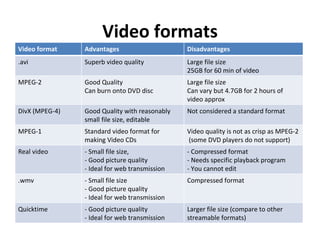
Video formats
Video format    Advantages                     Disadvantages
.avi            Superb video quality           Large file size
                                               25GB for 60 min of video
MPEG-2          Good Quality                   Large file size
                Can burn onto DVD disc         Can vary but 4.7GB for 2 hours of
                                               video approx
DivX (MPEG-4)   Good Quality with reasonably   Not considered a standard format
                small file size, editable
MPEG-1          Standard video format for      Video quality is not as crisp as MPEG-2
                making Video CDs               (some DVD players do not support)
Real video      - Small file size,             - Compressed format
                - Good picture quality         - Needs specific playback program
                - Ideal for web transmission   - You cannot edit
.wmv            - Small file size              Compressed format
                - Good picture quality
                - Ideal for web transmission
Quicktime       - Good picture quality         Larger file size (compare to other
                - Ideal for web transmission   streamable formats)
Some interesting videos...
        Derek Molloy’s YouTube channel:
http://www.youtube.com/user/DerekMolloyDCU


    Microbiology at NUI Galway on YouTube:
http://www.youtube.com/watch?v=teV7rlBkpQU

Slow and Steady Wins the Race: Irene McCormick:
          http://vimeo.com/39274294
Storyboarding
Lets get started with our own video...
Choose a topic, for example:

  An interview on any topic of interest
or
  A promo piece for your library
or
  A report on today’s event
Post-production - editing our video
files using Windows Movie Maker
Live


1. Connect our Flip cam to the laptop via the usb

2. Save our video files in My Computer

3. Launch Window Movie Maker

4. Import our video files in Windows Movie
Maker

5. Edit our video files

6. Save our project (in case we would like to re-
edit)

7. Save our edited movie

8. Export/Publish
Links to videos and websites...
•   http://thinkingabout.nuigalway.ie/spotlight/
•   http://net.educause.edu/ir/library/pdf/ELI7043.pdf
•   http://youtube-global.blogspot.com/2010/11/great-scott-over-35-hours-of-video.html
•   http://www.jiscdigitalmedia.ac.uk/movingimages/advice/basic-guide-to-the-flip
•   http://www.jiscdigitalmedia.ac.uk/movingimages/advice/using-video-in-teaching-and-learning
•   National Digital Learning Resources – www.ndlr.ie
•   HEAnet media hosting - http://media.heanet.ie/
•   Video tutorials from online Media College - http://www.mediacollege.com/video/
•   File formats - http://en.wikipedia.org/wiki/Video_file_format
•   Salman Khan: Let's use video to reinvent education -
    http://www.ted.com/talks/lang/eng/salman_khan_let_s_use_video_to_reinvent_education.html

•   Flip Cam quick start guide - http://www.lesley.edu/elis/docs/flipguide.pdf
Screencasting
Guide to Screencasting Tools

http://enhancingteaching.com/2012/06/01/guide-to-screencasting-tools/

Video workshop

  • 1.
    Video Workshop Gráinne McGrath& Sharon Flynn, Centre for Excellence in Learning and Teaching
  • 2.
    Overview Part 1: Video •An introduction to video • The elements, considerations and guidelines for creating video • Plan and storyboard a video • Record our footage • Edit and publish our video footage Part 2: Screen casting • Demo using Jing
  • 3.
    Over 35 hoursof video is being uploaded to YouTube every minute http://youtube-global.blogspot.com
  • 4.
    3 key elements •Pre-production – Preparation, testing, planning, storyboarding • Production – Recording your video footage • Post-production – Editing video footage, publishing your video Keep it simple!
  • 5.
    Considerations and guidelines • Always plan and storyboard • Keep your audience in mind • Get consent from participants • Think of the context • Test your video equipment • Location, location, location • Audio quality • Lighting • Choose your output file/video format
  • 6.
  • 7.
    Video formats Video format Advantages Disadvantages .avi Superb video quality Large file size 25GB for 60 min of video MPEG-2 Good Quality Large file size Can burn onto DVD disc Can vary but 4.7GB for 2 hours of video approx DivX (MPEG-4) Good Quality with reasonably Not considered a standard format small file size, editable MPEG-1 Standard video format for Video quality is not as crisp as MPEG-2 making Video CDs (some DVD players do not support) Real video - Small file size, - Compressed format - Good picture quality - Needs specific playback program - Ideal for web transmission - You cannot edit .wmv - Small file size Compressed format - Good picture quality - Ideal for web transmission Quicktime - Good picture quality Larger file size (compare to other - Ideal for web transmission streamable formats)
  • 8.
    Some interesting videos... Derek Molloy’s YouTube channel: http://www.youtube.com/user/DerekMolloyDCU Microbiology at NUI Galway on YouTube: http://www.youtube.com/watch?v=teV7rlBkpQU Slow and Steady Wins the Race: Irene McCormick: http://vimeo.com/39274294
  • 10.
  • 12.
    Lets get startedwith our own video... Choose a topic, for example: An interview on any topic of interest or A promo piece for your library or A report on today’s event
  • 13.
    Post-production - editingour video files using Windows Movie Maker Live 1. Connect our Flip cam to the laptop via the usb 2. Save our video files in My Computer 3. Launch Window Movie Maker 4. Import our video files in Windows Movie Maker 5. Edit our video files 6. Save our project (in case we would like to re- edit) 7. Save our edited movie 8. Export/Publish
  • 14.
    Links to videosand websites... • http://thinkingabout.nuigalway.ie/spotlight/ • http://net.educause.edu/ir/library/pdf/ELI7043.pdf • http://youtube-global.blogspot.com/2010/11/great-scott-over-35-hours-of-video.html • http://www.jiscdigitalmedia.ac.uk/movingimages/advice/basic-guide-to-the-flip • http://www.jiscdigitalmedia.ac.uk/movingimages/advice/using-video-in-teaching-and-learning • National Digital Learning Resources – www.ndlr.ie • HEAnet media hosting - http://media.heanet.ie/ • Video tutorials from online Media College - http://www.mediacollege.com/video/ • File formats - http://en.wikipedia.org/wiki/Video_file_format • Salman Khan: Let's use video to reinvent education - http://www.ted.com/talks/lang/eng/salman_khan_let_s_use_video_to_reinvent_education.html • Flip Cam quick start guide - http://www.lesley.edu/elis/docs/flipguide.pdf
  • 15.
    Screencasting Guide to ScreencastingTools http://enhancingteaching.com/2012/06/01/guide-to-screencasting-tools/

Editor's Notes

  • #4 A comment on the amount of video being created and consumed....estimates that the amount being uploaded is now far in excess of this – 45/50 hours!
  • #9 Showing building H-Ras from USB key...
  • #14 The group will be given a step-by-step guide to using Windows Live Movie Maker at this point