TESOL Arabia 2012
          Alan Bessette
Poole Gakuin University
   bessette@poole.ac.jp
Overview
 What is VoiceThread?
 What kind of presentations can students create?
 What do teachers need to do?
 How can you make a VoiceThread presentation?
 What are the options for using VoiceThread?
What is VoiceThread?
 Web-based presentation software
   Pictures, videos, PowerPoint slides, and documents
 Narration and comments
   Typing, voice, or video & voice (with a webcam)
 Individually or collaboratively
Examples of students work
 Talking about Yourself
    Tell something about yourself, for example, a hobby, a
     trip, your family, a pet, a part-time job, etc.
    My School Excursion
 Introducing Japanese culture
    Introduce an aspect of Japanese culture, for example, a
     temple or shrine, flower arranging, a festival, kimono,
     etc.
    Sashimi and Sushi
Process
1.   Deciding on a theme
2.   Research and preparing
3.   Practicing
4.   Creating the VoiceThread
5.   Commenting
6.   Evaluating
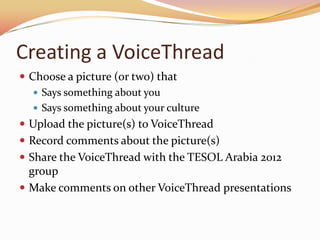
Creating a VoiceThread
 Choose a picture (or two) that
    Says something about you
    Says something about your culture
 Upload the picture(s) to VoiceThread
 Record comments about the picture(s)
 Share the VoiceThread with the TESOL Arabia 2012
  group
 Make comments on other VoiceThread presentations
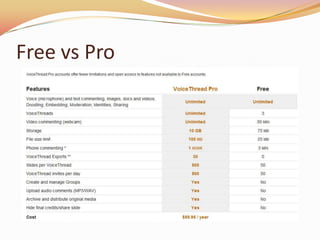
Free vs Pro
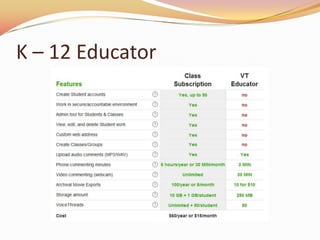
K – 12 Educator
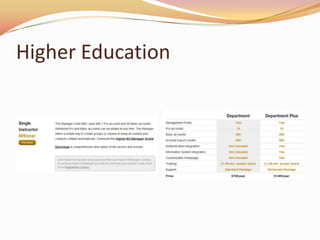
Higher Education

Using voice thread to create student presentations

  • 1.
    TESOL Arabia 2012 Alan Bessette Poole Gakuin University bessette@poole.ac.jp
  • 2.
    Overview  What isVoiceThread?  What kind of presentations can students create?  What do teachers need to do?  How can you make a VoiceThread presentation?  What are the options for using VoiceThread?
  • 3.
    What is VoiceThread? Web-based presentation software  Pictures, videos, PowerPoint slides, and documents  Narration and comments  Typing, voice, or video & voice (with a webcam)  Individually or collaboratively
  • 4.
    Examples of studentswork  Talking about Yourself  Tell something about yourself, for example, a hobby, a trip, your family, a pet, a part-time job, etc.  My School Excursion  Introducing Japanese culture  Introduce an aspect of Japanese culture, for example, a temple or shrine, flower arranging, a festival, kimono, etc.  Sashimi and Sushi
  • 5.
    Process 1. Deciding on a theme 2. Research and preparing 3. Practicing 4. Creating the VoiceThread 5. Commenting 6. Evaluating
  • 6.
    Creating a VoiceThread Choose a picture (or two) that  Says something about you  Says something about your culture  Upload the picture(s) to VoiceThread  Record comments about the picture(s)  Share the VoiceThread with the TESOL Arabia 2012 group  Make comments on other VoiceThread presentations
  • 7.
  • 8.
    K – 12Educator
  • 9.

Editor's Notes

  • #4 Presentations can be used to tell stories, make presentations, explain processes, etc.Presentations can be created for commenting within classes or between classes.
  • #6 Most important # 2. Involves collecting pictures and creating a narration. Can include writing drafts.
  • #8 Important to use avatars for identities. Only a limited number of symbols