Jill Tonello
EDU614
INTEGRATING
TECHNOLOGY:
VOICETHREAD
 Essentially PowerPoint 2.0!
 Interactive collaboration and sharing tool that incorporates
multiple forms of media to present information
 Allows the user to overlay images, videos, or other documents
with voice, text, or video commentary
 Users invited to the VoiceThread can also add pictures, videos,
and document
WHAT IS VOICETHREAD?
 VoiceThread is an Internet-based application. Therefore:
 It does not need to be installed
 It is free
 All of your work is saved to your account on the website
 You can access your VoiceThreads from any device with Internet
 Creating an Account:
 Go to www.voicethread.com and register by choosing an email &
password
 Log in
 You are ready to go!
HOW DOES IT WORK?
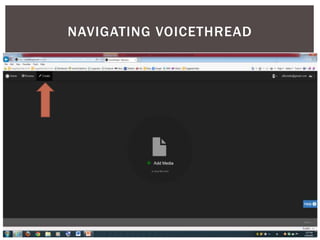
NAVIGATING VOICETHREAD
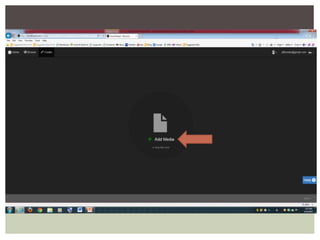
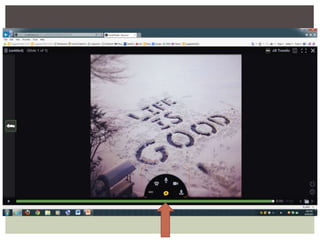
 As long as you have a microphone/camera feature on your
computer, you can add voice and video
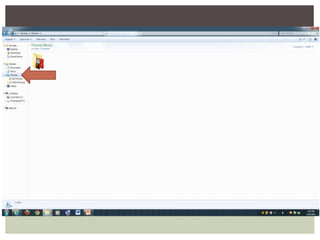
 Add more content to your thread by clicking “Add Media” or
the menu tab under “Edit” ; “Add Media”
 When you are finished, click the menu tab, then click “Share”
to copy or embed the link to send to desired
viewers/contributors
 Intended for a Kindergarten or First Grade classroom
 Fostering ELA and creativity through digital storytelling
 Modeling my experience with the technology first, then asking
students to try it out
 UDL (Universal Design for Learning)
 Visuals
 Audio
 Accessibility
 Expression & Engagement
http://voicethread.com/new/share/6890764/
MY VOICETHREAD
 Engaging “Do Now” activity
 Opportunity for journal entry, interpretation, discussion, etc.
 Great way to introduce a new topic in class
 Capture attention and transition into new material
 Diagnostic Assessment
 Gauge present levels of understanding
 Student-led Tutorials
 The ability to display the content while explaining it colloquially and
fluidly
CLASSROOM APPLICATIONS
 ELA
 Poetry and storytelling
 Math
 Map your thought process out loud; watch AND hear how it’s
done
 Science
 Experiment Report; document the experiment and present
findings
 Explain a phenomenon in your own words
 History
 Synthesize data; organize time periods by thread
 Art
 Showcase your own work!
 Describe the work of another
EXAMPLES
(The obvious being that it’s way more fun than a lecture!)
 VoiceThreads you find to be successful in class can be recycled
 It is very simple to add, remove, revise, or update information if
necessary
 Share VoiceThreads with students:
 As a prompt for a HW assignment
 As a review of information covered in class
a). Catch-up for absent students
b). Study guide for quiz/memory refresher
c). Re-visit material with pause, rewind, and fast forward
options
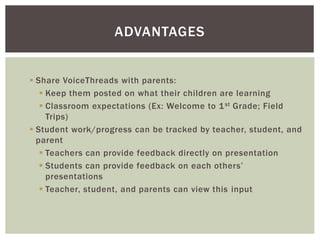
ADVANTAGES
 Share VoiceThreads with parents:
 Keep them posted on what their children are learning
 Classroom expectations (Ex: Welcome to 1st Grade; Field
Trips)
 Student work/progress can be tracked by teacher, student, and
parent
 Teachers can provide feedback directly on presentation
 Students can provide feedback on each others’
presentations
 Teacher, student, and parents can view this input
ADVANTAGES
THE END

J tonello voice thread ppt

  • 1.
  • 2.
     Essentially PowerPoint2.0!  Interactive collaboration and sharing tool that incorporates multiple forms of media to present information  Allows the user to overlay images, videos, or other documents with voice, text, or video commentary  Users invited to the VoiceThread can also add pictures, videos, and document WHAT IS VOICETHREAD?
  • 3.
     VoiceThread isan Internet-based application. Therefore:  It does not need to be installed  It is free  All of your work is saved to your account on the website  You can access your VoiceThreads from any device with Internet  Creating an Account:  Go to www.voicethread.com and register by choosing an email & password  Log in  You are ready to go! HOW DOES IT WORK?
  • 4.
  • 8.
     As longas you have a microphone/camera feature on your computer, you can add voice and video  Add more content to your thread by clicking “Add Media” or the menu tab under “Edit” ; “Add Media”  When you are finished, click the menu tab, then click “Share” to copy or embed the link to send to desired viewers/contributors
  • 9.
     Intended fora Kindergarten or First Grade classroom  Fostering ELA and creativity through digital storytelling  Modeling my experience with the technology first, then asking students to try it out  UDL (Universal Design for Learning)  Visuals  Audio  Accessibility  Expression & Engagement http://voicethread.com/new/share/6890764/ MY VOICETHREAD
  • 10.
     Engaging “DoNow” activity  Opportunity for journal entry, interpretation, discussion, etc.  Great way to introduce a new topic in class  Capture attention and transition into new material  Diagnostic Assessment  Gauge present levels of understanding  Student-led Tutorials  The ability to display the content while explaining it colloquially and fluidly CLASSROOM APPLICATIONS
  • 11.
     ELA  Poetryand storytelling  Math  Map your thought process out loud; watch AND hear how it’s done  Science  Experiment Report; document the experiment and present findings  Explain a phenomenon in your own words  History  Synthesize data; organize time periods by thread  Art  Showcase your own work!  Describe the work of another EXAMPLES
  • 12.
    (The obvious beingthat it’s way more fun than a lecture!)  VoiceThreads you find to be successful in class can be recycled  It is very simple to add, remove, revise, or update information if necessary  Share VoiceThreads with students:  As a prompt for a HW assignment  As a review of information covered in class a). Catch-up for absent students b). Study guide for quiz/memory refresher c). Re-visit material with pause, rewind, and fast forward options ADVANTAGES
  • 13.
     Share VoiceThreadswith parents:  Keep them posted on what their children are learning  Classroom expectations (Ex: Welcome to 1st Grade; Field Trips)  Student work/progress can be tracked by teacher, student, and parent  Teachers can provide feedback directly on presentation  Students can provide feedback on each others’ presentations  Teacher, student, and parents can view this input ADVANTAGES
  • 14.