Open Atrium
Using Open Atrium at Your Organization
Agenda
• Intro to Drupal and Open Atrium
• Users and Roles
• Site Structure
• Theming
• Q&A
Intro to Drupal
Drupal Concepts
• Core - Drupal standard functionality

• Modules - Functional unit that can be core, contributed
  from the community or custom written

• Theme - Templates and code (HTML, CSS, images,
  PHP) that comprise the design layer
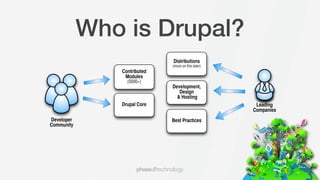
Who is Drupal?
                             Distributions
                             (more on this later)
               Contributed
                Modules
                 (5000+)
                             Development,
                                Design
                               & Hosting
               Drupal Core                           Leading
                                                    Companies
Developer                    Best Practices
Community
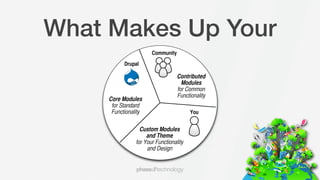
What Makes Up Your
                       Community
           Drupal

                                   Contributed
                                     Modules
                                   for Common
                                   Functionality
     Core Modules
      for Standard
      Functionality                      You


                  Custom Modules
                     and Theme
                for Your Functionality
                     and Design
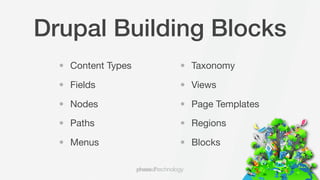
Drupal Building Blocks
  • Content Types   • Taxonomy

  • Fields          • Views

  • Nodes           • Page Templates

  • Paths           • Regions

  • Menus           • Blocks
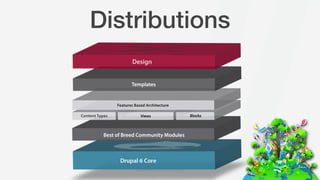
Distributions
How Do I Install Open
•   Download Open Atrium at http://openatrium.com. You must have a web server set up in
    order to install Open Atrium.

•   Follow the install.txt instructions in the Open Atrium base directory, but move the current
    Open Atrium directory to your html directory.

•   Make sure you have set up your files directory with the proper permissions

    •   Instructions are at http://drupal.org/node/394704

•   Configure cron at http://drupal.org/cron
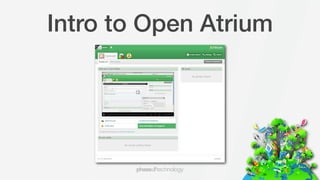
Intro to Open Atrium
Users and Roles
• Anonymous

• Authenticated

• Manager

• Admin
Site Structure
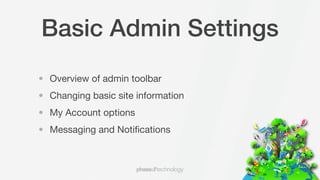
Basic Admin Settings
• Overview of admin toolbar
• Changing basic site information
• My Account options
• Messaging and Notifications
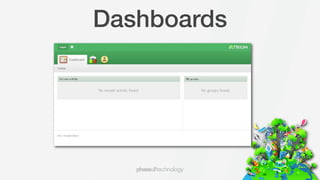
Dashboards
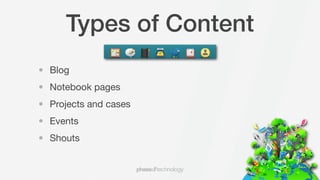
Types of Content
• Blog
• Notebook pages
• Projects and cases
• Events
• Shouts
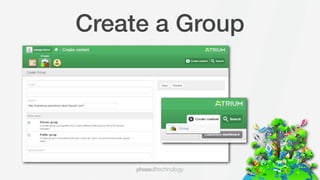
Create a Group
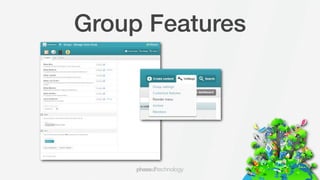
Group Features
Create Content
• Blog
• Notebook Pages
• Project and Cases
• Shouts
• Events
Custom Theming

• How do I change my theme?
• How do I change my logo?
• Basic options for custom design elements
Think of Anything Later
  We’re always available on Twitter at @Open_Atrium
                         or
    email us at dsheffler@phase2technology.com

Using Open Atrium in Your Organization

  • 1.
    Open Atrium Using OpenAtrium at Your Organization
  • 2.
    Agenda • Intro toDrupal and Open Atrium • Users and Roles • Site Structure • Theming • Q&A
  • 3.
  • 4.
    Drupal Concepts • Core- Drupal standard functionality • Modules - Functional unit that can be core, contributed from the community or custom written • Theme - Templates and code (HTML, CSS, images, PHP) that comprise the design layer
  • 5.
    Who is Drupal? Distributions (more on this later) Contributed Modules (5000+) Development, Design & Hosting Drupal Core Leading Companies Developer Best Practices Community
  • 6.
    What Makes UpYour Community Drupal Contributed Modules for Common Functionality Core Modules for Standard Functionality You Custom Modules and Theme for Your Functionality and Design
  • 7.
    Drupal Building Blocks • Content Types • Taxonomy • Fields • Views • Nodes • Page Templates • Paths • Regions • Menus • Blocks
  • 8.
  • 9.
    How Do IInstall Open • Download Open Atrium at http://openatrium.com. You must have a web server set up in order to install Open Atrium. • Follow the install.txt instructions in the Open Atrium base directory, but move the current Open Atrium directory to your html directory. • Make sure you have set up your files directory with the proper permissions • Instructions are at http://drupal.org/node/394704 • Configure cron at http://drupal.org/cron
  • 10.
  • 11.
    Users and Roles •Anonymous • Authenticated • Manager • Admin
  • 12.
  • 13.
    Basic Admin Settings •Overview of admin toolbar • Changing basic site information • My Account options • Messaging and Notifications
  • 14.
  • 15.
    Types of Content •Blog • Notebook pages • Projects and cases • Events • Shouts
  • 16.
  • 17.
  • 18.
    Create Content • Blog •Notebook Pages • Project and Cases • Shouts • Events
  • 19.
    Custom Theming • Howdo I change my theme? • How do I change my logo? • Basic options for custom design elements
  • 20.
    Think of AnythingLater We’re always available on Twitter at @Open_Atrium or email us at dsheffler@phase2technology.com