Maarten De Block
Drupal 8 Basic Training
A little bit about me
• Maarten De Block
• Drupal Developer/Coach
• Co-organizer of the Belgian DrupalCamp
• Author “Kickstart Drupal 7” and “Handleiding
Drupal 8”
• CEO of EntityOne: Belgian Drupal agency
• Partner at SaaS Minded: Drupal SaaS
Overview
• Background/History
• Installation
• Basic concepts
• Main items in Drupal administration
– Content
– Structure
– Appearance
– Extend
– Configuration
– People
– Reports
• Bonus
– Multilingual
– Views, more in depth
BACKGROUND
Part 1
What is Drupal?
• Content Management System (CMS)
• Programming Framework
• Community
– “Come for the Code, Stay for the Community”
Drupal versions
• Current version is 8.6.0
• 8 major version, 6 minor version, 0 patch
• Major version: Core compatibility
• Minor version: New features
• Patch: Fixes, small improvements, etc.
Drupal versions
Technology behind Drupal
• PHP (compatible with PHP 7)
• HTML 5
• CSS 3
• JavaScript
All standards, all opens source!
History of Drupal
• Invented by Dries Buytaert
• Aka “user 1”
• Message board for
fellow students
• Tried to register ‘dorp.org’ |
which means ‘Village’
• Instead registerd ‘drop.org’
History of Drupal
• Drop in Dutch is “Druppel”
• Drupal in English is
phonetically the same
• First official release:
May 18, 2000
INSTALLATION
Part 2
Server
• Usually you need a LAMP stack
– Linux
– Apache
– MySQL
– PHP
• Many variations possible
• Locally we’ll be using Acquia Dev Desktop
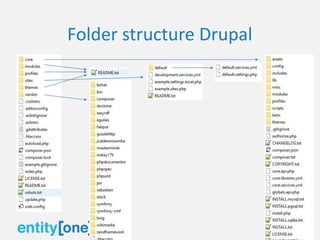
Folder structure Drupal
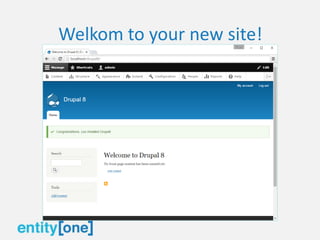
Install
• Click the URL in Dev Desktop
Welkom to your new site!
BASIS CONCEPTS
Part 3
Node
• A piece of content in Drupal is a ‘node’
• There are different types of nodes called ’Content types’
• Standard profile gives us ‘Article’ and ‘Basic page’
• You can create as many content types as you want
• Content types can have fields
• Every node has a URL node/nid
• Nid is the id in the database
Entity
• Almost everything in Drupal is an entity of some
kind
• Content Entity
• Users, nodes, tags, etc.
• Configuration Entity
• Makes configuration exportable
Module
• A piece of functionality
• 2 types
• Core: official modules by the Drupal
Association
• Contrib: Contributed by the community
Theme
• A specific layout
• Can also be core or contrib
• Contains Twig, HTML, CSS and sometimes JS
• A theme can be swapped without loss of
functionality
Theme: Regions & Blocks
Taxonomy
• Anything to do with tagging
• Grouping of data
View
• List of content
• Can take different forms:
– Table
– HTML list: UL/LI
– Slideshow
– Gallery
– ….
Management toolbar
• Menu for managing the website
• Only show up if you have suffictiant
permissions
• Responsive (new in D8)
MAIN ITEMS IN DRUPAL
ADMINISTRATION
Part 4
Content
• Overview of all content (a view)
• Sort, filter, bulk operations
• Create new content
Structure
• Content types: create and edit types of
content
• Block layout: where and when to show blocks
• Contact forms: basic contact forms
• Menus: Menu settings
Structure
• Taxonomy: Tags and labels
• Comment types: similar to content types, but
for comments
• Display modes: different ways to display
content
• Views: overviews of content
Appearance
• Everything to do with the themes
• Frontend themes and admin themes
Extend
• Install and uninstall modules
• For now only core modules
• Experimental modules is how Drupal
innovates
Extend
• Let’s install a contrib module
• Google Analytics:
– https://www.drupal.org/project/google_analytics
– Download Drupal 8 version
– Extract in /modules/
• Best practice is to create a folder “contrib”
– Return to Extend and install
Configuration
• All “other” configuration
• Everything that doesn’t fit in Structure, Extend
of Appearance
• 80% of all configuration links
• Modules can add configuration
People
• Manage users
• Manage permissions
• Manage roles
Reports
• Recent log messages: overview of all
messages, first place to check if something is
wrong
• Field list: list of all fields
• Status report: “health” of your Drupal
installation
Reports
• Top ‘access denied’ errors: filter on “Recent
log messages” for 403 errors
• Top ‘page not found’ errors: filter on “Recent
log messages” for 404 errors
• Top search phrases: filter on “Recent log
messages” of all searches
• Views plugins: overview of views plugins
BONUS
Part 5
Multilingual
• Multilingual modules fully in core
• Based on “field translation”
• Not the entire entity is translated, but field by
field
• Transliteration (é -> e, ç ->c, …)
Multilingual
• 4 modules in core
– Language: allows you to add languages
– Content Translation: allows you to translation
content entities
– Configuration Translation: allows you to translate
menu’s, views, blocks, etc.
– Interface Translation: allows you to translate
everything straight out of a module
Add languages
• Go to Configuration -> Regional and language -
> Language
• Available translations are downloaded from
drupal.org
• English is no longer a “special” language and
can be removed
Activate content translation
• Needs to be activated for each entity
• Go to Configuration -> Regional and language -
> Content Language and translation
Interface translation
• Go to Configuration -> Regional and language -
> User interface translation
• Plural and singular
Configuration translation
• Go to Configuration -> Regional and language -
> Configuration translation
• All configuration listed
• “Drill down” to find the right labels
Views
Find me at
https://be.linkedin.com/in/maartendeblock

Drupal 8 Basic Training - DrupalEurope 2018 - Maarten De Block

  • 1.
    Maarten De Block Drupal8 Basic Training
  • 2.
    A little bitabout me • Maarten De Block • Drupal Developer/Coach • Co-organizer of the Belgian DrupalCamp • Author “Kickstart Drupal 7” and “Handleiding Drupal 8” • CEO of EntityOne: Belgian Drupal agency • Partner at SaaS Minded: Drupal SaaS
  • 3.
    Overview • Background/History • Installation •Basic concepts • Main items in Drupal administration – Content – Structure – Appearance – Extend – Configuration – People – Reports • Bonus – Multilingual – Views, more in depth
  • 4.
  • 5.
    What is Drupal? •Content Management System (CMS) • Programming Framework • Community – “Come for the Code, Stay for the Community”
  • 6.
    Drupal versions • Currentversion is 8.6.0 • 8 major version, 6 minor version, 0 patch • Major version: Core compatibility • Minor version: New features • Patch: Fixes, small improvements, etc.
  • 7.
  • 8.
    Technology behind Drupal •PHP (compatible with PHP 7) • HTML 5 • CSS 3 • JavaScript All standards, all opens source!
  • 9.
    History of Drupal •Invented by Dries Buytaert • Aka “user 1” • Message board for fellow students • Tried to register ‘dorp.org’ | which means ‘Village’ • Instead registerd ‘drop.org’
  • 10.
    History of Drupal •Drop in Dutch is “Druppel” • Drupal in English is phonetically the same • First official release: May 18, 2000
  • 11.
  • 12.
    Server • Usually youneed a LAMP stack – Linux – Apache – MySQL – PHP • Many variations possible • Locally we’ll be using Acquia Dev Desktop
  • 13.
  • 14.
    Install • Click theURL in Dev Desktop
  • 15.
    Welkom to yournew site!
  • 16.
  • 17.
    Node • A pieceof content in Drupal is a ‘node’ • There are different types of nodes called ’Content types’ • Standard profile gives us ‘Article’ and ‘Basic page’ • You can create as many content types as you want • Content types can have fields • Every node has a URL node/nid • Nid is the id in the database
  • 18.
    Entity • Almost everythingin Drupal is an entity of some kind • Content Entity • Users, nodes, tags, etc. • Configuration Entity • Makes configuration exportable
  • 19.
    Module • A pieceof functionality • 2 types • Core: official modules by the Drupal Association • Contrib: Contributed by the community
  • 20.
    Theme • A specificlayout • Can also be core or contrib • Contains Twig, HTML, CSS and sometimes JS • A theme can be swapped without loss of functionality
  • 21.
  • 22.
    Taxonomy • Anything todo with tagging • Grouping of data
  • 23.
    View • List ofcontent • Can take different forms: – Table – HTML list: UL/LI – Slideshow – Gallery – ….
  • 24.
    Management toolbar • Menufor managing the website • Only show up if you have suffictiant permissions • Responsive (new in D8)
  • 25.
    MAIN ITEMS INDRUPAL ADMINISTRATION Part 4
  • 26.
    Content • Overview ofall content (a view) • Sort, filter, bulk operations • Create new content
  • 27.
    Structure • Content types:create and edit types of content • Block layout: where and when to show blocks • Contact forms: basic contact forms • Menus: Menu settings
  • 28.
    Structure • Taxonomy: Tagsand labels • Comment types: similar to content types, but for comments • Display modes: different ways to display content • Views: overviews of content
  • 29.
    Appearance • Everything todo with the themes • Frontend themes and admin themes
  • 30.
    Extend • Install anduninstall modules • For now only core modules • Experimental modules is how Drupal innovates
  • 31.
    Extend • Let’s installa contrib module • Google Analytics: – https://www.drupal.org/project/google_analytics – Download Drupal 8 version – Extract in /modules/ • Best practice is to create a folder “contrib” – Return to Extend and install
  • 32.
    Configuration • All “other”configuration • Everything that doesn’t fit in Structure, Extend of Appearance • 80% of all configuration links • Modules can add configuration
  • 33.
    People • Manage users •Manage permissions • Manage roles
  • 34.
    Reports • Recent logmessages: overview of all messages, first place to check if something is wrong • Field list: list of all fields • Status report: “health” of your Drupal installation
  • 35.
    Reports • Top ‘accessdenied’ errors: filter on “Recent log messages” for 403 errors • Top ‘page not found’ errors: filter on “Recent log messages” for 404 errors • Top search phrases: filter on “Recent log messages” of all searches • Views plugins: overview of views plugins
  • 36.
  • 37.
    Multilingual • Multilingual modulesfully in core • Based on “field translation” • Not the entire entity is translated, but field by field • Transliteration (é -> e, ç ->c, …)
  • 38.
    Multilingual • 4 modulesin core – Language: allows you to add languages – Content Translation: allows you to translation content entities – Configuration Translation: allows you to translate menu’s, views, blocks, etc. – Interface Translation: allows you to translate everything straight out of a module
  • 39.
    Add languages • Goto Configuration -> Regional and language - > Language • Available translations are downloaded from drupal.org • English is no longer a “special” language and can be removed
  • 40.
    Activate content translation •Needs to be activated for each entity • Go to Configuration -> Regional and language - > Content Language and translation
  • 41.
    Interface translation • Goto Configuration -> Regional and language - > User interface translation • Plural and singular
  • 42.
    Configuration translation • Goto Configuration -> Regional and language - > Configuration translation • All configuration listed • “Drill down” to find the right labels
  • 43.
  • 44.