Building a Mobile Drupal Site
Presented by Mark W. Jarrell   mark@fleetthought.com
                               Twitter: attheshow

April 30, 2011
DrupalCamp Nashville
Overview


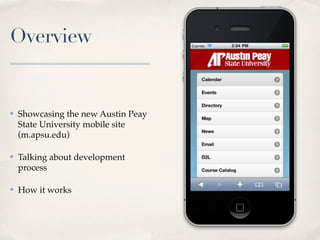
✤   Showcasing the new Austin Peay
    State University mobile site
    (m.apsu.edu)

✤   Talking about development
    process

✤   How it works
Demo
Why is this site important?

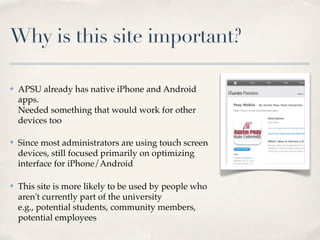
✤   APSU already has native iPhone and Android
    apps.
    Needed something that would work for other
    devices too

✤   Since most administrators are using touch screen
    devices, still focused primarily on optimizing
    interface for iPhone/Android

✤   This site is more likely to be used by people who
    aren't currently part of the university
    e.g., potential students, community members,
    potential employees
Going Mobile - Methods

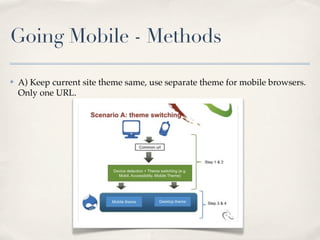
✤   A) Keep current site theme same, use separate theme for mobile browsers.
    Only one URL.
Going Mobile - Methods

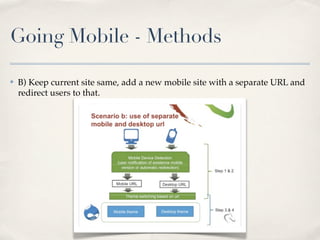
✤   B) Keep current site same, add a new mobile site with a separate URL and
    redirect users to that.
Going Mobile - Methods

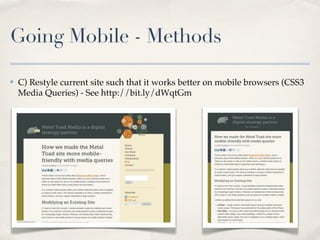
✤   C) Restyle current site such that it works better on mobile browsers (CSS3
    Media Queries) - See http://bit.ly/dWqtGm
Going Mobile - Methods

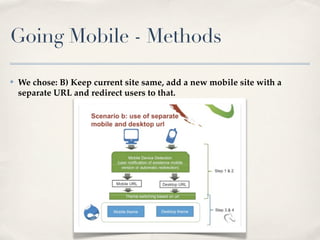
✤   We chose: B) Keep current site same, add a new mobile site with a
    separate URL and redirect users to that.
What was the process?
(Executive Summary)


✤   Worked with Public Relations and Admissions to come up with a feature
    list

✤   Designed initial theme

✤   Originally started building this site in Drupal 6
What was the process?
(Executive Summary)

✤   Upgraded content to D7 in January/February

✤   Upgraded theme and custom modules to D7 in February/March

✤   Converted existing theme to be a subtheme of "jQM" theme in April

✤   Added in jQuery Mobile module/library in April

✤   Site officially launched this week
Content - What goes into the site?

✤   What's do we include here in mobile version that's not on the main site?

    ✤   Focus: on-the-go users

    ✤   Prepared for quick actions (e.g., Request Info, Campus Map, Schedule
        Campus Tour, etc.)

    ✤   Keep everything as "slim" as you can. Try to make it bite-sized.
        Less text unless it’s a news article or blog post

    ✤   Make your forms as short as you possibly can or you'll lose them
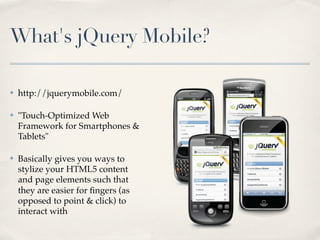
What's jQuery Mobile?

✤   http://jquerymobile.com/

✤   "Touch-Optimized Web
    Framework for Smartphones &
    Tablets"

✤   Basically gives you ways to
    stylize your HTML5 content
    and page elements such that
    they are easier for ngers (as
    opposed to point & click) to
    interact with
HTML5

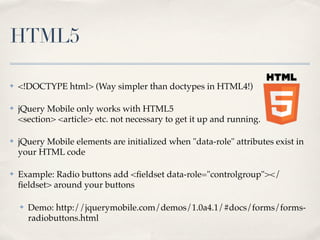
✤   <!DOCTYPE html> (Way simpler than doctypes in HTML4!)

✤   jQuery Mobile only works with HTML5
    <section> <article> etc. not necessary to get it up and running.

✤   jQuery Mobile elements are initialized when "data-role" attributes exist in
    your HTML code

✤   Example: Radio buttons add <fieldset data-role="controlgroup"></
    eldset> around your buttons

    ✤   Demo: http://jquerymobile.com/demos/1.0a4.1/#docs/forms/forms-
        radiobuttons.html
Page Refreshes

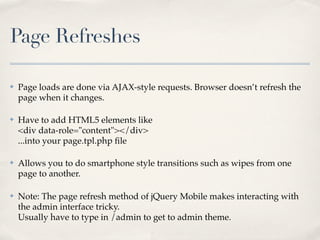
✤   Page loads are done via AJAX-style requests. Browser doesn’t refresh the
    page when it changes.

✤   Have to add HTML5 elements like
    <div data-role="content"></div>
    ...into your page.tpl.php le

✤   Allows you to do smartphone style transitions such as wipes from one
    page to another.

✤   Note: The page refresh method of jQuery Mobile makes interacting with
    the admin interface tricky.
    Usually have to type in /admin to get to admin theme.
What are jQM and the jQuery
Mobile module?

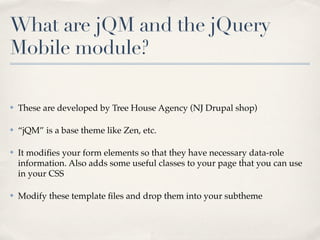
✤   These are developed by Tree House Agency (NJ Drupal shop)

✤   “jQM” is a base theme like Zen, etc.

✤   It modifies your form elements so that they have necessary data-role
    information. Also adds some useful classes to your page that you can use
    in your CSS

✤   Modify these template files and drop them into your subtheme
What are jQM and the jQuery
Mobile module?

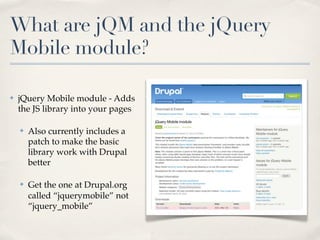
✤   jQuery Mobile module - Adds
    the JS library into your pages

    ✤   Also currently includes a
        patch to make the basic
        library work with Drupal
        better

    ✤   Get the one at Drupal.org
        called “jquerymobile” not
        “jquery_mobile”
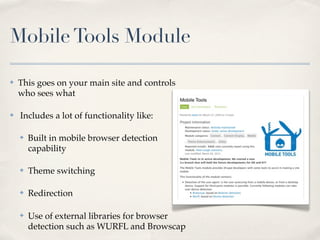
Mobile Tools Module

✤   This goes on your main site and controls
    who sees what

✤   Includes a lot of functionality like:

    ✤   Built in mobile browser detection
        capability

    ✤   Theme switching

    ✤   Redirection

    ✤   Use of external libraries for browser
        detection such as WURFL and Browscap
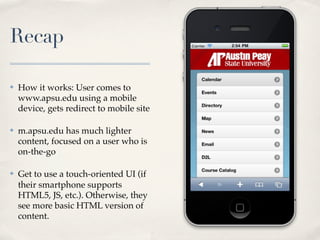
Recap

✤   How it works: User comes to
    www.apsu.edu using a mobile
    device, gets redirect to mobile site

✤   m.apsu.edu has much lighter
    content, focused on a user who is
    on-the-go

✤   Get to use a touch-oriented UI (if
    their smartphone supports
    HTML5, JS, etc.). Otherwise, they
    see more basic HTML version of
    content.
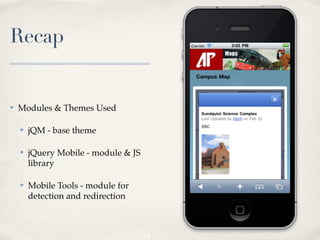
Recap


✤   Modules & Themes Used

    ✤   jQM - base theme

    ✤   jQuery Mobile - module & JS
        library

    ✤   Mobile Tools - module for
        detection and redirection
Further Reading Links


✤   “Mobile Marketing: Strategy challenges for  advancement and enrollment”
    session with Bob Johnson
    http://www.slideshare.net/bestbob/mobile-marketing-strategy-
    challenges-for-advancement-and-enrollment

✤   DrupalCon Chicago Presentation from Treehouse Agency:
    http://chicago2011.drupal.org/sessions/drupal-go-jquery-mobile

✤   Metal Toad article on CSS3 Media Queries (if you’re going that route):
    http://bit.ly/dWqtGm
Building a Mobile Drupal Site
Presented by Mark W. Jarrell   mark@fleetthought.com
                               Twitter: attheshow

April 30, 2011
DrupalCamp Nashville
Need Help?


✤   Consulting

✤   Theming                               mark@fleetthought.com

✤   Module Development

✤   Training

✤   Migrating a legacy system to Drupal

Building a Mobile Drupal Site

  • 1.
    Building a MobileDrupal Site Presented by Mark W. Jarrell mark@fleetthought.com Twitter: attheshow April 30, 2011 DrupalCamp Nashville
  • 2.
    Overview ✤ Showcasing the new Austin Peay State University mobile site (m.apsu.edu) ✤ Talking about development process ✤ How it works
  • 3.
  • 4.
    Why is thissite important? ✤ APSU already has native iPhone and Android apps. Needed something that would work for other devices too ✤ Since most administrators are using touch screen devices, still focused primarily on optimizing interface for iPhone/Android ✤ This site is more likely to be used by people who aren't currently part of the university e.g., potential students, community members, potential employees
  • 5.
    Going Mobile -Methods ✤ A) Keep current site theme same, use separate theme for mobile browsers. Only one URL.
  • 6.
    Going Mobile -Methods ✤ B) Keep current site same, add a new mobile site with a separate URL and redirect users to that.
  • 7.
    Going Mobile -Methods ✤ C) Restyle current site such that it works better on mobile browsers (CSS3 Media Queries) - See http://bit.ly/dWqtGm
  • 8.
    Going Mobile -Methods ✤ We chose: B) Keep current site same, add a new mobile site with a separate URL and redirect users to that.
  • 9.
    What was theprocess? (Executive Summary) ✤ Worked with Public Relations and Admissions to come up with a feature list ✤ Designed initial theme ✤ Originally started building this site in Drupal 6
  • 10.
    What was theprocess? (Executive Summary) ✤ Upgraded content to D7 in January/February ✤ Upgraded theme and custom modules to D7 in February/March ✤ Converted existing theme to be a subtheme of "jQM" theme in April ✤ Added in jQuery Mobile module/library in April ✤ Site officially launched this week
  • 11.
    Content - Whatgoes into the site? ✤ What's do we include here in mobile version that's not on the main site? ✤ Focus: on-the-go users ✤ Prepared for quick actions (e.g., Request Info, Campus Map, Schedule Campus Tour, etc.) ✤ Keep everything as "slim" as you can. Try to make it bite-sized. Less text unless it’s a news article or blog post ✤ Make your forms as short as you possibly can or you'll lose them
  • 12.
    What's jQuery Mobile? ✤ http://jquerymobile.com/ ✤ "Touch-Optimized Web Framework for Smartphones & Tablets" ✤ Basically gives you ways to stylize your HTML5 content and page elements such that they are easier for fingers (as opposed to point & click) to interact with
  • 13.
    HTML5 ✤ <!DOCTYPE html> (Way simpler than doctypes in HTML4!) ✤ jQuery Mobile only works with HTML5 <section> <article> etc. not necessary to get it up and running. ✤ jQuery Mobile elements are initialized when "data-role" attributes exist in your HTML code ✤ Example: Radio buttons add <fieldset data-role="controlgroup"></ fieldset> around your buttons ✤ Demo: http://jquerymobile.com/demos/1.0a4.1/#docs/forms/forms- radiobuttons.html
  • 14.
    Page Refreshes ✤ Page loads are done via AJAX-style requests. Browser doesn’t refresh the page when it changes. ✤ Have to add HTML5 elements like <div data-role="content"></div> ...into your page.tpl.php file ✤ Allows you to do smartphone style transitions such as wipes from one page to another. ✤ Note: The page refresh method of jQuery Mobile makes interacting with the admin interface tricky. Usually have to type in /admin to get to admin theme.
  • 15.
    What are jQMand the jQuery Mobile module? ✤ These are developed by Tree House Agency (NJ Drupal shop) ✤ “jQM” is a base theme like Zen, etc. ✤ It modifies your form elements so that they have necessary data-role information. Also adds some useful classes to your page that you can use in your CSS ✤ Modify these template files and drop them into your subtheme
  • 16.
    What are jQMand the jQuery Mobile module? ✤ jQuery Mobile module - Adds the JS library into your pages ✤ Also currently includes a patch to make the basic library work with Drupal better ✤ Get the one at Drupal.org called “jquerymobile” not “jquery_mobile”
  • 17.
    Mobile Tools Module ✤ This goes on your main site and controls who sees what ✤ Includes a lot of functionality like: ✤ Built in mobile browser detection capability ✤ Theme switching ✤ Redirection ✤ Use of external libraries for browser detection such as WURFL and Browscap
  • 18.
    Recap ✤ How it works: User comes to www.apsu.edu using a mobile device, gets redirect to mobile site ✤ m.apsu.edu has much lighter content, focused on a user who is on-the-go ✤ Get to use a touch-oriented UI (if their smartphone supports HTML5, JS, etc.). Otherwise, they see more basic HTML version of content.
  • 19.
    Recap ✤ Modules & Themes Used ✤ jQM - base theme ✤ jQuery Mobile - module & JS library ✤ Mobile Tools - module for detection and redirection
  • 20.
    Further Reading Links ✤ “Mobile Marketing: Strategy challenges for  advancement and enrollment” session with Bob Johnson http://www.slideshare.net/bestbob/mobile-marketing-strategy- challenges-for-advancement-and-enrollment ✤ DrupalCon Chicago Presentation from Treehouse Agency: http://chicago2011.drupal.org/sessions/drupal-go-jquery-mobile ✤ Metal Toad article on CSS3 Media Queries (if you’re going that route): http://bit.ly/dWqtGm
  • 21.
    Building a MobileDrupal Site Presented by Mark W. Jarrell mark@fleetthought.com Twitter: attheshow April 30, 2011 DrupalCamp Nashville
  • 22.
    Need Help? ✤ Consulting ✤ Theming mark@fleetthought.com ✤ Module Development ✤ Training ✤ Migrating a legacy system to Drupal