Using Hadoop as a Platform for Master
Data Management
Roman Kucera
Ataccama Corporation
Using Hadoop as a platform for
Master Data Management
Roman Kucera, Ataccama Corporation
Roman Kucera
Head of Technology and Research
 Implementing MDM projects for major banks since 2010
 Last 12 months spent on expanding Ataccama portfolio into Big
Data space, most importantly adopting the Hadoop platform
Ataccama Corporation
Ataccama is a software vendor focused on Data Quality, Master
Data Management, Data Governance and now also on Big Data
processing in general
Quick Introduction
Why have I decided to give this speech?
 Typical MDM quotes on Hadoop conferences:
 „There are no MDM tools for Hadoop“
 „We have struggled with MDM and Data Quality“
 „You do not need MDM, it does not make sense on Hadoop“
 My goal is to:
 Explain that MDM is necessary, but it does not have to be scary
 Show a simplified example
What is Master Data Management?
 „Master Data is a single source of basic business data used across
multiple systems, applications, and/or processes“
(Wikipedia)
 Important parts of MDM solution:
 Collection – gathering of all data
 Consolidation – finding relations in the data
 Storage – persistence of consolidated data
 Distribution – providing a consolidated view to consumers
 Maintenance – making sure that the data is serving its purpose
 … and a ton of Data Quality
How is this related to Big Data?
 Traditional MDM using Big Data technologies
 Some companies struggle with performance and/or price of hardware
and DB licenses for their MDM solution
 Big Data technologies offer some options for better scalability,
especially as the data volumes and data diversity grows
 MDM on Big Data
 Adding new data sources that were previously not mastered
 Your Hadoop is probably the only place where you have all of the data
together, therefore it is the only place where you can create the
consolidated view
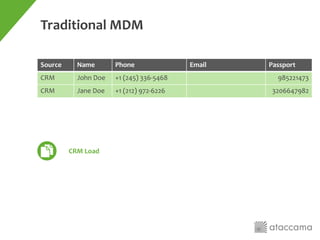
Traditional MDM
Source Name Phone Email Passport
CRM John Doe +1 (245) 336-5468 985221473
CRM Jane Doe +1 (212) 972-6226 3206647982
CRM Load
Traditional MDM
Source Name Phone Email Passport
CRM John Doe +1 (245) 336-5468 985221473
CRM Jane Doe +1 (212) 972-6226 3206647982
WEBAPP J. Doe 2129726226 Jane.doe@gmail.com
CRM Load
WEBAPP Load
Traditional MDM
Source Name Phone Email Passport
CRM John Doe +1 (245) 336-5468 985221473
CRM Jane Doe +1 (212) 972-6226 3206647982
WEBAPP J. Doe 2129726226 Jane.doe@gmail.com
Billing Doe John John.doe@yahoo.com 985221473
CRM Load
WEBAPP Load
Billing Load
Traditional MDM
Source Name Phone Email Passport
CRM John Doe +1 (245) 336-5468 985221473
CRM Jane Doe +1 (212) 972-6226 3206647982
WEBAPP J. Doe 2129726226 Jane.doe@gmail.com
Billing Doe John John.doe@yahoo.com 985221473
ID Name Phone Email Passport
1 John Doe +1 (245) 336-5468 John.doe@yahoo.com 985221473
2 Jane Doe +1 (212) 972-6226 Jane.doe@gmail.com 3206647982
Match and Merge
MDM on Big Data
The goal is to get all relevant data about given entity
John Doe, ID 007
• Links to original source records
• Traditional mastered attributes
• Contact history
• Clickstream in web app
• Call recordings
• Usage of the mobile app
• Tweets
• Gazillion different classification attributes
computed in Hadoop
Billing
CRM
Twitter
Email
Web app
&
mobile
Single view of…
 People say „Let’s just store the raw data and do the transformation
only when we know the purpose“
But you still need some definition of your business entities, what use is any
analysis of your clients behavior without having a definition of client?
 Processes need to relate to some central master data
You may end up with multiple views on the same entity, some usage purposes
may need a different definition than others, but the process of creating these
multiple views is exactly the same.
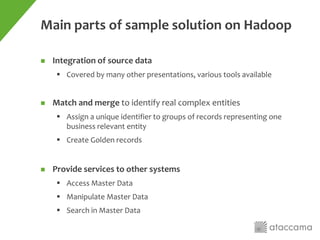
Main parts of sample solution on Hadoop
 Integration of source data
 Covered by many other presentations, various tools available
 Match and merge to identify real complex entities
 Assign a unique identifier to groups of records representing one
business relevant entity
 Create Golden records
 Provide services to other systems
 Access Master Data
 Manipulate Master Data
 Search in Master Data
Profiling
The most important part of Data Integration is knowing your data
Moving MDM process to Hadoop
 The matching itself is the only complicated part
 This is where sophisticated tools come in … only there is not many of
them that work in Hadoop properly
 Common approaches
 Simple matching („group by“) is easy to implement using MapReduce
for large batch, or with simple lookup for small increments
 Complex matching as implemented in commercial MDM tools typically
does not scale well and it is difficult to implement these methods in
Hadoop from scratch – some of them are not scalable even on a
theoretical level
Matching options
 Rule-based matching
Traditional approach, good for auditability – for every matched record you
know exactly why they are matched
 Probabilistic matching, machine learning
Serves more like a black box, but with proper training data, it can be easier to
configure for the multitude of big data sources
 Search-based matching
Not really matching, but can be used synergically to supplement matching –
Traditional MDM for traditional data sources and then use full-text search to
find related pieces of information in other (Big Data) sources
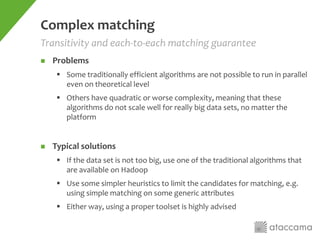
Complex matching
 Problems
 Some traditionally efficient algorithms are not possible to run in parallel
even on theoretical level
 Others have quadratic or worse complexity, meaning that these
algorithms do not scale well for really big data sets, no matter the
platform
 Typical solutions
 If the data set is not too big, use one of the traditional algorithms that
are available on Hadoop
 Use some simpler heuristics to limit the candidates for matching, e.g.
using simple matching on some generic attributes
 Either way, using a proper toolset is highly advised
Transitivity and each-to-each matching guarantee
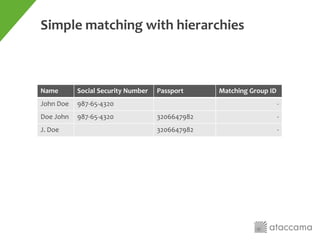
Simple matching with hierarchies
Name Social Security Number Passport Matching Group ID
John Doe 987-65-4320 -
Doe John 987-65-4320 3206647982 -
J. Doe 3206647982 -
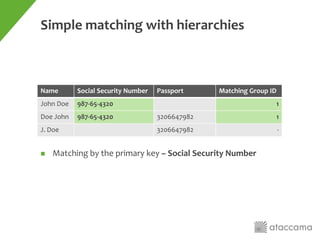
Simple matching with hierarchies
Name Social Security Number Passport Matching Group ID
John Doe 987-65-4320 1
Doe John 987-65-4320 3206647982 1
J. Doe 3206647982 -
 Matching by the primary key – Social Security Number
Simple matching with hierarchies
Name Social Security Number Passport Matching Group ID
John Doe 987-65-4320 1
Doe John 987-65-4320 3206647982 1
J. Doe 3206647982 1
 Matching by the secondary key – Passport
 Records that did not have a group ID assigned in the first run and
can be matched by a secondary key will join the primary group
Simple matching with hierarchies
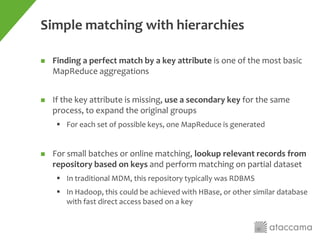
 Finding a perfect match by a key attribute is one of the most basic
MapReduce aggregations
 If the key attribute is missing, use a secondary key for the same
process, to expand the original groups
 For each set of possible keys, one MapReduce is generated
 For small batches or online matching, lookup relevant records from
repository based on keys and perform matching on partial dataset
 In traditional MDM, this repository typically was RDBMS
 In Hadoop, this could be achieved with HBase, or other similar database
with fast direct access based on a key
Sample tool
Step 1 | Bulk matching
Matching Engine
[MapReduce]
MDM Repository
[HDFS file]
Source 1
[Full Extract]
Source 2
[Full Extract]
Source Increment Extract
[HDFS file]
Step 2 | Incremental bulk matching
Matching Engine
[MapReduce]
New MDM Repository
[HDFS file]
Old MDM Repository
[HDFS file]
Step 3 | Online MDM Services
Matching Engine
[Non-Parallel Execution]
MDM Repository
[Online Accessible DB]
Online or Microbatch
[Increment]
1. Online request comes through designated interface
2. Matching engine asks MDM repository for all related records,
based on defined matching keys
3. Repository returns all relevant records that were previously
stored
4. Matching engine computes the matching on the available dataset
and stores new results (changes) back into the repository
1
2
3
4
Step 4 | Complex Scenario
MDM Repository
[Online Accessible DB]
Online or Microbatch
[Increment]
Matching Engine
SMALL DATASET
[Non-Parallel Execution]
LARGE DATASET
[MapReduce]Size?
Source 1
[Full Extract]
Update
Repository
Full scan
Get
Step 4 | Complex Scenario
MDM Repository
[Online Accessible DB]
Online or Microbatch
[Increment]
Matching Engine
SMALL DATASET
[Non-Parallel Execution]
LARGE DATASET
[MapReduce]Size?
Source 1
[Full Extract]
Full scan
Get
Update
Repository
Delta Detection
[MapReduce]
Typical MDM services for consumers
 Insert, update (upsert)
Record is matched against the existing repository and results are stored back
 Identify
Similar to upsert, but it does not store the results back into the repository
 Search
Using fulltext (or other) index to find master entities
 Fetch
Get all the information on master record identified by its ID
 Scan
Get all master records for batch analysis
Questions?
For more information, visit us at Ataccama booth!
Using Hadoop as a platform for Master Data Management

Using Hadoop as a platform for Master Data Management

  • 1.
    Using Hadoop asa Platform for Master Data Management Roman Kucera Ataccama Corporation
  • 2.
    Using Hadoop asa platform for Master Data Management Roman Kucera, Ataccama Corporation
  • 3.
    Roman Kucera Head ofTechnology and Research  Implementing MDM projects for major banks since 2010  Last 12 months spent on expanding Ataccama portfolio into Big Data space, most importantly adopting the Hadoop platform Ataccama Corporation Ataccama is a software vendor focused on Data Quality, Master Data Management, Data Governance and now also on Big Data processing in general Quick Introduction
  • 4.
    Why have Idecided to give this speech?  Typical MDM quotes on Hadoop conferences:  „There are no MDM tools for Hadoop“  „We have struggled with MDM and Data Quality“  „You do not need MDM, it does not make sense on Hadoop“  My goal is to:  Explain that MDM is necessary, but it does not have to be scary  Show a simplified example
  • 5.
    What is MasterData Management?  „Master Data is a single source of basic business data used across multiple systems, applications, and/or processes“ (Wikipedia)  Important parts of MDM solution:  Collection – gathering of all data  Consolidation – finding relations in the data  Storage – persistence of consolidated data  Distribution – providing a consolidated view to consumers  Maintenance – making sure that the data is serving its purpose  … and a ton of Data Quality
  • 6.
    How is thisrelated to Big Data?  Traditional MDM using Big Data technologies  Some companies struggle with performance and/or price of hardware and DB licenses for their MDM solution  Big Data technologies offer some options for better scalability, especially as the data volumes and data diversity grows  MDM on Big Data  Adding new data sources that were previously not mastered  Your Hadoop is probably the only place where you have all of the data together, therefore it is the only place where you can create the consolidated view
  • 7.
    Traditional MDM Source NamePhone Email Passport CRM John Doe +1 (245) 336-5468 985221473 CRM Jane Doe +1 (212) 972-6226 3206647982 CRM Load
  • 8.
    Traditional MDM Source NamePhone Email Passport CRM John Doe +1 (245) 336-5468 985221473 CRM Jane Doe +1 (212) 972-6226 3206647982 WEBAPP J. Doe 2129726226 Jane.doe@gmail.com CRM Load WEBAPP Load
  • 9.
    Traditional MDM Source NamePhone Email Passport CRM John Doe +1 (245) 336-5468 985221473 CRM Jane Doe +1 (212) 972-6226 3206647982 WEBAPP J. Doe 2129726226 Jane.doe@gmail.com Billing Doe John John.doe@yahoo.com 985221473 CRM Load WEBAPP Load Billing Load
  • 10.
    Traditional MDM Source NamePhone Email Passport CRM John Doe +1 (245) 336-5468 985221473 CRM Jane Doe +1 (212) 972-6226 3206647982 WEBAPP J. Doe 2129726226 Jane.doe@gmail.com Billing Doe John John.doe@yahoo.com 985221473 ID Name Phone Email Passport 1 John Doe +1 (245) 336-5468 John.doe@yahoo.com 985221473 2 Jane Doe +1 (212) 972-6226 Jane.doe@gmail.com 3206647982 Match and Merge
  • 11.
    MDM on BigData The goal is to get all relevant data about given entity John Doe, ID 007 • Links to original source records • Traditional mastered attributes • Contact history • Clickstream in web app • Call recordings • Usage of the mobile app • Tweets • Gazillion different classification attributes computed in Hadoop Billing CRM Twitter Email Web app & mobile
  • 12.
    Single view of… People say „Let’s just store the raw data and do the transformation only when we know the purpose“ But you still need some definition of your business entities, what use is any analysis of your clients behavior without having a definition of client?  Processes need to relate to some central master data You may end up with multiple views on the same entity, some usage purposes may need a different definition than others, but the process of creating these multiple views is exactly the same.
  • 13.
    Main parts ofsample solution on Hadoop  Integration of source data  Covered by many other presentations, various tools available  Match and merge to identify real complex entities  Assign a unique identifier to groups of records representing one business relevant entity  Create Golden records  Provide services to other systems  Access Master Data  Manipulate Master Data  Search in Master Data
  • 14.
    Profiling The most importantpart of Data Integration is knowing your data
  • 15.
    Moving MDM processto Hadoop  The matching itself is the only complicated part  This is where sophisticated tools come in … only there is not many of them that work in Hadoop properly  Common approaches  Simple matching („group by“) is easy to implement using MapReduce for large batch, or with simple lookup for small increments  Complex matching as implemented in commercial MDM tools typically does not scale well and it is difficult to implement these methods in Hadoop from scratch – some of them are not scalable even on a theoretical level
  • 16.
    Matching options  Rule-basedmatching Traditional approach, good for auditability – for every matched record you know exactly why they are matched  Probabilistic matching, machine learning Serves more like a black box, but with proper training data, it can be easier to configure for the multitude of big data sources  Search-based matching Not really matching, but can be used synergically to supplement matching – Traditional MDM for traditional data sources and then use full-text search to find related pieces of information in other (Big Data) sources
  • 17.
    Complex matching  Problems Some traditionally efficient algorithms are not possible to run in parallel even on theoretical level  Others have quadratic or worse complexity, meaning that these algorithms do not scale well for really big data sets, no matter the platform  Typical solutions  If the data set is not too big, use one of the traditional algorithms that are available on Hadoop  Use some simpler heuristics to limit the candidates for matching, e.g. using simple matching on some generic attributes  Either way, using a proper toolset is highly advised Transitivity and each-to-each matching guarantee
  • 18.
    Simple matching withhierarchies Name Social Security Number Passport Matching Group ID John Doe 987-65-4320 - Doe John 987-65-4320 3206647982 - J. Doe 3206647982 -
  • 19.
    Simple matching withhierarchies Name Social Security Number Passport Matching Group ID John Doe 987-65-4320 1 Doe John 987-65-4320 3206647982 1 J. Doe 3206647982 -  Matching by the primary key – Social Security Number
  • 20.
    Simple matching withhierarchies Name Social Security Number Passport Matching Group ID John Doe 987-65-4320 1 Doe John 987-65-4320 3206647982 1 J. Doe 3206647982 1  Matching by the secondary key – Passport  Records that did not have a group ID assigned in the first run and can be matched by a secondary key will join the primary group
  • 21.
    Simple matching withhierarchies  Finding a perfect match by a key attribute is one of the most basic MapReduce aggregations  If the key attribute is missing, use a secondary key for the same process, to expand the original groups  For each set of possible keys, one MapReduce is generated  For small batches or online matching, lookup relevant records from repository based on keys and perform matching on partial dataset  In traditional MDM, this repository typically was RDBMS  In Hadoop, this could be achieved with HBase, or other similar database with fast direct access based on a key
  • 22.
  • 23.
    Step 1 |Bulk matching Matching Engine [MapReduce] MDM Repository [HDFS file] Source 1 [Full Extract] Source 2 [Full Extract]
  • 24.
    Source Increment Extract [HDFSfile] Step 2 | Incremental bulk matching Matching Engine [MapReduce] New MDM Repository [HDFS file] Old MDM Repository [HDFS file]
  • 25.
    Step 3 |Online MDM Services Matching Engine [Non-Parallel Execution] MDM Repository [Online Accessible DB] Online or Microbatch [Increment] 1. Online request comes through designated interface 2. Matching engine asks MDM repository for all related records, based on defined matching keys 3. Repository returns all relevant records that were previously stored 4. Matching engine computes the matching on the available dataset and stores new results (changes) back into the repository 1 2 3 4
  • 26.
    Step 4 |Complex Scenario MDM Repository [Online Accessible DB] Online or Microbatch [Increment] Matching Engine SMALL DATASET [Non-Parallel Execution] LARGE DATASET [MapReduce]Size? Source 1 [Full Extract] Update Repository Full scan Get
  • 27.
    Step 4 |Complex Scenario MDM Repository [Online Accessible DB] Online or Microbatch [Increment] Matching Engine SMALL DATASET [Non-Parallel Execution] LARGE DATASET [MapReduce]Size? Source 1 [Full Extract] Full scan Get Update Repository Delta Detection [MapReduce]
  • 28.
    Typical MDM servicesfor consumers  Insert, update (upsert) Record is matched against the existing repository and results are stored back  Identify Similar to upsert, but it does not store the results back into the repository  Search Using fulltext (or other) index to find master entities  Fetch Get all the information on master record identified by its ID  Scan Get all master records for batch analysis
  • 29.
    Questions? For more information,visit us at Ataccama booth!