Building a SIP softswitch with
 Asterisk and Asterisk-Java


            Monica McArthur

  Adapted from my presentation at AstriCon 2007
The task at hand
Build a pure SIP softswitch that can perform the following functions:

•   Answer an inbound call and redirect it to a specified target phone
    number
     –   Rules for determining target number can be complex
•   Record both legs of the call
•   Play prerecorded prompts separately to inbound and outbound legs
•   Provide call routing through IVR trees, overflow on busy/no answer,
    and voicemail
•   Save the call detail record to a database for access by applications to
    do reporting and further data processing
•   All features can be provisioned in real-time
•   System must be highly-available and scalable
     –   Initial capacity 1250 simultaneous calls
     –   99.99% availability requirement
     –   Scheduled maintenance can be performed with no downtime
General solution
•   Write a routing application in Java to handle routing rules,
    provisioning changes, and interface with the database and other
    applications

•   Have the Java application direct a third-party host media processing
    system that provides the actual SIP signaling, RTP media handling,
    prompt playing, call recording, and DTMF input

•   The application servers running the Java routing application are load-
    balanced by hardware and can be scaled as needed

•   The host media processing servers are load-balanced by a SIP proxy
    server and can be scaled as needed
Particular issues
•   Inbound leg must be able to continue even if outbound leg fails
     –   To provide voicemail and overflow routing


•   Outbound leg must be able to continue after inbound leg hangs up on
    a connected call
     –   To provide post-call input and play “index number” for recorded calls


•   Outbound calls may play a “whisper” heard only by the target while
    the inbound still hears ringback

•   If there is no “whisper”, the call must support early media
     –   Media begins streaming (initially ringback) before outbound connect and must be
         played to inbound
     –   If early media is not streamed to inbound leg, the initial few syllables of the outbound
         call may be lost (“media clipping”)
     –   Ringback must not be included in call recordings
Overview of early media issue
•   In many standard SIP signaling exchanges, the answering user agent
    may start generating media before the first agent is ready for it
    (“media clipping”)
•   To avoid media clipping, the answering user agent may send a 183
    (“session progress”) and then initiate a one-way media stream at that
    point
•   If the initial user agent ignores the media stream sent with the 183
    and only accesses it after receiving a 200, media clipping will still
    occur
•   This issue is discussed in RFC 3960: Early Media and Ringing Tone
    Generation in the Session Initiation Protocol (SIP)
     http://www.rfc-archive.org/getrfc.php?rfc=3960
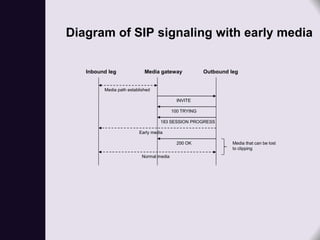
Diagram of SIP signaling with early media

   Inbound leg              Media gateway              Outbound leg


         Media path established

                                            INVITE

                                          100 TRYING

                                   183 SESSION PROGRESS

                         Early media

                                            200 OK               Media that can be lost
                                                                 to clipping
                           Normal media
Problems with existing solution

•   Ports are expensive!


•   Chosen host media platform did not support early media


•   Dependent on vendor to implement fixes
     –   Could take years
     –   Often broke workarounds in place to support other features
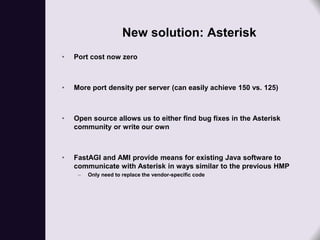
New solution: Asterisk
•   Port cost now zero


•   More port density per server (can easily achieve 150 vs. 125)


•   Open source allows us to either find bug fixes in the Asterisk
    community or write our own


•   FastAGI and AMI provide means for existing Java software to
    communicate with Asterisk in ways similar to the previous HMP
     –   Only need to replace the vendor-specific code
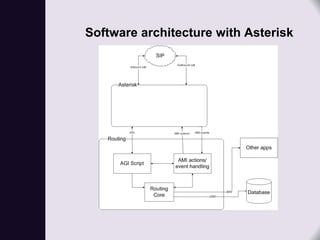
Software architecture with Asterisk
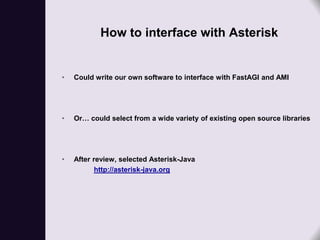
How to interface with Asterisk


•   Could write our own software to interface with FastAGI and AMI


•   Or… could select from a wide variety of existing open source libraries


•   After review, selected Asterisk-Java
           http://asterisk-java.org
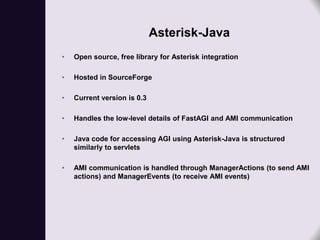
Asterisk-Java
•   Open source, free library for Asterisk integration

•   Hosted in SourceForge

•   Current version is 0.3

•   Handles the low-level details of FastAGI and AMI communication

•   Java code for accessing AGI using Asterisk-Java is structured
    similarly to servlets

•   AMI communication is handled through ManagerActions (to send AMI
    actions) and ManagerEvents (to receive AMI events)
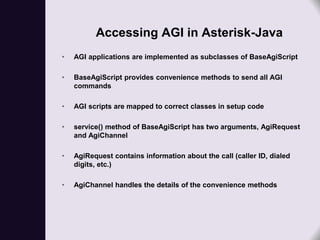
Accessing AGI in Asterisk-Java
•   AGI applications are implemented as subclasses of BaseAgiScript

•   BaseAgiScript provides convenience methods to send all AGI
    commands

•   AGI scripts are mapped to correct classes in setup code

•   service() method of BaseAgiScript has two arguments, AgiRequest
    and AgiChannel

•   AgiRequest contains information about the call (caller ID, dialed
    digits, etc.)

•   AgiChannel handles the details of the convenience methods
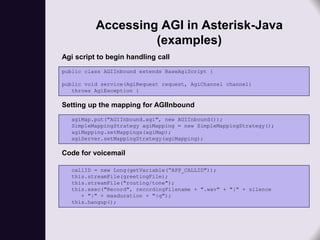
Accessing AGI in Asterisk-Java
                   (examples)
Agi script to begin handling call
public class AGIInbound extends BaseAgiScript {

public void service(AgiRequest request, AgiChannel channel)
   throws AgiException {

Setting up the mapping for AGIInbound
  agiMap.put("AGIInbound.agi", new AGIInbound());
  SimpleMappingStrategy agiMapping = new SimpleMappingStrategy();
  agiMapping.setMappings(agiMap);
  agiServer.setMappingStrategy(agiMapping);

Code for voicemail

  callID = new Long(getVariable(“APP_CALLID"));
  this.streamFile(greetingFile);
  this.streamFile("routing/tone");
  this.exec("Record", recordingFilename + ".wav" + "|" + silence
     + "|" + maxduration + "|q");
  this.hangup();
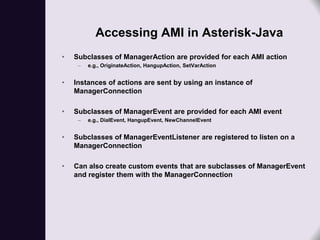
Accessing AMI in Asterisk-Java
•   Subclasses of ManagerAction are provided for each AMI action
     –   e.g., OriginateAction, HangupAction, SetVarAction


•   Instances of actions are sent by using an instance of
    ManagerConnection

•   Subclasses of ManagerEvent are provided for each AMI event
     –   e.g., DialEvent, HangupEvent, NewChannelEvent


•   Subclasses of ManagerEventListener are registered to listen on a
    ManagerConnection

•   Can also create custom events that are subclasses of ManagerEvent
    and register them with the ManagerConnection
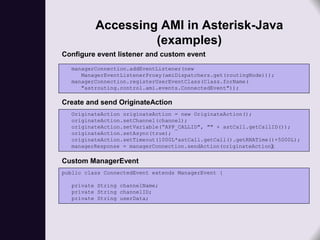
Accessing AMI in Asterisk-Java
                   (examples)
Configure event listener and custom event
  managerConnection.addEventListener(new
     ManagerEventListenerProxy(amiDispatchers.get(routingNode)));
  managerConnection.registerUserEventClass(Class.forName(
     "astrouting.control.ami.events.ConnectedEvent"));

Create and send OriginateAction
  OriginateAction originateAction = new OriginateAction();
  originateAction.setChannel(channel);
  originateAction.setVariable(“APP_CALLID", "" + astCall.getCallID());
  originateAction.setAsync(true);
  originateAction.setTimeout(1000L*astCall.getCall().getRNATime()+5000L);
  managerResponse = managerConnection.sendAction(originateAction);

Custom ManagerEvent
public class ConnectedEvent extends ManagerEvent {

  private String channelName;
  private String channelID;
  private String userData;
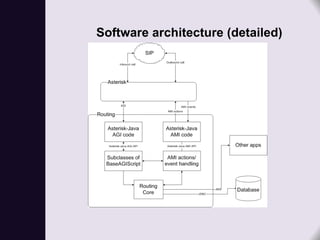
Software architecture (detailed)
Remaining issues
With this architecture and a plain version of Asterisk, we can provide all
   of the required features of the softswitch EXCEPT


•   Having the outbound leg survive after the inbound disconnects
     –   Need legs in separate threads


•   Early media
     –   app_dial does provide support for early media, but only with the channel it is running
         on
Problem 1: having the outbound leg
    survive after the inbound disconnects

•   The straightforward way to handle connecting an inbound leg to
    another number is to dial the number using app_dial

•   Unfortunately, in that case the outbound leg does not survive the
    hangup of the inbound leg

•   Need to have each leg living independently (in its own channel) but
    still joined together
Solution
•   To get the outbound leg in its own channel: use AMI Originate to get a
    local channel, connect to AGI, then use app_dial to make the
    outbound call

•   To join the two channels together: use a patch for bridging
    independent legs
     –   Was bug 5841; in trunk for 1.6
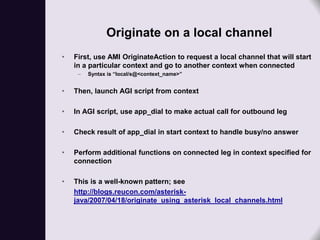
Originate on a local channel
•   First, use AMI OriginateAction to request a local channel that will start
    in a particular context and go to another context when connected
     –   Syntax is “local/s@<context_name>”


•   Then, launch AGI script from context

•   In AGI script, use app_dial to make actual call for outbound leg

•   Check result of app_dial in start context to handle busy/no answer

•   Perform additional functions on connected leg in context specified for
    connection

•   This is a well-known pattern; see
    http://blogs.reucon.com/asterisk-
    java/2007/04/18/originate_using_asterisk_local_channels.html
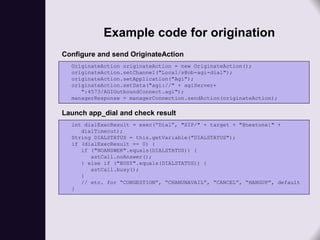
Example code for origination
Configure and send OriginateAction
  OriginateAction originateAction = new OriginateAction();
  originateAction.setChannel("Local/s@ob-agi-dial");
  originateAction.setApplication("Agi");
  originateAction.setData("agi://" + agiServer+
     ":4573/AGIOutboundConnect.agi");
  managerResponse = managerConnection.sendAction(originateAction);

Launch app_dial and check result
  int dialExecResult = exec(“Dial”, "SIP/" + target + "@nextone|" +
     dialTimeout);
  String DIALSTATUS = this.getVariable("DIALSTATUS");
  if (dialExecResult == 0) {
     if ("NOANSWER".equals(DIALSTATUS)) {
        astCall.noAnswer();
     } else if ("BUSY".equals(DIALSTATUS)) {
        astCall.busy();
     }
     // etc. for “CONGESTION”, “CHANUNAVAIL”, “CANCEL”, “HANGUP”, default
  }
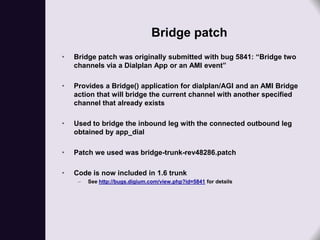
Bridge patch
•   Bridge patch was originally submitted with bug 5841: “Bridge two
    channels via a Dialplan App or an AMI event”

•   Provides a Bridge() application for dialplan/AGI and an AMI Bridge
    action that will bridge the current channel with another specified
    channel that already exists

•   Used to bridge the inbound leg with the connected outbound leg
    obtained by app_dial

•   Patch we used was bridge-trunk-rev48286.patch

•   Code is now included in 1.6 trunk
     –   See http://bugs.digium.com/view.php?id=5841 for details
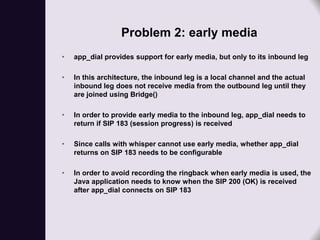
Problem 2: early media
•   app_dial provides support for early media, but only to its inbound leg

•   In this architecture, the inbound leg is a local channel and the actual
    inbound leg does not receive media from the outbound leg until they
    are joined using Bridge()

•   In order to provide early media to the inbound leg, app_dial needs to
    return if SIP 183 (session progress) is received

•   Since calls with whisper cannot use early media, whether app_dial
    returns on SIP 183 needs to be configurable

•   In order to avoid recording the ringback when early media is used, the
    Java application needs to know when the SIP 200 (OK) is received
    after app_dial connects on SIP 183
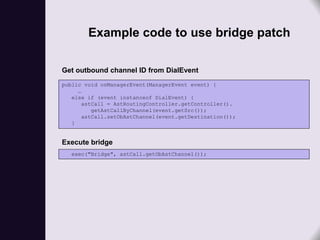
Example code to use bridge patch

Get outbound channel ID from DialEvent
public void onManagerEvent(ManagerEvent event) {
     …
   else if (event instanceof DialEvent) {
       astCall = AstRoutingController.getController().
          getAstCallByChannel(event.getSrc());
       astCall.setObAstChannel(event.getDestination());
   }


Execute bridge
   exec("Bridge", astCall.getObAstChannel());
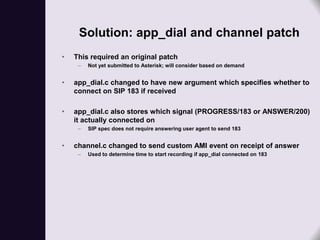
Solution: app_dial and channel patch
•   This required an original patch
     –   Not yet submitted to Asterisk; will consider based on demand


•   app_dial.c changed to have new argument which specifies whether to
    connect on SIP 183 if received

•   app_dial.c also stores which signal (PROGRESS/183 or ANSWER/200)
    it actually connected on
     –   SIP spec does not require answering user agent to send 183


•   channel.c changed to send custom AMI event on receipt of answer
     –   Used to determine time to start recording if app_dial connected on 183
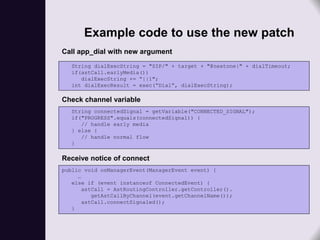
Example code to use the new patch
Call app_dial with new argument
   String dialExecString = "SIP/" + target + "@nextone|" + dialTimeout;
   if(astCall.earlyMedia())
      dialExecString += “||1";
   int dialExecResult = exec(“Dial”, dialExecString);

Check channel variable
   String connectedSignal = getVariable("CONNECTED_SIGNAL");
   if("PROGRESS".equals(connectedSignal)) {
      // handle early media
   } else {
      // handle normal flow
   }

Receive notice of connect
public void onManagerEvent(ManagerEvent event) {
     …
   else if (event instanceof ConnectedEvent) {
       astCall = AstRoutingController.getController().
          getAstCallByChannel(event.getChannelName());
       astCall.connectSignaled();
   }
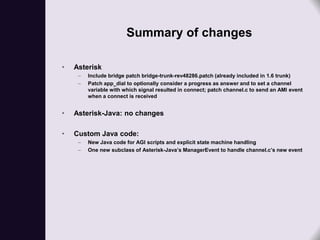
Summary of changes

•   Asterisk
     –   Include bridge patch bridge-trunk-rev48286.patch (already included in 1.6 trunk)
     –   Patch app_dial to optionally consider a progress as answer and to set a channel
         variable with which signal resulted in connect; patch channel.c to send an AMI event
         when a connect is received


•   Asterisk-Java: no changes

•   Custom Java code:
     –   New Java code for AGI scripts and explicit state machine handling
     –   One new subclass of Asterisk-Java’s ManagerEvent to handle channel.c’s new event
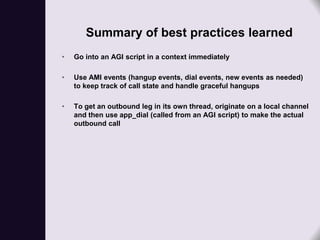
Summary of best practices learned
•   Go into an AGI script in a context immediately

•   Use AMI events (hangup events, dial events, new events as needed)
    to keep track of call state and handle graceful hangups

•   To get an outbound leg in its own thread, originate on a local channel
    and then use app_dial (called from an AGI script) to make the actual
    outbound call

Using Asterisk in a SIP softswitch

  • 1.
    Building a SIPsoftswitch with Asterisk and Asterisk-Java Monica McArthur Adapted from my presentation at AstriCon 2007
  • 2.
    The task athand Build a pure SIP softswitch that can perform the following functions: • Answer an inbound call and redirect it to a specified target phone number – Rules for determining target number can be complex • Record both legs of the call • Play prerecorded prompts separately to inbound and outbound legs • Provide call routing through IVR trees, overflow on busy/no answer, and voicemail • Save the call detail record to a database for access by applications to do reporting and further data processing • All features can be provisioned in real-time • System must be highly-available and scalable – Initial capacity 1250 simultaneous calls – 99.99% availability requirement – Scheduled maintenance can be performed with no downtime
  • 3.
    General solution • Write a routing application in Java to handle routing rules, provisioning changes, and interface with the database and other applications • Have the Java application direct a third-party host media processing system that provides the actual SIP signaling, RTP media handling, prompt playing, call recording, and DTMF input • The application servers running the Java routing application are load- balanced by hardware and can be scaled as needed • The host media processing servers are load-balanced by a SIP proxy server and can be scaled as needed
  • 4.
    Particular issues • Inbound leg must be able to continue even if outbound leg fails – To provide voicemail and overflow routing • Outbound leg must be able to continue after inbound leg hangs up on a connected call – To provide post-call input and play “index number” for recorded calls • Outbound calls may play a “whisper” heard only by the target while the inbound still hears ringback • If there is no “whisper”, the call must support early media – Media begins streaming (initially ringback) before outbound connect and must be played to inbound – If early media is not streamed to inbound leg, the initial few syllables of the outbound call may be lost (“media clipping”) – Ringback must not be included in call recordings
  • 5.
    Overview of earlymedia issue • In many standard SIP signaling exchanges, the answering user agent may start generating media before the first agent is ready for it (“media clipping”) • To avoid media clipping, the answering user agent may send a 183 (“session progress”) and then initiate a one-way media stream at that point • If the initial user agent ignores the media stream sent with the 183 and only accesses it after receiving a 200, media clipping will still occur • This issue is discussed in RFC 3960: Early Media and Ringing Tone Generation in the Session Initiation Protocol (SIP) http://www.rfc-archive.org/getrfc.php?rfc=3960
  • 6.
    Diagram of SIPsignaling with early media Inbound leg Media gateway Outbound leg Media path established INVITE 100 TRYING 183 SESSION PROGRESS Early media 200 OK Media that can be lost to clipping Normal media
  • 7.
    Problems with existingsolution • Ports are expensive! • Chosen host media platform did not support early media • Dependent on vendor to implement fixes – Could take years – Often broke workarounds in place to support other features
  • 8.
    New solution: Asterisk • Port cost now zero • More port density per server (can easily achieve 150 vs. 125) • Open source allows us to either find bug fixes in the Asterisk community or write our own • FastAGI and AMI provide means for existing Java software to communicate with Asterisk in ways similar to the previous HMP – Only need to replace the vendor-specific code
  • 9.
  • 10.
    How to interfacewith Asterisk • Could write our own software to interface with FastAGI and AMI • Or… could select from a wide variety of existing open source libraries • After review, selected Asterisk-Java http://asterisk-java.org
  • 11.
    Asterisk-Java • Open source, free library for Asterisk integration • Hosted in SourceForge • Current version is 0.3 • Handles the low-level details of FastAGI and AMI communication • Java code for accessing AGI using Asterisk-Java is structured similarly to servlets • AMI communication is handled through ManagerActions (to send AMI actions) and ManagerEvents (to receive AMI events)
  • 12.
    Accessing AGI inAsterisk-Java • AGI applications are implemented as subclasses of BaseAgiScript • BaseAgiScript provides convenience methods to send all AGI commands • AGI scripts are mapped to correct classes in setup code • service() method of BaseAgiScript has two arguments, AgiRequest and AgiChannel • AgiRequest contains information about the call (caller ID, dialed digits, etc.) • AgiChannel handles the details of the convenience methods
  • 13.
    Accessing AGI inAsterisk-Java (examples) Agi script to begin handling call public class AGIInbound extends BaseAgiScript { public void service(AgiRequest request, AgiChannel channel) throws AgiException { Setting up the mapping for AGIInbound agiMap.put("AGIInbound.agi", new AGIInbound()); SimpleMappingStrategy agiMapping = new SimpleMappingStrategy(); agiMapping.setMappings(agiMap); agiServer.setMappingStrategy(agiMapping); Code for voicemail callID = new Long(getVariable(“APP_CALLID")); this.streamFile(greetingFile); this.streamFile("routing/tone"); this.exec("Record", recordingFilename + ".wav" + "|" + silence + "|" + maxduration + "|q"); this.hangup();
  • 14.
    Accessing AMI inAsterisk-Java • Subclasses of ManagerAction are provided for each AMI action – e.g., OriginateAction, HangupAction, SetVarAction • Instances of actions are sent by using an instance of ManagerConnection • Subclasses of ManagerEvent are provided for each AMI event – e.g., DialEvent, HangupEvent, NewChannelEvent • Subclasses of ManagerEventListener are registered to listen on a ManagerConnection • Can also create custom events that are subclasses of ManagerEvent and register them with the ManagerConnection
  • 15.
    Accessing AMI inAsterisk-Java (examples) Configure event listener and custom event managerConnection.addEventListener(new ManagerEventListenerProxy(amiDispatchers.get(routingNode))); managerConnection.registerUserEventClass(Class.forName( "astrouting.control.ami.events.ConnectedEvent")); Create and send OriginateAction OriginateAction originateAction = new OriginateAction(); originateAction.setChannel(channel); originateAction.setVariable(“APP_CALLID", "" + astCall.getCallID()); originateAction.setAsync(true); originateAction.setTimeout(1000L*astCall.getCall().getRNATime()+5000L); managerResponse = managerConnection.sendAction(originateAction); Custom ManagerEvent public class ConnectedEvent extends ManagerEvent { private String channelName; private String channelID; private String userData;
  • 16.
  • 17.
    Remaining issues With thisarchitecture and a plain version of Asterisk, we can provide all of the required features of the softswitch EXCEPT • Having the outbound leg survive after the inbound disconnects – Need legs in separate threads • Early media – app_dial does provide support for early media, but only with the channel it is running on
  • 18.
    Problem 1: havingthe outbound leg survive after the inbound disconnects • The straightforward way to handle connecting an inbound leg to another number is to dial the number using app_dial • Unfortunately, in that case the outbound leg does not survive the hangup of the inbound leg • Need to have each leg living independently (in its own channel) but still joined together
  • 19.
    Solution • To get the outbound leg in its own channel: use AMI Originate to get a local channel, connect to AGI, then use app_dial to make the outbound call • To join the two channels together: use a patch for bridging independent legs – Was bug 5841; in trunk for 1.6
  • 20.
    Originate on alocal channel • First, use AMI OriginateAction to request a local channel that will start in a particular context and go to another context when connected – Syntax is “local/s@<context_name>” • Then, launch AGI script from context • In AGI script, use app_dial to make actual call for outbound leg • Check result of app_dial in start context to handle busy/no answer • Perform additional functions on connected leg in context specified for connection • This is a well-known pattern; see http://blogs.reucon.com/asterisk- java/2007/04/18/originate_using_asterisk_local_channels.html
  • 21.
    Example code fororigination Configure and send OriginateAction OriginateAction originateAction = new OriginateAction(); originateAction.setChannel("Local/s@ob-agi-dial"); originateAction.setApplication("Agi"); originateAction.setData("agi://" + agiServer+ ":4573/AGIOutboundConnect.agi"); managerResponse = managerConnection.sendAction(originateAction); Launch app_dial and check result int dialExecResult = exec(“Dial”, "SIP/" + target + "@nextone|" + dialTimeout); String DIALSTATUS = this.getVariable("DIALSTATUS"); if (dialExecResult == 0) { if ("NOANSWER".equals(DIALSTATUS)) { astCall.noAnswer(); } else if ("BUSY".equals(DIALSTATUS)) { astCall.busy(); } // etc. for “CONGESTION”, “CHANUNAVAIL”, “CANCEL”, “HANGUP”, default }
  • 22.
    Bridge patch • Bridge patch was originally submitted with bug 5841: “Bridge two channels via a Dialplan App or an AMI event” • Provides a Bridge() application for dialplan/AGI and an AMI Bridge action that will bridge the current channel with another specified channel that already exists • Used to bridge the inbound leg with the connected outbound leg obtained by app_dial • Patch we used was bridge-trunk-rev48286.patch • Code is now included in 1.6 trunk – See http://bugs.digium.com/view.php?id=5841 for details
  • 23.
    Problem 2: earlymedia • app_dial provides support for early media, but only to its inbound leg • In this architecture, the inbound leg is a local channel and the actual inbound leg does not receive media from the outbound leg until they are joined using Bridge() • In order to provide early media to the inbound leg, app_dial needs to return if SIP 183 (session progress) is received • Since calls with whisper cannot use early media, whether app_dial returns on SIP 183 needs to be configurable • In order to avoid recording the ringback when early media is used, the Java application needs to know when the SIP 200 (OK) is received after app_dial connects on SIP 183
  • 24.
    Example code touse bridge patch Get outbound channel ID from DialEvent public void onManagerEvent(ManagerEvent event) { … else if (event instanceof DialEvent) { astCall = AstRoutingController.getController(). getAstCallByChannel(event.getSrc()); astCall.setObAstChannel(event.getDestination()); } Execute bridge exec("Bridge", astCall.getObAstChannel());
  • 25.
    Solution: app_dial andchannel patch • This required an original patch – Not yet submitted to Asterisk; will consider based on demand • app_dial.c changed to have new argument which specifies whether to connect on SIP 183 if received • app_dial.c also stores which signal (PROGRESS/183 or ANSWER/200) it actually connected on – SIP spec does not require answering user agent to send 183 • channel.c changed to send custom AMI event on receipt of answer – Used to determine time to start recording if app_dial connected on 183
  • 26.
    Example code touse the new patch Call app_dial with new argument String dialExecString = "SIP/" + target + "@nextone|" + dialTimeout; if(astCall.earlyMedia()) dialExecString += “||1"; int dialExecResult = exec(“Dial”, dialExecString); Check channel variable String connectedSignal = getVariable("CONNECTED_SIGNAL"); if("PROGRESS".equals(connectedSignal)) { // handle early media } else { // handle normal flow } Receive notice of connect public void onManagerEvent(ManagerEvent event) { … else if (event instanceof ConnectedEvent) { astCall = AstRoutingController.getController(). getAstCallByChannel(event.getChannelName()); astCall.connectSignaled(); }
  • 27.
    Summary of changes • Asterisk – Include bridge patch bridge-trunk-rev48286.patch (already included in 1.6 trunk) – Patch app_dial to optionally consider a progress as answer and to set a channel variable with which signal resulted in connect; patch channel.c to send an AMI event when a connect is received • Asterisk-Java: no changes • Custom Java code: – New Java code for AGI scripts and explicit state machine handling – One new subclass of Asterisk-Java’s ManagerEvent to handle channel.c’s new event
  • 28.
    Summary of bestpractices learned • Go into an AGI script in a context immediately • Use AMI events (hangup events, dial events, new events as needed) to keep track of call state and handle graceful hangups • To get an outbound leg in its own thread, originate on a local channel and then use app_dial (called from an AGI script) to make the actual outbound call