Creating Communication Applications
using the Asterisk RESTful Interface
API Strategy & Practice 2017, Portland Oregon
Chris Howard, Digium
Who am I?
Chris	Howard	
•  Digium	Training	Manager	
•  											#	2373	
•  											choward@digium.com	
•  											@cch_123	
•  											https://www.linkedin.com/in/christopher-c-howard
Background
Digium	–	Developer	Products	Training	manager.			
	
Asteria	Solutions	Group	–	Director	of	Software	Development	
	
Nortel/Architel/MetaSolv	–	Senior	Consultant	
	
Teledyne	Brown/EER	Systems	–	Programmer	(Ada	yay!)
Introduction to Asterisk
•  What is Asterisk?
•  What can Asterisk do?
•  Who is Digium?
What is Asterisk?
Open Source Communications Platform
•  Asterisk is
–  software that turns an ordinary computer into a
communications server
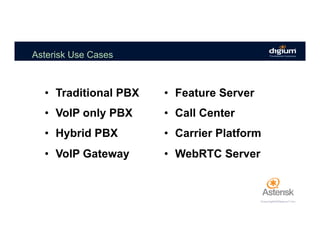
Asterisk Use Cases
•  Traditional PBX
•  VoIP only PBX
•  Hybrid PBX
•  VoIP Gateway
•  Feature Server
•  Call Center
•  Carrier Platform
•  WebRTC Server
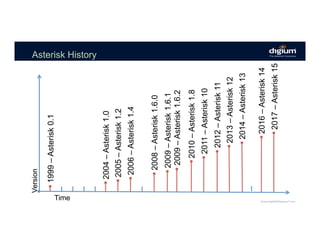
Asterisk History
2014–Asterisk13
2008–Asterisk1.6.0
2009–Asterisk1.6.1
2009–Asterisk1.6.2
2010–Asterisk1.8
2011–Asterisk10
1999–Asterisk0.1
2004–Asterisk1.0
2005–Asterisk1.2
2006–Asterisk1.4
Version
Time
2012–Asterisk11
2013–Asterisk12
2016–Asterisk14
2017–Asterisk15
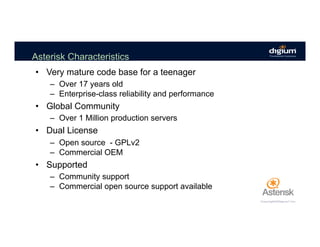
Asterisk Characteristics
•  Very mature code base for a teenager
–  Over 17 years old
–  Enterprise-class reliability and performance
•  Global Community
–  Over 1 Million production servers
•  Dual License
–  Open source - GPLv2
–  Commercial OEM
•  Supported
–  Community support
–  Commercial open source support available
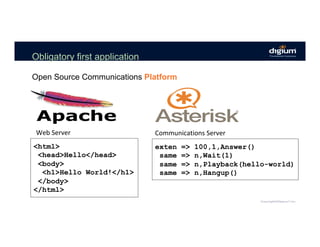
Obligatory first application
Open Source Communications Platform
Web	Server	 Communications	Server	
<html>
<head>Hello</head>
<body>
<h1>Hello World!</h1>
</body>
</html>
exten => 100,1,Answer()
same => n,Wait(1)
same => n,Playback(hello-world)
same => n,Hangup()
Who is Digium?
•  “The Asterisk Company”
•  Mark Spencer
•  2 Fold Mission
–  Open Source
–  Commercial
•  200+ employees
•  Headquartered in Huntsville, AL
•  Atlanta, San Diego
Business Lines
•  Digium has 2 primary business lines
–  Business Communications Systems
–  Custom Communications Solutions
•  And a wholly owned subsidiary, Digium Cloud Services
12
Business Products
Switchvox	Hardware	PBX	
Switchvox	Mobile	Apps	
Switchvox	Cloud	
	
SIP	Trunking	
Swithvox	Switchboard
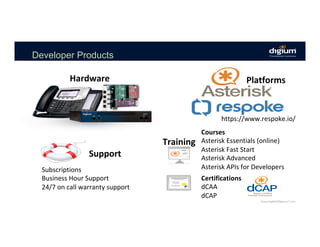
Developer Products
Courses	
Asterisk	Essentials	(online)	
Asterisk	Fast	Start	
Asterisk	Advanced	
Asterisk	APIs	for	Developers	
Certifications	
dCAA	
dCAP	
Training	
Support	
Subscriptions	
Business	Hour	Support	
24/7	on	call	warranty	support	
https://www.respoke.io/	
Hardware	 Platforms
Asterisk APIs History
Asterisk RESTFul Interface (ARI) Overview
When	Asterisk	was	first	created	back	in	1999,	its	design	was	focused	
on	being	a	stand-alone	Private	Branch	eXchange	(PBX)	that	you	could	
configure	via	static	configuration	files.		
	
While	this	level	of	configuration	is	sufficient	for	many	applications,	for	
some	domains,	it	is	far	more	preferable	to	manipulate	Asterisk	via	an	
external	system.		
	
So,	not	long	into	the	project,	two	APIs	were	added	to	Asterisk:	the	
Asterisk	Gateway	Interface	(AGI)	and	the	Asterisk	Manager	Interface	
(AMI).		
Asterisk	API	History
ARI Overview
The	AGI	and	AMI	interfaces	are	powerful	and	opened	up	a	wide	
range	of	integration	possibilities	for	developing	Asterisk	based	apps	
and	integrating	Asterisk	with	other	systems.	
	
•  Using	AGI,	remote	dialplan	execution	could	be	enabled	which	allowed	
developers	to	control	channels	in	Asterisk	using	PHP,	Python,	Java,	and	
other	languages.		
•  With	AMI,	the	state	of	Asterisk	could	be	displayed,	calls	initiated,	and	
the	location	of	channels	controlled.	Using	both	APIs	together,	complex	
applications	using	Asterisk	as	the	engine	could	be	developed.	
Asterisk	API	History	(continued)
The AGI Dialplan App
You	will	need	to	create	an	extension	that	calls	the	AGI	
dialplan	application.	
[internal]
exten => 301,1,NoOp(Hello World)
same => n,Answer()
same => n,AGI(hello-world.pl)
same => n,Hangup()
The	AGI	application	hands	off	call	control	to	the	program	specified	in	
the	argument.		(	default	location	/var/lib/asterisk/agi-bin/	)
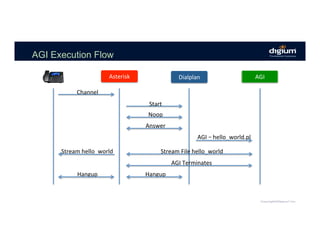
AGI Execution Flow
Asterisk	Asterisk	 Dialplan	Dialplan	 AGI	
Channel	
Start	
Noop	
Answer	
AGI	– hello_world.pl	
Stream	File	hello_world	
AGI	Terminates	
Hangup	
Stream	hello_world	
Hangup
AGI Demo
•  Show	hello-world.pl	script.	
•  Turn	on	AGI	Debug.	
•  Place	call	to	hello-world	AGI	extension.
Asterisk Manager Interface
[root@localhost ~]# nc 127.0.0.1 5038
Asterisk Call Manager/3.2.0
Action: Login
Username: test
Secret: mysecret
Response: Success
Message: Authentication accepted
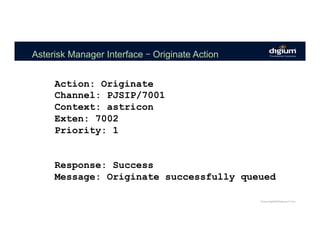
Asterisk Manager Interface – Originate Action
Action: Originate
Channel: PJSIP/7001
Context: astricon
Exten: 7002
Priority: 1
Response: Success
Message: Originate successfully queued
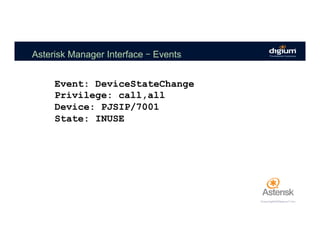
Asterisk Manager Interface – Events
Event: DeviceStateChange
Privilege: call,all
Device: PJSIP/7001
State: INUSE
AMI Demo
•  Login	to	AMI	
•  Issue	Originate	Command	
•  Display	events	fired	from	originate
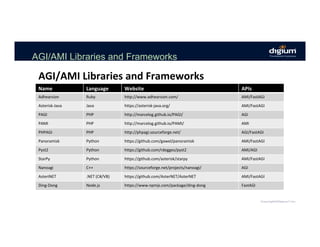
AGI/AMI Libraries and Frameworks
Name	 Language	 Website	 APIs	
Adhearsion	 Ruby	 http://www.adhearsion.com/	 AMI/FastAGI	
Asterisk-Java	 Java	 https://asterisk-java.org/	 AMI/FastAGI	
PAGI	 PHP	 http://marcelog.github.io/PAGI/	 AGI	
PAMI	 PHP	 http://marcelog.github.io/PAMI/	 AMI	
PHPAGI	 PHP	 http://phpagi.sourceforge.net/	 AGI/FastAGI	
Panoramisk	 Python	 https://github.com/gawel/panoramisk	 AMI/FastAGI	
Pyst2	 Python	 https://github.com/rdegges/pyst2	 AMI/AGI	
StarPy	 Python	 https://github.com/asterisk/starpy	 AMI/FastAGI	
Nanoagi	 C++	 https://sourceforge.net/projects/nanoagi/	 AGI	
AsteriNET	 .NET	(C#/VB)	 https://github.com/AsterNET/AsterNET	 AMI/FastAGI	
Ding-Dong	 Node.js	 https://www.npmjs.com/package/ding-dong	 FastAGI	
AGI/AMI	Libraries	and	Frameworks
Asterisk RESTful Interface
(ARI) Overview
ARI Overview
While	AMI	is	good	at	call	control	and	event	monitoring	
and	AGI	is	good	at	allowing	a	remote	process	to	
execute	dialplan	applications,	neither	of	these	APIs	
were	designed	to	let	a	developer	build	their	own	
custom	communications	application.	
	
Asterisk	API	History	–	ARI	Rational
ARI Overview
	
Neither	API	exposes	the	kinds	of	communications	
primitives	that	exist	in	Asterisk	needed	to	easily	build	such	
an	application.	That	wasn’t	their	intended	purpose.	
	
So,	the	Asterisk	Developer	Community	set	out	to	build	a	
better	API	that	would	make	it	easier	to	build	custom	
communications	applications.	ARI	was	the	result	of	this	
effort.	
Asterisk	API	History	–	ARI	Rational	(continued)
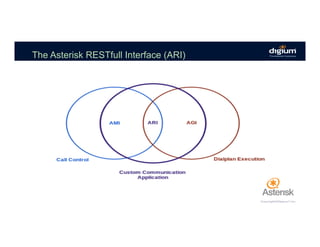
The Asterisk RESTfull Interface (ARI)
ARI Overview
•  ARI	is	a	REST	interface	allows	application	developers	to	build	rich,	
custom	communications	applications	in	the	language	of	their	choice.		
•  ARI	exposes	the	raw	primitive	objects	in	Asterisk	normally	reserved	
for	C	modules	—	channels,	bridges,	endpoints,	media,	etc.	—	
through	an	intuitive	REST	interface.		
•  As	an	asynchronous	interface,	ARI	conveys	the	state	of	the	objects	
being	controlled	by	the	user	via	JSON	events	over	a	WebSocket.	
What	is	the	Asterisk	RESTful	Interface	(ARI)
ARI Overview
•  The	websocket	interface	that	listens	for	events.	
•  The	REST	interface	where	you	can	send	commands	and	
receive	responses.	
ARI	consist	of	2	“parts”.		This	is	an	important	concept	to	
remember.		There	are	2	distinct	interfaces	that	makeup	ARI.
AGI vs. AMI vs. ARI
ARI	is	not	a	replacement	for	AMI	or	AGI.		
	
•  AGI	allows	you	to	control	dialplan	execution	of	a	channel.	
•  AMI	allows	you	to	manage	calls	at	a	high	level.	
•  ARI	allows	you	to	replace	dialplan	applications	with	your	
own	custom	communications	application.	
ARI	is	not	about	telling	a	channel	to	execute	the	VoiceMail	dialplan	application	or	
redirecting	a	channel	in	the	dialplan	to	a	VoiceMail	extension.	
	
It	is	about	letting	you	build	your	own	VoiceMail	application.
ARI Quick Start Guide
1.	Enable	the	Asterisk	HTTP	service	in	http.conf:	
[general]
enabled = yes
bindaddr = 0.0.0.0
2.	Configure	an	ARI	user	in	ari.conf:	
[general]
enabled = yes
pretty = yes
[asterisk]
type = user
read_only = no
password = asterisk
The Stasis Dialplan App
You	will	need	to	create	an	extension	that	calls	the	Stasis	
dialplan	application.	
[internal]
exten => 403,1,NoOp()
same => n,Answer()
same => n,Stasis(hello-world)
same => n,Hangup()
Stasis	is	the	mechanism	that	Asterisk	uses	to	hand	control	of	a	
channel	over	from	the	dialplan	-	which	is	the	traditional	way	in	which	
channels	are	controlled	-	to	ARI	and	the	client.
Websock Connection
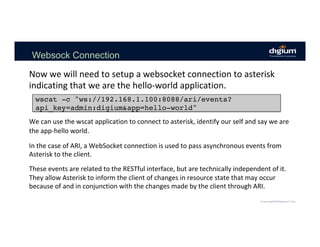
Now	we	will	need	to	setup	a	websocket	connection	to	asterisk	
indicating	that	we	are	the	hello-world	application.	
wscat -c "ws://192.168.1.100:8088/ari/events?
api_key=admin:digium&app=hello-world"
We	can	use	the	wscat	application	to	connect	to	asterisk,	identify	our	self	and	say	we	are	
the	app-hello	world.	
	
In	the	case	of	ARI,	a	WebSocket	connection	is	used	to	pass	asynchronous	events	from	
Asterisk	to	the	client.		
	
These	events	are	related	to	the	RESTful	interface,	but	are	technically	independent	of	it.	
They	allow	Asterisk	to	inform	the	client	of	changes	in	resource	state	that	may	occur	
because	of	and	in	conjunction	with	the	changes	made	by	the	client	through	ARI.
The ARI Websock Session
When	you	call	the	
extension	of	the	Stasis	
application	you	will	see	a	
StasisStart	message	in	
your	wscat	section.			Note	
the	“id:”	attribute.		We	
will	use	that	to	issue	
commands	to	the	call.	
{
"type": "StasisStart",
"timestamp": "2017-04-05T11:04:14.869-0700",
"args": [],
"channel": {
"id": "1491415454.6",
"name": "PJSIP/302-00000003",
"state": "Up",
"caller": {
"name": "302",
"number": "302"
},
"connected": {
"name": "",
"number": ""
},x
"accountcode": "",
"dialplan": {
"context": "internal",
"exten": "401",
"priority": 3
},
"creationtime": "2017-04-05T11:04:14.714-0700",
"language": "en"
},
"application": "hello-world"
}
ARI Request/Response
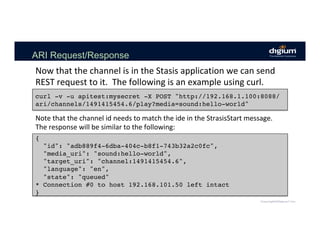
Now	that	the	channel	is	in	the	Stasis	application	we	can	send	
REST	request	to	it.		The	following	is	an	example	using	curl.	
curl -v -u apitest:mysecret -X POST "http://192.168.1.100:8088/
ari/channels/1491415454.6/play?media=sound:hello-world"
Note	that	the	channel	id	needs	to	match	the	ide	in	the	StrasisStart	message.		
The	response	will	be	similar	to	the	following:	
{
"id": "adb889f4-6dba-404c-b8f1-743b32a2c0fc",
"media_uri": "sound:hello-world",
"target_uri": "channel:1491415454.6",
"language": "en",
"state": "queued"
* Connection #0 to host 192.168.101.50 left intact
}
The ARI Websock Session After Request
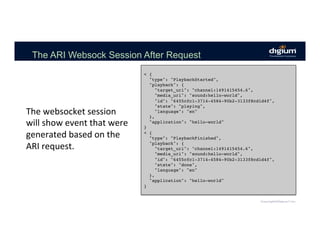
The	websocket	session	
will	show	event	that	were	
generated	based	on	the	
ARI	request.	
< {
"type": "PlaybackStarted",
"playback": {
"target_uri": "channel:1491415454.6",
"media_uri": "sound:hello-world",
"id": "6455cfc1-3714-4584-90b2-3133f8cd1d4f",
"state": "playing",
"language": "en"
},
"application": "hello-world"
}
< {
"type": "PlaybackFinished",
"playback": {
"target_uri": "channel:1491415454.6",
"media_uri": "sound:hello-world",
"id": "6455cfc1-3714-4584-90b2-3133f8cd1d4f",
"state": "done",
"language": "en"
},
"application": "hello-world"
}
AMI Demo
•  Create	Stasis	Extension	
•  Use	wscat	to	monitor	events	
•  Send	hello-world	sound	to	the	channel	from	the	event	
ARI	Demo
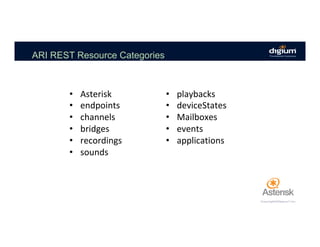
ARI REST Resource Categories
•  Asterisk	
•  endpoints	
•  channels	
•  bridges	
•  recordings	
•  sounds	
•  playbacks	
•  deviceStates	
•  Mailboxes	
•  events	
•  applications
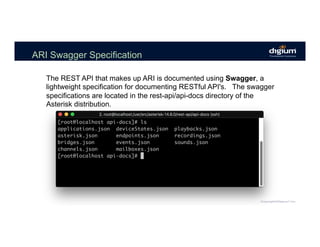
ARI Swagger Specification
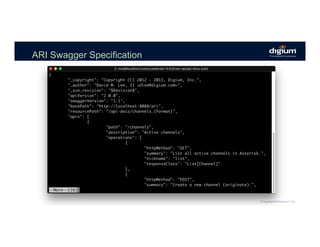
The REST API that makes up ARI is documented using Swagger, a
lightweight specification for documenting RESTful API's. The swagger
specifications are located in the rest-api/api-docs directory of the
Asterisk distribution.
ARI Swagger Specification
ARI Applications
•  The	websocket	interface	that	listens	for	events.	
•  The	REST	interface	where	you	can	send	commands	and	
receive	responses.	
The	previous	demo	showed	the	architecture	of	the	Asterisk	
RESTfull	interface	and	an	example	of	using	the	“2	channel”	
approach.	
You	can	use	these	2	channels	to	create	an	Asterisk	
Application	however	it	is	rather	difficult	keeping	up	with	the	
websocket	events	and	controlling	an	active	system.
ARI Applications
The	Answer… 	ARI	Frameworks!		
One	of	the	beautiful	things	about	ARI	is	that	it's	so	easy	to	just	
bang	out	a	request.	However	you	don’t	want	to	lots	of	direct	
HTTP	calls	throughout	your	application	and	how	do	you	keep	
up	with	all	of	the	events	that	you	are	responding	to	…
ARI Frameworks
ARI	Frameworks	are	an	abstraction	layer	for	the	raw	
ARI	calls.	
	
The	abstraction	layers	allow	for	language	native	
functions	and	event	handlers	that	handle	all	of	the	
underlying	ARI	events	and	Actions.	
	
Most	frameworks	were	built	from	the	ARI	swagger	
spec.
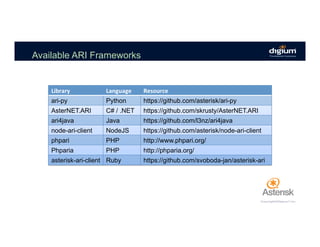
Available ARI Frameworks
Library	 Language	 Resource	
ari-py Python https://github.com/asterisk/ari-py
AsterNET.ARI C# / .NET https://github.com/skrusty/AsterNET.ARI
ari4java Java https://github.com/l3nz/ari4java
node-ari-client NodeJS https://github.com/asterisk/node-ari-client
phpari PHP http://www.phpari.org/
Phparia PHP http://phparia.org/
asterisk-ari-client Ruby https://github.com/svoboda-jan/asterisk-ari
ARI Frameworks
Note:	For	this	session	we	are	going	to	focus	on	using	
the	node-ari-client	framework.				
	
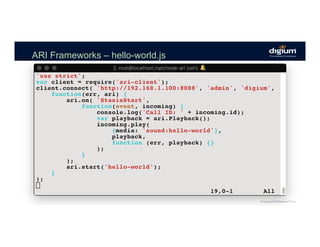
Let’s	revisit	the	hello-world	sample	that	we	built	using	
wscat	and	curl	but	now	using	the	node-ari-client	
framework.
ARI Frameworks – hello-world.js
AMI Demo
•  Show	the	hello-world.js	application	
•  Start	the	Node	App.	
•  Dial	403	to	hear	the	sound.	
	
ARI	Framework	Demo
ARI Application
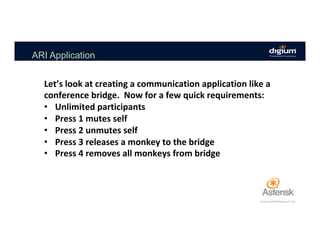
Let’s	look	at	creating	a	communication	application	like	a	
conference	bridge.		Now	for	a	few	quick	requirements:	
•  Unlimited	participants	
•  Press	1	mutes	self	
•  Press	2	unmutes	self	
•  Press	3	releases	a	monkey	to	the	bridge	
•  Press	4	removes	all	monkeys	from	bridge
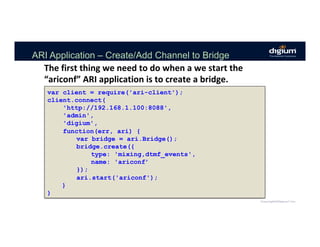
ARI Application – Create/Add Channel to Bridge
The	first	thing	we	need	to	do	when	a	we	start	the	
“ariconf”	ARI	application	is	to	create	a	bridge.	
var client = require('ari-client');
client.connect(
'http://192.168.1.100:8088',
'admin',
'digium',
function(err, ari) {
var bridge = ari.Bridge();
bridge.create({
type: 'mixing,dtmf_events',
name: 'ariconf’
});
ari.start('ariconf');
}
)
ARI Application – Cleanup Bridges
Note:		Bridges	don’t	die	when	ARI	script	dies.	
function cleanupBridges() {
ari.bridges.list(
function(err, bridges) {
var ariconfBridges = bridges.filter(
function(candidate) {
return candidate['name'] === 'ariconf';
}
);
ariconfBridges.forEach(
function(bridge) {
bridge.destroy(function(err) {});
});
}
);
}
ARI Application – Add New Channels to the Bridge
Now	that	the	application	has	started	and	we	have	a	
bridge	created	we	will	want	to	add	any	new	channel	that	
enters	the	‘ariconf’	Stasis	application	to	the	bridge.	
	
This	will	be	handled	in	the	“StasisStart”	event.	
	
First	we	need	to	find	the	bridge	and	then	we	add	the	
channel	to	the	bridge.
ARI Application – Add Channel to Bridge
function joinBridge(channel) {
ari.bridges.list(
function(err, bridges) {
var bridge = bridges.filter(
function(candidate) {
return candidate['name'] === ‘ariconf’;
}
)[0];
if (!bridge) {
console.log("bridge not found!");
} else {
bridge.addChannel({channel: channel.id});
}
);
}
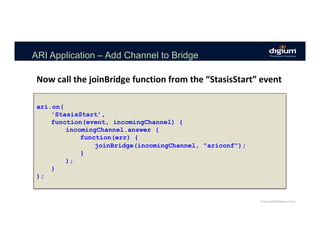
ARI Application – Add Channel to Bridge
ari.on(
'StasisStart’,
function(event, incomingChannel) {
incomingChannel.answer (
function(err) {
joinBridge(incomingChannel, "ariconf");
}
);
}
);
Now	call	the	joinBridge	function	from	the	“StasisStart”	event
ARI Application – Handle DTMF
So	now	that	we	have	a	Conference	
Bridge	application	that	can	handle	
multiple	calls	we	want	to	add	a	few	
features	that	are	triggered	by	DTMF	
key	presses.	
	
This	is	done	using	the	
“ChannelDtmfReceived”	events.
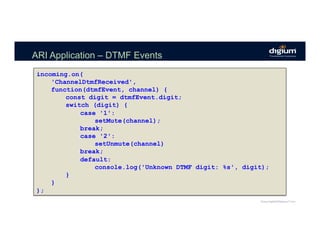
ARI Application – DTMF Events
incoming.on(
'ChannelDtmfReceived',
function(dtmfEvent, channel) {
const digit = dtmfEvent.digit;
switch (digit) {
case '1':
setMute(channel);
break;
case '2':
setUnmute(channel)
break;
default:
console.log('Unknown DTMF digit: %s', digit);
}
}
);
ARI Application – Create/Add Channel to Bridge
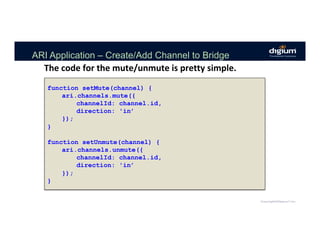
The	code	for	the	mute/unmute	is	pretty	simple.	
function setMute(channel) {
ari.channels.mute({
channelId: channel.id,
direction: 'in’
});
}
function setUnmute(channel) {
ari.channels.unmute({
channelId: channel.id,
direction: 'in’
});
}
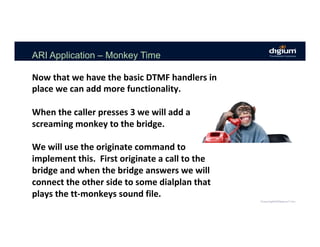
ARI Application – Monkey Time
Now	that	we	have	the	basic	DTMF	handlers	in	
place	we	can	add	more	functionality.	
	
When	the	caller	presses	3	we	will	add	a	
screaming	monkey	to	the	bridge.	
	
We	will	use	the	originate	command	to	
implement	this.		First	originate	a	call	to	the	
bridge	and	when	the	bridge	answers	we	will	
connect	the	other	side	to	some	dialplan	that	
plays	the	tt-monkeys	sound	file.
ARI Application – Monkeys Dialplan
The	dialplan	for	the	tt-monkeys	playback	
[monkeys]
exten => monkeys,1,Noop(playback tt-monkeys)
same => n,Playback(tt-monkeys)
same => n,Hangup()
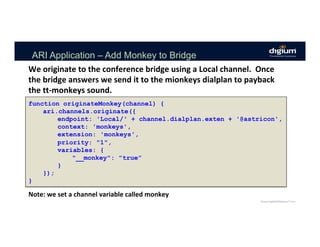
ARI Application – Add Monkey to Bridge
function originateMonkey(channel) {
ari.channels.originate({
endpoint: 'Local/' + channel.dialplan.exten + '@astricon',
context: 'monkeys',
extension: 'monkeys',
priority: "1",
variables: {
"__monkey": "true”
}
});
}
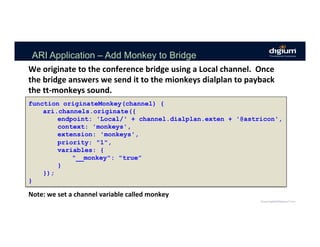
We	originate	to	the	conference	bridge	using	a	Local	channel.		Once	
the	bridge	answers	we	send	it	to	the	mionkeys	dialplan	to	payback	
the	tt-monkeys	sound.	
Note:	we	set	a	channel	variable	called	monkey
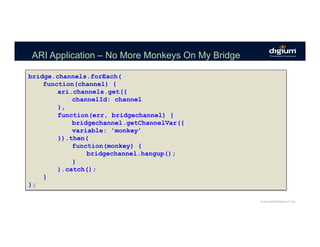
ARI Application – Kick the Monkey
Now	since	we	have	a	way	to	add	monkeys	to	the	conference	
bridge	it	sure	would	be	nice	to	be	able	to	kick	them	out.	
	
We	can	do	this	by	looking	at	all	of	the	channels	in	the	bridge	
and	if	any	of	them	have	the	monkey	channel	variable	then	we	
can	call	hangup()	on	the	channel	to	remove	them.
ARI Application – Add Monkey to Bridge
function originateMonkey(channel) {
ari.channels.originate({
endpoint: 'Local/' + channel.dialplan.exten + '@astricon',
context: 'monkeys',
extension: 'monkeys',
priority: "1",
variables: {
"__monkey": "true”
}
});
}
We	originate	to	the	conference	bridge	using	a	Local	channel.		Once	
the	bridge	answers	we	send	it	to	the	mionkeys	dialplan	to	payback	
the	tt-monkeys	sound.	
Note:	we	set	a	channel	variable	called	monkey
ARI Application – No More Monkeys On My Bridge
bridge.channels.forEach(
function(channel) {
ari.channels.get({
channelId: channel
},
function(err, bridgechannel) {
bridgechannel.getChannelVar({
variable: 'monkey’
}).then(
function(monkey) {
bridgechannel.hangup();
}
).catch();
}
);
Asterisk APIs Training
Note:		There	is	an	Asterisk	APIs	for	Developers	class	
scheduled	for	Nov-14	to	Nov-16	at	the	Digium	HQ	in	
Huntsville,	AL.	
	
https://www.digium.com/training/asterisk	
	
Questions?

LF_APIStrat17_Creating Communication Applications using the Asterisk RESTFul Interface (ARI)