Hamid Fadishei
Assistant Professor, University of Bojnord
fadishei@yahoo.com http://www.fadishei.ir
Spring 2015
Telephony Service Development on Asterisk
Platform
Workshop
Hamid Fadishei
University of Bojnord Telephony Service Development on Asterisk Platform
What's Asterisk?
 Hard to tell in one sentence
 A very powerful, flexible, and extensible piece of integrated
telecommunications software
 An Open Source Telephony Swiss Army Knife
 A Linux Based PBX w/ Minimal Hardware Reqs
 A Community Driven Development Project
Asterisk turns an ordinary computer into a communications server. Asterisk powers
IP PBX systems, VoIP gateways, conference servers and is used by small
businesses, large businesses, call centers, carriers and governments worldwide.
Hamid Fadishei
University of Bojnord Telephony Service Development on Asterisk Platform
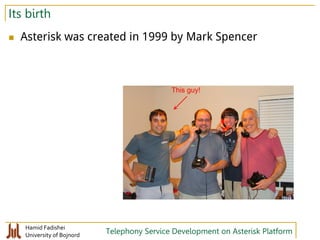
Its birth
 Asterisk was created in 1999 by Mark Spencer
This guy!
Hamid Fadishei
University of Bojnord Telephony Service Development on Asterisk Platform
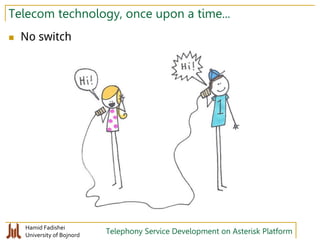
Telecom technology, once upon a time...
 No switch
Hamid Fadishei
University of Bojnord Telephony Service Development on Asterisk Platform
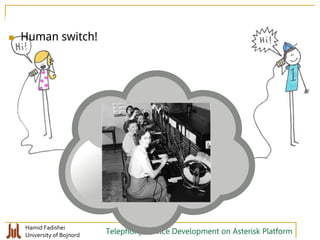
 Human switch!
Hamid Fadishei
University of Bojnord Telephony Service Development on Asterisk Platform
 Mechanical switch
Hamid Fadishei
University of Bojnord Telephony Service Development on Asterisk Platform
 Soft switch Digital switch
Hamid Fadishei
University of Bojnord Telephony Service Development on Asterisk Platform
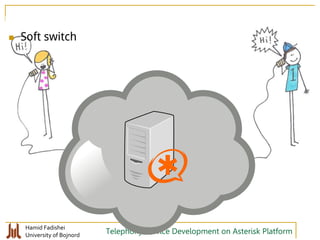
 Soft switch
Hamid Fadishei
University of Bojnord Telephony Service Development on Asterisk Platform
Its capabilities
 Asterisk can do many cool things... It can be used as a...
 Legacy PBX Replacement
 Voicemail Server
 Conferencing Server
 Call Center ACD Queue
 VoIP Endpoint for IP Phones
 Calling Card Application
 Predictive Dialer
 Home Answering Machine
 …
In this workshop, we'll use it to implement a software-based IVR machine. At
the end of this workshop, we will hopefully implement a simple telephony
weather service
Hamid Fadishei
University of Bojnord Telephony Service Development on Asterisk Platform
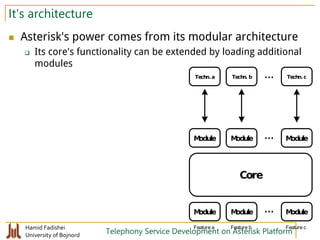
It's architecture
 Asterisk's power comes from its modular architecture
 Its core's functionality can be extended by loading additional
modules
Core
Module Module Module...
Techn.a Techn. b Techn.c...
Module Module Module...
Feature a Feature b Feature c
Hamid Fadishei
University of Bojnord Telephony Service Development on Asterisk Platform
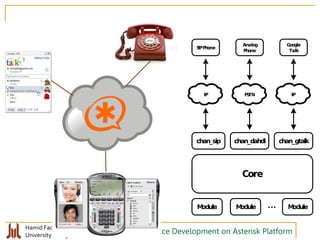
Core
Module Module Module...
SIPPhone
Analog
Phone
chan_sip chan_dahdi
IP PSTN
Google
Talk
chan_gtalk
IP
Hamid Fadishei
University of Bojnord Telephony Service Development on Asterisk Platform
How to install Asterisk
 Different approaches
 Compile from source codes
 Obtain the source code from asterisk.org
 Compile and install it (make install)
 Install precompiled binaries
 Some Linux distributions offer Asterisk in their official repos
 Debian, Ubuntu, and Fedora
 Some offer it by third-party repos
 Centos (via EPEL), Arch (via AUR)
 Install an Asterisk-bundled operating system
 Such as AsteriskNow or Elastix
 The Choice is yours... but I would recommnd...
 The second approach
 less installation hassles, good understanding of the system internals
 takes advantage from regular OS updates
 I prefer packages from either Centos+EPEL or Debian
Hamid Fadishei
University of Bojnord Telephony Service Development on Asterisk Platform
Experimental environment
 We will try asterisk in this environment
 Hardware
 A VM inside Virtualbox
 RAM: 1024MB, CPU:1, HDD: 8GB
 Operating Systems:
 Latest Debian stable release as of today which would be Debian
8.0.0 Jessie
Hamid Fadishei
University of Bojnord Telephony Service Development on Asterisk Platform
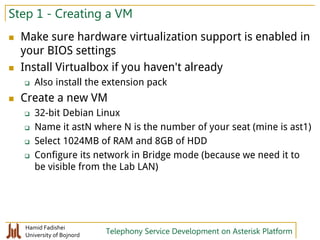
Step 1 - Creating a VM
 Make sure hardware virtualization support is enabled in
your BIOS settings
 Install Virtualbox if you haven't already
 Also install the extension pack
 Create a new VM
 32-bit Debian Linux
 Name it astN where N is the number of your seat (mine is ast1)
 Select 1024MB of RAM and 8GB of HDD
 Configure its network in Bridge mode (because we need it to
be visible from the Lab LAN)
Hamid Fadishei
University of Bojnord Telephony Service Development on Asterisk Platform
Step 2 - Install Debian
 We will install a minimal debian with no graphical
Desktop
 Insert CD#1 ISO image of Debian 8 inside the CD drive of your
new VM and start it
 Select the first boot menu option, "Install"
 Use guided partitioning
 Do not opt to use a network mirror
 Deselect Desktop Environment when it asks which features to
install
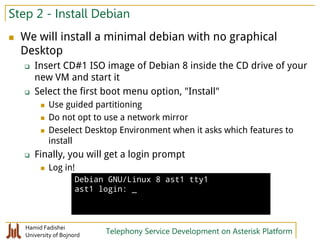
 Finally, you will get a login prompt
 Log in!
Debian GNU/Linux 8 ast1 tty1
ast1 login: _
Hamid Fadishei
University of Bojnord Telephony Service Development on Asterisk Platform
Step 2 - Setup remote access to OS
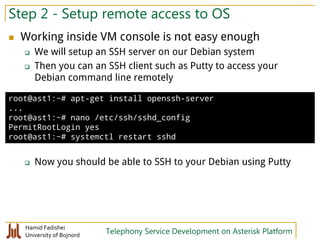
 Working inside VM console is not easy enough
 We will setup an SSH server on our Debian system
 Then you can an SSH client such as Putty to access your
Debian command line remotely
 Now you should be able to SSH to your Debian using Putty
root@ast1:~# apt-get install openssh-server
...
root@ast1:~# nano /etc/ssh/sshd_config
PermitRootLogin yes
root@ast1:~# systemctl restart sshd
Hamid Fadishei
University of Bojnord Telephony Service Development on Asterisk Platform
Step 3 - Install asterisk
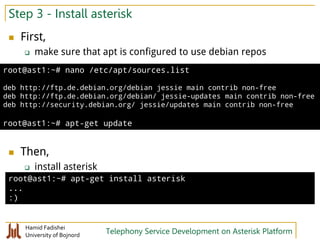
 First,
 make sure that apt is configured to use debian repos
 Then,
 install asterisk
root@ast1:~# nano /etc/apt/sources.list
deb http://ftp.de.debian.org/debian jessie main contrib non-free
deb http://ftp.de.debian.org/debian/ jessie-updates main contrib non-free
deb http://security.debian.org/ jessie/updates main contrib non-free
root@ast1:~# apt-get update
root@ast1:~# apt-get install asterisk
...
:)
Hamid Fadishei
University of Bojnord Telephony Service Development on Asterisk Platform
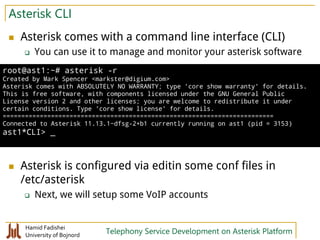
Asterisk CLI
 Asterisk comes with a command line interface (CLI)
 You can use it to manage and monitor your asterisk software
 Asterisk is configured via editin some conf files in
/etc/asterisk
 Next, we will setup some VoIP accounts
root@ast1:~# asterisk -r
Created by Mark Spencer <markster@digium.com>
Asterisk comes with ABSOLUTELY NO WARRANTY; type 'core show warranty' for details.
This is free software, with components licensed under the GNU General Public
License version 2 and other licenses; you are welcome to redistribute it under
certain conditions. Type 'core show license' for details.
=========================================================================
Connected to Asterisk 11.13.1~dfsg-2+b1 currently running on ast1 (pid = 3153)
ast1*CLI> _
Hamid Fadishei
University of Bojnord Telephony Service Development on Asterisk Platform
Step4-AddacoupleofSIPaccounts
root@ast1:~# nano /etc/asterisk/sip.conf
[general]
allowguest=no
disallow=all
allow=gsm
jbenable=no
deny=0.0.0.0/0.0.0.0
permit=0.0.0.0/0.0.0.0
[101]
secret=asdf1234
context=phones
host=dynamic
type=friend
mailbox=101@default
callerid=Test 1 <101>
[102]
secret=asdf1234
context=phones
host=dynamic
type=friend
mailbox=102@default
callerid=Test 2 <102>
Hamid Fadishei
University of Bojnord Telephony Service Development on Asterisk Platform
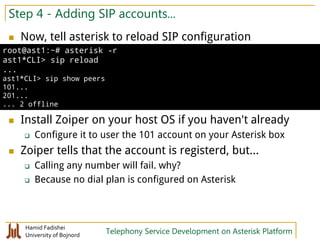
Step 4 - Adding SIP accounts...
 Now, tell asterisk to reload SIP configuration
 Install Zoiper on your host OS if you haven't already
 Configure it to user the 101 account on your Asterisk box
 Zoiper tells that the account is registerd, but...
 Calling any number will fail. why?
 Because no dial plan is configured on Asterisk
root@ast1:~# asterisk -r
ast1*CLI> sip reload
...
ast1*CLI> sip show peers
101...
201...
... 2 offline
Hamid Fadishei
University of Bojnord Telephony Service Development on Asterisk Platform
Step 5 - Configuring a dial plan
 Add a simple dial plan
 And,...
 Then, dial 876
root@ast1:~# nano /etc/asterisk/extensions.conf
[general]
static=yes
writeprotect=no
autofallthrough=yes
[phones]
exten => 876,1,Answer()
exten => 876,2,Playback(hello-world)
exten => 876,3,Hangup()
ast1*CLI> dialplan reload
Hamid Fadishei
University of Bojnord Telephony Service Development on Asterisk Platform
Dialplan structure
 Add a simple dial plan
root@ast1:~# nano /etc/asterisk/extensions.conf
[general]
static=yes
writeprotect=no
autofallthrough=yes
[phones]
exten => 876,1,Answer()
exten => 876,2,Playback(hello-world)
exten => 876,3,Hangup()
Context
Extension
Priority
Application
Hamid Fadishei
University of Bojnord Telephony Service Development on Asterisk Platform
Some hints
 You don't have to explicitly mentions priorities:
 You can use Goto application to write neater dialplans
[phones]
exten => 876,1,Answer()
exten => 876,n,Playback(hello-world)
exten => 876,n,Hangup()
[phones]
exten => 876,1,Goto(hello,s,1)
[hello]
exten => s,1,Answer()
exten => s,n,Playback(hello-world)
exten => s,n,Hangup()
Hamid Fadishei
University of Bojnord Telephony Service Development on Asterisk Platform
Calling phones
 In order to make a call to another phone registerd at
the same Asterisk server,
 You'll need to use the "Dial" application inside dialplan
...
[phones]
exten => 876,1,Goto(hello,s,1)
exten => 101,1,Dial(SIP/101)
exten => 102,1,Dial(SIP/102)
...
Hamid Fadishei
University of Bojnord Telephony Service Development on Asterisk Platform
Power of Asterisk dialplan
 Asterisk allows you to write very complex dialplans
 But the focus of this workshop is not mastering dialplan
development
 We will focus on developing services using
programming languages such as Java or PHP
Hamid Fadishei
University of Bojnord Telephony Service Development on Asterisk Platform
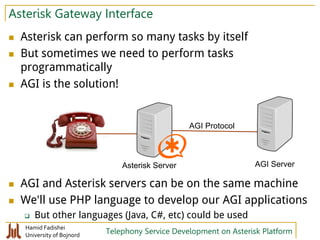
Asterisk Gateway Interface
 Asterisk can perform so many tasks by itself
 But sometimes we need to perform tasks
programmatically
 AGI is the solution!
 AGI and Asterisk servers can be on the same machine
 We'll use PHP language to develop our AGI applications
 But other languages (Java, C#, etc) could be used
Asterisk Server AGI Server
AGI Protocol
Hamid Fadishei
University of Bojnord Telephony Service Development on Asterisk Platform
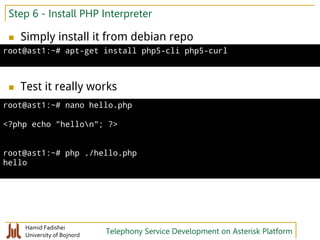
Step 6 - Install PHP Interpreter
 Simply install it from debian repo
 Test it really works
root@ast1:~# apt-get install php5-cli php5-curl
root@ast1:~# nano hello.php
<?php echo "hellon"; ?>
root@ast1:~# php ./hello.php
hello
Hamid Fadishei
University of Bojnord Telephony Service Development on Asterisk Platform
Step 7 - AGI hello world
 Extract and copy PHPAGI library files:
 Create a simple AGI script:
 Configure dialplan to call the script
root@ast1:~# tar -xf phpagi-2.20.tgz
root@ast1:~# cp phpagi-2.20/phpagi*.php /usr/share/asterisk/agi-bin/
root@ast1:~# nano /usr/share/asterisk/agi-bin/hello.php
#!/usr/bin/php
<?php
set_time_limit(0);
require('phpagi.php');
$agi = new AGI();
$agi->answer();
$agi->stream_file('hello-world');
$agi->hangup();
?>
root@ast1:~# chmod a+x /usr/share/asterisk/agi-bin/hello.php
[phones]
exten => 875,1,AGI(hello.php)
Hamid Fadishei
University of Bojnord Telephony Service Development on Asterisk Platform
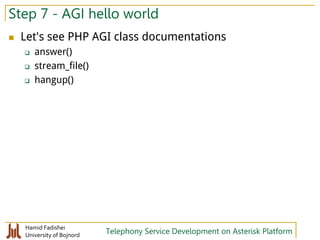
Step 7 - AGI hello world
 Let's see PHP AGI class documentations
 answer()
 stream_file()
 hangup()
Hamid Fadishei
University of Bojnord Telephony Service Development on Asterisk Platform
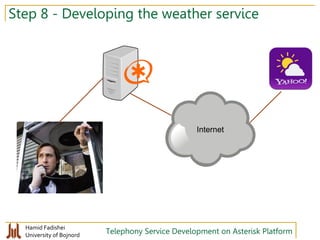
Step 8 - Developing the weather service
Internet
Hamid Fadishei
University of Bojnord Telephony Service Development on Asterisk Platform
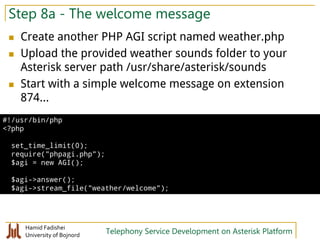
Step 8a - The welcome message
 Create another PHP AGI script named weather.php
 Upload the provided weather sounds folder to your
Asterisk server path /usr/share/asterisk/sounds
 Start with a simple welcome message on extension
874...
#!/usr/bin/php
<?php
set_time_limit(0);
require("phpagi.php");
$agi = new AGI();
$agi->answer();
$agi->stream_file("weather/welcome");
Hamid Fadishei
University of Bojnord Telephony Service Development on Asterisk Platform
Step 8b - Getting the area code
 Let's see two more PHP AGI methods
 get_data()
 verbose()
...
$agi->stream_file("weather/welcome");
$data = $agi->get_data("weather/enter-area-code", 20000, 5);
$code = $data["result"];
$agi->verbose("got area code: $code");
Hamid Fadishei
University of Bojnord Telephony Service Development on Asterisk Platform
Step 8c - Calculating the woeid
 Yahoo! weather webservice requires a region code
 We need to convert city area code to Yahoo! region
code
 A table can do the job
...
$agi->verbose("got area code: $code");
$woeids = array(
11 => 2255150, // Sari
13 => 2255086, // Rasht
17 => 2217763, // Gorgan
21 => 2251945, // Tehran
...
86 => 2254333, // Arak
87 => 2255130, // Sanandaj
);
$woeid = $woeids[$code];
$agi->verbose("got woeid: $woeid");
Hamid Fadishei
University of Bojnord Telephony Service Development on Asterisk Platform
Step 8d -Always validate user input!
 Change this segment:
 to:
...
$data = $agi->get_data("weather/enter-area-code", 20000, 5);
...
$woeid = $woeids[$code];
$agi->verbose("got woeid: $woeid");
...
get_area_code;
$data = $agi->get_data("weather/enter-area-code", 20000, 5);
...
$woeid = $woeids[$code];
if (!$woeid)
{
$agi->stream_file("weather/invalid-number");
goto get_area_code;
}
$agi->verbose("got woeid: $woeid");
Hamid Fadishei
University of Bojnord Telephony Service Development on Asterisk Platform
Step 8e - Calling the webservice
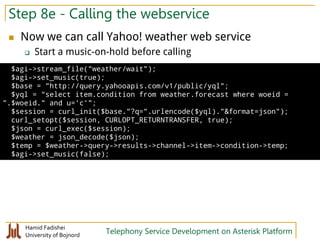
 Now we can call Yahoo! weather web service
 Start a music-on-hold before calling
$agi->stream_file("weather/wait");
$agi->set_music(true);
$base = "http://query.yahooapis.com/v1/public/yql";
$yql = "select item.condition from weather.forecast where woeid =
".$woeid." and u='c'";
$session = curl_init($base."?q=".urlencode($yql)."&format=json");
curl_setopt($session, CURLOPT_RETURNTRANSFER, true);
$json = curl_exec($session);
$weather = json_decode($json);
$temp = $weather->query->results->channel->item->condition->temp;
$agi->set_music(false);
Hamid Fadishei
University of Bojnord Telephony Service Development on Asterisk Platform
Step 8f - Say temperature
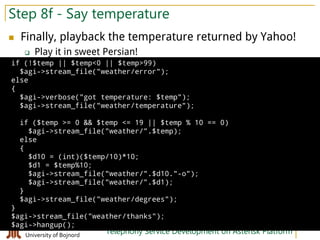
 Finally, playback the temperature returned by Yahoo!
 Play it in sweet Persian!
if (!$temp || $temp<0 || $temp>99)
$agi->stream_file("weather/error");
else
{
$agi->verbose("got temperature: $temp");
$agi->stream_file("weather/temperature");
if ($temp >= 0 && $temp <= 19 || $temp % 10 == 0)
$agi->stream_file("weather/".$temp);
else
{
$d10 = (int)($temp/10)*10;
$d1 = $temp%10;
$agi->stream_file("weather/".$d10."-o");
$agi->stream_file("weather/".$d1);
}
$agi->stream_file("weather/degrees");
}
$agi->stream_file("weather/thanks");
$agi->hangup();
Hamid Fadishei
University of Bojnord Telephony Service Development on Asterisk Platform
A few words on selecting hardware
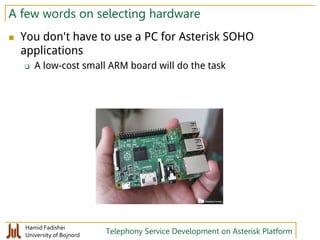
 You don't have to use a PC for Asterisk SOHO
applications
 A low-cost small ARM board will do the task
Hamid Fadishei
University of Bojnord Telephony Service Development on Asterisk Platform
Next steps
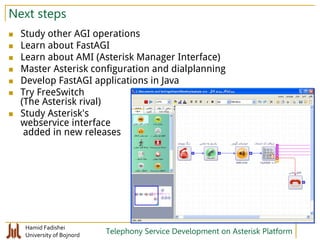
 Study other AGI operations
 Learn about FastAGI
 Learn about AMI (Asterisk Manager Interface)
 Master Asterisk configuration and dialplanning
 Develop FastAGI applications in Java
 Try FreeSwitch
(The Asterisk rival)
 Study Asterisk's
webservice interface
added in new releases

Telephony Service Development on Asterisk Platform

  • 1.
    Hamid Fadishei Assistant Professor,University of Bojnord fadishei@yahoo.com http://www.fadishei.ir Spring 2015 Telephony Service Development on Asterisk Platform Workshop
  • 2.
    Hamid Fadishei University ofBojnord Telephony Service Development on Asterisk Platform What's Asterisk?  Hard to tell in one sentence  A very powerful, flexible, and extensible piece of integrated telecommunications software  An Open Source Telephony Swiss Army Knife  A Linux Based PBX w/ Minimal Hardware Reqs  A Community Driven Development Project Asterisk turns an ordinary computer into a communications server. Asterisk powers IP PBX systems, VoIP gateways, conference servers and is used by small businesses, large businesses, call centers, carriers and governments worldwide.
  • 3.
    Hamid Fadishei University ofBojnord Telephony Service Development on Asterisk Platform Its birth  Asterisk was created in 1999 by Mark Spencer This guy!
  • 4.
    Hamid Fadishei University ofBojnord Telephony Service Development on Asterisk Platform Telecom technology, once upon a time...  No switch
  • 5.
    Hamid Fadishei University ofBojnord Telephony Service Development on Asterisk Platform  Human switch!
  • 6.
    Hamid Fadishei University ofBojnord Telephony Service Development on Asterisk Platform  Mechanical switch
  • 7.
    Hamid Fadishei University ofBojnord Telephony Service Development on Asterisk Platform  Soft switch Digital switch
  • 8.
    Hamid Fadishei University ofBojnord Telephony Service Development on Asterisk Platform  Soft switch
  • 9.
    Hamid Fadishei University ofBojnord Telephony Service Development on Asterisk Platform Its capabilities  Asterisk can do many cool things... It can be used as a...  Legacy PBX Replacement  Voicemail Server  Conferencing Server  Call Center ACD Queue  VoIP Endpoint for IP Phones  Calling Card Application  Predictive Dialer  Home Answering Machine  … In this workshop, we'll use it to implement a software-based IVR machine. At the end of this workshop, we will hopefully implement a simple telephony weather service
  • 10.
    Hamid Fadishei University ofBojnord Telephony Service Development on Asterisk Platform It's architecture  Asterisk's power comes from its modular architecture  Its core's functionality can be extended by loading additional modules Core Module Module Module... Techn.a Techn. b Techn.c... Module Module Module... Feature a Feature b Feature c
  • 11.
    Hamid Fadishei University ofBojnord Telephony Service Development on Asterisk Platform Core Module Module Module... SIPPhone Analog Phone chan_sip chan_dahdi IP PSTN Google Talk chan_gtalk IP
  • 12.
    Hamid Fadishei University ofBojnord Telephony Service Development on Asterisk Platform How to install Asterisk  Different approaches  Compile from source codes  Obtain the source code from asterisk.org  Compile and install it (make install)  Install precompiled binaries  Some Linux distributions offer Asterisk in their official repos  Debian, Ubuntu, and Fedora  Some offer it by third-party repos  Centos (via EPEL), Arch (via AUR)  Install an Asterisk-bundled operating system  Such as AsteriskNow or Elastix  The Choice is yours... but I would recommnd...  The second approach  less installation hassles, good understanding of the system internals  takes advantage from regular OS updates  I prefer packages from either Centos+EPEL or Debian
  • 13.
    Hamid Fadishei University ofBojnord Telephony Service Development on Asterisk Platform Experimental environment  We will try asterisk in this environment  Hardware  A VM inside Virtualbox  RAM: 1024MB, CPU:1, HDD: 8GB  Operating Systems:  Latest Debian stable release as of today which would be Debian 8.0.0 Jessie
  • 14.
    Hamid Fadishei University ofBojnord Telephony Service Development on Asterisk Platform Step 1 - Creating a VM  Make sure hardware virtualization support is enabled in your BIOS settings  Install Virtualbox if you haven't already  Also install the extension pack  Create a new VM  32-bit Debian Linux  Name it astN where N is the number of your seat (mine is ast1)  Select 1024MB of RAM and 8GB of HDD  Configure its network in Bridge mode (because we need it to be visible from the Lab LAN)
  • 15.
    Hamid Fadishei University ofBojnord Telephony Service Development on Asterisk Platform Step 2 - Install Debian  We will install a minimal debian with no graphical Desktop  Insert CD#1 ISO image of Debian 8 inside the CD drive of your new VM and start it  Select the first boot menu option, "Install"  Use guided partitioning  Do not opt to use a network mirror  Deselect Desktop Environment when it asks which features to install  Finally, you will get a login prompt  Log in! Debian GNU/Linux 8 ast1 tty1 ast1 login: _
  • 16.
    Hamid Fadishei University ofBojnord Telephony Service Development on Asterisk Platform Step 2 - Setup remote access to OS  Working inside VM console is not easy enough  We will setup an SSH server on our Debian system  Then you can an SSH client such as Putty to access your Debian command line remotely  Now you should be able to SSH to your Debian using Putty root@ast1:~# apt-get install openssh-server ... root@ast1:~# nano /etc/ssh/sshd_config PermitRootLogin yes root@ast1:~# systemctl restart sshd
  • 17.
    Hamid Fadishei University ofBojnord Telephony Service Development on Asterisk Platform Step 3 - Install asterisk  First,  make sure that apt is configured to use debian repos  Then,  install asterisk root@ast1:~# nano /etc/apt/sources.list deb http://ftp.de.debian.org/debian jessie main contrib non-free deb http://ftp.de.debian.org/debian/ jessie-updates main contrib non-free deb http://security.debian.org/ jessie/updates main contrib non-free root@ast1:~# apt-get update root@ast1:~# apt-get install asterisk ... :)
  • 18.
    Hamid Fadishei University ofBojnord Telephony Service Development on Asterisk Platform Asterisk CLI  Asterisk comes with a command line interface (CLI)  You can use it to manage and monitor your asterisk software  Asterisk is configured via editin some conf files in /etc/asterisk  Next, we will setup some VoIP accounts root@ast1:~# asterisk -r Created by Mark Spencer <markster@digium.com> Asterisk comes with ABSOLUTELY NO WARRANTY; type 'core show warranty' for details. This is free software, with components licensed under the GNU General Public License version 2 and other licenses; you are welcome to redistribute it under certain conditions. Type 'core show license' for details. ========================================================================= Connected to Asterisk 11.13.1~dfsg-2+b1 currently running on ast1 (pid = 3153) ast1*CLI> _
  • 19.
    Hamid Fadishei University ofBojnord Telephony Service Development on Asterisk Platform Step4-AddacoupleofSIPaccounts root@ast1:~# nano /etc/asterisk/sip.conf [general] allowguest=no disallow=all allow=gsm jbenable=no deny=0.0.0.0/0.0.0.0 permit=0.0.0.0/0.0.0.0 [101] secret=asdf1234 context=phones host=dynamic type=friend mailbox=101@default callerid=Test 1 <101> [102] secret=asdf1234 context=phones host=dynamic type=friend mailbox=102@default callerid=Test 2 <102>
  • 20.
    Hamid Fadishei University ofBojnord Telephony Service Development on Asterisk Platform Step 4 - Adding SIP accounts...  Now, tell asterisk to reload SIP configuration  Install Zoiper on your host OS if you haven't already  Configure it to user the 101 account on your Asterisk box  Zoiper tells that the account is registerd, but...  Calling any number will fail. why?  Because no dial plan is configured on Asterisk root@ast1:~# asterisk -r ast1*CLI> sip reload ... ast1*CLI> sip show peers 101... 201... ... 2 offline
  • 21.
    Hamid Fadishei University ofBojnord Telephony Service Development on Asterisk Platform Step 5 - Configuring a dial plan  Add a simple dial plan  And,...  Then, dial 876 root@ast1:~# nano /etc/asterisk/extensions.conf [general] static=yes writeprotect=no autofallthrough=yes [phones] exten => 876,1,Answer() exten => 876,2,Playback(hello-world) exten => 876,3,Hangup() ast1*CLI> dialplan reload
  • 22.
    Hamid Fadishei University ofBojnord Telephony Service Development on Asterisk Platform Dialplan structure  Add a simple dial plan root@ast1:~# nano /etc/asterisk/extensions.conf [general] static=yes writeprotect=no autofallthrough=yes [phones] exten => 876,1,Answer() exten => 876,2,Playback(hello-world) exten => 876,3,Hangup() Context Extension Priority Application
  • 23.
    Hamid Fadishei University ofBojnord Telephony Service Development on Asterisk Platform Some hints  You don't have to explicitly mentions priorities:  You can use Goto application to write neater dialplans [phones] exten => 876,1,Answer() exten => 876,n,Playback(hello-world) exten => 876,n,Hangup() [phones] exten => 876,1,Goto(hello,s,1) [hello] exten => s,1,Answer() exten => s,n,Playback(hello-world) exten => s,n,Hangup()
  • 24.
    Hamid Fadishei University ofBojnord Telephony Service Development on Asterisk Platform Calling phones  In order to make a call to another phone registerd at the same Asterisk server,  You'll need to use the "Dial" application inside dialplan ... [phones] exten => 876,1,Goto(hello,s,1) exten => 101,1,Dial(SIP/101) exten => 102,1,Dial(SIP/102) ...
  • 25.
    Hamid Fadishei University ofBojnord Telephony Service Development on Asterisk Platform Power of Asterisk dialplan  Asterisk allows you to write very complex dialplans  But the focus of this workshop is not mastering dialplan development  We will focus on developing services using programming languages such as Java or PHP
  • 26.
    Hamid Fadishei University ofBojnord Telephony Service Development on Asterisk Platform Asterisk Gateway Interface  Asterisk can perform so many tasks by itself  But sometimes we need to perform tasks programmatically  AGI is the solution!  AGI and Asterisk servers can be on the same machine  We'll use PHP language to develop our AGI applications  But other languages (Java, C#, etc) could be used Asterisk Server AGI Server AGI Protocol
  • 27.
    Hamid Fadishei University ofBojnord Telephony Service Development on Asterisk Platform Step 6 - Install PHP Interpreter  Simply install it from debian repo  Test it really works root@ast1:~# apt-get install php5-cli php5-curl root@ast1:~# nano hello.php <?php echo "hellon"; ?> root@ast1:~# php ./hello.php hello
  • 28.
    Hamid Fadishei University ofBojnord Telephony Service Development on Asterisk Platform Step 7 - AGI hello world  Extract and copy PHPAGI library files:  Create a simple AGI script:  Configure dialplan to call the script root@ast1:~# tar -xf phpagi-2.20.tgz root@ast1:~# cp phpagi-2.20/phpagi*.php /usr/share/asterisk/agi-bin/ root@ast1:~# nano /usr/share/asterisk/agi-bin/hello.php #!/usr/bin/php <?php set_time_limit(0); require('phpagi.php'); $agi = new AGI(); $agi->answer(); $agi->stream_file('hello-world'); $agi->hangup(); ?> root@ast1:~# chmod a+x /usr/share/asterisk/agi-bin/hello.php [phones] exten => 875,1,AGI(hello.php)
  • 29.
    Hamid Fadishei University ofBojnord Telephony Service Development on Asterisk Platform Step 7 - AGI hello world  Let's see PHP AGI class documentations  answer()  stream_file()  hangup()
  • 30.
    Hamid Fadishei University ofBojnord Telephony Service Development on Asterisk Platform Step 8 - Developing the weather service Internet
  • 31.
    Hamid Fadishei University ofBojnord Telephony Service Development on Asterisk Platform Step 8a - The welcome message  Create another PHP AGI script named weather.php  Upload the provided weather sounds folder to your Asterisk server path /usr/share/asterisk/sounds  Start with a simple welcome message on extension 874... #!/usr/bin/php <?php set_time_limit(0); require("phpagi.php"); $agi = new AGI(); $agi->answer(); $agi->stream_file("weather/welcome");
  • 32.
    Hamid Fadishei University ofBojnord Telephony Service Development on Asterisk Platform Step 8b - Getting the area code  Let's see two more PHP AGI methods  get_data()  verbose() ... $agi->stream_file("weather/welcome"); $data = $agi->get_data("weather/enter-area-code", 20000, 5); $code = $data["result"]; $agi->verbose("got area code: $code");
  • 33.
    Hamid Fadishei University ofBojnord Telephony Service Development on Asterisk Platform Step 8c - Calculating the woeid  Yahoo! weather webservice requires a region code  We need to convert city area code to Yahoo! region code  A table can do the job ... $agi->verbose("got area code: $code"); $woeids = array( 11 => 2255150, // Sari 13 => 2255086, // Rasht 17 => 2217763, // Gorgan 21 => 2251945, // Tehran ... 86 => 2254333, // Arak 87 => 2255130, // Sanandaj ); $woeid = $woeids[$code]; $agi->verbose("got woeid: $woeid");
  • 34.
    Hamid Fadishei University ofBojnord Telephony Service Development on Asterisk Platform Step 8d -Always validate user input!  Change this segment:  to: ... $data = $agi->get_data("weather/enter-area-code", 20000, 5); ... $woeid = $woeids[$code]; $agi->verbose("got woeid: $woeid"); ... get_area_code; $data = $agi->get_data("weather/enter-area-code", 20000, 5); ... $woeid = $woeids[$code]; if (!$woeid) { $agi->stream_file("weather/invalid-number"); goto get_area_code; } $agi->verbose("got woeid: $woeid");
  • 35.
    Hamid Fadishei University ofBojnord Telephony Service Development on Asterisk Platform Step 8e - Calling the webservice  Now we can call Yahoo! weather web service  Start a music-on-hold before calling $agi->stream_file("weather/wait"); $agi->set_music(true); $base = "http://query.yahooapis.com/v1/public/yql"; $yql = "select item.condition from weather.forecast where woeid = ".$woeid." and u='c'"; $session = curl_init($base."?q=".urlencode($yql)."&format=json"); curl_setopt($session, CURLOPT_RETURNTRANSFER, true); $json = curl_exec($session); $weather = json_decode($json); $temp = $weather->query->results->channel->item->condition->temp; $agi->set_music(false);
  • 36.
    Hamid Fadishei University ofBojnord Telephony Service Development on Asterisk Platform Step 8f - Say temperature  Finally, playback the temperature returned by Yahoo!  Play it in sweet Persian! if (!$temp || $temp<0 || $temp>99) $agi->stream_file("weather/error"); else { $agi->verbose("got temperature: $temp"); $agi->stream_file("weather/temperature"); if ($temp >= 0 && $temp <= 19 || $temp % 10 == 0) $agi->stream_file("weather/".$temp); else { $d10 = (int)($temp/10)*10; $d1 = $temp%10; $agi->stream_file("weather/".$d10."-o"); $agi->stream_file("weather/".$d1); } $agi->stream_file("weather/degrees"); } $agi->stream_file("weather/thanks"); $agi->hangup();
  • 37.
    Hamid Fadishei University ofBojnord Telephony Service Development on Asterisk Platform A few words on selecting hardware  You don't have to use a PC for Asterisk SOHO applications  A low-cost small ARM board will do the task
  • 38.
    Hamid Fadishei University ofBojnord Telephony Service Development on Asterisk Platform Next steps  Study other AGI operations  Learn about FastAGI  Learn about AMI (Asterisk Manager Interface)  Master Asterisk configuration and dialplanning  Develop FastAGI applications in Java  Try FreeSwitch (The Asterisk rival)  Study Asterisk's webservice interface added in new releases