A screenshot paints a thousand words.
The problem
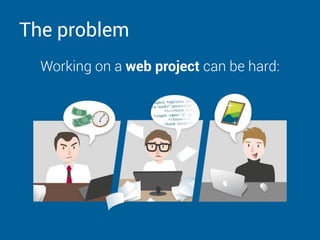
Working on a web project can be hard:
The problem
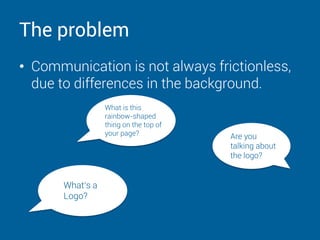
• Communication is not always frictionless,
due to differences in the background.
Are you
talking about
the logo?
What‘s a
Logo?
What is this
rainbow-shaped
thing on the top of
your page?
The solution
Usersnap provides visual and annotated
feedback via screenshots of the current
browser content to close the gap between
reporting web problems and fixing them. We
unify communication between all parties
involved in the process, including the end
users.
Why Usersnap?
• Usersnap helps you to be understood!
• Provide visual & annotated feedback
• See your work through the client‘s eyes
• It‘s 100% web based – no download
required
• And brings you 25% higher efficiency
No way? Can
you prove it?
Why higher efficiency?
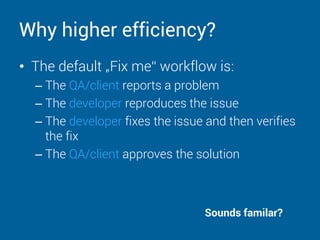
• The default „Fix me“ workflow is:
– The QA/client reports a problem
– The developer reproduces the issue
– The developer fixes the issue and then verifies
the fix
– The QA/client approves the solution
Sounds familar?
Why higher efficiency?
• How clients report problems:
– Common methods: Email, MS-Paint, Skype,
Bug tracker, Live Chat, even over the phone.
– They don't know what information you need
and what „reproduction“ means
– They don't know the magic words: div, span,
pixel, browser version, etc.
Why higher efficiency?
• How developers reproduces the issue:
– The more information the developer has, the
quicker he/she can reproduce the issue.
– Details like browser version, URL, Screensize,
etc. are also necessary.
– AND even a screenshot.
If the information is not enough, the Ping - Pong communication will be
initiated.
Why higher efficiency?
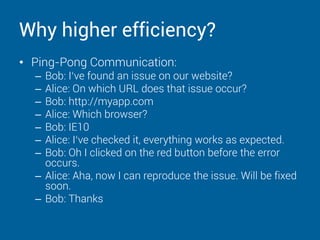
• Ping-Pong Communication:
– Bob: I‘ve found an issue on our website?
– Alice: On which URL does that issue occur?
– Bob: http://myapp.com
– Alice: Which browser?
– Bob: IE10
– Alice: I‘ve checked it, everything works as expected.
– Bob: Oh I clicked on the red button before the error
occurs.
– Alice: Aha, now I can reproduce the issue. Will be fixed
soon.
– Bob: Thanks
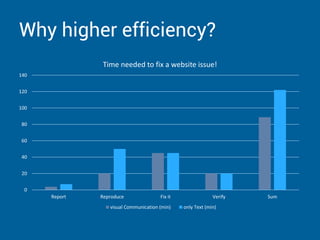
Why higher efficiency?
0
20
40
60
80
100
120
140
Report Reproduce Fix it Verify Sum
Time needed to fix a website issue!
visual Communication (min) only Text (min)
Why Usersnap?
• Usersnap helps you to be understood!
• Provide visual & annotated feedback and
almost everything needed to speed up the
process
• Makes communication and feedback
meaningful and effective.
• Brings you 25% higher efficiency
We‘ve proved
it to you
A video
We‘ve created a short video (2:08), comparing the
„old“ way of reporting web problems – the way
everybody knows: „the good `ol MS Paint“ and the
new one, using our solution.
Visit this url to see it:
http://bit.ly/1jdVS9t
Why Usersnap?
You could have 1:22 man-hours more every day to
improve your business.
Get a free trial, free training and the gift of 25%
higher efficiency.
http://usersnap.com

What is Usersnap

  • 1.
    A screenshot paintsa thousand words.
  • 2.
    The problem Working ona web project can be hard:
  • 3.
    The problem • Communicationis not always frictionless, due to differences in the background. Are you talking about the logo? What‘s a Logo? What is this rainbow-shaped thing on the top of your page?
  • 4.
    The solution Usersnap providesvisual and annotated feedback via screenshots of the current browser content to close the gap between reporting web problems and fixing them. We unify communication between all parties involved in the process, including the end users.
  • 5.
    Why Usersnap? • Usersnaphelps you to be understood! • Provide visual & annotated feedback • See your work through the client‘s eyes • It‘s 100% web based – no download required • And brings you 25% higher efficiency No way? Can you prove it?
  • 6.
    Why higher efficiency? •The default „Fix me“ workflow is: – The QA/client reports a problem – The developer reproduces the issue – The developer fixes the issue and then verifies the fix – The QA/client approves the solution Sounds familar?
  • 7.
    Why higher efficiency? •How clients report problems: – Common methods: Email, MS-Paint, Skype, Bug tracker, Live Chat, even over the phone. – They don't know what information you need and what „reproduction“ means – They don't know the magic words: div, span, pixel, browser version, etc.
  • 8.
    Why higher efficiency? •How developers reproduces the issue: – The more information the developer has, the quicker he/she can reproduce the issue. – Details like browser version, URL, Screensize, etc. are also necessary. – AND even a screenshot. If the information is not enough, the Ping - Pong communication will be initiated.
  • 9.
    Why higher efficiency? •Ping-Pong Communication: – Bob: I‘ve found an issue on our website? – Alice: On which URL does that issue occur? – Bob: http://myapp.com – Alice: Which browser? – Bob: IE10 – Alice: I‘ve checked it, everything works as expected. – Bob: Oh I clicked on the red button before the error occurs. – Alice: Aha, now I can reproduce the issue. Will be fixed soon. – Bob: Thanks
  • 10.
    Why higher efficiency? 0 20 40 60 80 100 120 140 ReportReproduce Fix it Verify Sum Time needed to fix a website issue! visual Communication (min) only Text (min)
  • 11.
    Why Usersnap? • Usersnaphelps you to be understood! • Provide visual & annotated feedback and almost everything needed to speed up the process • Makes communication and feedback meaningful and effective. • Brings you 25% higher efficiency We‘ve proved it to you
  • 12.
    A video We‘ve createda short video (2:08), comparing the „old“ way of reporting web problems – the way everybody knows: „the good `ol MS Paint“ and the new one, using our solution. Visit this url to see it: http://bit.ly/1jdVS9t
  • 13.
    Why Usersnap? You couldhave 1:22 man-hours more every day to improve your business. Get a free trial, free training and the gift of 25% higher efficiency. http://usersnap.com