User Management on SharePoint Online
Hoang Nhut NGUYEN
http://niftit.com
http://o365.vn
About Me
• Job Title: Technical Leader – SharePoint Consultant
• Communities and Blog:
• SharePoint Saturday :
http://www.sharepointsaturday.org/vietnam
Organizer & Speaker
• Communities:
• http://o365.vn
• My Blog: http://nhutcmos.wordpress.com
• Follow me:
• http://facebook.com/terrencenguyenhoang
• http://twitter.com/nhutcmos
• https://profiles.google.com/nhutcmos
Agenda
• Understand Office 365 licenses
• A real life case study
• Solution and tools
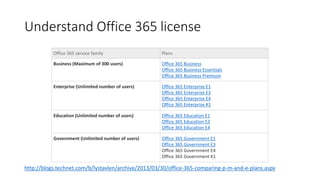
Understand Office 365 license
Office 365 service family Plans
Business (Maximum of 300 users) Office 365 Business
Office 365 Business Essentials
Office 365 Business Premium
Enterprise (Unlimited number of users) Office 365 Enterprise E1
Office 365 Enterprise E3
Office 365 Enterprise E4
Office 365 Enterprise K1
Education (Unlimited number of users) Office 365 Education E1
Office 365 Education E3
Office 365 Education E4
Government (Unlimited number of users) Office 365 Government E1
Office 365 Government E3
Office 365 Government E4
Office 365 Government K1
http://blogs.technet.com/b/lystavlen/archive/2013/03/30/office-365-comparing-p-m-and-e-plans.aspx
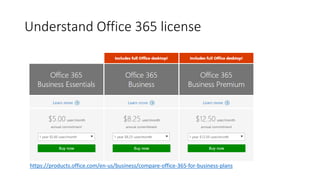
Understand Office 365 license
https://products.office.com/en-us/business/compare-office-365-for-business-plans
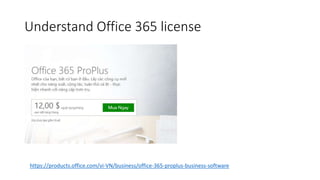
Understand Office 365 license
https://products.office.com/vi-VN/business/office-365-proplus-business-software
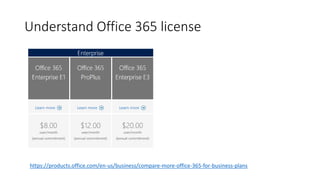
Understand Office 365 license
https://products.office.com/en-us/business/compare-more-office-365-for-business-plans
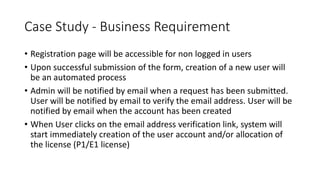
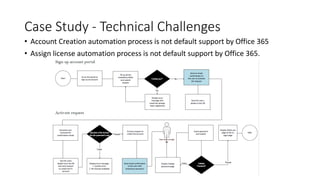
Case Study - Business Requirement
• Registration page will be accessible for non logged in users​
• Upon successful submission of the form, creation of a new user will
be an automated process​​
• Admin will be notified by email when a request has been submitted.
User will be notified by email to verify the email address. ​User will be
notified by email when the account has been created
• When User clicks on the email address verification link, system will
start immediately creation of the user account and/or allocation of
the license (P1/E1 license)​
Case Study - Technical Challenges
• Account Creation automation process is not default support by Office 365
• Assign license automation process is not default support by Office 365.
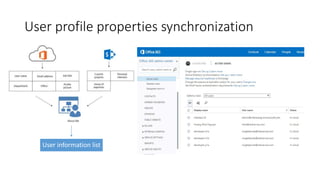
User profile properties synchronization
User information list
Solution and Tools
• Windows Azure Active Directory Module for Windows PowerShell
• MSOnline Powershell Module
• System.Management.Automation
• SPServices
• PeopleManager Services
• JSOM SharePoint API
DEMO

User and License Management on SharePoint Online

  • 1.
    User Management onSharePoint Online Hoang Nhut NGUYEN http://niftit.com http://o365.vn
  • 2.
    About Me • JobTitle: Technical Leader – SharePoint Consultant • Communities and Blog: • SharePoint Saturday : http://www.sharepointsaturday.org/vietnam Organizer & Speaker • Communities: • http://o365.vn • My Blog: http://nhutcmos.wordpress.com • Follow me: • http://facebook.com/terrencenguyenhoang • http://twitter.com/nhutcmos • https://profiles.google.com/nhutcmos
  • 3.
    Agenda • Understand Office365 licenses • A real life case study • Solution and tools
  • 4.
    Understand Office 365license Office 365 service family Plans Business (Maximum of 300 users) Office 365 Business Office 365 Business Essentials Office 365 Business Premium Enterprise (Unlimited number of users) Office 365 Enterprise E1 Office 365 Enterprise E3 Office 365 Enterprise E4 Office 365 Enterprise K1 Education (Unlimited number of users) Office 365 Education E1 Office 365 Education E3 Office 365 Education E4 Government (Unlimited number of users) Office 365 Government E1 Office 365 Government E3 Office 365 Government E4 Office 365 Government K1 http://blogs.technet.com/b/lystavlen/archive/2013/03/30/office-365-comparing-p-m-and-e-plans.aspx
  • 5.
    Understand Office 365license https://products.office.com/en-us/business/compare-office-365-for-business-plans
  • 6.
    Understand Office 365license https://products.office.com/vi-VN/business/office-365-proplus-business-software
  • 7.
    Understand Office 365license https://products.office.com/en-us/business/compare-more-office-365-for-business-plans
  • 8.
    Case Study -Business Requirement • Registration page will be accessible for non logged in users​ • Upon successful submission of the form, creation of a new user will be an automated process​​ • Admin will be notified by email when a request has been submitted. User will be notified by email to verify the email address. ​User will be notified by email when the account has been created • When User clicks on the email address verification link, system will start immediately creation of the user account and/or allocation of the license (P1/E1 license)​
  • 9.
    Case Study -Technical Challenges • Account Creation automation process is not default support by Office 365 • Assign license automation process is not default support by Office 365.
  • 10.
    User profile propertiessynchronization User information list
  • 11.
    Solution and Tools •Windows Azure Active Directory Module for Windows PowerShell • MSOnline Powershell Module • System.Management.Automation • SPServices • PeopleManager Services • JSOM SharePoint API
  • 12.