USER INTERFACE OF DIGITAL LIBRARY SOFTWARE
Om Prakash Samal
Dept. of LIS
Khallikote University, Berhampur
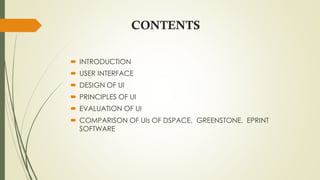
CONTENTS
 INTRODUCTION
 USER INTERFACE
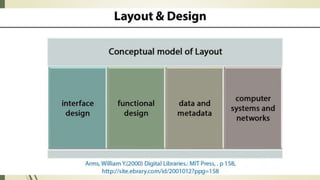
 DESIGN OF UI
 PRINCIPLES OF UI
 EVALUATION OF UI
 COMPARISON OF UIs OF DSPACE, GREENSTONE, EPRINT
SOFTWARE
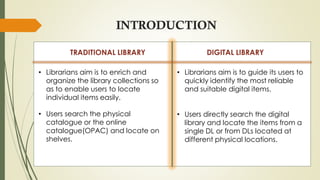
INTRODUCTION
TRADITIONAL LIBRARY DIGITAL LIBRARY
• Librarians aim is to enrich and
organize the library collections so
as to enable users to locate
individual items easily.
• Users search the physical
catalogue or the online
catalogue(OPAC) and locate on
shelves.
• Librarians aim is to guide its users to
quickly identify the most reliable
and suitable digital items.
• Users directly search the digital
library and locate the items from a
single DL or from DLs located at
different physical locations.
 A function of the operating system that allows individuals to
access and command the computer.
 User Interface(UI), the junction between a user and a computer
program.
 An interface is a set of commands or menus through which a
user communicates with a program.
 Visual part of computer application or operating system
through which a user interacts with a computer or a software.
 It determines how commands are given to the computer or the
program and how information is displayed on the screen.
WHAT IS USER INTERFACE
NEED OF EFFECTIVE UI
 A digital library is a large-scale, organized collection of complex
and dynamic multimedia information and knowledge, and tools
and methods to enable search manipulation and presentation
of this information and knowledge via Internet.
 Since the digital libraries are running on the Internet and the
users are from different psychological, educational and social
backgrounds, the usage of digital libraries is varying from user to
user which entail the need of best user interface (UI).
DESIGN OF UI
 It is the job of a user interface to make a program easy to use.
 A good user interface should:
• Be attractive and pleasing to the eye.
• Be easy to use.
• Have all options clearly shown.
• Have clear warning messages when someone makes a mistake.
• Have online help and support.
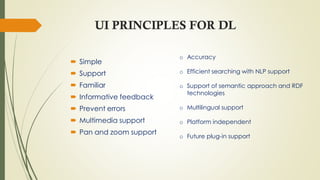
UI PRINCIPLES FOR DL
 Simple
 Support
 Familiar
 Informative feedback
 Prevent errors
 Multimedia support
 Pan and zoom support
o Accuracy
o Efficient searching with NLP support
o Support of semantic approach and RDF
technologies
o Multilingual support
o Platform independent
o Future plug-in support
EVALUATION OF USER INTERFACE
 WHAT ?
• Evaluation is something we actually already do, but without
formally saying.
• Example : buy something, then decide good enough to buy
again.
 WHY ?
• Help us to understand the user experience with the system and,
where there are difficulties, to find ways to improving it.
• Does the interface meet the usability requirements ?
• Why user unable to complete particular task very easily ?
• Whether the UI that has been developed for novice user is
acceptable to experienced users.
• To find out if the user like a particular design feature.
CRITERIAS TO EVALUATE
 Easy to use
 Interactive efficiency
 Easy to remember behaviour
 The frequency and severity of the error
 The user satisfaction
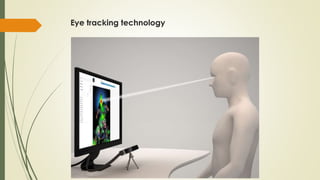
Eye tracking technology
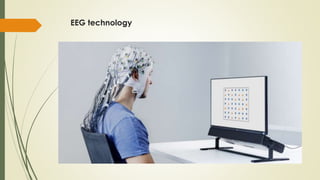
EEG technology
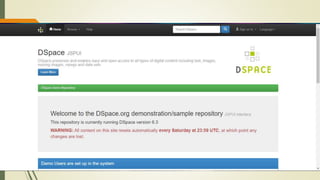
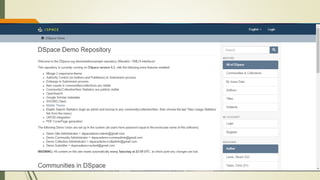
UI OF DSPACE
 This software is ideal for planning, building and managing digital
repositories for large institutions.
 DSpace has been jointly developed by Massachusetts Institute of
Technology (MIT) Libraries and Hewlett-Packard (HP) and distributed
under BSD Open License.
 This software supports community/ collection-based content and work
flow submissions by different user communities
(http://www.sourceforge.net).
 The first version of this software was started from 2002 and the latest
version is DSpace v4.2. The development of DSpace has clearly
defined rules and each user of the community can contribute to it with
new functions (http://www.dspace.org).
 Therefore, DSpace is advantageous for academics and young
researchers to upload and manage their works by themselves.
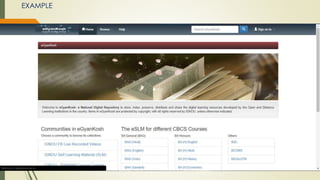
EXAMPLE
UI OF GSDL
 An international cooperative effort established in 2000 among three
parties namely New Zealand Digital Library Projects at the University of
Waikato, UNESCO and the Human Info NGO, Belgium has developed
and distributed this product.
 GSDL can handle multilingual digital documents, with search and
browse facility under GNU General Public License (http://www.
greenstone.org).
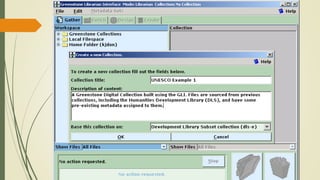
 Greenstone is meant for non-specialist users to produce single and
personalized collections.
 Its model visualizes a ‘librarian’ who is creating collections from existing
resources by comprising both ‘items’ and metadata and distributing
them over the Web or on removable media (Witten, 2005).
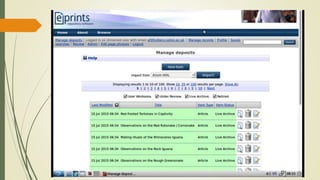
UI OF EPRINT
 EPrints was created in 2000 as a direct outcome of the 1999
Santa Fe meeting that launched what eventually became
the OAI-PMH.
 Prints has been developed at the University of Southampton
School of Electronics and Computer Science and released
under a GPL license.
 EPrints is a Web and command-line application based on
the LAMP architecture (but is written in Perl rather than PHP).
THANK YOU
REFERENCES
1.https://www.researchgate.net/publication/228680679_User_Interface_Design_Prin
ciples_for_Digital_Libraries
2. https://www.youtube.com/watch?v=cGDHv3h0e-k
3.http://www.greenstone.org/manuals/gsdl2/en/html/Chapter_making_greenston
e_collections.html
4. https://www.indeed.com/career-advice/career-development/user-interface
5. https://medium.com/@afang720/user-interface-usability-testing-and-evaluation-
methods-7bd0d141b98a
6.https://www.researchgate.net/publication/279250121_Comparison_of_Greenston
e_Digital_Library_and_DSpace_Experiences_from_Digital_Library_Initiatives_at_Easte
rn_University_Sri_Lanka

User interface of digital library software

  • 1.
    USER INTERFACE OFDIGITAL LIBRARY SOFTWARE Om Prakash Samal Dept. of LIS Khallikote University, Berhampur
  • 2.
    CONTENTS  INTRODUCTION  USERINTERFACE  DESIGN OF UI  PRINCIPLES OF UI  EVALUATION OF UI  COMPARISON OF UIs OF DSPACE, GREENSTONE, EPRINT SOFTWARE
  • 3.
    INTRODUCTION TRADITIONAL LIBRARY DIGITALLIBRARY • Librarians aim is to enrich and organize the library collections so as to enable users to locate individual items easily. • Users search the physical catalogue or the online catalogue(OPAC) and locate on shelves. • Librarians aim is to guide its users to quickly identify the most reliable and suitable digital items. • Users directly search the digital library and locate the items from a single DL or from DLs located at different physical locations.
  • 5.
     A functionof the operating system that allows individuals to access and command the computer.  User Interface(UI), the junction between a user and a computer program.  An interface is a set of commands or menus through which a user communicates with a program.  Visual part of computer application or operating system through which a user interacts with a computer or a software.  It determines how commands are given to the computer or the program and how information is displayed on the screen. WHAT IS USER INTERFACE
  • 6.
    NEED OF EFFECTIVEUI  A digital library is a large-scale, organized collection of complex and dynamic multimedia information and knowledge, and tools and methods to enable search manipulation and presentation of this information and knowledge via Internet.  Since the digital libraries are running on the Internet and the users are from different psychological, educational and social backgrounds, the usage of digital libraries is varying from user to user which entail the need of best user interface (UI).
  • 7.
    DESIGN OF UI It is the job of a user interface to make a program easy to use.  A good user interface should: • Be attractive and pleasing to the eye. • Be easy to use. • Have all options clearly shown. • Have clear warning messages when someone makes a mistake. • Have online help and support.
  • 8.
    UI PRINCIPLES FORDL  Simple  Support  Familiar  Informative feedback  Prevent errors  Multimedia support  Pan and zoom support o Accuracy o Efficient searching with NLP support o Support of semantic approach and RDF technologies o Multilingual support o Platform independent o Future plug-in support
  • 9.
    EVALUATION OF USERINTERFACE  WHAT ? • Evaluation is something we actually already do, but without formally saying. • Example : buy something, then decide good enough to buy again.
  • 10.
     WHY ? •Help us to understand the user experience with the system and, where there are difficulties, to find ways to improving it. • Does the interface meet the usability requirements ? • Why user unable to complete particular task very easily ? • Whether the UI that has been developed for novice user is acceptable to experienced users. • To find out if the user like a particular design feature.
  • 11.
    CRITERIAS TO EVALUATE Easy to use  Interactive efficiency  Easy to remember behaviour  The frequency and severity of the error  The user satisfaction
  • 12.
  • 13.
  • 14.
    UI OF DSPACE This software is ideal for planning, building and managing digital repositories for large institutions.  DSpace has been jointly developed by Massachusetts Institute of Technology (MIT) Libraries and Hewlett-Packard (HP) and distributed under BSD Open License.  This software supports community/ collection-based content and work flow submissions by different user communities (http://www.sourceforge.net).  The first version of this software was started from 2002 and the latest version is DSpace v4.2. The development of DSpace has clearly defined rules and each user of the community can contribute to it with new functions (http://www.dspace.org).  Therefore, DSpace is advantageous for academics and young researchers to upload and manage their works by themselves.
  • 17.
  • 18.
    UI OF GSDL An international cooperative effort established in 2000 among three parties namely New Zealand Digital Library Projects at the University of Waikato, UNESCO and the Human Info NGO, Belgium has developed and distributed this product.  GSDL can handle multilingual digital documents, with search and browse facility under GNU General Public License (http://www. greenstone.org).  Greenstone is meant for non-specialist users to produce single and personalized collections.  Its model visualizes a ‘librarian’ who is creating collections from existing resources by comprising both ‘items’ and metadata and distributing them over the Web or on removable media (Witten, 2005).
  • 20.
    UI OF EPRINT EPrints was created in 2000 as a direct outcome of the 1999 Santa Fe meeting that launched what eventually became the OAI-PMH.  Prints has been developed at the University of Southampton School of Electronics and Computer Science and released under a GPL license.  EPrints is a Web and command-line application based on the LAMP architecture (but is written in Perl rather than PHP).
  • 22.
  • 23.
    REFERENCES 1.https://www.researchgate.net/publication/228680679_User_Interface_Design_Prin ciples_for_Digital_Libraries 2. https://www.youtube.com/watch?v=cGDHv3h0e-k 3.http://www.greenstone.org/manuals/gsdl2/en/html/Chapter_making_greenston e_collections.html 4. https://www.indeed.com/career-advice/career-development/user-interface 5.https://medium.com/@afang720/user-interface-usability-testing-and-evaluation- methods-7bd0d141b98a 6.https://www.researchgate.net/publication/279250121_Comparison_of_Greenston e_Digital_Library_and_DSpace_Experiences_from_Digital_Library_Initiatives_at_Easte rn_University_Sri_Lanka