INTERFACE DESIGN AND ECONAMIC
ISSUES OF DIGITAL LIBRARY
PRESENTED
BY
KAMRAN ALI
PRESENTED TO M.SHAHAB
STUDENTS OF MLIS 3rd semester
Department of library and information sciences
Khushal Khan Khattak University Karak (kpk)
1
INTRODUCTION
A digital library is a large-scale, organized collection of complex and dynamic
multimedia information and knowledge, and tools and methods to enable search
manipulation and presentation of this information and knowledge via Internet. Since
the digital libraries are running on the Internet and the users are from different
psychological, educational and social backgrounds, the usage of digital libraries is
varying from user to user which entail the need of best user interface (UI
2
User interface
 A function of the operating system that allows
individuals to access and command the computer.
 User Interface(UI), the junction between a user and a computer program.
 An interface is a set of commands or menus through which a user
communicates with a program.
3
Cont.
 Visual part of computer application or operating system through which a user
interacts with a computer or a software.
 It determines how commands are given to the computer or the program and
how information is displayed on the screen.
4
TYPES OF User Interface
 Command line interface (CLI)
 Menu Driven interface (MDI)
 Graphical User interface (GUI)
5
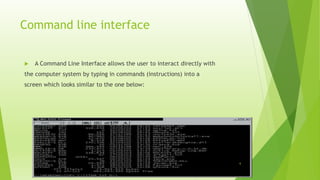
Command line interface
 A Command Line Interface allows the user to interact directly with
the computer system by typing in commands (instructions) into a
screen which looks similar to the one below:
6
cont.
 These commands are very specific, for example in DOS you could type in:
MD: library science
 Nowadays, very few people have the knowledge to be able to use a command
line interface.
 An example of this type of interface is DOS (Disk Operating System).
7
Manus driven interface
 This type of interface interact the user with a computer or device through a
series of screens or menus.
User chooses the commands from lists displayed on the screen
8
Example
 Think about your mobile phone, they both use a menu driven interface.
 You are presented with a menu, you make a choice and then the next menu
appears on the screen. You make another choice and so on.
 Cash point machines (ATMs) are another good example of a menu driven
interface
9
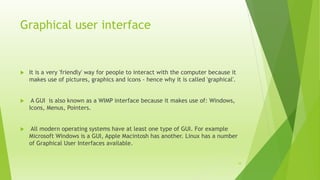
Graphical user interface
 It is a very 'friendly' way for people to interact with the computer because it
makes use of pictures, graphics and icons - hence why it is called 'graphical'.
 A GUI is also known as a WIMP interface because it makes use of: Windows,
Icons, Menus, Pointers.
 All modern operating systems have at least one type of GUI. For example
Microsoft Windows is a GUI, Apple Macintosh has another. Linux has a number
of Graphical User Interfaces available.
10
DESIGN OF UI
 It is the job of a user interface to make a program easy to use.
 A good user interface should:
-Be attractive and pleasing to the eye.
-Be easy to use.
-Have all options clearly shown.
-Have clear warning messages when someone makes a mistake.
-Have online help and support.
11
PRINCIPLES OF USER INTERFACE DESIGN
 Structure :- Design should organize the user interface purposefully, in
meaningful and useful ways based on clear, consistent Models
 Simplicity : - The design should make simple, common tasks easy,
communicating clearly and simply in the user's own language
 Visibility : The design should make all needed options and materials for a
given task visible without distracting the user with extraneous information.
12
cont.
 Feedback : The design should keep users informed of actions , changes of
state or condition, and errors or exceptions
 Tolerance : The design should be flexible and tolerant, reducing the cost of
mistakes and misuse by allowing undoing and redoing
13
ISSUES and CHALLENGES
 Interoperability
Technical, process, language,
 Building digital collections
Digitization
Acquisition of original digital works
Access to external materials
 Metadata Standard
Such as Dublin core, marc-21,green stone etc.
 Naming, identifiers, and persistence
Uniform Resource Locator (URL)
Persistent Uniform Resource Locator (PURL)
Uniform Resource Name (URN)
Digital Object Identifier 14
cont.
 Copyright / rights management
Usage tracking
Identifying and authenticating users
Providing the copyright status of each digital object, and the restrictions
on its use or the fees associated with it
 Preservation
Preservation of the storage medium
Preservation of access to content
15
16
Regular electricity
The digital library is depended on regular electricity .all the devices run through electric
power. So, with out electricity the system is useless.
Networking
In digital library networking is very important because networking gives the facilities of
sharing and linkages with other.
Speed of Internet
The speed of internet is very important because with out high speed digital library did not
save the time of the user.
Technical Expert
In digital library we need experience personnel who have the knowledge about project
management , selection ,cataloguing ,classification, networking, programming and other
technical issue .z
17
User education
The use of digital library is very technical .it need to train the user that how to access
and use the digital library resources and database.so, the user education is necessary.
Maintenance
Digital library required maintenance which is very costly. you need to updates the
information, solve technical damages, protect the system from virus, subscription of
database contentiously and many other issues included in the maintenance

User interface and econamic issues in digital library

  • 1.
    INTERFACE DESIGN ANDECONAMIC ISSUES OF DIGITAL LIBRARY PRESENTED BY KAMRAN ALI PRESENTED TO M.SHAHAB STUDENTS OF MLIS 3rd semester Department of library and information sciences Khushal Khan Khattak University Karak (kpk) 1
  • 2.
    INTRODUCTION A digital libraryis a large-scale, organized collection of complex and dynamic multimedia information and knowledge, and tools and methods to enable search manipulation and presentation of this information and knowledge via Internet. Since the digital libraries are running on the Internet and the users are from different psychological, educational and social backgrounds, the usage of digital libraries is varying from user to user which entail the need of best user interface (UI 2
  • 3.
    User interface  Afunction of the operating system that allows individuals to access and command the computer.  User Interface(UI), the junction between a user and a computer program.  An interface is a set of commands or menus through which a user communicates with a program. 3
  • 4.
    Cont.  Visual partof computer application or operating system through which a user interacts with a computer or a software.  It determines how commands are given to the computer or the program and how information is displayed on the screen. 4
  • 5.
    TYPES OF UserInterface  Command line interface (CLI)  Menu Driven interface (MDI)  Graphical User interface (GUI) 5
  • 6.
    Command line interface A Command Line Interface allows the user to interact directly with the computer system by typing in commands (instructions) into a screen which looks similar to the one below: 6
  • 7.
    cont.  These commandsare very specific, for example in DOS you could type in: MD: library science  Nowadays, very few people have the knowledge to be able to use a command line interface.  An example of this type of interface is DOS (Disk Operating System). 7
  • 8.
    Manus driven interface This type of interface interact the user with a computer or device through a series of screens or menus. User chooses the commands from lists displayed on the screen 8
  • 9.
    Example  Think aboutyour mobile phone, they both use a menu driven interface.  You are presented with a menu, you make a choice and then the next menu appears on the screen. You make another choice and so on.  Cash point machines (ATMs) are another good example of a menu driven interface 9
  • 10.
    Graphical user interface It is a very 'friendly' way for people to interact with the computer because it makes use of pictures, graphics and icons - hence why it is called 'graphical'.  A GUI is also known as a WIMP interface because it makes use of: Windows, Icons, Menus, Pointers.  All modern operating systems have at least one type of GUI. For example Microsoft Windows is a GUI, Apple Macintosh has another. Linux has a number of Graphical User Interfaces available. 10
  • 11.
    DESIGN OF UI It is the job of a user interface to make a program easy to use.  A good user interface should: -Be attractive and pleasing to the eye. -Be easy to use. -Have all options clearly shown. -Have clear warning messages when someone makes a mistake. -Have online help and support. 11
  • 12.
    PRINCIPLES OF USERINTERFACE DESIGN  Structure :- Design should organize the user interface purposefully, in meaningful and useful ways based on clear, consistent Models  Simplicity : - The design should make simple, common tasks easy, communicating clearly and simply in the user's own language  Visibility : The design should make all needed options and materials for a given task visible without distracting the user with extraneous information. 12
  • 13.
    cont.  Feedback :The design should keep users informed of actions , changes of state or condition, and errors or exceptions  Tolerance : The design should be flexible and tolerant, reducing the cost of mistakes and misuse by allowing undoing and redoing 13
  • 14.
    ISSUES and CHALLENGES Interoperability Technical, process, language,  Building digital collections Digitization Acquisition of original digital works Access to external materials  Metadata Standard Such as Dublin core, marc-21,green stone etc.  Naming, identifiers, and persistence Uniform Resource Locator (URL) Persistent Uniform Resource Locator (PURL) Uniform Resource Name (URN) Digital Object Identifier 14
  • 15.
    cont.  Copyright /rights management Usage tracking Identifying and authenticating users Providing the copyright status of each digital object, and the restrictions on its use or the fees associated with it  Preservation Preservation of the storage medium Preservation of access to content 15
  • 16.
    16 Regular electricity The digitallibrary is depended on regular electricity .all the devices run through electric power. So, with out electricity the system is useless. Networking In digital library networking is very important because networking gives the facilities of sharing and linkages with other. Speed of Internet The speed of internet is very important because with out high speed digital library did not save the time of the user. Technical Expert In digital library we need experience personnel who have the knowledge about project management , selection ,cataloguing ,classification, networking, programming and other technical issue .z
  • 17.
    17 User education The useof digital library is very technical .it need to train the user that how to access and use the digital library resources and database.so, the user education is necessary. Maintenance Digital library required maintenance which is very costly. you need to updates the information, solve technical damages, protect the system from virus, subscription of database contentiously and many other issues included in the maintenance

Editor's Notes

  • #13 Irrelevant information