

Graphic and Web designer/SEO
   User interface design or user interface engineering is the design of
    computers, appliances, machines, mobile communication devices,
    software applications, and websites with the focus on the user’s
    experience and interaction. The goal of user interface design is to
    make the user’s interaction as simple and efficient as possible

   Graphic design may be utilized to support its usability. The design
    process must balance technical functionality and visual elements
    (e.g., mental model) to create a system that is not only operational
    but also usable and adaptable to changing user needs.

   user interface concept of designing an interface through which user
    can interact with the product,
   People (mostly) use apps because they’re useful, not because they
    look pretty. But that doesn’t mean you can ignore good UI design,
    or just slap together a generic-looking user interface. Good UI
    design adds to the overall user satisfaction of any web app.

   Good UI design is, in many ways, similar to good web design.
    Principles of color theory, negative space, and layout all still apply.
    But UI design requires a bit more thought in many cases due to the
    interactivity it requires.
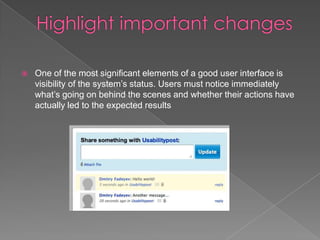
   One of the most significant elements of a good user interface is
    visibility of the system’s status. Users must notice immediately
    what’s going on behind the scenes and whether their actions have
    actually led to the expected results
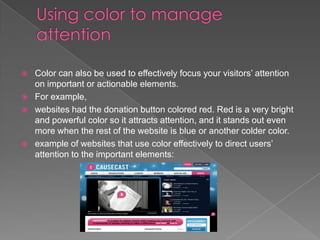
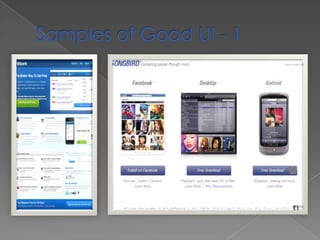
   Color can also be used to effectively focus your visitors’ attention
    on important or actionable elements.
   For example,
   websites had the donation button colored red. Red is a very bright
    and powerful color so it attracts attention, and it stands out even
    more when the rest of the website is blue or another colder color.
   example of websites that use color effectively to direct users’
    attention to the important elements:
   Many Web applications and websites feature forms. These may be
    search forms or input forms inviting you to submit something. If this
    form is the core feature of your application or website, you may
    want to consider automatically focusing the user’s cursor on the
    input field when the website loads. This will speed things up
    because users can start typing right away without having to click on
    it. A good example of this is Google and Wikipedia’s websites.
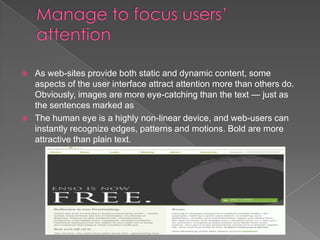
   As web-sites provide both static and dynamic content, some
    aspects of the user interface attract attention more than others do.
    Obviously, images are more eye-catching than the text — just as
    the sentences marked as
   The human eye is a highly non-linear device, and web-users can
    instantly recognize edges, patterns and motions. Bold are more
    attractive than plain text.
   Limited short-term memory
    › People can instantaneously remember about 7 items of
      information. If you present more than this, they are more liable
      to make mistakes.
   People make mistakes
    › When people make mistakes and systems go wrong,
      inappropriate alarms and messages can increase stress and
      hence the likelihood of more mistakes.
   People are different
    › People have a wide range of physical capabilities. Designers
      should not just design for their own capabilities.
   People have different interaction preferences
    › Some like pictures, some like text.
   Error message design is critically important.
    Poor error messages can mean that a user
    rejects rather than accepts a system.

   Messages should be polite, consistent and constructive.

   The background and experience of users
    should be the determining factor in message
    design.
User interface for website

User interface for website

  • 1.
    Graphic and Webdesigner/SEO
  • 3.
    User interface design or user interface engineering is the design of computers, appliances, machines, mobile communication devices, software applications, and websites with the focus on the user’s experience and interaction. The goal of user interface design is to make the user’s interaction as simple and efficient as possible  Graphic design may be utilized to support its usability. The design process must balance technical functionality and visual elements (e.g., mental model) to create a system that is not only operational but also usable and adaptable to changing user needs.  user interface concept of designing an interface through which user can interact with the product,
  • 4.
    People (mostly) use apps because they’re useful, not because they look pretty. But that doesn’t mean you can ignore good UI design, or just slap together a generic-looking user interface. Good UI design adds to the overall user satisfaction of any web app.  Good UI design is, in many ways, similar to good web design. Principles of color theory, negative space, and layout all still apply. But UI design requires a bit more thought in many cases due to the interactivity it requires.
  • 5.
    One of the most significant elements of a good user interface is visibility of the system’s status. Users must notice immediately what’s going on behind the scenes and whether their actions have actually led to the expected results
  • 6.
    Color can also be used to effectively focus your visitors’ attention on important or actionable elements.  For example,  websites had the donation button colored red. Red is a very bright and powerful color so it attracts attention, and it stands out even more when the rest of the website is blue or another colder color.  example of websites that use color effectively to direct users’ attention to the important elements:
  • 8.
    Many Web applications and websites feature forms. These may be search forms or input forms inviting you to submit something. If this form is the core feature of your application or website, you may want to consider automatically focusing the user’s cursor on the input field when the website loads. This will speed things up because users can start typing right away without having to click on it. A good example of this is Google and Wikipedia’s websites.
  • 9.
    As web-sites provide both static and dynamic content, some aspects of the user interface attract attention more than others do. Obviously, images are more eye-catching than the text — just as the sentences marked as  The human eye is a highly non-linear device, and web-users can instantly recognize edges, patterns and motions. Bold are more attractive than plain text.
  • 10.
    Limited short-term memory › People can instantaneously remember about 7 items of information. If you present more than this, they are more liable to make mistakes.  People make mistakes › When people make mistakes and systems go wrong, inappropriate alarms and messages can increase stress and hence the likelihood of more mistakes.  People are different › People have a wide range of physical capabilities. Designers should not just design for their own capabilities.  People have different interaction preferences › Some like pictures, some like text.
  • 11.
    Error message design is critically important. Poor error messages can mean that a user rejects rather than accepts a system.  Messages should be polite, consistent and constructive.  The background and experience of users should be the determining factor in message design.