ISE-USECASE
Week 7
Use Case
• Review of last week lecture
• This week
• Identify actors
• Identify use case
Use Case Definition
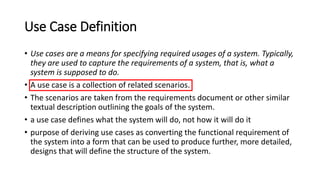
• Use cases are a means for specifying required usages of a system. Typically,
they are used to capture the requirements of a system, that is, what a
system is supposed to do.
• A use case is a collection of related scenarios.
• The scenarios are taken from the requirements document or other similar
textual description outlining the goals of the system.
• a use case defines what the system will do, not how it will do it
• purpose of deriving use cases as converting the functional requirement of
the system into a form that can be used to produce further, more detailed,
designs that will define the structure of the system.
Use Cases
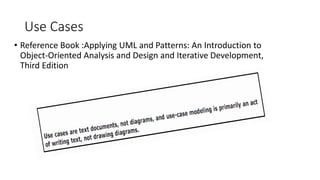
• Reference Book :Applying UML and Patterns: An Introduction to
Object-Oriented Analysis and Design and Iterative Development,
Third Edition
Actor Definition
• An actor specifies a role played by a user or any other system that
interacts with the subject." [UML spec. v2.0]
• We use the term "actor" to represent the role of someone or
something that interacts with the system.
• Actors exist outside of the scope of a use case and are responsible for
initiating use cases.
• an actor is something with behavior, such as a person (identified by
role),computer system, or organization; for example, a cashier.
Scenario
• A scenario is a specific sequence of actions and interactions between
actors and the system; it is also called a use case instance.
• It is one particular story of using a system, or one path through the
use case; for example,
• the scenario of successfully purchasing items with cash, or the
scenario of failing to purchase items because of a credit payment
denial.
• Informally then, a use case is a collection of related success and
failure scenarios that describe an actor using a system to support a
goal. For example, here is a casual format use case with alternate
scenarios:
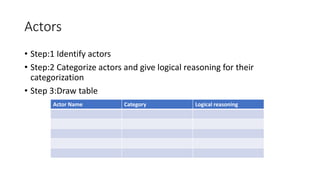
Actors
• Step:1 Identify actors
• Step:2 Categorize actors and give logical reasoning for their
categorization
• Step 3:Draw table
Actor Name Category Logical reasoning
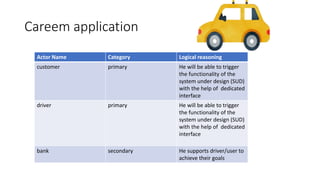
Careem application
Actor Name Category Logical reasoning
customer primary He will be able to trigger
the functionality of the
system under design (SUD)
with the help of dedicated
interface
driver primary He will be able to trigger
the functionality of the
system under design (SUD)
with the help of dedicated
interface
bank secondary He supports driver/user to
achieve their goals
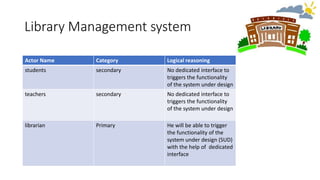
Library Management system
Actor Name Category Logical reasoning
students secondary No dedicated interface to
triggers the functionality
of the system under design
teachers secondary No dedicated interface to
triggers the functionality
of the system under design
librarian Primary He will be able to trigger
the functionality of the
system under design (SUD)
with the help of dedicated
interface
Use case identification
• Actors identified
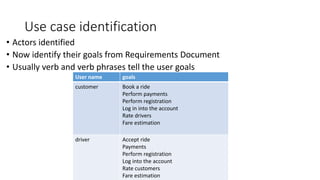
• Now identify their goals from Requirements Document
• Usually verb and verb phrases tell the user goals
User name goals
customer Book a ride
Perform payments
Perform registration
Log in into the account
Rate drivers
Fare estimation
driver Accept ride
Payments
Perform registration
Log into the account
Rate customers
Fare estimation
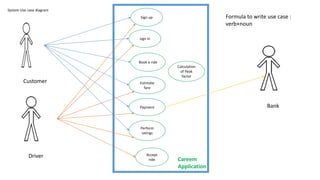
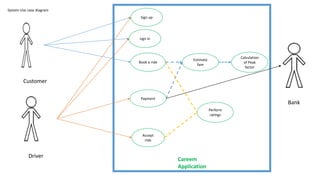
System Use case diagram
sign in
Book a ride
Estimate
fare
Payment
Perform
ratings
Calculation
of Peak
factor
Accept
ride
Customer
Driver
Bank
Careem
Application
Sign up Formula to write use case :
verb+noun
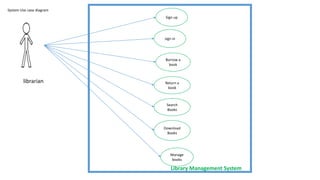
System Use case diagram
sign in
Borrow a
book
Return a
book
Search
Books
Download
Books
Manage
books
librarian
Library Management System
Sign up
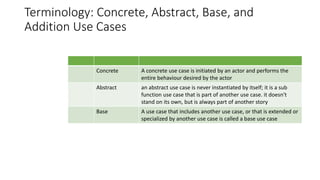
Terminology: Concrete, Abstract, Base, and
Addition Use Cases
Concrete A concrete use case is initiated by an actor and performs the
entire behaviour desired by the actor
Abstract an abstract use case is never instantiated by itself; it is a sub
function use case that is part of another use case. it doesn't
stand on its own, but is always part of another story
Base A use case that includes another use case, or that is extended or
specialized by another use case is called a base use case
Associations
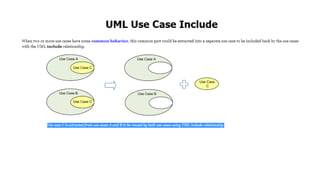
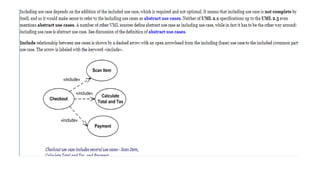
• Includes
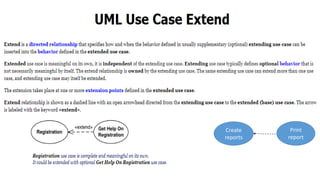
• Extend
Create
reports
Print
report
System Use case diagram
sign in
Book a ride
Estimate
fare
Payment
Perform
ratings
Calculation
of Peak
factor
Accept
ride
Customer
Driver
Bank
Careem
Application
Sign up
Writing use case
Three formats used
• Brief: one-paragraph summary, usually of the main success scenario
• Casual: Informal paragraph format. Multiple paragraphs that cover various scenarios
• Fully dressed: All steps and variations are written in detail, and there are supporting
sections, such as preconditions and success guarantees.
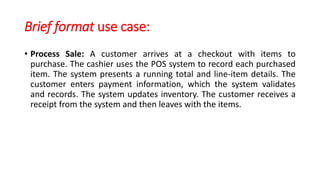
Brief format use case:
• Process Sale: A customer arrives at a checkout with items to
purchase. The cashier uses the POS system to record each purchased
item. The system presents a running total and line-item details. The
customer enters payment information, which the system validates
and records. The system updates inventory. The customer receives a
receipt from the system and then leaves with the items.
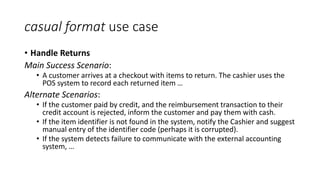
casual format use case
• Handle Returns
Main Success Scenario:
• A customer arrives at a checkout with items to return. The cashier uses the
POS system to record each returned item …
Alternate Scenarios:
• If the customer paid by credit, and the reimbursement transaction to their
credit account is rejected, inform the customer and pay them with cash.
• If the item identifier is not found in the system, notify the Cashier and suggest
manual entry of the identifier code (perhaps it is corrupted).
• If the system detects failure to communicate with the external accounting
system, …
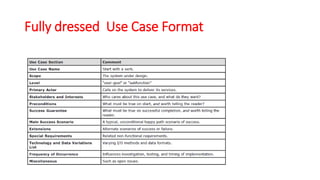
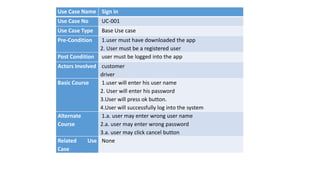
Fully dressed Use Case Format
Use Case Name Sign in
Use Case No UC-001
Use Case Type Base Use case
Pre-Condition 1.user must have downloaded the app
2. User must be a registered user
Post Condition user must be logged into the app
Actors Involved customer
driver
Basic Course 1.user will enter his user name
2. User will enter his password
3.User will press ok button.
4.User will successfully log into the system
Alternate
Course
1.a. user may enter wrong user name
2.a. user may enter wrong password
3.a. user may click cancel button
Related Use
Case
None

use_case+use_case description.pptx

  • 1.
  • 2.
    Use Case • Reviewof last week lecture • This week • Identify actors • Identify use case
  • 3.
    Use Case Definition •Use cases are a means for specifying required usages of a system. Typically, they are used to capture the requirements of a system, that is, what a system is supposed to do. • A use case is a collection of related scenarios. • The scenarios are taken from the requirements document or other similar textual description outlining the goals of the system. • a use case defines what the system will do, not how it will do it • purpose of deriving use cases as converting the functional requirement of the system into a form that can be used to produce further, more detailed, designs that will define the structure of the system.
  • 4.
    Use Cases • ReferenceBook :Applying UML and Patterns: An Introduction to Object-Oriented Analysis and Design and Iterative Development, Third Edition
  • 5.
    Actor Definition • Anactor specifies a role played by a user or any other system that interacts with the subject." [UML spec. v2.0] • We use the term "actor" to represent the role of someone or something that interacts with the system. • Actors exist outside of the scope of a use case and are responsible for initiating use cases. • an actor is something with behavior, such as a person (identified by role),computer system, or organization; for example, a cashier.
  • 6.
    Scenario • A scenariois a specific sequence of actions and interactions between actors and the system; it is also called a use case instance. • It is one particular story of using a system, or one path through the use case; for example, • the scenario of successfully purchasing items with cash, or the scenario of failing to purchase items because of a credit payment denial. • Informally then, a use case is a collection of related success and failure scenarios that describe an actor using a system to support a goal. For example, here is a casual format use case with alternate scenarios:
  • 7.
    Actors • Step:1 Identifyactors • Step:2 Categorize actors and give logical reasoning for their categorization • Step 3:Draw table Actor Name Category Logical reasoning
  • 8.
    Careem application Actor NameCategory Logical reasoning customer primary He will be able to trigger the functionality of the system under design (SUD) with the help of dedicated interface driver primary He will be able to trigger the functionality of the system under design (SUD) with the help of dedicated interface bank secondary He supports driver/user to achieve their goals
  • 9.
    Library Management system ActorName Category Logical reasoning students secondary No dedicated interface to triggers the functionality of the system under design teachers secondary No dedicated interface to triggers the functionality of the system under design librarian Primary He will be able to trigger the functionality of the system under design (SUD) with the help of dedicated interface
  • 10.
    Use case identification •Actors identified • Now identify their goals from Requirements Document • Usually verb and verb phrases tell the user goals User name goals customer Book a ride Perform payments Perform registration Log in into the account Rate drivers Fare estimation driver Accept ride Payments Perform registration Log into the account Rate customers Fare estimation
  • 11.
    System Use casediagram sign in Book a ride Estimate fare Payment Perform ratings Calculation of Peak factor Accept ride Customer Driver Bank Careem Application Sign up Formula to write use case : verb+noun
  • 12.
    System Use casediagram sign in Borrow a book Return a book Search Books Download Books Manage books librarian Library Management System Sign up
  • 13.
    Terminology: Concrete, Abstract,Base, and Addition Use Cases Concrete A concrete use case is initiated by an actor and performs the entire behaviour desired by the actor Abstract an abstract use case is never instantiated by itself; it is a sub function use case that is part of another use case. it doesn't stand on its own, but is always part of another story Base A use case that includes another use case, or that is extended or specialized by another use case is called a base use case
  • 14.
  • 15.
  • 18.
    System Use casediagram sign in Book a ride Estimate fare Payment Perform ratings Calculation of Peak factor Accept ride Customer Driver Bank Careem Application Sign up
  • 19.
    Writing use case Threeformats used • Brief: one-paragraph summary, usually of the main success scenario • Casual: Informal paragraph format. Multiple paragraphs that cover various scenarios • Fully dressed: All steps and variations are written in detail, and there are supporting sections, such as preconditions and success guarantees.
  • 20.
    Brief format usecase: • Process Sale: A customer arrives at a checkout with items to purchase. The cashier uses the POS system to record each purchased item. The system presents a running total and line-item details. The customer enters payment information, which the system validates and records. The system updates inventory. The customer receives a receipt from the system and then leaves with the items.
  • 21.
    casual format usecase • Handle Returns Main Success Scenario: • A customer arrives at a checkout with items to return. The cashier uses the POS system to record each returned item … Alternate Scenarios: • If the customer paid by credit, and the reimbursement transaction to their credit account is rejected, inform the customer and pay them with cash. • If the item identifier is not found in the system, notify the Cashier and suggest manual entry of the identifier code (perhaps it is corrupted). • If the system detects failure to communicate with the external accounting system, …
  • 22.
    Fully dressed UseCase Format
  • 23.
    Use Case NameSign in Use Case No UC-001 Use Case Type Base Use case Pre-Condition 1.user must have downloaded the app 2. User must be a registered user Post Condition user must be logged into the app Actors Involved customer driver Basic Course 1.user will enter his user name 2. User will enter his password 3.User will press ok button. 4.User will successfully log into the system Alternate Course 1.a. user may enter wrong user name 2.a. user may enter wrong password 3.a. user may click cancel button Related Use Case None