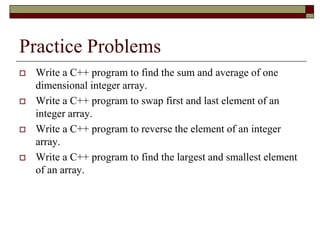
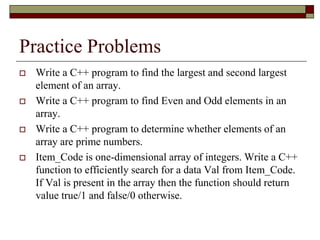
The document discusses multidimensional arrays in C++. It provides examples of declaring and initializing 2D arrays, accessing elements, and iterating through elements using for loops. It also gives examples of user input and output of 2D arrays, including a program that takes user input to populate a 2D integer array and then displays the populated array.
![Multidimensional Arrays
Arrays can be multidimensional.
A two dimensional array consists of Rows and
Columns as we have them in a matrix.
To declare a two-dimensional array of size x, y:
data_type arrayName [ x ] [ y ];
Where data_type can be any valid C++ data type
and arrayName will be a valid C++ identifier.
x represents number of Rows and y represents
number of Columns](https://image.slidesharecdn.com/19-lec-multidimensionalarrays-240121121017-b1ff84a1/85/19-Lec-Multidimensional-Arrays-ppt-4-320.jpg)
![Multidimensional Arrays
A two-dimensional array can be think as a table, which
will have x number of rows and y number of columns. A
2-dimensional array a of type float, which contains
three rows and four columns can be shown as below:
float a [ 3 ] [ 4 ];](https://image.slidesharecdn.com/19-lec-multidimensionalarrays-240121121017-b1ff84a1/85/19-Lec-Multidimensional-Arrays-ppt-5-320.jpg)
![Multidimensional Arrays
Every element in array a is identified by an element
name of the form a[ i ][ j ], where a is the name of the
array, and i and j are the subscripts that uniquely identify
each element in a.
Initializing Two-Dimensional Arrays](https://image.slidesharecdn.com/19-lec-multidimensionalarrays-240121121017-b1ff84a1/85/19-Lec-Multidimensional-Arrays-ppt-6-320.jpg)
![Multidimensional Arrays
Multi-dimensioned arrays may be initialized by specifying
bracketed values for each row. Following are some examples
for declaration and initialization.
int val[3][4] = {
{0, 1, 2, 3} , //initializers for row indexed by 0
{4, 5, 6, 7} , //initializers for row indexed by 1
{8, 9, 10, 11} //initializers for row indexed by 2
};
int b[4][4] = {0,1,2,3,4,5,6,7,8,9,10,11,12,13,14,15};
int c[2][5] = {0}; //initialize all elements with 0](https://image.slidesharecdn.com/19-lec-multidimensionalarrays-240121121017-b1ff84a1/85/19-Lec-Multidimensional-Arrays-ppt-7-320.jpg)
![Example:
int main()
{
int rows=4, cols=2;
float array[rows][cols] = { {17.0, 25.5},
{23.95,41.25}, {37.25,60.5},{40.0,81.35}};
// output each array element's value
for ( int i = 0; i < rows; i++ )
for ( int j = 0; j < cols; j++ ) {
cout << "array[" << i << "][" << j << "]: ";
cout << array[i][j]<< endl;
}
}](https://image.slidesharecdn.com/19-lec-multidimensionalarrays-240121121017-b1ff84a1/85/19-Lec-Multidimensional-Arrays-ppt-8-320.jpg)

![Multidimensional Arrays
int main() {
const int ROW = 4;
const int COLUMN = 3;
int matrix[ROW][COLUMN];
for(int a = 0; a < ROW; a++)
{
for(int b = 0; b < COLUMN; b++)
{
cout << "Enter ROW " << a+1 << " COLUMN "<<b+1<<" ";
cin>>matrix[a][b];
}
}
for(int a = 0; a < ROW; a++) //display array contents
{
for(int b = 0; b < COLUMN; b++)
cout << matrix[a][b] << "t";
cout << endl;
}
}](https://image.slidesharecdn.com/19-lec-multidimensionalarrays-240121121017-b1ff84a1/85/19-Lec-Multidimensional-Arrays-ppt-10-320.jpg)


