ITERATIVE/
REPETITIVE
STATEMENTS
OVERVIEW
OVERVIEW
 We often need to do repetitive calculations in order to solve
complex problems
 Example: calculate the trajectory of a cannon ball
 Humans are typically very bad at this
 Fortunately computers are very good at this
 To perform repetitive calculations in a program we need
iterative statements that let us execute the same block of
code multiple times
 Loops cause a section of program to be repeated certain
number of times.
 As long as condition remains true, the repetition continues,
when the condition becomes false, the loop ends and the
control passes to the statement following the loop.
2
OVERVIEW
 C++ has three kinds of iterative statements
 The for loop
 The while loop
 The do-while loop
 Lesson objectives:
 Learn the syntax and semantics of these iterative statements
 Study example programs showing their use
 Complete lab tasks on iterative statements
 Complete programming project using iterative statements
3
ITERATIVE
STATEMENTS
PART 1
FOR LOOP
FOR LOOP
 The C++ for loop provides a compact syntax for iteration
 For loops are typically used for counting loops, but they can
be used for any looping task
 Allows you to specify the following all on one line
 Initialization statement
 Logical expression/condition for continuing loop
 Statement to be executed after loop
 The for loop executes a section of code a fixed number of
times.
 “for loop” is used normally when we know, before entering
the loop, that how many times we want to execute the code
5
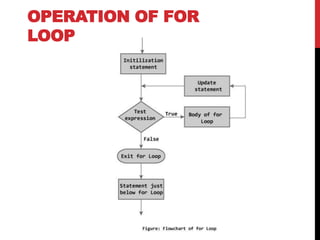
OPERATION OF FOR
LOOP
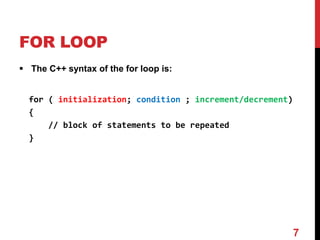
FOR LOOP
 The C++ syntax of the for loop is:
for ( initialization; condition ; increment/decrement)
{
// block of statements to be repeated
}
7
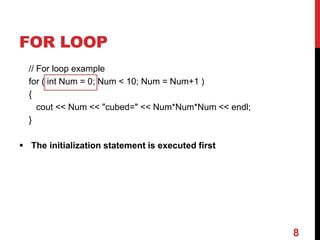
FOR LOOP
// For loop example
for ( int Num = 0; Num < 10; Num = Num+1 )
{
cout << Num << "cubed=" << Num*Num*Num << endl;
}
 The initialization statement is executed first
8
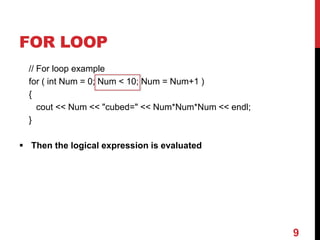
FOR LOOP
// For loop example
for ( int Num = 0; Num < 10; Num = Num+1 )
{
cout << Num << "cubed=" << Num*Num*Num << endl;
}
 Then the logical expression is evaluated
9
FOR LOOP
// For loop example
for ( int Num = 0; Num < 10; Num = Num+1 )
{
cout << Num << "cubed=" << Num*Num*Num << endl;
}
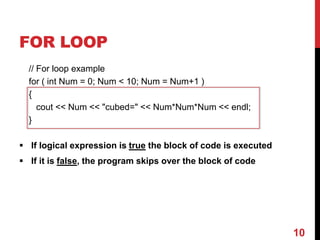
 If logical expression is true the block of code is executed
 If it is false, the program skips over the block of code
10
FOR LOOP
// For loop example
for ( int Num = 0; Num < 10; Num = Num+1 )
{
cout << Num << "cubed=" << Num*Num*Num << endl;
}
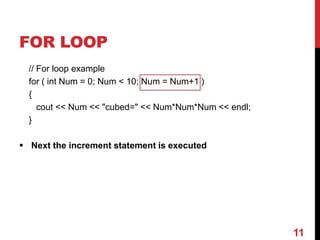
 Next the increment statement is executed
11
FOR LOOP
// For loop example
for ( int Num = 0; Num < 10; Num = Num+1 )
{
cout << Num << "cubed=" << Num*Num*Num << endl;
}
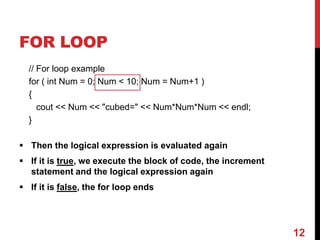
 Then the logical expression is evaluated again
 If it is true, we execute the block of code, the increment
statement and the logical expression again
 If it is false, the for loop ends
12
EXAMPLE OF A
SIMPLE FOR LOOP
int main()
{
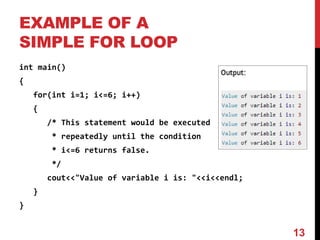
for(int i=1; i<=6; i++)
{
/* This statement would be executed
* repeatedly until the condition
* i<=6 returns false.
*/
cout<<"Value of variable i is: "<<i<<endl;
}
}
13
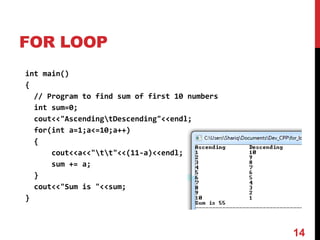
FOR LOOP
14
int main()
{
// Program to find sum of first 10 numbers
int sum=0;
cout<<"AscendingtDescending"<<endl;
for(int a=1;a<=10;a++)
{
cout<<a<<"tt"<<(11-a)<<endl;
sum += a;
}
cout<<"Sum is "<<sum;
}
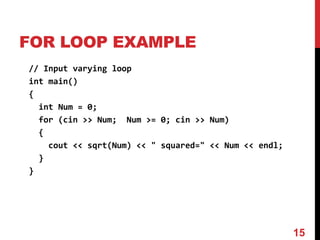
FOR LOOP EXAMPLE
// Input varying loop
int main()
{
int Num = 0;
for (cin >> Num; Num >= 0; cin >> Num)
{
cout << sqrt(Num) << " squared=" << Num << endl;
}
}
15
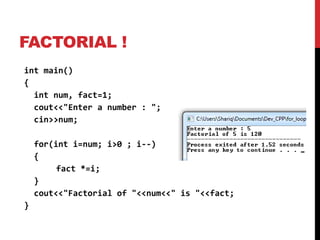
FACTORIAL !
int main()
{
int num, fact=1;
cout<<"Enter a number : ";
cin>>num;
for(int i=num; i>0 ; i--)
{
fact *=i;
}
cout<<"Factorial of "<<num<<" is "<<fact;
}
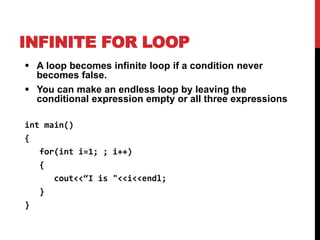
INFINITE FOR LOOP
 A loop becomes infinite loop if a condition never
becomes false.
 You can make an endless loop by leaving the
conditional expression empty or all three expressions
int main()
{
for(int i=1; ; i++)
{
cout<<“I is "<<i<<endl;
}
}
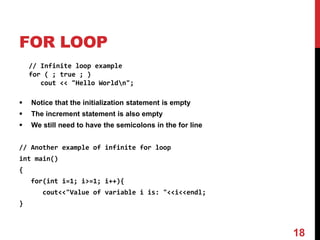
FOR LOOP
// Infinite loop example
for ( ; true ; )
cout << "Hello Worldn";
 Notice that the initialization statement is empty
 The increment statement is also empty
 We still need to have the semicolons in the for line
// Another example of infinite for loop
int main()
{
for(int i=1; i>=1; i++){
cout<<"Value of variable i is: "<<i<<endl;
}
18
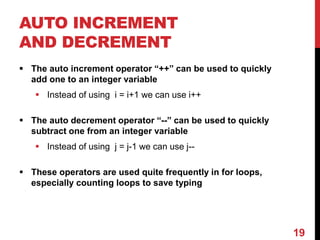
AUTO INCREMENT
AND DECREMENT
 The auto increment operator “++” can be used to quickly
add one to an integer variable
 Instead of using i = i+1 we can use i++
 The auto decrement operator “--” can be used to quickly
subtract one from an integer variable
 Instead of using j = j-1 we can use j--
 These operators are used quite frequently in for loops,
especially counting loops to save typing
19
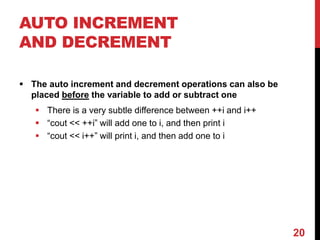
AUTO INCREMENT
AND DECREMENT
 The auto increment and decrement operations can also be
placed before the variable to add or subtract one
 There is a very subtle difference between ++i and i++
 “cout << ++i” will add one to i, and then print i
 “cout << i++” will print i, and then add one to i
20
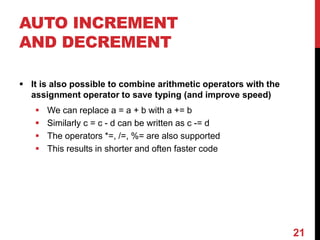
AUTO INCREMENT
AND DECREMENT
 It is also possible to combine arithmetic operators with the
assignment operator to save typing (and improve speed)
 We can replace a = a + b with a += b
 Similarly c = c - d can be written as c -= d
 The operators *=, /=, %= are also supported
 This results in shorter and often faster code
21
AUTO INCREMENT
AND DECREMENT
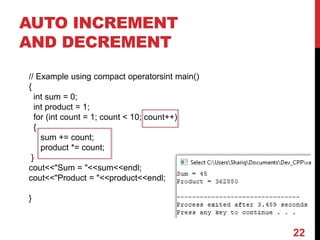
// Example using compact operatorsint main()
{
int sum = 0;
int product = 1;
for (int count = 1; count < 10; count++)
{
sum += count;
product *= count;
}
cout<<"Sum = "<<sum<<endl;
cout<<"Product = "<<product<<endl;
}
22
SUMMARY
 In this section we have introduced the syntax and use of
the C++ for loop
 We also described how you can convert a for loop into a
while loop and vice versa
 Finally, we described the C++ auto increment and auto
decrement operators and related operations that combine
an arithmetic operation with assignment
23

12-Lec - Repetition For Loop.pptx

  • 1.
  • 2.
    OVERVIEW  We oftenneed to do repetitive calculations in order to solve complex problems  Example: calculate the trajectory of a cannon ball  Humans are typically very bad at this  Fortunately computers are very good at this  To perform repetitive calculations in a program we need iterative statements that let us execute the same block of code multiple times  Loops cause a section of program to be repeated certain number of times.  As long as condition remains true, the repetition continues, when the condition becomes false, the loop ends and the control passes to the statement following the loop. 2
  • 3.
    OVERVIEW  C++ hasthree kinds of iterative statements  The for loop  The while loop  The do-while loop  Lesson objectives:  Learn the syntax and semantics of these iterative statements  Study example programs showing their use  Complete lab tasks on iterative statements  Complete programming project using iterative statements 3
  • 4.
  • 5.
    FOR LOOP  TheC++ for loop provides a compact syntax for iteration  For loops are typically used for counting loops, but they can be used for any looping task  Allows you to specify the following all on one line  Initialization statement  Logical expression/condition for continuing loop  Statement to be executed after loop  The for loop executes a section of code a fixed number of times.  “for loop” is used normally when we know, before entering the loop, that how many times we want to execute the code 5
  • 6.
  • 7.
    FOR LOOP  TheC++ syntax of the for loop is: for ( initialization; condition ; increment/decrement) { // block of statements to be repeated } 7
  • 8.
    FOR LOOP // Forloop example for ( int Num = 0; Num < 10; Num = Num+1 ) { cout << Num << "cubed=" << Num*Num*Num << endl; }  The initialization statement is executed first 8
  • 9.
    FOR LOOP // Forloop example for ( int Num = 0; Num < 10; Num = Num+1 ) { cout << Num << "cubed=" << Num*Num*Num << endl; }  Then the logical expression is evaluated 9
  • 10.
    FOR LOOP // Forloop example for ( int Num = 0; Num < 10; Num = Num+1 ) { cout << Num << "cubed=" << Num*Num*Num << endl; }  If logical expression is true the block of code is executed  If it is false, the program skips over the block of code 10
  • 11.
    FOR LOOP // Forloop example for ( int Num = 0; Num < 10; Num = Num+1 ) { cout << Num << "cubed=" << Num*Num*Num << endl; }  Next the increment statement is executed 11
  • 12.
    FOR LOOP // Forloop example for ( int Num = 0; Num < 10; Num = Num+1 ) { cout << Num << "cubed=" << Num*Num*Num << endl; }  Then the logical expression is evaluated again  If it is true, we execute the block of code, the increment statement and the logical expression again  If it is false, the for loop ends 12
  • 13.
    EXAMPLE OF A SIMPLEFOR LOOP int main() { for(int i=1; i<=6; i++) { /* This statement would be executed * repeatedly until the condition * i<=6 returns false. */ cout<<"Value of variable i is: "<<i<<endl; } } 13
  • 14.
    FOR LOOP 14 int main() { //Program to find sum of first 10 numbers int sum=0; cout<<"AscendingtDescending"<<endl; for(int a=1;a<=10;a++) { cout<<a<<"tt"<<(11-a)<<endl; sum += a; } cout<<"Sum is "<<sum; }
  • 15.
    FOR LOOP EXAMPLE //Input varying loop int main() { int Num = 0; for (cin >> Num; Num >= 0; cin >> Num) { cout << sqrt(Num) << " squared=" << Num << endl; } } 15
  • 16.
    FACTORIAL ! int main() { intnum, fact=1; cout<<"Enter a number : "; cin>>num; for(int i=num; i>0 ; i--) { fact *=i; } cout<<"Factorial of "<<num<<" is "<<fact; }
  • 17.
    INFINITE FOR LOOP A loop becomes infinite loop if a condition never becomes false.  You can make an endless loop by leaving the conditional expression empty or all three expressions int main() { for(int i=1; ; i++) { cout<<“I is "<<i<<endl; } }
  • 18.
    FOR LOOP // Infiniteloop example for ( ; true ; ) cout << "Hello Worldn";  Notice that the initialization statement is empty  The increment statement is also empty  We still need to have the semicolons in the for line // Another example of infinite for loop int main() { for(int i=1; i>=1; i++){ cout<<"Value of variable i is: "<<i<<endl; } 18
  • 19.
    AUTO INCREMENT AND DECREMENT The auto increment operator “++” can be used to quickly add one to an integer variable  Instead of using i = i+1 we can use i++  The auto decrement operator “--” can be used to quickly subtract one from an integer variable  Instead of using j = j-1 we can use j--  These operators are used quite frequently in for loops, especially counting loops to save typing 19
  • 20.
    AUTO INCREMENT AND DECREMENT The auto increment and decrement operations can also be placed before the variable to add or subtract one  There is a very subtle difference between ++i and i++  “cout << ++i” will add one to i, and then print i  “cout << i++” will print i, and then add one to i 20
  • 21.
    AUTO INCREMENT AND DECREMENT It is also possible to combine arithmetic operators with the assignment operator to save typing (and improve speed)  We can replace a = a + b with a += b  Similarly c = c - d can be written as c -= d  The operators *=, /=, %= are also supported  This results in shorter and often faster code 21
  • 22.
    AUTO INCREMENT AND DECREMENT //Example using compact operatorsint main() { int sum = 0; int product = 1; for (int count = 1; count < 10; count++) { sum += count; product *= count; } cout<<"Sum = "<<sum<<endl; cout<<"Product = "<<product<<endl; } 22
  • 23.
    SUMMARY  In thissection we have introduced the syntax and use of the C++ for loop  We also described how you can convert a for loop into a while loop and vice versa  Finally, we described the C++ auto increment and auto decrement operators and related operations that combine an arithmetic operation with assignment 23