Functions
3 Introduction
โ€ข Divide and conquer
โ€“ Construct a program from smaller pieces or components
โ€“ Each piece more manageable than the original program
3.2 Program Components in C++
โ€ข Programs written by
โ€“ combining new functions with โ€œprepackagedโ€ functions in
the C++ standard library.
โ€“ new classes with โ€œprepackagedโ€ classes.
โ€ข The standard library provides a rich collection of
functions.
โ€ข Functions are invoked by a function call
โ€“ A function call specifies the function name and provides
information (as arguments) that the called function needs
โ€“ Boss to worker analogy:
A boss (the calling function or caller) asks a worker (the called
function) to perform a task and return (i.e., report back) the
results when the task is done.
3.2 Program Components in C++
โ€ข Function definitions
โ€“ Only written once
โ€“ These statements are hidden from other functions.
โ€“ Boss to worker analogy:
The boss does not know how the worker gets the job done; he
just wants it done
3.3 Math Library Functions
โ€ข Math library functions
โ€“ Allow the programmer to perform common mathematical
calculations
โ€“ Are used by including the header file <cmath>
โ€ข Functions called by writing
functionName (argument)
โ€ข Example
cout << sqrt( 900.0 );
โ€“ Calls the sqrt (square root) function. The preceding
statement would print 30
โ€“ The sqrt function takes an argument of type double and
returns a result of type double, as do all functions in the
math library
3.3 Math Library Functions
โ€ข Function arguments can be
โ€“ Constants
sqrt( 4 );
โ€“ Variables
sqrt( x );
โ€“ Expressions
sqrt( sqrt( x ) ) ;
sqrt( 3 - 6x );
3.4 Functions
โ€ข Functions
โ€“ Allow the programmer to modularize a program
โ€ข Local variables
โ€“ Known only in the function in which they are defined
โ€“ All variables declared in function definitions are local
variables
โ€ข Parameters
โ€“ Local variables passed when the function is called that
provide the function with outside information
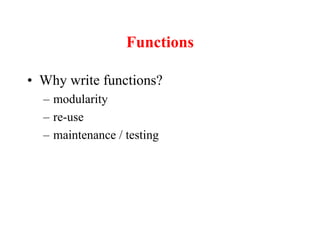
Functions
โ€ข Why write functions?
โ€“ modularity
โ€“ re-use
โ€“ maintenance / testing
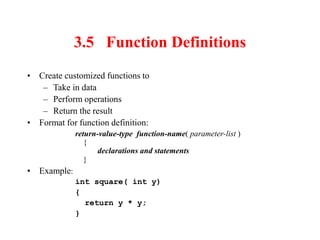
3.5 Function Definitions
โ€ข Create customized functions to
โ€“ Take in data
โ€“ Perform operations
โ€“ Return the result
โ€ข Format for function definition:
return-value-type function-name( parameter-list )
{
declarations and statements
}
โ€ข Example:
int square( int y)
{
return y * y;
}
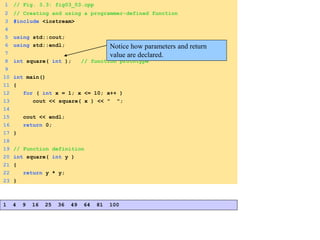
1 // Fig. 3.3: fig03_03.cpp
2 // Creating and using a programmer-defined function
3 #include <iostream>
4
5 using std::cout;
6 using std::endl;
7
8 int square( int ); // function prototype
9
10 int main()
11 {
12 for ( int x = 1; x <= 10; x++ )
13 cout << square( x ) << " ";
14
15 cout << endl;
16 return 0;
17 }
18
19 // Function definition
20 int square( int y )
21 {
22 return y * y;
23 }
1 4 9 16 25 36 49 64 81 100
Notice how parameters and return
value are declared.
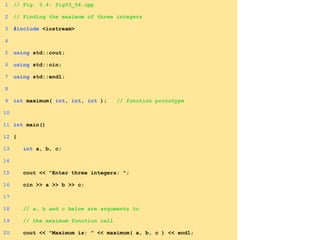
1 // Fig. 3.4: fig03_04.cpp
2 // Finding the maximum of three integers
3 #include <iostream>
4
5 using std::cout;
6 using std::cin;
7 using std::endl;
8
9 int maximum( int, int, int ); // function prototype
10
11 int main()
12 {
13 int a, b, c;
14
15 cout << "Enter three integers: ";
16 cin >> a >> b >> c;
17
18 // a, b and c below are arguments to
19 // the maximum function call
20 cout << "Maximum is: " << maximum( a, b, c ) << endl;
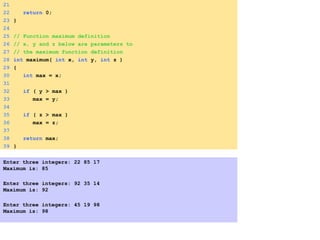
21
22 return 0;
23 }
24
25 // Function maximum definition
26 // x, y and z below are parameters to
27 // the maximum function definition
28 int maximum( int x, int y, int z )
29 {
30 int max = x;
31
32 if ( y > max )
33 max = y;
34
35 if ( z > max )
36 max = z;
37
38 return max;
39 }
Enter three integers: 22 85 17
Maximum is: 85
Enter three integers: 92 35 14
Maximum is: 92
Enter three integers: 45 19 98
Maximum is: 98
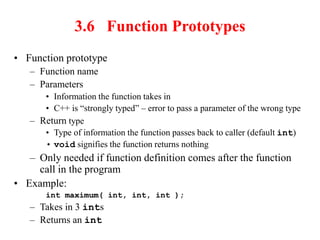
3.6 Function Prototypes
โ€ข Function prototype
โ€“ Function name
โ€“ Parameters
โ€ข Information the function takes in
โ€ข C++ is โ€œstrongly typedโ€ โ€“ error to pass a parameter of the wrong type
โ€“ Return type
โ€ข Type of information the function passes back to caller (default int)
โ€ข void signifies the function returns nothing
โ€“ Only needed if function definition comes after the function
call in the program
โ€ข Example:
int maximum( int, int, int );
โ€“ Takes in 3 ints
โ€“ Returns an int
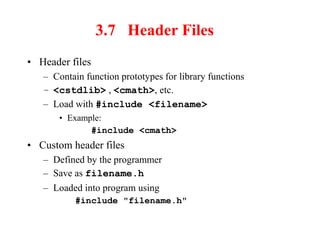
3.7 Header Files
โ€ข Header files
โ€“ Contain function prototypes for library functions
โ€“ <cstdlib> , <cmath>, etc.
โ€“ Load with #include <filename>
โ€ข Example:
#include <cmath>
โ€ข Custom header files
โ€“ Defined by the programmer
โ€“ Save as filename.h
โ€“ Loaded into program using
#include "filename.h"
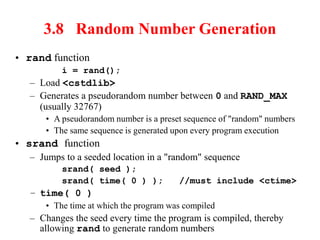
3.8 Random Number Generation
โ€ข rand function
i = rand();
โ€“ Load <cstdlib>
โ€“ Generates a pseudorandom number between 0 and RAND_MAX
(usually 32767)
โ€ข A pseudorandom number is a preset sequence of "random" numbers
โ€ข The same sequence is generated upon every program execution
โ€ข srand function
โ€“ Jumps to a seeded location in a "random" sequence
srand( seed );
srand( time( 0 ) ); //must include <ctime>
โ€“ time( 0 )
โ€ข The time at which the program was compiled
โ€“ Changes the seed every time the program is compiled, thereby
allowing rand to generate random numbers
3.8 Random Number Generation
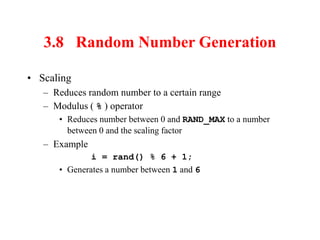
โ€ข Scaling
โ€“ Reduces random number to a certain range
โ€“ Modulus ( % ) operator
โ€ข Reduces number between 0 and RAND_MAX to a number
between 0 and the scaling factor
โ€“ Example
i = rand() % 6 + 1;
โ€ข Generates a number between 1 and 6
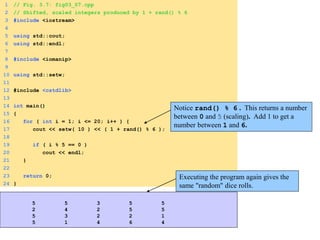
1 // Fig. 3.7: fig03_07.cpp
2 // Shifted, scaled integers produced by 1 + rand() % 6
3 #include <iostream>
4
5 using std::cout;
6 using std::endl;
7
8 #include <iomanip>
9
10 using std::setw;
11
12 #include <cstdlib>
13
14 int main()
15 {
16 for ( int i = 1; i <= 20; i++ ) {
17 cout << setw( 10 ) << ( 1 + rand() % 6 );
18
19 if ( i % 5 == 0 )
20 cout << endl;
21 }
22
23 return 0;
24 }
Notice rand() % 6 . This returns a number
between 0 and 5 (scaling). Add 1 to get a
number between 1 and 6.
Executing the program again gives the
same "random" dice rolls.
5 5 3 5 5
2 4 2 5 5
5 3 2 2 1
5 1 4 6 4
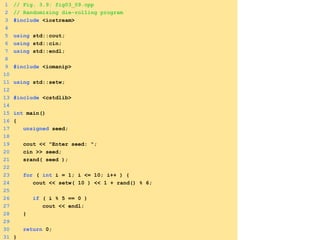
1 // Fig. 3.9: fig03_09.cpp
2 // Randomizing die-rolling program
3 #include <iostream>
4
5 using std::cout;
6 using std::cin;
7 using std::endl;
8
9 #include <iomanip>
10
11 using std::setw;
12
13 #include <cstdlib>
14
15 int main()
16 {
17 unsigned seed;
18
19 cout << "Enter seed: ";
20 cin >> seed;
21 srand( seed );
22
23 for ( int i = 1; i <= 10; i++ ) {
24 cout << setw( 10 ) << 1 + rand() % 6;
25
26 if ( i % 5 == 0 )
27 cout << endl;
28 }
29
30 return 0;
31 }
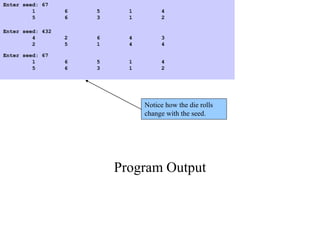
Program Output
Enter seed: 67
1 6 5 1 4
5 6 3 1 2
Enter seed: 432
4 2 6 4 3
2 5 1 4 4
Enter seed: 67
1 6 5 1 4
5 6 3 1 2
Notice how the die rolls
change with the seed.
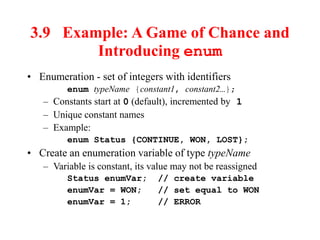
3.9 Example: A Game of Chance and
Introducing enum
โ€ข Enumeration - set of integers with identifiers
enum typeName {constant1, constant2โ€ฆ};
โ€“ Constants start at 0 (default), incremented by 1
โ€“ Unique constant names
โ€“ Example:
enum Status {CONTINUE, WON, LOST};
โ€ข Create an enumeration variable of type typeName
โ€“ Variable is constant, its value may not be reassigned
Status enumVar; // create variable
enumVar = WON; // set equal to WON
enumVar = 1; // ERROR
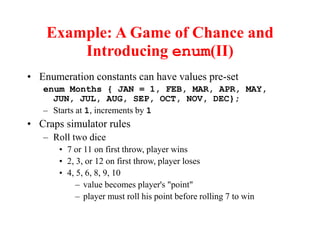
Example: A Game of Chance and
Introducing enum(II)
โ€ข Enumeration constants can have values pre-set
enum Months { JAN = 1, FEB, MAR, APR, MAY,
JUN, JUL, AUG, SEP, OCT, NOV, DEC};
โ€“ Starts at 1, increments by 1
โ€ข Craps simulator rules
โ€“ Roll two dice
โ€ข 7 or 11 on first throw, player wins
โ€ข 2, 3, or 12 on first throw, player loses
โ€ข 4, 5, 6, 8, 9, 10
โ€“ value becomes player's "point"
โ€“ player must roll his point before rolling 7 to win
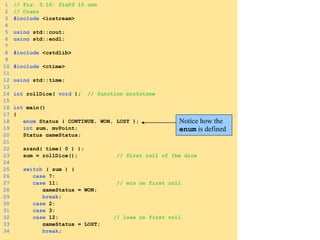
1 // Fig. 3.10: fig03_10.cpp
2 // Craps
3 #include <iostream>
4
5 using std::cout;
6 using std::endl;
7
8 #include <cstdlib>
9
10 #include <ctime>
11
12 using std::time;
13
14 int rollDice( void ); // function prototype
15
16 int main()
17 {
18 enum Status { CONTINUE, WON, LOST };
19 int sum, myPoint;
20 Status gameStatus;
21
22 srand( time( 0 ) );
23 sum = rollDice(); // first roll of the dice
24
25 switch ( sum ) {
26 case 7:
27 case 11: // win on first roll
28 gameStatus = WON;
29 break;
30 case 2:
31 case 3:
32 case 12: // lose on first roll
33 gameStatus = LOST;
34 break;
Notice how the
enum is defined
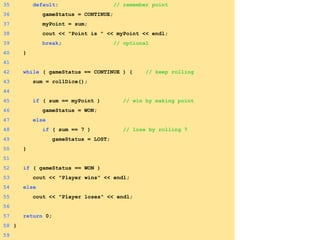
35 default: // remember point
36 gameStatus = CONTINUE;
37 myPoint = sum;
38 cout << "Point is " << myPoint << endl;
39 break; // optional
40 }
41
42 while ( gameStatus == CONTINUE ) { // keep rolling
43 sum = rollDice();
44
45 if ( sum == myPoint ) // win by making point
46 gameStatus = WON;
47 else
48 if ( sum == 7 ) // lose by rolling 7
49 gameStatus = LOST;
50 }
51
52 if ( gameStatus == WON )
53 cout << "Player wins" << endl;
54 else
55 cout << "Player loses" << endl;
56
57 return 0;
58 }
59
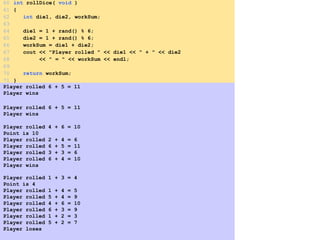
Player rolled 6 + 5 = 11
Player wins
Player rolled 6 + 5 = 11
Player wins
Player rolled 4 + 6 = 10
Point is 10
Player rolled 2 + 4 = 6
Player rolled 6 + 5 = 11
Player rolled 3 + 3 = 6
Player rolled 6 + 4 = 10
Player wins
Player rolled 1 + 3 = 4
Point is 4
Player rolled 1 + 4 = 5
Player rolled 5 + 4 = 9
Player rolled 4 + 6 = 10
Player rolled 6 + 3 = 9
Player rolled 1 + 2 = 3
Player rolled 5 + 2 = 7
Player loses
60 int rollDice( void )
61 {
62 int die1, die2, workSum;
63
64 die1 = 1 + rand() % 6;
65 die2 = 1 + rand() % 6;
66 workSum = die1 + die2;
67 cout << "Player rolled " << die1 << " + " << die2
68 << " = " << workSum << endl;
69
70 return workSum;
71 }
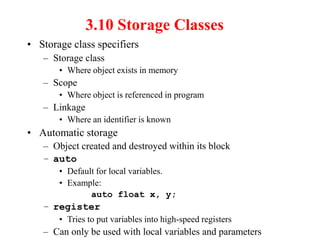
3.10 Storage Classes
โ€ข Storage class specifiers
โ€“ Storage class
โ€ข Where object exists in memory
โ€“ Scope
โ€ข Where object is referenced in program
โ€“ Linkage
โ€ข Where an identifier is known
โ€ข Automatic storage
โ€“ Object created and destroyed within its block
โ€“ auto
โ€ข Default for local variables.
โ€ข Example:
auto float x, y;
โ€“ register
โ€ข Tries to put variables into high-speed registers
โ€“ Can only be used with local variables and parameters
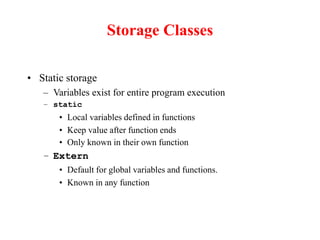
Storage Classes
โ€ข Static storage
โ€“ Variables exist for entire program execution
โ€“ static
โ€ข Local variables defined in functions
โ€ข Keep value after function ends
โ€ข Only known in their own function
โ€“ Extern
โ€ข Default for global variables and functions.
โ€ข Known in any function
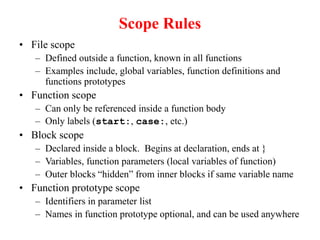
Scope Rules
โ€ข File scope
โ€“ Defined outside a function, known in all functions
โ€“ Examples include, global variables, function definitions and
functions prototypes
โ€ข Function scope
โ€“ Can only be referenced inside a function body
โ€“ Only labels (start:, case:, etc.)
โ€ข Block scope
โ€“ Declared inside a block. Begins at declaration, ends at }
โ€“ Variables, function parameters (local variables of function)
โ€“ Outer blocks โ€œhiddenโ€ from inner blocks if same variable name
โ€ข Function prototype scope
โ€“ Identifiers in parameter list
โ€“ Names in function prototype optional, and can be used anywhere
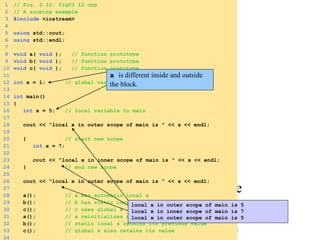
1. Function prototypes
1.1 Initialize global variable
1.2 Initialize local variable
1 // Fig. 3.12: fig03_12.cpp
2 // A scoping example
3 #include <iostream>
4
5 using std::cout;
6 using std::endl;
7
8 void a( void ); // function prototype
9 void b( void ); // function prototype
10 void c( void ); // function prototype
11
12 int x = 1; // global variable
13
14 int main()
15 {
16 int x = 5; // local variable to main
17
18 cout << "local x in outer scope of main is " << x << endl;
19
20 { // start new scope
21 int x = 7;
22
23 cout << "local x in inner scope of main is " << x << endl;
24 } // end new scope
25
26 cout << "local x in outer scope of main is " << x << endl;
27
28 a(); // a has automatic local x
29 b(); // b has static local x
30 c(); // c uses global x
31 a(); // a reinitializes automatic local x
32 b(); // static local x retains its previous value
33 c(); // global x also retains its value
34
x is different inside and outside
the block.
local x in outer scope of main is 5
local x in inner scope of main is 7
local x in outer scope of main is 5
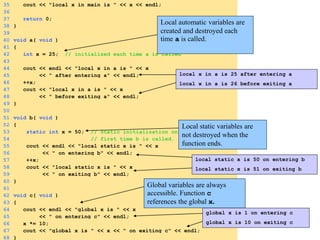
3.1 Define Functions
35 cout << "local x in main is " << x << endl;
36
37 return 0;
38 }
39
40 void a( void )
41 {
42 int x = 25; // initialized each time a is called
43
44 cout << endl << "local x in a is " << x
45 << " after entering a" << endl;
46 ++x;
47 cout << "local x in a is " << x
48 << " before exiting a" << endl;
49 }
50
51 void b( void )
52 {
53 static int x = 50; // Static initialization only
54 // first time b is called.
55 cout << endl << "local static x is " << x
56 << " on entering b" << endl;
57 ++x;
58 cout << "local static x is " << x
59 << " on exiting b" << endl;
60 }
61
62 void c( void )
63 {
64 cout << endl << "global x is " << x
65 << " on entering c" << endl;
66 x *= 10;
67 cout << "global x is " << x << " on exiting c" << endl;
68 }
Local automatic variables are
created and destroyed each
time a is called.
Local static variables are
not destroyed when the
function ends.
Global variables are always
accessible. Function c
references the global x.
local x in a is 25 after entering a
local x in a is 26 before exiting a
local static x is 50 on entering b
local static x is 51 on exiting b
global x is 1 on entering c
global x is 10 on exiting c
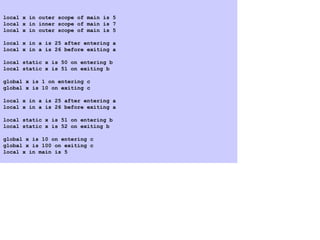
local x in outer scope of main is 5
local x in inner scope of main is 7
local x in outer scope of main is 5
local x in a is 25 after entering a
local x in a is 26 before exiting a
local static x is 50 on entering b
local static x is 51 on exiting b
global x is 1 on entering c
global x is 10 on exiting c
local x in a is 25 after entering a
local x in a is 26 before exiting a
local static x is 51 on entering b
local static x is 52 on exiting b
global x is 10 on entering c
global x is 100 on exiting c
local x in main is 5
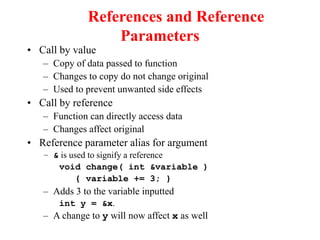
References and Reference
Parameters
โ€ข Call by value
โ€“ Copy of data passed to function
โ€“ Changes to copy do not change original
โ€“ Used to prevent unwanted side effects
โ€ข Call by reference
โ€“ Function can directly access data
โ€“ Changes affect original
โ€ข Reference parameter alias for argument
โ€“ & is used to signify a reference
void change( int &variable )
{ variable += 3; }
โ€“ Adds 3 to the variable inputted
int y = &x.
โ€“ A change to y will now affect x as well
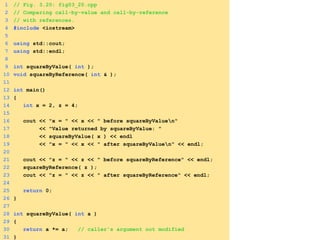
1 // Fig. 3.20: fig03_20.cpp
2 // Comparing call-by-value and call-by-reference
3 // with references.
4 #include <iostream>
5
6 using std::cout;
7 using std::endl;
8
9 int squareByValue( int );
10 void squareByReference( int & );
11
12 int main()
13 {
14 int x = 2, z = 4;
15
16 cout << "x = " << x << " before squareByValuen"
17 << "Value returned by squareByValue: "
18 << squareByValue( x ) << endl
19 << "x = " << x << " after squareByValuen" << endl;
20
21 cout << "z = " << z << " before squareByReference" << endl;
22 squareByReference( z );
23 cout << "z = " << z << " after squareByReference" << endl;
24
25 return 0;
26 }
27
28 int squareByValue( int a )
29 {
30 return a *= a; // caller's argument not modified
31 }
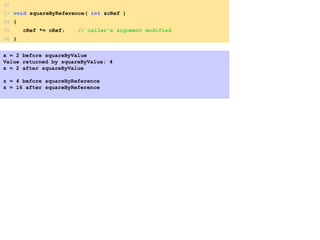
x = 2 before squareByValue
Value returned by squareByValue: 4
x = 2 after squareByValue
z = 4 before squareByReference
z = 16 after squareByReference
32
33 void squareByReference( int &cRef )
34 {
35 cRef *= cRef; // caller's argument modified
36 }
3.12 Recursion
โ€ข Recursive functions
โ€“ Are functions that calls themselves
โ€“ Can only solve a base case
โ€“ If not base case, the function breaks the problem into a
slightly smaller, slightly simpler, problem that resembles the
original problem and
โ€ข Launches a new copy of itself to work on the smaller problem,
slowly converging towards the base case
โ€ข Makes a call to itself inside the return statement
โ€“ Eventually the base case gets solved and then that value
works its way back up to solve the whole problem
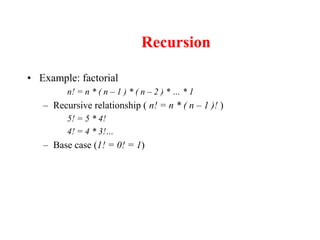
Recursion
โ€ข Example: factorial
n! = n * ( n โ€“ 1 ) * ( n โ€“ 2 ) * โ€ฆ * 1
โ€“ Recursive relationship ( n! = n * ( n โ€“ 1 )! )
5! = 5 * 4!
4! = 4 * 3!โ€ฆ
โ€“ Base case (1! = 0! = 1)
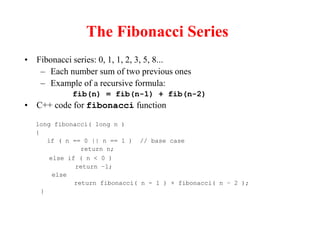
The Fibonacci Series
โ€ข Fibonacci series: 0, 1, 1, 2, 3, 5, 8...
โ€“ Each number sum of two previous ones
โ€“ Example of a recursive formula:
fib(n) = fib(n-1) + fib(n-2)
โ€ข C++ code for fibonacci function
long fibonacci( long n )
{
if ( n == 0 || n == 1 ) // base case
return n;
else if ( n < 0 )
return โ€“1;
else
return fibonacci( n - 1 ) + fibonacci( n โ€“ 2 );
}
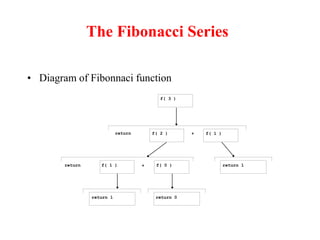
The Fibonacci Series
โ€ข Diagram of Fibonnaci function
f( 3 )
f( 1 )
f( 2 )
f( 1 ) f( 0 ) return 1
return 1 return 0
return +
+
return
1. Function prototype
1.1 Initialize variables
2. Input an integer
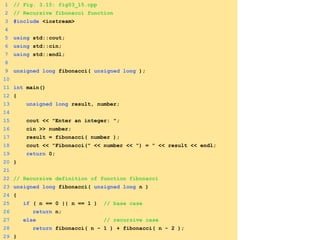
1 // Fig. 3.15: fig03_15.cpp
2 // Recursive fibonacci function
3 #include <iostream>
4
5 using std::cout;
6 using std::cin;
7 using std::endl;
8
9 unsigned long fibonacci( unsigned long );
10
11 int main()
12 {
13 unsigned long result, number;
14
15 cout << "Enter an integer: ";
16 cin >> number;
17 result = fibonacci( number );
18 cout << "Fibonacci(" << number << ") = " << result << endl;
19 return 0;
20 }
21
22 // Recursive definition of function fibonacci
23 unsigned long fibonacci( unsigned long n )
24 {
25 if ( n == 0 || n == 1 ) // base case
26 return n;
27 else // recursive case
28 return fibonacci( n - 1 ) + fibonacci( n - 2 );
29 }
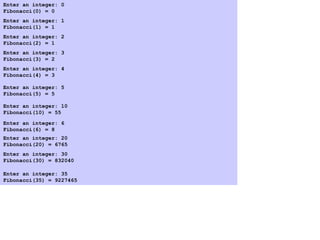
Program Output
Enter an integer: 0
Fibonacci(0) = 0
Enter an integer: 1
Fibonacci(1) = 1
Enter an integer: 2
Fibonacci(2) = 1
Enter an integer: 3
Fibonacci(3) = 2
Enter an integer: 4
Fibonacci(4) = 3
Enter an integer: 5
Fibonacci(5) = 5
Enter an integer: 6
Fibonacci(6) = 8
Enter an integer: 10
Fibonacci(10) = 55
Enter an integer: 20
Fibonacci(20) = 6765
Enter an integer: 30
Fibonacci(30) = 832040
Enter an integer: 35
Fibonacci(35) = 9227465
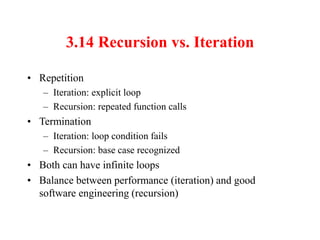
3.14 Recursion vs. Iteration
โ€ข Repetition
โ€“ Iteration: explicit loop
โ€“ Recursion: repeated function calls
โ€ข Termination
โ€“ Iteration: loop condition fails
โ€“ Recursion: base case recognized
โ€ข Both can have infinite loops
โ€ข Balance between performance (iteration) and good
software engineering (recursion)
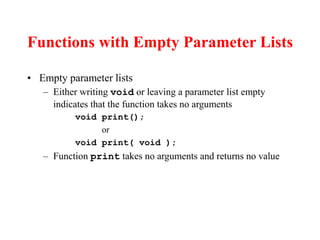
Functions with Empty Parameter Lists
โ€ข Empty parameter lists
โ€“ Either writing void or leaving a parameter list empty
indicates that the function takes no arguments
void print();
or
void print( void );
โ€“ Function print takes no arguments and returns no value
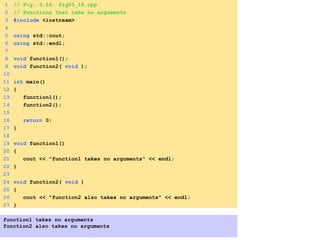
1 // Fig. 3.18: fig03_18.cpp
2 // Functions that take no arguments
3 #include <iostream>
4
5 using std::cout;
6 using std::endl;
7
8 void function1();
9 void function2( void );
10
11 int main()
12 {
13 function1();
14 function2();
15
16 return 0;
17 }
18
19 void function1()
20 {
21 cout << "function1 takes no arguments" << endl;
22 }
23
24 void function2( void )
25 {
26 cout << "function2 also takes no arguments" << endl;
27 }
function1 takes no arguments
function2 also takes no arguments
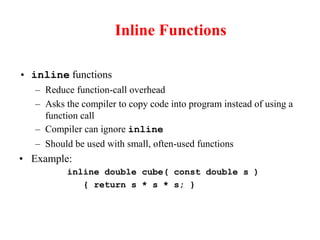
Inline Functions
โ€ข inline functions
โ€“ Reduce function-call overhead
โ€“ Asks the compiler to copy code into program instead of using a
function call
โ€“ Compiler can ignore inline
โ€“ Should be used with small, often-used functions
โ€ข Example:
inline double cube( const double s )
{ return s * s * s; }
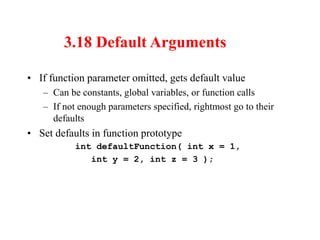
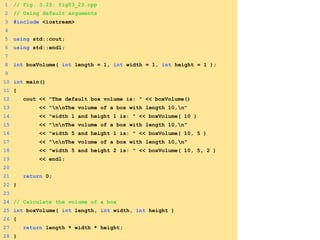
3.18 Default Arguments
โ€ข If function parameter omitted, gets default value
โ€“ Can be constants, global variables, or function calls
โ€“ If not enough parameters specified, rightmost go to their
defaults
โ€ข Set defaults in function prototype
int defaultFunction( int x = 1,
int y = 2, int z = 3 );
1 // Fig. 3.23: fig03_23.cpp
2 // Using default arguments
3 #include <iostream>
4
5 using std::cout;
6 using std::endl;
7
8 int boxVolume( int length = 1, int width = 1, int height = 1 );
9
10 int main()
11 {
12 cout << "The default box volume is: " << boxVolume()
13 << "nnThe volume of a box with length 10,n"
14 << "width 1 and height 1 is: " << boxVolume( 10 )
15 << "nnThe volume of a box with length 10,n"
16 << "width 5 and height 1 is: " << boxVolume( 10, 5 )
17 << "nnThe volume of a box with length 10,n"
18 << "width 5 and height 2 is: " << boxVolume( 10, 5, 2 )
19 << endl;
20
21 return 0;
22 }
23
24 // Calculate the volume of a box
25 int boxVolume( int length, int width, int height )
26 {
27 return length * width * height;
28 }
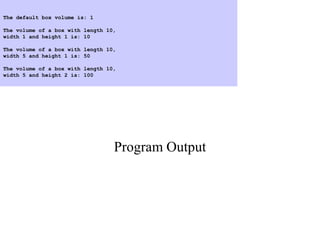
Program Output
The default box volume is: 1
The volume of a box with length 10,
width 1 and height 1 is: 10
The volume of a box with length 10,
width 5 and height 1 is: 50
The volume of a box with length 10,
width 5 and height 2 is: 100
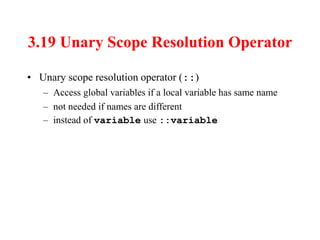
3.19 Unary Scope Resolution Operator
โ€ข Unary scope resolution operator (::)
โ€“ Access global variables if a local variable has same name
โ€“ not needed if names are different
โ€“ instead of variable use ::variable
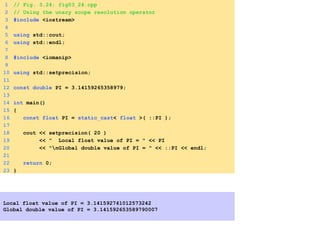
1 // Fig. 3.24: fig03_24.cpp
2 // Using the unary scope resolution operator
3 #include <iostream>
4
5 using std::cout;
6 using std::endl;
7
8 #include <iomanip>
9
10 using std::setprecision;
11
12 const double PI = 3.14159265358979;
13
14 int main()
15 {
16 const float PI = static_cast< float >( ::PI );
17
18 cout << setprecision( 20 )
19 << " Local float value of PI = " << PI
20 << "nGlobal double value of PI = " << ::PI << endl;
21
22 return 0;
23 }
Local float value of PI = 3.141592741012573242
Global double value of PI = 3.141592653589790007
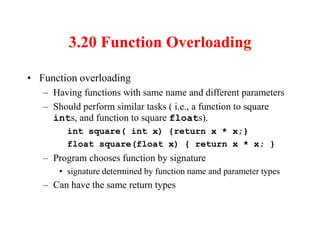
3.20 Function Overloading
โ€ข Function overloading
โ€“ Having functions with same name and different parameters
โ€“ Should perform similar tasks ( i.e., a function to square
ints, and function to square floats).
int square( int x) {return x * x;}
float square(float x) { return x * x; }
โ€“ Program chooses function by signature
โ€ข signature determined by function name and parameter types
โ€“ Can have the same return types
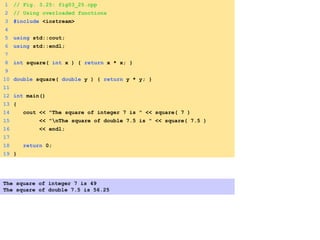
1 // Fig. 3.25: fig03_25.cpp
2 // Using overloaded functions
3 #include <iostream>
4
5 using std::cout;
6 using std::endl;
7
8 int square( int x ) { return x * x; }
9
10 double square( double y ) { return y * y; }
11
12 int main()
13 {
14 cout << "The square of integer 7 is " << square( 7 )
15 << "nThe square of double 7.5 is " << square( 7.5 )
16 << endl;
17
18 return 0;
19 }
The square of integer 7 is 49
The square of double 7.5 is 56.25

lecture56.ppt

  • 1.
  • 2.
    3 Introduction โ€ข Divideand conquer โ€“ Construct a program from smaller pieces or components โ€“ Each piece more manageable than the original program
  • 3.
    3.2 Program Componentsin C++ โ€ข Programs written by โ€“ combining new functions with โ€œprepackagedโ€ functions in the C++ standard library. โ€“ new classes with โ€œprepackagedโ€ classes. โ€ข The standard library provides a rich collection of functions. โ€ข Functions are invoked by a function call โ€“ A function call specifies the function name and provides information (as arguments) that the called function needs โ€“ Boss to worker analogy: A boss (the calling function or caller) asks a worker (the called function) to perform a task and return (i.e., report back) the results when the task is done.
  • 4.
    3.2 Program Componentsin C++ โ€ข Function definitions โ€“ Only written once โ€“ These statements are hidden from other functions. โ€“ Boss to worker analogy: The boss does not know how the worker gets the job done; he just wants it done
  • 5.
    3.3 Math LibraryFunctions โ€ข Math library functions โ€“ Allow the programmer to perform common mathematical calculations โ€“ Are used by including the header file <cmath> โ€ข Functions called by writing functionName (argument) โ€ข Example cout << sqrt( 900.0 ); โ€“ Calls the sqrt (square root) function. The preceding statement would print 30 โ€“ The sqrt function takes an argument of type double and returns a result of type double, as do all functions in the math library
  • 6.
    3.3 Math LibraryFunctions โ€ข Function arguments can be โ€“ Constants sqrt( 4 ); โ€“ Variables sqrt( x ); โ€“ Expressions sqrt( sqrt( x ) ) ; sqrt( 3 - 6x );
  • 7.
    3.4 Functions โ€ข Functions โ€“Allow the programmer to modularize a program โ€ข Local variables โ€“ Known only in the function in which they are defined โ€“ All variables declared in function definitions are local variables โ€ข Parameters โ€“ Local variables passed when the function is called that provide the function with outside information
  • 8.
    Functions โ€ข Why writefunctions? โ€“ modularity โ€“ re-use โ€“ maintenance / testing
  • 9.
    3.5 Function Definitions โ€ขCreate customized functions to โ€“ Take in data โ€“ Perform operations โ€“ Return the result โ€ข Format for function definition: return-value-type function-name( parameter-list ) { declarations and statements } โ€ข Example: int square( int y) { return y * y; }
  • 10.
    1 // Fig.3.3: fig03_03.cpp 2 // Creating and using a programmer-defined function 3 #include <iostream> 4 5 using std::cout; 6 using std::endl; 7 8 int square( int ); // function prototype 9 10 int main() 11 { 12 for ( int x = 1; x <= 10; x++ ) 13 cout << square( x ) << " "; 14 15 cout << endl; 16 return 0; 17 } 18 19 // Function definition 20 int square( int y ) 21 { 22 return y * y; 23 } 1 4 9 16 25 36 49 64 81 100 Notice how parameters and return value are declared.
  • 11.
    1 // Fig.3.4: fig03_04.cpp 2 // Finding the maximum of three integers 3 #include <iostream> 4 5 using std::cout; 6 using std::cin; 7 using std::endl; 8 9 int maximum( int, int, int ); // function prototype 10 11 int main() 12 { 13 int a, b, c; 14 15 cout << "Enter three integers: "; 16 cin >> a >> b >> c; 17 18 // a, b and c below are arguments to 19 // the maximum function call 20 cout << "Maximum is: " << maximum( a, b, c ) << endl;
  • 12.
    21 22 return 0; 23} 24 25 // Function maximum definition 26 // x, y and z below are parameters to 27 // the maximum function definition 28 int maximum( int x, int y, int z ) 29 { 30 int max = x; 31 32 if ( y > max ) 33 max = y; 34 35 if ( z > max ) 36 max = z; 37 38 return max; 39 } Enter three integers: 22 85 17 Maximum is: 85 Enter three integers: 92 35 14 Maximum is: 92 Enter three integers: 45 19 98 Maximum is: 98
  • 13.
    3.6 Function Prototypes โ€ขFunction prototype โ€“ Function name โ€“ Parameters โ€ข Information the function takes in โ€ข C++ is โ€œstrongly typedโ€ โ€“ error to pass a parameter of the wrong type โ€“ Return type โ€ข Type of information the function passes back to caller (default int) โ€ข void signifies the function returns nothing โ€“ Only needed if function definition comes after the function call in the program โ€ข Example: int maximum( int, int, int ); โ€“ Takes in 3 ints โ€“ Returns an int
  • 14.
    3.7 Header Files โ€ขHeader files โ€“ Contain function prototypes for library functions โ€“ <cstdlib> , <cmath>, etc. โ€“ Load with #include <filename> โ€ข Example: #include <cmath> โ€ข Custom header files โ€“ Defined by the programmer โ€“ Save as filename.h โ€“ Loaded into program using #include "filename.h"
  • 15.
    3.8 Random NumberGeneration โ€ข rand function i = rand(); โ€“ Load <cstdlib> โ€“ Generates a pseudorandom number between 0 and RAND_MAX (usually 32767) โ€ข A pseudorandom number is a preset sequence of "random" numbers โ€ข The same sequence is generated upon every program execution โ€ข srand function โ€“ Jumps to a seeded location in a "random" sequence srand( seed ); srand( time( 0 ) ); //must include <ctime> โ€“ time( 0 ) โ€ข The time at which the program was compiled โ€“ Changes the seed every time the program is compiled, thereby allowing rand to generate random numbers
  • 16.
    3.8 Random NumberGeneration โ€ข Scaling โ€“ Reduces random number to a certain range โ€“ Modulus ( % ) operator โ€ข Reduces number between 0 and RAND_MAX to a number between 0 and the scaling factor โ€“ Example i = rand() % 6 + 1; โ€ข Generates a number between 1 and 6
  • 17.
    1 // Fig.3.7: fig03_07.cpp 2 // Shifted, scaled integers produced by 1 + rand() % 6 3 #include <iostream> 4 5 using std::cout; 6 using std::endl; 7 8 #include <iomanip> 9 10 using std::setw; 11 12 #include <cstdlib> 13 14 int main() 15 { 16 for ( int i = 1; i <= 20; i++ ) { 17 cout << setw( 10 ) << ( 1 + rand() % 6 ); 18 19 if ( i % 5 == 0 ) 20 cout << endl; 21 } 22 23 return 0; 24 } Notice rand() % 6 . This returns a number between 0 and 5 (scaling). Add 1 to get a number between 1 and 6. Executing the program again gives the same "random" dice rolls. 5 5 3 5 5 2 4 2 5 5 5 3 2 2 1 5 1 4 6 4
  • 18.
    1 // Fig.3.9: fig03_09.cpp 2 // Randomizing die-rolling program 3 #include <iostream> 4 5 using std::cout; 6 using std::cin; 7 using std::endl; 8 9 #include <iomanip> 10 11 using std::setw; 12 13 #include <cstdlib> 14 15 int main() 16 { 17 unsigned seed; 18 19 cout << "Enter seed: "; 20 cin >> seed; 21 srand( seed ); 22 23 for ( int i = 1; i <= 10; i++ ) { 24 cout << setw( 10 ) << 1 + rand() % 6; 25 26 if ( i % 5 == 0 ) 27 cout << endl; 28 } 29 30 return 0; 31 }
  • 19.
    Program Output Enter seed:67 1 6 5 1 4 5 6 3 1 2 Enter seed: 432 4 2 6 4 3 2 5 1 4 4 Enter seed: 67 1 6 5 1 4 5 6 3 1 2 Notice how the die rolls change with the seed.
  • 20.
    3.9 Example: AGame of Chance and Introducing enum โ€ข Enumeration - set of integers with identifiers enum typeName {constant1, constant2โ€ฆ}; โ€“ Constants start at 0 (default), incremented by 1 โ€“ Unique constant names โ€“ Example: enum Status {CONTINUE, WON, LOST}; โ€ข Create an enumeration variable of type typeName โ€“ Variable is constant, its value may not be reassigned Status enumVar; // create variable enumVar = WON; // set equal to WON enumVar = 1; // ERROR
  • 21.
    Example: A Gameof Chance and Introducing enum(II) โ€ข Enumeration constants can have values pre-set enum Months { JAN = 1, FEB, MAR, APR, MAY, JUN, JUL, AUG, SEP, OCT, NOV, DEC}; โ€“ Starts at 1, increments by 1 โ€ข Craps simulator rules โ€“ Roll two dice โ€ข 7 or 11 on first throw, player wins โ€ข 2, 3, or 12 on first throw, player loses โ€ข 4, 5, 6, 8, 9, 10 โ€“ value becomes player's "point" โ€“ player must roll his point before rolling 7 to win
  • 22.
    1 // Fig.3.10: fig03_10.cpp 2 // Craps 3 #include <iostream> 4 5 using std::cout; 6 using std::endl; 7 8 #include <cstdlib> 9 10 #include <ctime> 11 12 using std::time; 13 14 int rollDice( void ); // function prototype 15 16 int main() 17 { 18 enum Status { CONTINUE, WON, LOST }; 19 int sum, myPoint; 20 Status gameStatus; 21 22 srand( time( 0 ) ); 23 sum = rollDice(); // first roll of the dice 24 25 switch ( sum ) { 26 case 7: 27 case 11: // win on first roll 28 gameStatus = WON; 29 break; 30 case 2: 31 case 3: 32 case 12: // lose on first roll 33 gameStatus = LOST; 34 break; Notice how the enum is defined
  • 23.
    35 default: //remember point 36 gameStatus = CONTINUE; 37 myPoint = sum; 38 cout << "Point is " << myPoint << endl; 39 break; // optional 40 } 41 42 while ( gameStatus == CONTINUE ) { // keep rolling 43 sum = rollDice(); 44 45 if ( sum == myPoint ) // win by making point 46 gameStatus = WON; 47 else 48 if ( sum == 7 ) // lose by rolling 7 49 gameStatus = LOST; 50 } 51 52 if ( gameStatus == WON ) 53 cout << "Player wins" << endl; 54 else 55 cout << "Player loses" << endl; 56 57 return 0; 58 } 59
  • 24.
    Player rolled 6+ 5 = 11 Player wins Player rolled 6 + 5 = 11 Player wins Player rolled 4 + 6 = 10 Point is 10 Player rolled 2 + 4 = 6 Player rolled 6 + 5 = 11 Player rolled 3 + 3 = 6 Player rolled 6 + 4 = 10 Player wins Player rolled 1 + 3 = 4 Point is 4 Player rolled 1 + 4 = 5 Player rolled 5 + 4 = 9 Player rolled 4 + 6 = 10 Player rolled 6 + 3 = 9 Player rolled 1 + 2 = 3 Player rolled 5 + 2 = 7 Player loses 60 int rollDice( void ) 61 { 62 int die1, die2, workSum; 63 64 die1 = 1 + rand() % 6; 65 die2 = 1 + rand() % 6; 66 workSum = die1 + die2; 67 cout << "Player rolled " << die1 << " + " << die2 68 << " = " << workSum << endl; 69 70 return workSum; 71 }
  • 25.
    3.10 Storage Classes โ€ขStorage class specifiers โ€“ Storage class โ€ข Where object exists in memory โ€“ Scope โ€ข Where object is referenced in program โ€“ Linkage โ€ข Where an identifier is known โ€ข Automatic storage โ€“ Object created and destroyed within its block โ€“ auto โ€ข Default for local variables. โ€ข Example: auto float x, y; โ€“ register โ€ข Tries to put variables into high-speed registers โ€“ Can only be used with local variables and parameters
  • 26.
    Storage Classes โ€ข Staticstorage โ€“ Variables exist for entire program execution โ€“ static โ€ข Local variables defined in functions โ€ข Keep value after function ends โ€ข Only known in their own function โ€“ Extern โ€ข Default for global variables and functions. โ€ข Known in any function
  • 27.
    Scope Rules โ€ข Filescope โ€“ Defined outside a function, known in all functions โ€“ Examples include, global variables, function definitions and functions prototypes โ€ข Function scope โ€“ Can only be referenced inside a function body โ€“ Only labels (start:, case:, etc.) โ€ข Block scope โ€“ Declared inside a block. Begins at declaration, ends at } โ€“ Variables, function parameters (local variables of function) โ€“ Outer blocks โ€œhiddenโ€ from inner blocks if same variable name โ€ข Function prototype scope โ€“ Identifiers in parameter list โ€“ Names in function prototype optional, and can be used anywhere
  • 28.
    1. Function prototypes 1.1Initialize global variable 1.2 Initialize local variable 1 // Fig. 3.12: fig03_12.cpp 2 // A scoping example 3 #include <iostream> 4 5 using std::cout; 6 using std::endl; 7 8 void a( void ); // function prototype 9 void b( void ); // function prototype 10 void c( void ); // function prototype 11 12 int x = 1; // global variable 13 14 int main() 15 { 16 int x = 5; // local variable to main 17 18 cout << "local x in outer scope of main is " << x << endl; 19 20 { // start new scope 21 int x = 7; 22 23 cout << "local x in inner scope of main is " << x << endl; 24 } // end new scope 25 26 cout << "local x in outer scope of main is " << x << endl; 27 28 a(); // a has automatic local x 29 b(); // b has static local x 30 c(); // c uses global x 31 a(); // a reinitializes automatic local x 32 b(); // static local x retains its previous value 33 c(); // global x also retains its value 34 x is different inside and outside the block. local x in outer scope of main is 5 local x in inner scope of main is 7 local x in outer scope of main is 5
  • 29.
    3.1 Define Functions 35cout << "local x in main is " << x << endl; 36 37 return 0; 38 } 39 40 void a( void ) 41 { 42 int x = 25; // initialized each time a is called 43 44 cout << endl << "local x in a is " << x 45 << " after entering a" << endl; 46 ++x; 47 cout << "local x in a is " << x 48 << " before exiting a" << endl; 49 } 50 51 void b( void ) 52 { 53 static int x = 50; // Static initialization only 54 // first time b is called. 55 cout << endl << "local static x is " << x 56 << " on entering b" << endl; 57 ++x; 58 cout << "local static x is " << x 59 << " on exiting b" << endl; 60 } 61 62 void c( void ) 63 { 64 cout << endl << "global x is " << x 65 << " on entering c" << endl; 66 x *= 10; 67 cout << "global x is " << x << " on exiting c" << endl; 68 } Local automatic variables are created and destroyed each time a is called. Local static variables are not destroyed when the function ends. Global variables are always accessible. Function c references the global x. local x in a is 25 after entering a local x in a is 26 before exiting a local static x is 50 on entering b local static x is 51 on exiting b global x is 1 on entering c global x is 10 on exiting c
  • 30.
    local x inouter scope of main is 5 local x in inner scope of main is 7 local x in outer scope of main is 5 local x in a is 25 after entering a local x in a is 26 before exiting a local static x is 50 on entering b local static x is 51 on exiting b global x is 1 on entering c global x is 10 on exiting c local x in a is 25 after entering a local x in a is 26 before exiting a local static x is 51 on entering b local static x is 52 on exiting b global x is 10 on entering c global x is 100 on exiting c local x in main is 5
  • 31.
    References and Reference Parameters โ€ขCall by value โ€“ Copy of data passed to function โ€“ Changes to copy do not change original โ€“ Used to prevent unwanted side effects โ€ข Call by reference โ€“ Function can directly access data โ€“ Changes affect original โ€ข Reference parameter alias for argument โ€“ & is used to signify a reference void change( int &variable ) { variable += 3; } โ€“ Adds 3 to the variable inputted int y = &x. โ€“ A change to y will now affect x as well
  • 32.
    1 // Fig.3.20: fig03_20.cpp 2 // Comparing call-by-value and call-by-reference 3 // with references. 4 #include <iostream> 5 6 using std::cout; 7 using std::endl; 8 9 int squareByValue( int ); 10 void squareByReference( int & ); 11 12 int main() 13 { 14 int x = 2, z = 4; 15 16 cout << "x = " << x << " before squareByValuen" 17 << "Value returned by squareByValue: " 18 << squareByValue( x ) << endl 19 << "x = " << x << " after squareByValuen" << endl; 20 21 cout << "z = " << z << " before squareByReference" << endl; 22 squareByReference( z ); 23 cout << "z = " << z << " after squareByReference" << endl; 24 25 return 0; 26 } 27 28 int squareByValue( int a ) 29 { 30 return a *= a; // caller's argument not modified 31 }
  • 33.
    x = 2before squareByValue Value returned by squareByValue: 4 x = 2 after squareByValue z = 4 before squareByReference z = 16 after squareByReference 32 33 void squareByReference( int &cRef ) 34 { 35 cRef *= cRef; // caller's argument modified 36 }
  • 34.
    3.12 Recursion โ€ข Recursivefunctions โ€“ Are functions that calls themselves โ€“ Can only solve a base case โ€“ If not base case, the function breaks the problem into a slightly smaller, slightly simpler, problem that resembles the original problem and โ€ข Launches a new copy of itself to work on the smaller problem, slowly converging towards the base case โ€ข Makes a call to itself inside the return statement โ€“ Eventually the base case gets solved and then that value works its way back up to solve the whole problem
  • 35.
    Recursion โ€ข Example: factorial n!= n * ( n โ€“ 1 ) * ( n โ€“ 2 ) * โ€ฆ * 1 โ€“ Recursive relationship ( n! = n * ( n โ€“ 1 )! ) 5! = 5 * 4! 4! = 4 * 3!โ€ฆ โ€“ Base case (1! = 0! = 1)
  • 36.
    The Fibonacci Series โ€ขFibonacci series: 0, 1, 1, 2, 3, 5, 8... โ€“ Each number sum of two previous ones โ€“ Example of a recursive formula: fib(n) = fib(n-1) + fib(n-2) โ€ข C++ code for fibonacci function long fibonacci( long n ) { if ( n == 0 || n == 1 ) // base case return n; else if ( n < 0 ) return โ€“1; else return fibonacci( n - 1 ) + fibonacci( n โ€“ 2 ); }
  • 37.
    The Fibonacci Series โ€ขDiagram of Fibonnaci function f( 3 ) f( 1 ) f( 2 ) f( 1 ) f( 0 ) return 1 return 1 return 0 return + + return
  • 38.
    1. Function prototype 1.1Initialize variables 2. Input an integer 1 // Fig. 3.15: fig03_15.cpp 2 // Recursive fibonacci function 3 #include <iostream> 4 5 using std::cout; 6 using std::cin; 7 using std::endl; 8 9 unsigned long fibonacci( unsigned long ); 10 11 int main() 12 { 13 unsigned long result, number; 14 15 cout << "Enter an integer: "; 16 cin >> number; 17 result = fibonacci( number ); 18 cout << "Fibonacci(" << number << ") = " << result << endl; 19 return 0; 20 } 21 22 // Recursive definition of function fibonacci 23 unsigned long fibonacci( unsigned long n ) 24 { 25 if ( n == 0 || n == 1 ) // base case 26 return n; 27 else // recursive case 28 return fibonacci( n - 1 ) + fibonacci( n - 2 ); 29 }
  • 39.
    Program Output Enter aninteger: 0 Fibonacci(0) = 0 Enter an integer: 1 Fibonacci(1) = 1 Enter an integer: 2 Fibonacci(2) = 1 Enter an integer: 3 Fibonacci(3) = 2 Enter an integer: 4 Fibonacci(4) = 3 Enter an integer: 5 Fibonacci(5) = 5 Enter an integer: 6 Fibonacci(6) = 8 Enter an integer: 10 Fibonacci(10) = 55 Enter an integer: 20 Fibonacci(20) = 6765 Enter an integer: 30 Fibonacci(30) = 832040 Enter an integer: 35 Fibonacci(35) = 9227465
  • 40.
    3.14 Recursion vs.Iteration โ€ข Repetition โ€“ Iteration: explicit loop โ€“ Recursion: repeated function calls โ€ข Termination โ€“ Iteration: loop condition fails โ€“ Recursion: base case recognized โ€ข Both can have infinite loops โ€ข Balance between performance (iteration) and good software engineering (recursion)
  • 41.
    Functions with EmptyParameter Lists โ€ข Empty parameter lists โ€“ Either writing void or leaving a parameter list empty indicates that the function takes no arguments void print(); or void print( void ); โ€“ Function print takes no arguments and returns no value
  • 42.
    1 // Fig.3.18: fig03_18.cpp 2 // Functions that take no arguments 3 #include <iostream> 4 5 using std::cout; 6 using std::endl; 7 8 void function1(); 9 void function2( void ); 10 11 int main() 12 { 13 function1(); 14 function2(); 15 16 return 0; 17 } 18 19 void function1() 20 { 21 cout << "function1 takes no arguments" << endl; 22 } 23 24 void function2( void ) 25 { 26 cout << "function2 also takes no arguments" << endl; 27 } function1 takes no arguments function2 also takes no arguments
  • 43.
    Inline Functions โ€ข inlinefunctions โ€“ Reduce function-call overhead โ€“ Asks the compiler to copy code into program instead of using a function call โ€“ Compiler can ignore inline โ€“ Should be used with small, often-used functions โ€ข Example: inline double cube( const double s ) { return s * s * s; }
  • 44.
    3.18 Default Arguments โ€ขIf function parameter omitted, gets default value โ€“ Can be constants, global variables, or function calls โ€“ If not enough parameters specified, rightmost go to their defaults โ€ข Set defaults in function prototype int defaultFunction( int x = 1, int y = 2, int z = 3 );
  • 45.
    1 // Fig.3.23: fig03_23.cpp 2 // Using default arguments 3 #include <iostream> 4 5 using std::cout; 6 using std::endl; 7 8 int boxVolume( int length = 1, int width = 1, int height = 1 ); 9 10 int main() 11 { 12 cout << "The default box volume is: " << boxVolume() 13 << "nnThe volume of a box with length 10,n" 14 << "width 1 and height 1 is: " << boxVolume( 10 ) 15 << "nnThe volume of a box with length 10,n" 16 << "width 5 and height 1 is: " << boxVolume( 10, 5 ) 17 << "nnThe volume of a box with length 10,n" 18 << "width 5 and height 2 is: " << boxVolume( 10, 5, 2 ) 19 << endl; 20 21 return 0; 22 } 23 24 // Calculate the volume of a box 25 int boxVolume( int length, int width, int height ) 26 { 27 return length * width * height; 28 }
  • 46.
    Program Output The defaultbox volume is: 1 The volume of a box with length 10, width 1 and height 1 is: 10 The volume of a box with length 10, width 5 and height 1 is: 50 The volume of a box with length 10, width 5 and height 2 is: 100
  • 47.
    3.19 Unary ScopeResolution Operator โ€ข Unary scope resolution operator (::) โ€“ Access global variables if a local variable has same name โ€“ not needed if names are different โ€“ instead of variable use ::variable
  • 48.
    1 // Fig.3.24: fig03_24.cpp 2 // Using the unary scope resolution operator 3 #include <iostream> 4 5 using std::cout; 6 using std::endl; 7 8 #include <iomanip> 9 10 using std::setprecision; 11 12 const double PI = 3.14159265358979; 13 14 int main() 15 { 16 const float PI = static_cast< float >( ::PI ); 17 18 cout << setprecision( 20 ) 19 << " Local float value of PI = " << PI 20 << "nGlobal double value of PI = " << ::PI << endl; 21 22 return 0; 23 } Local float value of PI = 3.141592741012573242 Global double value of PI = 3.141592653589790007
  • 49.
    3.20 Function Overloading โ€ขFunction overloading โ€“ Having functions with same name and different parameters โ€“ Should perform similar tasks ( i.e., a function to square ints, and function to square floats). int square( int x) {return x * x;} float square(float x) { return x * x; } โ€“ Program chooses function by signature โ€ข signature determined by function name and parameter types โ€“ Can have the same return types
  • 50.
    1 // Fig.3.25: fig03_25.cpp 2 // Using overloaded functions 3 #include <iostream> 4 5 using std::cout; 6 using std::endl; 7 8 int square( int x ) { return x * x; } 9 10 double square( double y ) { return y * y; } 11 12 int main() 13 { 14 cout << "The square of integer 7 is " << square( 7 ) 15 << "nThe square of double 7.5 is " << square( 7.5 ) 16 << endl; 17 18 return 0; 19 } The square of integer 7 is 49 The square of double 7.5 is 56.25