#ATAGTR2017
16th 17th March
Upgrading Mobile Tester’s
Weapons with Advanced
Debugging
Abhijeet Vaikar
Agile Testing Alliance Global Testing Retreat 2017
Abhijeet Vaikar
@AbhijeetVaikar
https://in.linkedin.com/in/abhijeetvaikar
Agile Testing Alliance Global Testing Retreat 2017
What are we here for?
Agile Testing Alliance Global Testing Retreat 2017
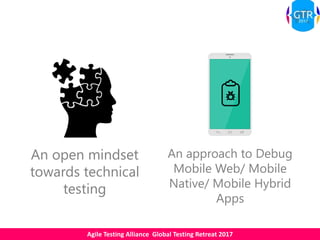
An open mindset
towards technical
testing
An approach to Debug
Mobile Web/ Mobile
Native/ Mobile Hybrid
Apps
Agile Testing Alliance Global Testing Retreat 2017
Mobile testers in the world are
evolving. Are you too?
Agile Testing Alliance Global Testing Retreat 2017
Why should you evolve?
Agile Testing Alliance Global Testing Retreat 2017
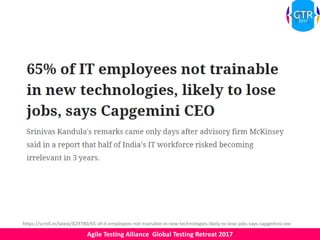
https://scroll.in/latest/829780/65-of-it-employees-not-trainable-in-new-technologies-likely-to-lose-jobs-says-capgemini-ceo
Agile Testing Alliance Global Testing Retreat 2017
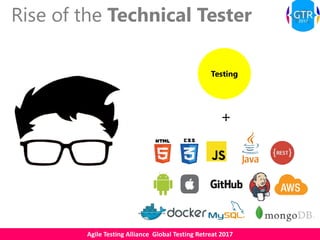
Rise of the Technical Tester
Testing
+
Agile Testing Alliance Global Testing Retreat 2017
Current Testing Trends
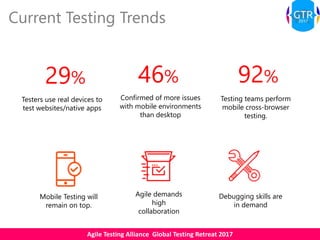
29%
Testers use real devices to
test websites/native apps
46%
Confirmed of more issues
with mobile environments
than desktop
92%
Testing teams perform
mobile cross-browser
testing.
Mobile Testing will
remain on top.
Agile demands
high
collaboration
Debugging skills are
in demand
Agile Testing Alliance Global Testing Retreat 2017
State of Sherlock, The Mobile Tester
Conventional
Black-Box Tester
Poor Coverage
of Tests
Stuck with
producing
orthodox defect
artefacts
Ends up with
Technical
Testing Debt
Agile Testing Alliance Global Testing Retreat 2017
Is this enough?
Agile Testing Alliance Global Testing Retreat 2017
Applications on the mobile
Web Hybrid Native
Android
WebView
iOS
UIWebView
Pure Native
SDK
Components
Agile Testing Alliance Global Testing Retreat 2017
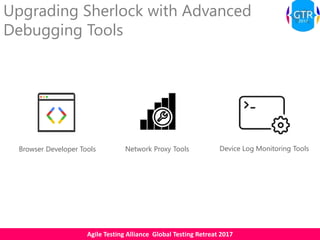
Upgrading Sherlock with Advanced
Debugging Tools
Network Proxy ToolsBrowser Developer Tools Device Log Monitoring Tools
Agile Testing Alliance Global Testing Retreat 2017
Browser Developer Tools
Debug mobile websites on your device by connecting to Desktop browser developer tools
Agile Testing Alliance Global Testing Retreat 2017
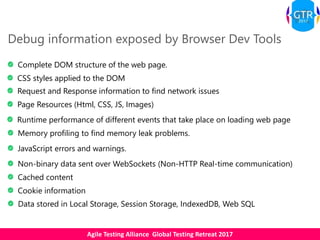
Debug information exposed by Browser Dev Tools
Complete DOM structure of the web page.
CSS styles applied to the DOM
Request and Response information to find network issues
Page Resources (Html, CSS, JS, Images)
Runtime performance of different events that take place on loading web page
Memory profiling to find memory leak problems.
JavaScript errors and warnings.
Non-binary data sent over WebSockets (Non-HTTP Real-time communication)
Cached content
Cookie information
Data stored in Local Storage, Session Storage, IndexedDB, Web SQL
Agile Testing Alliance Global Testing Retreat 2017
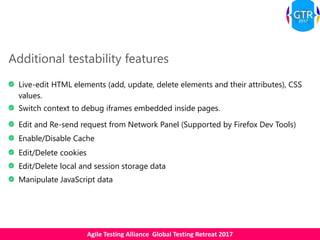
Additional testability features
Live-edit HTML elements (add, update, delete elements and their attributes), CSS
values.
Switch context to debug iframes embedded inside pages.
Edit and Re-send request from Network Panel (Supported by Firefox Dev Tools)
Enable/Disable Cache
Edit/Delete cookies
Edit/Delete local and session storage data
Manipulate JavaScript data
Agile Testing Alliance Global Testing Retreat 2017
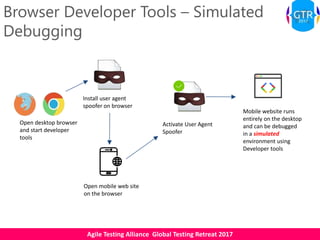
Browser Developer Tools – Simulated
Debugging
Open desktop browser
and start developer
tools
Install user agent
spoofer on browser
Open mobile web site
on the browser
Activate User Agent
Spoofer
Mobile website runs
entirely on the desktop
and can be debugged
in a simulated
environment using
Developer tools
Agile Testing Alliance Global Testing Retreat 2017
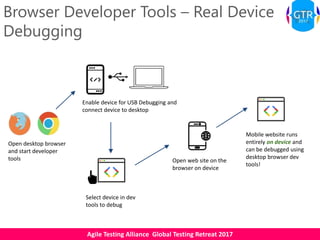
Browser Developer Tools – Real Device
Debugging
Open desktop browser
and start developer
tools Open web site on the
browser on device
Mobile website runs
entirely on device and
can be debugged using
desktop browser dev
tools!
Enable device for USB Debugging and
connect device to desktop
Select device in dev
tools to debug
Agile Testing Alliance Global Testing Retreat 2017
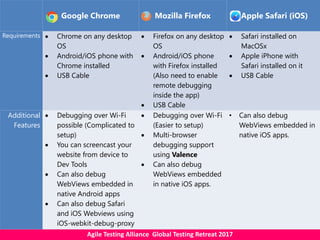
Google Chrome Mozilla Firefox Apple Safari (iOS)
Requirements  Chrome on any desktop
OS
 Android/iOS phone with
Chrome installed
 USB Cable
 Firefox on any desktop
OS
 Android/iOS phone
with Firefox installed
(Also need to enable
remote debugging
inside the app)
 USB Cable
 Safari installed on
MacOSx
 Apple iPhone with
Safari installed on it
 USB Cable
Additional
Features
 Debugging over Wi-Fi
possible (Complicated to
setup)
 You can screencast your
website from device to
Dev Tools
 Can also debug
WebViews embedded in
native Android apps
 Can also debug Safari
and iOS Webviews using
iOS-webkit-debug-proxy
 Debugging over Wi-Fi
(Easier to setup)
 Multi-browser
debugging support
using Valence
 Can also debug
WebViews embedded
in native iOS apps.
• Can also debug
WebViews embedded in
native iOS apps.
Agile Testing Alliance Global Testing Retreat 2017
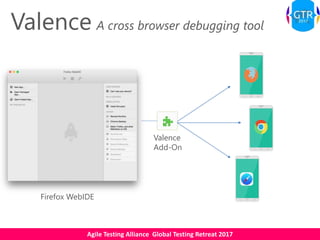
Valence A cross browser debugging tool
Valence
Add-On
Firefox WebIDE
Agile Testing Alliance Global Testing Retreat 2017
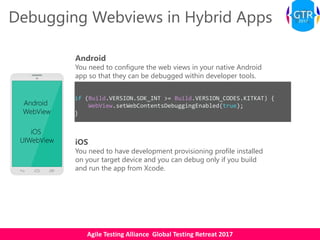
Debugging Webviews in Hybrid Apps
Android
WebView
iOS
UIWebView
Android
You need to configure the web views in your native Android
app so that they can be debugged within developer tools.
if (Build.VERSION.SDK_INT >= Build.VERSION_CODES.KITKAT) {
WebView.setWebContentsDebuggingEnabled(true);
}
iOS
You need to have development provisioning profile installed
on your target device and you can debug only if you build
and run the app from Xcode.
Agile Testing Alliance Global Testing Retreat 2017
Other options?
Weinre (WEb INspector REmote)
Ghostlab – Licensed tool to test and inspect any
website on various browsers and mobile devices
simultaneously
Agile Testing Alliance Global Testing Retreat 2017
Network Proxy Tools
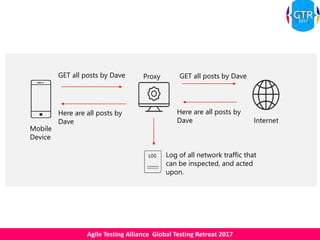
Debug network calls made from your app by introducing a proxy between app and the internet
Agile Testing Alliance Global Testing Retreat 2017
GET all posts by Dave GET all posts by Dave
Here are all posts by
Dave
Here are all posts by
Dave
Log of all network traffic that
can be inspected, and acted
upon.
Proxy
Internet
Mobile
Device
Agile Testing Alliance Global Testing Retreat 2017
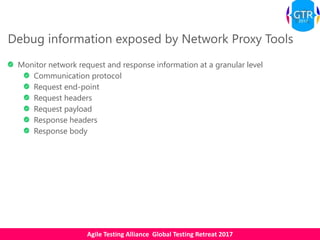
Debug information exposed by Network Proxy Tools
Monitor network request and response information at a granular level
Communication protocol
Request end-point
Request headers
Request payload
Response headers
Response body
Agile Testing Alliance Global Testing Retreat 2017
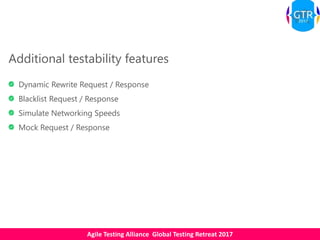
Additional testability features
Dynamic Rewrite Request / Response
Blacklist Request / Response
Simulate Networking Speeds
Mock Request / Response
Agile Testing Alliance Global Testing Retreat 2017
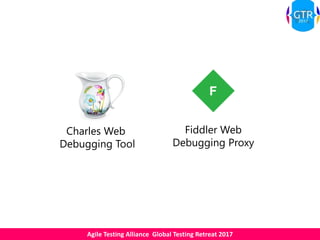
Charles Web
Debugging Tool
Fiddler Web
Debugging Proxy
Agile Testing Alliance Global Testing Retreat 2017
Other options?
Burp – Security vulnerability scanner which can
also be used as a network proxy.
Agile Testing Alliance Global Testing Retreat 2017
Device Log Monitoring Tools
Debug native apps by monitoring device console logs.
Agile Testing Alliance Global Testing Retreat 2017
Debug information exposed by Device Log Monitoring
Tools
Device log (which includes app logs) messages:
Explicit debug messages
Warnings
Errors
Agile Testing Alliance Global Testing Retreat 2017
Monitoring device logs from
command line using Android

Debug Bridge (adb) utility
View device logs by connecting
iOS device to XCode
Use Apple Configurator2 to
view iOS device logs
Use an app like iOSConsole
(Requires OS X 10.9.2 or higher)
Agile Testing Alliance Global Testing Retreat 2017
Gray Box Tester Can cover more
tests
Produces better
defect artefacts
Technical Testing
Debt is no more
Upgraded Sherlock!
Agile Testing Alliance Global Testing Retreat 2017
Which tools can you use when?
Agile Testing Alliance Global Testing Retreat 2017
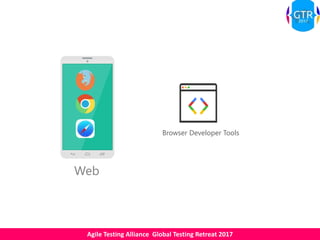
Web
Browser Developer Tools
Agile Testing Alliance Global Testing Retreat 2017
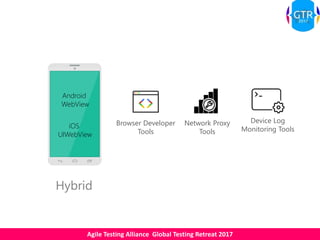
Hybrid
Android
WebView
iOS
UIWebView
Browser Developer
Tools
Device Log
Monitoring Tools
Network Proxy
Tools
Agile Testing Alliance Global Testing Retreat 2017
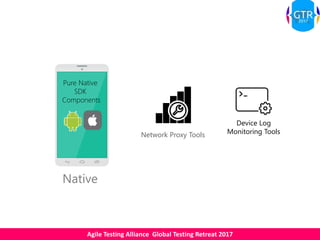
Native
Pure Native
SDK
Components
Network Proxy Tools
Device Log
Monitoring Tools
Agile Testing Alliance Global Testing Retreat 2017
How can you get started?
Agile Testing Alliance Global Testing Retreat 2017
Understand the application architecture. Ask your developers
questions!
Understand the technology behind the app.
Raise bugs with all the information gathered from
debugging tools. This will save your dev’s time to fix the
bug.
Use multiple tools in tandem. One tool is not a solution for
everything.
Document the debugging approaches you use for others
to benefit from.
Agile Testing Alliance Global Testing Retreat 2017
Resources
• https://developers.google.com/web/tools/chrome-devtools/remote-debugging/
• https://developer.mozilla.org/en-
US/docs/Tools/Remote_Debugging/Debugging_Firefox_for_Android_with_WebIDE
• https://webdesign.tutsplus.com/articles/quick-tip-using-web-inspector-to-debug-mobile-safari--
webdesign-8787
• http://stackoverflow.com/questions/3712883/logcat-standalone-client
• https://play.google.com/store/apps/details?id=org.jtb.alogcat&hl=en
• http://apple.stackexchange.com/questions/155552/is-there-any-way-to-access-the-console-logs-on-an-
ios-8-device-without-installin
• https://www.utest.com/articles/how-to-get-console-and-crash-logs-from-ios-on-a-mac-using-xcode
• http://codewithchris.com/tutorial-using-charles-proxy-with-your-ios-development-and-http-debugging/
• https://www.moncefbelyamani.com/how-to-capture-iphone-and-ipad-network-traffic-with-charles/
• https://jaanus.com/debugging-http-on-an-android-phone-or-tablet-with-charles-proxy-for-fun-and-
profit/
• http://docs.telerik.com/fiddler/Configure-Fiddler/Tasks/ConfigureForAndroid
• http://www-01.ibm.com/support/docview.wss?uid=swg21968525
• http://www.gallop.net/blog/rise-of-the-software-development-engineer-in-test-sdet/
• http://qablog.practitest.com/stop-being-a-non-technical-tester/
Agile Testing Alliance Global Testing Retreat 2017
Thank You. Questions?

Upgrading Mobile Tester's Weapons with Advanced Debugging

  • 1.
    #ATAGTR2017 16th 17th March UpgradingMobile Tester’s Weapons with Advanced Debugging Abhijeet Vaikar
  • 2.
    Agile Testing AllianceGlobal Testing Retreat 2017 Abhijeet Vaikar @AbhijeetVaikar https://in.linkedin.com/in/abhijeetvaikar
  • 3.
    Agile Testing AllianceGlobal Testing Retreat 2017 What are we here for?
  • 4.
    Agile Testing AllianceGlobal Testing Retreat 2017 An open mindset towards technical testing An approach to Debug Mobile Web/ Mobile Native/ Mobile Hybrid Apps
  • 5.
    Agile Testing AllianceGlobal Testing Retreat 2017 Mobile testers in the world are evolving. Are you too?
  • 6.
    Agile Testing AllianceGlobal Testing Retreat 2017 Why should you evolve?
  • 7.
    Agile Testing AllianceGlobal Testing Retreat 2017 https://scroll.in/latest/829780/65-of-it-employees-not-trainable-in-new-technologies-likely-to-lose-jobs-says-capgemini-ceo
  • 8.
    Agile Testing AllianceGlobal Testing Retreat 2017
  • 9.
    Agile Testing AllianceGlobal Testing Retreat 2017 Rise of the Technical Tester Testing +
  • 10.
    Agile Testing AllianceGlobal Testing Retreat 2017 Current Testing Trends 29% Testers use real devices to test websites/native apps 46% Confirmed of more issues with mobile environments than desktop 92% Testing teams perform mobile cross-browser testing. Mobile Testing will remain on top. Agile demands high collaboration Debugging skills are in demand
  • 11.
    Agile Testing AllianceGlobal Testing Retreat 2017 State of Sherlock, The Mobile Tester Conventional Black-Box Tester Poor Coverage of Tests Stuck with producing orthodox defect artefacts Ends up with Technical Testing Debt
  • 12.
    Agile Testing AllianceGlobal Testing Retreat 2017 Is this enough?
  • 13.
    Agile Testing AllianceGlobal Testing Retreat 2017
  • 14.
    Agile Testing AllianceGlobal Testing Retreat 2017 Applications on the mobile Web Hybrid Native Android WebView iOS UIWebView Pure Native SDK Components
  • 15.
    Agile Testing AllianceGlobal Testing Retreat 2017 Upgrading Sherlock with Advanced Debugging Tools Network Proxy ToolsBrowser Developer Tools Device Log Monitoring Tools
  • 16.
    Agile Testing AllianceGlobal Testing Retreat 2017 Browser Developer Tools Debug mobile websites on your device by connecting to Desktop browser developer tools
  • 17.
    Agile Testing AllianceGlobal Testing Retreat 2017 Debug information exposed by Browser Dev Tools Complete DOM structure of the web page. CSS styles applied to the DOM Request and Response information to find network issues Page Resources (Html, CSS, JS, Images) Runtime performance of different events that take place on loading web page Memory profiling to find memory leak problems. JavaScript errors and warnings. Non-binary data sent over WebSockets (Non-HTTP Real-time communication) Cached content Cookie information Data stored in Local Storage, Session Storage, IndexedDB, Web SQL
  • 18.
    Agile Testing AllianceGlobal Testing Retreat 2017 Additional testability features Live-edit HTML elements (add, update, delete elements and their attributes), CSS values. Switch context to debug iframes embedded inside pages. Edit and Re-send request from Network Panel (Supported by Firefox Dev Tools) Enable/Disable Cache Edit/Delete cookies Edit/Delete local and session storage data Manipulate JavaScript data
  • 19.
    Agile Testing AllianceGlobal Testing Retreat 2017 Browser Developer Tools – Simulated Debugging Open desktop browser and start developer tools Install user agent spoofer on browser Open mobile web site on the browser Activate User Agent Spoofer Mobile website runs entirely on the desktop and can be debugged in a simulated environment using Developer tools
  • 20.
    Agile Testing AllianceGlobal Testing Retreat 2017 Browser Developer Tools – Real Device Debugging Open desktop browser and start developer tools Open web site on the browser on device Mobile website runs entirely on device and can be debugged using desktop browser dev tools! Enable device for USB Debugging and connect device to desktop Select device in dev tools to debug
  • 21.
    Agile Testing AllianceGlobal Testing Retreat 2017 Google Chrome Mozilla Firefox Apple Safari (iOS) Requirements  Chrome on any desktop OS  Android/iOS phone with Chrome installed  USB Cable  Firefox on any desktop OS  Android/iOS phone with Firefox installed (Also need to enable remote debugging inside the app)  USB Cable  Safari installed on MacOSx  Apple iPhone with Safari installed on it  USB Cable Additional Features  Debugging over Wi-Fi possible (Complicated to setup)  You can screencast your website from device to Dev Tools  Can also debug WebViews embedded in native Android apps  Can also debug Safari and iOS Webviews using iOS-webkit-debug-proxy  Debugging over Wi-Fi (Easier to setup)  Multi-browser debugging support using Valence  Can also debug WebViews embedded in native iOS apps. • Can also debug WebViews embedded in native iOS apps.
  • 22.
    Agile Testing AllianceGlobal Testing Retreat 2017 Valence A cross browser debugging tool Valence Add-On Firefox WebIDE
  • 23.
    Agile Testing AllianceGlobal Testing Retreat 2017 Debugging Webviews in Hybrid Apps Android WebView iOS UIWebView Android You need to configure the web views in your native Android app so that they can be debugged within developer tools. if (Build.VERSION.SDK_INT >= Build.VERSION_CODES.KITKAT) { WebView.setWebContentsDebuggingEnabled(true); } iOS You need to have development provisioning profile installed on your target device and you can debug only if you build and run the app from Xcode.
  • 24.
    Agile Testing AllianceGlobal Testing Retreat 2017 Other options? Weinre (WEb INspector REmote) Ghostlab – Licensed tool to test and inspect any website on various browsers and mobile devices simultaneously
  • 25.
    Agile Testing AllianceGlobal Testing Retreat 2017 Network Proxy Tools Debug network calls made from your app by introducing a proxy between app and the internet
  • 26.
    Agile Testing AllianceGlobal Testing Retreat 2017 GET all posts by Dave GET all posts by Dave Here are all posts by Dave Here are all posts by Dave Log of all network traffic that can be inspected, and acted upon. Proxy Internet Mobile Device
  • 27.
    Agile Testing AllianceGlobal Testing Retreat 2017 Debug information exposed by Network Proxy Tools Monitor network request and response information at a granular level Communication protocol Request end-point Request headers Request payload Response headers Response body
  • 28.
    Agile Testing AllianceGlobal Testing Retreat 2017 Additional testability features Dynamic Rewrite Request / Response Blacklist Request / Response Simulate Networking Speeds Mock Request / Response
  • 29.
    Agile Testing AllianceGlobal Testing Retreat 2017 Charles Web Debugging Tool Fiddler Web Debugging Proxy
  • 30.
    Agile Testing AllianceGlobal Testing Retreat 2017 Other options? Burp – Security vulnerability scanner which can also be used as a network proxy.
  • 31.
    Agile Testing AllianceGlobal Testing Retreat 2017 Device Log Monitoring Tools Debug native apps by monitoring device console logs.
  • 32.
    Agile Testing AllianceGlobal Testing Retreat 2017 Debug information exposed by Device Log Monitoring Tools Device log (which includes app logs) messages: Explicit debug messages Warnings Errors
  • 33.
    Agile Testing AllianceGlobal Testing Retreat 2017 Monitoring device logs from command line using Android Debug Bridge (adb) utility View device logs by connecting iOS device to XCode Use Apple Configurator2 to view iOS device logs Use an app like iOSConsole (Requires OS X 10.9.2 or higher)
  • 34.
    Agile Testing AllianceGlobal Testing Retreat 2017 Gray Box Tester Can cover more tests Produces better defect artefacts Technical Testing Debt is no more Upgraded Sherlock!
  • 35.
    Agile Testing AllianceGlobal Testing Retreat 2017 Which tools can you use when?
  • 36.
    Agile Testing AllianceGlobal Testing Retreat 2017 Web Browser Developer Tools
  • 37.
    Agile Testing AllianceGlobal Testing Retreat 2017 Hybrid Android WebView iOS UIWebView Browser Developer Tools Device Log Monitoring Tools Network Proxy Tools
  • 38.
    Agile Testing AllianceGlobal Testing Retreat 2017 Native Pure Native SDK Components Network Proxy Tools Device Log Monitoring Tools
  • 39.
    Agile Testing AllianceGlobal Testing Retreat 2017 How can you get started?
  • 40.
    Agile Testing AllianceGlobal Testing Retreat 2017 Understand the application architecture. Ask your developers questions! Understand the technology behind the app. Raise bugs with all the information gathered from debugging tools. This will save your dev’s time to fix the bug. Use multiple tools in tandem. One tool is not a solution for everything. Document the debugging approaches you use for others to benefit from.
  • 41.
    Agile Testing AllianceGlobal Testing Retreat 2017 Resources • https://developers.google.com/web/tools/chrome-devtools/remote-debugging/ • https://developer.mozilla.org/en- US/docs/Tools/Remote_Debugging/Debugging_Firefox_for_Android_with_WebIDE • https://webdesign.tutsplus.com/articles/quick-tip-using-web-inspector-to-debug-mobile-safari-- webdesign-8787 • http://stackoverflow.com/questions/3712883/logcat-standalone-client • https://play.google.com/store/apps/details?id=org.jtb.alogcat&hl=en • http://apple.stackexchange.com/questions/155552/is-there-any-way-to-access-the-console-logs-on-an- ios-8-device-without-installin • https://www.utest.com/articles/how-to-get-console-and-crash-logs-from-ios-on-a-mac-using-xcode • http://codewithchris.com/tutorial-using-charles-proxy-with-your-ios-development-and-http-debugging/ • https://www.moncefbelyamani.com/how-to-capture-iphone-and-ipad-network-traffic-with-charles/ • https://jaanus.com/debugging-http-on-an-android-phone-or-tablet-with-charles-proxy-for-fun-and- profit/ • http://docs.telerik.com/fiddler/Configure-Fiddler/Tasks/ConfigureForAndroid • http://www-01.ibm.com/support/docview.wss?uid=swg21968525 • http://www.gallop.net/blog/rise-of-the-software-development-engineer-in-test-sdet/ • http://qablog.practitest.com/stop-being-a-non-technical-tester/
  • 42.
    Agile Testing AllianceGlobal Testing Retreat 2017 Thank You. Questions?