









Selendroid in Action
Dominik Dary
Hamburg Mobile Quality Crew
2015-10-21
Who am I?
Dominik Dary
Engineering Manager @
Twitter: @dominikdary
Github: http://github.com/dominikdary
Disclaimer: My Opinions are my own.
Selendroid in Action
Agenda
• Short Introdution
• After covering the basics about how to find and interact with UI
elements,
• we will look into techniques of writing maintainable tests.
• In the end we will run our tests in parallel using the Selenium Grid.
Selendroid in Action
SHORT INTRODUCTION
Selendroid in Action
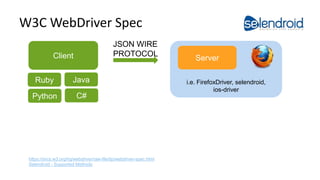
W3C WebDriver Spec
Selendroid in Action
JSON WIRE
PROTOCOLClient
Java
C#
Ruby
Python
i.e. FirefoxDriver, selendroid,
ios-driver
Server
https://dvcs.w3.org/hg/webdriver/raw-file/tip/webdriver-spec.html
Selendroid - Supported Methods
ONE PROTOCOL TO RULE THEM ALL
Selendroid in Action
Source:
http://en.wikipedia.org/wiki/File:Unico_Anello.png#file
Selendroid
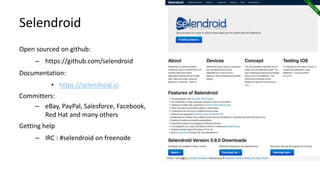
Open sourced on github:
– https://github.com/selendroid
Documentation:
• https://selendroid.io
Committers:
– eBay, PayPal, Salesforce, Facebook,
Red Hat and many others
Getting help
– IRC : #selendroid on freenode
Selendroid in Action
Features
– The only mobile WebDriver that supports native & hybrid apps
and testing the mobile web on Android versions (API 10 to 23)
– Full compatibility with the JSON Wire Protocol.
– The app under test must not be modified
– No jailbreak / rooting of devices
– Interacts simultaneously with multiple Android devices
– Supports hot plugging of hardware devices
– Advanced Gestures are supported
Selendroid in Action
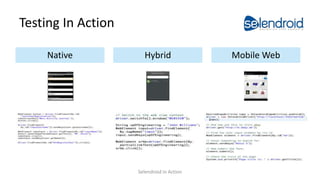
Testing In Action
Mobile WebHybridNative
Selendroid in Action
Native Element Selectors
• Id
Finds the element by Id.
• name
Finds the element by content description (accessibility label).
• link text
Finds the element by displayed text.
• partial link text
Finds the element by partial displayed text.
• class
Finds the element by full class name (e.g. android.widget.Button).
• tag name
Finds the element by tag name e.g. button
• xpath
Finds the element by a xpath expression.
Selendroid in Action
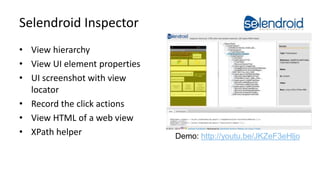
Selendroid Inspector
• View hierarchy
• View UI element properties
• UI screenshot with view
locator
• Record the click actions
• View HTML of a web view
• XPath helper
Selendroid in Action
Demo: http://youtu.be/JKZeF3eHljo
FIRST HANDS ON SESSION
Selendroid in Action
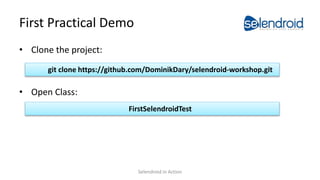
First Practical Demo
• Clone the project:
• Open Class:
git clone https://github.com/DominikDary/selendroid-workshop.git
FirstSelendroidTest
Selendroid in Action
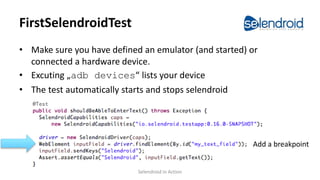
FirstSelendroidTest
• Make sure you have defined an emulator (and started) or
connected a hardware device.
• Excuting „adb devices“ lists your device
• The test automatically starts and stops selendroid
Add a breakpoint
Selendroid in Action
Get Your Hands Dirty
• Write a Test
– that navigate to the User Registration Screen
– Use the Inspector to find the Element details
– Use these locators
• Id, name, xpath, link text
• Goal is to fill out the registration form and
• To validate on the following Dialog that the right input
Hints:
• Debug the test and use the Selendroid Inspector
(http://localhost:4444/inspector/ )
• Docu is located here: http://selendroid.io/native.html
• Do not over engineer, just write all the stepsSelendroid in Action
Selendroid Repl
• Interactive Command execution
• Results are immediately displayed
• The app can be manually used to navigate to the dialog you
want to automate.
• Interested? Read more:
selendroid-workshop/docs/selendroid-python-repl.md
Selendroid in Action
MAINTAINABILITY IS KING
Selendroid in Action
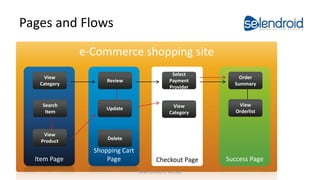
Pages and Flows
e-Commerce shopping site
Checkout Page Success Page
Shopping Cart
PageItem Page
View
Orderlist
View
Category
Update
Delete
View
Product
Search
Item
View
Category
Review
Select
Payment
Provider
Order
Summary
Selendroid in Action
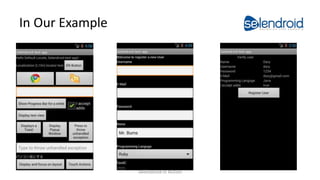
In Our Example
Selendroid in Action
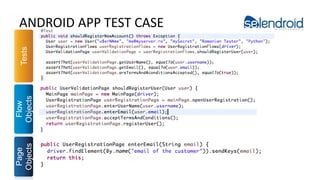
ANDROID APP TEST CASE
Selendroid in Action
Tests
Flow
Objects
Page
Objects
SECOND HANDS ON SESSION
Selendroid in Action
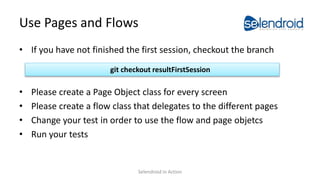
Use Pages and Flows
• If you have not finished the first session, checkout the branch
• Please create a Page Object class for every screen
• Please create a flow class that delegates to the different pages
• Change your test in order to use the flow and page objetcs
• Run your tests
git checkout resultFirstSession
Selendroid in Action
Second Result
• If you have not finished the first session, checkout the branch
git checkout resultSecondSession
Selendroid in Action
TEST INFRASTRUCTURE
Selendroid in Action
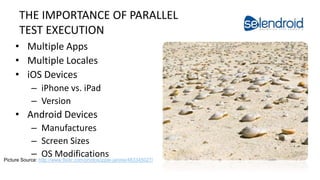
THE IMPORTANCE OF PARALLEL
TEST EXECUTION
• Multiple Apps
• Multiple Locales
• iOS Devices
– iPhone vs. iPad
– Version
• Android Devices
– Manufactures
– Screen Sizes
– OS Modifications
Selendroid in Action
Picture Source: http://www.flickr.com/photos/ippei-janine/483345027/
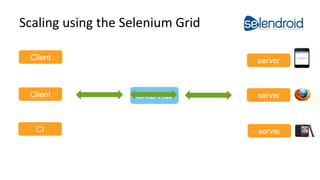
Scaling using the Selenium Grid
Selendroid in Action
Client
serverGRID HubClient
CI
server
server
THIRD HANDS ON SESSION
Selendroid in Action
Startup a Grid
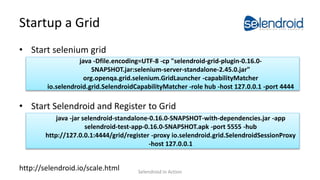
• Start selenium grid
• Start Selendroid and Register to Grid
http://selendroid.io/scale.html
java -jar selendroid-standalone-0.16.0-SNAPSHOT-with-dependencies.jar -app
selendroid-test-app-0.16.0-SNAPSHOT.apk -port 5555 -hub
http://127.0.0.1:4444/grid/register -proxy io.selendroid.grid.SelendroidSessionProxy
-host 127.0.0.1
java -Dfile.encoding=UTF-8 -cp "selendroid-grid-plugin-0.16.0-
SNAPSHOT.jar:selenium-server-standalone-2.45.0.jar"
org.openqa.grid.selenium.GridLauncher -capabilityMatcher
io.selendroid.grid.SelendroidCapabilityMatcher -role hub -host 127.0.0.1 -port 4444
Selendroid in Action
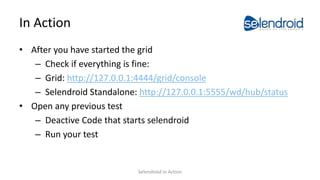
In Action
• After you have started the grid
– Check if everything is fine:
– Grid: http://127.0.0.1:4444/grid/console
– Selendroid Standalone: http://127.0.0.1:5555/wd/hub/status
• Open any previous test
– Deactive Code that starts selendroid
– Run your test
Selendroid in Action
FUTURE
Selendroid in Action
Future
• Adding uiautomator2 support
• Release Selendroid 1.0
Selendroid in Action
We are looking for contributors and
Image Source: https://c2.staticflickr.com/8/7350/9665734904_38a85f1be5_b.jpg
Selendroid in Action
Thank You!
Questions or Comments?
Selendroid in Action
Contact & Getting help
IRC : #selendroid on freenode
Mailing List:
http://groups.google.com/group/selendroid
Selendroid in Action
Videos: Selendroid in Action
– Native Demo: http://youtu.be/074BnGV0mS0
– Hybrid Demo: http://youtu.be/FGsKI6esKpw
– Mobile Web Demo: http://goo.gl/41uvAx
– Selendroid Article:
http://www.methodsandtools.com/tools/selendroid.php
Selendroid in Action
BACKUP
Selendroid in Action
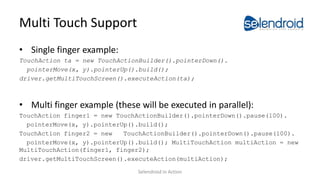
Multi Touch Support
• Single finger example:
TouchAction ta = new TouchActionBuilder().pointerDown().
pointerMove(x, y).pointerUp().build();
driver.getMultiTouchScreen().executeAction(ta);
• Multi finger example (these will be executed in parallel):
TouchAction finger1 = new TouchActionBuilder().pointerDown().pause(100).
pointerMove(x, y).pointerUp().build();
TouchAction finger2 = new TouchActionBuilder().pointerDown().pause(100).
pointerMove(x, y).pointerUp().build(); MultiTouchAction multiAction = new
MultiTouchAction(finger1, finger2);
driver.getMultiTouchScreen().executeAction(multiAction);
Selendroid in Action
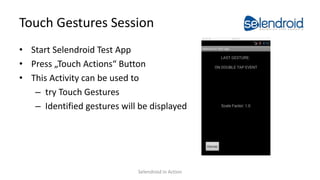
Touch Gestures Session
• Start Selendroid Test App
• Press „Touch Actions“ Button
• This Activity can be used to
– try Touch Gestures
– Identified gestures will be displayed
Selendroid in Action

Selendroid in Action

  • 1.
    Selendroid in Action DominikDary Hamburg Mobile Quality Crew 2015-10-21
  • 2.
    Who am I? DominikDary Engineering Manager @ Twitter: @dominikdary Github: http://github.com/dominikdary Disclaimer: My Opinions are my own. Selendroid in Action
  • 3.
    Agenda • Short Introdution •After covering the basics about how to find and interact with UI elements, • we will look into techniques of writing maintainable tests. • In the end we will run our tests in parallel using the Selenium Grid. Selendroid in Action
  • 4.
  • 5.
    W3C WebDriver Spec Selendroidin Action JSON WIRE PROTOCOLClient Java C# Ruby Python i.e. FirefoxDriver, selendroid, ios-driver Server https://dvcs.w3.org/hg/webdriver/raw-file/tip/webdriver-spec.html Selendroid - Supported Methods
  • 6.
    ONE PROTOCOL TORULE THEM ALL Selendroid in Action Source: http://en.wikipedia.org/wiki/File:Unico_Anello.png#file
  • 7.
    Selendroid Open sourced ongithub: – https://github.com/selendroid Documentation: • https://selendroid.io Committers: – eBay, PayPal, Salesforce, Facebook, Red Hat and many others Getting help – IRC : #selendroid on freenode Selendroid in Action
  • 8.
    Features – The onlymobile WebDriver that supports native & hybrid apps and testing the mobile web on Android versions (API 10 to 23) – Full compatibility with the JSON Wire Protocol. – The app under test must not be modified – No jailbreak / rooting of devices – Interacts simultaneously with multiple Android devices – Supports hot plugging of hardware devices – Advanced Gestures are supported Selendroid in Action
  • 9.
    Testing In Action MobileWebHybridNative Selendroid in Action
  • 10.
    Native Element Selectors •Id Finds the element by Id. • name Finds the element by content description (accessibility label). • link text Finds the element by displayed text. • partial link text Finds the element by partial displayed text. • class Finds the element by full class name (e.g. android.widget.Button). • tag name Finds the element by tag name e.g. button • xpath Finds the element by a xpath expression. Selendroid in Action
  • 11.
    Selendroid Inspector • Viewhierarchy • View UI element properties • UI screenshot with view locator • Record the click actions • View HTML of a web view • XPath helper Selendroid in Action Demo: http://youtu.be/JKZeF3eHljo
  • 12.
    FIRST HANDS ONSESSION Selendroid in Action
  • 13.
    First Practical Demo •Clone the project: • Open Class: git clone https://github.com/DominikDary/selendroid-workshop.git FirstSelendroidTest Selendroid in Action
  • 14.
    FirstSelendroidTest • Make sureyou have defined an emulator (and started) or connected a hardware device. • Excuting „adb devices“ lists your device • The test automatically starts and stops selendroid Add a breakpoint Selendroid in Action
  • 15.
    Get Your HandsDirty • Write a Test – that navigate to the User Registration Screen – Use the Inspector to find the Element details – Use these locators • Id, name, xpath, link text • Goal is to fill out the registration form and • To validate on the following Dialog that the right input Hints: • Debug the test and use the Selendroid Inspector (http://localhost:4444/inspector/ ) • Docu is located here: http://selendroid.io/native.html • Do not over engineer, just write all the stepsSelendroid in Action
  • 16.
    Selendroid Repl • InteractiveCommand execution • Results are immediately displayed • The app can be manually used to navigate to the dialog you want to automate. • Interested? Read more: selendroid-workshop/docs/selendroid-python-repl.md Selendroid in Action
  • 17.
  • 18.
    Pages and Flows e-Commerceshopping site Checkout Page Success Page Shopping Cart PageItem Page View Orderlist View Category Update Delete View Product Search Item View Category Review Select Payment Provider Order Summary Selendroid in Action
  • 19.
  • 20.
    ANDROID APP TESTCASE Selendroid in Action Tests Flow Objects Page Objects
  • 21.
    SECOND HANDS ONSESSION Selendroid in Action
  • 22.
    Use Pages andFlows • If you have not finished the first session, checkout the branch • Please create a Page Object class for every screen • Please create a flow class that delegates to the different pages • Change your test in order to use the flow and page objetcs • Run your tests git checkout resultFirstSession Selendroid in Action
  • 23.
    Second Result • Ifyou have not finished the first session, checkout the branch git checkout resultSecondSession Selendroid in Action
  • 24.
  • 25.
    THE IMPORTANCE OFPARALLEL TEST EXECUTION • Multiple Apps • Multiple Locales • iOS Devices – iPhone vs. iPad – Version • Android Devices – Manufactures – Screen Sizes – OS Modifications Selendroid in Action Picture Source: http://www.flickr.com/photos/ippei-janine/483345027/
  • 26.
    Scaling using theSelenium Grid Selendroid in Action Client serverGRID HubClient CI server server
  • 27.
    THIRD HANDS ONSESSION Selendroid in Action
  • 28.
    Startup a Grid •Start selenium grid • Start Selendroid and Register to Grid http://selendroid.io/scale.html java -jar selendroid-standalone-0.16.0-SNAPSHOT-with-dependencies.jar -app selendroid-test-app-0.16.0-SNAPSHOT.apk -port 5555 -hub http://127.0.0.1:4444/grid/register -proxy io.selendroid.grid.SelendroidSessionProxy -host 127.0.0.1 java -Dfile.encoding=UTF-8 -cp "selendroid-grid-plugin-0.16.0- SNAPSHOT.jar:selenium-server-standalone-2.45.0.jar" org.openqa.grid.selenium.GridLauncher -capabilityMatcher io.selendroid.grid.SelendroidCapabilityMatcher -role hub -host 127.0.0.1 -port 4444 Selendroid in Action
  • 29.
    In Action • Afteryou have started the grid – Check if everything is fine: – Grid: http://127.0.0.1:4444/grid/console – Selendroid Standalone: http://127.0.0.1:5555/wd/hub/status • Open any previous test – Deactive Code that starts selendroid – Run your test Selendroid in Action
  • 30.
  • 31.
    Future • Adding uiautomator2support • Release Selendroid 1.0 Selendroid in Action
  • 32.
    We are lookingfor contributors and Image Source: https://c2.staticflickr.com/8/7350/9665734904_38a85f1be5_b.jpg Selendroid in Action
  • 33.
    Thank You! Questions orComments? Selendroid in Action
  • 34.
    Contact & Gettinghelp IRC : #selendroid on freenode Mailing List: http://groups.google.com/group/selendroid Selendroid in Action
  • 35.
    Videos: Selendroid inAction – Native Demo: http://youtu.be/074BnGV0mS0 – Hybrid Demo: http://youtu.be/FGsKI6esKpw – Mobile Web Demo: http://goo.gl/41uvAx – Selendroid Article: http://www.methodsandtools.com/tools/selendroid.php Selendroid in Action
  • 36.
  • 37.
    Multi Touch Support •Single finger example: TouchAction ta = new TouchActionBuilder().pointerDown(). pointerMove(x, y).pointerUp().build(); driver.getMultiTouchScreen().executeAction(ta); • Multi finger example (these will be executed in parallel): TouchAction finger1 = new TouchActionBuilder().pointerDown().pause(100). pointerMove(x, y).pointerUp().build(); TouchAction finger2 = new TouchActionBuilder().pointerDown().pause(100). pointerMove(x, y).pointerUp().build(); MultiTouchAction multiAction = new MultiTouchAction(finger1, finger2); driver.getMultiTouchScreen().executeAction(multiAction); Selendroid in Action
  • 38.
    Touch Gestures Session •Start Selendroid Test App • Press „Touch Actions“ Button • This Activity can be used to – try Touch Gestures – Identified gestures will be displayed Selendroid in Action