Software Configuration Management   Presented by:  Susan Sekira Software Process Improvement (SPI) Project
Agenda Configuration Management (CM) Background CM Concepts CM Benefits Process Overview Configuration Management Implementation Planning and Startup Tasks Execution Tasks CM Support Information
Purpose and Objectives Purpose:  Describe CM Concepts and the implementation approach Objective:  After this session you should understand: Four key functions of CM How to apply CM to your project Which CM records to maintain Where to find additional information on CM processes and tools
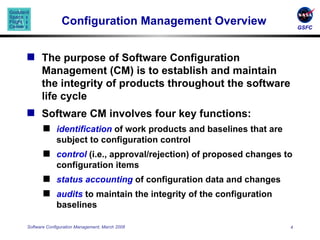
Configuration Management Overview The purpose of Software Configuration Management (CM) is to establish and maintain the integrity of products throughout the software life cycle Software CM involves four key functions: identification  of work products and baselines that are subject to configuration control control  (i.e., approval/rejection) of proposed changes to configuration items status accounting  of configuration data and changes audits  to maintain the integrity of the configuration baselines
CM Benefits Improves Product protection Product visibility Product control Team communication Customer Confidence Decreases Rework Confusion Project Risk
Key Definitions  Configuration Item (CI)  - an aggregation of work products (e.g., hardware, software, firmware, or documentation) that is designated for configuration management and treated as a single entity in the configuration management process Baseline  – a set of specifications or work products that has been formally reviewed and agreed on, which thereafter serves as the basis for further development, and which can be changed only through change control procedures.  Typically  defined for each project life-cycle phase
Configuration Management Roles and Responsibilities Product Development Lead (PDL)  - Responsible for CM planning and overall control and approval of CM activities and tools.  Develops and maintains the project’s CM Plan Configuration Management Officer (CMO)  – Implements and maintains the CM system according to the project’s CM Plan.  Coordinates, supports, and performs CM activities and reports those activities to the PDL Control Board  – composed of technical and  administrative representatives who recommend approval/disapproval of changes to a CI or baseline (e.g., Configuration Control Board (CCB), Internal Review Board (IRB))
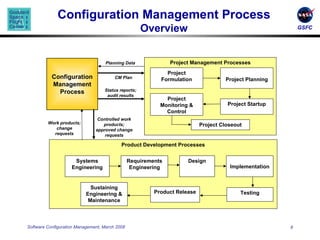
Configuration Management Process Overview Work products; change requests Controlled work products; approved change requests Status reports; audit results CM Plan Project Management Processes Project Planning Project Monitoring & Control Project Startup Project Closeout Project Formulation Product Development Processes Requirements Engineering Product Release Sustaining Engineering & Maintenance Design Implementation Testing Systems Engineering Configuration Management Process Planning Data
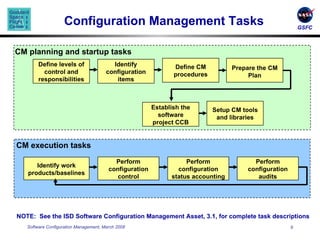
Configuration Management Tasks CM planning and startup   tasks CM execution   tasks NOTE:  See the ISD Software Configuration Management Asset, 3.1, for complete task descriptions Establish the software project CCB Setup CM tools and libraries Define levels of control and responsibilities Identify configuration items Define CM procedures Prepare the CM Plan Identify work products/baselines Perform configuration control Perform configuration status accounting Perform configuration audits
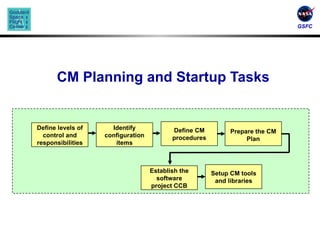
CM Planning and Startup Tasks Establish the software project CCB Setup CM tools and libraries Define levels of control and responsibilities Identify configuration items Define CM procedures Prepare the CM Plan
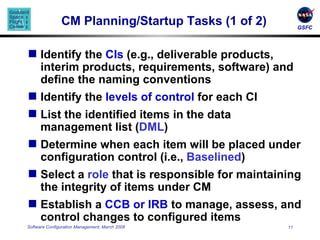
CM Planning/Startup Tasks (1 of 2) Identify the  CIs  (e.g., deliverable products, interim products, requirements, software) and define the naming conventions Identify the  levels of control  for each CI List the identified items in the data management list ( DML ) Determine when each item will be placed under configuration control (i.e.,  Baselined ) Select a  role  that is responsible for maintaining the integrity of items under CM Establish a  CCB   or IRB  to manage, assess, and control changes to configured items
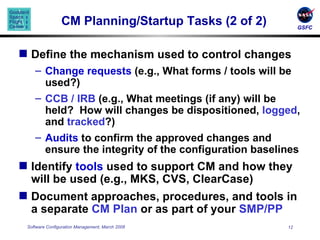
CM Planning/Startup Tasks (2 of 2) Define the mechanism used to control changes Change requests  (e.g., What forms / tools will be used?)  CCB / IRB  (e.g., What meetings (if any) will be held?  How will changes be dispositioned,  logged , and  tracked ?) Audits  to confirm the approved changes and ensure the integrity of the configuration baselines Identify  tools  used to support CM and how they will be used (e.g., MKS, CVS, ClearCase) Document approaches, procedures, and tools in a separate  CM Plan  or as part of your  SMP/PP
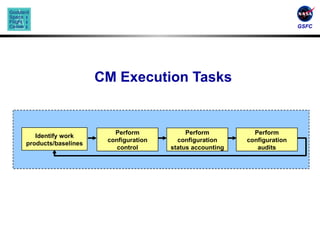
CM Execution Tasks Perform configuration control Perform configuration status accounting Perform configuration audits Identify work products/baselines
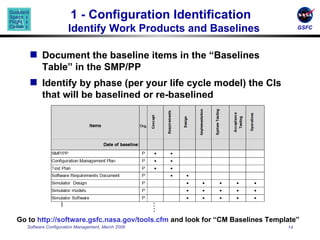
1 - Configuration Identification  Identify Work Products and Baselines Document the baseline items in the “Baselines Table” in the SMP/PP Identify by phase (per your life cycle model) the CIs that will be baselined or re-baselined Go to  http://software.gsfc.nasa.gov/tools.cfm  and look for “CM Baselines Template” … .
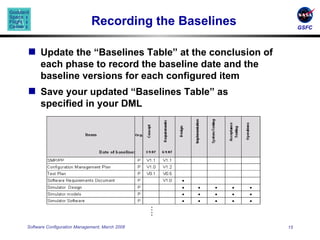
Recording the Baselines Update the “Baselines Table” at the conclusion of each phase to record the baseline date and the baseline versions for each configured item  Save your updated “Baselines Table” as specified in your DML … .
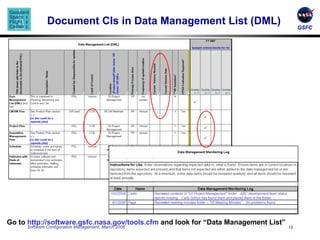
Document CIs in Data Management List (DML) Go to  http://software.gsfc.nasa.gov/tools.cfm  and look for “Data Management List”
2 - Configuration Control Identify and record desired changes to a baselined item Define the need / problem rather than the desired resolution Document the analysis of change Impact analysis, costs, urgency… Review and disposition each change request Use a tool* to record and track the status of all change requests *Go to  http://software.gsfc.nasa.gov/tools.cfm  and look for “Change Request Form” and “Change Request Log Template”
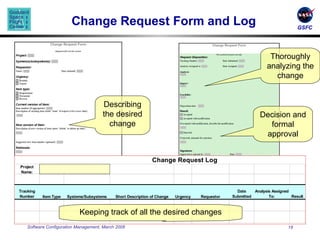
Change Request Form and Log Describing the desired change Thoroughly analyzing the change Decision and formal approval Keeping track of all the desired changes
3 – Configuration Status Accounting Maintain records of the CIs throughout the project’s life cycle Record and monitor all changes to CIs Document the contents of versions, builds, and baselines Generate periodic status reports – your CM tool may provide the reporting for you!
4 – Configuration Audits Conduct audits to maintain the integrity of the configuration baselines Three types of CM Audits are required: Baseline Audit Functional Configuration Audit (FCA) Physical Configuration Audit (PCA) Audits correspond to major milestones and must be planned and on your schedule
Baseline Audit Conducted at the end of each life cycle phase or at each major delivery  Conducted by the team’s CMO or designated team personnel; reviewed by the team’s Software Quality Engineer (SQE) Baseline Audit -- verifies the content of the baseline Correct versions of CIs were used to build the baseline Correct version of documentation are included in the baseline
FCA and PCA  Functional Configuration Audit ( FCA ) -- Verifies functionality of baseline after final testing Ensures that CIs achieve the performance and functional requirements Ensures that operational and support documents are complete and satisfactory Physical Configuration Audit ( PCA ) -- Verifies content of baseline for major builds or deliveries Ensures that baseline items of a delivery match the documentation that defines it (e.g., Version Description Document (VDD), design documents) Both conducted by the team’s CMO or designated team personnel; verified by the team’s SQE
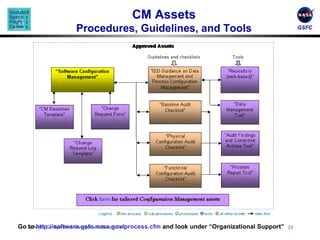
CM Assets Procedures, Guidelines, and Tools Go to  http://software.gsfc.nasa.gov/process.cfm  and look under “Organizational Support”
CM Records CM Plan  (including responsibilities, approach, baselines, and CI naming conventions) Schedule  of CM activities Evidence of  Change Request  (CR) handling, assignment, and tracking – following the full thread thru the CM process CCB  agendas  and  meeting minutes   VDDs  and/or  Delivery Letters CM  audit results Emails  communicating audit results, configuration problems, distribution of the Plan, CRs emailed for analysis, summary of open CRs…
Summary Software Configuration Management   establishes and maintains the integrity of products throughout the software life cycle CM planning and implementation support include: Configuration Identification Configuration Control Configuration Status Accounting Configuration Audits CM records must be organized and maintained
Questions?
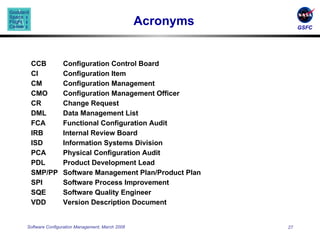
Acronyms CCB Configuration Control Board CI Configuration Item CM Configuration Management CMO Configuration Management Officer CR Change Request DML Data Management List FCA Functional Configuration Audit IRB Internal Review Board ISD Information Systems Division PCA Physical Configuration Audit PDL Product Development Lead SMP/PP Software Management Plan/Product Plan SPI Software Process Improvement SQE Software Quality Engineer VDD Version Description Document

Software Configuration Management

  • 1.
    Software Configuration Management Presented by: Susan Sekira Software Process Improvement (SPI) Project
  • 2.
    Agenda Configuration Management(CM) Background CM Concepts CM Benefits Process Overview Configuration Management Implementation Planning and Startup Tasks Execution Tasks CM Support Information
  • 3.
    Purpose and ObjectivesPurpose: Describe CM Concepts and the implementation approach Objective: After this session you should understand: Four key functions of CM How to apply CM to your project Which CM records to maintain Where to find additional information on CM processes and tools
  • 4.
    Configuration Management OverviewThe purpose of Software Configuration Management (CM) is to establish and maintain the integrity of products throughout the software life cycle Software CM involves four key functions: identification of work products and baselines that are subject to configuration control control (i.e., approval/rejection) of proposed changes to configuration items status accounting of configuration data and changes audits to maintain the integrity of the configuration baselines
  • 5.
    CM Benefits ImprovesProduct protection Product visibility Product control Team communication Customer Confidence Decreases Rework Confusion Project Risk
  • 6.
    Key Definitions Configuration Item (CI) - an aggregation of work products (e.g., hardware, software, firmware, or documentation) that is designated for configuration management and treated as a single entity in the configuration management process Baseline – a set of specifications or work products that has been formally reviewed and agreed on, which thereafter serves as the basis for further development, and which can be changed only through change control procedures. Typically defined for each project life-cycle phase
  • 7.
    Configuration Management Rolesand Responsibilities Product Development Lead (PDL) - Responsible for CM planning and overall control and approval of CM activities and tools. Develops and maintains the project’s CM Plan Configuration Management Officer (CMO) – Implements and maintains the CM system according to the project’s CM Plan. Coordinates, supports, and performs CM activities and reports those activities to the PDL Control Board – composed of technical and administrative representatives who recommend approval/disapproval of changes to a CI or baseline (e.g., Configuration Control Board (CCB), Internal Review Board (IRB))
  • 8.
    Configuration Management ProcessOverview Work products; change requests Controlled work products; approved change requests Status reports; audit results CM Plan Project Management Processes Project Planning Project Monitoring & Control Project Startup Project Closeout Project Formulation Product Development Processes Requirements Engineering Product Release Sustaining Engineering & Maintenance Design Implementation Testing Systems Engineering Configuration Management Process Planning Data
  • 9.
    Configuration Management TasksCM planning and startup tasks CM execution tasks NOTE: See the ISD Software Configuration Management Asset, 3.1, for complete task descriptions Establish the software project CCB Setup CM tools and libraries Define levels of control and responsibilities Identify configuration items Define CM procedures Prepare the CM Plan Identify work products/baselines Perform configuration control Perform configuration status accounting Perform configuration audits
  • 10.
    CM Planning andStartup Tasks Establish the software project CCB Setup CM tools and libraries Define levels of control and responsibilities Identify configuration items Define CM procedures Prepare the CM Plan
  • 11.
    CM Planning/Startup Tasks(1 of 2) Identify the CIs (e.g., deliverable products, interim products, requirements, software) and define the naming conventions Identify the levels of control for each CI List the identified items in the data management list ( DML ) Determine when each item will be placed under configuration control (i.e., Baselined ) Select a role that is responsible for maintaining the integrity of items under CM Establish a CCB or IRB to manage, assess, and control changes to configured items
  • 12.
    CM Planning/Startup Tasks(2 of 2) Define the mechanism used to control changes Change requests (e.g., What forms / tools will be used?) CCB / IRB (e.g., What meetings (if any) will be held? How will changes be dispositioned, logged , and tracked ?) Audits to confirm the approved changes and ensure the integrity of the configuration baselines Identify tools used to support CM and how they will be used (e.g., MKS, CVS, ClearCase) Document approaches, procedures, and tools in a separate CM Plan or as part of your SMP/PP
  • 13.
    CM Execution TasksPerform configuration control Perform configuration status accounting Perform configuration audits Identify work products/baselines
  • 14.
    1 - ConfigurationIdentification Identify Work Products and Baselines Document the baseline items in the “Baselines Table” in the SMP/PP Identify by phase (per your life cycle model) the CIs that will be baselined or re-baselined Go to http://software.gsfc.nasa.gov/tools.cfm and look for “CM Baselines Template” … .
  • 15.
    Recording the BaselinesUpdate the “Baselines Table” at the conclusion of each phase to record the baseline date and the baseline versions for each configured item Save your updated “Baselines Table” as specified in your DML … .
  • 16.
    Document CIs inData Management List (DML) Go to http://software.gsfc.nasa.gov/tools.cfm and look for “Data Management List”
  • 17.
    2 - ConfigurationControl Identify and record desired changes to a baselined item Define the need / problem rather than the desired resolution Document the analysis of change Impact analysis, costs, urgency… Review and disposition each change request Use a tool* to record and track the status of all change requests *Go to http://software.gsfc.nasa.gov/tools.cfm and look for “Change Request Form” and “Change Request Log Template”
  • 18.
    Change Request Formand Log Describing the desired change Thoroughly analyzing the change Decision and formal approval Keeping track of all the desired changes
  • 19.
    3 – ConfigurationStatus Accounting Maintain records of the CIs throughout the project’s life cycle Record and monitor all changes to CIs Document the contents of versions, builds, and baselines Generate periodic status reports – your CM tool may provide the reporting for you!
  • 20.
    4 – ConfigurationAudits Conduct audits to maintain the integrity of the configuration baselines Three types of CM Audits are required: Baseline Audit Functional Configuration Audit (FCA) Physical Configuration Audit (PCA) Audits correspond to major milestones and must be planned and on your schedule
  • 21.
    Baseline Audit Conductedat the end of each life cycle phase or at each major delivery Conducted by the team’s CMO or designated team personnel; reviewed by the team’s Software Quality Engineer (SQE) Baseline Audit -- verifies the content of the baseline Correct versions of CIs were used to build the baseline Correct version of documentation are included in the baseline
  • 22.
    FCA and PCA Functional Configuration Audit ( FCA ) -- Verifies functionality of baseline after final testing Ensures that CIs achieve the performance and functional requirements Ensures that operational and support documents are complete and satisfactory Physical Configuration Audit ( PCA ) -- Verifies content of baseline for major builds or deliveries Ensures that baseline items of a delivery match the documentation that defines it (e.g., Version Description Document (VDD), design documents) Both conducted by the team’s CMO or designated team personnel; verified by the team’s SQE
  • 23.
    CM Assets Procedures,Guidelines, and Tools Go to http://software.gsfc.nasa.gov/process.cfm and look under “Organizational Support”
  • 24.
    CM Records CMPlan (including responsibilities, approach, baselines, and CI naming conventions) Schedule of CM activities Evidence of Change Request (CR) handling, assignment, and tracking – following the full thread thru the CM process CCB agendas and meeting minutes VDDs and/or Delivery Letters CM audit results Emails communicating audit results, configuration problems, distribution of the Plan, CRs emailed for analysis, summary of open CRs…
  • 25.
    Summary Software ConfigurationManagement establishes and maintains the integrity of products throughout the software life cycle CM planning and implementation support include: Configuration Identification Configuration Control Configuration Status Accounting Configuration Audits CM records must be organized and maintained
  • 26.
  • 27.
    Acronyms CCB ConfigurationControl Board CI Configuration Item CM Configuration Management CMO Configuration Management Officer CR Change Request DML Data Management List FCA Functional Configuration Audit IRB Internal Review Board ISD Information Systems Division PCA Physical Configuration Audit PDL Product Development Lead SMP/PP Software Management Plan/Product Plan SPI Software Process Improvement SQE Software Quality Engineer VDD Version Description Document