PHP Tutorials By Vineet Kumar Saini

                         Update Statement in PHP

In this article you will see how to update data in a database through HTML table. Using the
update statement you can update data in your database.

Code

<?php
$con=mysql_connect ("localhost","root","");
mysql_select_db ("mcn",$con);
@$a=$_POST['txt1'];
@$b=$_POST['txt2'];
@$c=$_POST['txt3'];
@$d=$_POST['txt4'];
if(@$_POST ['up'])
{
 $s="update employee set Designation='$b',Sal='$c',Qualification='$d' where Name='$a'";
echo "Your Data Updated.";
 mysql_query( $s);
}
$con=mysql_connect ("localhost","root","");
mysql_select_db("mcn",$con);
if(@$_POST ['sel'])
{
echo $ins=mysql_query ("select * from employee");
echo "<table bgcolor=skyblue border='2' align=center>
   <tr>
   <th colspan=4>Select Data From Employee Table</th></tr>
   <tr>
   <th>Nmae</th>
   <th>Designation</th>
   <th>Sal</th>
   <th>Qualification</th>
   </tr>";
   while ($row=mysql_fetch_array($ins))
   {
   echo "<tr>";
   echo "<th>".$row ['Name']."</th>";
   echo "<th>". $row ['Designation']. "</th>";
   echo "<th>". $row ['Sal']."</th>";
   echo "<th>".$row ['Qualification']."</th>";
   echo "</tr>";
   }
   }
  echo "</table>"
?>
<html>
<head>
</head>
<body bgcolor="pink">
<center>
PHP Tutorials By Vineet Kumar Saini

<table bgcolor="skyblue" border="2">
<form method="post">
<tr>
<td colspan=2 align="center">Employee Table</td>
</tr>
<td>Name</td><td><input type="text" name="txt1"></td>
</tr>
<tr>
<td>Designation</td><td><input type="text" name="txt2"></td>
</tr>
<tr>
<td>Sal</td><td><input type="text" name="txt3"></td>
</tr>
<tr>
<td>Qualification</td><td><input type="text" name="txt4"></td>
</tr>
<tr>
<td><input type="submit" name="up" value="Update"></td>
<td><input type="submit" name="sel" value="Select"></td>
</tr>
</form>
</table>
</center>
</body>
</html

Output

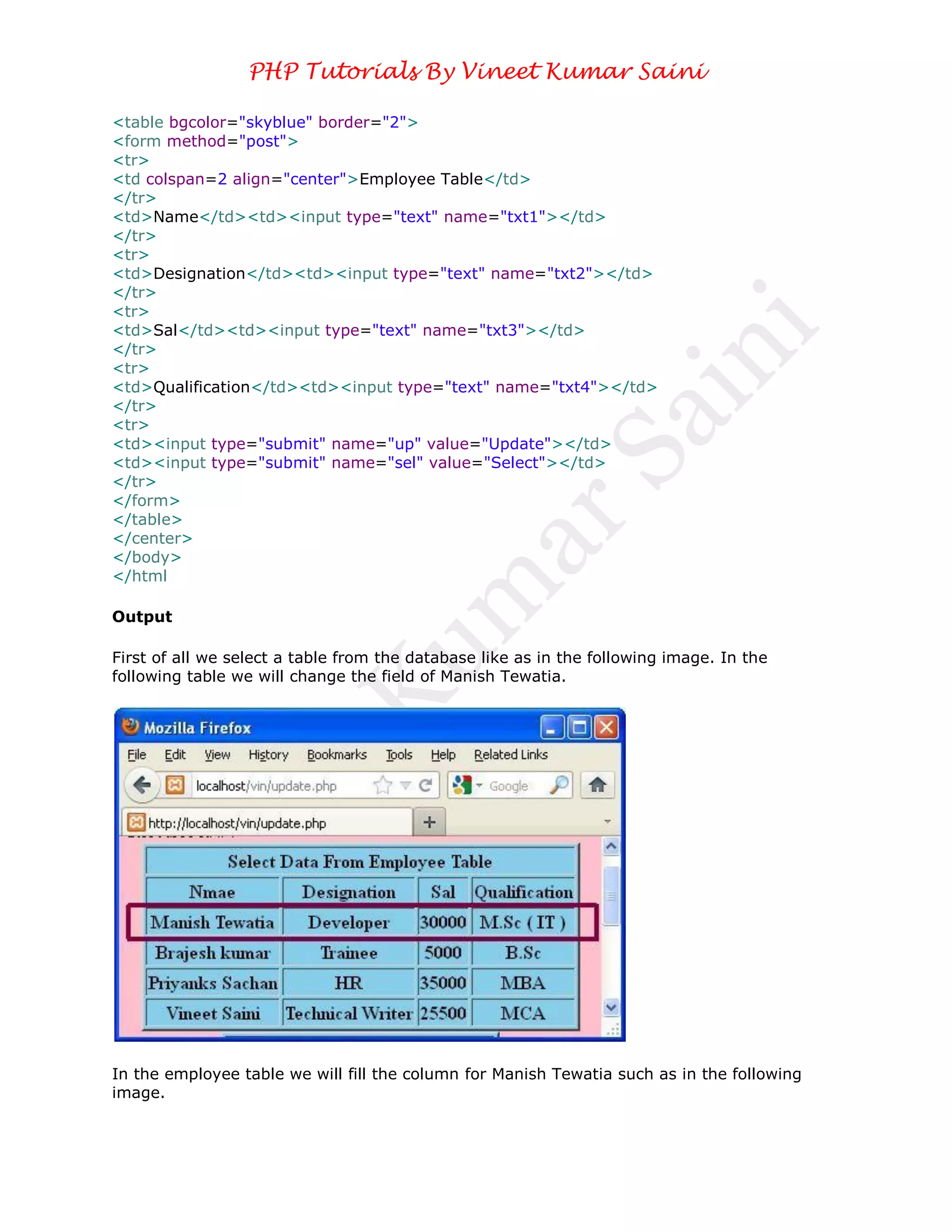
First of all we select a table from the database like as in the following image. In the
following table we will change the field of Manish Tewatia.


In the employee table we will fill the column for Manish Tewatia such as in the following
image.
PHP Tutorials By Vineet Kumar Saini


In the above table we filled designation, sal, qualification of Manish Tewatia. When you will
click on the update button then your data will be updated.


When you select a table from your database then you will get the update data of Manish
Tewatia. Like as in the following image.
PHP Tutorials By Vineet Kumar Saini


In the above table you will see, the designation, sal, qualification changed of Manish
Tewatia.

Conclusion

So in this article you saw how to update data in the database. Using this article one can
easily understand update statement in PHP.

Update statement in PHP

  • 1.
    PHP Tutorials ByVineet Kumar Saini Update Statement in PHP In this article you will see how to update data in a database through HTML table. Using the update statement you can update data in your database. Code <?php $con=mysql_connect ("localhost","root",""); mysql_select_db ("mcn",$con); @$a=$_POST['txt1']; @$b=$_POST['txt2']; @$c=$_POST['txt3']; @$d=$_POST['txt4']; if(@$_POST ['up']) { $s="update employee set Designation='$b',Sal='$c',Qualification='$d' where Name='$a'"; echo "Your Data Updated."; mysql_query( $s); } $con=mysql_connect ("localhost","root",""); mysql_select_db("mcn",$con); if(@$_POST ['sel']) { echo $ins=mysql_query ("select * from employee"); echo "<table bgcolor=skyblue border='2' align=center> <tr> <th colspan=4>Select Data From Employee Table</th></tr> <tr> <th>Nmae</th> <th>Designation</th> <th>Sal</th> <th>Qualification</th> </tr>"; while ($row=mysql_fetch_array($ins)) { echo "<tr>"; echo "<th>".$row ['Name']."</th>"; echo "<th>". $row ['Designation']. "</th>"; echo "<th>". $row ['Sal']."</th>"; echo "<th>".$row ['Qualification']."</th>"; echo "</tr>"; } } echo "</table>" ?> <html> <head> </head> <body bgcolor="pink"> <center>
  • 2.
    PHP Tutorials ByVineet Kumar Saini <table bgcolor="skyblue" border="2"> <form method="post"> <tr> <td colspan=2 align="center">Employee Table</td> </tr> <td>Name</td><td><input type="text" name="txt1"></td> </tr> <tr> <td>Designation</td><td><input type="text" name="txt2"></td> </tr> <tr> <td>Sal</td><td><input type="text" name="txt3"></td> </tr> <tr> <td>Qualification</td><td><input type="text" name="txt4"></td> </tr> <tr> <td><input type="submit" name="up" value="Update"></td> <td><input type="submit" name="sel" value="Select"></td> </tr> </form> </table> </center> </body> </html Output First of all we select a table from the database like as in the following image. In the following table we will change the field of Manish Tewatia. In the employee table we will fill the column for Manish Tewatia such as in the following image.
  • 3.
    PHP Tutorials ByVineet Kumar Saini In the above table we filled designation, sal, qualification of Manish Tewatia. When you will click on the update button then your data will be updated. When you select a table from your database then you will get the update data of Manish Tewatia. Like as in the following image.
  • 4.
    PHP Tutorials ByVineet Kumar Saini In the above table you will see, the designation, sal, qualification changed of Manish Tewatia. Conclusion So in this article you saw how to update data in the database. Using this article one can easily understand update statement in PHP.